Introducing the PromQL Receiver for the Splunk OpenTelemetry Collector
Observability Antoine ToulmeKey takeaways
- Prometheus is often more than a metrics endpoint—it is also a powerful query and aggregation engine. With the new PromQL receiver, the Splunk OpenTelemetry
- Collector can periodically execute PromQL queries against Prometheus or Thanos and convert the results into OpenTelemetry metrics.
- This makes it possible to collect a focused view of your telemetry without ingesting every underlying time series into the Collector.
How It Works
The receiver sends each configured query to the Prometheus-compatible /api/v1/query endpoint at the configured collection interval. Returned samples are converted into OpenTelemetry metrics:
- Prometheus metric names become OpenTelemetry metric names.
- Prometheus labels become data-point attributes.
- Gauges, counters, and histograms are mapped to their OpenTelemetry equivalents.
- Results without a metric name (such as the result of an aggregation function, sum or count) use a predefined name or promql_result as a fallback.
For example, the following configuration queries a Prometheus server every 30 seconds:
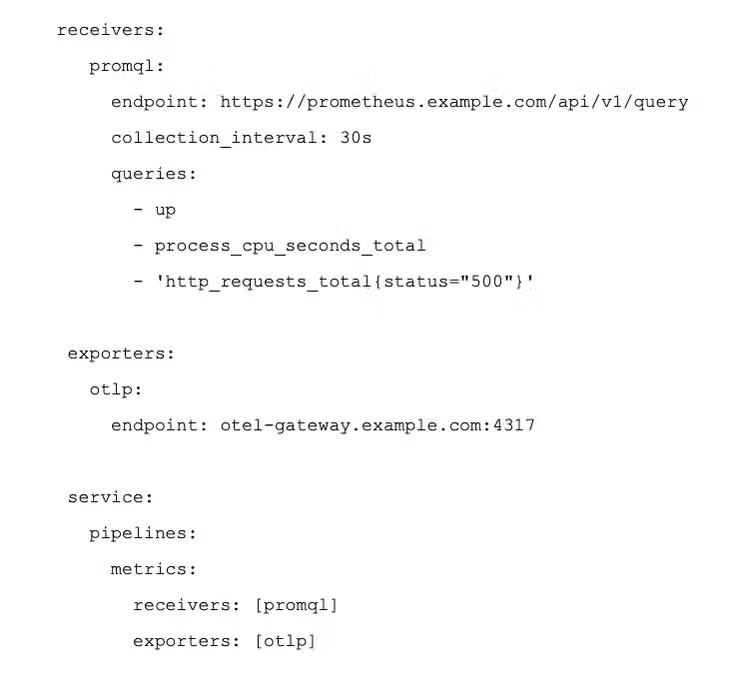
The receiver uses the Collector’s standard HTTP client configuration, including TLS settings and supported authentication extensions, making it suitable for secured Prometheus and Thanos deployments.
Why Use PromQL in the Collector?
The PromQL receiver is useful when you want to:
- collect only selected time series from a central Prometheus server;
- apply PromQL filtering before exporting data;
- retrieve metrics from systems the Collector cannot access directly;
- use Prometheus or Thanos as the query and aggregation layer;
- reduce the volume of raw time series sent downstream.
This is different from the standard Prometheus receiver, which scrapes /metrics endpoints.
Development Status
We introduced the PromQL receiver in the Splunk OpenTelemetry Collector under PR #8011 and it is available in release 0.160.0 forward.
The receiver is considered feature-complete and ready for field testing. We aim to mature this receiver quickly and donate it to OpenTelemetry. To this end, we have opened an issue here. If you are interested in supporting or helping with this donation, please feel free to like and comment.
Want to talk about OpenTelemetry? Join me every Monday at 8:30am PT/11:30am ET for Observability HQ when I lead an OpenTelemetry drop-in. You can also meet me and the other Splunk maintainers and contributors at Kubecon North America in Salt Lake City in November. Pop into an Observability HQ and we’ll give you a 20% off discount code for Kubecon!
Related Articles

Assigning Role Based Permissions in Splunk Enterprise Security

Cybersecurity Awareness Month Spotlight: Insights from the Cisco Talos & SURGe Teams