Five New AppDynamics Features You’ll Actually Use
Ever feel like your observability platform is a bit like a tricky puzzle—with key pieces always just out of reach? You're not alone. If keeping up with licenses, permissions, logs and troubleshooting leaves you wondering if things could be smoother, you’re about to get some good news. This latest release brings five practical features straight from customer wishlists (and let's be real, our own “if only” lists). Let’s walk through what’s new and why you’ll actually care.
License Metrics, Alerts, and Usage Rules: No More Guessing Games
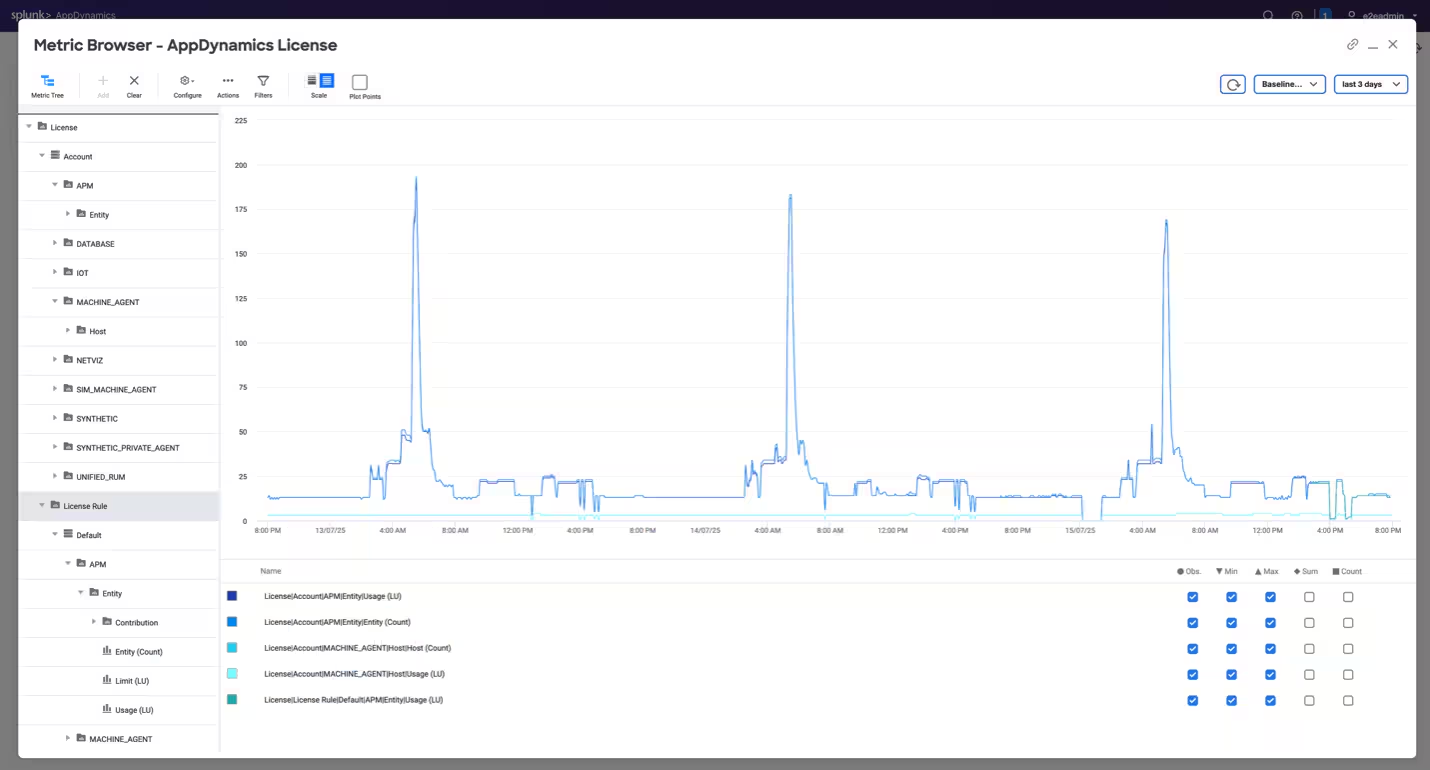
Figure 1: What does this image illustrate?
License management shouldn’t be a leap of faith. With the new consolidated license usage view, you finally get a single spot for all your license metrics—think active agents, hosts, and more. It’s like flipping on the lights in a room you’ve only navigated by memory. Now, tracking and managing licenses, especially for those of you wrangling multiple controllers, is a whole lot easier.
But the improvements don’t stop there. You can now see license usage right in the metric browser, filter it, and analyze alongside your application metrics. That means custom dashboards and deeper analysis come naturally, with no extra hoops to jump through. And if you’ve ever worried about running out of storage or crossing a license threshold, you can set up alerts and notifications to give you a heads-up—no more frantic “Why isn’t this working?” calls on a Friday afternoon.
For those who love digging into details, event history and improved notifications make tracking changes and investigating incidents much clearer. You can drill down into specific event types and usage patterns, making capacity planning a less daunting chore. On top of that, API access lets you plug license metrics into your own tools, automate reporting, and build custom compliance workflows.
And while out-of-the-box dashboards and health rules aren’t quite here yet, they’re on the horizon, promising even faster setup and insights down the road. In short, this feature set offers transparency, flexibility, and a lot less stress—especially as your environment grows.
Tag-Based RBAC: The Key to Smarter Access
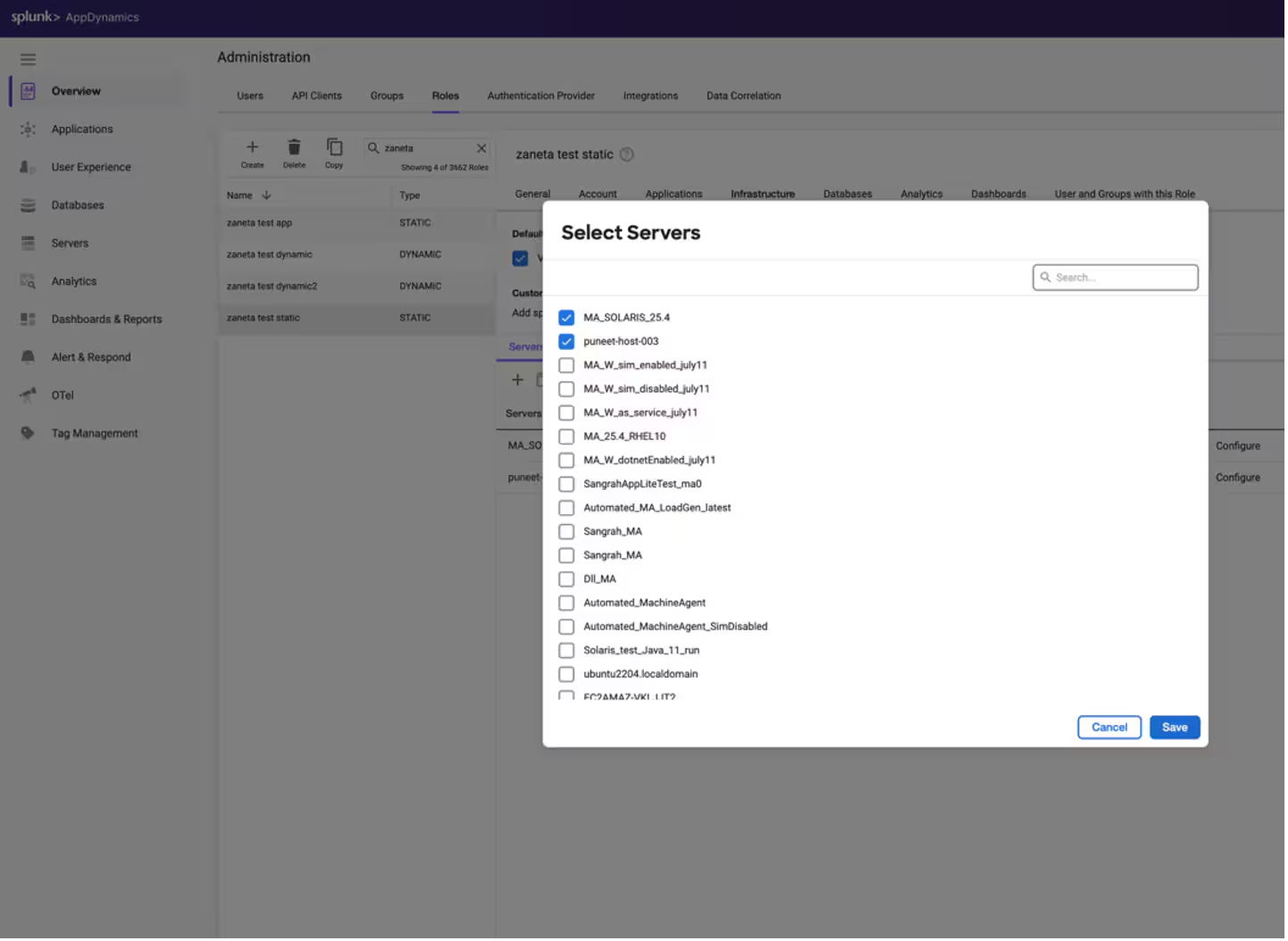
Figure 2: Gain granular role-based access control for server monitoring
Let’s talk access control. Before now, giving someone access to servers was basically an all-or-nothing deal—not exactly the definition of “granular.” With the new tag-based role-based access control (RBAC), that changes in a big way. Now, admins can assign permissions based on tags like “environment:production” or “region:US”—not just to everyone, but to exactly the right people.
It works both ways: dynamic roles automatically grant access as new servers with matching tags come online, while static roles let you handpick which servers someone can see. A new interface makes tag selection and role assignment straightforward, so even as your environment balloons in complexity, you stay in the driver’s seat.
This is a big win for security and operational efficiency. No more worrying about overexposure or wrestling with unwieldy permission lists. And for those looking ahead, support for clusters and namespaces is on the roadmap. Sometimes the simplest changes—like handing out keys instead of master passes—make the biggest difference.
Log Observer Connect: Log Correlation Finally Clicks
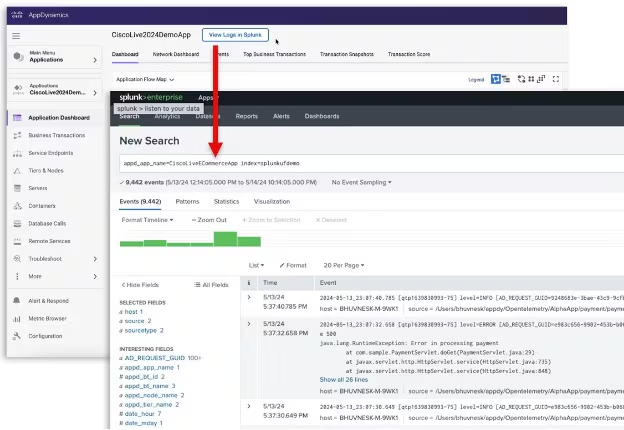
Figure 3: Deep links take you to the right logs every time.
If you’re running AppDynamics on-premises and wished you could send logs straight to Splunk Enterprise, you probably felt stuck for a while. Not anymore. This long-requested integration is now live, letting your on-premises virtual appliance deployment plug directly into Splunk. That means you can correlate logs across your ecosystem and get to the bottom of issues faster.
Why does that matter? When logs, metrics, and traces are all in sync, troubleshooting isn’t just faster—it’s almost satisfying. You see the whole story, not just disconnected chapters. For SRE teams especially, this brings real-time troubleshooting front and center, giving you the kind of visibility and speed that sets you apart from the crowd. And yes, it’s a big selling point—because frankly, it’s something competitors just don’t do.
AI-Directed Troubleshooting: Your New “Easy Button” for RCA
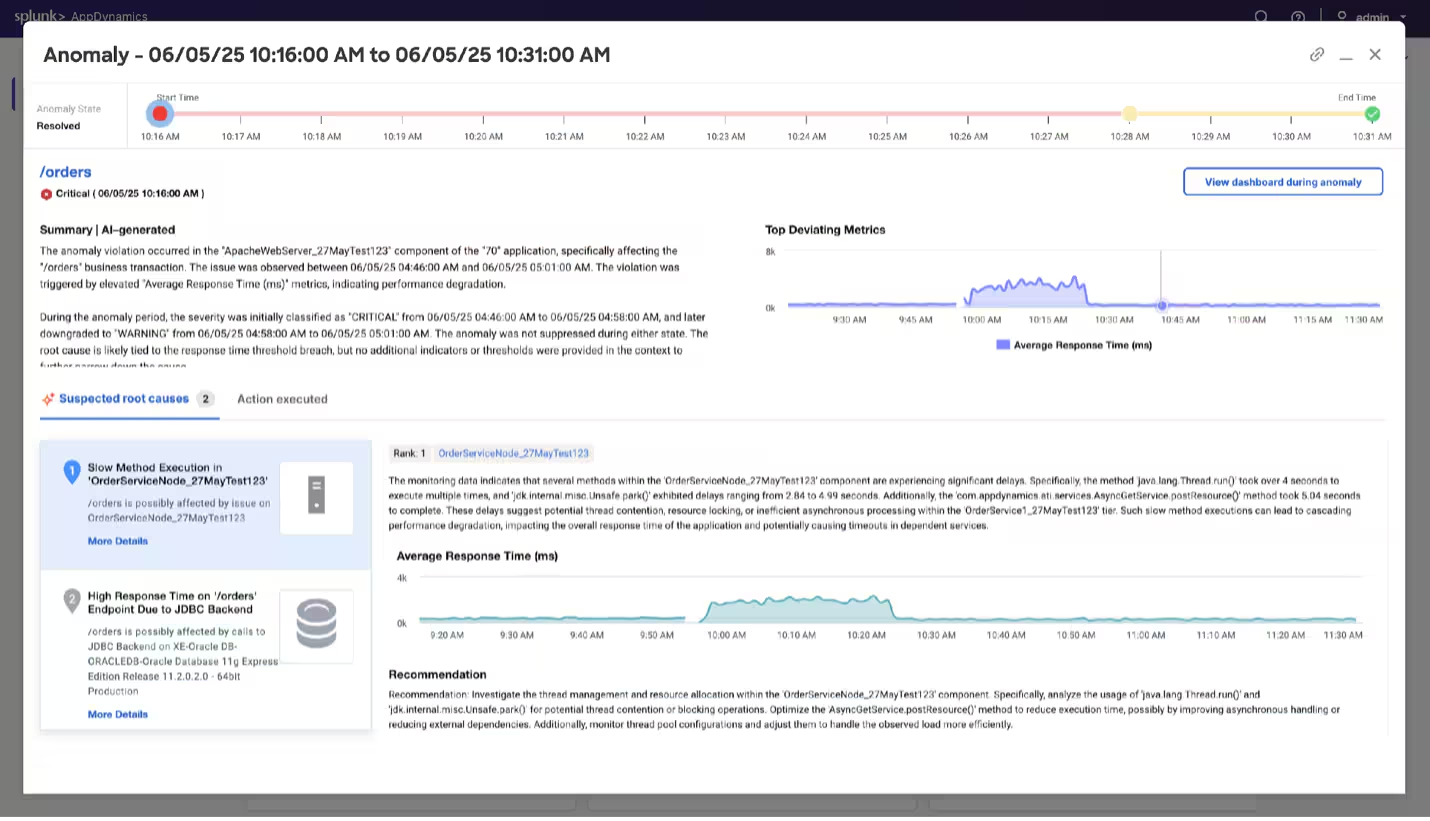
Figure 4: See a concise AI-generated RCA summary, with referenced insights
Root cause analysis (RCA) is nobody’s favorite game, especially when you’re under pressure. In the 25.7 release, we’re previewing AI-Directed Troubleshooting, a new capability powered by Agentic AI that changes the game by analyzing incidents as they happen, uncover likely causes, and recommend next steps—all right inside the AppDynamics UI.
When anomalies are detected, the AI doesn’t stop at “something’s wrong”. It tells you what’s happening, why it’s happening, and what to do next. And when a health rule violation triggers, it dives deeper, surfacing probable causes and packaging its findings in a concise summary. No more jumping between screens or guessing which metric actually matters.
The result? Teams find and fix issues faster, even if they’re not the system expert. It’s quicker, it’s more accurate, and it gives everyone more confidence. Think of it as having a GPS for your troubleshooting—no more squinting at the map, just clear directions to the problem and a suggested route out.
Kubernetes Deep Linking: Bridging the App-to-Infrastructure Gap
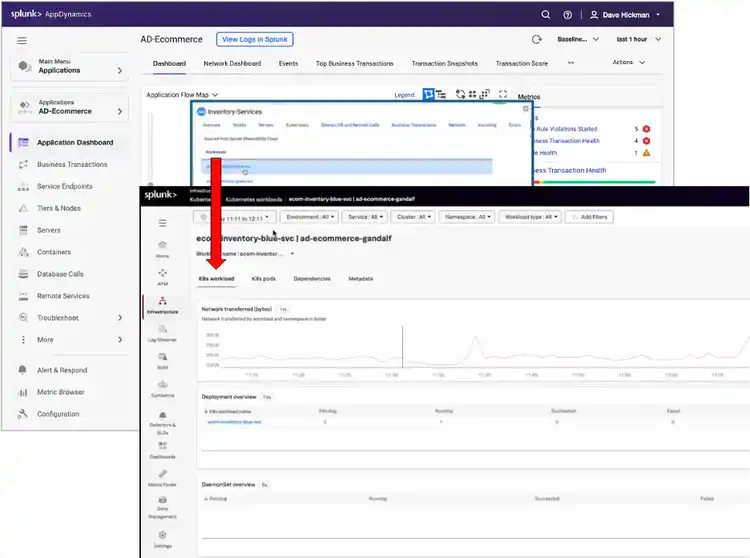
Figure 5: Deep links take you from flow map to workloads seamlessly
Modern cloud-native apps are a tapestry of moving parts, and finding the thread that connects application problems to infrastructure is, well, tricky. Now, with Kubernetes deep linking between AppDynamics and Splunk Observability Cloud, you can click straight from an app view to the impacted pod or workload, and back again. It’s the kind of shortcut you’ll wonder how you ever lived without.
This new integration is a game-changer for hybrid environments or teams using both products. Troubleshooting feels unified—no more “which dashboard do I trust?” debates. And you don’t need extra licenses, either; it uses what you already have. Sure, it’s in preview mode for now and needs some setup, but the payoff is a smoother, more connected workflow that actually helps you solve problems, not just stare at them.
Final Thoughts: More Control, Less Chaos
So, what’s the real value here? These features aren’t just shiny add-ons—they’re direct answers to daily headaches: managing licenses, controlling access, finding problems and connecting logs. The result is a platform that feels smarter, more unified, and honestly, a little more human.
Whether you’re an admin hoping for fewer late-night alerts or a security pro finally able to lock down what matters, this release is for you. Give the new features a try, and if you find yourself with a little extra peace of mind, well, that’s exactly the point.
Ready to see it in action? Your account team is on standby, or head to the docs and explore firsthand. And as always, your feedback shapes what comes next—so keep it coming.
Related Articles
What the North Pole Can Teach Us About Digital Resilience

The Next Step in your Metric Data Optimization Starts Now

How to Manage Planned Downtime the Right Way, with Synthetics

Smart Alerting for Reliable Synthetics: Tune for Signal, Not Noise

How To Choose the Best Synthetic Test Locations
Advanced Network Traffic Analysis with Splunk and Isovalent

Conquer Complexity, Accelerate Resolution with the AI Troubleshooting Agent in Splunk Observability Cloud

Instrument OpenTelemetry for Non-Kubernetes Environments in One Simple Step