Splunk Universal Forwarder
Curious about Splunk® Universal Forwarders? This article will sum up what they are, why to use them and how the universal forwarder works. Importantly, we’ll point you to the very best tips, tricks and resources on using universal forwarders (and other ways) to get data into Splunk.
Download Universal Forwarder Now (FREE) >
Quick links
- Download the current version of Universal Forwarder
- Download previous versions
- Access the Splunk Universal Forwarder Manual
For more info, keep reading for a full explanation on universal forwarders. As you go through this tutorial, some lingo might be new to you. You can check out Splexicon, the Splunk Glossary, for definitions and clarifications.
Getting data into Splunk Cloud Platform & Splunk Enterprise
The story of universal forwarders starts with a simple purpose: getting data into Splunk. Wondering what kind of data you can index in Splunk? The short answer is any kind.
Specifically, the Splunk platform, whether Splunk Cloud Platform or with Splunk Enterprise on-premises or cloud-deployed, can index and monitor all IT data, including streaming, machine and historical data. Examples of this data include:
- Microsoft Windows event logs
- Web server logs
- Live application logs
- Network feeds
- Change logs
- Message queues
- Archive files
OK, so Splunk can handle all your data — but how do you get it into Splunk? That’s where forwarders come in. Actually, there are four ways to get data in. The universal forwarder is the most common way.
Types of forwarders in Splunk
A forwarder is any Splunk Enterprise instance that forwards data to another Splunk Enterprise instance, such as:
- An Indexer
- Another forwarder
- A third-party system (heavy forwaders only)
Splunk Enterprise has three types of forwarders:
- A universal forwarder contains only the components required for forwarding data, nothing more, nothing less. In general, it is the best tool for sending data to indexers.
- A heavy forwarder is a full Splunk Enterprise instance that can index, search, change and forward data. Certain features from a full Splunk Enterprise instance are disabled in order to reduce system resource use.
- A light forwarder is also a full Splunk Enterprise instance, with even more features disabled to achieve as small a resource footprint as possible. Deprecated as of Splunk Enterprise version 6.0, the light forwarder is replaced by the universal forwarder for almost all purposes.
Let’s now turn to the universal forwarder, as it’s the primary way to send data into your Splunk Cloud Platform or Splunk Enterprise instance.
How a universal forwarder works
A universal forwarder collects data from a variety of places — whether data sources or other forwarders — and then sends it to a forwarder or a Splunk deployment. So, what can you do with universal forwarders? Capabilities include:
- Tagging metadata (source, source type and host)
- Configuring buffering
- Compressing data
- Securing via SSL
- Using any available network ports
The current version of Splunk Universal Forwarder is free to download, as are previous versions.

(The most common configuration for the universal forwarder.)
When to use a universal forwarder
The universal forwarder is the best option when it comes to forwarding data to Indexers. According to our Splexicon:
The universal forwarder is a dedicated, streamlined version of Splunk Enterprise that contains only the essential components needed to forward data. The universal forwarder does not support python and does not expose a UI.
In most situations, the universal forwarder is the best way to forward data to indexers.
Benefits
The primary benefits of universal forwarders include reliability, security and broad platform support. You can easily install Splunk Universal Forwarders on a variety of diverse computing platforms and architectures.
Perhaps the biggest benefit is the scalability of our universal forwarders. Because they use significantly less hardware resources than other Splunk products, you can install literally thousands of them without a loss in network and host performance or cost. Part of its low resource usage is because the forwarder does not have a user interface.
In fact, universal forwarders can scale to tens of thousands of remote systems — making it a breeze to collect terabytes of data.
Drawbacks
The universal forwarder does have one significant limitation: it forwards only unparsed data. Which means, if you want to send event-based data to Indexers, you’ll have to use a heavy forwarder.
Installing universal forwarders
Here’s where to head for installing in various environments:
- Installing a Windows universal forwarder
- Installing a *nix (Linux, Solaris, Mac OS X, etc.) universal forwarder
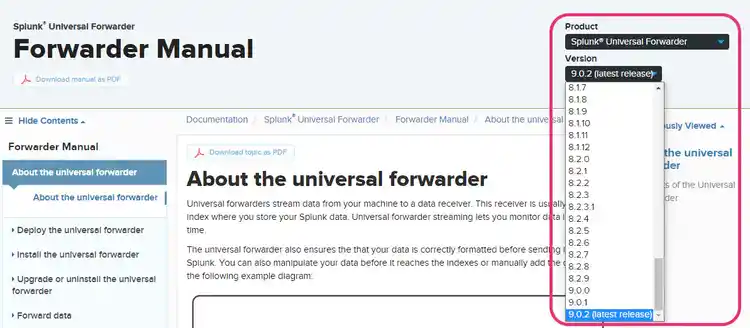
Get all the technical details on deploying, installing, configuring, forwarding and even troubleshooting with our Splunk Universal Forwarder Manual. Importantly, you can check all previous release documentation too! Simply look in the upper-right hand drop-down menu:
In this excellent Tech Talk, Gregg Daly, Technical Marketing Manager at Splunk, shows how to get data in from any linux or windows host, among other important tips to know:
Now let’s look at universal forwarders in two primary products, Splunk Cloud Platform and Splunk Enterprise.
Forwarders in Splunk Cloud Platform
For many use cases, plenty of data comes directly from files and directories. It’s best to use universal and heavy forwarders to monitor and send those to Splunk Cloud Platform. A best practice here is:
- Install universal forwarders on each machine where you need to monitor files and directories.
- Send that data to a heavy forwarder, which moves that data along into Splunk.
Learn more about getting data from files and directories and the other ways to get data in, including from network events, windows sources, metrics and HTTP Event Collector.
Forwarders in Splunk Enterprise
With Splunk Enterprise, you’re on-premises, so you can get your data into the instance directly or you can opt for universal and heavy forwarders. Generally, Splunk Enterprise inputs can be categorized like so:
- Files and directories
- Network events
- Windows data
- Other sources
Learn more about getting data into Splunk Enterprise on Splunk Lantern, or take the free eLearning course: Getting Data into Splunk.
Download Universal Forwarder Now (FREE) >
Splunk Universal Forwarder Resources
This is not the end of great resources for using universal forwarders. Here’s more Splunk destinations that can help you:
- Splunk Lantern, where you can self-serve your way to achieving business use cases with Splunk products.
- Splunk Docs, where you’ll find all the technical specs for our products.
- Splunk Training & Certification, where you can take a variety of courses or follow learning paths towards Splunk expertise.
- Splunk Community, where you can ask questions and find answers to your questions.
Related Articles

Cyber Resilience Explained: Strategies, Definitions, & More

Splunk Threat Intelligence Management

The Compliance-as-a-Service (CaaS) Ultimate Guide

The Role of Behavioral Analytics in Cybersecurity

Log Aggregation: Everything You Need to Know for Aggregating Log Data

CIO vs. CISO vs. CPO: What's The Difference?

The Incident Commander Role: Duties & Best Practices for ICs

Cyber Counterintelligence (CCI): Offensive & Defensive Strategies for Cybersecurity