What is Real User Monitoring?

Splunk Real User Monitoring (RUM)
End-to-end visibility helps you pinpoint customer-impacting issues from web browsers and native mobile apps to your backend services.
You run an online store. But despite the high traffic to your site, your sales numbers aren't matching your expectations. Customers leave before completing a purchase. Now, you're wondering: 'What's going wrong? Why are potential customers leaving without making a purchase?'
This is where Real User Monitoring (RUM) comes in. It helps you monitor visitors' every move, revealing critical insights into the user experience, such as:
- Are pages loading too slowly?
- Is the checkout process too complicated?
- Are customers struggling to find what they're looking for?
So, in this article, we'll discuss how to leverage RUM to enhance your service’s performance and improve the overall user experience.
Defining real user monitoring
Real user monitoring is part of application performance monitoring (APM), which has different technologies and tools under its umbrella. Within multifaceted APM technology, RUM specifically focuses on your customer's experience. It analyzes how your users interact with your website by continuously tracking their activity.
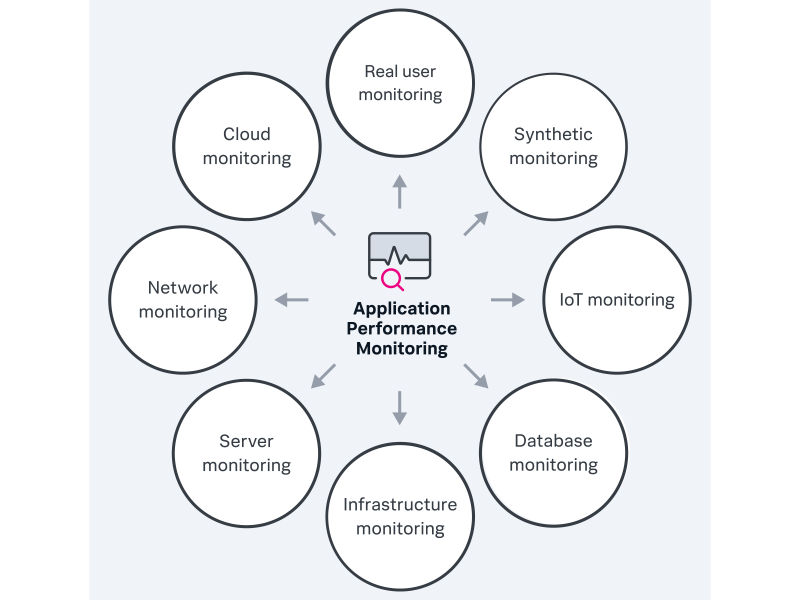
Simply put, RUM gleans insights from real user interactions. Now you can understand how your users feel about your service — and you can make changes accordingly.
If you have an e-commerce platform like eBay or Amazon, RUM will monitor user interactions such as:
- Page load times
- Checkout processes
- Search functionality
By doing so, you can pinpoint bottlenecks within the user journey, so you can optimize your application’s performance.
(Looking for Splunk RUM? Learn about the solution & take a free tour.)
Synthetic monitoring vs. real user monitoring
RUM takes a real-world approach: It monitors actual users to provide insights into how a site or service works. And tracking the experiences paints a vivid picture of long-term trends.
But synthetic monitoring uses simulated data to see how a site should perform in real-world situations. This way you can find and fix short-term problems without live traffic.
However, the true potential emerges when these two approaches combine. Integrating them gives a complete view of the user experience. And you can analyze both — long-term trends and immediate performance breakdowns.
(Read our synthetic vs real-user monitoring comparison.)
RUM metrics
RUM metrics fall into three platform-specific categories: metrics for browsers, metrics for Android and metrics for iOS. To give you a better idea, some of the common real-user monitoring metrics are as under:
- Custom event count tracks the total spans with the selected custom event within a specified time range.
- Page views and route changes measure the total number of page views and route changes — organized by individual pages within the chosen time frame.
- JavaScript errors count the total number of spans that contain JavaScript errors during the specified time range.
- Long task count represents the total long tasks that occur within the defined time frame. They impact the user experience by causing delays in page rendering.
- The network requests metric counts the total number of network requests, like those for HTTPS, XHR and AJAX, within a specific time range.
By tracking these browser-specific RUM metrics, you gain insights into the user experience of web applications.
How real user monitoring works
If you have the right tool, real user monitoring will be seamless and quick. Here’s how RUM solutions should work:
- Capturing data. First, RUM collects data from your website. It’s embedded as a JavaScript tag directly onto the webpage or through a secure API. This tag tracks user interactions on your website and creates a data stream.
- Assembling data into user activity. The collected data is then processed by the RUM tool, transforming it into real-time insights. These insights show which users access specific web pages and highlight ongoing transactional or geographic issues.
- Visualizing real user activity. Visuals are better than raw data to understand. That’s why the processed user interactions are displayed as reports or dashboards. These visual representations help you better understand how users are engaging with your services.
Through this structured process, RUM equips you with actionable suggestions to improve existing customer experience.
Reasons to monitor real user metrics
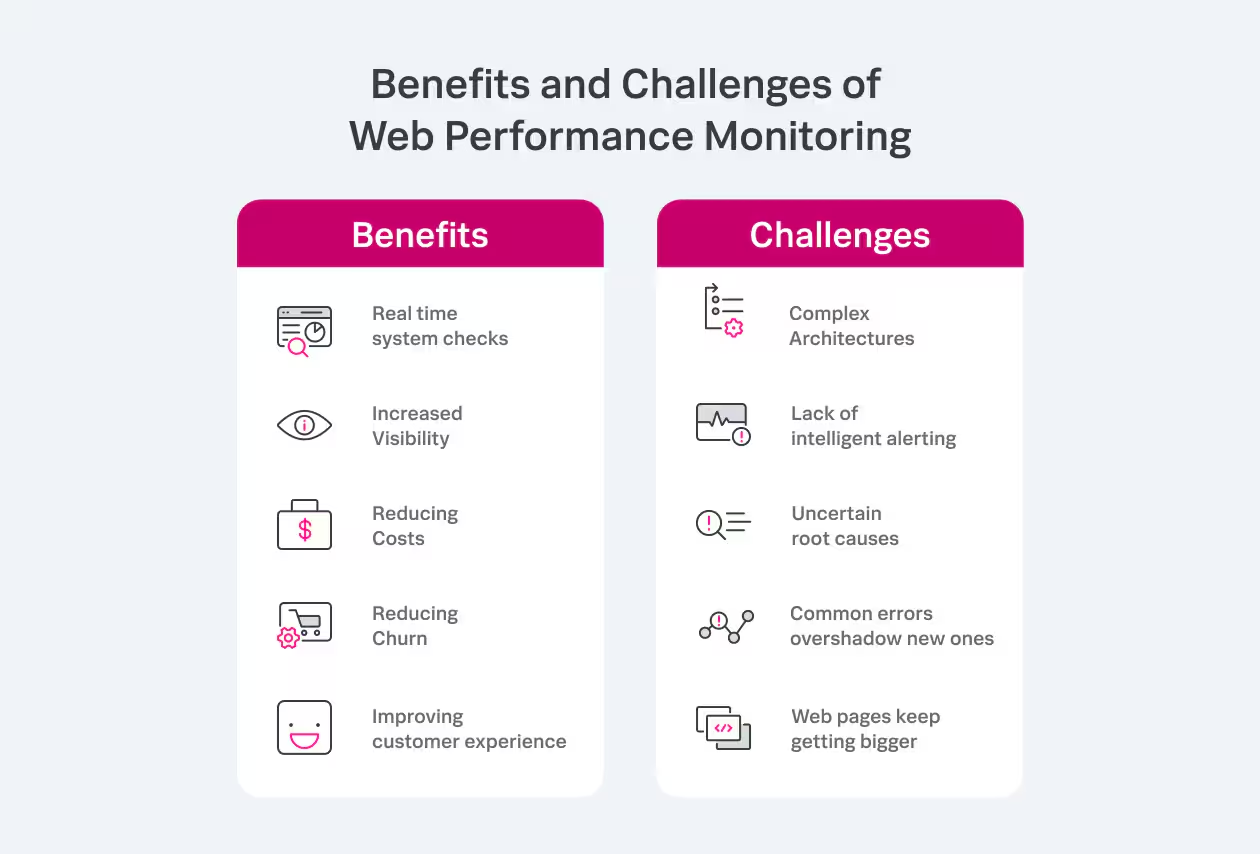
Real user monitoring impacts your website performance positively by helping you discover and solve critical issues. Here are some core benefits of monitoring your visitor’s activity:
Track where errors occur
You can measure each web application component, leaving no room for undetected errors. This means you can scrutinize the performance of individual elements. Here’s how:
RUM performs full user session analysis using streaming analytics. It captures and analyzes entire user sessions, from when users start using the service to when they leave. For mobile apps, it captures detailed insights about attributes and events related to the client, including:
- Device type
- Operating system (iOS or Android)
- Network requests made by the app
- Any errors or crashes
You can even analyze the many variables that together contribute to a single issue within a complex distributed system.
Measure every user component
RUM doesn't care what technology you use; it measures everything. It tracks every user session, recording what resources (like images and routes) users use and how it affects them. Doing so lets you analyze how well your pages perform and fix problems. And when something goes wrong, it helps you figure out what happened — whether a code change or update caused issues.
Assess the health of your user experience
With RUM, you can evaluate the overall performance and health of your user experience using these metrics:
- Page load times
- User experiences on various devices
- Geographical disparities in performance
In other words, real user monitoring contributes to a better user experience and improves overall web or app performance.
Challenges associated with real user monitoring
While RUM offers valuable insights, it has certain challenges and limitations, especially for big tech and government organizations:
Data volume dependency
RUM is most effective when dealing with large volumes of data. If your website has limited traffic or few daily users, it won’t yield accurate results. So, wait until your audience grows to maximize RUM capabilities.
Expensive tools
Implementing and maintaining tools is costly, especially for large organizations because they have large customer bases. So, weigh your budget constraints against the potential benefits of monitoring. And before you begin, assess your financial capacity to ensure your organization can support RUM effectively.
Simply put, RUM doesn’t work with websites having limited traffic and is financially challenging for large organizations.
(Compare CapEx and OpEx for spending and budgeting.)
Choosing the perfect RUM tool for your organization
Selecting your organization's ideal RUM tool is crucial. So, consider these options when making your next choice:
Custom event capabilities
Look for a tool that allows you to create custom events. They let you understand the user interactions and identify issues in workflows.
Here’s how it’s done: Suppose you’ve created a 30-day fitness challenge in your mobile application. You want to understand how users engage with this feature and why some drop out before completing the challenge.
With a custom event, you can track daily logins, completed workouts, and incomplete challenges. This way you’ll know where users lose interest or face difficulties. And, now, you can make targeted improvements to optimize the user experience.
(Learn more about IT event correlation & analytics.)
Demo applications for experimentation
A good RUM tool provides demo applications to let you test its capabilities and see how the tool works in practice. So, you can identify poor-performing parts of the application impacting your user experience. And test appropriate measures to fine-tune your monitoring setup before applying it to your live applications.
Error identification learning resources
Resources support your team to become proficient in recognizing and resolving issues swiftly. Understand this with an example here:
Amy, a database administrator, works at a fictional company. She maintains the company's database systems to ensure optimal performance. To support her, the tool has customer resources. And she uses them to learn about filtering options and some common errors such as:
- Syntax errors: Queries with the "syntax_error" attribute set to true.
- Deadlock errors: Queries with the "deadlock" attribute set to true.
- Constraint violation errors: Queries with the "constraint_violation" attribute set to true.
- Performance issues: Queries with execution times exceeding a predefined threshold.
With the tool’s guide, she now knows how to spot and differentiate between these errors. This way fixing various issues becomes easier for her team.
Considering these factors, you can make informed decisions and choose the right tool that aligns with your organization's needs and objectives.
Leverage real user monitoring to optimize service performance
By leveraging real user monitoring, you enhance application’s performance on web browsers, Android, or iOS. This satisfies users that ultimately leads to higher sales and happier customers.
Where every click, page load, and interaction matters, RUM helps organizations understand, adapt, and thrive digitally. So, use it strategically and transform your visitor interactions into successful conversions.
Related Articles

Managed Services vs. Professional Services: What's the Difference?

The Software Engineer Role: Skills and Responsibilities Explained

Data Sovereignty vs. Data Residency: What's The Difference?

What's Event-Driven Security? Explaining This Proactive Defense Approach

KPI Management: A Complete Introduction

Azure Services: The Complete Guide

The Serverless Functions Beginner's Guide

Source Code Management: An Introduction