Operational Intelligence: 6 Steps To Get Started
The ability to make decisions quickly can mean the difference between success and stagnation. Of course, quick decisions aren’t necessarily the right decisions. The right decisions are the best informed, and the best way to get informed is through data.
That’s what operational intelligence is all about.
In this article, we’re diving into all things operational intelligence (OI), including key benefits, goals and how to get started. First, let’s start by expanding our definition of OI.
What Is Operational Intelligence (OI)?
Operational intelligence is a collection of business analytics systems designed to aid decision-making in real-time. OI gathers various data feeds that represent ongoing business operations and related external factors, then analyzes and digests these feeds as the data arrives.
The data sources in an OI implementation can be quite varied and diverse, but they're largely drawn from a company’s most important business processes. In IT operations, this means monitoring operational metrics around networks and servers, security threats, application deployments and more.
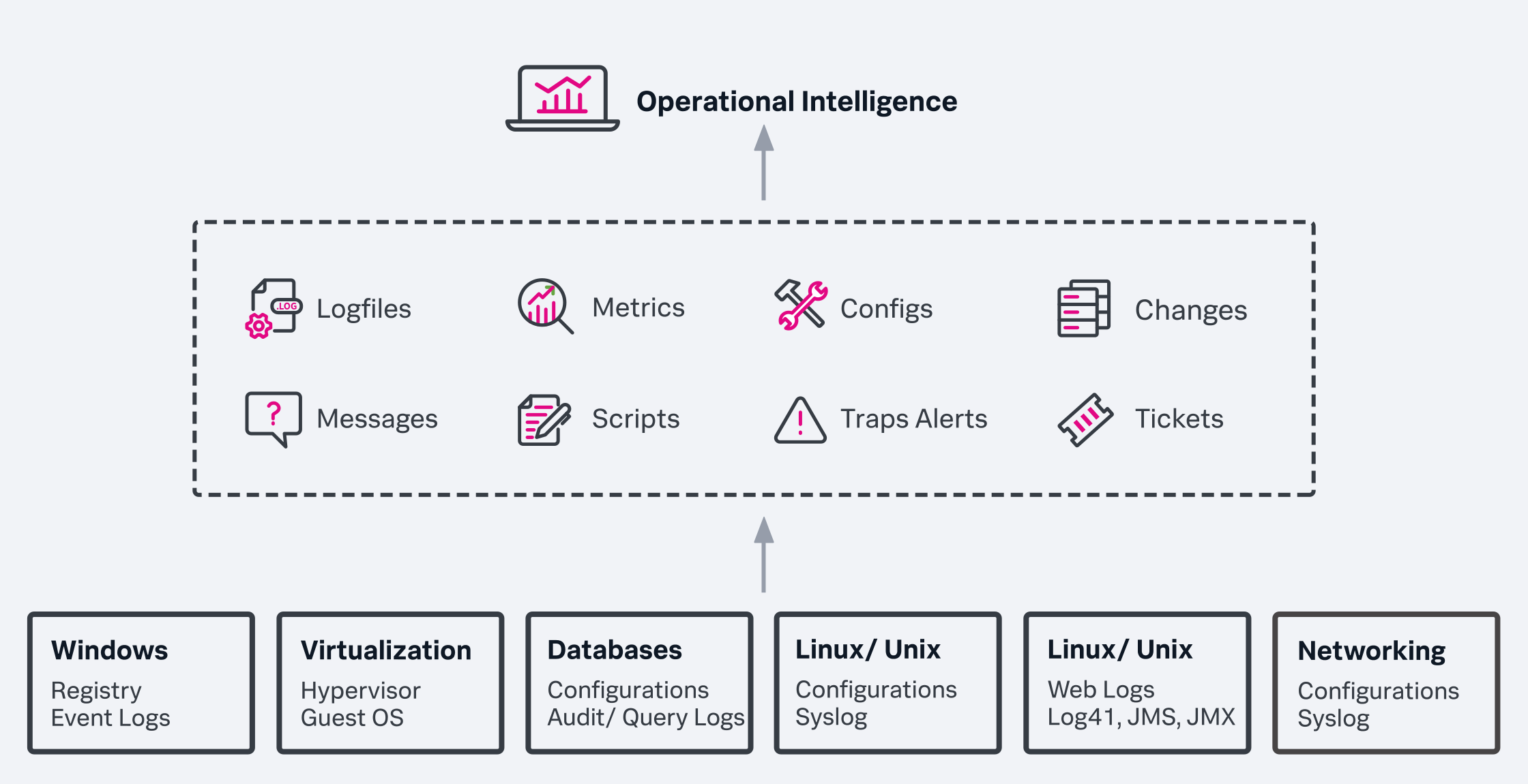
Typically, this information is presented in a dashboard format, highlighting key outliers or trends. With such a variety of data sources, OI solutions can get incredibly detailed and complex — delivering increasingly actionable and useful business insights — as myriad data sources are incorporated into the system.
So far, this description might sound pretty familiar, especially if you’re familiar with business intelligence. So how are the two different?
Operational intelligence (OI) vs. business intelligence (BI)
The primary differentiator between the two technologies is timeliness.
Operational intelligence is often described as the next generation of business intelligence, a reference to the clear lineage shared by the two schools of data analytics.
In simple terms, business intelligence relies on historical data such as
- Server logs
- Past financial reports
- Industry analysis
It was conceived to digest vast amounts of information into smaller, actionable chunks. Technologies like data mining were developed as a way to glean operational and business insights from large data stores, but this type of analysis took time — meaning only occasional snapshots were available, and not continuous monitoring.
Operational intelligence tools are designed to be run in real-time, using the information as it’s recorded to constantly improve analytics. Businesses are no longer tied to archived logs and static information. With OI, they can gather real-time insights and capture intel as it develops, providing useful and timely business insights. The timeliness of these real-time insights lets businesses take immediate action regarding opportunities or threats.
That being said, BI is still incredibly valuable: BI and OI often work together, pairing BI’s broad historical analysis with OI’s real-time visibility for a more complete, strategic view of the enterprise and the market.
Whatever the approach, any operational intelligence implementation should be looking to incorporate some key features. These features can come from a variety of systems or monitoring tools — all of which comprise a strong OI approach.
Key features in operational intelligence
Key features of operational intelligence solutions include:
- Real-time monitoring
- Dashboards and visualizations
- Real-time alerting systems
- Industry-specific analysis
- On-demand report generation
- Big data and machine learning capabilities
- Automatic remediation operations
- Infinite scalability
Let’s take a look at each of these.
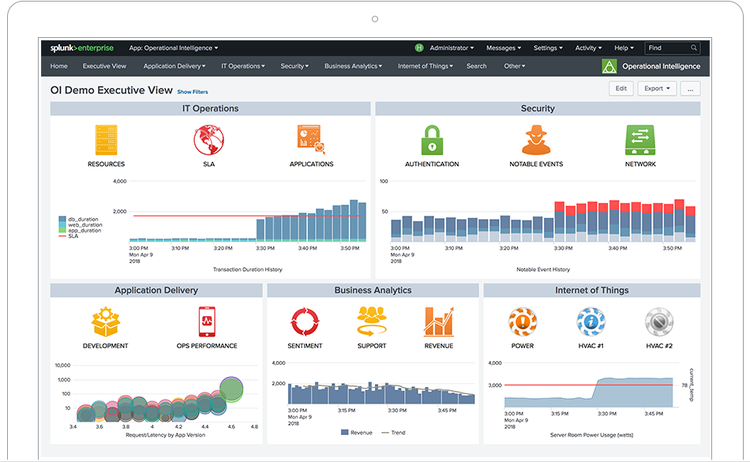
Dashboards and visualizations provide quick insights into operational status and data trends.
Real-time monitoring
This is the very core of what defines OI. Every OI solution will monitor its data sources in real-time. Whether that data is drawn from manufacturing floor machine sensors, a retail sales feed or alerts generated when an application deployed to customers begins to crash, the key feature of OI is that analysis and alerts are provided as they happen, often within seconds of the event data being generated.
(Learn more about IoT monitoring.)
Dashboards and visualizations
Another essential feature of OI is its ability to digest complex information and present it in an easily understandable format. Dashboards are the common mechanism for this, presenting information in a graphical form that takes a mountain of data and makes sense out of it. In a capable OI system, dashboards are also customizable based on the user.
A financial auditor and a product developer may both rely on OI information but will have vastly different decisions to make from it. The ability to customize the way the dashboard and data visualizations look, and what data they rely on, is an essential feature.
Real-time alerting systems
Operational intelligence is also designed to alert the user when key events occur. The user can set specific conditions and thresholds for which a notification is generated. This alert is then populated on the dashboard and/or pushed to the user via email or a mobile device notification, allowing for a proactive response.
Industry-specific analytics
OI solutions are appropriate for a vast array of industries, from manufacturing to retail to financial services, but the needs of those users will be variable. A telecommunications company will have different challenges than a national retail chain or a healthcare provider. Dashboards can be configured based on the company’s industry, making the most important and relevant information visible to the end user.
On-demand report generation
A live dashboard is useful for responding to situations in the moment, as are reports for presenting information to others and building a broader picture of the present environment. The best OI solutions offer reporting that is accessible to everyday users, not just expert data scientists.
Big data and machine learning capabilities
OI leverages artificial intelligence, enabling advanced models and algorithms to make sense of vast data stores. A capable OI solution must be able to index hundreds of terabytes of data each day, processing and analyzing it to continuously predict potential outcomes and expose new market opportunities.
Automatic remediation operations
What happens when your OI solution determines there’s a problem? It can either alert you or take action to repair the problem itself.
Automatic remediation is a groundbreaking feature of OI, with powerful scripting allowing certain operations to be automatically repaired via algorithmic operations.
Infinite scalability
Data storage and processing needs are expanding exponentially, and an OI solution needs to be able to keep up with this to be of any use. Properly designed OI technologies should be able to scale without limit by simply adding computing power on the fly via a cloud-based infrastructure.
6 steps for getting started with OI
Start your operational intelligence initiative with these six steps, beginning with objectives and working through to the initial pilot:
Understand your objectives
While OI has broad applicability, you have to identify where it will have the greatest impact. Identify problems that OI can solve by unearthing key pain points in the organization, then ask how OI’s delivery of more timely, actionable data analysis can help solve them.
Build a team
Once your challenges are identified, it’s time to start putting together a team that will select, build and operate the OI solution. This is often spearheaded by someone in the executive suite (CIO, CTO or CDO, CFO or CMO), depending on the particulars of the problem you’re trying to solve.
For an OI initiative aimed at improving network uptime, the CTO might be the best sponsor, while an initiative aimed at monitoring retail traffic patterns could fall to a CMO.
Take stock of your operational data
OI requires data to be effective. This means you need to understand what your data looks like before you try to shoehorn it into an OI solution. OI will fail immediately if your raw data feeds are not sufficient, or if operational data is not accessible. Audit your data stores to determine:
- What is being generated
- Where it’s being stored
- How it is currently being analyzed
Improve your data
Chances are you’ll find that some of your data is either insufficient in volume, low in quality, out of date — or all of the above.
Clean up your data feeds before you launch an OI initiative; otherwise, you risk bad data, leading to bad analysis and bad decisions. Data cleanup is likely to be a complex endeavor that involves the upgrade of data feeds or rethinking how certain systems are architected. That might require new machine data sensors or changing the way key transactions are logged.
Set up metrics
At the same time as step four, you’ll want to identify in quantitative terms specific KPIs for what your OI solution is being designed to improve. That could be a reduction of downtime from 0.1 percent to 0.01 percent, a reduction of customer wait times by an average of two minutes, or an increase in sales by five percent. Whatever constitutes measurable, meaningful progress.
(Explore go-to metrics for DevOps metrics, SRE metrics, security operation metrics and incident response metrics.)
Start small and build from there
As with any large tech undertaking, you’ll want to learn to walk before you run. Take a single KPI and launch an OI pilot. From there, add related problems and associated metrics to the solution. An OI solution initially tasked with reducing app downtime might later start monitoring customer reviews of that app, or help determine the cause of app crashes. Build on your successes as the OI solution proves its value.
Related Articles

Regulatory Compliance 101: What You Need To Know

Cloud Migration Basics: A Beginner’s Guide

Predictive vs. Prescriptive Analytics: What’s The Difference?

SIEM vs SOAR: What’s The Difference?

DataOps & Data Operations Explained

The Quantum Threat: Options for Migrating to Quantum Safe Cryptography

What is OMB M-21-31?

Data Mesh Architecture Explained