What Is a DNS Prefetch?
This article helps you understand DNS prefetching, one type of resource hint, including what they are, why and how to use them, and best practices for auditing and scaling them.
How DNS prefetch works
A DNS prefetch is a resource hint to make a DNS lookup for a domain the browser has not yet determined needs to be made. This can improve performance because when the browser does need to make a request for a resource, the DNS lookup for that domain has already occurred.
Let’s see an example. The browser is loading a page and needs to request the resource https://stats.example.com/js/pinit.js. To do this, it first must make an HTTP connection to the domain stats.example.com. If the browser already has an HTTP connection to the domain, the existing connection can be used, otherwise a new connection is created.
To do this, the browser first makes a DNS lookup for stats.example.com. In the screenshot below, you can see the request for pinit.js:

This resource was discovered later in the waterfall and the JavaScript file is located on another domain, separate from the domain of the base HTML page. An existing HTTP connection does not exist, so a DNS lookup occurs, shown as the dark green section of the resource bar in the waterfall. This takes approximately 40ms, though DNS lookups can take tens or even hundreds of milliseconds, depending on circumstances like network connection or the number of DNS servers that need to be contacted.
We can optimize this by adding a DNS prefetch resource hint in the <head> of the HTML file, as shown below:
<link rel="dns-prefetch" href="https://stats.example.com/">
In the screenshot below, you can see that the browser was instructed to proactively attempt a DNS lookup for stats.example.com where pinit.js is located:

When the browser later determines that it needs to request pinit.js and makes a connection to stats.example.com, the DNS lookup has already occurred. This allows the JS file to download more quickly, shifting the overall waterfall to the left.
DNS Prefetch and Preconnect
DNS Prefetching is one of many kinds of resource hints a site can use to instruct the browser to do something before it otherwise would. It is a small, fairly basic resource hint which allows it to be applied more broadly than other options.
(Learn about preconnect, a similar resource hint type.)
You don’t need to specify both a DNS prefetch and a preconnect resource hint. The browser will do all the steps it needs to do with just a preconnect.
DNS prefetch is still important, and can be used in conjunction with preconnect hints. This is because browsers place limits on the number of HTTP connections they will maintain. Using more than 6-8 preconnect resource hints can limit the browser from making connections they actually need. DNS prefetches operate at a different level, which means you can have 6-8 preconnects to critical domains on the page, and then have additional DNS prefetch hints to other, less-critical domains.
When to use DNS prefetch
In general, DNS prefetch should be used for important first party domains and third party domains including:
- Domains that are discovered later in the waterfall
- Domains with resources that then cause other requests to occur
- Domains with a lot of requests, or which download a large amount of content
- Domains are not already used by another type of resource hint
As a rule, DNS prefetch should not be used for domains that are part of the critical rendering path. This is because, ideally, those domains should use a preconnect resource hint.
DNS prefetch and first-party domains
Using DNS Prefetch for first party domains tends to be easy, for a variety of reasons:
- You control the domain name.
- You are purposefully hosting content on that domain and linked to it for a page.
- You should know ahead of time what first party domains a page will use.
- The domain name is unlikely to change.
These factors allow you to include a DNS prefetch resource hint with some degree of confidence that the domain contains resources that are needed by a page and that they are unlikely to change. Good examples include:
- Other domains with images or videos that have deferred loaded
- First party domains for API endpoints that are used later in the page
Third-party content and DNS prefetch
Using DNS prefetch resource hints with third party domains can be very challenging, for a variety of reasons:
- The domain name could be dynamic or change without your knowledge
- Different third party domains may be used for different parts of your site
- It may not be clear which third party content is loading from which domains, so adding or removing third party tags can add or remove domains that need DNS prefetching
- Third party domains could be appearing because of actions by another department, such as a marketing or business group using a tag manager.
You may need to do extra work to determine the source of the third party content. Ideally you want to use DNS prefetch for third party content which will be consistently used by your pages for a long period of time.
The following are good examples of third party content to use with DNS prefetch because they tend to have consistent domains or URLs:
- Analytics or activity trackers
- A/B testing widgets
- Chat widgets
- Error and logging frameworks
- Social sharing widgets
Ads can be especially difficult to optimize with resource hints. This is because, while the initial ad exchange may have a well-known domain name, the ultimate domain serving the ad is often unknown and inconsistent.
Validating the benefits
Once you have determined which domains should use DNS prefetching, you still need to test it! Just because something should improve your site’s performance or experience, that does not mean it actually will: you need to always test to make sure.
- Baseline your performance with synthetic tools.
- Implement your change.
- Compare the “before” and “after” performance metrics.
Challenges with DNS Prefetches
There’s one big issue with DNS prefetching—when people use it excessively. Let’s also look at other issues for awareness.
Excessive DNS prefetching
When people first hear about DNS prefetching, they immediately think:
Since DNS prefetching can make later calls in the waterfall happen faster, why don’t I DNS prefetch to all the domains that might be used by a page?
You can see this thinking in the wild. For example, here is a major news site, making 33 DNS prefetches:
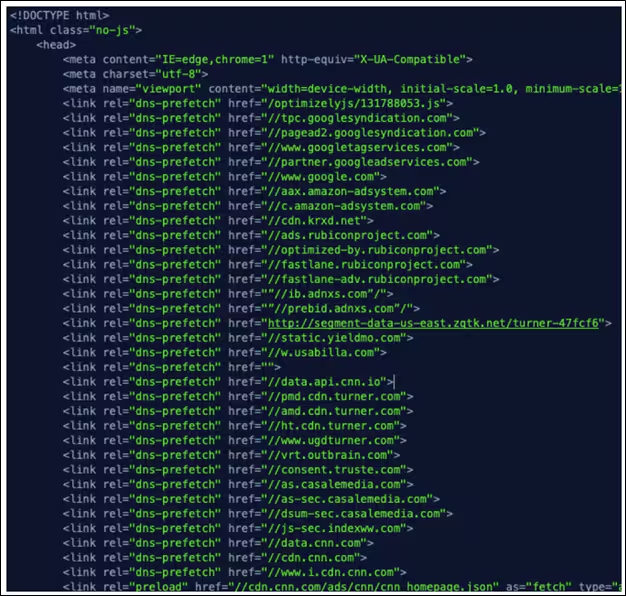
Remember that each type of resource hint asks the browser to override which tasks it would normally perform. Using an excessive number of DNS prefetches can lead to performance issues since browsers place limits on the number of outstanding DNS requests they will maintain. Using DNS prefetch to force a DNS lookup is “using up” an available slot that the browser could otherwise use for a DNS lookup the browser knows it needs. Making too many DNS prefetches, or doing a DNS prefetch for a domain that ultimately is not used, creates resource contention and can make the browser operate inefficiently.
As a general rule, websites should try not to make more than 10 DNS prefetches.
Unused DNS lookups
Don’t make DNS prefetches to domains that aren’t even used by a page. It’s just a waste and will impact the browsers ability to make other DNS lookups for domains that are actually needed.
Don’t DNS prefetch and preconnect to the same domain
There is no reason to include both a DNS prefetch and a preconnect hint to the same domain for “backwards compatibility.” Today, more browsers support preconnect than DNS prefetch, and the browsers that do support DNS prefetch also support preconnect.
- If a domain is critical, use preconnect.
- If it is less important, use DNS prefetch.
Best practices for DNS prefetch auditing
We have seen there are many benefits with using DNS prefetch resource hints, but also many pitfalls that hurt performance if you use them incorrectly. This means it is important to audit how a page is using resource hints to ensure you are following all of the best practices.
First, identify all of the DNS prefetch resource hints a page is currently using. You will want to look for <link rel="dns-prefetch"> tags in the base HTML page, as well as Link: HTTP headers which can also contain resource hints. Also remember that Link headers containing resource hints can appear on other responses beyond just the based HTML page!
Once you have listed all the DNS prefetched domains, ask yourself the following questions:
- Using the guidance above, I need to determine which domains should use a DNS prefetch. Are they on the list of hints the page is already using? If not, why not?
- Am I using more than 10 DNS prefetches? If so, that is too many and you should consider removing them.
- Are there any domains that are using a DNS prefetch that should instead be using preconnect?
- Am I using preconnect and DNS prefetch for any of the same domains? If so, remove the DNS prefetch hint to that domain.
- Am I using multiple resource hints in the <link rel=""> tag and triggering the Safari issue? If so, remove it.
- Are all the DNS prefetches used? Most waterfall charts will allow you to filter by the domain or parts of the URL. This makes it much easier to see if a domain is actually used by the page.
Automate with Splunk
This can all be overwhelming, we know! If you are looking for a more automated solution or want to do this validation at scale, you have options. Splunk Synthetic Monitoring automatically audits pages for different issues that can occur when using resource hints.
FAQs about DNS Prefetch
Related Articles

Using AI in Security Operations: A Practical Checklist for the Modern SOC

A Guide to Bots: Good vs. Bad Bots, Common Types, and Online Safety in 2026

Splunk Community: The Beginner's Guide

Digital Transformation in 2026: Strategies, Benefits, & Real-World Examples

SOC 2 Compliance Checklist: How to Pass the Audit (Checklist Inside)

A Guide to Cloud-Native Security: 4Cs, 3Rs, and Essential Protection Strategies

How to Troubleshoot Kubernetes Environments with Observability

The Best AI Governance Platforms in 2026