Cloud Migration Basics: A Beginner’s Guide
What is a cloud migration? A cloud migration is the practice of moving IT workloads (data, applications, security, infrastructure, and other objects) to a cloud environment.
Quick Links:
- Want to migrate from Splunk Enterprise to Splunk Cloud Platform? Visit our Customer Success section to learn about making the move
- Want to use Splunk to help your organization migrate to the Cloud? Check out our Use Case page for moving from on-premises to the cloud
Cloud migration can take many forms, including:
- Moving from a local, on-premises data center to a computing environment situated in a public cloud
- Migrating from one public cloud to another
- Moving to a hybrid cloud or multicloud environment
- Cloud-to-cloud migration
There is also another type of cloud migration called a reverse cloud migration (also known as cloud repatriation or cloud exit) where existing applications are moved from a public cloud back to an on-premises data center.
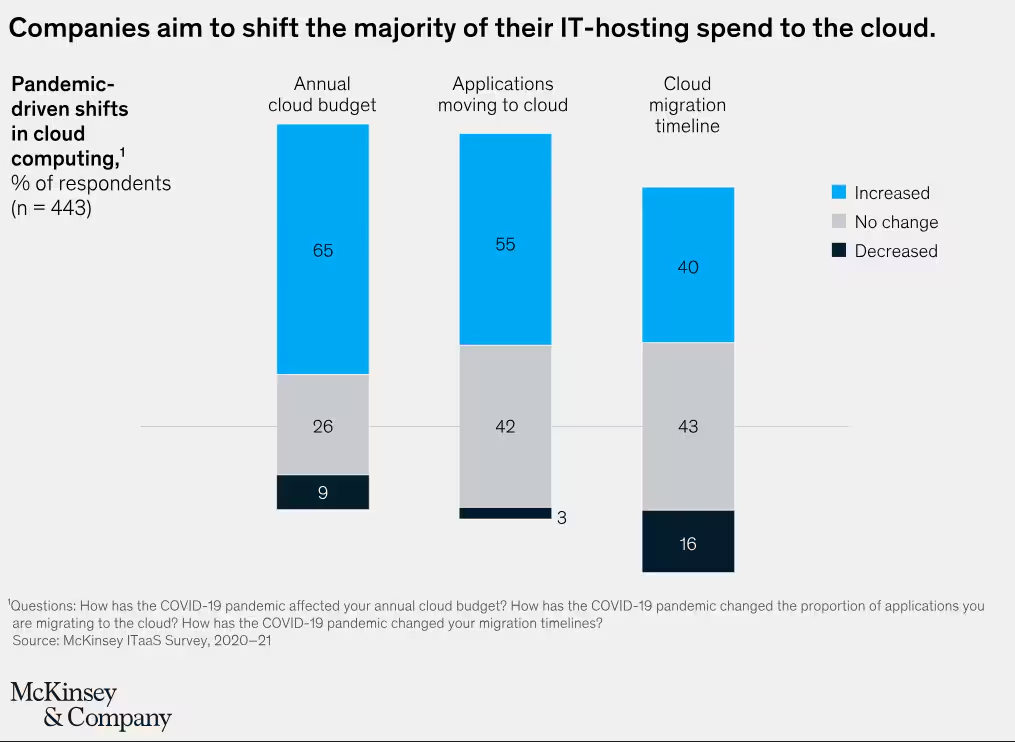
According to McKinsey, by 2024 most enterprises aspire to have 80% of IT hosting in some type of cloud environment, whether private cloud, infrastructure as a service (IaaS), platform as a service (PaaS), and software as a service (SaaS).
While the cloud can offer significant advantages in terms of speed and scale, it does have its challenges. In this article, we’ll look at the basics of cloud migration, talk about the benefits and challenges, explore some best practices, and talk about what is necessary for a successful cloud migration.
Why Migrate to the Cloud?
There’s a reason why so many organizations have chosen to migrate their data and applications to the cloud. In fact, the process has become the norm rather than the exception. Here are some of the main reasons organizations choose to migrate and the benefits they receive.
- Application modernization: Organizations often find themselves using legacy systems and applications because it is the line of least resistance, and upgrading can be an expensive and painful process. Often that process is spurred by cloud migration. Modernizing applications to function in a cloud infrastructure almost always comes with increases in application speed, performance and security.
- Cost savings: It used to be taken for granted that companies had to spend money on servers and their accompanying infrastructure. With cloud computing, organizations no longer need to buy and maintain the hardware and software, nor do they need to carry the depreciating expenses on their books. Furthermore, cloud computing is a competitive business, meaning that companies can move to a less expensive cloud provider if they choose, or at least have the bargaining power to negotiate cloud costs.
- Better use of IT teams: On-premises operating systems require significant amounts of regular care and maintenance and always need someone on call in case something goes wrong. Frequently the demands of maintaining an on-premises infrastructure put an added burden on your IT team and require them to perform repetitive tasks that prevent them spending their time more productively. With cloud infrastructure, significant amounts of the maintenance, monitoring and response duties are outsourced and handled by the cloud provider.
- Speed and scale: Nearly every modern organization relies on online tools to conduct their business and present their best face to customers. Adopting a cloud computing infrastructure allows an organization to take advantage of increased speed and enhanced scale, with their public-facing websites operating faster than would be possible in any typical on-premises environment. When traffic spikes occur, additional cloud computing resources can handle the overflow, and customers don’t notice any reduction in speed or functionality.
- Minimize latency: The farther customers are from an on-premises data center, the greater the likelihood they will notice latency — a slowdown in your services. In a cloud computing environment, with multiple servers in multiple locations, customers will get the same performance wherever they are in the world.
- Faster rollout of new services: Provisioning a new application in an on-premises environment usually means adding servers, spending money and all the accompanying work. This can greatly reduce the speed and increase the cost of rolling out a new product or service. In a cloud environment, the ability to add new services can be facilitated much more quickly and cheaply.
To get a better understanding of how a Cloud Migration can work, this presentation explains how Splunk migrated over 10,000 users from Atlassian’s self-hosted offering to the Atlassian Cloud platform – along with the business case justifying the investment.
Cloud Migrations Accelerating
One result of the global COVID-19 pandemic was a growing urgency to shift from on-premises to cloud. According to McKinsey, around 40% of companies have accelerated their plans to move to the cloud as a result of, or during, the crisis.
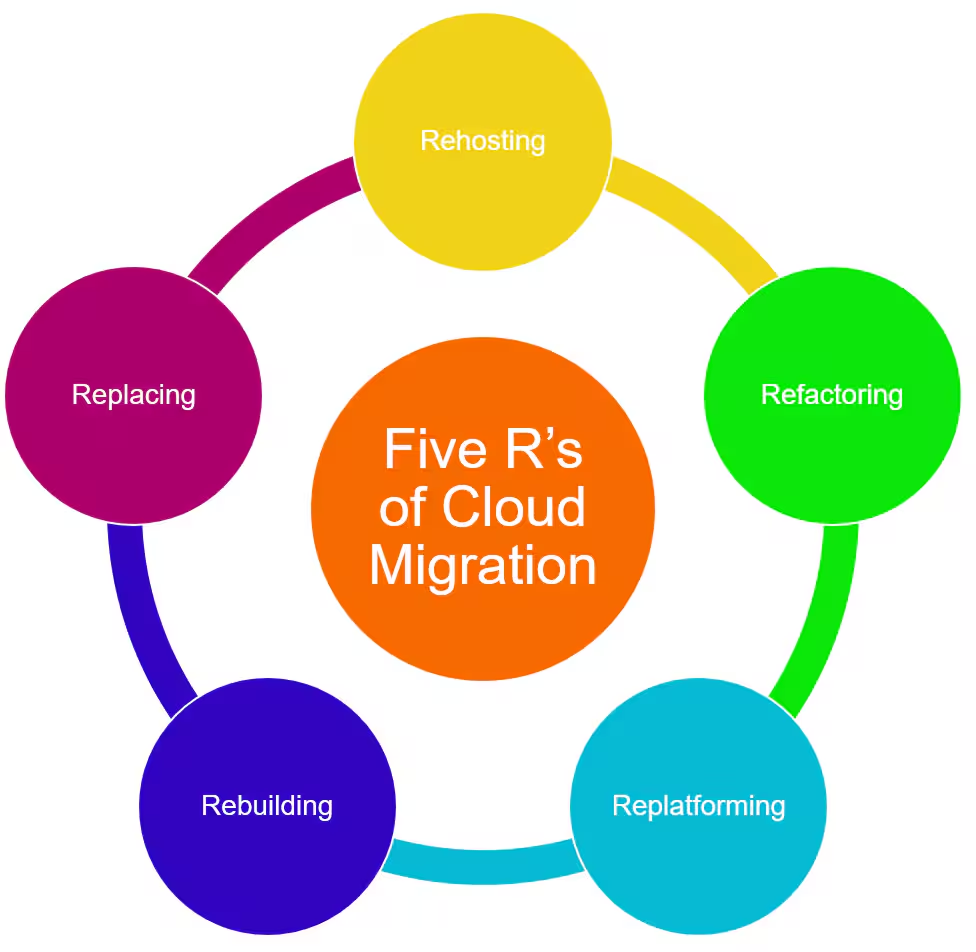
Five R’s of Cloud Migration
Often referred to as the “Five Rs,” there are five common ways that organizations migrate data and applications to the cloud, listed here in order of complexity from simplest to most complicated.
- Rehosting: Also referred to by the phrase “lift and shift,” rehosting is the cloud migration process, where IT workloads are redeployed from an on-premises server to a cloud-based server, making minimal changes to the code.
- Refactoring: Refactoring involves making small changes to applications in order to optimize them for a cloud environment, even if the change is not absolutely necessary for the migration. The application’s core architecture remains the same.
- Replatforming: Like refactoring, replatforming (also known as revising) involves changes to the underlying application code to prepare it for cloud hosting, but the changes are more involved.
- Rebuilding: As the name suggests, rebuilding (also known as refactoring) involves rearchitecting with new, cloud-native application source code.
- Replacing: Also known as repurchasing, this is the most drastic change, wherein the organization discards its own custom-built applications and begins using third-party software as a service application provided by the cloud vendor and hosted on the cloud platform. The only real migration in this scenario involves data migration.
Some industry leaders, such as Oracle, include a 6th R: Retiring. In some instances, after evaluating the needs of the business and its holistic technology landscape, the best course of action is to deprecate some on-premises applications rather than migrate them.
Examples & Use Cases for Cloud Migrations
Cloud migrations are similar in many ways and unique in others, but to give you some idea of why organizations pursue migrations, here are some common use cases.
- An e-commerce platform might move their customer-facing order fulfillment infrastructure from their own on-premises servers to the cloud so that they no longer need to worry about critical infrastructure maintenance and risk outages or downtime.
- An online content provider could choose to move their content from in-house servers to a cloud host, ensuring they always have the speed and bandwidth they need to meet real-time customer demand.
- A productivity application might choose to move from self-hosting their application on their own servers to hosting it on a major cloud provider, helping to boost their availability, speed and security.
- A mobile application (highly dependent on availability and speed to maintain consumer confidence) could opt for a redundant cloud environment hosted by two major cloud providers, helping keep them safe from potential outages or security threats.
- A business services company could choose a cloud provider to host its applications and data rather than maintaining the capability in house to help use automations for increased scalability or to reduce operational expenses.
On premises migration vs cloud migration
We looked at the Five Rs of cloud migration above. In terms of an on-premises migration of data and applications from one server to another, the process is similar even if the migration occurs within the same environment.
An on-premises migration can take the form of a server-to-server migration, where an application is moved from one physical server to another. This is essentially the same as reinstalling the application on the new server, and copying any data files that need to be moved along with it.
An on-premises migration can also involve a move from a physical server to a virtual machine (VM), a software application that emulates the functions of a physical computer. VM environments are often set up for testing. The application being moved from the physical server to the virtual machine can be installed and set up before the migration.
Virtual-to-virtual migrations are common both on premises and in the clouds. They involve the use of a hypervisor — a program used to run and manage one or more virtual machines on a computer — to support live migrations, moving a working VM from one server to another without the need to stop its operation.
Common Challenges with Cloud Migrations
As with any major technological change, there are challenges associated with a cloud migration, but these can largely be alleviated by proper planning, as well as working with the service provider.
- Application performance: Sometimes cloud applications won’t work as well as they did on premises. Not every application works well in a cloud environment. Ideally, an organization will plan their application migration strategy and do their due diligence to determine whether certain applications work well in the cloud than others — and be sure of interoperability. Again, this is a good place to take advantage of the services of your cloud provider.
- Unexpected cost: This is a cloud migration challenge that gets a lot of attention. One of the primary selling points of the cloud for many organizations is that it is more cost-effective than on-premises infrastructure, and that is true in most cases. However, cloud configurations can cost more than expected if they are not properly set up. Make sure that the cloud computing resources you are contracting for are sufficient to run the applications you want to migrate, but that the pricing isn’t more than you need (or want to pay for).
- Poor training: While the fundamentals of cloud computing are like working with an on-premises infrastructure, there are significant differences when it comes to managing apps in the cloud. Make sure your people have the right skillset to manage your cloud infrastructure, plan to give them the training they need, and/or hire an experienced partner externally to help with your migration.
Strategies for Migrating
Creating a cloud migration strategy is much like creating a strategy for any major technological initiative. You need to understand your business needs and where you want to go to plan the steps in between.
- Understand your current situation: A fundamental step in your migration project is to use your system monitoring tools to get a clear picture of where your data and applications are today, how they operate, how your IT infrastructure functions, and develop a business case for a cloud deployment. You need a clear picture of your legacy systems. The machine data generated by your systems provides some of the most important information.
- Establish key performance indicators (KPIs): While you’re in the process of migrating, you’ll need to ensure that your systems (CPUs, network, storage, etc.) are operating at acceptable performance levels. It’s important to establish KPIs in advance so you can monitor performance during the migration.
- Ensure cloud security: Application and data safety are always important, but they are especially important during a cloud migration, when changes in configurations can lead to security vulnerabilities. If you use a security solution already, one that works with your machine and log data to identify anomalies, this can help ensure your network, data and apps remain secure during migration.
- Consider compliance issues: Make sure you understand before beginning your migration process all the applicable regulations that apply to your company and your industry. Set up a baseline derived from your machine data so that you know your compliance baselines before you begin your migration. Discuss any compliance issues and regulations in advance with your cloud provider to make sure the migration and subsequent relationship is compliant.
Cloud Migration Tools
When undertaking a cloud migration, you will almost always be working with one of the major cloud providers, such as Amazon Web Services (AWS), Google Cloud (GCP) and Microsoft Azure. Each of these vendors offers tools and services to help with cloud migrations. Typical migration services include:
- Database migration: A database migration tool lets you transfer data from one type of database to another, or from a database to another kind of data repository (such as a data warehouse) without the necessity of rewriting code or using other more complicated tools.
- Data transfer appliance: A data transfer appliance is a high-capacity storage device designed to upload very large amounts of data to a cloud environment.
- Online data transfer: Similar in purpose to a data transfer appliance, online data transfer copies data over a high-speed network link rather than using a storage device.
- Server migration: Also known as a lift-and-shift process, server migration involves taking on premises workloads, virtualizing them and transferring them to the cloud.
- Migration tracker: A cloud migration tracker helps track the progress of your migration as well as monitor the servers linked to each application.
Best Practices for Cloud Migration
In addition to having a well-designed plan for your migration, there are best practices that can help to ensure your success. Let’s take a look at a few of them.
- Have a long-term cloud vision: You may go into your first migration knowing only that you want to migrate certain data or applications. But if you can plan a long-term vision for your overall cloud environment in the future, you will be much more likely to make decisions now that will help you as you move forward.
- Choose cloud services carefully: As we’ve seen in this article, there are many different types of cloud environments as well as types of migration. Cloud providers will have a long list of available services they can provide. Plan as much as possible in advance for what you will need and stick to the plan to make sure your migration costs don’t grow beyond expectations.
- Prepare all stakeholders: No matter how well planned and executed your migration, there will be some inevitable disruption. Make sure everyone involved knows the plan and understands how they may be affected.
- Know who will do what: A cloud migration will touch many roles in your organization. Be sure you have clearly defined roles and responsibilities before you begin, as well as clear communication guidelines to keep everyone in touch during the migration.
In addition to these best practices, Gartner’s IT Roadmap for Cloud Migration suggests the following 5 key stages for cloud migration:
1. Align Objectives
- Build understanding around different use cases for cloud adoption
- Define formal cloud strategy aligned to IT strategic goals
- Define action steps to achieve goals, keeping in mind cloud financial management
- Craft decision principles for migration informed by application and team readiness, business priorities, application modernization strategy and vendor capabilities
- Understand data and metrics for usage and capabilities
2. Develop plan of action
- Develop cloud competencies across enterprise
- Assess different service providers (AWS, Google, Microsoft, etc.)
- Build protections against cloud-specific risks
- Identify viable investments in networking, security and identity architectures, and tools
3. Prepare for Execution
- Identify and segment workloads for migration
- Establish cloud management workflow
- Adopt best practices for implementation and practice workload placement analysis
4. Establish governance and mitigate risk
- Prioritize sensitive data discovery, monitoring and analytics
- Establish security control plane using third-party tools
- Develop life cycle approach to cloud governance
- Automate to embed governance adherence feedback directly into workflows
5. Optimize and scale
- Prioritize investments to advance existing cloud strategies and implementation
- Create shared objectives for cross-functional teams that favor customer centricity
- Iterate to optimize and evolve cloud footprint
Getting Started
The process for beginning a cloud migration is similar to the process for beginning any major technology initiative in an organization. You need to have a strategy and a plan, and know who is going to do what and by when. There are likely other considerations, including regulatory requirements, that your organization will need to follow. While it is beyond the scope of this article to map out a complete cloud migration plan, here are some of the key steps to consider:
- Choose the workload (data or application) that you want to migrate.
- Determine how much data needs to be migrated.
- Make sure you aren’t migrating unused legacy applications or stale data.
- Ensure that all dependencies among workloads are accounted for; in other words, make sure you’re migrating everything necessary for continued operation.
- Decide which workloads should stay on-premises. You may choose to leave certain business-critical applications in your data center, or applications that require low latency. There may also be geographic or other regulatory constraints that determine what workloads should remain on-premises.
- Determine the most appropriate type of migration based on all of the above factors, e.g. the “Five Rs” referred to in the section, “How do organizations migrate data to the cloud.”
- Create a testing plan to ensure that migrated workloads are functioning properly before moving them into a production environment.
The Bottom Line: Cloud migration requires planning but often delivers big benefits
The cloud is an inescapable part of the modern computing environment and accompanying digital transformation initiatives, and for many organizations who want to experience its value, a cloud migration (and a broader cloud strategy) will be required. Sometimes organizations put off their migrations because they are concerned about potential challenges and problems. While there are challenges inherent in the process, that’s true of any technological change, and shouldn’t deter you from proceeding with a cloud migration plan. Ensure you have a clear understanding of what you want to accomplish and how you will know if it’s going right (or going wrong), secure the appropriate resources and assistance and you can be comfortably certain that your migration will be successful.
Related Articles

What Are Preload Resource Hints?

What Is a DNS Prefetch?

What Are Preconnect Resource Hints?

Synthetic Monitoring vs Real User Monitoring: What’s The Difference?

Continuous Performance Management Basics

API Testing vs Monitoring: What's The Difference?