Scale Your Splunk Cloud Operations With The Splunk Content Manager App
Evolution of Splunk Cloud Service: Streamlining App Management and Enhancing Operational Efficiency
Effectively managing both public and private Splunk Apps across multiple Splunk environments poses a considerable challenge, demanding significant time and effort with the potential for tedious and manual tasks. Recognizing this complexity, the Splunk Cloud Service has been progressively introducing additional features and capabilities to streamline and simplify these intricate administrative responsibilities.
As a reminder, just a few months ago, the process of installing an application on any Splunk Cloud stack was marked by a rather cumbersome procedure. It necessitated the initiation of a support ticket, resulting in extended waiting periods, sometimes stretching to hours or even days before the task was completed. However, with the recent integration of ACS features, this once time-consuming process has been dramatically reduced to a matter of minutes. This transformation allows for the seamless and efficient management of stacks through a self-service approach, marking a significant advancement in the Splunk Cloud Service's commitment to enhancing user experience and operational efficiency.
However, there is still a lack of a Splunk built-in method to automate and execute this process across multiple stacks. Up until now, Managed Service Providers (MSPs and MSSPs) had to create their own solution to fill this gap.
Introducing App Content Manager For Splunk
To address the absence of a solution that simplifies the administration of Splunk instances and aligns with Splunk's ultimate goal of focusing on generating value from data, I created the App Content Manager for Splunk.
This new Splunkbase application is designed to empower all our partners and large Splunk Cloud customers in managing app deployments at scale. Specifically, it serves as an "easy button" for any Managed Security Service Provider (MSSP) to efficiently manage apps across numerous Splunk Cloud stacks and seamlessly integrate Splunk Cloud as the backbone of their MSSP operations.
It aims to hide all the complexity behind this process and provide a guided and user-friendly way to facilitate content deployment.
App Content Manager for Splunk empowers administrators as the chefs, granting them the ability to choose the content (whether entire applications or individual configurations), decide on the deployment method (instant or scheduled), and specify the deployment destination (single or multiple stacks), and they even have the capability to establish workflows for executing a sequence of actions or seamlessly integrate with CI/CD pipelines in GitHub.
App Content Manager for Splunk is now available in beta version on Splunkbase!
Features And How It Works
This application contains four main features:
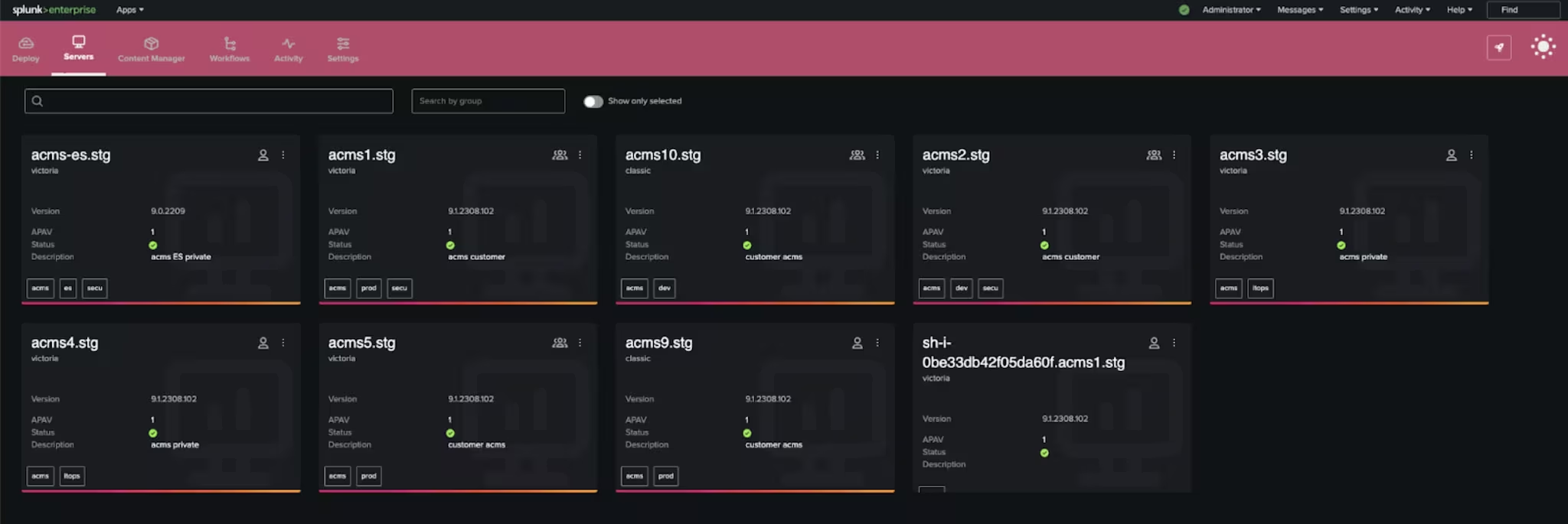
- Manage servers: This feature facilitates the management of Splunk Cloud stacks. Add, modify, delete stacks or categorize them under different groups.
The only prerequisite is to have a valid authentication token to be able to initiate communications with the Splunk Cloud Stack.
-
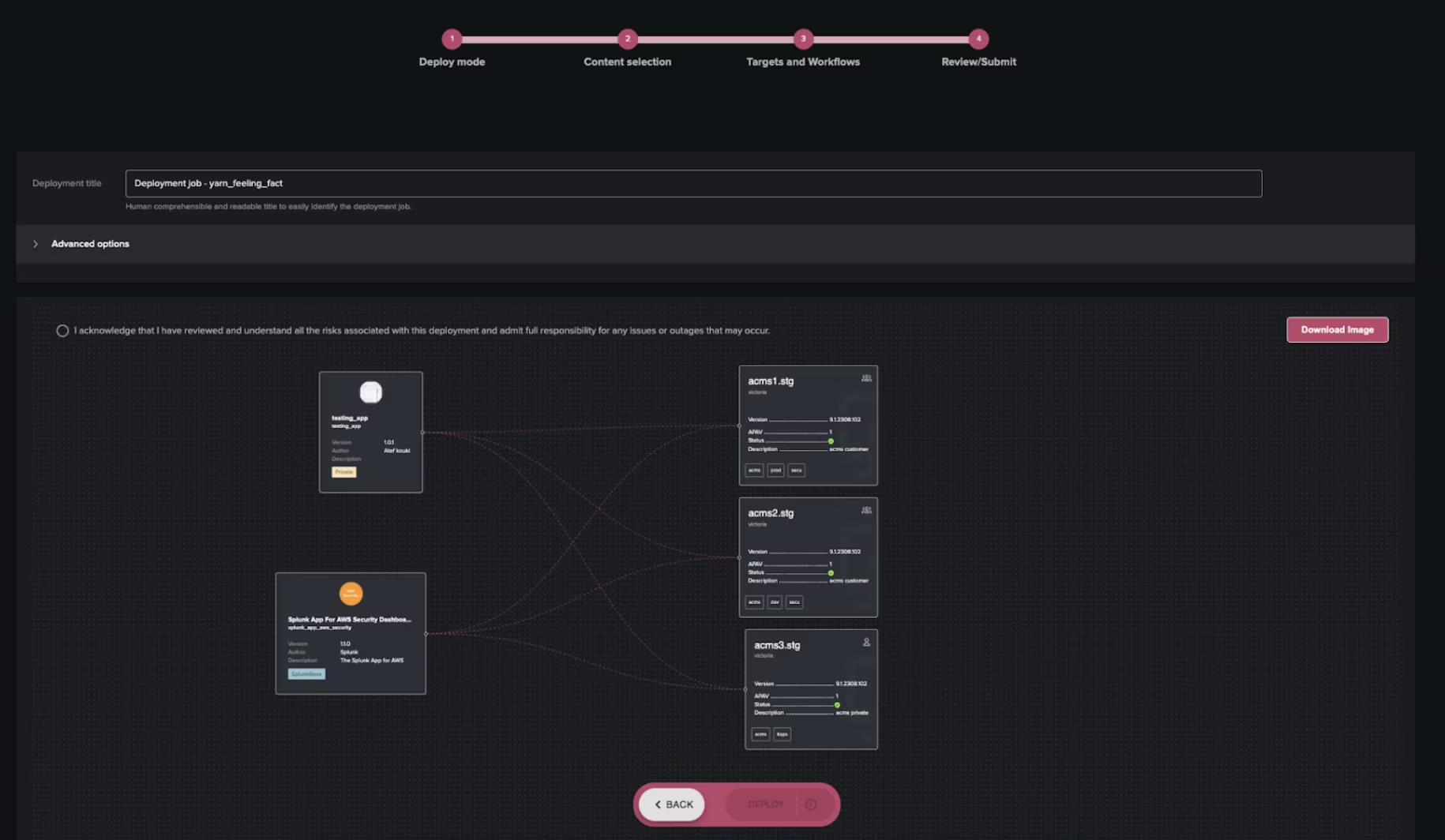
Manage content: In this view, the user will have the flexibility to choose Splunk configurations or full applications and then select one of the predefined actions to process them.
This will offer an automated method to perform multiple actions on multiple apps/configurations and deploy them to multiple stacks. The user will be guided in a user-friendly wizard to select content and targets, review all that and then deploy or schedule the deployment job.
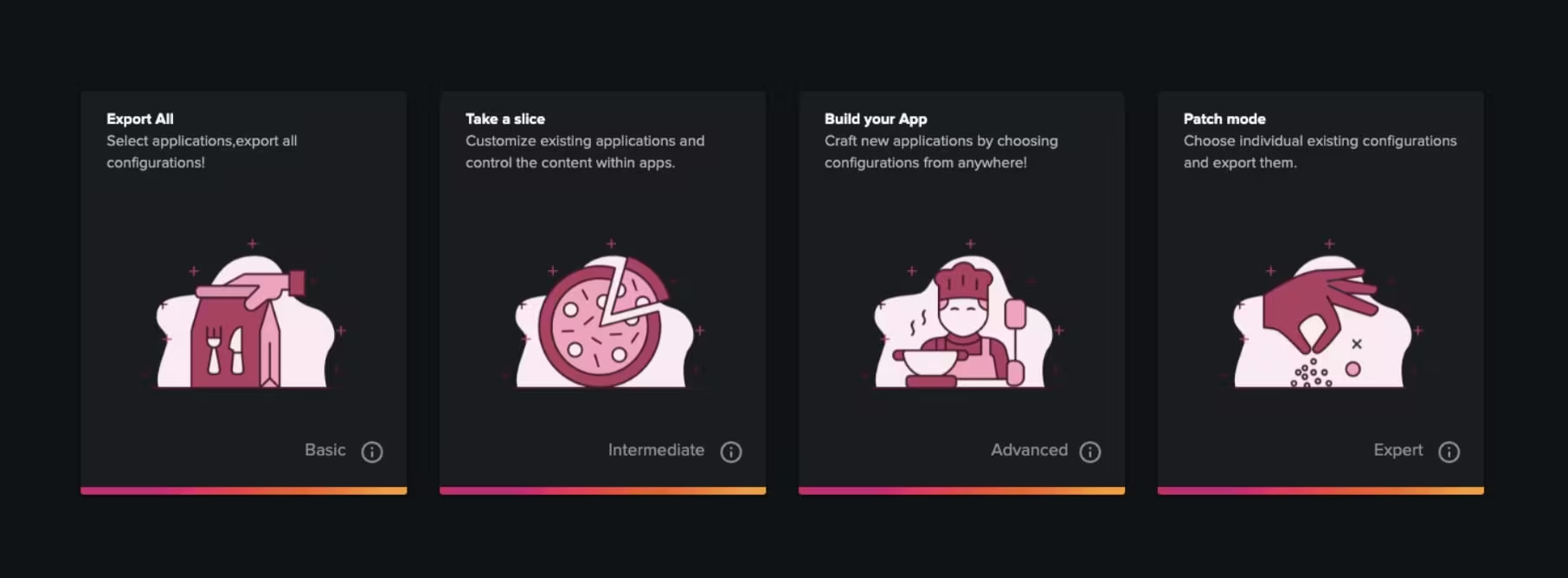
Four possible modes are available:- Export all (Basic): The user can select applications and export/deploy all configurations associated with those applications. This is a simple way to deploy for example many applications to multi Splunk Cloud stacks and hide all the complexity of this process. All the required steps to inspect applications using AppInspect and then to use ACS endpoints will be automated and managed by ACM (App Content Manager).
There are three possible sources to select apps: locally installed on the management node server, any Splunkbase application compatible with Splunk Cloud, or .spl/tgz packaged applications that can be uploaded. - Take a slice (Intermediate): The user can select one or many Splunk deployment target roles and ACM will take care of splitting all selected apps into custom parts containing only role-specific configurations, then the user can export, deploy or download generated apps.
Use case example:Administrators might need to deploy some TAs (Technology Add-ons) but also have to remove certain configurations to optimize the app for the target server. For example, deploying to the search head tier might require removing certain inputs.conf files. - Build your app (Advanced): The user has the liberty to select any configuration from any existing applications or TAs to create a new customized and freshly crafted application.
Use case example: Within the Splunk environment, Splunk users can create knowledge objects or configurations using the Splunk UI, and these may belong to different Splunk applications (e.g., Search,...). This feature allows administrators to collect these configurations and group/package them conveniently. - Patch Mode (Expert): Effortlessly deploy individual configurations to Splunk Cloud using REST APIs or ACS features. Admins will be able to keep original ACLs or customize permissions or sharing for each single stanza. Use case example: updating or creating correlation searches across multiple instances by pushing search configurations to REST Endpoints. This feature relies on rest Splunk Cloud Rest APIs and needs to have your management node server IPip address added to the stack IPip whitelist.
- Export all (Basic): The user can select applications and export/deploy all configurations associated with those applications. This is a simple way to deploy for example many applications to multi Splunk Cloud stacks and hide all the complexity of this process. All the required steps to inspect applications using AppInspect and then to use ACS endpoints will be automated and managed by ACM (App Content Manager).
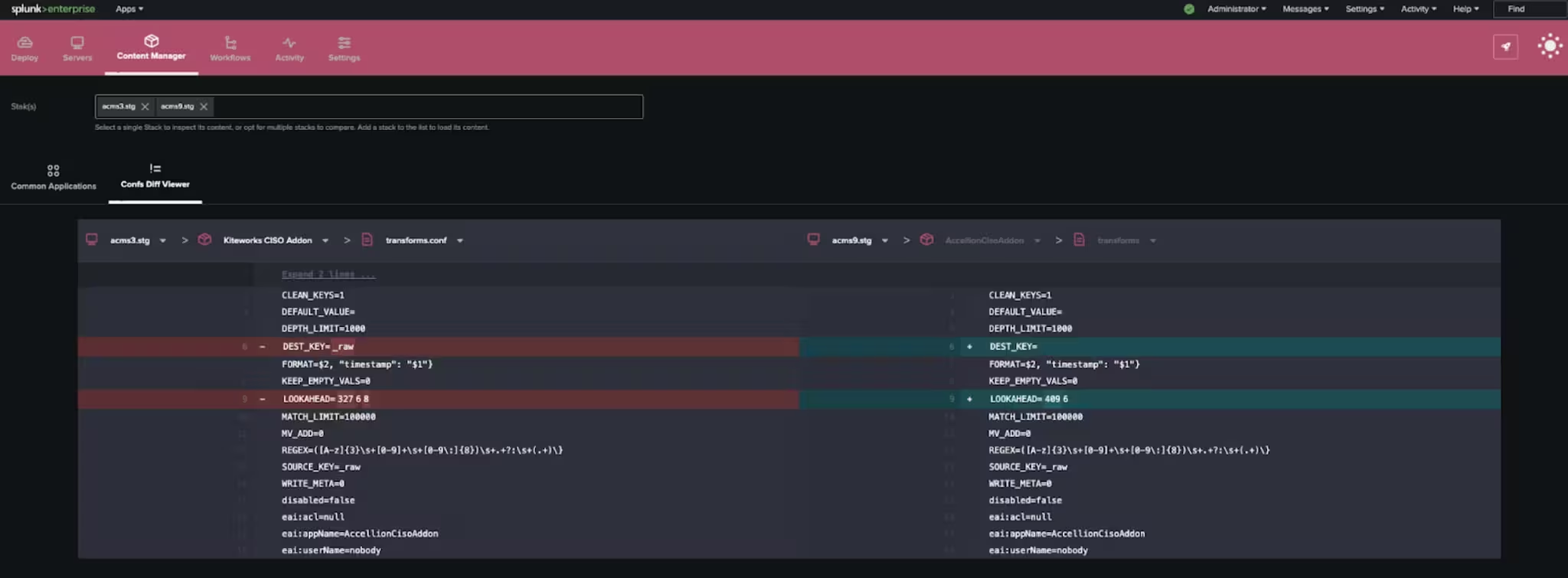
- Check and compare stack's content: This feature enables administrators to list all installed applications on Splunk Cloud stacks, verifying their versions and detecting any newer releases for Splunkbase apps.
The compare mode activates when more than one stack is selected, displaying common applications (to verify if an app is installed on all selected stacks) and ensuring version consistency across all selected stacks.
Additionally, administrators can use this feature to compare the effective configurations of any application from different stacks in a side-by-side diff view, allowing them to detect any inconsistencies.
-
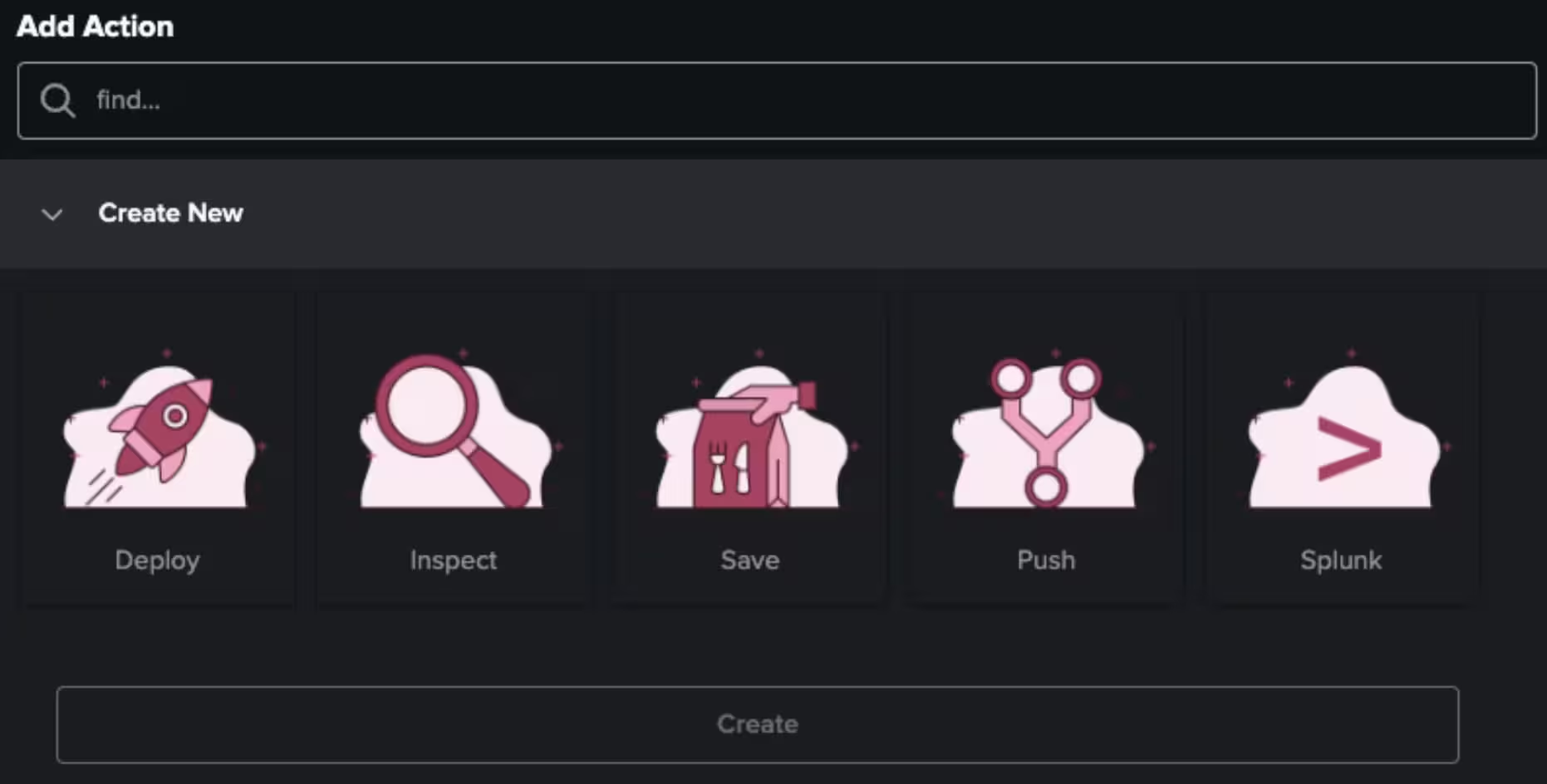
Manage Workflows: A workflow represents a predefined set of actions that users/Admins can create and customize. Users have the option to craft new workflows by selecting actions from a library of predefined ones:
- Deploy: deploy packages or configurations to Ssplunk Ccloud Sstack(s)
- Inspect: i nspect packages with AppInspect
- Save to disk: save generated packages to disk
- Push: push to a CI/CD Pipeline.
Key Use Cases:
- Deploying one or multiple public/private Splunk App(s) to one or multiple Splunk Cloud tenants;
- Deploying a portion (E.g. saved searches) of a public/private Splunk App(s) to one or multiple Splunk Cloud tenants;
- Compare public/private Splunk App(s) versions between one or multiple Splunk Cloud tenants;
- Configure a set of Workflow actions allowing Admins to follow a sequence of activities when deploying Splunk Apps (Deploy, Inspect, Save to Disk to Push to GitHub)
- I've hidden an Easter egg
within this app. If you discover it, please don't hesitate to share it with me!
Useful Links:
- Download ACMS: https://splunkbase.splunk.com/app/7062
- Splunk announcing ACS: https://www.splunk.com/en_us/blog/platform/splunk-cloud-self-service-announcing-the-new-admin-config-service-api.html
- ACS Helper for Splunk: https://www.splunk.com/en_us/blog/tips-and-tricks/administer-your-splunk-cloud-stacks-easily-and-efficiently-with-acs-helper-for-splunk.html
- Splunk Cloud MSP Blueprint: https://partners.splunk.com/prm/English/s/assets?id=472277&q=msp