Using Splunk for Your Vulnerability Management
Hello,
The last days have been full of Microsoft ISS http.sys Vulnerability informations and notifications. So patching was at the top of the agenda for many companies and teams.
Recently Verizon also released their yearly data breach report. One of the major trends they have seen is that vulnerabilities are still not patched or isolated at systems and are one of the highest risk factors over the last 20 years.
“We found that 99,9% of the exploited vulnerabilities had been compromised more than a year after the CVE was published.”
So why are still attackers so successfully with this attack method? I guess it cokes down to the fact that often there is not an established vulnerability incident handling process in place. Did you know that you can setup this security process (that involves usually several teams system owners in larger companies) with Splunk?
You can feed Vulnerability Scan reports from Nessus, Qualys and other well known vendors into Splunk. Splunk then breaks them down from a full report into events to ensure every vulnerability of a system can be handled and investigated separate if necessary.
The process of vulnerability review:
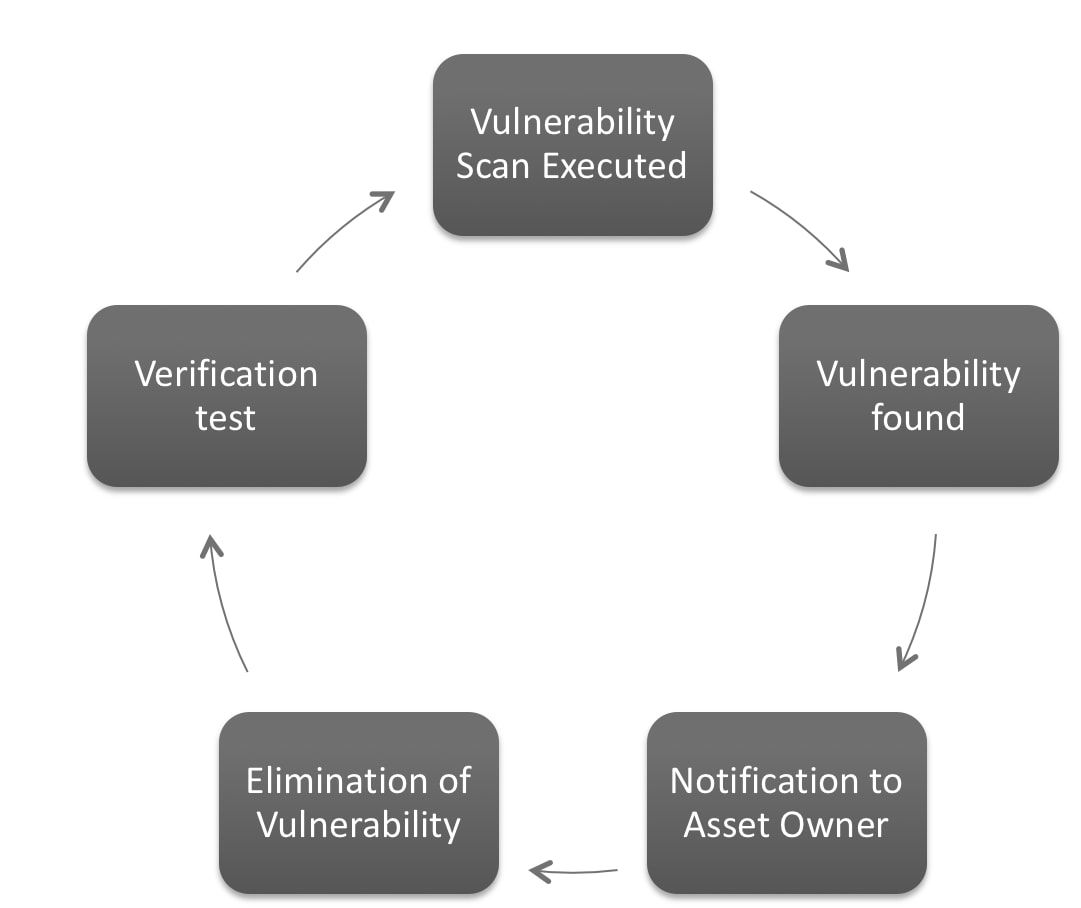
To ensure consistent risk mitigation a repeatable process needs to be established. The graphic shows a best practice to design that process.
Vulnerability Scan Executed
You’ll execute regular scans with your vulnerability scanner. Ensure to monitor them properly. You can use the Vulnerability Operations Dashboard to monitor and track the status of your scans in your environment.
Vulnerability Found
Once a scan has finished the results are processed in Splunk. A high level overview of the current situation is useful here and the Vulnerability Center Dashboard gives you that visibility in a single pane of glas.

Notification to Asset Owner
This is one of the key steps and there are different ways to do it. Usually it involves any team that is responsible for some kind of operations of a specific server, from the network team up to the web application team. It all depends on the kind of vulnerability and technology involved.
-
Manual Proccess
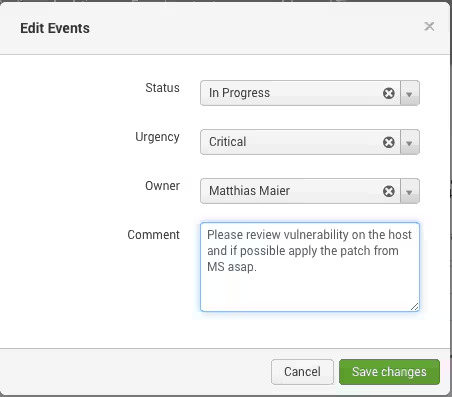
- The Security Analyst sends an e-mail to the Asset Owner and informs them about the vulnerability and which hosts are involved, and discusses steps to eliminate the vulnerability.
- Once discussed, the event can be suppressed or closed. If the Vulnerability still exists in the next scan, it will be reopend.
-
Usage of Splunk’s Notable Event Framework
- An correlation search can be configured and a notable event will be created for new vulnerabilities. Once a new vulnerability is detected, the Security Analyst can review and assign the Event to the System/Asset/Service Owner
Elimination of Vulnerability
The responsible system owner needs to review the impact of the vulnerability to their service and decide which remediation is the best in short and long term . Short term remediation can include re-configuration, temporary blocking of a specific port that is vulnerable, disabling the functionality. Long term remediation can be applying vendor patches or upgrading the system.
This process can take some time. So there is the option to suppress specific events to avoid that the same vulnerability alerting again with the next scan.
Verification Test
If a vulnerability was patched or fixed it also needs to be validated to ensure the patching was successful. That step can be done by reusing the vulnerability scanner and performing a dedicated scan or by waiting until the next scan cycle happens if the risk allows it.
How to explain this to management:
At Splunk .Conf Mark Graff, CISO at NASDAQ showed very impressive stats about how fast their teams were able to react to heartbleed.
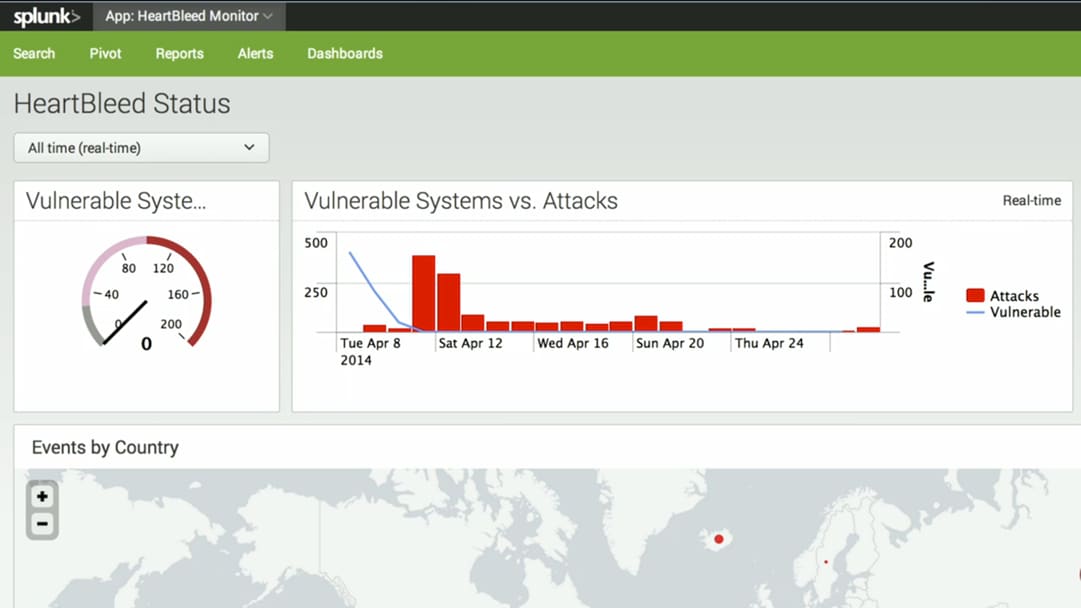
In the “Vulnerable Systems vs. Attacks” they outlined how fast they patched their systems. The Attack-Events come from their Network Protection Systems that sits before their Systems. That showed very impressive what a great job they did and why they need to ensure fast patching. The few attacks on the first few days were their validation tests. After 48 hours external activities started to exploid the vulnerability.
If you want to learn more technically how specific vulnerability events look like, how a custom correlation search can be created in enterprise security you want to review a .Conf session from Randal T. Rioux, Chief of Digital Paranoia and Minister of Offense at Splunk ;-).
Related Articles

Predicting Cyber Fraud Through Real-World Events: Insights from Domain Registration Trends

When Your Fraud Detection Tool Doubles as a Wellness Check: The Unexpected Intersection of Security and HR

Splunk Security Content for Threat Detection & Response: November Recap

Security Staff Picks To Read This Month, Handpicked by Splunk Experts

Behind the Walls: Techniques and Tactics in Castle RAT Client Malware

AI for Humans: A Beginner’s Field Guide

Splunk Security Content for Threat Detection & Response: November 2025 Update

Operation Defend the North: What High-Pressure Cyber Exercises Teach Us About Resilience and How OneCisco Elevates It
