Unmasking the Enigma: A Historical Dive into the World of PlugX Malware
In the ever-evolving landscape of cybersecurity threats, one name that consistently surfaces as a force to be reckoned with is "PlugX." This covert and insidious malware has left a trail of digital intrigue, combining advanced features with a knack for eluding detection. Its history is interwoven with cyber espionage, targeted attacks, and a continuous cat-and-mouse game with security experts (1)(2).
The Splunk Threat Research Team (STRT) unravels the mystery of a PlugX variant, peeling back the layers of its payload, tactics, and impact on the digital realm. Join us as we delve into the dark corridors of this malware, exploring its side loading technique and how it executes its malicious code in the compromised host .
In this blog, the STRT provides a deep dive analysis of this threat, including:
-
PlugX .DAT Payload Extraction
-
PlugX .CFG Decryption
-
PlugX Extractor Tool
-
PlugX Analysis
- Process Masquerading
- System info discovery
- Firewall rule
- Create service
- Delete service
- Drop Files
- Impersonate User
- Keylogger and Process Monitoring
PlugX .DAT Payload Extraction
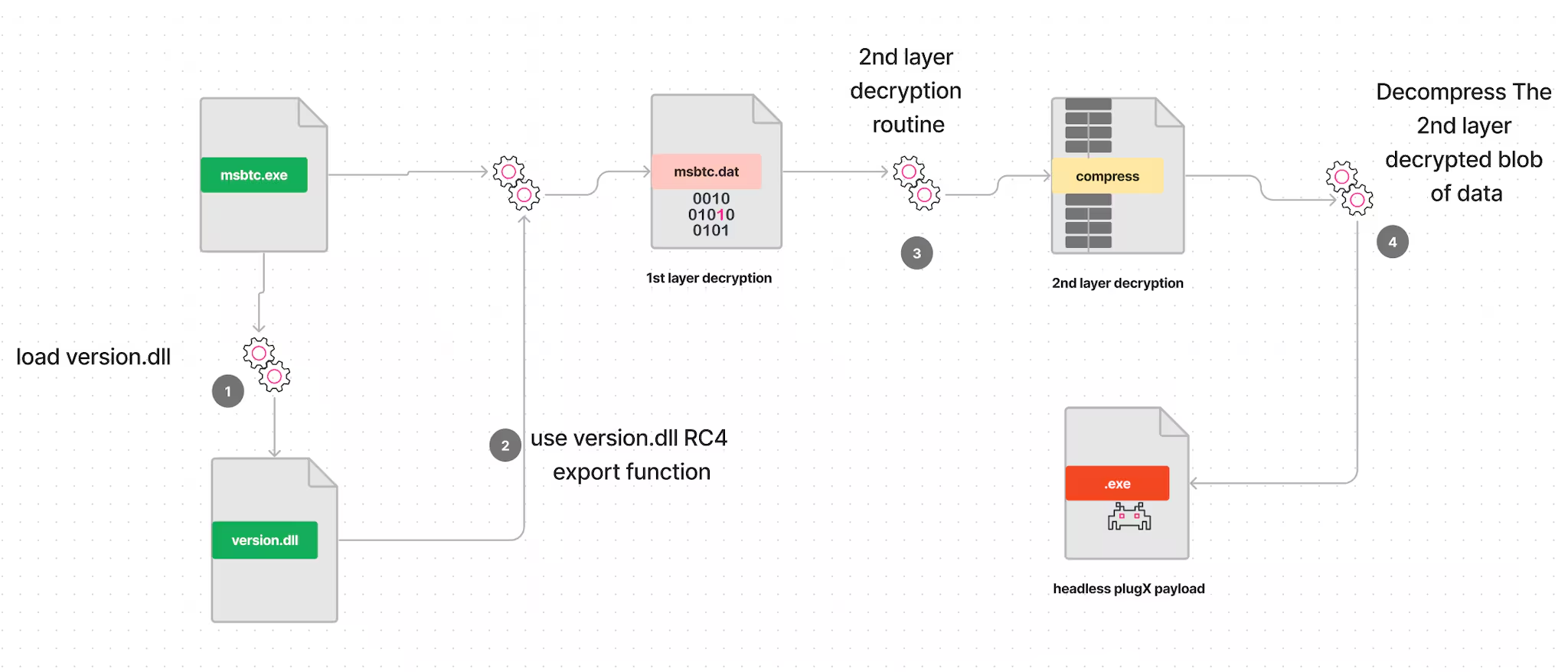
Much like its predecessors, this variant of PlugX leverages the side-loading technique to discreetly execute its nefarious code. In this intricate sequence, when a user initiates the legitimate 'msbtc.exe,' the malware dynamically loads the 'version.dll,' a critical component required for the initial layer of decryption of the 'msbtc.dat' file. This first layer decryption employs a RC4 algorithm, discreetly orchestrated by the 'Version.DLL' within its 'VerQueryValueW' export function.
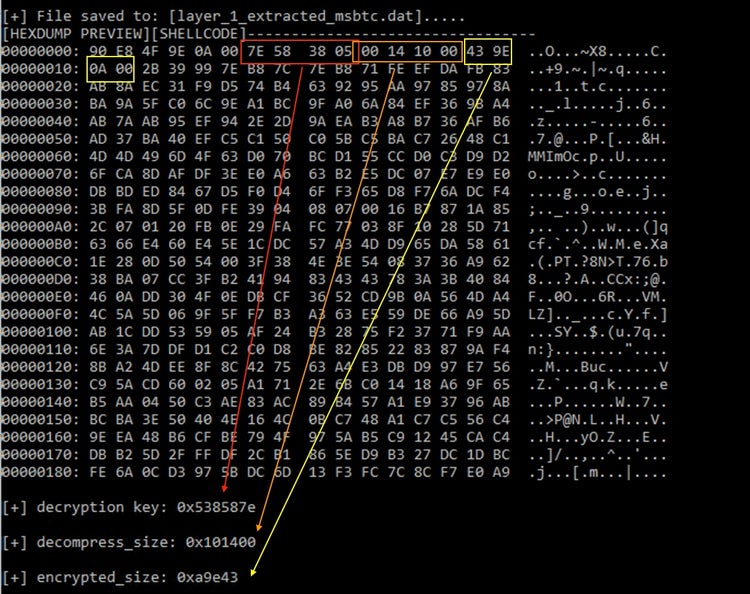
Upon successful decryption of the first layer, PlugX incorporates a set of critical headers, which serve as essential components in the subsequent decryption and decompression of its final payload. In Figure 1, we provide a comprehensive breakdown of these header elements, shedding light on their intricate composition and their pivotal role in the functionality of the malware.
Subsequently, the malware progresses to the second layer of decryption, which comprises a series of XOR operations and basic mathematical operations that can be seen in our extraction tool. These transformations are applied to generate a compressed layer, which is further unpacked using the 'RtlDecompressBuffer()' API. This meticulous process culminates in the creation of a headless PlugX payload variant, poised for injection into a targeted process. The specific process chosen for this operation will be explored in subsequent sections, shedding light on the malware's evasion tactics and persistence strategies.
PlugX .CFG Decryption
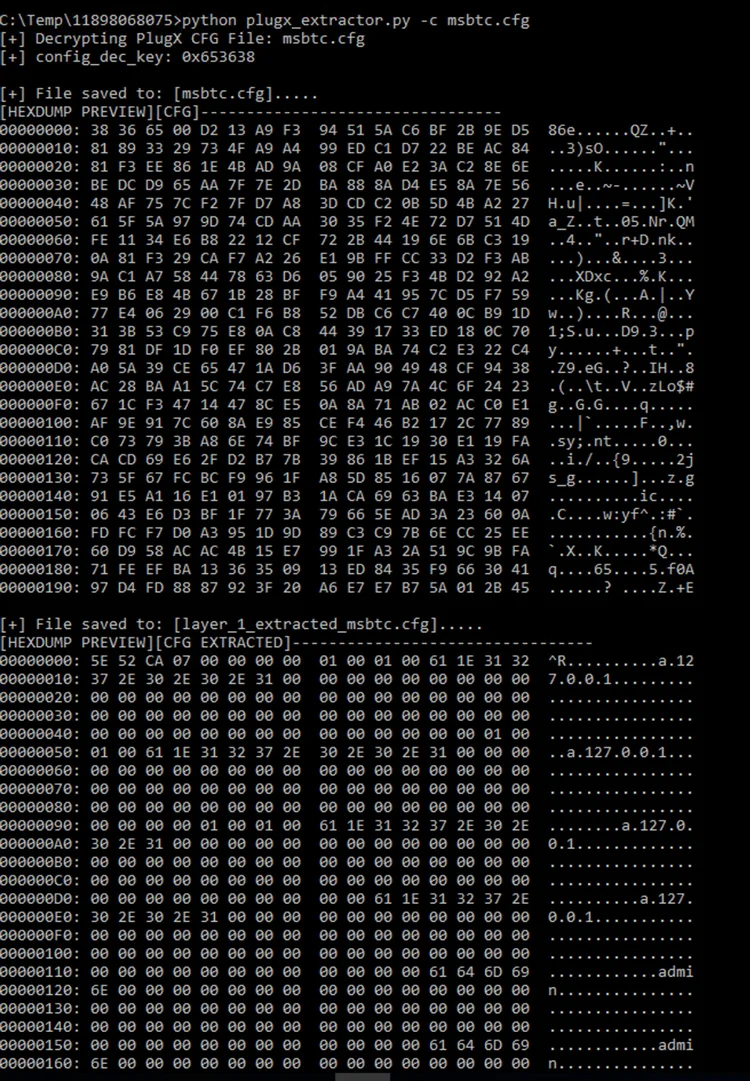
Differing from the decryption process for 'msbtc.dat,' when dealing with the 'msbtc.cfg' file of this particular PlugX variant, it simplifies the procedure. It solely relies on the identical key and RC4 algorithm as employed by the 'Version.DLL' to extract its configuration settings. This streamlined approach emphasizes efficiency in handling configuration data, making use of the existing tools to expedite the process.
PlugX Extractor Tool
In an effort to contribute to the cybersecurity community by facilitating the analysis of this threat and the extraction of the PlugX payload along with its configuration file, the STRT has taken the initiative to create a Python tool named plugx_extractor.py. This tool automates the extraction process, ensuring seamless and precise results. The extracted data is efficiently saved to a file, simplifying the investigative process and empowering security professionals to dissect and understand this threat more effectively.
Below is a short video demo of how this tool extracts both Plugx payload and config files.
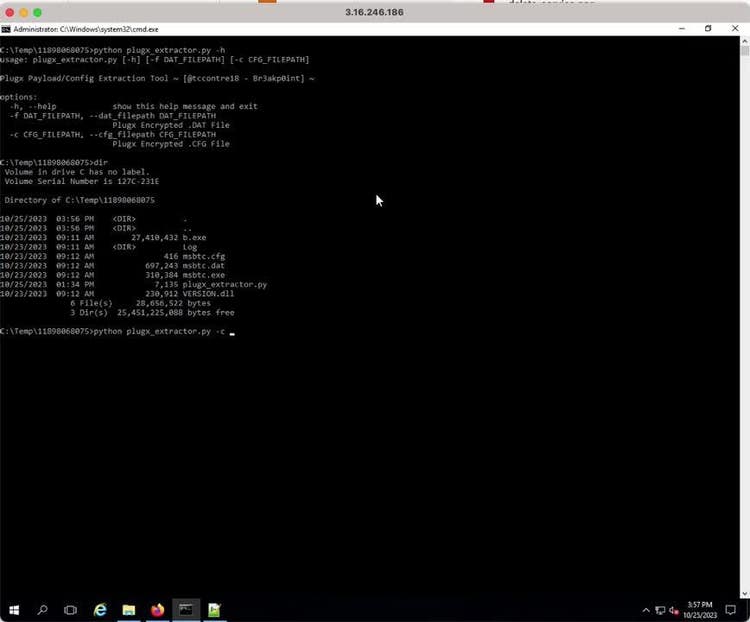
Figure 3: plugx_extractor.py Demo
PlugX Analysis
In the following subheadings, we will conduct an in-depth analysis of the headless Plugx payload that we decrypted from the 'mbstc.dat' file.
Process Masquerading
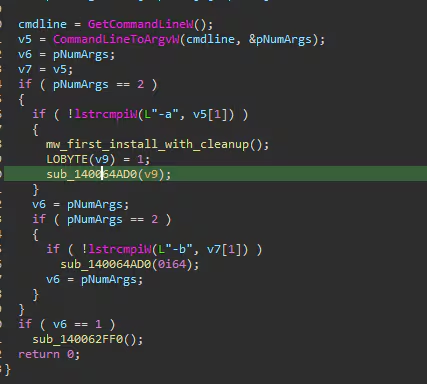
After decrypting the headless PlugX payload from 'msbtc.dat,' it proceeds to inject it into legitimate 'msdtc.exe,' which stands for Microsoft Distributed Transaction Coordinator. This essential Windows service is responsible for managing distributed transactions across various resources, including databases, message queues, and file systems.
In Figure 5, it inspects the command line parameters of the 'msdtc.exe' process. If it detects '-a,' it indicates a fresh execution, and if it finds '-b,' it triggers additional features.
System Info Discovery
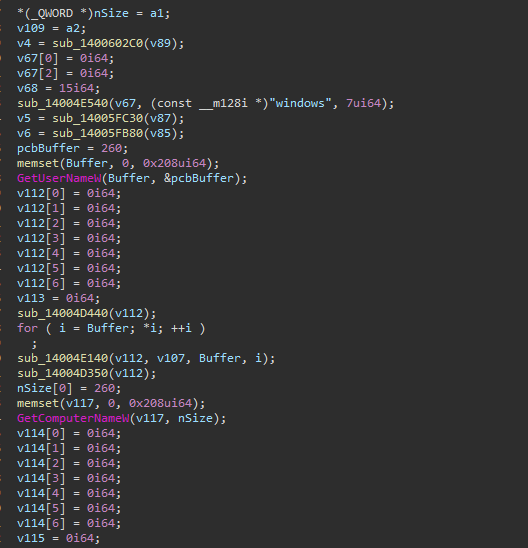
As part of its beacon communication with the C2 server, the PlugX malware retrieves the compromised host's username, computer name, and operating system information.
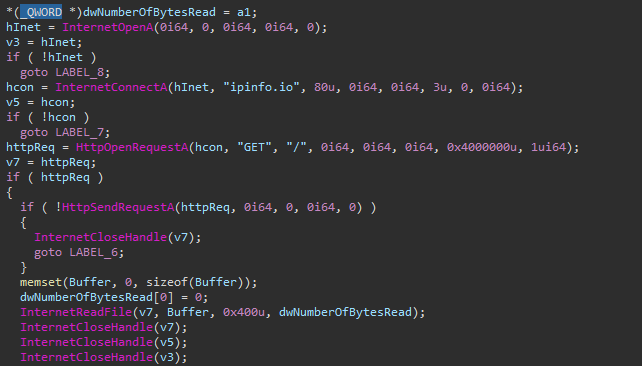
In addition to the aforementioned actions, it will make an attempt to gather network-related information from the compromised host by initiating queries to the ipinfo.io website. This data collection process involves retrieving details about the host's external IP address, geographical location, Internet service provider, and other relevant network-related parameters. By querying ipinfo.io, the malware aims to build a comprehensive profile of the compromised host's network environment, which can be further utilized for various malicious activities or information gathering.
Firewall Rule
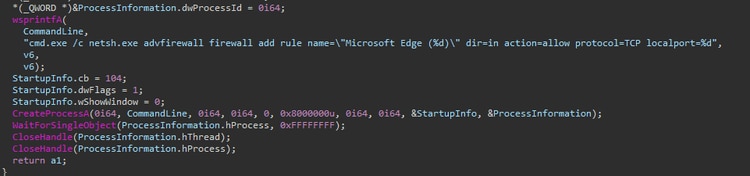
The malware initiates a strategic action by adding a firewall rule, which it designates as "Microsoft Edge." This rule is configured to permit incoming network traffic for a specific TCP port, which is crucial for its communication with the Command and Control (C2) server. In our test environment, we customized the PlugX configuration to establish a connection through port 7777.
By creating this firewall rule, PlugX manipulates the host's security settings, ensuring that network traffic on the specified port is permitted. This allows the malicious software to maintain a covert line of communication with its remote C2 server through port 7777, thereby enabling the exfiltration of data, execution of commands, and potentially additional malicious activities. This deliberate manipulation of the firewall settings is a key component of the malware's ability to operate stealthily within the compromised system.
Create Service
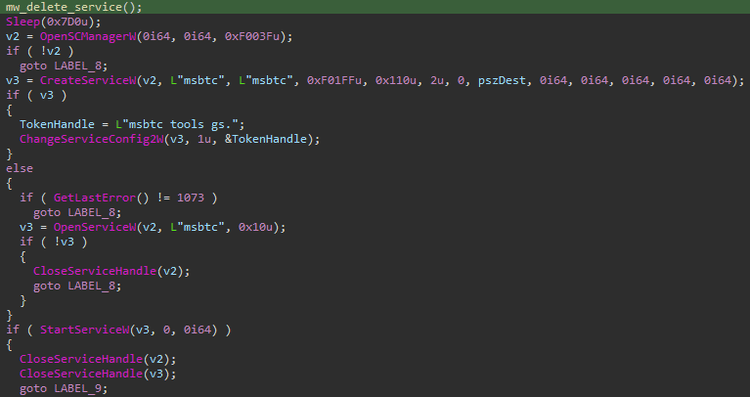
During its installation process and to establish persistence and gain elevated privileges within the compromised host, the malware executes a multifaceted strategy. One of its key actions involves the installation of a service that is strategically overlaid onto the legitimate "msbtc.exe" executable. This service plays a pivotal role in orchestrating the covert operations of the malicious software.
This service is configured to perform two essential functions:
Automated Decryption: Once in place, it operates as a sophisticated decryption mechanism. It diligently decrypts the concealed, compressed payload and configuration files that constitute the heart of the PlugX malware. This decryption process is initiated seamlessly upon the execution of the legitimate "msbtc.exe."
Dynamic Payload Loading: Simultaneously, the service facilitates the dynamic loading of the decrypted PlugX payload and configuration. This allows the PlugX to transition from its concealed state to full functionality as it injects itself into the mstdc.exe processes and memory, positioning itself to carry out its malicious agenda.
Delete Service
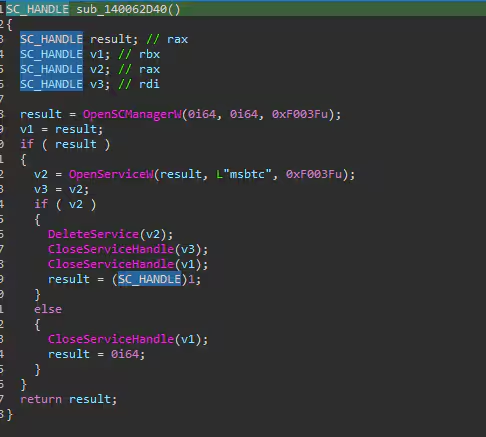
In the initial execution phase of PlugX, the malware meticulously executes a sequence of actions designed to eliminate or clean-up any traces of its previous installations and related artifacts. This calculated process is enacted to ensure the seamless and error-free reinstallation of itself, minimizing the likelihood of detection or interference. A telling example of this sophisticated housekeeping operation is illustrated in the figure below.
Drop Files
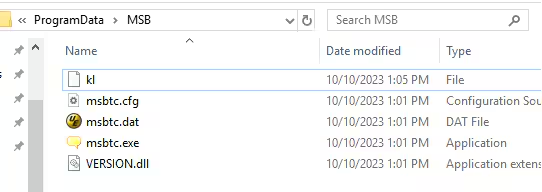
As part of its installation process, the PlugX orchestrates dropping copies of all its essential components that are critical to the PlugX overall functionality. The dropped copies are placed specifically in the "%programdata%\MSB" folder.
Impersonate User
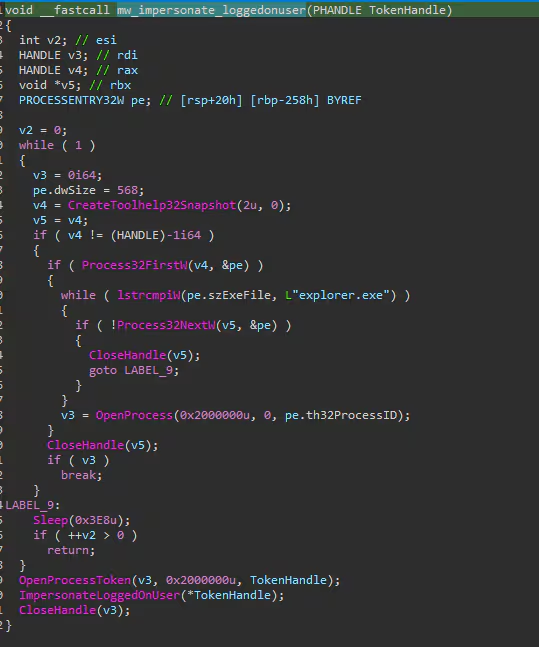
To gain privilege escalation, this particular variant of PlugX exhibits a capability to impersonate the currently logged-in user by leveraging the "explorer.exe" process. This technique allows the malware to adopt the identity and permissions of the legitimate user, thereby gaining unprecedented access to system resources and sensitive data. By disguising its activities within the "explorer.exe" process, a common and essential component of the Windows operating system, PlugX effectively conceals its malicious intentions.
Keylogger and Process Monitoring
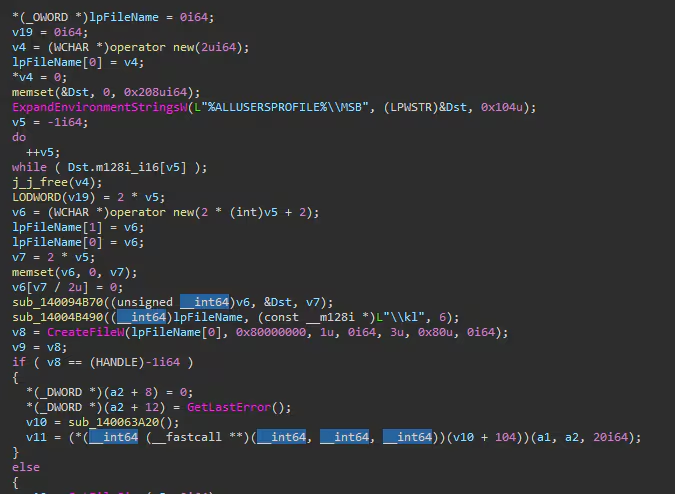
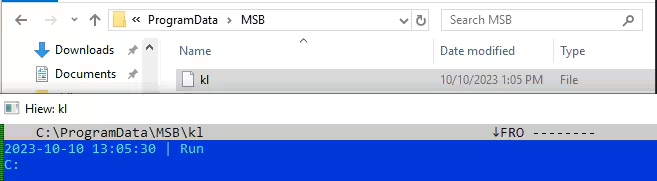
PlugX also possesses a keylogging feature, enabling it to covertly monitor keystrokes and process activities on the compromised host. The data collected through this surveillance is discreetly stored in a file located within the "%ALLUSERPROFILE%\MSB" directory, specifically named "kl." This gathered information plays a pivotal role in the malware's data collection and exfiltration strategy. Subsequently, the contents of the "kl" file are systematically read and transmitted to the Command and Control (C2) server.
Detections
The Splunk Threat Research Team has curated relevant detections and tagged them to the PlugX Analytic Story to help security analysts detect adversaries leveraging the malware.
This release used and considered the relevant data endpoint telemetry sources such as:
- Process Execution & Command Line Logging
- Windows Security SACL Event ID, Sysmon, or any Common Information Model compliant EDR technology
- Windows Security Event Log
- Windows System Event Log
- Windows PowerShell Script Block Logging
Indicators of Compromise (IOC)
Name: msbtc.cfg
Size: 416 bytes
SHA256: 66f9cc42c27cf689911f6ba3e24ad9cbec6fa3066a50c448d4cbf5d8a66d2eb5
Name: msbtc.dat
Size: 697243 bytes (680 KiB)
SHA256: f991c13a24df578a9f31741a263dc1405eac660d4e749465991bac68eccdc490
Name: msbtc.exe
Size: 310384 bytes (303 KiB)
SHA256: fca2fad3466fefebd6df133d48485374ca647dedcc2ef9ba52e7d0ccdbf91000
Name: VERSION.dll
Size: 230912 bytes (225 KiB)
SHA256: 64c5c9732a97f9b088e63173cb8781cae33d29934fdbe3652393394c4188d15c
Playbooks
Non-hunting detections associated with this analytic story create entries by default in the Splunk Enterprise Security risk index which can be used seamlessly with risk notables and the Risk Notable Playbook Pack. Additionally, the Automated Enrichment playbook pack also works well with the output of any of these analytics.
Why Should You Care?
This blog helps security analysts, blue teamers, and Splunk customers to identify PlugX malware by enabling the community to discover the PlugX tactics, techniques and procedures being used by threat actors and adversaries. By understanding its behaviors, the STRT was able to generate telemetry and datasets to develop and test Splunk detections which are designed to help defend and respond against this threat.
Learn More
You can find the latest content about security analytic stories on GitHub and in Splunkbase. Splunk Security Essentials also has all these detections now available via push update. In the upcoming weeks, the Splunk Threat Research team will be releasing a more detailed blog post on this analytic story. Stay tuned!
For a full list of security content, check out the release notes on Splunk Docs.
Feedback
Any feedback or requests? Feel free to put in an issue on Github and we’ll follow up. Alternatively, join us on the Slack channel #security-research. Follow these instructions If you need an invitation to our Splunk user groups on Slack.
Contributors
We would like to thank Teoderick Contreras for authoring this post and the entire Splunk Threat Research Team for their contributions including Michael Haag, Mauricio Velazco, Lou Stella, Bhavin Patel, Rod Soto, Eric McGinnis, and Patrick Bareiss.
Related Articles

Predicting Cyber Fraud Through Real-World Events: Insights from Domain Registration Trends

When Your Fraud Detection Tool Doubles as a Wellness Check: The Unexpected Intersection of Security and HR

Splunk Security Content for Threat Detection & Response: November Recap

Security Staff Picks To Read This Month, Handpicked by Splunk Experts

Behind the Walls: Techniques and Tactics in Castle RAT Client Malware

AI for Humans: A Beginner’s Field Guide

Splunk Security Content for Threat Detection & Response: November 2025 Update

Operation Defend the North: What High-Pressure Cyber Exercises Teach Us About Resilience and How OneCisco Elevates It
