Splunk Security Content for Impact Assessment of CrowdStrike Windows Outage
On July 19, 2024, CrowdStrike, a global cybersecurity company, experienced a significant outage caused by a faulty software update. This incident impacted millions of Windows machines across multiple industries, including transportation, defense, manufacturing, and finance. CrowdStrike has released an official statement and is posting updates on their blog. Microsoft has also published a blog with remediations, which we encourage you to review.
This blog is intended to help existing Splunk customers who are also customers of CrowdStrike gain visibility into how the CrowdStrike outage may be impacting their organizations.
With that in mind, we’d like to share a few detections and additional resources that may help you gain further visibility into how this event is impacting your organization.
Splunk Security Analytics
These detections are designed for use within Splunk Enterprise Security, our SIEM solution that supports our broader unified security and observability platform. For technical support, please reach out to us via the Support Portal.
Find machines with the broken update
This search requires the Splunk Add-on for CrowdStrike, an app that is used with data from Falcon Data Replicator. For more information on the sourcetypes produced by this app, refer to the Splunk documentation.
This search is designed to identify file downloads of the defective CrowdStrike content update on Windows systems by querying CrowdStrike sensor logs. It looks for events where the target file name contains the substring "C-00000291" and ends with ".sys", which might indicate a bad update file, specifically during the LFODownloadConfirmation event. The search is confined to a specific time range that CrowdStrike has provided.
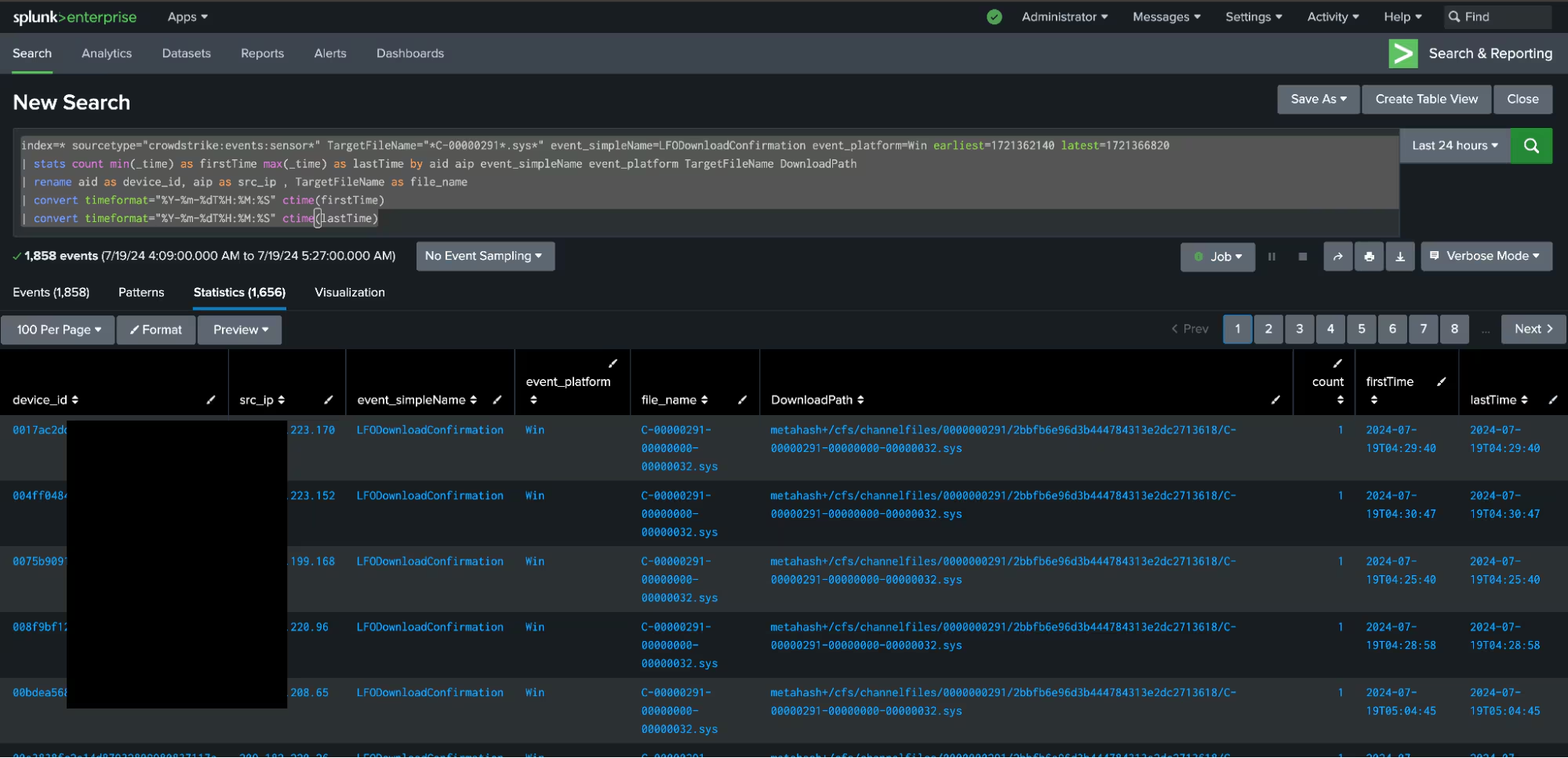
index=* sourcetype="crowdstrike:events:sensor"
TargetFileName="*C-00000291*.sys*" event_simpleName=LFODownloadConfirmation
event_platform=Win earliest=1721362140 latest=1721366820
| stats count min(_time) as firstTime max(_time) as lastTime by aid aip
event_simpleName event_platform TargetFileName DownloadPath
| rename aid as device_id, aip as src_ip , TargetFileName as file_name
| convert timeformat="%Y-%m-%dT%H:%M:%S" ctime(firstTime)
| convert timeformat="%Y-%m-%dT%H:%M:%S" ctime(lastTime)
Sample logs from sourcetype="crowdstrikesensor"
{
    "event_simpleName": "LFODownloadConfirmation",
    "ConfigStateHash": "3600681180",
    "aip": "18.82.155.193",
    "DownloadServer": "lfodown01-b.cloudsink.net",
    "DownloadPath":
 "metahash+/cfs/channelfiles/0000000291/bd9a5c40318869df823085f4449d4c9a/C-00000291-00000000-00000032.sys",
    "DownloadPort": "443",
    "ConfigBuild": "1007.3.0018408.1",
    "event_platform": "Win",
    "Entitlements": "15",
    "name": "LFODownloadConfirmationV1",
    "EventOrigin": "17",
    "CompletionEventId": "Event_ChannelDataDownloadCompleteV1",
    "id": "3aab720a-f12d-139d-883c-693105c5a42c",
    "EffectiveTransmissionClass": "0",
    "aid": "69483d8c3f0bb47758126f30921102e8",
    "timestamp": "1721366804209",
    "cid": "bd9a5c40318869df823085f4449d4c9a",
    "TargetFileName": "C-00000291-00000000-00000032.sys"
}
This data comes from a production environment. We have anonymized the sensitive fields “aip”, “id”, “cid”, and the “cid” value embedded in the “DownloadPath” field.
Identify machines that have not checked in with CrowdStrike
This search requires the Splunk Add-on for CrowdStrike and the CrowdStrike Devices Inventory for Splunk.
This search identifies Windows machines that have not checked in with CrowdStrike using data from the crowdstrike_devices lookup table and calculates a delta of when it was last seen from the date of the outage July 19, 2024, 04:09:00 UTC.
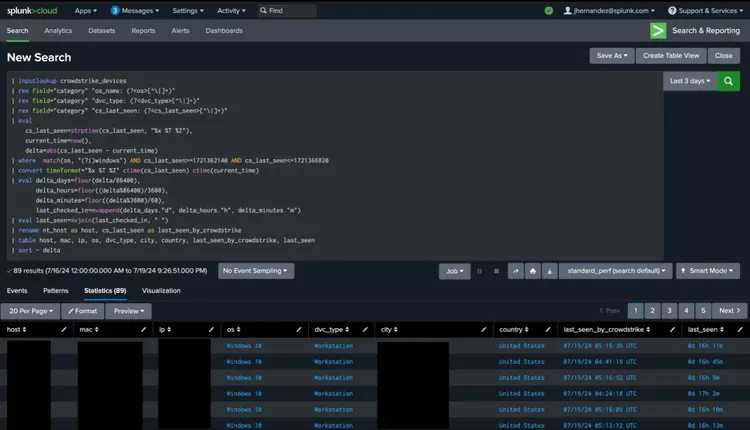
| inputlookup crowdstrike_devices
| rex field="category" "os_name: (?[^\|]+)"
| rex field="category" "dvc_type: (?[^\|]+)"
| rex field="category" "cs_last_seen: (?[^\|]+)"
| eval
    cs_last_seen=strptime(cs_last_seen, "%x %T %Z"),
    current_time=now(),
    delta=abs(cs_last_seen - current_time)
| where  match(os, "(?i)windows") AND cs_last_seen>=1721362140 AND cs_last_seen<=1721366820
| convert timeformat="%x %T %Z" ctime(cs_last_seen) ctime(current_time)
| eval delta_days=floor(delta/86400),
        delta_hours=floor((delta%86400)/3600),
        delta_minutes=floor((delta%3600)/60),
        last_checked_in=mvappend(delta_days."d", delta_hours."h", delta_minutes."m")
| eval last_seen=mvjoin(last_checked_in, " ")
| rename nt_host as host, cs_last_seen as last_seen_by_crowdstrike
| table host, mac, ip, os, dvc_type, city, country, last_seen_by_crowdstrike, last_seen
| sort - delta
Additional Apps and Resources for Tracking Host Check-ins
In addition to these detections, there are several apps built by members of the Splunk Community and articles that can help with tracking host check-ins, which is particularly useful in this scenario:
Community-Built Apps on Splunkbase
Articles and Documentation
- Splunk Docs: Monitoring Console
- Splunk Docs: Deployment Server
- Lantern article: Hosts logging data in a certain timeframe
- Post from duanewaddle.com: Proving a Negative
Summary
We’ve provided this security content to help Splunk customers gain further visibility into how the CrowdStrike outage may be impacting their organizations. This and the community’s response in general — sharing information, providing solutions, and supporting affected organizations — demonstrates the strength of our industry when faced with unexpected challenges.
While this event serves as a reminder of the potential risks in software updates — especially for products with deployed agents — it also underscores the overall benefits of automatic update processes in maintaining robust security postures.
Moving forward, this incident will likely drive improvements in update deployment and quality assurance processes across the industry. It reinforces the importance of maintaining robust incident response plans and the value of community collaboration in addressing cybersecurity challenges.
Contributors
We would like to thank Kevin Jarvis, Jonathan Heckinger, Emmanuel Jamison, Lou Stella, Bhavin Patel, Rod Soto, Eric McGinnis, Tyne Darke, Anne Ortel and Jose Hernandez for authoring this post, and Zachary Christensen for sharing how to identify machines that have not checked into Splunk.
Related Articles

Predicting Cyber Fraud Through Real-World Events: Insights from Domain Registration Trends

When Your Fraud Detection Tool Doubles as a Wellness Check: The Unexpected Intersection of Security and HR

Splunk Security Content for Threat Detection & Response: November Recap

Security Staff Picks To Read This Month, Handpicked by Splunk Experts

Behind the Walls: Techniques and Tactics in Castle RAT Client Malware

AI for Humans: A Beginner’s Field Guide

Splunk Security Content for Threat Detection & Response: November 2025 Update

Operation Defend the North: What High-Pressure Cyber Exercises Teach Us About Resilience and How OneCisco Elevates It
