Identifying Phishing Sites in Your Events
Recently, I thought I was caught in a phishing scheme where I created an account on an e-commerce site to checkout and as soon as I clicked on the checkout button, it asked me to log onto a well known site. It turned out that the original site was badly implemented and it should have told users that they are affiliates with the other site. Nevertheless, I went to Phishtank to make sure that no one had complained about the original e-commerce site.
This got me thinking that since phishing occurs all too often, there must be a way for a corporations to verify that their users are not going to phishing sites and if they are to know about it when it does happen through alerts. What I ended up doing was building a simple app, called Phishing Lookup, available at the Splunk app store, that can used to automate this exercise using the data from the phishtank.
What the app does is once a day (or it could be configured to once a hour) it downloads the latest list of verified phishing sites as a CSV file through Splunk’s scripted input. I provide two ways to do the correlation to see if your events contain any web addresses that are known phishing sites. First, I provide a simple form search dashboard where you input one of your event sourcetype names, the field in your sourcetype that represents a URL, and a time range. After the search returns, if you get no results, that’s a good thing. If you do get results, you may want to investigate why your applications or browsers have been surfing known phishing sites.
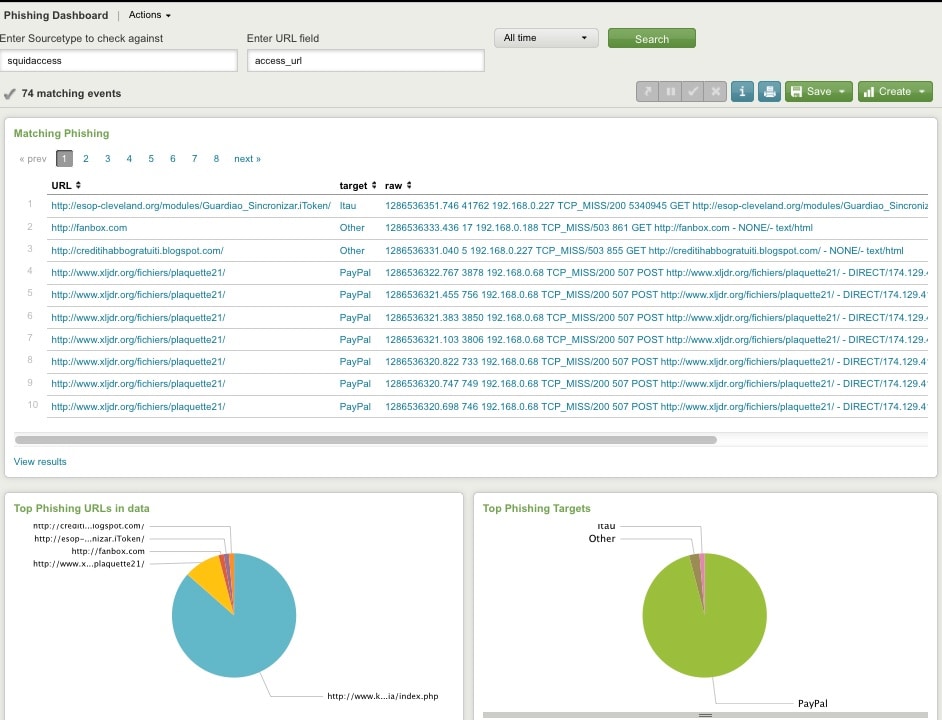
The other way to use this is to set up a Splunk alert by calling the included macro phishing(sourcetype name, name of URL field) on a schedule. If the number of events returned is greater than zero, the alert action should be executed. This automates the process rather than having to do this manually by using the dashboard.
Real World Usage
This by itself sound theoretical, so how would you use it in the real world? One data source that comes to mind are your proxy logs as they have definite evidence that your user or application attempted to contact a site. Even if you have network software in place to block the eventual connection, it would be worth knowing that the attempt was made. If you are using Bluecoat proxy logs, there is already an app to report on Bluecoat events upon which you could then correlate with phishing data, but the correlation with any set of proxy events should be possible with my simple phishing lookup app.
We should not stop there as many phishing attacks originate with email and often have patterns in subjects that make identifying them a little easier. If you use Exchange, you could install the Exchange App on Splunkbase to monitor these devious subjects. Also, mail that contains only one line links and no subject may be suspicious.
Often the goal of a phishing attack is to make you log into some site that you think is legitimate to steal credentials and other forms of identity. Some attacks may have a different purpose where simply clicking on the link in an email or a web site may initiate the installation of malware, which may go unnoticed for a long time. In this situation, not only would installed anti-viruses, anti-virus logs, and endpoint protection be valuable, but also an inventory of installed desktop apps may help in an investigation of unapproved software. For instance, on Splunkbase, the Splunk App for Citrix Xen Desktop, could be used to take an inventory of all virtual and physical desktops to see where else suspicious malware may be installed.
Finally, if you have been using Splunk for some time with these various sources, you may want to use all your apps along with their event data to see if the same phishing attack occurred months ago using the same investigative approaches of looking at proxy events, web access logs, email subjects, and desktop inventories. This would help identify the Advance Persistent Threat, something which may not be possible with traditional SIEM vendors that do not store events for as long as you need them for forensic search and alerts. In summary, I hope my simple app to correlate phishing sites with your data and the points in this article are useful in maintaining your network’s security.
Related Articles

Predicting Cyber Fraud Through Real-World Events: Insights from Domain Registration Trends

When Your Fraud Detection Tool Doubles as a Wellness Check: The Unexpected Intersection of Security and HR

Splunk Security Content for Threat Detection & Response: November Recap

Security Staff Picks To Read This Month, Handpicked by Splunk Experts

Behind the Walls: Techniques and Tactics in Castle RAT Client Malware

AI for Humans: A Beginner’s Field Guide

Splunk Security Content for Threat Detection & Response: November 2025 Update

Operation Defend the North: What High-Pressure Cyber Exercises Teach Us About Resilience and How OneCisco Elevates It
