Now Available: Splunk Enterprise Security Content Update App 5.0
The Splunk Threat Research Team is thrilled to announce the release of the Enterprise Security Content Update (ESCU) app 5.0, marking a significant milestone in our continuous effort to enhance your security operations. With ESCU 5.0, we're introducing a completely revamped user interface (UI) and an exciting new feature, the Analytic Story Onboarding Assistant, designed to help mass enable security analytics like never before.
What’s New in ESCU 5.0?
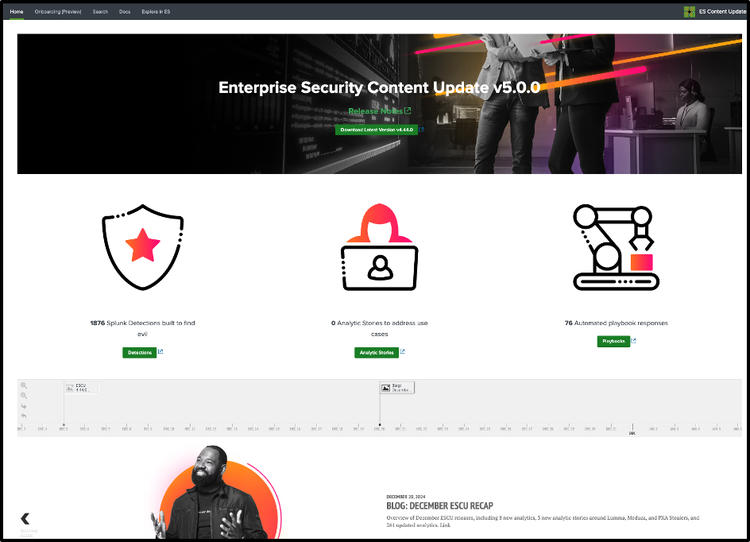
Revamped Home Page
We have introduced a redesigned home page featuring a streamlined UI that displays links to release notes, the count of analytics, and the latest version available on Splunkbase. Additionally, we've integrated a comprehensive timeline feature that provides direct links to all blogs written by the Splunk Threat Research Team, tool updates, and major enhancements, simplifying access to our historical updates and improvements.
Analytic Story Onboarding Assistant
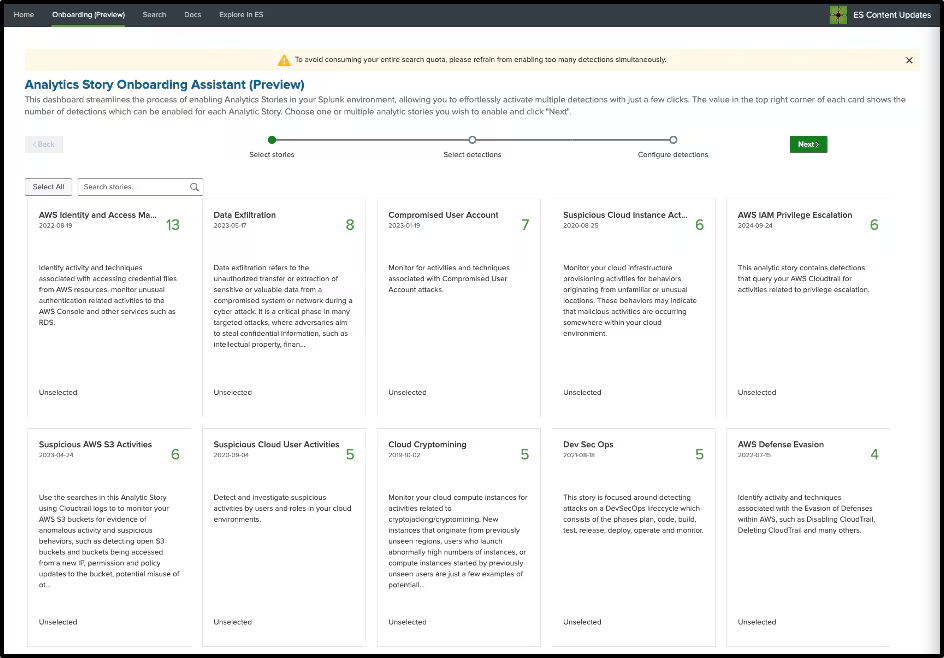
This new feature helps accelerate how you enable detections in your SOC. With just a few clicks, the onboarding wizard guides you through the process of enabling all relevant detections for the selected analytic story. This means faster setup times and a more efficient way to bolster your defense strategies.
Please note that this feature is in a preview stage available to all Splunk customers.
Step 1 . Select the stories you want to enable the detections for, the number alongside each story specifies the number of detections which have relevant data in your splunk environment
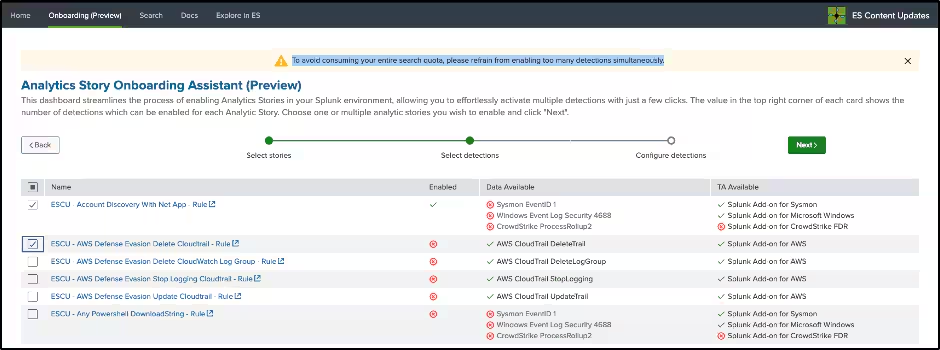
Step 2. Select the detections you would want to enable in your environment.
Note: To avoid consuming your entire search quota, please refrain from enabling too many detections simultaneously or enabling detections that have no data or TA available. The red X means that the required data is not available.
Step 3: Configure the scheduling parameters and default adaptive response actions will be applied. Default ESCU detections adaptive response actions can be found here.
Step 4. Click Enable.
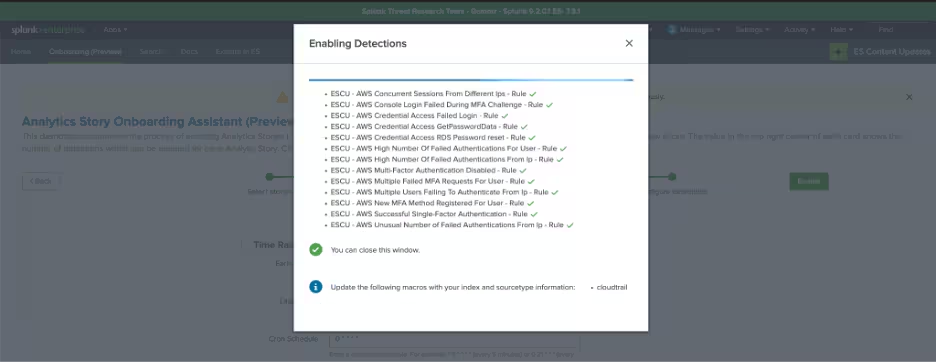
Once these detections are enabled, make sure to follow the instructions and update any macros if suggested. You can now view your triggered notables and risk events in your Splunk Enterprise Security environment!
YAML Updates
We've enhanced the way the Splunk Threat Research Team’s security content within our repository is validated and tested. We've implemented stricter validation checks to the YAML files to support greater accuracy, improved version control and greater consistency in the content provided. Moreover, we've made a key structural change by replacing the 'observables' key with an 'RBA' key in our YAML configurations. This adjustment aligns better with the field names used in Splunk Enterprise Security, simplifying the process of risk and threat attribution by matching key-value formats more directly.
message:
risk_score:
observable:
- name:
type:
role: [ ]
- name:
type:
role: [ ]
rba:
message:
risk_objects:
- field:
type: user, system, other
score:
threat_objects:
- field:
type:
Deprecation Assistant Dashboard
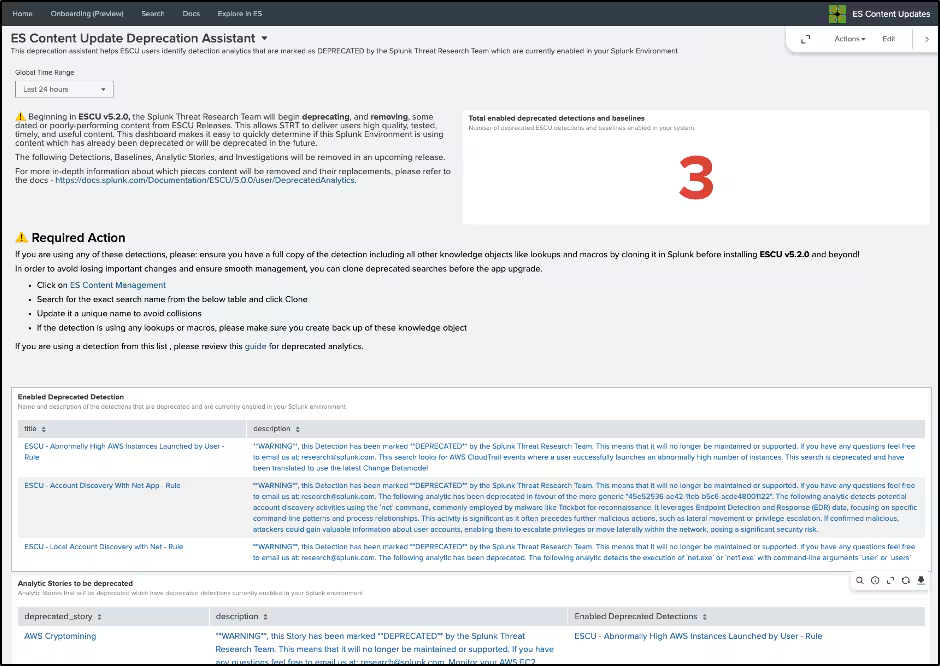
In this release, we have added a deprecation assistant dashboard that helps ESCU users identify detection analytics that are marked as Deprecated by the Splunk Threat Research Team which are currently enabled in your Splunk environment. These detections are no longer maintained or are outdated and should not be used. While these analytics are still available within the ESCU app, we will be removing these deprecated analytics beginning with ESCU v5.2.0. Please note that this update may disrupt Splunk environments where deprecated ESCU detections are currently enabled. If you are using a detection from this list, please review this guide for deprecated analytics.
We show the following warning banner on the ESCU landing page in all Splunk environments that have enabled and running deprecated detections with the only exception of users of Enterprise Security 8.0.0 who have enabled content versioning.

⚠️ If you have deprecated detections enabled, please use this dashboard and follow the instructions in this guide.
FAQ
- Does upgrading ESCU to version 5.0 affect Splunk Enterprise Security 8.0 customers?
- No, upgrading to Splunk Enterprise Security 8.0 does not affect any ESCU deployments with the exception of stacks where deprecated detections are enabled and content versioning is disabled. Please review this guide for deprecated analytics.
- Do the RBA-related changes affect the current RBA deployments?
- No, we have not made any changes to the RBA configs in the savedsearches.conf files. We have only made changes to the YAML files in the security content repository.
- Where can I find the list of deprecated detections and the guide?
- The current list of detections that will be deprecated as of ESCU v5.2.0 are listed in this guide and have instructions on how to preserve this deprecated detection.
Try It Out Now
Take action today to enhance your organization's security posture and better protect against potential threats! Using the powerful detections packaged in the ESCU app and Splunk Enterprise Security helps you stay ahead of the latest attacks and respond to potential threats before they can do any damage.
With over 1600 high-quality detections available, the ESCU app is a comprehensive and effective way to enhance your organization's security. By deploying these detections quickly and easily, you can take a proactive step in ensuring the safety and security of your organization's data and assets.
It's also important to note that maintaining such a large number of detections requires a robust detection engineering approach that is constantly improved and optimized for efficiency. So, don't delay — start using the ESCU app today to help safeguard your organization's security!
Feedback
Any feedback or requests? Feel free to put in an issue on GitHub or email research@splunk.com. Alternatively, join us on the Slack channel #security-research.
Related Articles

Predicting Cyber Fraud Through Real-World Events: Insights from Domain Registration Trends

When Your Fraud Detection Tool Doubles as a Wellness Check: The Unexpected Intersection of Security and HR

Splunk Security Content for Threat Detection & Response: November Recap

Security Staff Picks To Read This Month, Handpicked by Splunk Experts

Behind the Walls: Techniques and Tactics in Castle RAT Client Malware

AI for Humans: A Beginner’s Field Guide

Splunk Security Content for Threat Detection & Response: November 2025 Update

Operation Defend the North: What High-Pressure Cyber Exercises Teach Us About Resilience and How OneCisco Elevates It
