Detecting Suspicious ESXi Activity Before Ransomware Happens
Cybersecurity teams worldwide have been fighting against ransomware attacks on ESXi infrastructure for years. ESXi is a lightweight, bare-metal hypervisor developed by VMware that allows multiple virtual machines to run on a single physical server. ESXi is widely used in enterprise environments, often hosting virtual machines that support essential services for an entire organization. Gaining access to ESXi can enable a threat actor to encrypt the file system, cripple hosted VMs, extract sensitive data, and pivot through the environment.
Because of its nature as a centralized location for resources, ESXi has become a very hot target for attackers. A single compromise can lead to an entire environment being impaired. The other concern is that ESXi is commonly under-monitored so insights into activity on these systems is sparse at best. In 2023, MGM Resorts had an actor gain access to their ESXi infrastructure and within days they had encrypted over a 100 hypervisors, leading to $100 million in losses.
In this blog, we will cover how to get ESXi logs into Splunk, common activities to look out for, and provide comprehensive detection strategies.
Monitoring for ESXi Attacks with Splunk
Getting the Data
ESXi logging can be configured to send syslog data to an external logHost. In this case it’s going to be Splunk. Splunk can ingest syslog data through various methods, including using Splunk Connect for Syslog, a dedicated syslog server like syslog-ng, or directly via the Splunk Universal Forwarder.
This open-source solution simplifies syslog ingestion into Splunk by providing a containerized syslog-ng server with a pre-configured framework. It addresses common challenges like inconsistent deployments, lack of expertise, and uneven data distribution. This can be deployed using Docker, Podman, or Kubernetes. It is recommended for simplifying syslog data ingestion, especially for large-scale deployments.
Syslog Server and Universal Forwarder
Configure a syslog server, such as syslog-ng or rsyslog, to receive syslog messages and write them to files. Then, use a Splunk Universal Forwarder to monitor those files and send the data to your Splunk indexers. This method provides more flexibility in terms of filtering and routing data based on content. An inputs.conf like the following will need to be created for the files.
[monitor:///var/log/.../syslog.log]
disabled = false
index = vmware-esxilog
sourcetype = vmw-syslog
Direct Ingestion with Splunk
While possible, directly ingesting syslog data into Splunk (without a separate syslog server) is generally not recommended, especially for high-volume deployments or when high availability is crucial, because downtime for Splunk can lead to data loss. However, for testing this method is a low cost way of trying out Splunk for ESXi logs.
Splunk TAs
There are two Technology Add-ons that are needed to really work with ESXi data in splunk.
- Splunk Add-on for VMware ESXi Logs - Splunk Add-on for VMware ESXi logs contains commented inputs, Search-time/Index-time extractions for the collection, parsing, and ingestion of VMware ESXi logs in the Splunk environment.
- Splunk Add-on for VMware Indexes - The package ("SA-VMWIndex") present in this SA supplies the definition of indexes that are used by Splunk Add-on for VMware, Splunk Add-on for vCenter Logs, and Splunk Add-on for VMware ESXi Logs.
Configuring ESXi
Once a Splunk solution has been decided on and configured, ESXi needs to be set to forward syslog data to it. Luckily, this part is fairly straightforward. On the ESXi GUI you can modify the logging settings by navigating to Manage > System > Advanced Settings and searching for logHost. From here you will just configure the location to send the logs in proto://hostname:port format.
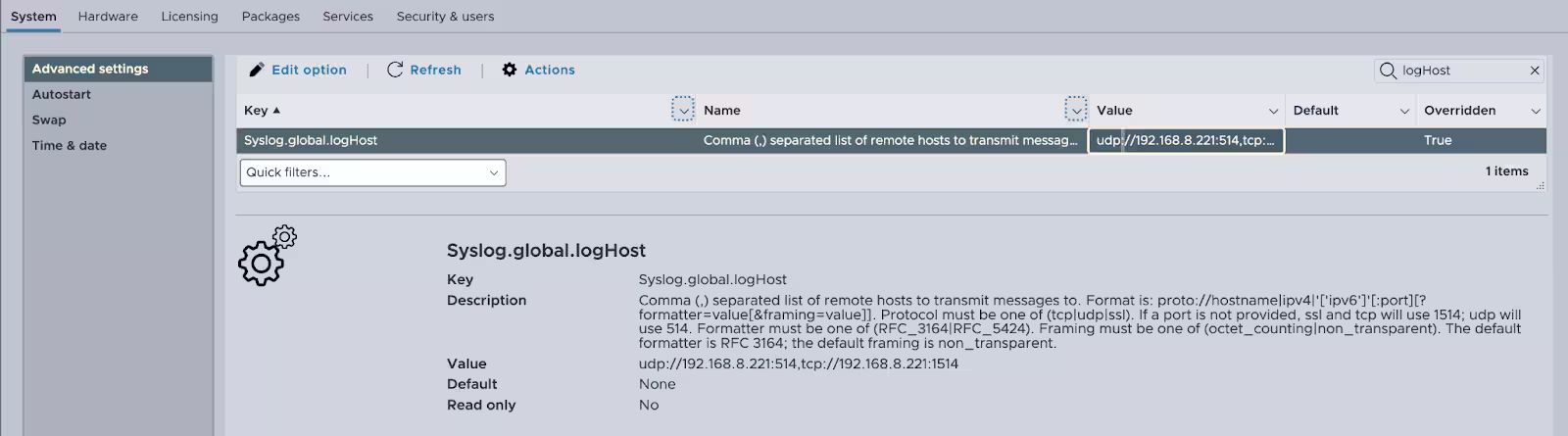
Figure 1: ESXi GUI Settings
Breaking Down ESXi Logs
ESXi has a plethora of various logs that will be ingested into splunk once everything has been set up. Knowing which logs have what data is important for detecting the activity you want. The following list isn’t exhaustive, but will give a great starting point.
Shell Logs
These logs contain commands that were executed on the ESXi system itself. This includes normal shell commands such as cat as well as esxcli commands used to interact with the ESXi components.
Jul 1 15:59:59 192.168.8.233 2025-07-01T15:58:48.124Z localhost.localdomain shell[1627100]: [root]: esxcli system account add -i svcuser -p h@ckAway! -c h@ckAway!
The first part of these logs are the timestamp information and ESXi host the log was generated on. This is followed by the shell[pid] information, [user] context, and finally the command that was executed.
Hostd Logs
These logs capture activity from the host management service, including VM lifecycle events, user authentication, and changes made via vSphere clients or APIs. Think changes that will affect the ESXi host itself.
May 12 19:41:28 192.168.8.233 2025-05-12T19:39:40.901Z localhost.lan Hostd[263214]: [Originator@6876 sub=Vimsvc.ha-eventmgr] Event 3240 : Administrator access to the host has been enabled.
These are similar to the shell logs with the major difference being the inclusion of the subsystem of hostd that generated the log.
VMK Warning Logs
Vmkwarning is a filtered view of vmkernel, focusing on warning-level events. It's a quick way for defenders to catch misconfigurations or early signs of hardware changes without parsing the more verbose kernel logs.
May 15 16:08:00 192.168.8.233 2025-05-15T16:07:04.134Z localhost.localdomain vmkwarning: cpu1:263203 opID=1cc2a6d6)WARNING: NTPClock: 1449: system clock stepped to 1736960820.000000000, but delta 10364403 > 172800 seconds
Again these start with timestamp and host information. After vmkwarning it specifies the cpu core and kernel thread handling the event. The opID is useful for correlating related events that occurred in the same operation chain. Then the log has the component that issued the warning, in this case its NTPClock, and the actual warning message itself.
ESXi Update Logs
These track patching and VIB (vSphere Installation Bundle) installations. Monitoring this log can help detect unauthorized VIBs, which may be used to install backdoors, persistence mechanisms, or malicious drivers.
May  7 18:07:11 192.168.8.233 2025-05-07T18:07:09Z localhost.localdomain esxupdate[264778]: runcommand called with: args = ['/usr/lib/vmware/vob/bin/addvob', 'vob.user.esximage.install.securityalert', '(Updated) ESXi-8.0U3e-24677879-standard', 'acceptance level checking disabled'], outfile = None, returnoutput = True, timeout = 0.0.
May  7 18:07:11 192.168.8.233 2025-05-07T18:07:09Z localhost.localdomain esxupdate[264778]: Attempting to install an image profile bypassing signing and acceptance level verification. This may pose a large security risk.
The ESXi update logs are varied in what the Message area contains, but they all contain the timestamp and host information, followed by component (esxupdate).
Detecting ESXi Attacks
Analytic story from the Splunk Threat Research Team
To help security teams defend against these disruptive campaigns, we've developed comprehensive detection content for Splunk. Our approach focuses on identifying the distinctive patterns and behaviors associated with ESXi attacks. We’ve developed an analytic story to assist organizations in quickly deploying this content. Here are just a few of the detections focused on malicious ESXi activity.
ESXi Recon
A common initial activity actors will take is performing reconnaissance on the system to identify their next targets. They will gather system information, VM information, account information, and even dig through sensitive files looking for data they can use.
System Information Discovery
The following detection identifies the use of ESXCLI system-level commands that retrieve configuration details. While they can be used for legitimate administration, this behavior may also indicate adversary reconnaissance aimed at profiling the ESXi host's capabilities, build information, or system role in preparation for further compromise.
`esxi_syslog` Message="*system*" AND Message="*esxcli*" AND Message IN ("*get*","*list*")
  AND Message="*user=*" NOT Message="*filesystem*"
  | rex field=_raw "user=(?\w+)\]\s+Dispatch\s+(?[^\s]+)"
  | rex field=_raw "Z (?[\w\.]+)\s"
  | stats min(_time) as firstTime max(_time) as lastTime count by dest user command
  | `security_content_ctime(firstTime)` | `security_content_ctime(lastTime)`
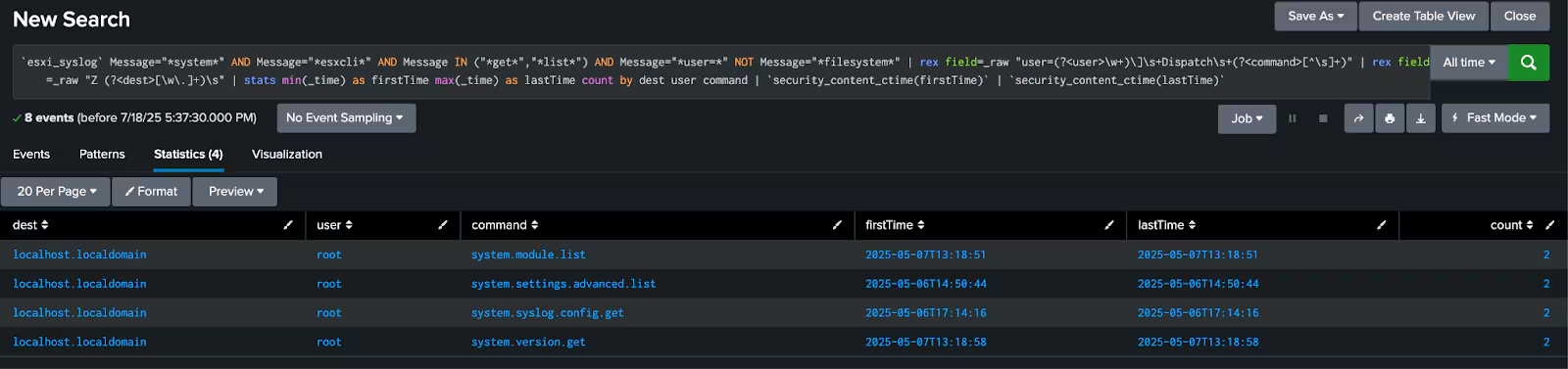
Figure 2: System Information Discovery
ESXi Suspicious Account Activity
Monitoring ESXi environments for signs of account compromise is critical, as attackers often target privileged access to gain control and evade detection. Direct root access to the ESXi UI circumvents role-based access controls and auditing, allowing malicious actors with stolen or shared credentials to operate undetected and potentially alter system configurations. Similarly, the unexpected assignment of the Administrator role to a user provides adversaries with a backdoor to elevated privileges.
External Root Login
This identifies instances where the ESXi UI is accessed using the root account instead of a delegated administrative user. Direct root access to the UI bypasses role-based access controls and auditing practices, and may indicate risky behavior, misconfiguration, or unauthorized activity by a malicious actor using compromised credentials.
`esxi_syslog` Message="*root*" AND Message="*logged in*"
  | rex field=_raw "root@(?\d{1,3}(?:\.\d{1,3}){3})"
  | rex field=_raw "Z (?[\w\.]+)\s" | search SrcIpAddr != "127.0.0.1" AND SrcIpAddr != 192.168.0.0/16 AND SrcIpAddr != 172.16.0.0/12 AND SrcIpAddr != 10.0.0.0/8 | stats min(_time) as firstTime max(_time) as lastTime count by dest SrcIpAddr | `security_content_ctime(firstTime)` | `security_content_ctime(lastTime)`

Figure 3: External Root Login
User Granted Admin Role
This detects when a user is granted the Administrator role on an ESXi host. Assigning elevated privileges is a critical action that can lead to unconstrained access to perform malicious actions if performed unexpectedly.
`esxi_syslog` Message="*esxcli system permission set*" AND Message="*role Admin*"
  | rex field=_raw "\]: \[(?\w+)\]:(?.+)"
  | rex field=_raw "--id (?\w+)"
  | rex field=_raw "Z (?[\w\.]+)\s" | stats min(_time) as firstTime max(_time) as lastTime count by dest user command target_user | `security_content_ctime(firstTime)` | `security_content_ctime(lastTime)`

Figure 4: User Granted Admin Role
Attempts to Install Software on ESXi
Monitoring ESXi hosts for suspicious activity related to software installation is crucial, as attackers frequently target these mechanisms to compromise or persist on systems. Changes to the VIB acceptance level lower system integrity and allow the installation of unsigned or unverified software. Attackers also commonly use the --force flag during VIB installations to bypass signature and compatibility checks, enabling the deployment of potentially malicious, backdoored, or incompatible kernel modules and tools. Failed file download attempts may reveal unauthorized or malicious efforts to install or update components. This activity often signals post-compromise behavior, where adversaries seek to establish persistence or escalate their control over the hypervisor.
VIB Acceptance Level Tampering
A very important thing to detect is changes to the VIB (vSphere Installation Bundle) acceptance level on an ESXi host. Modifying the acceptance level, such as setting it to CommunitySupported, lowers the system's integrity enforcement and may allow the installation of unsigned or unverified software.
`esxi_syslog` Message="*esxcli software acceptance set*" Message="*shell*"
  | rex field=_raw "\]: \[(?\w+)\]:(?.+)"
  | rex field=_raw "Z (?[\w\.]+)\s" | stats min(_time) as firstTime max(_time) as lastTime count by dest user command | `security_content_ctime(firstTime)` | `security_content_ctime(lastTime)`

Figure 5: VIB Acceptance Level Tampering
ESXi Access Changes
Attackers frequently manipulate ESXi host configurations to weaken security controls and gain persistent access. They may enable remote access services like SSH or the ESXi Shell to gain a foothold or maintain control after an initial compromise. Furthermore, adversaries often disable critical security features such as lockdown mode or the host firewall to broaden their access, bypass network restrictions, and facilitate further malicious activities like data exfiltration, lateral movement, or the installation of harmful software.
SSH Enabled
This detection identifies SSH being enabled on ESXi hosts, which can be an early indicator of malicious activity. Threat actors often use SSH to gain persistent remote access after compromising credentials or exploiting vulnerabilities.
`esxi_syslog` Message="*SSH access has been enabled"
  | rex field=_raw "Z (?[\w\.]+)\s"
  | stats min(_time) as firstTime max(_time) as lastTime count by dest Message
  | `security_content_ctime(firstTime)` | `security_content_ctime(lastTime)`
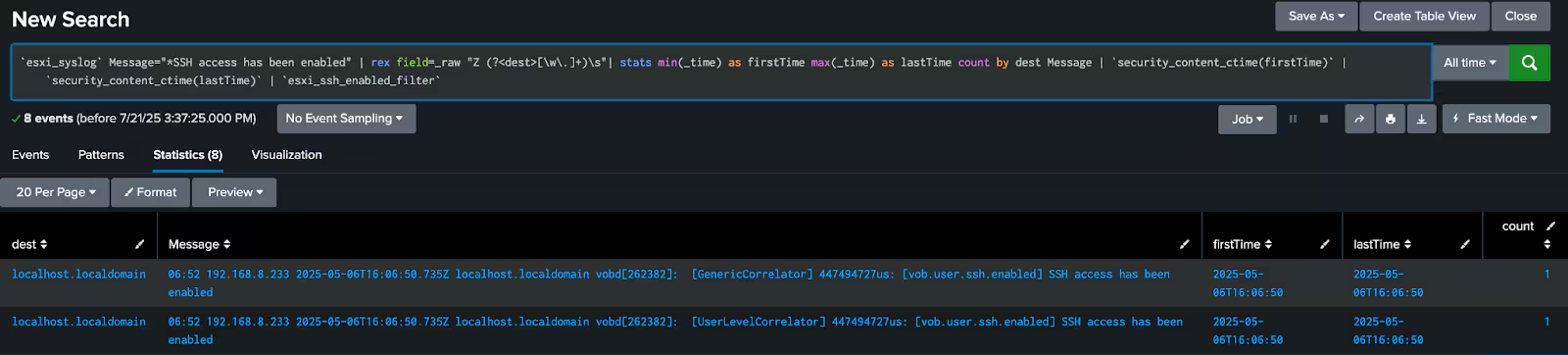
Figure 6: SSH Enabled
ESXi VM Activity
Attackers frequently target ESXi hosts to disrupt operations and exfiltrate sensitive data. They may attempt to disable critical security enforcement settings, such as those related to secure boot or executable verification, to weaken the hypervisor's defenses, allowing easier access to the hosts. In more destructive attacks, adversaries might abruptly terminate all virtual machines on a host, which can indicate a deliberate denial-of-service attack, or an attempt to destroy critical workloads. Attackers often leverage legitimate remote tools and protocols to download entire virtual machine disk files from datastores, enabling the exfiltration of vast amounts of sensitive data.
Encryption Settings Modified
This detects the disabling of critical encryption enforcement settings on an ESXi host, such as secure boot or executable verification requirements, which may indicate an attempt to weaken hypervisor integrity or allow unauthorized code execution.
`esxi_syslog` Message="*system settings encryption set*" NOT Message="*shell.*"
  Message IN ("* -s *", "* -e *","*--require-secure-boot*", "*require-exec-installed-only*", "execInstalledOnly")
  | rex field=_raw "Z (?[\w\.]*)\s.*\]: \[(?\w+)\]:(?.+)"
  | stats min(_time) as firstTime max(_time) as lastTime count by dest user command
  | `security_content_ctime(firstTime)` | `security_content_ctime(lastTime)`
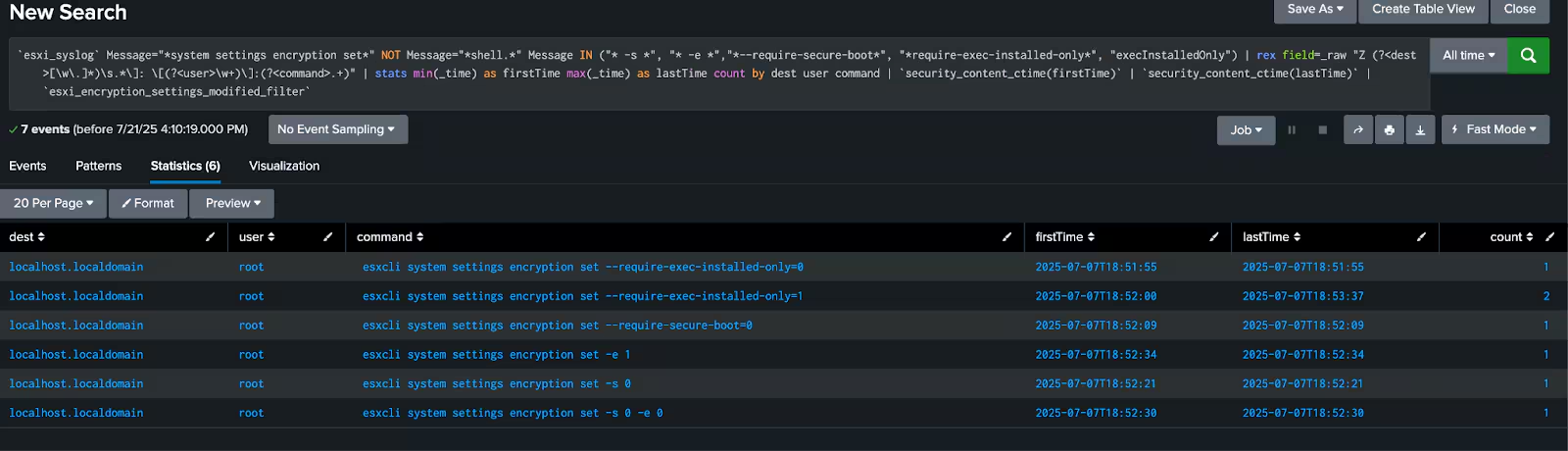
Figure 7: Encryption Settings Modified
VMs Exported via Remote Tool
This monitors for the use of a remote tool to download virtual machine disk files from a datastore. The NFC protocol is used by management tools to transfer files to and from ESXi hosts, but it can also be abused by attackers or insiders to exfiltrate full virtual disk images.
`esxi_syslog` Message="*File download from path*" Message="*was initiated from*"
  | rex field=_raw "from path ''\[(?[^\]]+)\](?[^'']+)''"
  | rex field=_raw "initiated from ''(?[^/]+)/(?[^@]+)@(?\d{1,3}(?:\.\d{1,3}){3})''"
  | rex field=_raw "Z (?[\w\.]+)\s"
  | stats min(_time) as firstTime max(_time) as lastTime count by Datastore VMPath InitiatorTool ToolVersion InitiatorIP dest
  | `security_content_ctime(firstTime)` | `security_content_ctime(lastTime)`
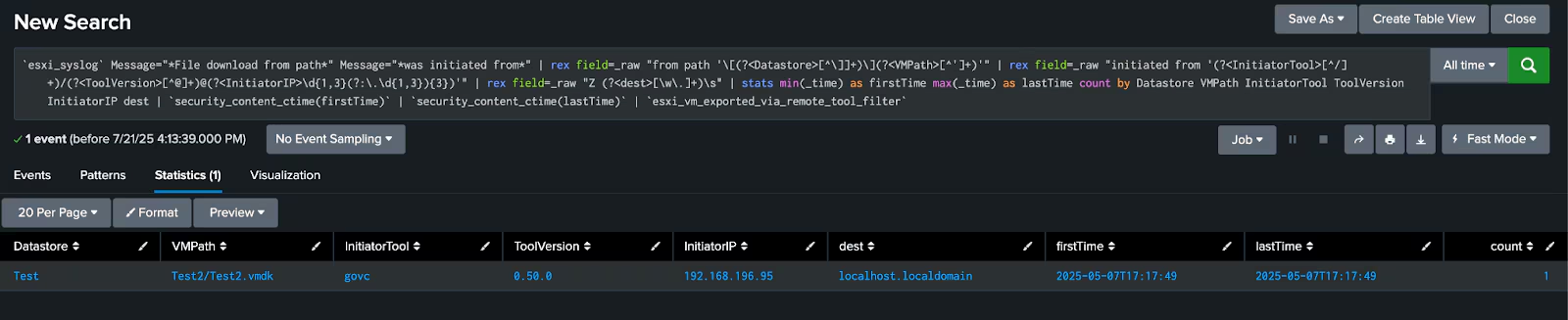
Figure 8: VM Exported
ESXi Indicator Removal
Attackers with root permissions will commonly attempt to hide their tracks upon gaining access to a system. With ESXi this can be through disabling auditing via the auditrecords command, through changing the syslog configurations, or modifying the system clock to evade detections based on timing.
Audit Tampering
This detection looks for the use of the esxcli system auditrecords commands, which can be used to tamper with logging on an ESXi host. This action may indicate an attempt to evade detection or hinder forensic analysis by preventing the recording of system-level audit events.
`esxi_syslog` Message="*esxcli system auditrecords*" Message IN ("*remote*","*local*") NOT Message = "*[shell*"
  | rex field=_raw "Z (?[\w\.]+)\s"
  | rex field=_raw "[\w+]\]: (?.*)"
  | rex field=full_command "\[(?.*)]:\s(?.*)"
  | stats min(_time) as firstTime max(_time) as lastTime count by dest user command
  | `security_content_ctime(firstTime)` | `security_content_ctime(lastTime)`
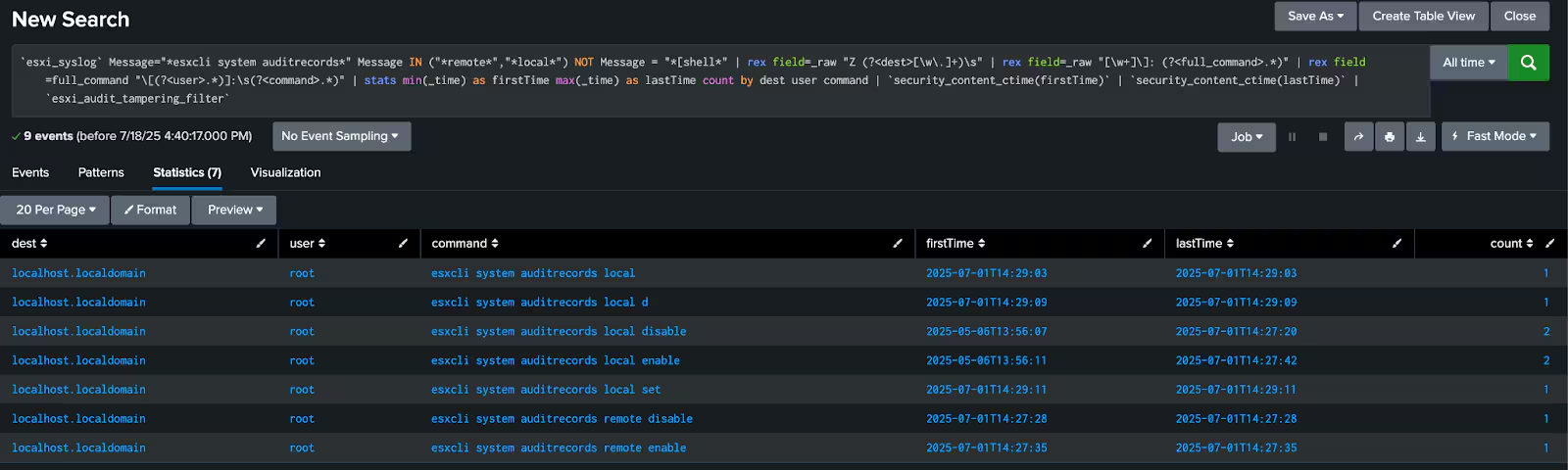
Figure 9: Audit Tampering
Syslog Config Change
This one detects changes to the syslog configuration on an ESXi host using esxcli, which may indicate an attempt to disrupt log collection and evade detection.
`esxi_syslog` Message="*syslog config set*" AND Message="*esxcli*"
  | rex field=_raw "\].*\[\s*(?P[^\]]+)\]:\s(?P.+)"
  | rex field=_raw "Z (?[\w\.]+)\s"
  | stats min(_time) as firstTime max(_time) as lastTime count by dest user command
  | `security_content_ctime(firstTime)` | `security_content_ctime(lastTime)`

Figure 10: Syslog Config Change
The loghost or logdir keys can also be monitored directly. This detection identifies changes to these configurations on an ESXi host, which may indicate an attempt to disrupt log forwarding and evade detection.
`esxi_syslog` Message="*Set called with key*" AND Message IN ("*Syslog.global.logHost*","*Syslog.global.logdir*")
  | rex field=_raw "key ''(?[^'']+)'', value ''\"(?[^\"]+)\"''"
  | rex field=_raw "Z (?[\w\.]+)\s"
  | stats min(_time) as firstTime max(_time) as lastTime count by dest key value
  | `security_content_ctime(firstTime)` | `security_content_ctime(lastTime)`
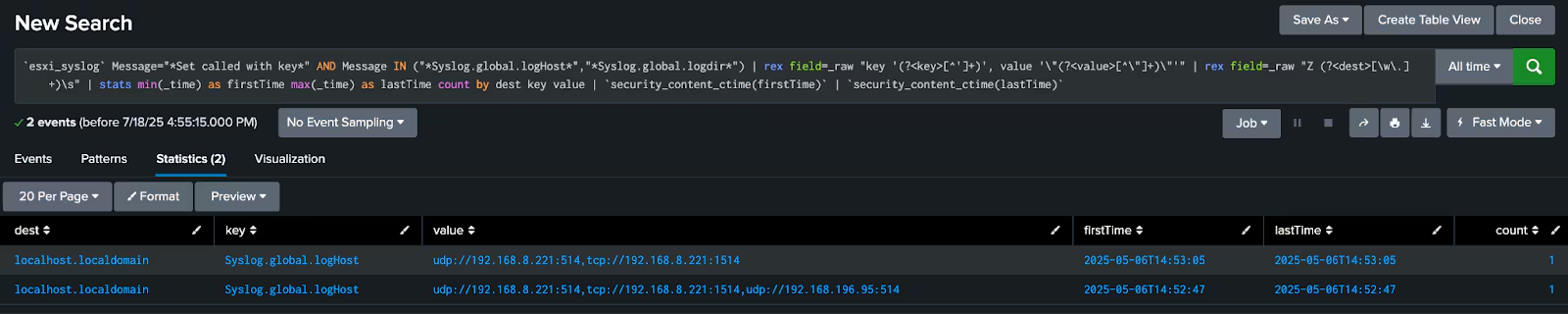
Figure 11: Loghost Key Monitoring
System Clock Manipulation
This detection is for a significant change to the system clock on an ESXi host, which may indicate an attempt to manipulate timestamps and evade detection or forensic analysis.
`esxi_syslog` Message="*NTPClock*" AND Message="*system clock stepped*"
  | rex field=_raw "stepped to (?\d+\.\d+),.+delta\s(?\d+)\s"
  | rex field=_raw "Z (?[\w\.]+)\s"
  | eval epoch_time=tonumber(epoch_time)
  | eval delta=tonumber(delta)
  | eval event_time=round(_time, 0)
  | eval direction=if(epoch_time < event_time, "backward", "forward")
  | eval original_time=if(direction=="backward", epoch_time + delta, epoch_time - delta)
  | eval stepped_to_str=strftime(epoch_time, "%Y-%m-%d %H:%M:%S")
  | eval original_time_str=strftime(original_time, "%Y-%m-%d %H:%M:%S")
  | stats min(_time) as firstTime max(_time) as lastTime count by dest direction original_time_str stepped_to_str epoch_time delta
  | `security_content_ctime(firstTime)` | `security_content_ctime(lastTime)`
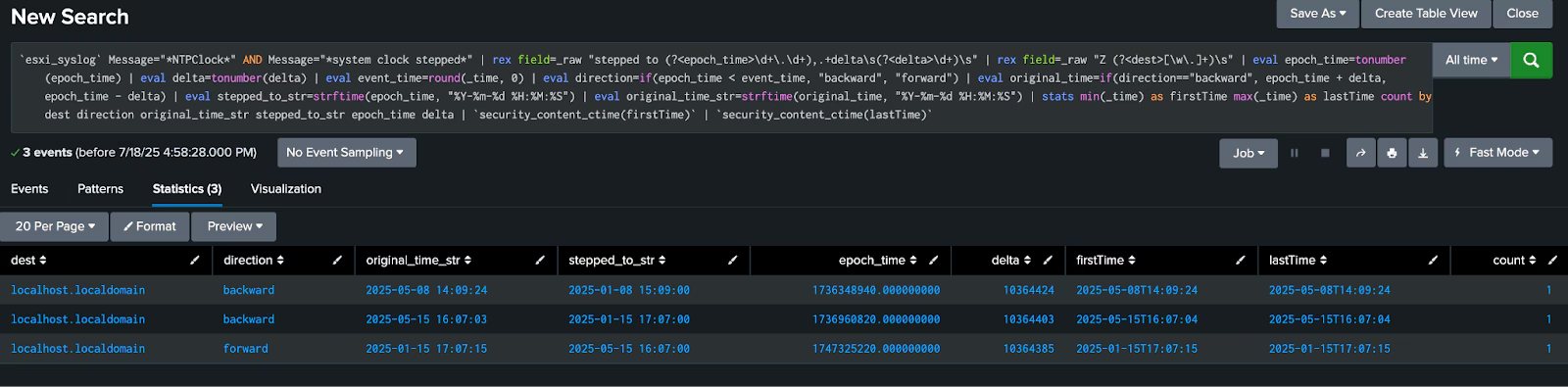
Figure 12: System Clock Manipulation
Learn More
You can find the latest content about security analytic stories on research.splunk.com and in the Splunk ES Content Update app.
The Splunk Threat Research Team's analytic story and the blog for ESXi Post Compromise provides comprehensive detection coverage for this activity and its attack patterns.
Feedback
Any feedback or requests? Feel free to put in an issue on GitHub and we'll follow up. Alternatively, join us on the Slack channel #security-research. Follow these instructions if you need an invitation to our Splunk user groups on Slack.
Contributors
We would like to thank Raven Tait for authoring this post, as well as the Splunk Threat Research Team (Lou Stella, Bhavin Patel, Rod Soto, Eric McGinnis, Michael Haag, Nasreddine Bencherchali, Teoderick Contreras, and Patrick Bareiss) for their contributions to the detection content and analysis.
Related Articles

Predicting Cyber Fraud Through Real-World Events: Insights from Domain Registration Trends

When Your Fraud Detection Tool Doubles as a Wellness Check: The Unexpected Intersection of Security and HR

Splunk Security Content for Threat Detection & Response: November Recap

Security Staff Picks To Read This Month, Handpicked by Splunk Experts

Behind the Walls: Techniques and Tactics in Castle RAT Client Malware

AI for Humans: A Beginner’s Field Guide

Splunk Security Content for Threat Detection & Response: November 2025 Update

Operation Defend the North: What High-Pressure Cyber Exercises Teach Us About Resilience and How OneCisco Elevates It
