How To Use CloudTrail Data for Security Operations & Threat Hunting
Security Tamara ChaconAs more organizations have workloads in the cloud, security teams are asking the same questions:
- What data is security relevant?
- Where does that data live, and how do we collect it?
- Most importantly — how can we use it to detect malicious activity?
In this blog, we’ll focus on one of the most valuable sources of AWS security telemetry: CloudTrail. At a high level, CloudTrail logs act like digital breadcrumbs, capturing activity across your AWS environment. They’re essential for both understanding what happened during an incident and building detections to catch threats early.
(This article is part of our Threat Hunting with Splunk series. We’ve updated it recently to maximize your value.)
What is AWS CloudTrail?
Amazon Web Services (AWS) defines CloudTrail as "a service that enables governance, compliance, operational auditing, and risk auditing of your AWS account." Any user, role, or service that attempts successfully or unsuccessfully to act as a service in AWS will generate a log containing information about that event. CloudTrail is such a valuable data source for security operations that AWS enables it in your account by default.
AWS services are the products that Amazon delivers. Examples include: Compute via EC2, Relational DataBases via RDS, and even logging in CloudTrail itself. By enabling CloudTrail, users get details about:
- All of the services currently offered
- Any new products that AWS will release in the future (and that your users will inevitably use in some capacity)
Getting CloudTrail logs into Splunk
There are several supported ways to ingest AWS CloudTrail logs into Splunk. Your choice depends on your deployment (Cloud vs. Enterprise), desired latency, and scale. Here are the primary methods:
(Legacy)
What does a CloudTrail event look like?
Use our BOTS dataset, which is available here on Github. Let’s look at an event that highlights the CreateKeyPair action against the IAM service. A raw JSON CloudTrail event looks like the following:
{"requestParameters": {"keyName": "BOTS"}, "userAgent": "signin.amazonaws.com",
"eventVersion": "1.05", "eventName": "CreateKeyPair", "userIdentity": {"accountId":
"622676721278", "arn": "arn:aws:iam::622676721278:user/frothly_admin", "sessionContext":
{"attributes": {"mfaAuthenticated": "false", "creationDate": "2018-07-26T20:56:40Z"}},
"accessKeyId": "ASIAZB6TMXZ7GUK5FY3H", "principalId": "AIDAIUCPPDM575G2FVOTI",
"userName": "frothly_admin", "type": "IAMUser", "invokedBy": "signin.amazonaws.com"},
"responseElements": {"keyFingerprint":
"02:36:de:d2:6a:97:c5:a7:f2:e7:b2:d8:ce:95:a7:bd:85:a6:af:39", "requestId": "477c8411-ae6b-4be6-9756-6cd1a29f503b", "keyName": "BOTS", "keyMaterial": ""},
"recipientAccountId": "622676721278", "eventSource": "ec2.amazonaws.com", "eventTime":
"2018-07-26T21:08:28Z", "requestID": "477c8411-ae6b-4be6-9756-6cd1a29f503b",
"awsRegion": "us-west-1", "sourceIPAddress": "12.196.122.120", "eventType": "AwsApiCall",
"eventID": "597b5cd4-9f1d-4087-a9e0-7a9e73d9aa3a"}
Splunk parses this raw data, extracts the CloudTrail fields, and provides a syntax-highlighted structured view of the raw JSON event, like so:
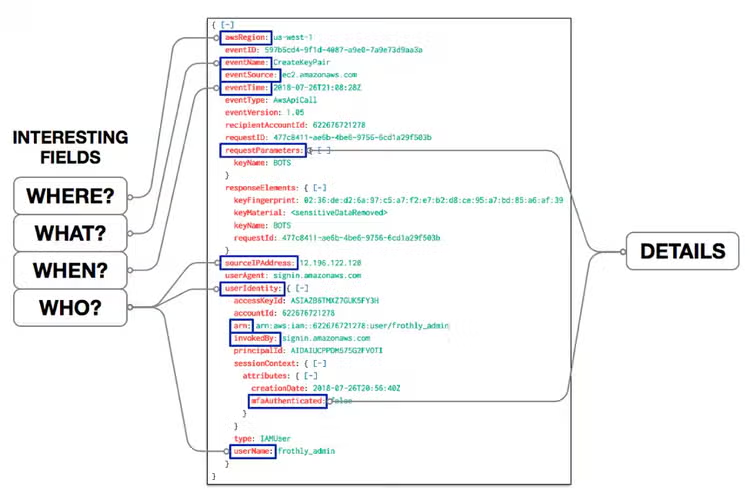
Looking at this event, we are quickly able to see the following:
- Who: The event was performed by the ‘frothly_admin’ IAM user
- What: The event contains details about an attempt to create a key called ‘BOTS’
- Where: The action to create a key pair occurred in the ‘us-west-1’ AWS region
- When: The event occurred on ‘2018-07-26’ at ‘21:08:28Z’ (UTC)
Further details about the action can be found in additional fields, such as:
- The attempt to create the key was successful, noted by the lack of an errorCode field
- The key was created by a user logged into the console
- invokedBy: signin.amazonaws.com - The user logged into the console without using Multi-Factor Authentication (MFA)
- mfaAuthenticated: false - The key fingerprint is ‘02:36d2:6a:97a7e7d895bd:85af:39
- keyFingerprint: 02:36d2:6a:97a7e7d895bd:85af:39 - AWS does not include the private key information in the CloudTrail event
- keyMaterial: <sensitiveDataRemoved>
Interesting CloudTrail fields
eventName
Of particular interest is the ‘eventName’ field. This field contains the requested action, which is one of the actions in the API for that service. After sorting this field by count, subfields using a regex, we can further identify individual actions and the corresponding services:
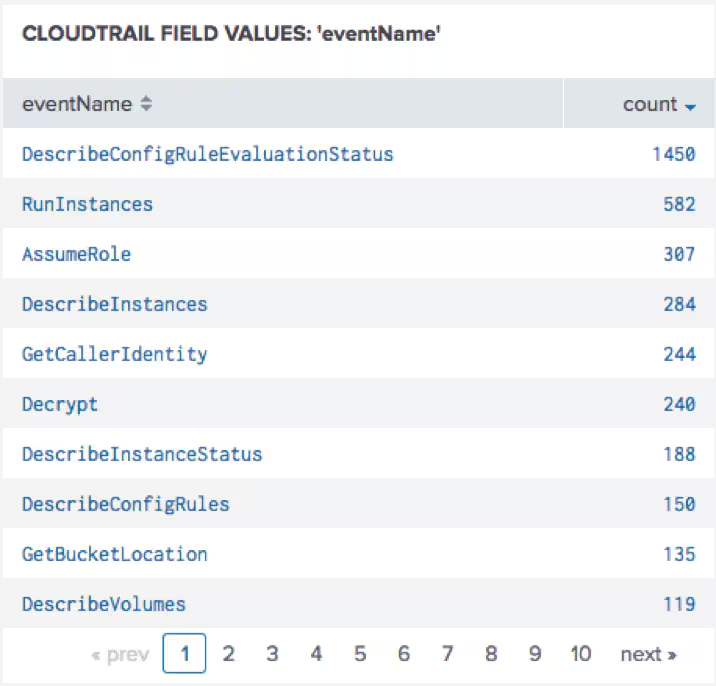
Here, we observe the AWS Config service generating a high volume of DescribeEvaluationStatus requests. While understanding the full scope of Config and its data is beyond the scope of this blog, it’s important to recognize the variety of event types captured in CloudTrail — ranging from actions like Get, Describe, and Run to services such as Config, EC2 instances, and S3 buckets.
Using CloudTrail data for cybersecurity use cases
Now let’s take a look at how CloudTrail supports security operations.
Use case #1: Detecting credential compromise
A common goal of security operations in any environment is to detect signs of credential compromise. CloudTrail can be especially useful in this capacity.
Since an ounce of prevention is worth a pound of cure, let’s start by looking at how to identify indicators of increased risk. One widely recognized resource for establishing AWS security policies is the CIS AWS Foundations Benchmark. As of 2025, the latest version (v5.0.0) offers updated best practices for securing your AWS environment. While AWS Security Hub currently supports v3.0.0, organizations can use either version to assess configuration risks, define baseline controls, and proactively reduce the likelihood of compromise.
CIS continues to strongly recommend using Multi‑Factor Authentication (MFA) on both:
- IAM users with console access. This control (IAM.5) ensures that anyone who can log in via the console must use MFA.
- The root account, with a recommendation for hardware-based MFA (IAM.6), especially in environments requiring the highest assurance.
These controls are included in the CIS AWS Foundations Benchmark v3.0.0 and are carried forward into v5.0.0. In short, if MFA isn't enabled on these accounts, you're exposing your environment to unnecessary risk.
Console logins appear in CloudTrail with an eventName of ‘ConsoleLogin.' The use of MFA for console logins appears in the additionalEventData section. Combining these two attributes into a Splunk search, we can identify users logging into the console without MFA:
 |sourcetype=aws:cloudtrail eventName=ConsoleLogin
 | stats count by username, additionalEventData.MFAUsed
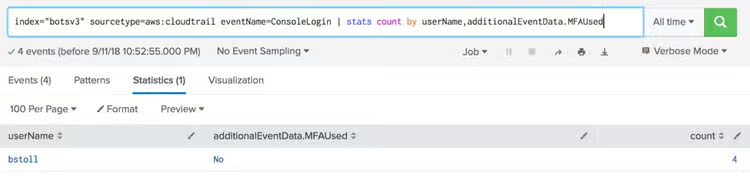
We can see that user ‘bstoll' has logged into the console four times without using MFA. Hopefully, this policy violation within your organization would warrant follow-up with bstoll or his administrator to enable MFA on the console account. Thankfully we do not see any signs of root login without the use of MFA.
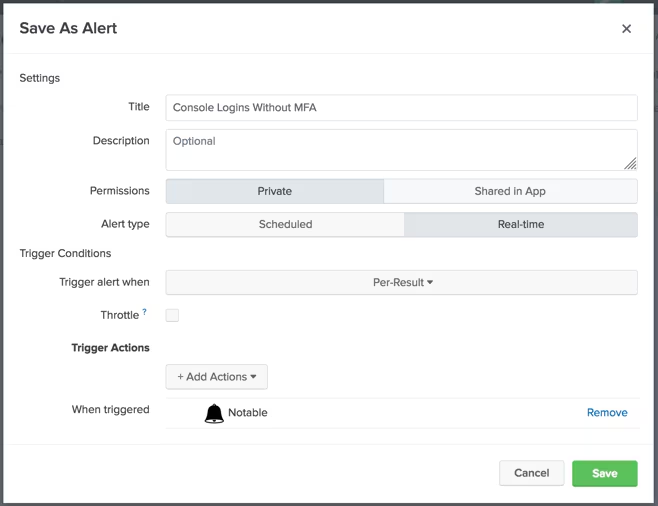
This search can easily be saved as an alert that a SOC could take action on, like so:
Use case #2: Security hunting
Let’s take a look at how CloudTrail can be used not for proactive alerting, but for security hunting. Let’s look at some of the errors associated with Service actions. A simple search shows the various error messages:
sourcetype=aws:cloudtrail
 | stats count by errorCode
 | sort - count
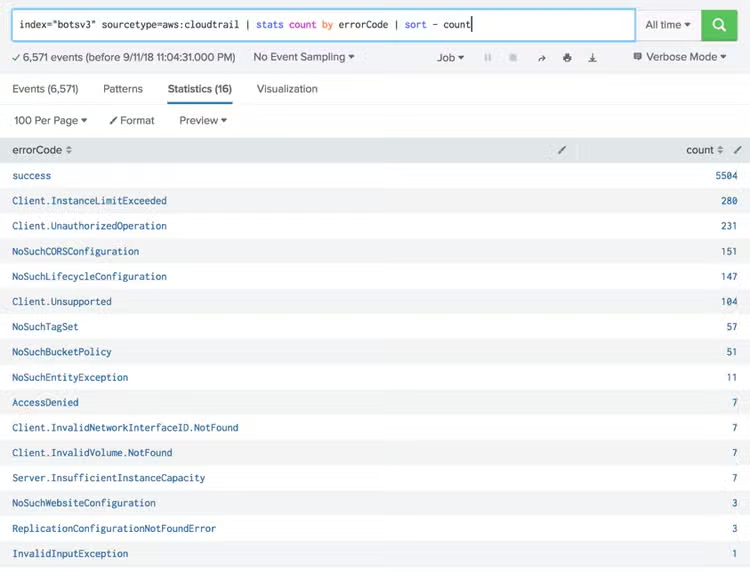
Most of the API actions were successful. While compromised account activity may result in successful command execution, let's look at the lower-hanging fruit. There are 7 events with an errorCode of ‘AccessDenied.' That seems interesting enough to look at further.
Filtering on those events, and formatting the output into a table shows some interesting results:
sourcetype=aws:cloudtrail errorCode=AccessDenied
| table awsregion, eventName, userName, src_ip, userAgent, errorMessage
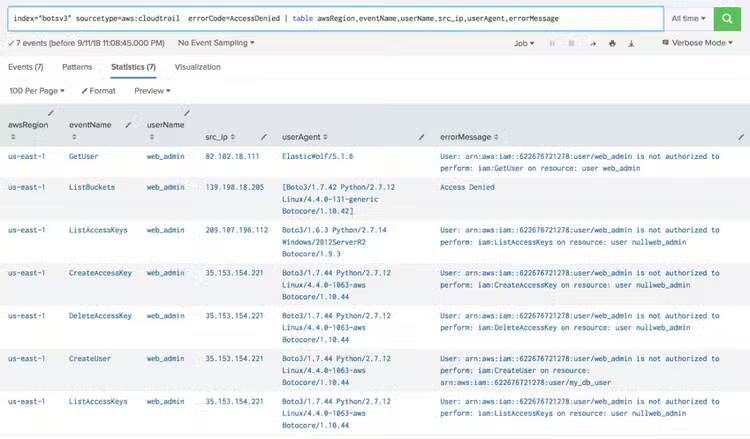
From this view, we can see the user web_admin is attempting many actions that are ultimately denied. The errorMessage indicates some suspicious activity:
- What's going on with all that
nullweb_adminactivity? - Could the
web_adminuser possibly be compromised? - Should we see activity from those source IPs?
It's worth a follow-up from the SOC team to find out what's going on here.
Wrapping up
CloudTrail is one of the most valuable data sources for AWS security operations. It captures detailed records of user and service activity across your environment, providing essential visibility for both detection and investigation.
By bringing CloudTrail logs into Splunk, security teams can uncover misconfigurations, detect signs of credential compromise, and investigate suspicious behavior using simple yet powerful queries. When combined with best practices like those outlined in the CIS AWS Foundations Benchmark, CloudTrail becomes a foundational component of a strong cloud security posture.
Whether you're monitoring for policy violations or hunting for subtle indicators of compromise, CloudTrail equips you with the context you need to take informed, timely action.
As always — happy hunting!
Related Articles

Enhancing SIEM Events with Automated Threat Analysis of URLs

Meduza Stealer Analysis: A Closer Look at its Techniques and Attack Vector