CitrixBleed 2: When Memory Leaks Become Session Hijacks
The cybersecurity community is facing yet another critical infrastructure vulnerability that threatens enterprise networks worldwide. CVE-2025-5777, dubbed "CitrixBleed 2" by security researcher Kevin Beaumont, represents a dangerous out-of-bounds memory read vulnerability in Citrix NetScaler ADC and Gateway devices. This new flaw bears an unsettling resemblance to the original CitrixBleed (CVE-2023-4966), which was widely exploited by ransomware groups and nation-state actors in 2023.
What makes CitrixBleed 2 particularly concerning is that ReliaQuest has observed indicators suggesting active exploitation in targeted environments, with attackers using the vulnerability to hijack sessions and bypass multi-factor authentication (MFA). Most significantly, CISA has now added CVE-2025-5777 to its Known Exploited Vulnerabilities (KEV) catalog on July 10, 2025, officially confirming active exploitation.
In this blog, the Splunk Threat Research Team dissect the technical mechanics of CitrixBleed 2, explore its exploitation in the wild, and provide comprehensive detection strategies and mitigation guidance.
CitrixBleed 2 Overview
Quick Facts
-
Vulnerability: Out-of-bounds memory read in Citrix NetScaler ADC and Gateway
-
CVE Identifier: CVE-2025-5777
-
CVSS Score: 9.3 (Critical) according to Citrix's assessment
-
Affected Components: NetScaler ADC and Gateway configured as Gateway (VPN virtual server, ICA Proxy, CVPN, RDP Proxy) or AAA virtual server
-
Impact: Allows unauthenticated attackers to read sensitive memory contents, steal session tokens, and bypass MFA
-
Attack Vector: POST requests with malformed login parameters to
/p/u/doAuthentication.do -
Affected Versions:
- NetScaler ADC and Gateway 14.1 before 14.1-43.56
- NetScaler ADC and Gateway 13.1 before 13.1-58.32
- NetScaler ADC 13.1-FIPS and NDcPP before 13.1-37.235-FIPS and NDcPP
- NetScaler ADC 12.1-FIPS before 12.1-55.328-FIPS
-
Complexity: Low (requires only a single HTTP POST request with malformed parameters)
-
Status: Patches available, actively exploited in the wild and added to CISA KEV catalog
Technical Details
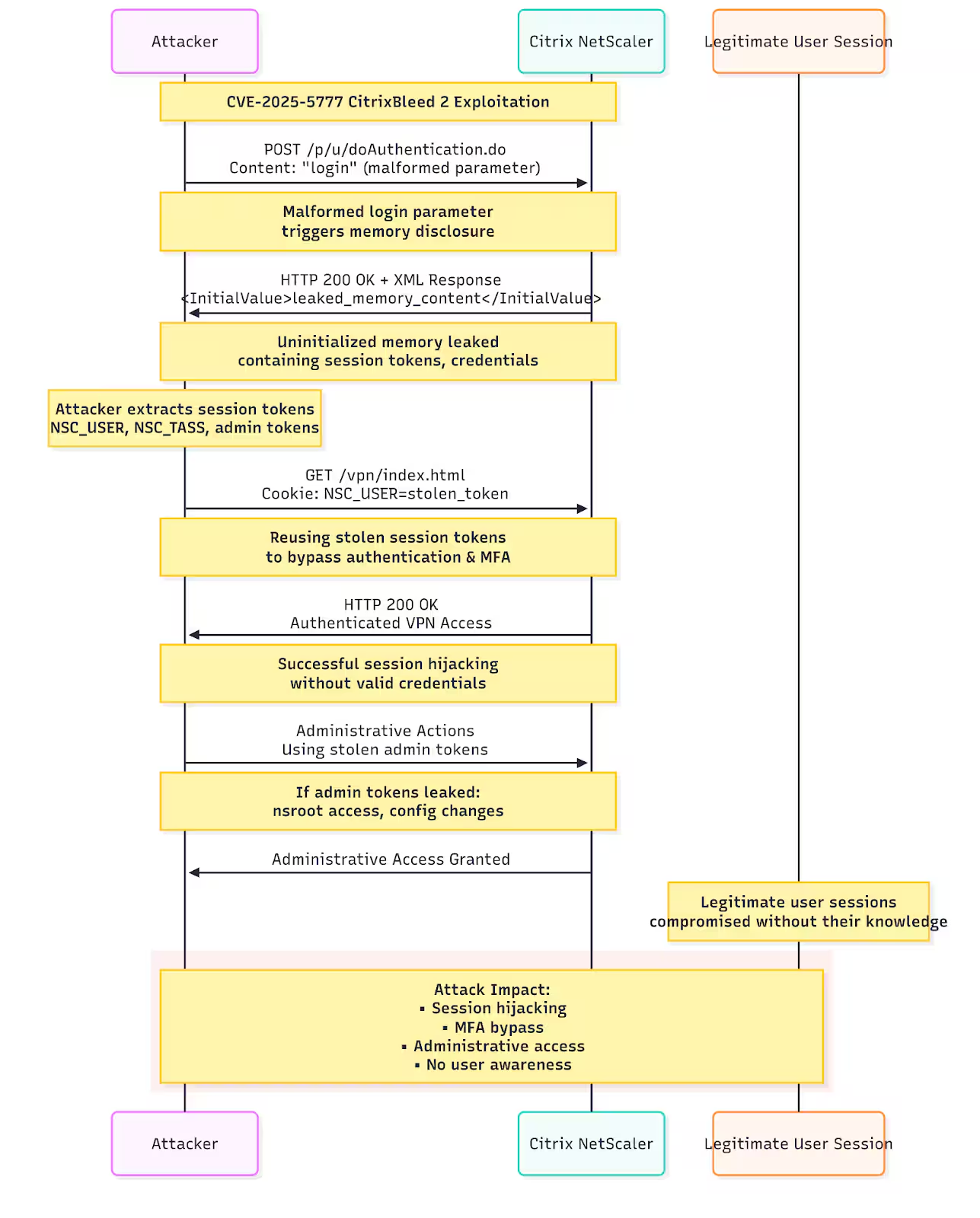
(Diagram of attack flow, Splunk 2025)
The Vulnerability
CVE-2025-5777 is an out-of-bounds read vulnerability stemming from insufficient input validation in the NetScaler ADC and Gateway products. The vulnerability occurs when the authentication handler processes specially crafted HTTP requests with malformed login parameters.
The flaw is triggered when the authentication parser processes HTTP POST requests to /p/u/doAuthentication.dowhere the login parameter is present but lacks proper structure. This causes the backend to return uninitialized memory content instead of properly initialized variables.
The root cause is a classic case of CWE-457: Use of Uninitialized Variable. When the input is partially formed or missing, the backend doesn't safely zero out or initialize the corresponding memory, and attackers end up leaking whatever residual data happened to occupy that memory space.
Exploit Mechanics
The exploitation process is remarkably straightforward, requiring only a single HTTP request:
1. Memory Leak Trigger
- Target Endpoint:
/p/u/doAuthentication.do - Method: Send HTTP POST request with malformed login parameter
- Payload:
login(without=or value)
Example request:
POST /p/u/doAuthentication.do HTTP/1.0
Host: target-gateway.example.com
User-Agent: python-requests/2.31.0
Content-Length: 5
Connection: keep-alive

login
2. Memory Content Extraction
The server responds with XML content that includes an <InitialValue> tag containing uninitialized memory. The format string %.*s tells snprintf to print up to N characters or stop at the first null byte, whichever comes first. This leaked memory can contain:
- Session Cookies: NSC_USER, NSC_TASS values from active sessions
- Authentication Tokens: SAML StateContext, MFA tokens, session tokens
- Credentials: Usernames, plaintext passwords from legitimate login requests
- Administrative Access: Session tokens belonging to "nsroot" users for entire NetScaler ADC instances
3. Session Hijacking
Leaked session tokens can be directly reused to hijack authenticated sessions and bypass MFA controls. Attackers simply replay the stolen cookies in subsequent requests to gain unauthorized access.
Exploitation in the Wild
Attack Timeline and Impact
The vulnerability was disclosed on June 17, 2025, with Citrix expanding the scope and releasing patches by June 23. Reports of active exploitation started popping up the following week, with ReliaQuest researchers spotting attacks which they assessed, with medium confidence, were pulled off by exploiting CitrixBleed 2.
On July 10, 2025, CISA officially added CVE-2025-5777 to its Known Exploited Vulnerabilities (KEV) catalog, confirming active exploitation. This designation requires federal agencies to patch by a specified deadline and serves as a strong indicator that widespread exploitation is occurring.
GreyNoise researchers have observed activity spanning back to July 1st, before any public technical details on the vulnerability were released. One of the IP addresses executing attacks in mid-June has previously been linked to the RansomHub ransomware group by CISA.
Public Exposure
Security scanning platform Censys detected nearly 70,000 exposed NetScaler Gateway & ADC instances online, though the exact number running vulnerable versions remains unclear. This exposure represents a substantial attack surface for threat actors.
NetScaler devices are critical infrastructure components in many enterprise environments, serving as:
- VPN gateways for remote access
- Application delivery controllers
- Load balancers for web applications
- Authentication proxies for cloud services
Defending Against CitrixBleed 2 with Splunk
Monitoring for CitrixBleed 2 with Splunk
Effective detection of CitrixBleed 2 exploitation requires monitoring for the vulnerability's distinctive attack patterns. This section outlines how to configure Splunk to detect exploitation attempts and successful compromises using official Splunk and Citrix integration methods.
To capture NetScaler logs in Splunk, Citrix provides comprehensive integration capabilities through their official audit log export feature and Splunk offers a dedicated Technical Add-on (TA) for NetScaler data ingestion and parsing.
Using the Official Splunk Technical Add-on for Citrix NetScaler
The most effective approach for ingesting and analyzing NetScaler logs in Splunk is to utilize the official Splunk Add-on for Citrix NetScaler. This Technical Add-on provides pre-built field extractions, event parsing, and data models specifically designed for NetScaler log analysis.
Configuring NetScaler to Splunk Integration
Citrix provides detailed guidance for exporting audit logs and events directly from NetScaler to Splunk through their official documentation: Export audit logs and events directly from NetScaler to Splunk.
Detecting CitrixBleed 2
Analytic Story from the Splunk Threat Research Team
The Splunk Threat Research Team has developed an analytic story that provides detection coverage for exploitation activities commonly associated with CitrixBleed 2 attacks: Citrix NetScaler ADC and NetScaler Gateway CVE-2025-5777 - analytic story focusing on CitrixBleed 2 exploitations.
Detection Queries from the Splunk Threat Research Team
Detect CitrixBleed 2 Exploitation Attempts
This detection identifies POST requests to the vulnerable /p/u/doAuthentication.do endpoint with malformed parameters that may indicate CitrixBleed 2 exploitation attempts:
index=netscaler sourcetype=citrix:netscaler:audit
| spath path=event.uri output=uri
| spath path=event.method output=method
| spath path=event.request_body output=request_body
| spath path=event.client_ip output=src_ip
| spath path=event.vserver_ip output=dest_ip
| where match(uri, "/p/u/doAuthentication\.do") AND method="POST"
  AND (match(request_body, "login\s*$") OR match(request_body, "login[^=]"))
| stats count as attempts, values(src_ip) as source_ips,
  min(_time) as first_seen, max(_time) as last_seen by dest_ip, uri
| convert ctime(first_seen) ctime(last_seen)
Citrix ADC and Gateway CitrixBleed 2 Memory Disclosure (Web Data Model
Detection using the Web data model for network security appliances like Suricata:
| tstats count min(_time) as firstTime max(_time) as lastTime
  from datamodel=Web
  where Web.url IN ("*/p/u/doAuthentication.do*") Web.http_method="POST" Web.status=200
  by Web.http_user_agent, Web.status, Web.http_method, Web.url,
     Web.url_length, Web.src, Web.dest, sourcetype
| `drop_dm_object_name("Web")`
| `security_content_ctime(firstTime)`
| `security_content_ctime(lastTime)`
Session Hijacking via Stolen Tokens
index=netscaler sourcetype=citrix:netscaler:audit OR sourcetype=citrix:netscaler:security
| spath path=event.session_hijack_indicator output=hijack_indicator
| spath path=event.ip_mismatch output=ip_mismatch
| spath path=event.mfa_bypassed output=mfa_bypass
| spath path=event.client_ip output=src_ip
| spath path=event.username output=user
| where hijack_indicator=true OR ip_mismatch=true OR mfa_bypass=true
| stats
    count as incidents,
    values(src_ip) as source_ips,
    values(user) as affected_users,
    min(_time) as first_incident,
    max(_time) as last_incident
    by hijack_indicator, ip_mismatch, mfa_bypass
| convert ctime(first_incident) ctime(last_incident)
Session Hijacking Detection
This detection identifies potential session hijacking by monitoring for user accounts that are accessing NetScaler services from multiple distinct IP addresses. This is an indicator of CitrixBleed 2 exploitation, where attackers steal session tokens from memory and reuse them from different locations.
index=netscaler sourcetype="citrix:netscaler:*"
| search "SSLVPN" OR "session"
| rex field=_raw "User\s+(?<user>[^\s]+).*Client_ip\s+(?<client_ip>\d+\.\d+\.\d+\.\d+)"
| stats dc(client_ip) as unique_ips, values(client_ip) as ips by user
| where unique_ips > 3
| eval suspicious=if(unique_ips > 5, "high", "medium")
Authentication Anomaly Detection
This detection identifies potential exploitation attempts by monitoring for abnormally high volumes of authentication requests from single IP addresses. This pattern may indicate both scanning for the vulnerability and active exploitation attempts against the /p/u/doAuthentication.do endpoint.
index=netscaler sourcetype="citrix:netscaler:*"
| search "doAuthentication" AND ("failed" OR "success")
| rex field=_raw "User\s+(?<username>[^\s]+)"
| rex field=_raw "Client_ip\s+(?<client_ip>\d+\.\d+\.\d+\.\d+)"
| stats count as auth_attempts, values(username) as users by client_ip
| where auth_attempts > 10
This detection represents the most direct evidence of active CitrixBleed 2 exploitation. It identifies authentication responses that contain leaked memory content with non-printable characters - the direct evidence of CVE-2025-5777 exploitation.
How CVE-2025-5777 Memory Leaks Appear in Logs:
When an attacker exploits CitrixBleed 2, the NetScaler responds with XML containing an <InitialValue> tag that should be empty but instead contains uninitialized memory. This leaked memory often includes:
- Binary data with non-printable characters (hex values outside 0x20-0x7E)
- Remnants of previous HTTP requests from other users
- Session tokens and authentication cookies from active sessions
- Plaintext credentials from recent login attempts
- Administrative session data including "nsroot" tokens
Example of Memory Leak in Logs:
xml
<InitialValue>É|¼C÷PkÓßYsa5ÊÞÅÐ^Ð|@ºJZõ¶@¹^ì¶Uã7Kèg Oë@¼~hL1{XöwnSC_USER=8d3f2a1b;NSC_TASS=a4e9c2f1</InitialValue>
The presence of non-printable characters (É|¼C÷PkÓß) mixed with readable session tokens is a definitive indicator of memory disclosure.
Required NetScaler Configuration
This detection requires specific NetScaler logging configuration that is NOT enabled by default.
1. Enable Debug Logging for Authentication Responses
# Enable debug logging to capture authentication response details
set audit nslogAction SPLUNK_ACTION <splunk_server_ip> -serverPort 514 -logLevel DEBUG
add audit nslogPolicy SPLUNK_POLICY "TRUE" SPLUNK_ACTION
bind audit global SPLUNK_POLICY -priority 100
# Enable detailed authentication logging
set audit nslogAction SPLUNK_ACTION -dateFormat MMDDYYYY -logFacility LOCAL0 -tcp ENABLED
2. Enable Application Firewall Logging (Alternative Method)
# Enable Application Firewall feature
enable ns feature APPFW

# Configure audit logging to capture HTTP request/response details
add audit syslogAction DETAILED_LOG <splunk_server_ip> -serverPort 514 -logLevel ALL
add audit syslogPolicy DETAILED_POLICY "TRUE" DETAILED_LOG
bind audit global DETAILED_POLICY -priority 90

# Enable HTTP request/response logging
set appfw settings -logMalformedReq ON -logEveryPolicyHit ON
3. Configure Session Response Logging
# Enable detailed session logging that captures authentication responses
set audit nslogAction SESSION_LOG <splunk_server_ip> -logLevel INFORMATIONAL
add audit syslogPolicy SESSION_POLICY "CLIENT.IP.SRC != 127.0.0.1" SESSION_LOG
bind audit global SESSION_POLICY -priority 80

# Enable authentication event logging
set authentication vserver <vserver_name> -authentication ON -authenticationHost <domain>
4. Verify Logging Configuration
# Check audit configuration
show audit nslogAction
show audit nslogPolicy
show audit global

# Test logging
set audit nslogAction SPLUNK_ACTION -loglevel DEBUG
# Generate test authentication request and verify logs appear in Splunk
Mitigation and Response
Immediate Actions
1. Apply Official Patches: Upgrade to NetScaler ADC and Gateway versions:
- 14.1-43.56 or later
- 13.1-58.32 or later
- 13.1-NDcPP 13.1-37.235 (FIPS)
- 12.1-55.328 (FIPS)
2. Terminate Active Sessions: After patching, execute commands to kill all active ICA and PCoIP sessions to prevent use of previously stolen session tokens:
kill icaconnection -all
kill vpn -all
3. Audit Active Sessions: Review for suspicious patterns such as single sessions being used from multiple client IP addresses, which could indicate session hijacking.
4. Check for Indicators of Compromise: Look for signs of post-exploitation activities including backdoor accounts, modified configurations, and installed remote access utilities.
Network-Based Detection
Network defenders can leverage signature-based detection for this vulnerability. A Snort rule was released (SID: 65120) to detect exploitation attempts of CVE-2025-5777. This Snort rule looks specifically for malformed HTTP POST requests targeting the /p/u/doAuthentication.do endpoint with suspicious patterns that could trigger the memory disclosure condition in Citrix NetScaler ADC and Gateway devices. The rule is classified under SERVER-WEBAPP and is enabled by default in updated Snort rulesets. This provides an additional layer of protection for organizations using Snort in their security infrastructure.
Learning from CitrixBleed History
Lessons from the Original CitrixBlee
The original CitrixBleed (CVE-2023-4966) taught the cybersecurity community several important lessons:
- Rapid Weaponization: Critical infrastructure vulnerabilities are quickly adopted by threat actors
- Session Management Importance: Session invalidation after patching is crucial to prevent continued exploitation
- Supply Chain Impact: Compromise of authentication infrastructure can lead to widespread organizational breach
Conclusion
CitrixBleed 2 represents a threat to enterprise infrastructure that demands immediate attention from security teams worldwide. With CISA's addition of CVE-2025-5777 to the Known Exploited Vulnerabilities catalog and evidence of active exploitation already emerging, organizations cannot afford to delay response efforts.
The vulnerability's similarity to the previously devastating original CitrixBleed, combined with confirmed active exploitation, makes this a critical priority for patch management and incident response teams.
Key takeaways for defenders:
- Patch Immediately: CVE-2025-5777 is now on CISA's KEV catalog with confirmed active exploitation
- Monitor Aggressively: Implement the detection strategies outlined in this post to identify potential exploitation
- Invalidate Sessions: Don't forget to terminate active sessions after patching to prevent continued abuse of stolen tokens
- Prepare for Impact: Develop incident response procedures specific to authentication infrastructure compromise
- Check for Compromise: Even organizations that patched quickly should check for indicators of compromise given the timeline of exploitation
Learn More
You can find the latest content about security analytic stories on research.splunk.com and in the Splunk ES Content Update app.
The Splunk Threat Research Team's analytic story for Citrix NetScaler ADC and NetScaler Gateway CVE-2025-5777 provides comprehensive detection coverage for this vulnerability and its exploitation patterns.
References
- CVE-2025-5777 CISA KEV Addition
- Citrix Security Bulletin CTX693420
- Citrix NetScaler Critical Security Updates
- Horizon3.ai Technical Analysis
- watchTowr Labs Deep Dive
- Nuclei Template
Feedback
Any feedback or requests? Feel free to put in an issue on GitHub and we'll follow up. Alternatively, join us on the Splunk Slack channel #security-research.
Contributors
We would like to thank Michael Haag for authoring this post, as well as the Splunk Threat Research Team (Lou Stella, Bhavin Patel, Rod Soto, Eric McGinnis, Nasreddine Bencherchali, Teoderick Contreras, and Patrick Bareiss), and Tyler Montier of Cisco Talos for their contributions to the detection content and analysis.
Related Articles

Predicting Cyber Fraud Through Real-World Events: Insights from Domain Registration Trends

When Your Fraud Detection Tool Doubles as a Wellness Check: The Unexpected Intersection of Security and HR

Splunk Security Content for Threat Detection & Response: November Recap

Security Staff Picks To Read This Month, Handpicked by Splunk Experts

Behind the Walls: Techniques and Tactics in Castle RAT Client Malware

AI for Humans: A Beginner’s Field Guide

Splunk Security Content for Threat Detection & Response: November 2025 Update

Operation Defend the North: What High-Pressure Cyber Exercises Teach Us About Resilience and How OneCisco Elevates It
