Unlocking Endpoint Network Security Insights with Cisco Network Visibility Module (NVM) and Splunk
As organizations continue to expand their endpoint footprint across remote and hybrid environments, understanding what applications are doing on the network has become more critical than ever. Cisco’s Network Visibility Module (NVM), offers visibility into this layer capturing endpoint-level flow data that ties network activity to the responsible process, user, and context.
As part of the Cisco + Splunk Better Together initiative, the Splunk’s Threat Research Team (STRT) along with the Cisco NVM engineering team, explored how to operationalize this telemetry within Splunk. This resulted in a set of 14 new detections powered by NVM data, helping security teams surface suspicious activity on the endpoint.
This initiative is a continuation of our broader collaboration to deliver integrated security monitoring experiences that highlight the combined value of Cisco’s security telemetry and Splunk’s analytics capabilities. As part of Cisco, the STRT works closely with the different Cisco product and detection teams to deeply understand the structure and detection potential of Cisco’s security data. In previous releases, we demonstrated how combining Cisco Secure Firewall (FTD) telemetry with Splunk allowed us to build 17 targeted detections covering a multitude of threats and anomalies. With NVM, we’re bringing that same approach to the endpoint, enabling high-fidelity detections rooted in process-aware network activity.
What is Cisco Network Visibility Module (NVM)
Cisco Network Visibility Module (NVM) is a component of the Cisco Secure Client (formerly known as AnyConnect) that collects detailed telemetry data directly from endpoint devices. NVM provides enriched flow context and behavioral insights from endpoints, whether they are connected to the corporate network or remote. It utilizes Cisco's proprietary protocol, nvzFlow, to capture, format, and transport telemetry data effectively.
Note: NVM can be shipped and installed as standalone software.
How Does NVM Work: Overview
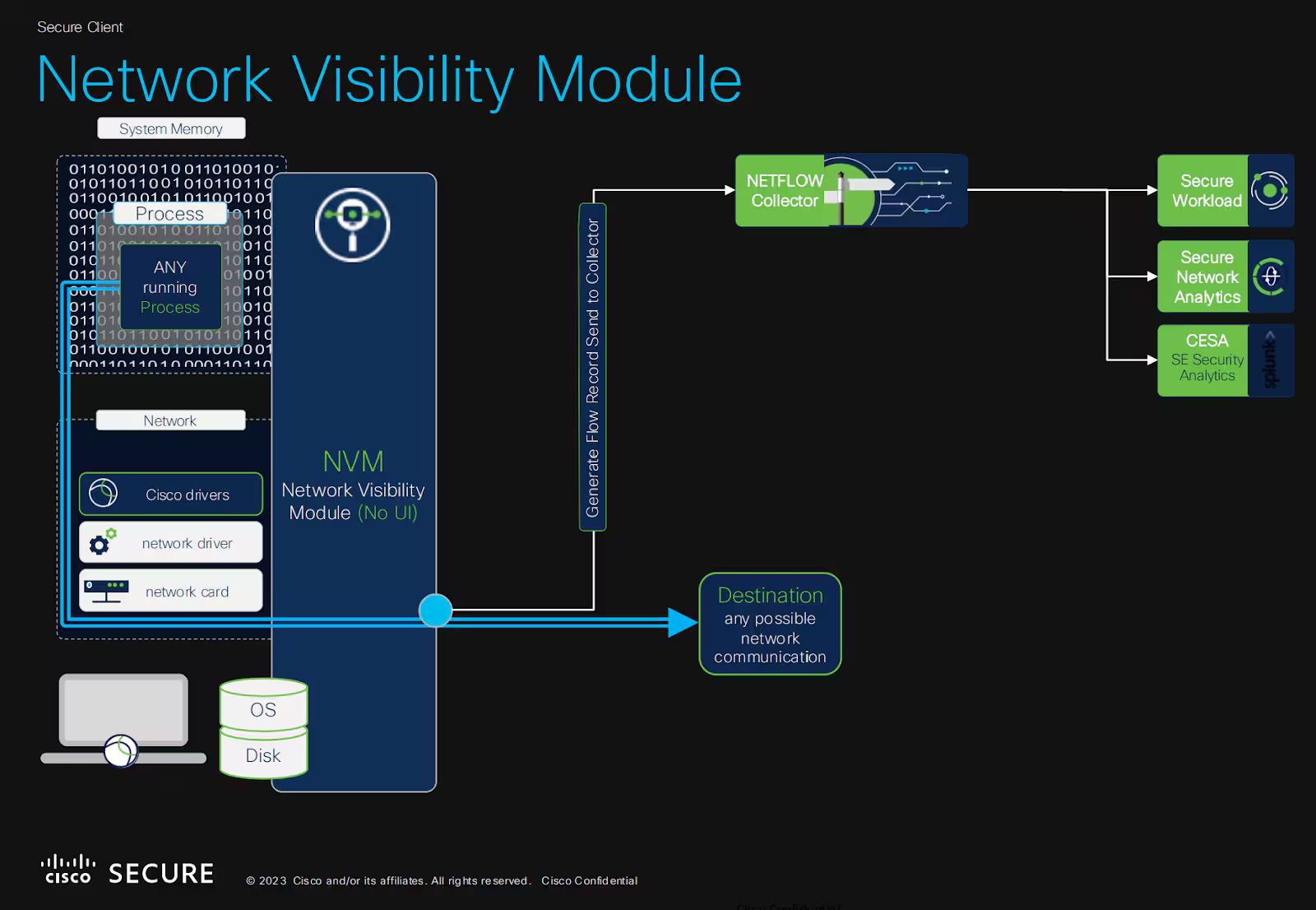
NVM operates as an integrated module within Cisco Secure Client installed on endpoints. It continuously captures flow records enriched with endpoint-specific context, such as the user, device, and process details.
On Windows, telemetry collection is facilitated by a kernel driver and a dedicated service (csc_nvmagent), with a similar architecture present on other supported operating systems.
By default it sends the collected flow data telemetry at the end of a flow. However, based on its profile configuration (NVM_ServiceProfile.xml), additional events may be sent at the start and during the lifecycle of long-running flows (known as periodic flow reporting). NVM also allows flow aggregation to manage the granularity and frequency of reported events.
However, NVM's true uniqueness and advantage comes from its powerful enriched telemetry and additional data that it collects. In the next section we’ll explore this richness.
Understanding NVM Telemetry: NVzFlow, Templates, and Events
At its core Cisco’s NVM exports telemetry using a protocol known as nvzFlow, which is an extension of the standardized IP Flow Information Export (IPFIX) protocol. IPFIX is a network protocol designed for exporting flow-level metadata in a structured and extensible manner. nvzFlow enriches IPFIX by embedding detailed endpoint-specific context, significantly enhancing its value for security monitoring.
Templates in IPFIX and nvzFlow
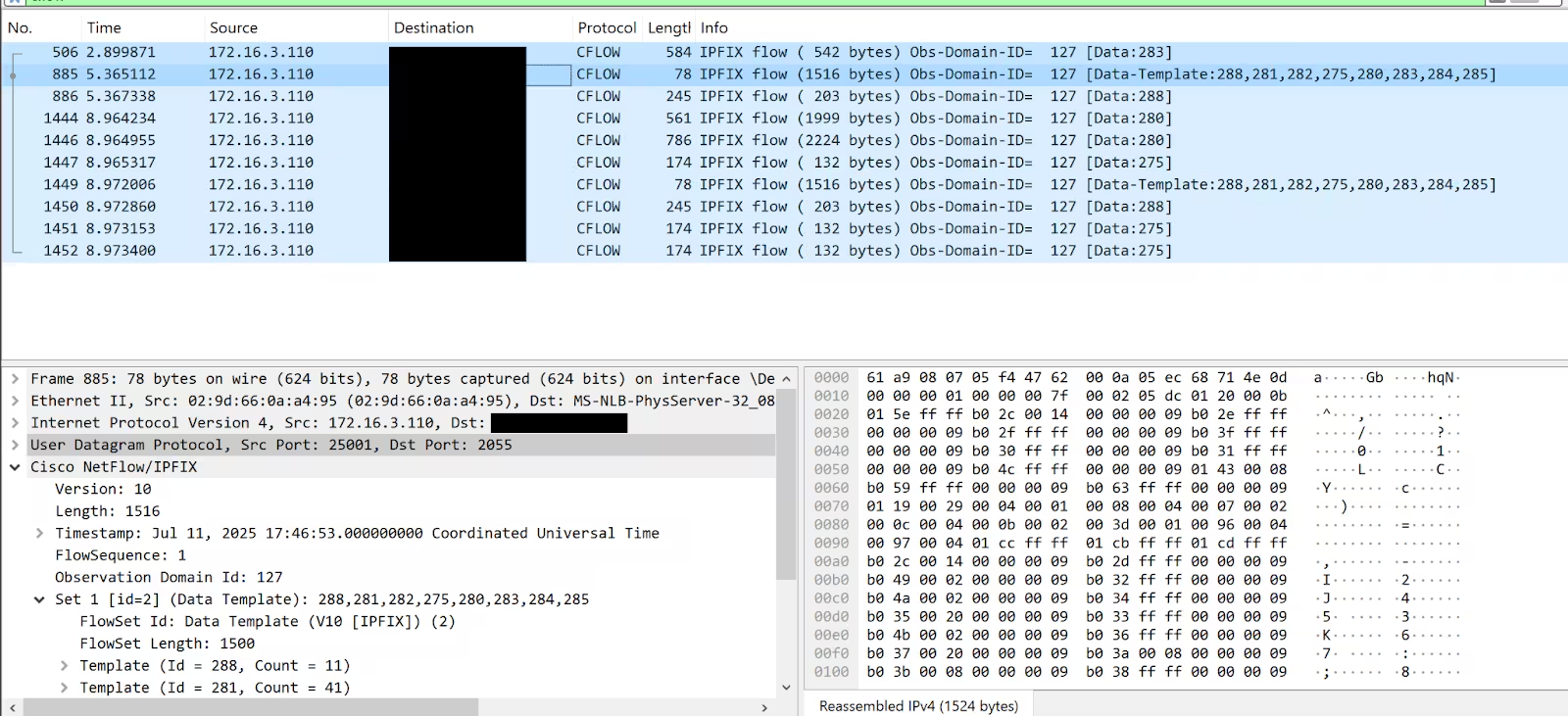
In IPFIX, templates define the structure and schema of exported data, enabling collectors to parse and interpret received information dynamically. NVM uses this concept and defines 6 main template (as of the writing of this blog) in the nvzFlow spec to describe how the collected data should be read and parsed :
- Endpoint Template: Provides periodic snapshots of endpoint system information (OS name, version, edition).
- Interface Template: Captures metadata about network interfaces, such as Interface type, Interface Name. MAC address, etc.
- Flow Template: Represents individual network connections enriched with detailed process and user context, this might include source/destination IP, ports, process name, parent process name, user, host.
- Process Template: Provides context about the process on the system, it contains fields PUID and PPUID which allows for the reconstruction of process hierarchy or a process tree.
- OSQuery Template: Provides system state data from periodic OSquery queries, currently these include information about installed browser plugging for the 3 following 3 browsers, Chrome, Firefox and Safari.
- EVE (Encrypted Visibility Engine) Template
These templates are initially exported or communicated to the collector when the NVM service starts on the endpoint, and subsequently on certain events such as profile changes, endpoint or service restarts, or network state changes.
Now that the templates are sent, the NVM collector is able to understand and parse subsequent exported events. What are these events and how do they look like you might ask? We’ll explore them next.
NVM Event Types & Export Conditions
NVM exports six types of events, they directly correspond to the templates we discussed above. In this section we’ll go into a bit more detail for each event type, highlight some of the available fields and their use, along with some examples and talk about export or generation conditions.
Keep in mind that I will not be exploring all possible fields for every event. Please refer to the following documentation for a full and updated list.
Interface Events
Jul 11 16:58:33 127.0.0.1 Jul 11 16:58:33 ip-172-31-30-201
fv="nvzFlow_v6"
udid="DA39A3EE5E6B4B0D3255BFEF95601890AFD80709"
iid="14"
ii="2"
it="1"
in="ens5"
ist="Trusted"
im="02:b8:8d:55:d1:c7"
ctm="1750402790561"
The interface event is straightforward, it contains information about the network interfaces on the endpoint. From the event above we can see for example:
- Interface Index (ii):
2 - Interface Name (in):
ens5 - Interface Trust State (ist):
Trusted - Interface Mac Address (im):
02:b8:8d:55:d1:c7
In addition to this, if the interface is wireless, NVM also sends out the SSID it is connected to.
Interface events are usually sent along with the template information. Which means they are subject to the same conditions described in the previous section. It’s also worth mentioning that any changes to the interface fields (Interface Trust State, SSID, etc) will also make NVM send a new interface event.
Endpoint Events
Jul 11 17:46:56 127.0.0.1 Jul 11 17:46:56 ip-172-31-30-201
fv="nvzFlow_v10"
vsn="EC2AMAZ-E56LIG5"
udid="10E8A7F940225180BFDB748D2AE336EA7285CB8C"
osn="WinNT"
osv="10.0.20348"
ose="Windows Server 2022 Datacenter (full installation)"
sm="Amazon EC2"
st="x64"
agv="5.1.8.122"
ctm="1752256016730"
ampguid="xxae7fcc-bxxb-4exx-a6xx-98xxa9xx0fxx"
eptag="endpoint"
Similarly to interface events, the endpoint event gives some extensive information about the endpoint itself. From our example:
- OS Edition (ose):
Windows Server 2022 Datacenter (full installation) - OS Name (osn):
WinNT - OS Version (osv):
10.0.20348 - System Manufacturer (sm):
Amazon EC2 - System Architecture (st):
x64
It even offers an ampguid field, which allows users to correlate an endpoint with a secure endpoint installation and its alert.
Endpoint events are usually sent along with the template information. Which means they are subject to the same conditions described in the previous sections.
OSQuery Events
Jul 11 17:46:56 127.0.0.1 Jul 11 17:46:56 ip-172-31-30-201
fv="nvzFlow_v8"
udid="10E8A7F940225180BFDB748D2AE336EA7285CB8C"
qv="5.5.1-dirty"
qid="38654705666"
qt="1752256015"
qpi="1"
qpn="1" qjr="[{"active":"1","autoupdate":"1","creator":"null","description":"","disabled":"0","identifier":"addons-search-detection@mozilla.com","location":"app-builtin-addons","name":"Add-ons Search Detection","native":"","path":"","source_url":"null","type":"extension","uid":"500","version":"2.0.0","visible":"1"},{"active":"0","autoupdate":"1","creator":"null","description":"","disabled":"0","identifier":"addons-search-detection@mozilla.com","location":"app-builtin","name":"Add-ons Search Detection","native":"","path":"null","source_url":"null","type":"extension","uid":"500","version":"2.0.0","visible":"0"},{"active":"1","autoupdate":"1","creator":"null","description":"","disabled":"0","identifier":"formautofill@mozilla.org","location":"app-builtin-addons","name":"Form Autofill","native":"","path":"","source_url":"null","type":"extension","uid":"500","version":"1.0.1","visible":"1"},{"active":"1","autoupdate":"1","creator":"null","description":"Fixes for web compatibility with Picture-in-Picture","disabled":"0","identifier":"pictureinpicture@mozilla.org","location":"app-builtin-addons","name":"Picture-In-Picture","native":"","path":"","source_url":"null","type":"extension","uid":"500","version":"1.0.0","visible":"1"},{"active":"0","autoupdate":"1","creator":"null","description":"Urgent post-release fixes for web compatibility.","disabled":"0","identifier":"webcompat@mozilla.org","location":"app-builtin-addons","name":"Web Compatibility Interventions","native":"","path":"","source_url":"null","type":"extension","uid":"500","version":"138.4.0","visible":"0"},{"active":"1","autoupdate":"1","creator":"null","description":"Urgent post-release fixes for web compatibility.","disabled":"0","identifier":"webcompat@mozilla.org","location":"app-system-addons","name":"Web Compatibility Interventions","native":"","path":"C:\\Users\\Administrator\\AppData\\Roaming\\Mozilla\\Firefox\\Profiles\\yolrcm3w.default-release\\features\\{bface300-4b25-49a1-b5e2-3111a359ee8f}\\webcompat@mozilla.org.xpi","source_url":"file:///C:/Users/ADMINI~1/AppData/Local/Temp/2/tmpaddon","type":"extension","uid":"500","version":"140.7.20250522.151919","visible":"1"}]"
A powerful capability of NVM is its integration of OSquery. There is a dedicated OSquery event that gets emitted from the endpoint on specified intervals.
As of the time of this writing, NVM only collects information about installed browser extensions, using the following queries
Information contained within this event is aligned with what OSquery offers, for example in the case of firefox addons, we’ll get information about the: “Identifier”, “version”, “source_url”, etc.
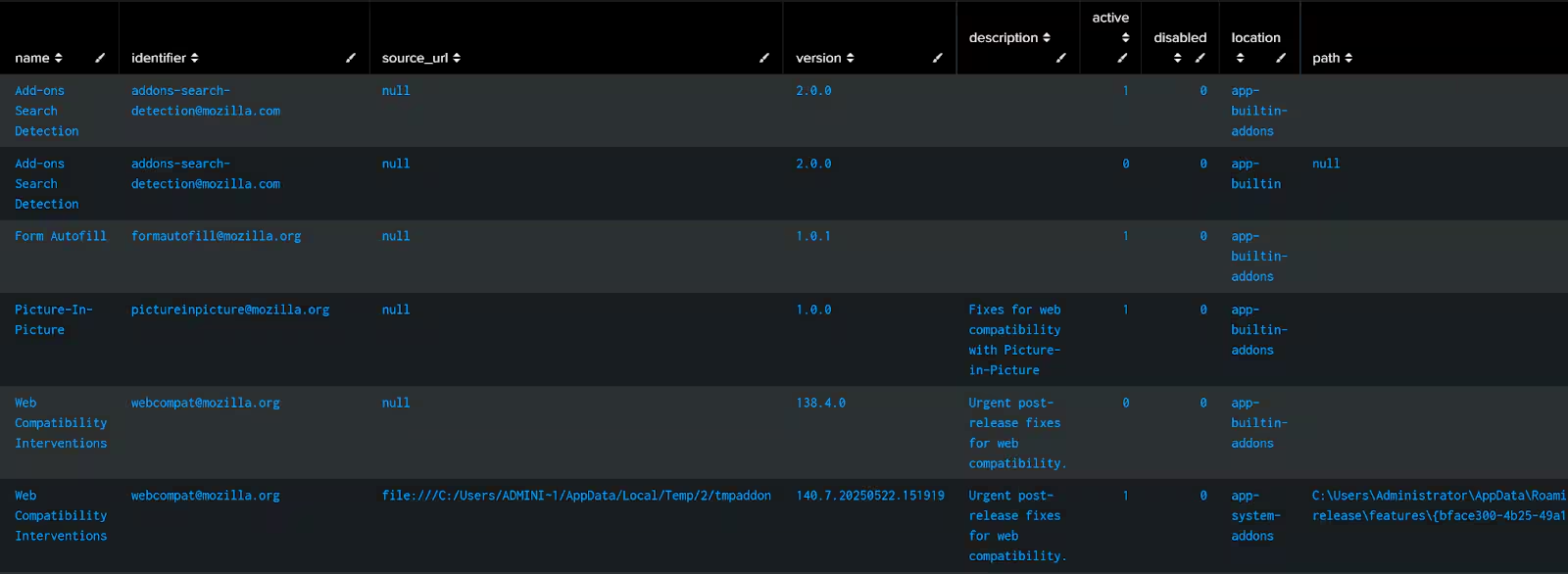
Figure 3: Splunk NVM OSquery Example Output
In terms of event generation, all the previously mentioned conditions apply. The only thing that is different is that OSquery events have their own configuration for periodic communication called “Report Interval”. Events and templates will also respect this value when sending data.
Flow Events
The most important event in NVM is the flow event. It contains a lot of enrichment and is a gold mine for writing detections.
Jul 14 15:55:34 127.0.0.1 Jul 14 15:55:34 ip-172-31-30-201  fv="nvzFlow_v9"
pr="6"
sa="172.16.3.110"
sp="43406"
da="89.44.169.134"
dp="80"
fd="1"
fss="1752508518"
fst="Mon Jul 14 15:55:18 2025"
fes="1752508518"
fet="Mon Jul 14 15:55:18 2025"
hh="g.static.mega.co.nz"
hm="GET"
ht="/eupd/wcmd64/v.txt"
udid="10E8A7F940225180BFDB748D2AE336EA7285CB8C"
liuid="EC2AMAZ-E56LIG5\Administrator"
liuida="EC2AMAZ-E56LIG5"
liuidp="Administrator"
liuat="2"
pa="EC2AMAZ-E56LIG5\Administrator"
paa="EC2AMAZ-E56LIG5"
pap="Administrator"
puat="8194"
pn="MEGAcmdUpdater.exe"
ph="B8B1A966C1708BADCD7F0F86C78E82576710D6C6F1CACDCFA6FF3351619A2EDC"
ppa="NT AUTHORITY\SYSTEM"
ppuat="8194"
ppn="svchost.exe"
pph="C188A1F4419C2DBE836ED831E9CED03A132C435958758D191670A940AD3857C9"
ibc="373"
obc="266"
ds="us-east-2.compute.internal"
dh="g.static.mega.co.nz"
iid="11"
mnl="''"
mhl="''"
fsms="1752508518677"
fems="1752508518899"
pid="1708"
ppath="C:\Users\Administrator\AppData\Local\MEGAcmd\MEGAcmdUpdater.exe"
parg="--emergency-update"
ppid="1572"
pppath="C:\Windows\System32\svchost.exe"
pparg="-k netsvcs -p -s Schedule"
aliul="''"
pil="12288"
ppil="16384"
fsg="0"
puid="4D03D883F2FA8DE7862F407172182175"
At its core the event contains basic flow information such as Source/Destination IP as well as Source/Destination Ports. But the real benefit comes from the process and user context enrichments. Lets take a look at some of the fields.
- Parent Process Name (ppn):
svchost.exe - Process Name (pn):
MEGAcmdUpdater.exe - Parent Process Argument (pparg):
-k netsvcs -p -s Schedule - Process Argument (pparg):
--emergency-update
These four additional fields alone, help elevate the detections we can write. Traditionally, in a network endpoint log (such as Sysmon Event ID 3). The only process related information you get are limited to the “Process Name”, “process GUID” and “PID”. While these are great to pin point specific behavior from certain processes it does not give the full picture.
Usually, we would have to use something like a join between a process creation event and a network event in order to get more context on the executing process. NVM solves this problem by providing us with all CommandLine related info in the same event.
While having this info is already great, NVM goes a bit beyond. If the network connection in question is going through something like HTTP (port 80). We also get the
- URI Path (ht):
/eupd/wcmd64/v.txt - HTTP Method (hm):
GET
We are also provided with additional metadata related to the “LoggedInUser” and any additional users that also logged in on the system “AdditionalLoggedInUsersList”, as well as the context of the execution in the form of “ProcessAccount”.
This richness is great to write more accurate detection relating to endpoint network activity. It also offers great insights during investigations in the form of extra fields.
In terms of event generation this event is generated every time there is a flow. Additional conditions will apply depending on the configuration set in the service profile. These include:
- Periodic Flow Report - Will determine if additional flow (start and intermediate flows) are sent in addition to the end flow.
- Aggregation Interval: Specify if a packet should contain 1 or more (aggregated) flows.
- Throttling Rate: This only affects the time when the data is sent.
Process Events
As the name suggests, process events describe the details of a specific process observed on the endpoint. While flow events capture network connections initiated by a process, process events document the process hierarchy related to that flow, this includes processes that do not necessarily initiate a connection.
Here’s an example of such an event:
Jul 11 18:37:01 127.0.0.1 Jul 11 18:37:01 ip-172-31-30-201
fv="nvzFlow_v9"
udid="10E8A7F940225180BFDB748D2AE336EA7285CB8C"
puid="25D0990331768B44A97162BDE8498E24"
ppuid="6AA420B6D60A89E9A1AD31655CC8FC08"
cppuid="6AA420B6D60A89E9A1AD31655CC8FC08"
pct="1752259001185"
pid="4496"
pn="MEGAcmdUpdater.exe"
ph="B8B1A966C1708BADCD7F0F86C78E82576710D6C6F1CACDCFA6FF3351619A2EDC"
ppath="C:\Users\Administrator\AppData\Local\MEGAcmd\MEGAcmdUpdater.exe"
parg="--normal-update --do-not-install --version 2010100"
pa="EC2AMAZ-E56LIG5\Administrator"
paa="EC2AMAZ-E56LIG5"
pap="Administrator"
puat="8194"
pil="8192"
mnl="''"
mhl="''"
At its core, this event captures the identity, ancestry, and context of a running process. Let’s take a look at some of the key fields:
- Process Name (pn):
MEGAcmdUpdater.exe - Process Path (ppath):
C:\Users\Administrator\AppData\Local\MEGAcmd\MEGAcmdUpdater.exe - Command Line Args (parg):
--normal-update --do-not-install --version 2010100 - Process ID (pid):
4496
These fields already give solid visibility into what program ran, from where, and with what arguments. But what makes the process event particularly useful is that it includes unique identifiers for tracking lineage:
- puid: Unique ID for this process
- ppuid: Unique ID of the parent process
- cppuid: Creation Parent Process UID. It represents the actual PPID, and can be used to spot PPID spoofing attempts. Oftentimes it’s similar to PPUID.
These identifiers allow us to reconstruct full process hierarchies even for non-networking processes. In logs like Windows Security Event ID 4688, we might get a single parent-child view, but with NVM process records, we can recursively walk the chain up through grandparents, great-grandparents, etc., to gain a deep understanding of execution context.
Take this example, where we have this flow event log:
Jul 14 12:03:55 127.0.0.1 Jul 14 12:03:55 ip-172-31-30-201  fv="nvzFlow_v9"
pr="6"
sa="172.16.3.110"
sp="42588"
da="34.120.208.123"
dp="443"
fd="1"
fss="1752494607"
fst="Mon Jul 14 12:03:27 2025"
fes="1752494607"
fet="Mon Jul 14 12:03:27 2025"
hh="''"
hm="''"
ht="''"
udid="10E8A7F940225180BFDB748D2AE336EA7285CB8C"
liuid="EC2AMAZ-E56LIG5\Administrator"
liuida="EC2AMAZ-E56LIG5"
liuidp="Administrator"
liuat="2"
pa="EC2AMAZ-E56LIG5\Administrator"
paa="EC2AMAZ-E56LIG5"
pap="Administrator"
puat="8194"
pn="pingsender.exe"
ph="81BC1AC9FC362D48B7A8911E32BAF6CE08027721E195AC54841FF6E315FB7CB6"
ppa="EC2AMAZ-E56LIG5\Administrator"
ppuat="8194"
ppn="firefox.exe"
pph="FD559D3C117A41AB5AA5BA7309E4898A222A9CA8C946B5A5854C142C7A5379D2"
ibc="4764"
obc="915"
ds="us-east-2.compute.internal"
dh="incoming.telemetry.mozilla.org"
iid="11"
mnl="''"
mhl="''"
fsms="1752494607583"
fems="1752494607865"
pid="3400"
ppath="C:\Program Files\Mozilla Firefox\pingsender.exe"
parg="https://incoming.telemetry.mozilla.org/submit/default-browser-agent/default-browser/1/A010EAE8-204B-446D-99CF-232978D3FF7F "C:\Users\Administrator\AppData\Roaming\Mozilla\Firefox\Pending Pings\A010EAE8-204B-446D-99CF-232978D3FF7F""
ppid="3784"
pppath="C:\Program Files\Mozilla Firefox\firefox.exe"
pparg="--backgroundtask defaultagent do-task 308046B0AF4A39CB"
aliul="''"
pil="8192"
ppil="8192"
fsg="0"
puid="64293FABB705874DA7CB4DC0EB0F683C"
As discussed previously, the event offers great visibility into the process initiating the network connection and its parent. But what if we want to gain more insight into ancestry? Maybe the grandparent process? Or perhaps the one before that?
Leveraging the process event we can do exactly that. By following the “puid” and “ppuid” values, we can start tracing the process hierarchy. In the case of our example, we get something like this:
C:\Windows\System32\svchost.exe -k netsvcs -p -s Schedule
  ↳ C:\Program Files\Mozilla Firefox\default-browser-agent.exe do-task "308046B0AF4A39CB"
     ↳ C:\Program Files\Mozilla Firefox\firefox.exe --backgroundtask defaultagent do-task 308046B0AF4A39CB
        ↳ C:\Program Files\Mozilla Firefox\firefox.exe --backgroundtask defaultagent do-task 308046B0AF4A39CB
            ↳ C:\Program Files\Mozilla Firefox\pingsender.exe https://incoming.telemetry.mozilla.org/submit/default-browser-agent/default-browser/1/A010EAE8-204B-446D-99CF-232978D3FF7F "C:\Users\Administrator\AppData\Roaming\Mozilla\Firefox\Pending Pings\A010EAE8-204B-446D-99CF-232978D3FF7F"
You can see how we obtained the hierarchy of the process along with process command line arguments. This is powerful for investigations and analysis.
Below are some examples from Splunk queries and dashboards we built / shipped with the CESA that allows us to trace the ancestry of a process up to 4 levels.
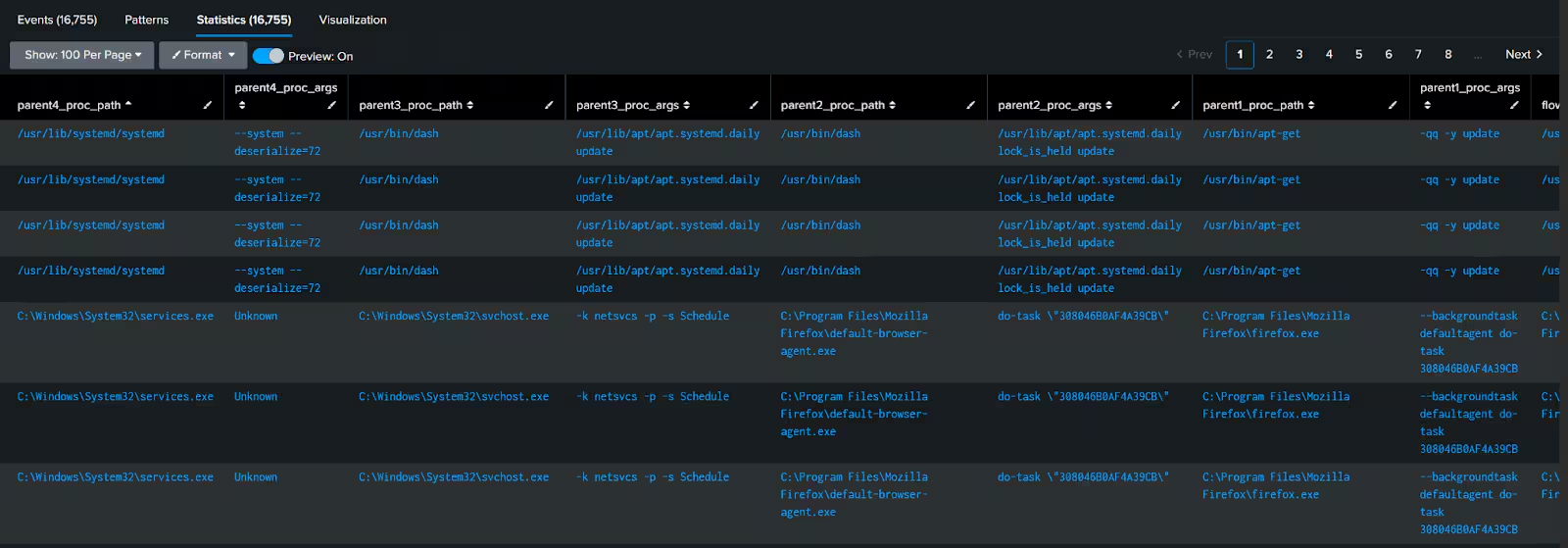
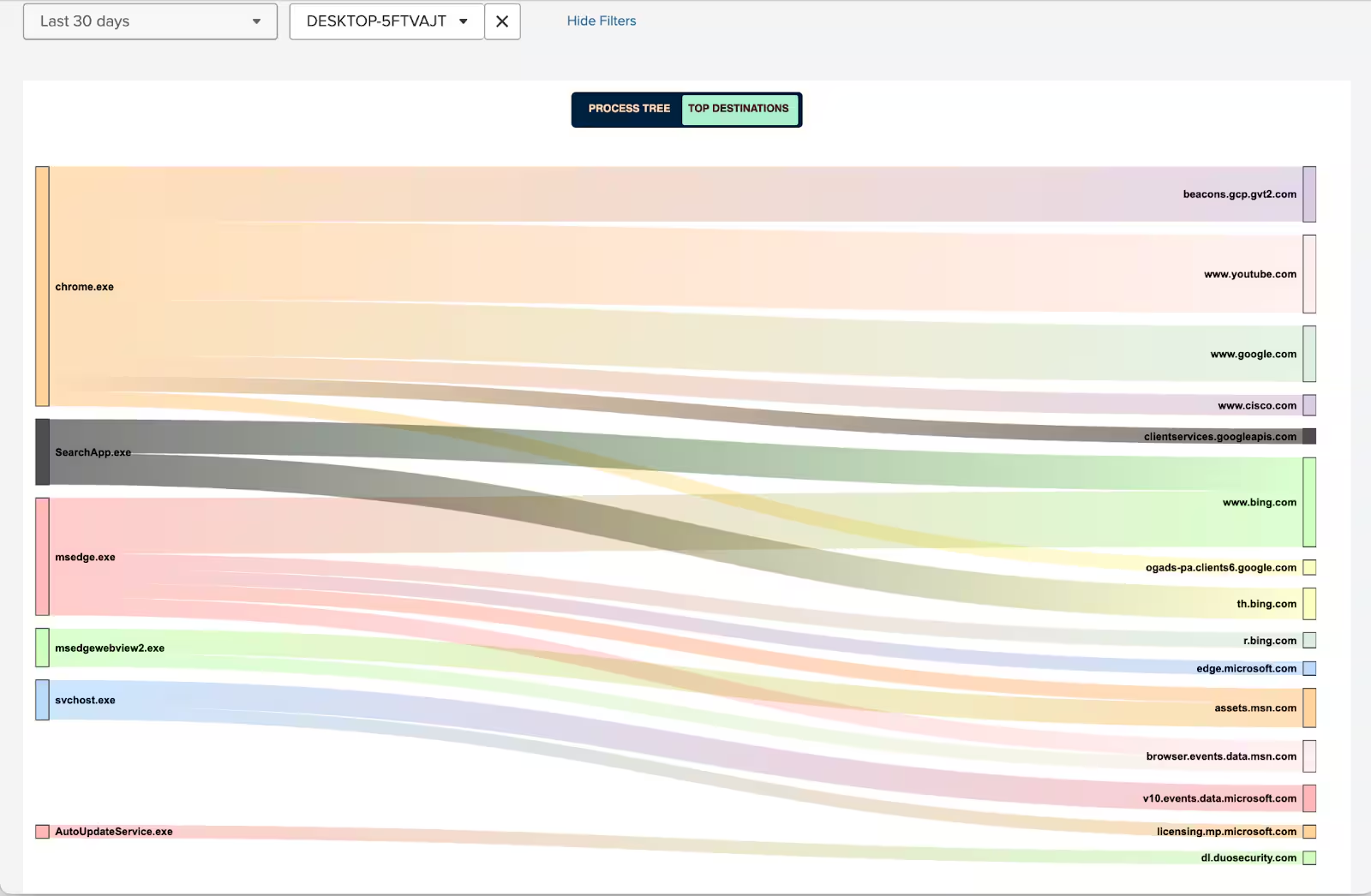
Figure 6: Process Tree Sankey - Splunk CESA TA View
In terms of event generation this event is similar to the flow event, in that it does not follow a specific cadence, however, aggregation and throttling rate configurations apply.
EVE Events
This event type is out of the scope of this blog.
To summarize the various event types and how they are generated, the diagram below provides a high-level overview of what events are generated by NVM and it decides when and what telemetry to export. It illustrates the relationship between configuration settings (such as aggregation interval, periodic flow reporting, and template intervals) and the different triggers that cause templates and events to be sent such as profile changes, reboots, and network transitions.
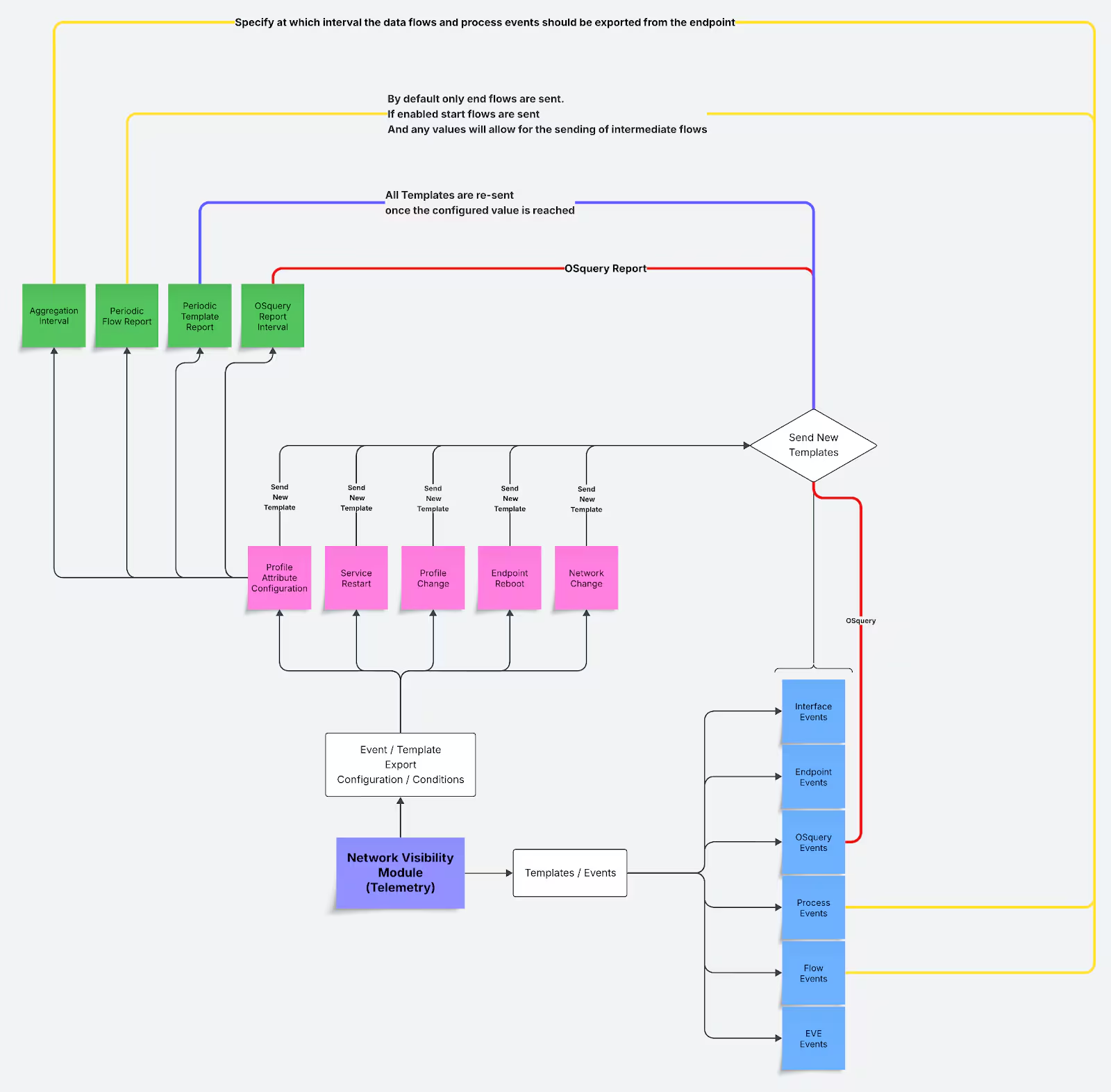
With that foundation established, let’s move on to how this telemetry is ingested and operationalized starting with deployment considerations and then look at how to integrate NVM data into Splunk.
Deployment Best Practices & Considerations
While Cisco NVM offers rich endpoint-layer visibility out of the box, deploying it at scale requires thoughtful tuning to ensure optimal performance and noise reduction. Below are a few key considerations for a successful adoption in production environments:
Tune Flow Granularity
NVM supports options for flow aggregation and periodic flow reporting. In high-throughput environments (e.g., browsers, proxy clients), consider enabling flow aggregation to reduce event volume while preserving visibility.
Balance Depth vs. Volume
Periodic flow reporting provides deeper insights into long-lived connections but may increase the total number of exported events. Align this setting with your detection needs and data retention policies.
Profile Before Production
It is recommended to validate the NVM configuration profile (NVM_ServiceProfile.xml) in a staging environment with representative workloads. This helps anticipate ingestion volume and tune indexing strategy within Splunk accordingly.
Ingesting NVM Data Into Splunk: Give Me All Your Flows
To bring NVM data into Splunk, we leveraged the Cisco Secure Endpoint Technology Add-on (CESA TA) which comes shipped with an NVM Collector.
The integration flow into our lab looks like this:
- Installation of the NVM module on the endpoint via secure client on both Windows and Linux
- Configuration of the NVM service profile with a Data Collection Policy to collect all necessary events.
- The collector receives the events and passes them to the TA, which applies any additional normalization of the fields and aligns them with CIM.
Since the installation and integration steps are described in detail in the following documentation we will not be detailing that aspect, instead we will cover the new updates that have been introduced in the latest CESA TA. We’ve collaborated with the NVM and CESA TA developers to introduce some enhancements and quality of life improvements to the TA.
Enhanced CIM Mapping
The latest CESA TA updates included an enhanced mapping for CIM fields. In addition to the previous mapping with the Network All_Traffic dataset, fields from the flow data events such as process name, process path, etc, are now mapped to the Endpoint Processes data set.
This allows users to leverage NVM telemetry directly via previously written rules against those data models / data sets.
We at STRT have leveraged this, and mapped previously written detection to this new data source. We’ll give more details in the detection section of this blog.
New Field Aliases for a Smoother Detection Writing Experience
The attentive readers of this blog might have noticed that the events generated by NVM and shared in previous sections of this blog are not immediately easy to understand. That’s because when the fields are sent to the collector they arrive in this compressed notation.
The CESA TA added field aliases to almost all the fields generated by NVM, in order to make it easier to understand and easier to leverage these fields when writing detection.
Here is an example of this in action in Splunk.

Improved OSquery Json Response Parsing
Another area that saw improvement is the OSquery event. Previously the event stored the response in a field called qjr that was not easy to read / parse.
Additional parsing was added and a new alias was created called “query_json_response” that will allow users to extract additional value from it in terms of detection.
With these improvements in place, ranging from better CIM alignment to cleaner field naming and enhanced parsing, NVM data is now far more accessible and detection-friendly within Splunk. These changes reduce friction for analysts and simplify rule development.
It’s worth noting that the Cisco Security Cloud starting from version 3.3.0 Integrated Cisco Secure Client NVM and it can be used to ingest NVM telemetry. That specific configuration is outside the scope of this blog. But stay tuned for future updates on how to get the NVM data ingested via that app.
In the next section, we’ll explore how we leveraged these changes and telemetry to build effective detections that take advantage of the enriched context NVM provides.
Leveraging NVM Telemetry for Detection
During this research, we’ve developed 14 new original detections, as well as mapped 14 CIM detections previously released to NVM data. This brings the total to 28 detections.
The detections are organized into the Cisco Network Visibility Module Analytics analytic story, available through the Enterprise Security Content Update (ESCU) 5.9.0 release. This story provides a comprehensive framework for monitoring and detecting network aware threats at the endpoint using Cisco NVM.
Each detection in the analytic story comes with metadata mapping to the MITRE ATT&CK framework, providing security teams with context about the adversary tactics being employed.
Below we’ll walk through a couple of the detections we’ve built and highlight how NVM enhances the experience.
MSHTML or MSHTA Network Execution Without URL in CLI
cisco_network_visibility_module_flowdata
(
(
process_name = "mshta.exe"
process_arguments IN ("javascript", "vbscript")
)
OR
( process_name = "rundll32.exe" AND
process_arguments = "mshtml" AND
process_arguments = "RunHTMLApplication"
)
)
NOT process_arguments IN ("http://", "https://")


| stats count min(_time) as firstTime max(_time) as lastTime
values(parent_process_arguments) as parent_process_arguments
values(process_arguments) as process_arguments
values(parent_process_hash) as parent_process_hash
values(process_hash) as process_hash
values(module_name_list) as module_name_list
values(module_hash_list) as module_hash_list
values(dest_port) as dest_port
values(aliul) as additional_logged_in_users_list
values(dest_hostname) as dest_hostname
by src dest parent_process_path parent_process_integrity_level process_path process_name process_integrity_level process_id transport


| security_content_ctime(firstTime)


| security_content_ctime(lastTime)


| table
parent_process_integrity_level parent_process_path parent_process_arguments parent_process_hash
process_integrity_level process_path process_name process_arguments process_hash process_id
additional_logged_in_users_list module_name_list module_hash_list
src dest_hostname dest dest_port transport firstTime lastTime


| cisco_nvm___mshtml_or_mshta_network_execution_without_url_in_cli_filter
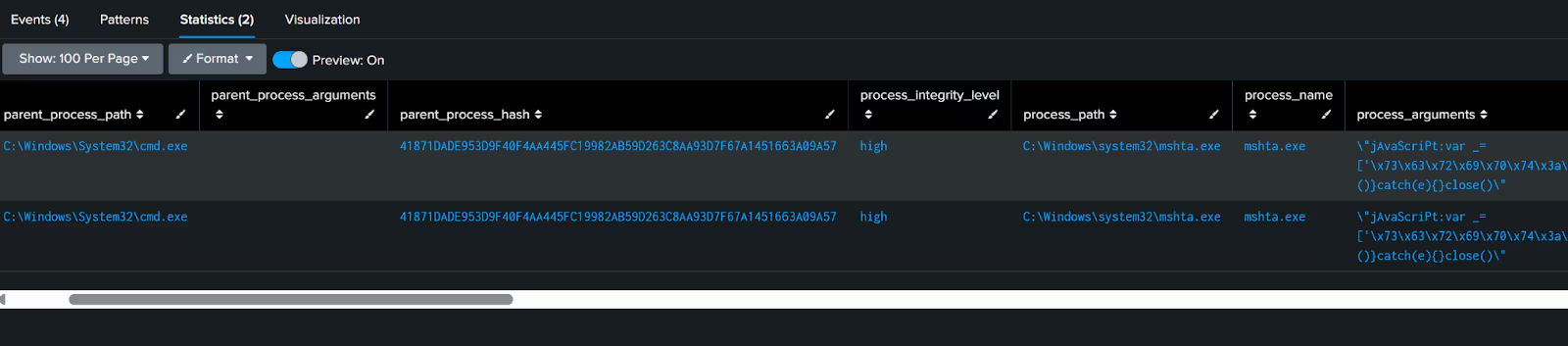
This first analytic detects the abuse of the MSHTML DLL or the MSHTA binary where a URL pattern is not present in the CommandLine.
The aim of this detection is to highlight potential obfuscation that an attacker might use when leveraging one of the techniques mentioned above.
Because both MSHTML and MSHTA allows for the execution of JavaScript or VBScripts, it also allows attackers to be creative in packaging their payloads, including the use of hexadecimal characters and so forth.
Traditionally we would have to combine data from a process creation event along with a network connection event, which might impact performance, especially in environments with a lot of data. Fortunately, since an NVM flow event already implies network activity and provides the process context (commandline in this case), we can leverage this to build out the detection.
Additionally, from an output perspective, having information about the destination hostname, parent process and parent command line. The data we can display to an analyst is already super enriched and will enable an easier investigation.
Susp Script From Archive Triggering Network Activity
cisco_network_visibility_module_flowdata
parent_process_name IN ("explorer.exe", "winrar.exe", "7zFM.exe")
process_name IN ("wscript.exe", "cscript.exe")
process_arguments = "\AppData\Local\Temp*"
process_arguments IN ("\rar*", "\7z", ".zip")


| stats count min(_time) as firstTime max(_time) as lastTime
values(parent_process_arguments) as parent_process_arguments
values(process_arguments) as process_arguments
values(parent_process_hash) as parent_process_hash
values(process_hash) as process_hash
values(module_name_list) as module_name_list
values(module_hash_list) as module_hash_list
values(dest_port) as dest_port
values(aliul) as additional_logged_in_users_list
values(dest_hostname) as dest_hostname
by src dest parent_process_path parent_process_name parent_process_integrity_level process_path process_name process_integrity_level process_id transport


| security_content_ctime(firstTime)


| security_content_ctime(lastTime)


| table
parent_process_integrity_level parent_process_name parent_process_path parent_process_arguments parent_process_hash
process_integrity_level process_path process_name process_arguments process_hash process_id
additional_logged_in_users_list module_name_list module_hash_list
src dest_hostname dest dest_port transport firstTime lastTime


| cisco_nvm___susp_script_from_archive_triggering_network_activity_filter
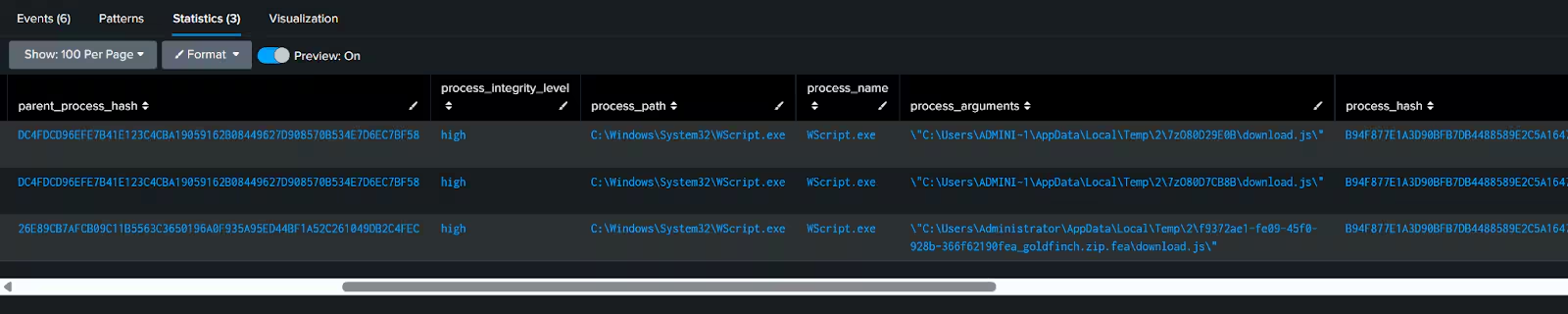
In a very similar fashion, this analytic focuses on a specific initial vector technique, where an attacker might provide a compressed file (zip, 7zip or rar) to a user, and tricks them into executing a malicious script (JavaScript or VBScript) directly from the compressed file by double clicking on it.
We monitor for a specific artefact of this technique in this case, which is second stage payload download.
By leveraging NVM telemetry, we can infer that a network connection was initiated just by the fact the event exists, and once again the context provided by the other fields will unlock a much easier investigation experience as well as ease the analysis of what occurred.
Installation of Typosquatted Python Package
cisco_network_visibility_module_flowdata
dest_hostname IN ("*.pythonhosted.org", "*pypi.org", "*python-poetry.org")
(
(process_arguments = "pip" process_arguments = "install")
OR
(process_arguments = "poetry" process_arguments = "add")
)


| rex field=process_arguments "(?i)(?:pip|poetry)[^|]*?\s+(?:install|add)\s+(?P[^\s\"']+)$"


| lookup typo_squatted_python_packages
typosquatted_package_name as package_name
OUTPUTNEW comment package_official_url


| where isnotnull(comment)


| stats count min(_time) as firstTime max(_time) as lastTime
values(parent_process_arguments) as parent_process_arguments
values(process_arguments) as process_arguments
values(parent_process_hash) as parent_process_hash
values(process_hash) as process_hash
values(module_name_list) as module_name_list
values(module_hash_list) as module_hash_list
values(dest_port) as dest_port
values(aliul) as additional_logged_in_users_list
values(dest_hostname) as dest_hostname
by src dest parent_process_path parent_process_integrity_level process_path process_name process_integrity_level process_id transport package_name comment package_official_url


| security_content_ctime(firstTime)


| security_content_ctime(lastTime)


| table firstTime lastTime src dest_hostname dest dest_port transport package_name comment package_official_url
parent_process_integrity_level parent_process_path parent_process_arguments parent_process_hash
process_integrity_level process_path process_name process_arguments process_hash process_id
additional_logged_in_users_list module_name_list module_hash_list


| cisco_nvm___installation_of_typosquatted_python_package_filter
The final analytic we’ll examine, is focusing on potential download of typo squatted python packages. It leverages NVM fields such as the “destination hostname” and process argument to map package names that are downloaded from the official package hosting sites.
One of the cool advantages in this detection is during investigation, because the parent information is already included we can directly understand who was responsible for initiating such action.
Better Together: Continuing the Journey with NVM
This effort represents the next step in our continued collaboration between Cisco and Splunk expanding from firewall telemetry to the endpoint. Building on our previous success with Cisco Secure Firewall, this project focused on operationalizing NVM’s unique telemetry within Splunk, with a shared goal: making enriched, high-context data actionable for defenders.
What made this possible was the direct engagement with Cisco’s NVM engineering teams, who provided deep insight into inner workings of the product including, collection logic, and export behaviors. This tight feedback loop helped shape both the detection logic and enhancements to the CESA TA, improving the overall experience for analysts working with NVM data in Splunk.
The leadership from the Cisco team who supported this effort includes:
- Jim Cowan, Director, Software Engineering
- Pete Davis, Director, Product Management
Key technical contributors from Cisco NVM team included:
- Sandeep Kumar T. K., Leader, Software Engineering
- Asir Sunil Babu, Leader, Software Engineering
- Sivakrishna Lingareddy, Software Engineering Technical Leader
- Arpita B Punjabi, Software Engineering Technical Leader
- Aniket Maitra, Software Engineer
Together, these efforts demonstrate how collaboration across teams and platforms can unlock meaningful security outcomes reducing detection gaps and improving visibility where it matters most: the endpoint.
Getting Started
Ready to implement these detections in your environment? Here's how to get started:
- Update your content: Install the latest Enterprise Security Content Update (ESCU) 5.9.0 or later from Splunkbase
- Install Cisco Secure Client with the NVM module and configured the NVM collector by following the documentation
- Install the Cisco Endpoint Security Add-On: Deploy the Cisco Endpoint Security Analytics (CESA) Add-On for Splunk to normalize your Cisco NVM data
- Explore the analytics: Visit the Cisco Network Visibility Module Analytics story on Splunk Research to review the full set of detections
- Contribute: Have ideas for improvements? Visit our Security Content repository on GitHub to contribute to the ongoing development of these detections
- Stay connected: Join the #security-research channel in the Splunk user groups on Slack to engage with our research team and the broader community.
Related Articles

Predicting Cyber Fraud Through Real-World Events: Insights from Domain Registration Trends

When Your Fraud Detection Tool Doubles as a Wellness Check: The Unexpected Intersection of Security and HR

Splunk Security Content for Threat Detection & Response: November Recap

Security Staff Picks To Read This Month, Handpicked by Splunk Experts

Behind the Walls: Techniques and Tactics in Castle RAT Client Malware

AI for Humans: A Beginner’s Field Guide

Splunk Security Content for Threat Detection & Response: November 2025 Update

Operation Defend the North: What High-Pressure Cyber Exercises Teach Us About Resilience and How OneCisco Elevates It
