Assigning Role Based Permissions in Splunk Enterprise Security
Recently, a customer asked if they could create additional roles beyond the default roles, ess_analyst and ess_user, that Enterprise Security provides and assign permissions to these roles to limit access based on their responsibilities. This is not a question that has come up often, but as larger Enterprise Security deployments come on line, coupled with additional capabilities like the Threat Intelligence framework, Asset & Identity framework, and Investigations, customers may find it necessary to have greater granularity in dividing up responsibilities, including who can edit correlation searches, glass tables and threat intelligence. With that in mind, let’s take a look at how additional roles can be added in Enterprise Security.
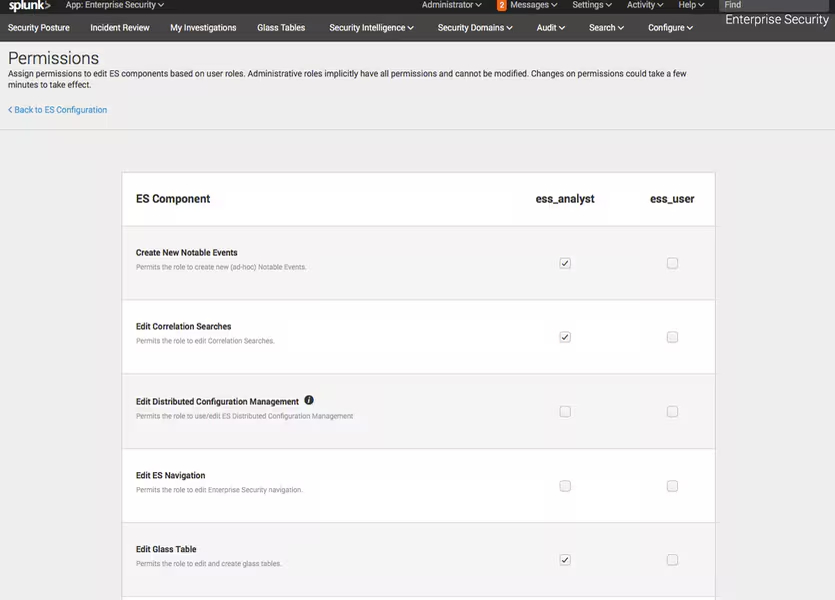
When defining a new role in Enterprise Security, an admin could take one of the pre-defined roles, like ess_analyst and use it as a template, or a new role could be created from scratch. Either approach is fine. In this example, let’s start with the existing role of ess_analyst.
- Open the authorize.conf file in $SPLUNK_HOME/etc/apps/SplunkEnterpriseSecuritySuite/default/ and select the role_ess_analyst stanza
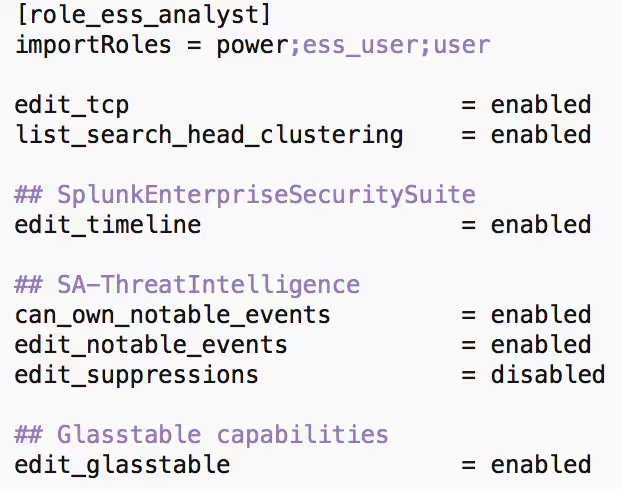
- Copy and paste the stanza into authorize.conf found in $SPLUNK_HOME/etc/apps/SplunkEnterpriseSecuritySuite/local/
- Rename the stanza to be the name of the new role. In this case, the role will be called role_ess_level_3_analyst
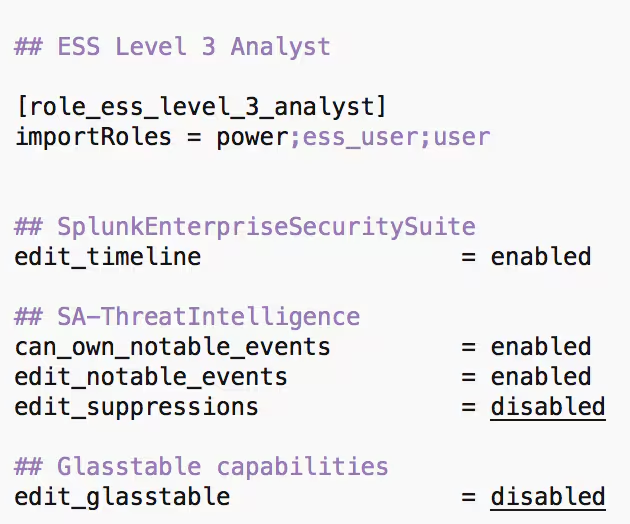
After creating the new role, it can be modified further in authorize.conf, if desired. For now, let’s leave it alone as it can also be edited in the UI later.
The next step is to associate this role as a managed role within Enterprise Security. The default value is found in the inputs.conf file in $SPLUNK_HOME/etc/apps/SplunkEnterpriseSecuritySuite/default/

- Either copy and paste or create/edit the inputs.conf file in $SPLUNK_HOME/etc/apps/SplunkEnterpriseSecuritySuite/local/ to add the lines above.
- Add into the managed_roles= the new role that was created in authorize.conf.

- After saving the conf files, restart Splunk.
- Login to Splunk, select the Enterprise Security app. On the ES menu, go to Configure – General – Permissions
The Permission window will now show the new role(s) that were added,
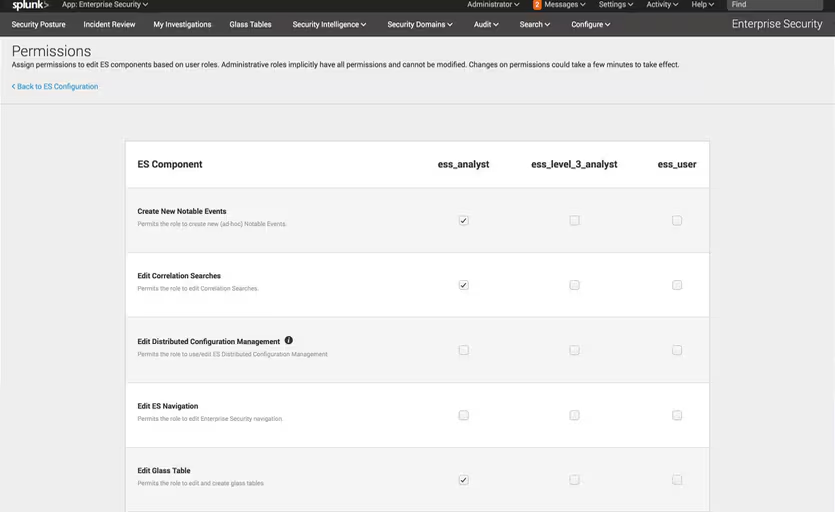
Now that the role has been added, Enterprise Security specific capabilities can be tuned as desired.
To continue with this example, let’s take the threat intelligence framework and limit the ability to add or edit threat feeds to the Level 3 Analyst role that was just created. By default, the ES Administrator role has this capability, so we would set it for ess_level_3_analyst.
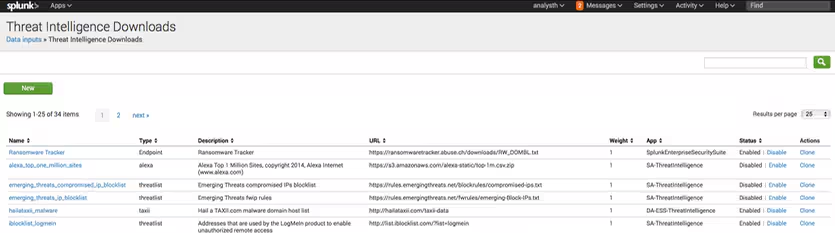
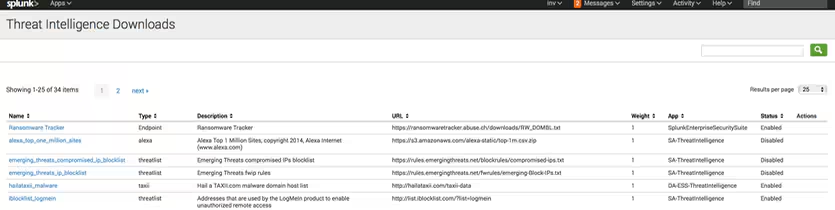
When a user with this role logs in and navigates to Configure – List and Lookups – Threat Intelligence Downloads, the screen they will see will have a New button on the left side of the screen while a user with the ess_analyst role will not. Additionally, the ability to edit or disable existing threat intelligence feeds is not enabled for the this role.
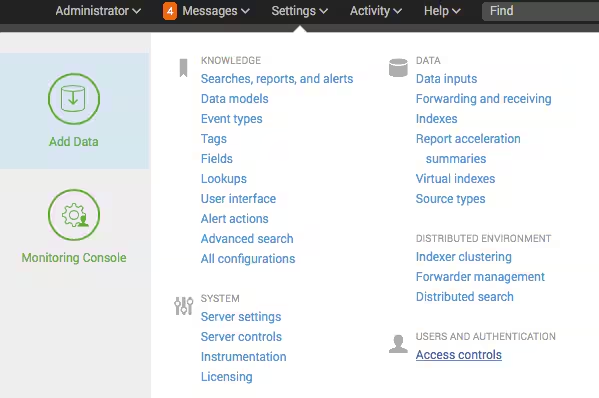
If additional modifications to the roles are required, such as limiting search to specific indexes, sources or sourcetypes, inheriting additional roles or adjusting the number of searches a specific role can execute, they can be modified in the UI from Settings - Access Controls – Roles.
Once we have created this role and started assigning capabilities, it may be desirable to audit the changes. After the role has been added, an audit log is created for the specific ES capabilities and is searchable, as seen in the following example.
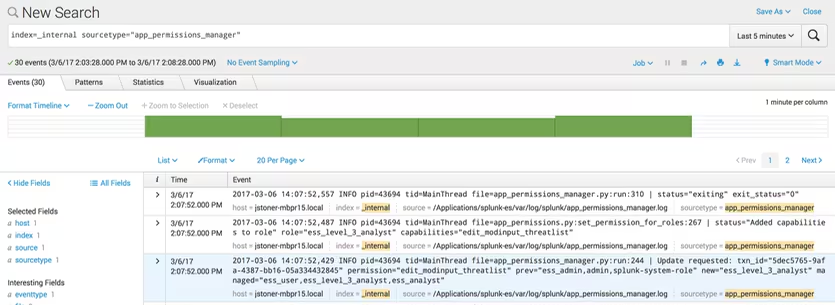
In the highlighted event, the permission edit_modinput_threatlist is added to the role of ess_level_3_analyst. The search to find this is as simple as searching the _internal index and the sourcetype=app_permissions_manager. Additional criteria such as the permission or role can be used to narrow down the events returned.
The ability to add capabilities to Enterprise Security provides a way for administrators to create additional roles specific to ES while maintaining a robust audit trail. If you need to refine roles within ES beyond the ess_analyst and ess_user role, consider using this as a primer to configure additional roles.
----------------------------------------------------
Thanks!
John Stoner
Related Articles

Predicting Cyber Fraud Through Real-World Events: Insights from Domain Registration Trends

When Your Fraud Detection Tool Doubles as a Wellness Check: The Unexpected Intersection of Security and HR

Splunk Security Content for Threat Detection & Response: November Recap

Security Staff Picks To Read This Month, Handpicked by Splunk Experts

Behind the Walls: Techniques and Tactics in Castle RAT Client Malware

AI for Humans: A Beginner’s Field Guide

Splunk Security Content for Threat Detection & Response: November 2025 Update

Operation Defend the North: What High-Pressure Cyber Exercises Teach Us About Resilience and How OneCisco Elevates It
