A Deeper Dive into TruSTAR Intel Workflows
TruSTAR's Indicator Prioritization Intel Workflows enable you to build data sets of Indicators with specific characteristics. For example, you might want to build up a data set of known bad Indicators to feed to your detection tool, triggering alerts faster while reducing false positives. And because TruSTAR supports multiple Intel Workflows, you can create a second data set that focuses on URLs, domains, and IP addresses and use that data set with your investigation tools to provide more context faster, saving both time and energy of your analysts.
There are three stages to a TruSTAR Intel Workflow:
- Sources: where you specify the intelligence sources you want to use.
- Transformations: where you filter the Indicators, based on what you want to do with the data set.
- Destinations: define what you want to do with the data set you’re creating. You can send the data to a TruSTAR Enclave or you can direct it to a third-party tool, using TruSTAR Workflow Apps.
Across those three stages, TruSTAR does the heavy lifting: collecting the data, cleaning it up, prioritizing it, and connecting it to Enclaves or other tools. It’s where things get interesting, so let’s dive in and take a look.
Collecting the Data
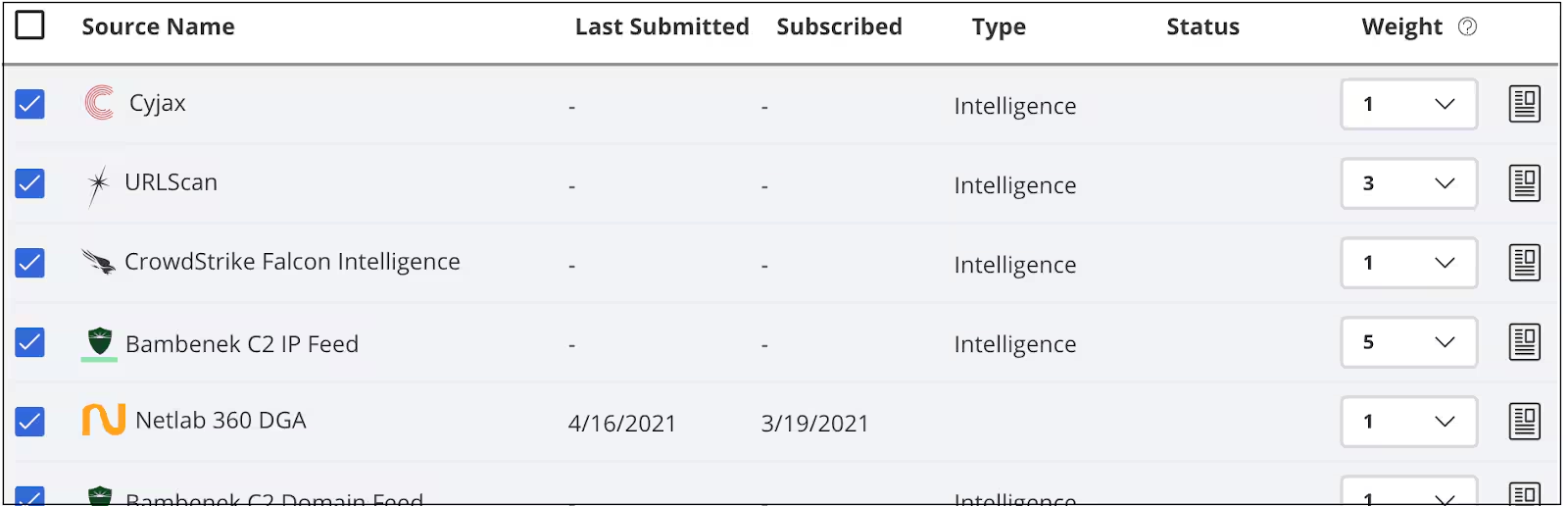
In this first part of the workflow, we bring in structured, semi-structured and unstructured data from intelligence sources that you specify. Each source, whether it’s a premium (subscription) feed or an open source feed, contains different Indicators, each with a score and perhaps other contextual information, depending on the source.
Preparing the Data
The next step in the workflow is to prepare the data by filtering it, mapping it and then normalizing it.
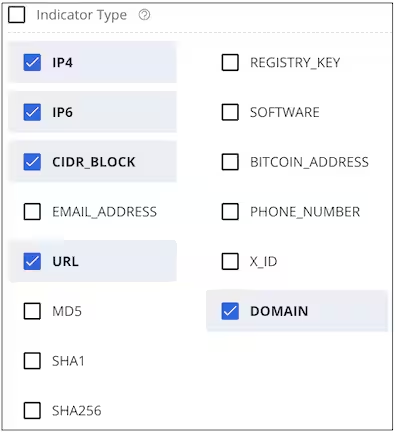
Filtering removes the types of Indicators you do not want in your data set. TruSTAR supports 14 types of Indicators but you may only want to use IP addresses, CIDR blocks, and URLs, for example. The Transformations page of the Indicator Prioritization page lets you specify which Indicators to keep and which to discard.
In the mapping step, we interpret the heterogeneous data coming from across different sources and map them to a generic indicator schema. Mapping also involves extracting necessary context and the score that the intelligence source has assigned to an Indicator.
Every intelligence source categorizes Indicators, scores, and attributes in their own specific way. The normalization step converts these multiple conventions into a single format that eventually will help with aggregation. Two specific normalizing operations are important to produce quality data: Indicator value and scores.
- Normalizing the Indicator value ensures that similar looking values are converted into a single value. For example, a URL might be handled differently by different sources: badurl.com or www.badurl.com or www[.]badurl[.]com. Normalization unifies these slightly different URLs into a single value of http://www.badurl.com/abcdefg
- Score normalization addresses the fact that each intelligence source uses its own scoring mechanism to indicate maliciousness of an Indicator. One source might use a numeric scale of 0-10 while a second source uses Low, Medium, or High, and a third source uses a numeric scale of 1-99. We map each of those scales to the TruSTAR normalized score of High, Medium, Low, or Unknown. For example, that numeric scale of 0-10 would map to TruSTAR as 0=Unknown, 1-3=Low, 4-7=Medium, and 8-10=High.
Prioritizing the Data
In this phase of the workflow, we aggregate Indicators, remove safe terms, and assign a final score.
Aggregation combines all the information about an Indicator into one item. Up to this point, each Indicator from each source held onto its normalized score and to any attributes that source provided, such as threat actors, MITRE ATT&CK tags, or text tags. Now, we take all that information and create a single Indicator that contains all that information, including which source provided what attributes.
When you set up an Indicator Prioritization Intel Workflow, you have the option to specify one or more Safelist Libraries that contain items your organization believes are not malicious. These terms can be wildcard terms, domains, private subnets and other observables. The aggregated Indicators that are generated from your workflows will be labeled safe and excluded from your aggregated indicators if they are present in the Safelist Library.
The final step in prioritizing the data is to assign the new Indicator a priority score based on the normalized score for each intel source and the context that we have associated with the score.
Connecting the Data
Once you’ve created your Indicator Prioritization Intel Workflow, TruSTAR runs periodically and produces an updated data set. You can direct that data set into a private Enclave in TruSTAR or you can send it directly to a third-party tool using one of our Workflow Apps.
If you’re like most security professionals, you’ll want to examine the data set to ensure it is producing the data most useful to you. TruSTAR uses Postman script to provide an easy way to view the data and then you can edit the workflow to change the output, if needed.
Automating the Workflow
As you can see, TruSTAR’s Indicator Prioritization Intel Workflow takes the complexity out of using multiple sources to create a high-fidelity data set that can be easily integrated into your security tools.
To learn more about Intel Workflows, check out our Knowledgebase articles or watch our video.
Related Articles

Predicting Cyber Fraud Through Real-World Events: Insights from Domain Registration Trends

When Your Fraud Detection Tool Doubles as a Wellness Check: The Unexpected Intersection of Security and HR

Splunk Security Content for Threat Detection & Response: November Recap

Security Staff Picks To Read This Month, Handpicked by Splunk Experts

Behind the Walls: Techniques and Tactics in Castle RAT Client Malware

AI for Humans: A Beginner’s Field Guide

Splunk Security Content for Threat Detection & Response: November 2025 Update

Operation Defend the North: What High-Pressure Cyber Exercises Teach Us About Resilience and How OneCisco Elevates It
