Introducing Splunk Federated Search
Platform Srinivas BobbaRapid digital transformation partnered with increased cloud adoption have resulted in organizations generating unprecedentedly large volumes of data. This data is stored in disparate data repositories due to organizational boundaries, data protection, and privacy laws (e.g. GDPR). Additionally, it is stored across environment types with some kept in the cloud and often historical data and other sensitive data types are kept in on-premise environments contributing to more data silos. So, how can organizations leverage data residing in these disparate data sources and glean insights from it? We’re excited to share that the Splunk Federated Search is now generally available starting in Splunk Cloud Platform 8.1.2103 and Splunk Enterprise 8.2.
What Is Federated Search?
Federated search provides the capability to execute a unified search across multiple Splunk environments (including Splunk Cloud and On-premise) providing a true federated search experience.
This includes the ability to:
- Run ad-hoc and scheduled searches
- Initiate searches from one Splunk environment to multiple Splunk environments
- Manage security requirements across environments with role based data access controls
- Leverage WLM to configure resources for federated searches
- Configure and setup with a self-service user interface (more on that below)
Federated search supports the following different configurations:
More importantly, with Splunk Enterprise 8.2, you can now search between your on-premise environment (SH) and Splunk cloud environment leveraging federated search. Federated search is a new capability that is distinct from hybrid search. Federated search addresses the limitations of hybrid search, allows you to run scheduled searches, enables you to search from on-premise search head (SH) to multiple Splunk cloud environments and better management of security permissions across environments with RBAC.
One of the frequently asked questions, how is this different from the legacy Data Fabric Search (DFS)? While the use cases are identical, federated search uses a different technology designed for Cloud experiences and seamless integration and doesn’t require the additional Spark infrastructure. Additionally, DFS is no longer available for purchase as of May 2020 and there is no support after October 2021.
Federated Search Can Be Configured and Run in Four Simple Steps
Before we go into details, let’s quickly define the key terms:
- FSH: Federated Search Head, the SH where the search is issued or originated
- RSH: Remote Search Head, the SH of remote Splunk deployment receiving the request from FSH
The below 4 steps can configured via a self-service UI:
- Service account creation on RSH
- Establish connection to Splunk remote deployment
- Setup Federated Index
- Run a Federated Search
The Splunk environments must be running a compatible Splunk version (see above supported configuration table) that supports federated search.
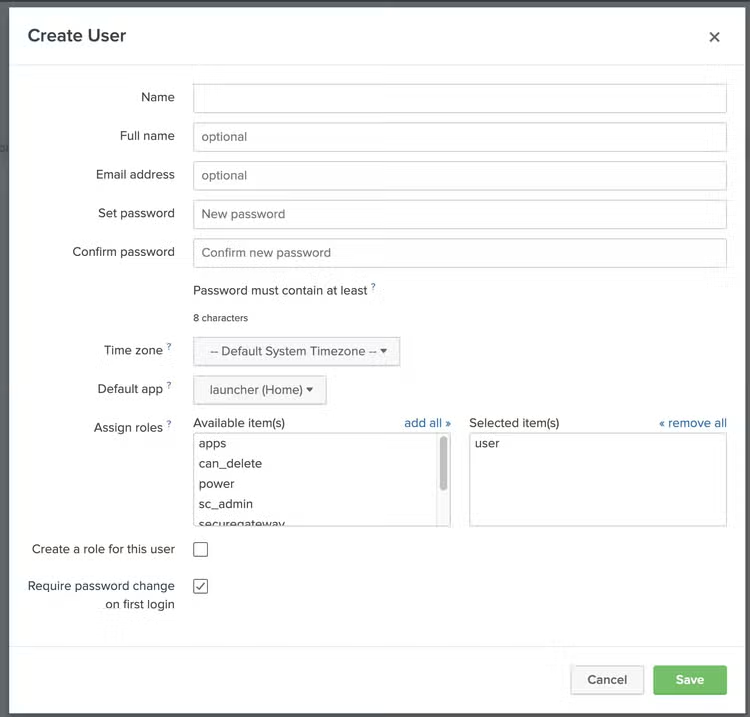
Step 1: Service Account Creation on RSH
Login to the Splunk SH (RSH) of remote deployment and create a service account through the UI.
This service account will be leveraged for communication between the FSH and RSH.
Access permissions to data can be managed at service account level.
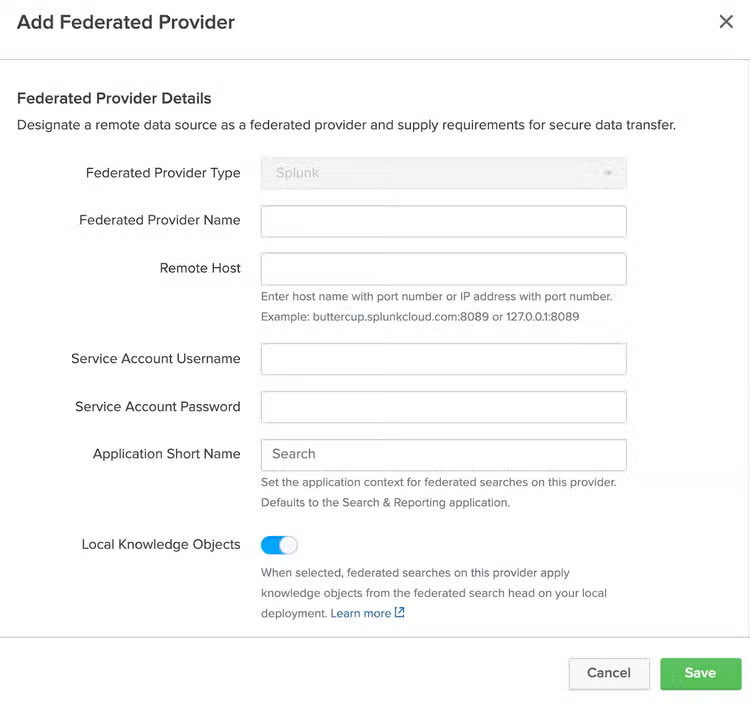
Step 2: Establish Connection to Splunk Remote Deployment
Login to the Splunk SH (FSH) and then create a connection through the UI.
This information on FSH helps make the connection to the remote Splunk environment.
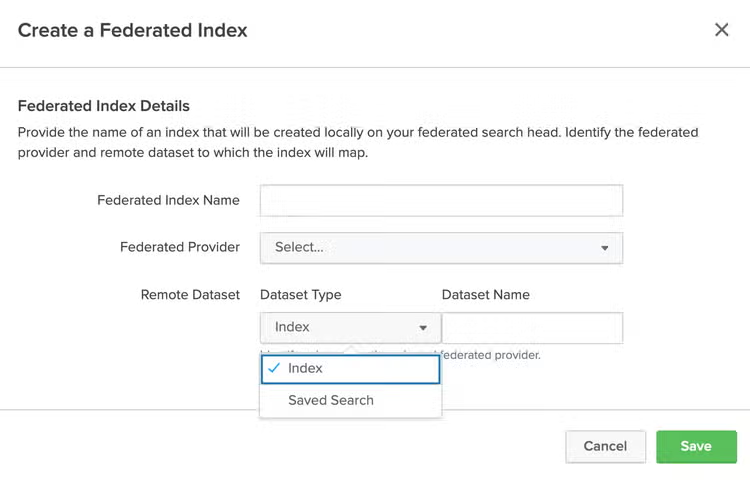
Step 3: Federated Index Creation
Login to the Splunk SH (FSH) and create a federated index on, that maps to a index or a saved search on the remote Splunk deployment.
Step 4: Run a Federated Search
To search federated indexes from the FSH, the search SPL must incorporate an explicit keyword federated: to run searches on the remote deployment as shown in below example.
- Example: search index = federated:remoteindex | stats count
Let’s take a quick look at a simple example scenario of searching between an On-premise Splunk environment and a Splunk Cloud environment. Let’s say the On-premise index name is indexlogs and Splunk Cloud index name is indexcloudlogs, now you want to combine results from these two environments to find the average of the values in the size field for each distinct value in the host field and you are searching from On-premise SH, all you need to do is as below
| union
  [search index=federated:indexcloudlogs]
  [search index=indexlogs]
| stats avg(size) BY host
That’s it folks, it’s as simple as the above four quick steps to federate your searches. Please try it out today and leave any feedback or suggestions on "Search Federation" on Splunk Ideas.
For an overview, listen to the Federated Search Tech Talk and for more detailed information, please refer to the Splunk Federated Search documentation.
Related Articles
Deep Learning Toolkit 3.6 - Automated Machine Learning, Random Cut Forests, Time Series Decomposition, and Sentiment Analysis

Announcing the Splunk SPL to SPL2 Converter