A Performance Analysis of Python WSGI Servers: Part 2
In Part 1 of this series, we introduced you to WSGI and the top 6 WSGI web servers. In this post, we’ll show you the result of our performance benchmark analysis of these servers. There are many production-grade WSGI servers, and we were curious as to how well they performed. To this end, we constructed a benchmark to test six of the most popular servers.
What About CGI and mod_python?
Before WSGI existed, the two primary methods of serving a python web application were CGI and mod_python. Both of these have fallen in their popularity in favor to WSGI because CGI applications are slower, as they spawn a new process for each request. Also, mod_python integrates with Python directly, which improves performance over CGI. However, it is only available for Apache and is no longer actively developed.
The Contestants
Due to time constraints, we limited this study to six WSGI servers. We tried to include servers that claimed to be fast but haven’t been prominently featured in benchmarks. Unfortunately, thismeant that there were many excellent choices that we simply didn’t have time to test. All the code for this project is posted on GitHub, and we’ll try to update the project with additional servers in the future.
- Bjoern describes itself as a “screamingly fast Python WSGI server” and boasts that is “the fastest, smallest and most lightweight WSGI server.” We created a small application, using most of the library’s defaults.
- CherryPy is an extremely popular and stable WSGI framework and server. This small script was used to serve our sample application through CherryPy
- Gunicorn was inspired by Ruby’s Unicorn server (hence the name). It modestly claims that it is “simply implemented, light on server resources, and fairly speedy.” Unlike Bjoern and CerryPy, Gunicorn is a standalone server. We instantiated it using this command. “WORKER_COUNT” was set to be twice the number of available of processors, plus one. This was based on a recommendation from Gunicorn’s documentation.
- Meinheld is a “high-performance WSGI-compliant web server” that claims to be lightweight. Based on the example listed on its website, we constructed this application.
- mod_wsgi is authored by the same creator as mod_python. Like mod_python, it is only available for Apache. However, it includes a tool called “mod_wsgi express” that transparently configures a minimal instance of Apache. we configured and used mod_wsgi-express with this command. To be consistent with Gunicorn (and in lieu of any official recommendation), we configured mod_wsgi to create twice as many workers as there are processors.
- uWSGI is a fully-featured application server. Generally, uWSGI is paired with a reverse proxy (such as Nginx). However, to best judge each server’s performance, I’ve tried only to use the bare servers (with mod_wsgi being the one notable exception). we followed mod_wsgi (and, by proxy, Gunicorn’s) configuration and created two workers for every processor available:
The Benchmark
To make the test as clean as possible, we created a Docker container to isolate the tested server from the rest of the system. In addition to sandboxing the WSGI server, this ensured that every run started with a clean slate.
Server
- Isolated in a Docker container.
- Allocated 2 CPU cores.
- Container’s RAM was capped at 512 MB.
Testing
- wrk, a “Modern HTTP benchmarking tool” performed the benchmarks.
- The servers were tested in a random order with an increasing number of simultaneous connections, ranging from 100 to 10,000.
- “wrk” was limited to 2 CPU cores not utilized by docker.
- Each test lasted 30 seconds and was repeated 4 times.
Metrics
- The average number of sustained requests, errors and latencies were provided by “wrk”.
- Docker’s stat tool provided the high CPU and memory watermarks.
- The highest and lowest numbers were discarded, and the remaining values were averaged.
- For the curious, we posted the full script on GitHub.
Results
All the raw performance metrics have been included in the project’s repository, and a summary CSV is provided. If you are more of a visual person, the CSV file has been graphed in a Google document.
Requests Served
This graph shows the average number of requests served; the higher the numbers, the better.
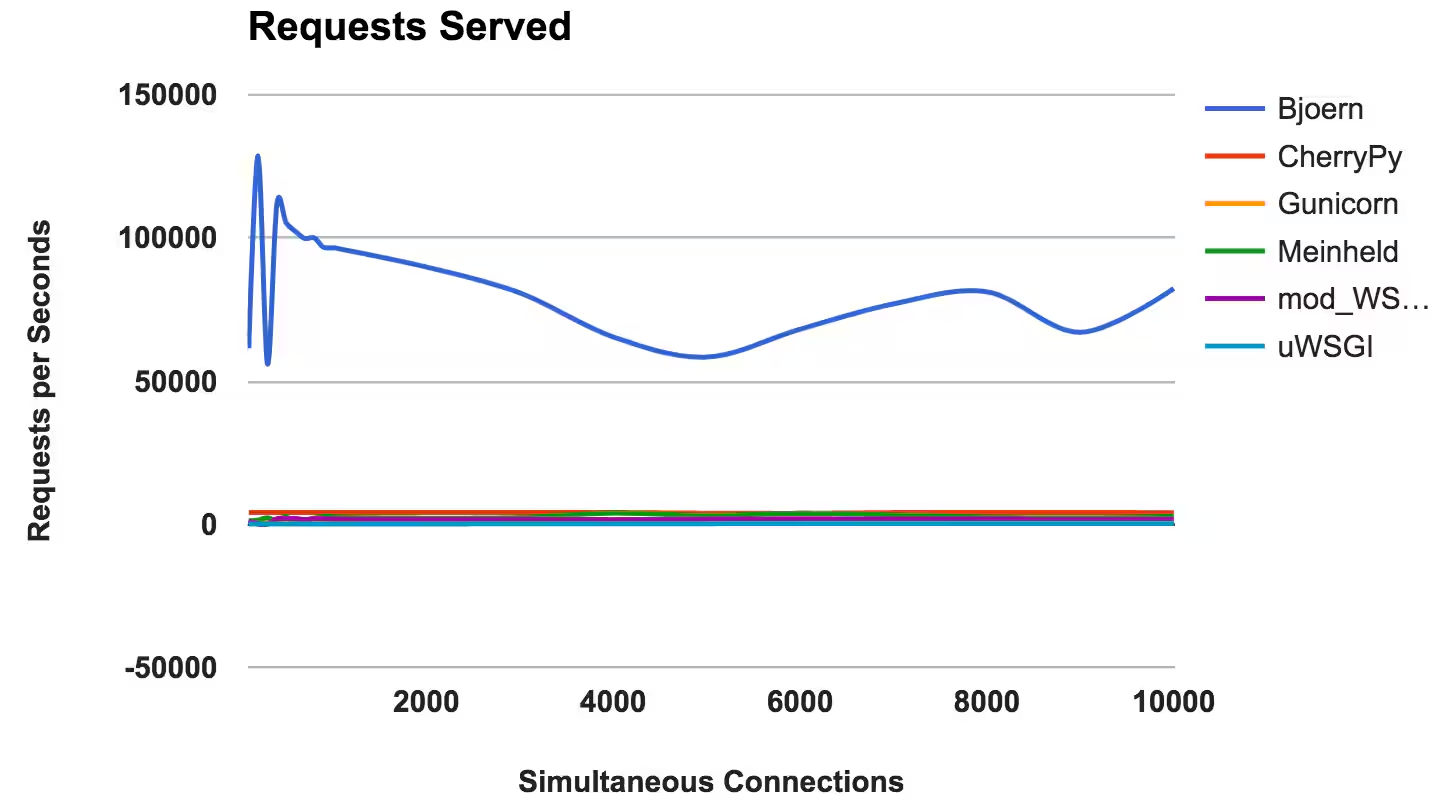
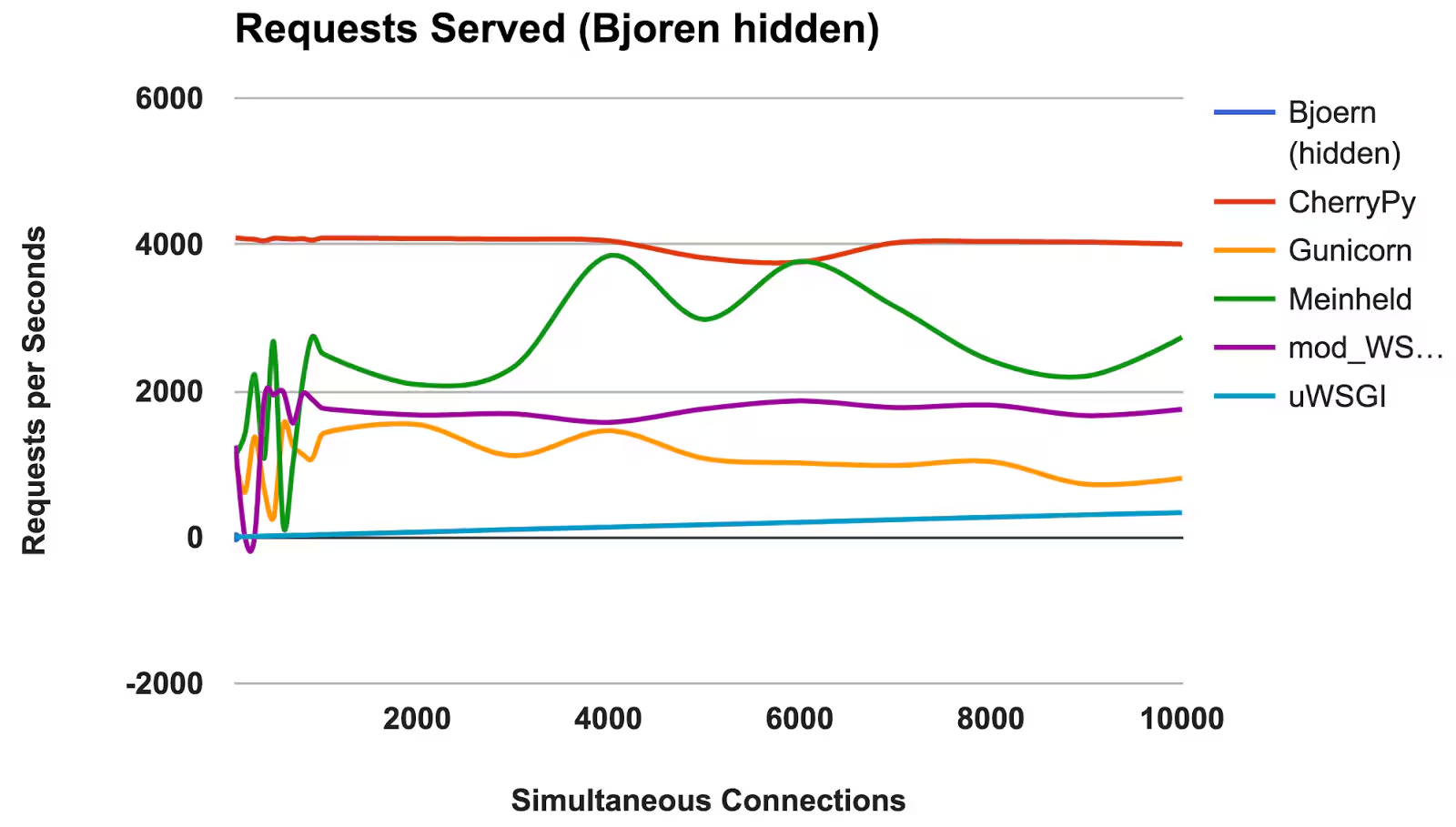
- Bjoern: The clear winner.
- CherryPy: Despite being written in pure Python, it was a top performer.
- Meinheld: Performed admirably, given the container’s meager resources.
- mod_wsgi: Wasn’t the fastest, but performance was consistent and adequate.
- Gunicorn: Good performance at lower loads but struggled at higher concurrences.
- uWSGI: Disappointedly poor results.
WINNER: Bjoern
Bjoern
In the number of sustained requests served, Bjoern is the obvious winner. However, given the numbers are so much higher than its competitors, we are a bit skeptical. We are not sure if Bjoern is really that mind-numbingly fast or if there is an error in the test. At first, we were testing the servers alphabetically, and we thought that Bjoern was gaining an unfair advantage. However, even after randomizing the server execution order and retesting, the output remained the same.
uWSGI
We were disappointed and by uWSGI’s poor results. We expected it to be one of the top performers. While testing, we noticed uWSGI printing logging information to the screen, and we initially attributed its lack of performance to the extra work that it was doing. However, even after introducing the “–disable-logging” option, it still is the slowest performer.
As mentioned in uWSGI’s introduction, it is usually paired with a reverse proxy, such as Nginx. However, we are not sure this could account for such a large difference.
Latency
Latency is the amount time elapsed between a request and its response. Lower numbers are better.
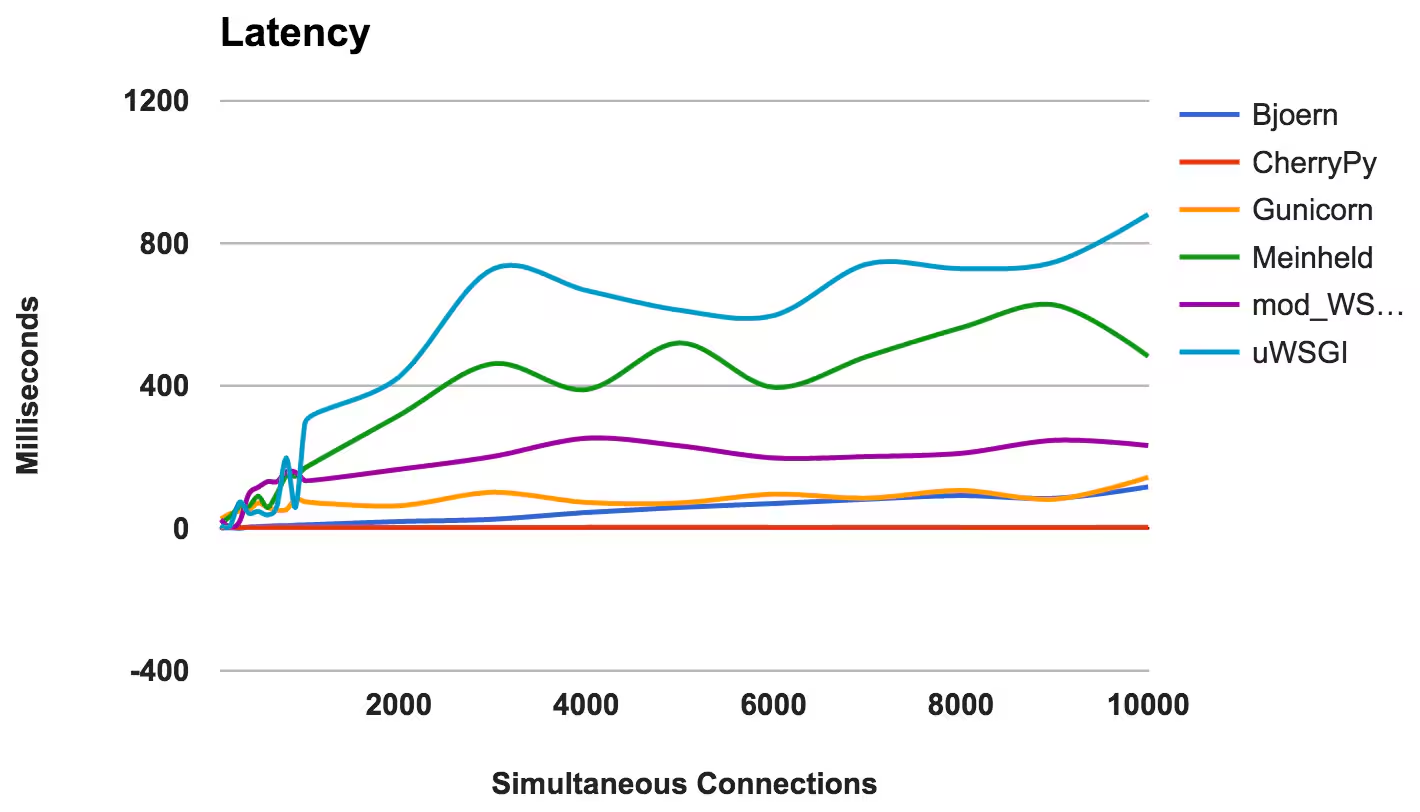
- CherryPy: Performed extremely well, consistently serving requests in under 3 milliseconds.
- Bjoern: Overall low latencies, but performed better at lower concurrences.
- Gunicorn: A consistent, good performer.
- mod_wsgi: An average performance, even at higher concurrences.
- Meinheld: Overall, acceptable performance, but it struggled as simultaneous connections increased.
- uWSGI: Again uWSGI placed last.
WINNER: CherryPy
RAM Usage
This compares the memory requirements and “lightness” of each server. Lower numbers are better.
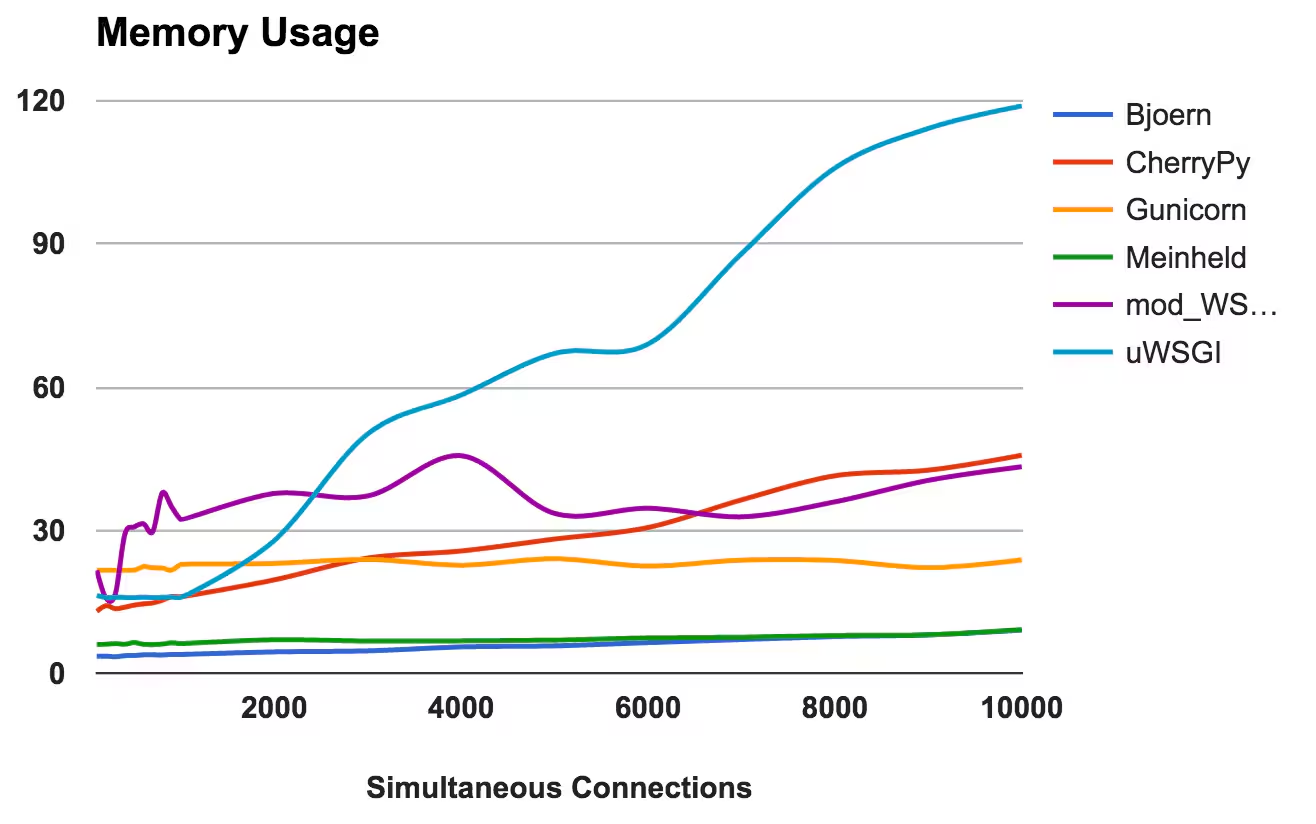
- Bjoern: Extremely lightweight, only requiring about 9MB of RAM to handle 10,000 concurrent requests.
- Meinheld: Tied with Bjoern for the most lightweight.
- Gunicorn: Was able to handle increased loads with barely perceptible memory increases.
- CherryPy: Initially needed very little memory, but its usage steadily increased with its load.
- mod_wsgi: At lower levels, it was one of the more memory intensive, but stayed fairly consistent.
- uWSGI: Clearly the version we tested against has memory issues.
WINNERS: Bjoern and Beinheld
Errors
For a web server, an error is when a server drops, aborts or times out. Lower is better.
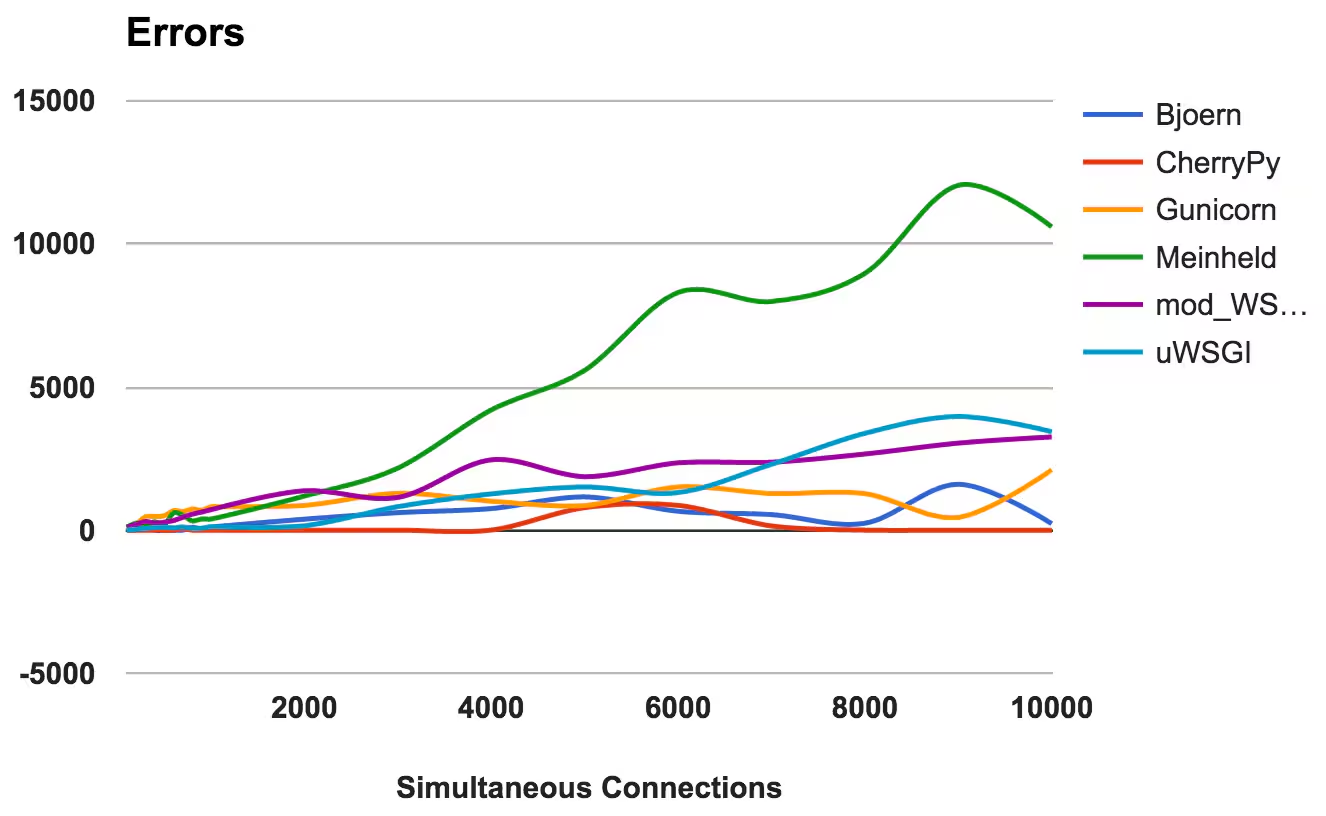
For each server, we calculated the ratio of total requests against the number of errors:
- CherryPy: A near 0 error rate, even at high currencies.
- Bjoern: Encountered errors, but these were offset by the number of requests it served.
- mod_wsgi: Performed well with an acceptable 6 percent error rate.
- Gunicorn: Struggled at higher loads with a 9 percent error rate.
- uWSGI: Given the low number of requests that it served, it ended up with a 34 percent error rate.
- Meinheld: Fell apart at higher loads, throwing over 10,000 errors during the most demanding test.
WINNER: CherryPy
CPU Usage
High CPU usage is not good or bad, as long as a server performs well. However, it yields some interesting insights into how the server works. Since two CPU cores were used, the maximum usage possible is 200 percent.
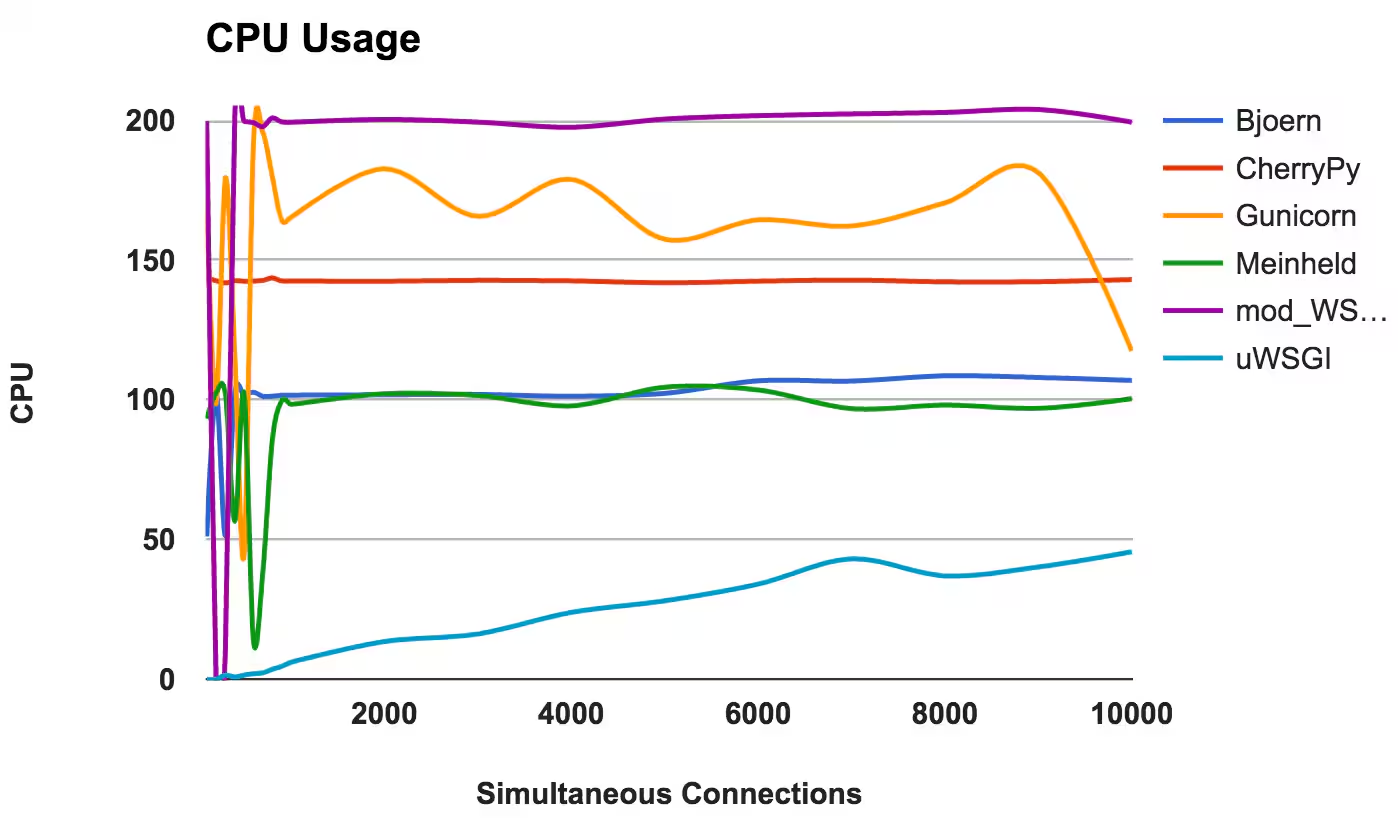
- Bjoern: A single-threaded server, evidenced by its consistent 100 percent CPU usage.
- CherryPy: Multi-threaded but stuck at 150 percent. This might be due to Python’s GIL.
- Gunicorn: Uses multiple processes with full CPU utilization at lower levels.
- Meinheld: Single-threaded server, with similar CPU utilization as Bjoern.
- mod_wsgi: Multi-threaded server with all cores fully pegged the entire time.
- uWSGI: Very low CPU usage at lower levels, never fully gets maxed out. Future evidence that something is misconfigured with uWSGI.
WINNER: None, since this is more of an observation in behavior than a comparison in performance.
Conclusion
The benchmark’s results surprised us in a couple of different ways. First, we were blown away with Bjoern’s performance. However, we were also a bit suspicious at the discrepancy between it and the next highest performer. We need to investigate this further and would also love to hear your thoughts if you have any insight into our approach. Secondly, we were sorely disappointed with uWSGI. Either we misconfigured uWSGI, or the version we installed has some major bugs, but we’d also love to open this up for discussion.
To summarize, here are some general insights that can be gleaned from the results of each server:
- Bjoern: Appears to live up to its claim as a “screamingly fast, ultra-lightweight WSGI server.”
- CherryPy: Fast performance, lightweight, and low errors. Not bad for pure Python.
- Gunicorn: A good, consistent performer for medium loads.
- Meinheld: Performs well and requires minimal resources. However, struggles at higher loads.
- mod_wsgi: Integrates well into Apache and performs admirably.
Sources used for research and inspiration, but not linked within in the article:
* http://nichol.as/benchmark-of-python-web-servers
* https://docs.python.org/2/howto/webservers.html
Related Articles
What the North Pole Can Teach Us About Digital Resilience

The Next Step in your Metric Data Optimization Starts Now

How to Manage Planned Downtime the Right Way, with Synthetics

Smart Alerting for Reliable Synthetics: Tune for Signal, Not Noise

How To Choose the Best Synthetic Test Locations

Advanced Network Traffic Analysis with Splunk and Isovalent

Conquer Complexity, Accelerate Resolution with the AI Troubleshooting Agent in Splunk Observability Cloud

Instrument OpenTelemetry for Non-Kubernetes Environments in One Simple Step