Advanced Network Traffic Analysis with Splunk and Isovalent
Observability Navtej SinghThis blog was co-authored by Jeremy Colvin, Senior Technical Marketing Engineer at Isovalent.
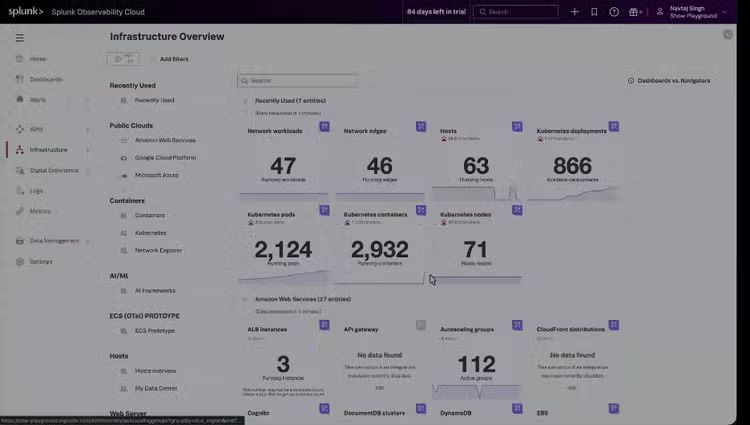
Visualize your cluster traffic in real time. The Network Map links workloads, namespaces, and services, so operators can instantly identify unexpected connections or dropped flows. Network blind spots quickly become bottlenecks for performance, security, and compliance. Traditional tools often stop at packet capture or flow logs, leaving operators struggling to correlate low-level data with services and workloads.
That’s where Splunk Observability with Isovalent shines a light on the dark spots of your network. By combining Isovalent’s eBPF-based runtime visibility with Splunk’s analytics and visualization platform, we’re re-launching Network Explorer to give you end-to-end observability of network traffic from Isovalent’s Tetragon & Cilium, from kernel to cluster to service.
This blog shows off the eBPF-driven advanced capabilities enabling Splunk and Isovalent to deliver unparalleled network observability across environments, offering a deeper set of contexts into all types of workload traffic (TCP, UDP, DNS, and more).
For an even closer look, check out the hands-on lab, Isovalent Runtime Security: Splunk Integration. This gold-badge lab demonstrates how Isovalent and Splunk work together to provide compensating runtime controls and advanced threat detection for cloud-native environments.
What’s New in Splunk Network Explorer?
Kubernetes-Aware Network Map
Visualize your cluster traffic in real time. The Network Map links workloads, namespaces, and services, so operators can instantly identify unexpected connections or dropped flows.
Protocol Dashboards (DNS, TCP, UDP, HTTP)
Go deeper into workload communication patterns:
- DNS: See resolution errors and query volume.
- TCP/UDP: Track connection attempts, resets, and retransmits.
- HTTP: Understand request success rates and response codes.
Infrastructure Health with Cilium Metrics
Beyond flows, you can now ingest Isovalent datapath and policy metrics into Splunk. This gives you visibility into packet forwarding, policy enforcement, and cluster networking health — essential for both SREs and security engineers.
Workload Deep-Dives
Drill down by namespace, service, or pod to trace specific connections, uncover bottlenecks, and validate compliance requirements.
Why Splunk + Isovalent?
This is a brief overview before we dive deeper into the technical implementation and dashboards.
Isovalent’s Runtime Security is already a powerful observability engine. But when combined with Splunk Observability Cloud, it becomes more than raw metrics.
Single destination for insights from infrastructure health to application behavior. With Splunk and Isovalent, customers easily observe everything from the underlying health of Kubernetes clusters and cloud infrastructure to the nuanced behavior of microservices.
Correlated across signals that combine network data with logs, traces, and metrics for faster root-cause analysis. Go beyond siloed data. These correlated insights make it easier to pinpoint root causes of incidents (whether the issue is rooted in the network, application code, or infrastructure layer), enabling faster and more accurate troubleshooting.
Enterprise-grade scale with Splunk’s analytics and alerting let you monitor thousands of pods and flows without losing signal in the noise. Even as your environment grows, you maintain the clarity needed to detect anomalies, spot performance bottlenecks, and ensure compliance, without losing signal in the noise.
Isovalent’s network observability provides deep insights into inbound and outbound network connections made and received by processes, without the implementation of complex and costly, sidecar-based, service mesh technologies.
Let’s review some of the use cases Network Explorer addresses:
Who Is Talking to Who in My Cluster?
Real-time Kubernetes Traffic Visualization & Anomaly Detection
Network Map powered by Tetragon metrics (Runtime Security use-case)
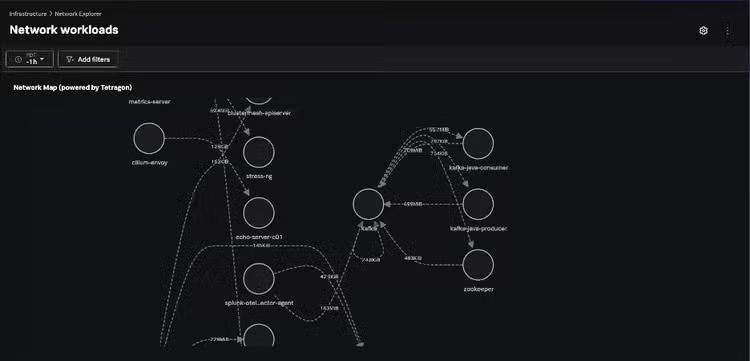
Tetragon collects real-time flow data directly from the Linux kernel via eBPF, associating every network connection with Kubernetes metadata: pod, namespace, service, and even process binary. In Kubernetes, there is no link between IP address and workload, so a real-time view into which process is using which ip/port addresses that gap in network-to-workload association.
This gives true end-to-end visibility of “who is talking to whom” in your cluster, bridging the gap between infrastructure-level traffic and application/service context. Security and operations teams can instantly spot unexpected connections, lateral movement, or anomalous traffic patterns. Tetragon records successful connections and failed and dropped connection attempts. Each flow is tied to the specific process (binary name, arguments, PID) and container image hash, enabling forensic-grade tracing of activity.
eBPF programs run on every Kubernetes node, capturing flow events (connect, accept, close, drop), then enriching them with real-time Kubernetes and process metadata before exporting them to Splunk. This is done with minimal overhead and without sidecars or code instrumentation.
Inside Splunk Observability, these enriched flow metrics power an interactive Network Map that visualizes live communication between services, pods, and processes. This unified, real-time view allows SREs and SecOps to detect unauthorized connections, investigate performance degradations, and trace issues seamlessly from the kernel to the application layer — all within the Splunk Observability experience.
How To Link TCP Latency and Retransmissions to Application (Mis)Behavior?
Pinpointing TCP Performance Bottlenecks & Application Causes
TCP Protocol Dashboard
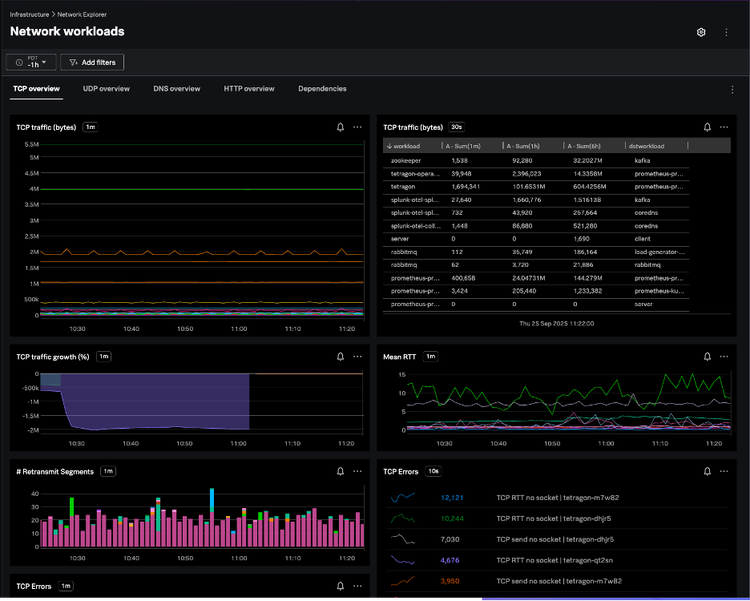
Reliable applications start with healthy TCP. Within Splunk Observability, operators can quickly visualize service-to-service latency, retransmission storms, or failed connection attempts—all enriched with process-level context to pinpoint not just where a problem occurred, but which workload or binary caused it.
Powered by Isovalent’s Tetragon, the TCP Protocol Dashboard surfaces real-time metrics from the Linux kernel, including SYN counts, connection attempts, resets, retransmits, windowing behavior, and packet loss. Each flow is automatically enriched with source and destination IPs, ports, pods, namespaces, and processes, providing full context across every layer of communication.
By measuring per-flow round-trip times (RTT) and highlighting retransmit or timeout anomalies, the dashboard helps identify whether degradations stem from the network path or from the application itself. Built on Splunk’s scalable metrics platform, this view delivers continuous TCP health monitoring with second-level granularity and zero instrumentation overhead.
The result: a live, kernel-to-service view of transport-layer performance that enables teams to detect microbursts, troubleshoot slow connections, and validate network reliability—all directly within Splunk Observability.
What Is This Specific Workload Doing on the Network?
Granular per-workload process-level network activity.
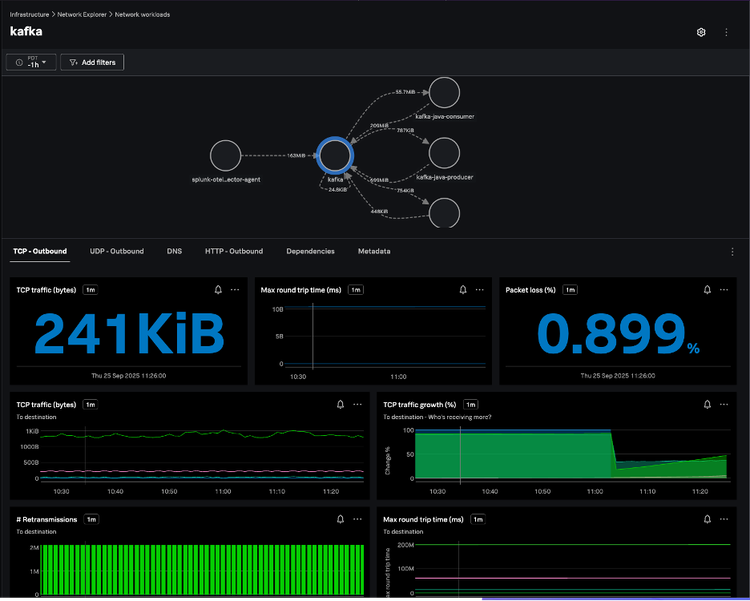
Isovalent delivers per-process and per-pod network observability, showing which binaries initiate which connections and tying network activity to execution context such as process, arguments, and container image.
Within Splunk Observability, these insights come to life through the Network Explorer, where every workload becomes an interactive node in a real-time topology. In the example above, we’re investigating a Kafka workload’s TCP health over the past hour. The map highlights its communication with java-consumer and java-producer workloads, along with key metrics like packet loss, round-trip time, and retransmissions — all captured through eBPF at the kernel level and surfaced instantly in Splunk.
Because this is a workload-centric view, users can move fluidly across tabs for UDP, DNS, HTTP, or dependency data — each view enriched with Kubernetes and process metadata. The result is a complete, live picture of what each workload is doing on the network and how it’s performing, all within the familiar Splunk Observability experience.
Why Is It Always DNS!?
Troubleshooting DNS issues.
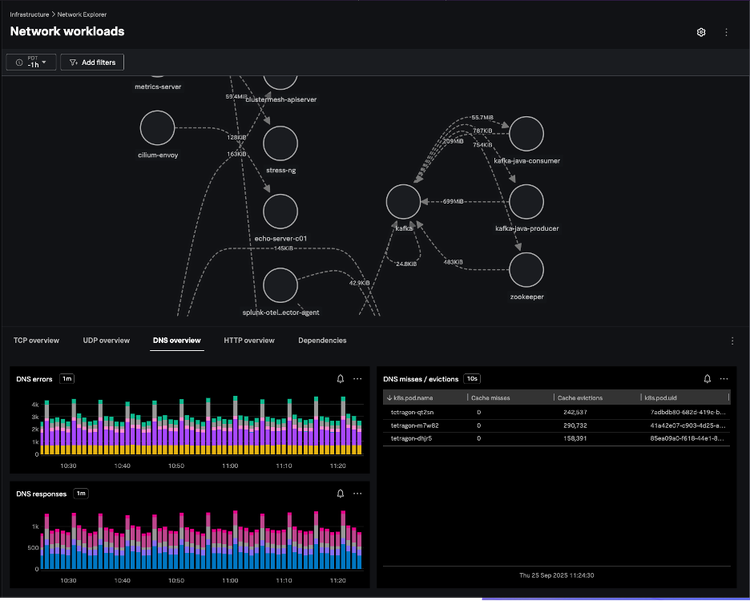
DNS issues can silently degrade application performance or break service connectivity. With Tetragon-powered DNS metrics in Splunk Observability, teams can instantly identify slow resolutions, repeated lookup failures, or unexpected external queries—all mapped back to the originating workload, pod, or process.
In the DNS Overview dashboard, every query and response is captured in real time, showing fully qualified domain names, response codes, latencies, and the exact service initiating the request. The view highlights DNS error rates, response distribution, and miss/eviction patterns across namespaces, helping SREs and platform teams quickly distinguish between upstream resolver issues and workload-level misconfigurations.
Consider this approach against a typical scenario where an application starts experiencing intermittent connection failures to an external service. In an environment with legacy tooling, you might start by checking application logs, then perhaps dig or nslookup from the host, and eventually resort to tcpdump to capture DNS traffic. This process is often manual, time-consuming, and lacks the deeper context about which specific process within a pod initiated the problematic query.
Because this data is collected through eBPF directly from the kernel and visualized in Splunk Observability, it scales effortlessly with cluster size while maintaining near-zero overhead. The result is a single, high-fidelity lens to monitor, validate, and troubleshoot DNS behavior across Kubernetes environments—without additional instrumentation or sidecars.
What’s Happening With My UDP Traffic?
Monitoring UDP health & detecting anomalies
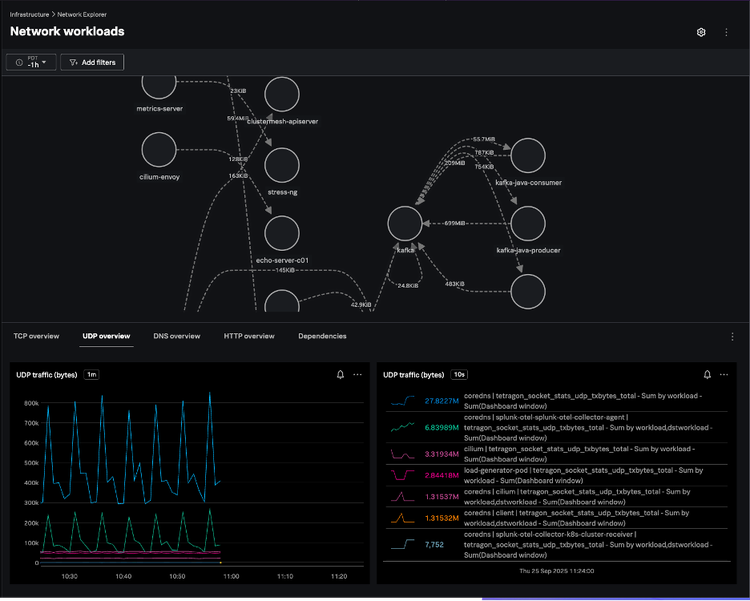
UDP is at the heart of DNS, service discovery, and many custom application protocols—but its connectionless nature makes it notoriously difficult to monitor. With Tetragon-powered UDP telemetry surfaced directly in Splunk Observability, teams gain real-time visibility into every packet sent or received across workloads, namespaces, and nodes.
In the UDP Overview dashboard, users can track traffic volume, packet errors, and send/receive activity per workload or service. Each flow is automatically enriched with Kubernetes metadata—source and destination pods, namespaces, and processes—making it easy to isolate misbehaving applications or detect sudden traffic anomalies.
Because this data is captured at the kernel level and visualized live in Splunk Observability, operators can quickly identify dropped packets, protocol misuse, or UDP-based denial-of-service patterns, all without additional instrumentation. The result: continuous, high-fidelity UDP monitoring that feels native to your observability workflow.
Learn More
Head over to voc.splunk.com to sign up and try it out now!
Watch our on-demand webinar now: Lighting Up the Dark Spots of Your Network.
Related Articles

Operationalizing HashiCorp Vault: Introducing a New Splunkbase App to Monitor Vault

DORA, Operational Resilience and Intelligent Observability