Hashing in Cryptography Explained: How It Works, Algorithms, and Real-World Uses
Learn Laiba SiddiquiKey Takeaways
- Hashing is a one-way process in cryptography that transforms data into a fixed-length code, making it secure and nearly impossible to reverse-engineer.
- Modern hash algorithms like SHA-256 and SHA-3 are essential for safely storing passwords, verifying file integrity, and securing blockchain technology.
- To maintain security, always use up-to-date hash functions, implement salting for passwords, and avoid outdated methods like MD5 and SHA-1
Hashing takes your data (like a password or file) and converts it into a fixed-length code that can’t be reversed. This makes it nearly impossible for attackers to figure out what the original data was, even if they steal the hash.
In this article, I’ll explain hashing in detail, including its working principles, applications, the algorithms behind it, and how to apply it correctly.
Hashing in cryptography
Hashing is a method that takes any type of data, such as a word, a file, or even a full message, and converts it into a short, fixed-length string of letters and numbers. This result is called a hash code.
You can think of a hash like a digital fingerprint. Like every person has a unique fingerprint, every data gets a unique hash. If the data changes (even a little), the hash code changes completely.
Let's say you type the word: “hello123”
Now the hash function converts this string into a unique string of characters. And the result would look something like this: “f30aa7a662c728b7407c54ae6bfd27d1”

Now, if you make even a tiny change and type: Hello123 (capital “H”). The new hash looks completely different: “d0aabe9a362cb2712ee90e04810902f3”
Even though you only changed one letter, the entire hash changed. This is called the avalanche effect.
Here are a few important rules that hashing follows in cryptography:
- One-way: Once data is converted into a hash, it becomes difficult to trace its original source.
- Same input, same hash: If you give the same data to the hash function (like typing the same password), it will always create the exact same hash.
- Tiny changes = totally new hash: Even changing one letter in the input gives you a totally different hash.
- Hard to fake: Just like fingerprints, it’s impossible for two different inputs (like different files or passwords) to produce the same hash.
Hashing vs. encryption
A lot of people confuse hashing with encryption. But they are not the same:
- Encryption is a two-way process. You can hide the data by encrypting it. Later, you can decrypt it using a special key to retrieve the original information.
- Hashing, on the other hand, is a one-way process. You can hash data but can’t reverse it. Once it’s converted into a hash, there’s no key or way to retrieve the original data.
For example, if you want to keep a message private and don’t want anyone else to read it, encrypt it. That way, only the person with the key can unlock and read it.
You’ve probably seen the end-to-end encryption option on WhatsApp. That means that only you and the person you’re talking to can read the messages. Not even WhatsApp can see them.
However, if you want to ensure that a particular file doesn’t get compromised, hash it. That way, you can check if it’s been changed without knowing what the original looked like.
For example, I used 7-Zip to calculate the SHA-256 hash of a file named ubuntu-24.04.2-desktop-amd64.iso. Here’s how:
- Open the 7-Zip File Manager from the start menu
- Right-click on the file you want to hash
- Choose CRC. Then I click on SHA-256 options
7-Zip scanned the file and created this unique code:

This feature is not built into the file. The tool reads the file’s contents and generates the hash for you.
You can now compare this hash with the one published on Ubuntu’s official website. If they match, the file is safe. If not, the file may have been damaged or altered.
Hashing in the real world
Let’s explore some of the top ways hashing is used in real-world practices:
Storing passwords
When you create a password for a website, the website usually doesn’t store your real password. Instead, it stores the hash of your password. So, when you log in later, the system hashes the password you type and compares it to the hash it saved. If they match, you are logged in. If not, access is denied.
Meta’s Facebook, for example, doesn’t store your real password. Instead, they hash and salt your passwords with a tool named “scrypt.” This means your password is converted into a scrambled version that’s very hard to reverse, and even Facebook employees can’t see what it is.
The good thing is, even if a hacker hacks their internal systems and steals the password database, they still won’t see your actual password. They’ll only see the hashed codes, which are very hard to crack.
Note: Not all systems use hashing; some use encryption, like Google password manager. It encrypts your username and passwords with a secret key.
Checking file safety
Hashing is commonly used to check if a file has been changed or tampered with. When you download software or system files, the website often provides a checksum (a hash value generated from the original file).
Checksums are widely used in IT when downloading large or critical files like operating system images. They ensure the download is clean and trustworthy.
For example, I downloaded the Ubuntu Desktop from the official website which provides a SHA256 checksum alongside the ISO file. After it's downloaded, I can generate the checksum on my command prompt (on Windows) using a tool like certutil and compare it to the official one.
- If the hashes match, the file is safe and unchanged.
- If they don’t match, the file may be corrupted or altered.
I compared and got the same checksum, which means my file is not corrupted.
Verifying with digital signatures
Hashing is also used in digital signatures to ensure a message or file hasn’t been altered.
Before a message is sent, the system uses a hash function to turn the message into a hash code. Then, that hash is digitally signed using the sender’s private key. This creates a digital signature.
For example, when you download Firefox from Mozilla’s official archive, you’ll find two extra files in the same folder as the installer:
- SHA256SUMS file contains hash values for the installer files.
- SHA256SUMS.asc files has the digital signature of that hash file.

These files help users verify the integrity of the download. If someone tampered with the installer (like adding malware), the hash would no longer match. The digital signature confirms that the hash file itself hasn't been tampered with.
This process makes sure that what you downloaded is safe, unchanged, and really from Mozilla not from a hacker or a fake copy of the site.
Applying blockchain in cryptocurrencies
Hashing is also a big part of blockchain (like in Bitcoin). Each block of data in a blockchain has its own hash and includes the hash of the block before it. This links all the blocks together.
If someone tries to change one block, the hash changes, and that breaks the chain. That’s how blockchains stay secure and trustworthy.
Imagine someone tried to change a past Bitcoin transaction to claim they received 1 bitcoin instead of 10. As soon as they do that, the hash for that block changes, and the rest of the chain no longer matches.
To make the fake change work, they’d have to modify all the blocks that follow it, which would require a substantial amount of compute power.
That’s why it’s nearly impossible to cheat in blockchain. Even a small change can break the entire chain.
Cryptographic hashing algorithms in cybersecurity
Hashing is not a stay-same-always process. There are several algorithms and each is different. So, let’s see what these are and how they differ.
Message digest 5
MD5 was once a very popular hashing algorithm due to its speed and simplicity. It creates a 128-bit hash and is commonly used for checking file integrity or verifying that files hadn’t changed during a transfer.
However, over time, serious flaws were found, especially its vulnerability to collisions, which means two different data points can end up producing the same hash.
For example, we can create two different PDF files that have the same MD5 hash:
- A safe one
- A harmful one
A GitHub project called universal-pdf-md5-collision shows exactly how two readable PDFs can be made to collide, proving MD5 is unreliable for verifying file authenticity.
That’s why MD5 is now considered outdated and is primarily used in non-security tasks, such as basic checksums or in legacy systems.
Secure hash algorithm 1
SHA-1 was developed to be stronger than MD5. It produces a longer, 160-bit hash and was widely used for authenticating passwords, file verification, and digital signatures.
I used an online tool to create the SHA-1 hash code for the string “hello.” Here’s how it looks:
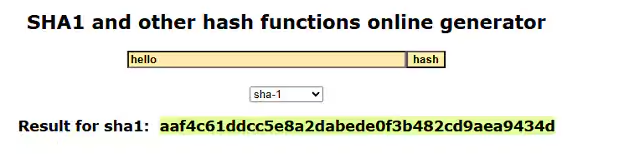
Git also used SHA-1 to identify commits and track changes in code repositories. But it has now been updated to a more secure algorithm (SHA-256).
Over time, like MD5, SHA-1 was eventually found to be weak.
Google and the CWI Institute in Amsterdam publicly demonstrated a collision attack against SHA-1, known as the “SHAttered” attack, where two different PDF files produced the same SHA-1 hash, which proves that this algorithm is also no longer collision-resistant.
That’s why it’s now considered outdated and is no longer recommended for anything involving sensitive or secure data.
Even Microsoft once used SHA-1 in software updates and Windows file signatures, but they officially stopped supporting it in 2021 due to security concerns.
Secure hash algorithm 2
SHA-2 is a group of hashing algorithms, with SHA-256 and SHA-512 being the most common. These algorithms are much stronger and widely used in digital signatures and cryptocurrency.
For example, Bitcoin uses SHA-256 for its proof-of-work algorithm, which maintains the integrity and security of transactions on its blockchain.
While it’s slower than MD5, it’s highly resistant to attacks and is considered a reliable choice for almost all cybersecurity needs.
In fact, SHA-512 offers an even longer hash, which is particularly helpful in higher-security environments, although it requires more system resources.
Secure hash algorithm 3
SHA-3 is the latest in the SHA family. It was created as a backup in case weaknesses were ever found in SHA-2. It works differently from SHA-2 internally:
- SHA-2 employs the Merkle–Damgård construction, which renders the hash function collision-resistant.
- SHA-3 uses the Keccak sponge construction, which absorbs the entire message into a large internal state, then gives the hash.
Even though it’s just as safe, it hasn’t been widely adopted yet because SHA-2 is still doing its job well. Still, SHA-3 is a great choice for future systems or as a second layer of protection.
How to choose the right hash algorithm
When choosing a hash function (also called a hash algorithm), think about what you need more: speed or security.
If you want to check something quickly (like making sure a file doesn’t change), then speed must be your priority. However, older hash functions like MD5 or SHA-1, although they’re fast, are no longer considered safe because they can produce the same hash for different data.
In 2024, a joint research team (UC San Diego, CWI Amsterdam, BastionZero) published Blast‑RADIUS (CVE‑2024‑3596). They demonstrated that hackers in the middle of the network could trick the system into letting them in (without knowing the password) by using a fast MD5 trick.
So, since hackers can break them, it’s better to avoid.
To keep data safe, like protecting passwords or securing important information, you should choose a stronger hash function like SHA-256 and SHA-3. They take a little more time to run because they do more complex calculations to keep your data secure.
For example, if MD5 requires one step to create a hash, SHA-256 may require three or four steps. That means it takes a few extra milliseconds.
And if you want something secure and fast at the same time, use SHA-512 or BLAKE2. They provide strong protection without slowing down the process.
Best practices for secure hashing
Here are some best practices to make hashing as secure as possible.
- Avoid outdated hash functions like MD5 or SHA-1.
- Always hash passwords before saving them to your database. If a hacker gets in, they’ll only find hashed data instead of real credentials.
- A salt is a random value added to each password before hashing. This makes every hash unique, even for users with the same password, and protects against rainbow table attacks.
- Regularly audit and update your systems to use the latest recommended hashing algorithms.
Common hashing mistakes
Hashing makes your data safe and secure, but it can go wrong if not used properly. Here are some common mistakes people make and how to avoid them:
Storing hashes with the original data
If you store the original data and its hash in the same place, you reduce the security. An attacker who gains access to that location gets both the hash and the data it's supposed to protect, making it easier to test or manipulate.
To avoid this, store hashes separately from the original data. Use different storage systems, apply access controls, and limit who can access each part.
This adds an extra layer of protection and makes attacks much harder.
Forgetting to update your hashing methods
Security changes over time. What’s strong today can become weak tomorrow. If you continue to use outdated methods, your data may be at risk.
So, stay updated. Stay informed about security news and update your hashing algorithms as needed.
Start hashing what’s important
If you’re storing user passwords or distributing files, make securing them your top priority. Switch to a secure hash function like SHA-256 or BLAKE2 and implement salting where necessary.
FAQs about Hashing in Cryptography
Related Articles

Network Security Controls: Preventive, Detective, and Corrective Measures

Is Blockchain Dead? No. Is Web3 Dead? Maybe.