What Is DNS? Domain Name Service, Explained
Domain Name Service (DNS) is a foundational backbone for internet communications. Think of DNS as the Internet’s phone book or contact list.
Domain Name Service allows users, devices, and applications to find and communicate with each other by entering user-friendly URLs (ex., splunk.com) instead of using hard to remember IP addresses such as 192.168.1.1. DNS simplifies the process of finding other internet resources.
Let’s look at the simple yet complicated world of DNS, its functions, types of uses, and its role in enabling and securing digital communications.
How does DNS work?
The DNS protocol simplifies and enables communication between internet devices (hosts) and clients. For example, I can type this URL into my client browser when I want to visit the Splunk Blogs website.
https://www.splunk.com/en_us/blog
Here’s what happens next:
My browser sends this URL to a DNS server. The DNS server resolves the URL to its underlying IP V4 or V6 address (52.1.114.19, in this case) and sends the IP address back to my browser. My browser client submits my https request to that address. The destination host processes the request and sends a response back to the client. If the host doesn’t exist, the DNS server sends back a 404 or “Page Not Found” error which my browser will display.
Depending on your device addressing scheme, IP addresses can be formatted in one of two ways:
- IP V4 addresses, which are 12-character numeric addresses
- IP V6 addresses, 32-character hexadecimal addresses
DNS servers contain internet-wide comprehensive lists of top-level URL domains and their corresponding IP addresses. DNS is a decentralized service that is available on many different internet hosts.
DNS service providers
Client and host devices are usually configured with the IP addresses for one primary and one secondary DNS service to be used for client address resolution (sometimes referred to as Preferred and Alternate DNS settings, as seen in the image below).
Although some devices may come pre-configured from a vendor to use the same DNS service for their primary and secondary servers, it is recommended to use two different DNS service providers for IP address resolution, in case one of the providers is not available.
Also note that different operating systems may treat primary and secondary DNS resolution settings differently:
- Some OSes may always send IP address resolutions to the client’s primary DNS server.
- Other operating systems may alternate or round-robin DNS resolution requests between the primary and the secondary DNS servers.
Clients can use any available servers as their primary and secondary DNS servers. DNS servers can be assigned to specific Wi-Fi or network connections, and selected servers must be open to client requests. Some of the more popular DNS server choices include:
- Cloudflare Public DNS: Residing at IP address 1.1.1.1, Cloudflare’s Public DNS supports standards for encrypting DNS traffic and securing DNS queries.
- Google Public DNS: Hosted by Google at IP address 8.8.8.8, this service is a favorite choice for primary DNS servers or as a backup server.
- Internet service provider (ISP) DNS servers: ISPs provide open DNS services to their customers so that clients can take advantage of the Internet service the ISP offers.
- Private DNS servers: Hosted on private networks, these servers can provide limited DNS resolution for greater security and to prevent users from browsing to unsafe locations.
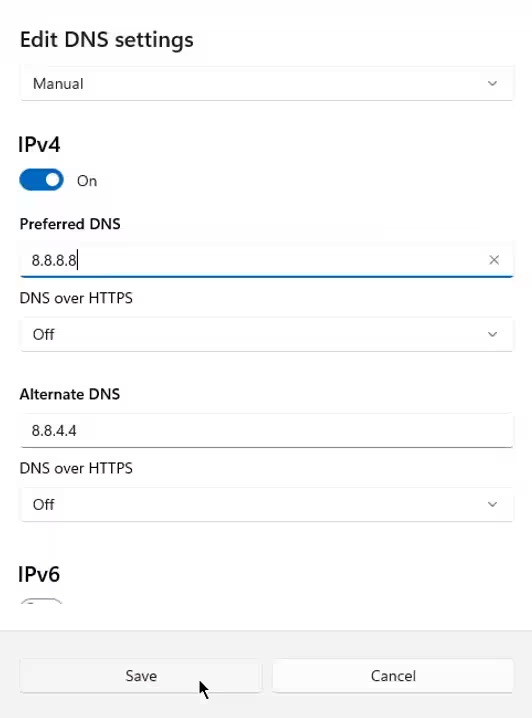
DNS connection settings can be assigned for Wi-Fi or network connections.
DNS caching
Whenever your device sends an URL-to-IP Address resolution request to a DNS server, the resulting address is returned and stored in the local device’s DNS cache. If the same address is requested a second time, it is retrieved from the DNS cache rather than resubmitting the request.
DNS caching reduces network/Internet traffic and improves retrieval speed and efficiency. Cached DNS records are retained according to a DNS time to live (TTL) setting. After a DNS record reaches its DNS TTL setting, any new requests for that information must be received again from a primary or secondary DNS server.
DNS security risks and threat vectors
Because of its simple design, DNS servers and requests are frequent targets for cyberattacks and exploitation. DNS attacks can be used to enable:
- Data theft aka data exfiltration
- Ransomware demands
- DDOS attacks
- Phishing campaigns
- And more
Here are some of the more common service and request attacks that threaten DNS servers and clients, including:
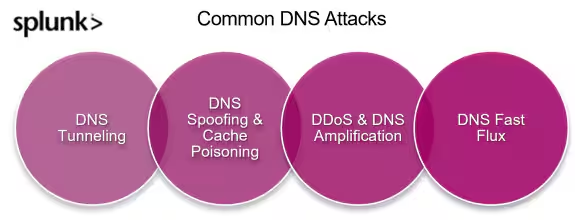
The more common DNS attacks
DNS tunneling: Cybercriminals covertly encode non-DNS data — including executable commands — into a DNS query.
DNS spoofing & cache poisoning: Hackers spoof DNS information and insert fraudulent IP addresses into a DNS cache, to redirect users to a malicious website.
Distributed Detail of Service (DDoS) & DNS amplification: DNS amplification — where many small requests are sent through a DNS resolver at the same time — overwhelms the Web service, creating a DDoS attack that renders website access inaccessible.
DNS fast flux: Cybercriminals exploit the DNS resolution mechanism to prevent search services and businesses from denylisting malicious IP addresses. DNS fast flux seeks to ensure malicious content remains available by continuously changing the content’s host IP address.
DNS Monitoring, inspection, and analysis
Vendors such as Splunk can provide tools and machine learning models to help monitor and inspect DNS traffic for traffic patterns and anomalies that may signify a security breach, DNS attack, misconfigured DNS endpoints, and more.
Explore these articles for more information on DNS monitoring, inspection, analysis, and security.
- DNS Security: How It Works & Top DNS Risks Today
- Detecting DNS Exfiltration with Splunk: Hunting Your DNS Dragons
- Machine Learning in Security: Detect DNS Data Exfiltration Using Deep Learning
- Detect Suspicious TXT Records Using Deep Learning
- Splunk SOAR Playbook of the Month: Cisco Umbrella DNS Denylisting
- What is Cybersecurity Analytics?
FAQs about Domain Name Service
Related Articles

How to Use LLMs for Log File Analysis: Examples, Workflows, and Best Practices

Beyond Deepfakes: Why Digital Provenance is Critical Now

The Best IT/Tech Conferences & Events of 2026

The Best Artificial Intelligence Conferences & Events of 2026

The Best Blockchain & Crypto Conferences in 2026

Log Analytics: How To Turn Log Data into Actionable Insights

The Best Security Conferences & Events 2026

Top Ransomware Attack Types in 2026 and How to Defend