Augmented vs. Virtual Reality: Comparing AR/VR
Learn Stephen WattsKey Takeaways
- Augmented Reality (AR) enhances the real world by overlaying digital information, while Virtual Reality (VR) immerses users in fully simulated environments, with AR excelling in practical applications like design, maintenance, and healthcare, and VR dominating in gaming and entertainment.
- Both AR and VR face challenges such as limited mobile processing power, development complexity, and privacy concerns, but advancements in hardware, bandwidth, and user interfaces are driving their adoption across industries.
- The AR/VR market is poised for significant growth, with emerging applications in education, retail, and healthcare, promising to revolutionize how we interact with technology and the world around us.
AR/VR, also known as augmented reality and virtual reality, are two approaches to recreating or blending environments in a way that enhances the experience of a human being.
- AR replaces real-world environments with digital elements. Thus providing an interactive and rich overlay of real-time information.
- VR immerses us within a digitally constructed environment, giving us the feel that we have been transported to a completely new world.
But what makes both of them unique? In this article, we will look at exactly that. We'll also discuss:
- How AR/VR is applied in different industries, with real-world example and the ways they are shaping the future in emerging use cases.
- Some examples of AR and VR applications
- Understand the differences and challenges for businesses and developers.
Let's get started.
What is augmented reality?
The purpose of augmented reality is to enhance and modify your surroundings. AR does this by integrating digitally created elements into a live view, usually by using a smart device's camera.
AR can make digital information accessible instantly by overlaying animations, images, or other information without disrupting the environment of a user. AR technology is normally used in mobile applications that combine real-time visuals with useful digital content.
With the help of AR, a user can understand their surroundings in a better way.
Industrial AR applications, for instance, can help technicians to troubleshoot or repair equipment. Technicians can just point out the smartphone camera at the damaged equipment. The AR app can help them by visually pointing out the problem or displaying on-screen guides or diagnostic information that eventually speeds up maintenance.
Examples of augmented reality
Augmented reality has many use cases. Here are some actual applications you can engage with today.
- Ikea Place is a mobile app that allows you to envision Ikea furniture in your own home, by overlaying a 3D representation of the piece atop a live video stream of your room.
- YouCam Makeup lets users virtually try on real-life cosmetics via a living selfie.
- Repair technicians can don a headset that walks them through the steps of fixing or maintaining a broken piece of equipment, diagramming exactly where each part goes and the order in which to do things.
- All sorts of professional sports around the world are experimenting with AR to provide real-time statistics and improve physical training for athletes.
What is virtual reality?
In contrast, virtual reality encompasses a complete environmental simulation that replaces the user’s world with an entirely virtual world.
The user needs to use a VR headset that covers their field of vision, isolating them completely from the physical world. With VR, a user can feel like they are inside a simulated environment.
Because these virtual environments are entirely fabricated, they are often designed to be larger than life. For example, VR could let a user box with a cartoon version of Mike Tyson in a virtual boxing ring.
Examples of virtual reality
Beyond gaming and other entertainment cases, some business examples of virtual reality include:
- Architects are using VR to design homes — and let clients “walk through” before the foundation has ever been laid.
- Automobiles and other vehicles are increasingly being designed in VR.
- Firefighters, soldiers, and other workers in hazardous environments are using VR to train without putting themselves at risk.
While both virtual reality and augmented reality are designed to bring a simulated environment to the user, each concept is unique and involves different use cases. In addition to entertainment scenarios, augmented reality is also increasingly being used by businesses, because of its ability to generate informational overlays that add useful, real-world scenarios.
The differences between AR and VR
While both technologies involve simulated reality, AR and VR rely on different underlying components and generally serve different audiences.
In virtual reality, the user almost always wears an eye-covering headset and headphones to completely replace the real world with the virtual one. The idea of VR is to eliminate the real world as much as possible and insulate the user from it. Once inside, the VR universe can be coded to provide just about anything, ranging from a lightsaber battle with Darth Vader to a realistic (yet wholly invented) recreation of Earth.
While VR has some business applications in product design, training, architecture and retail, today the majority of VR applications are built around entertainment, especially gaming.
Augmented reality, on the other hand, integrates the simulated world with the real one. In most applications the user relies on a smartphone or tablet screen to accomplish this, aiming the phone’s camera at a point of interest, and generating a live-streaming video of that scene on the screen. The screen is then overlaid with helpful information, which includes implementations such as:
- Repair instructions
- Navigation information
- Diagnostic data
However, AR can also be used in entertainment applications. The mobile game Pokemon Go, in which players attempt to capture virtual creatures while moving around in the real world, is a classic example.
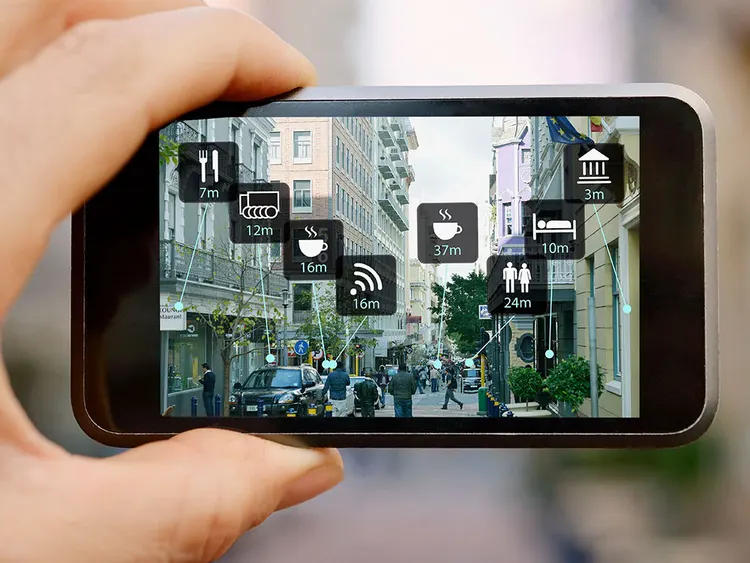
Hundreds of AR applications are available on mobile devices
Challenges for business and technology
AR and VR are still in their infancy, and they have a long timeline of development ahead of them before they become true mainstream technologies. Some of the most frequently cited technology and business challenges include:
Technology challenges
- Limited mobile processing capability. Mobile handsets have limited processing power, but tethering a user to a desktop or server isn’t realistic. Either mobile processing power will have to expand, or the work will have to be offloaded to the cloud.
- Limited mobile bandwidth. Cloud-based processing offers a compelling solution to the mobile processing bottleneck. However, mobile phone bandwidth is still too slow in most areas. This limits the ability to offer real-time video processing. This will likely change as mobile bandwidth improves.
- Complex development. Designing an AR or VR application is costly and complicated. Development tools will need to become more user-friendly to make these technologies accessible to programmers.
- Application maintenance. As platforms and hardware evolve, you need to ensure that your application is compatible with the latest devices and provides an updated and seamless experience to users. This is why regular maintenance is crucial.
Business challenges
- VR hardware’s inconvenience. Putting on a virtual reality headset and clearing a room often detracts from the user experience. VR input devices, in the form of modified gaming controllers, can also often be unintuitive, with a steep learning curve.
- Building a business model. Outside of video gaming, many AR and VR applications remain in the early stages of development with unproven viability in the business world.
- Security and privacy issues. The backlash over the original Google Glass proved that the mainstream remains skeptical about the proliferation of cameras and their privacy implications. How are video feeds secured, and are copies stored somewhere?
Despite these challenges, however, significant progress is being made to expand both business and commercial use cases for AR and VR, and further drive them into the mainstream.
AR/VR use cases in business
As per the latest industry forecasts, the AR/VR market is expected to exceed $62.9 billion by 2029. Today, business and enterprise use cases are the predominant reality applications for AR. Some key examples include:
- Design and construction. Arguably the most common and fruitful application for AR today, designers are using augmented reality to see what hypothetical products or structures look like in real environments. This ability alone is unique, and then you can also make virtual tweaks to existing products without ever laying a hand on them.
- Maintenance and repairs. AR technology can guide technicians through the steps of repairing, upgrading, and maintaining a wide range of products, ranging from industrial equipment to entire buildings. AR allows technicians to work on equipment without having to refer to printed manuals or websites, overlaying detailed instructions, often visual, atop the machinery itself.
- Training and education. Businesses are using AR technology to provide an immersive experience when training employees, allowing them to more comprehensively visualize new products and concepts. Schools are following suit. Not only that, AR language experience use AR technology to create immersive environment for learning a language. Learners can practice pronunciation, and vocabulary through overlays on real-world objects.
- Healthcare. AR technology has made its way into the surgery room, with overlays showing the critical steps of an operation, patients' vital statistics, and more.
- Retail. From virtual makeup to virtual changing rooms, businesses are using AR to give retail shoppers a revamped, modernized augmented reality experience when shopping.
- Technology. Products like Splunk AR bring AR to major utility companies to improve responses during power outages, and gain full visibility into the entirety of their data.
- Marketing. AR concepts on packaging, point-of-sale materials, and even billboards give businesses a brand new — and much more memorable — way to interact directly with customers.
AR/VR system components
Augmented reality varies depending on implementation, but the most common components include the following, categorized by hardware and software.
Hardware components
These hardware components comprise the backbone of augmented reality. Some of these components might already be supported if you are engaging in AR with your smartphone (more in the following section):
Processor
Augmented reality requires significant processing power to create the imagery needed and place it in the proper location for it to appear to exist in a real-world environment. Processors may be incorporated in a mobile handset or embedded into a wearable device (more on this below).
Display
In AR, imagery is created and then populated on some form of display. This can take several forms, depending on the specific application. These include:
- Mobile handheld device. The smartphone or tablet screen is the most common way to view AR hologram imagery. The user points their phone’s camera at a point of interest, and the camera generates a live video hologram that overlays AR information.
- Wearable device. Smart glasses such as Google Glass, Vuzix Blade, and Solos Smart Glasses are all designed as standard eyeglasses that also contain a small display only visible to the wearer. The person wearing the augmented reality headset can see the real world by looking straight through the lenses of the goggles, while the embedded display provides an informational overlay. VR headsets are less common in AR environments because they do not allow the wearer to see the real world directly; instead, it has to be recreated in video and displayed on the built-in screen, which is otherwise opaque.
- Automotive HUDs. HUDs, or heads-up displays, are systems that use your car’s windshield as a screen. A device projects an image – speed, directions, etc. – from the dashboard upwards onto the windshield. The driver sees the reflection of this imagery as it bounces off the glass like a mirror.
Looking ahead, more futuristic devices like smart contact lenses and systems that can project an image directly onto the retina may become viable.
Camera
The camera serves as the primary sensor for AR. It feeds live video to the processor, which detects key aspects of the environment for overlaying AR data. The camera itself does not process any of the digital information; it merely provides the video feed.
Other sensors
AR is often designed for motion, so additional sensor types are required for operation. These may include:
- Spatial sensors, such as accelerometers and digital compasses, to indicate the direction the camera is facing
- GPS sensors to track the user’s location in the world
- Microphones to incorporate audio data into the simulation
- LiDaR, which uses lasers to measure exact distance
Input devices
A user on the move is often not at liberty to type commands into a computer. As such, AR systems can work with numerous types of input technologies. Foremost is the mobile device touchscreen, providing a natural interaction if a phone or tablet is available. Other options include voice recognition technology, so users can control the system via speech, and gesture recognition systems, which typically translate the motion of the user’s hand into commands.
Software and algorithms
Several types of software algorithms are needed to enable augmented reality. Broadly, these include:
Image registration
Software takes a photographic representation of one’s surroundings. It uses this information to determine real-world coordinates and objects.
Image registration maps the real world. It has many capabilityes, including:
- Determining what is in the foreground versus what is in the background.
- Identifying where one object ends and another begins.
- Locating points of interest and additional information.
3D rendering
With the real world mapped and categorized, the next step is overlaying the augmented reality information on top of it. The 3D renderer creates virtual objects and places them into the appropriate location within the live image. The programming language Augmented Reality Markup Language (ARML) is the current standard for setting the location and appearance of a virtual object.
Content management
Content management is a back-end technology incorporating a system that maintains a database of virtual objects and 3D models.
Interface
Whether it’s a video game or a technical management tool, the interface is the intermediary between the user and the video representation of the augmented reality environment.
Development toolkits
A variety of open-source and proprietary technologies are there to give programmers a framework for building AR applications on the platform of their choice.
Using AR on mobile devices
If you encounter an AR application today, it will probably be in the form of a mobile phone app: any smartphone owner has access to hundreds of AR applications on iPhone or Android mobile phones without the need for any additional hardware. All the core software capabilities needed to enable AR are built into the operating system.
In a typical use case, the AR user launches an application on his or her mobile phone or tablet. Most AR apps are fairly simple in design. The user aims the mobile phone or device at a point of interest. Then, the application populates the screen with additional context. This could be anything from walking directions to the identity of stars in the sky to dance steps.
A brief history of AR & VR
Primitive virtual reality systems began in the 1950s and 1960s. VR and AR gained momentum in military applications during the early 1980s. Movies like Tron, The Matrix, and Minority Report portrayed futuristic ideas of these technologies.
The first mainstream attempt at a VR headset was the Sega VR in 1993. It was an add-on to the Sega Genesis gaming system. Though it never made it to market, it sparked consumer interest. In 2010, the Oculus Rift successfully introduced VR headsets to the consumer market. These devices remain expensive and are mostly of interest to gaming-focused users.
Augmented reality splintered from virtual reality around 1990. It was brought to the public’s attention in 1998. TV broadcasters began overlaying a yellow line on the football field. This indicated the distance to a first down. Over the next decade, various AR apps were designed for military use. These included AR in fighter jet cockpits. Consumer use also emerged, with print magazines and packaged goods. These items began embedding QR codes. Consumers could scan the codes with their cell phones. This made the product “come alive” with a short 3D video.
In 2014, Google rolled out Google Glass, with an eye toward equipping everyone with a head-mounted display AR device. The AR headset, which was controlled via voice and touch gestures, was met with skepticism and criticism, attributed to the new reality that people were recording video 24/7 in public. Privacy suddenly became a major talking point in consumer AR. Google ultimately suspended the project and relaunched it a few years later with enterprise users in mind.
What's next for AR and VR?
AR and VR have a decidedly bright future, and the years to come will bring many new capabilities and more widespread usage.
Improvements in video quality, processing power, mobile bandwidth, and AR/VR hardware will drive mainstream acceptance. Falling development costs and complexity will provide more options for creators to explore. Systems that track eye movement and facial expressions will slowly make clunky joysticks and other controllers obsolete.
While video gaming and entertainment will continue to drive this market, AR and VR will also see emerging practical applications. In virtual reality, fully virtual surgery allows surgeons to perform their jobs in a simulated environment. Robotic systems do the actual work. In augmented reality, Mirrorworld is an emerging platform. It aims to replicate the physical universe on a 1:1 scale, enabling virtual travel anywhere.
Education will likely continue to shift to a virtual model on AR and VR platforms in academia and corporate settings. Graphic design plays a crucial role in advancing VR and AR. It creates visually compelling and realistic elements. These elements enhance user immersion and interaction.
Retailers will rely on AR applications to upgrade virtual shopping experiences. This will slowly render the need for physical storefronts obsolete.
AR and VR are poised for growth
AR and VR are shedding their niche technology statuses slowly but surely: both have impressive futures ahead of them as they mature. With increasing momentum around innovative VR video games and AR navigation aids, consumers are increasingly ready to experiment with future applications of these technologies. In industry, AR especially is finding applications in everything from design to maintenance to healthcare.
Looking ahead, it will be exciting to see what new AR- and VR-driven tools come to fruition.
Related Articles

Splunk Tutorial: Getting Started Using Splunk

Hacking 101: Black Hat vs. White Hat vs. Gray Hat Hacking