The Top 10 Glass Table Design Tips to Boost Your Career
Principle #1: Glass tables are not reports
A glass table is something someone will look at often and it will allow for quick action. ITSI is not Excel (and I love Excel).
Principle #2: Start with paper
We all do this. We start using a new tool (PowerPoint, Photoshop or Gimp, Excel, Google docs etc…) and want to use all these fancy features without asking ourselves “What am I really doing here?"). So step away from your keyboard and mouse, grab a pen and paper, pick your brain and start defining your objectives.
Ask yourself these questions:
- Who is going to use the glass table?
- What kind of KPIs do they really need?
- Do they understand the KPIs?
- What format do you need to make the KPIs really understandable?
- Etc…
Keep it relevant (less is more), avoid overdesigning and use iconography (content isn’t limited to text and charts). The good news is that some iconography can really be understood by everybody the same way (think “road signs”).
Principle #3: Colors and fonts matters!
Fonts add another dimension… for example:

Pretty clear right? ☺
Here are some guidelines:
- Stick to 1 font
- No more than 3 sizes
- Need to create a visual hierarchy? Bold it or use colors
- Use sans-serif fonts (Serif fonts are designed for longer texts)

With regards to colors:
- Choose a few and stick to them (Have doubts? Ask your marketing team for help.)
- Leverage on contrast
- Use color sparingly (each color can represent one particular communication goal)
- Pay attention to the meaning (think red=danger, green=all good etc)
- Adapt colors to your audience culture (e.g. black = death in Western countries while it’s white in Japan for example)
- If you plan to use colors, make sure the background color is consistent (that way color changes are more obvious)
Principle #4: Choose the right viz for the right data
Yes, not all charts have been created equal! They don’t have the same Data-to-ink ratio.
Here are some examples:
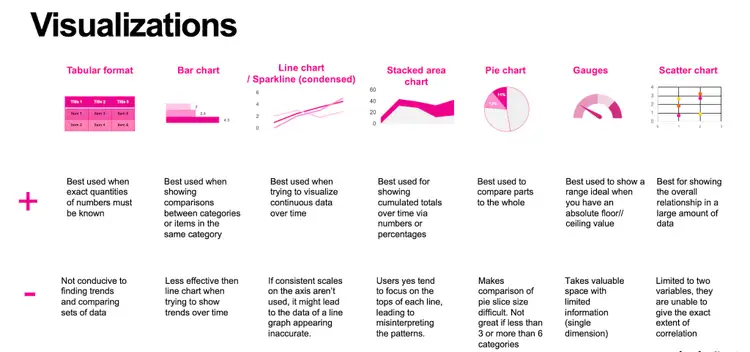
A few tips:
- Want to do a static comparison? Use column or bar charts
- Want to do a comparison over time? Use line charts
- Want to show a static composition? Use pie charts
- Want to show a composition changing over time? Use stacked column charts or stacked areas
Principle #5: Follow the eyes
There is a natural hierarchy when you’re reading… You start reading from left to right and from top to bottom. But also, depending on the media or the level of attention some people “scan documents” from top left to bottom right.
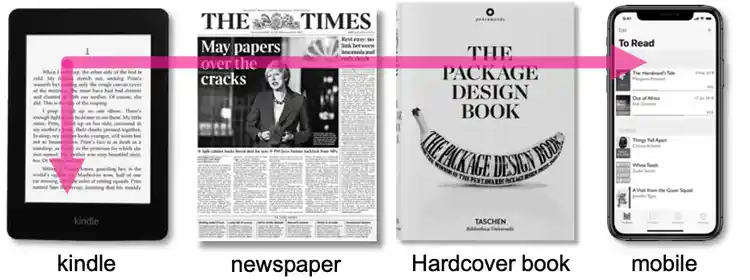
So, make sure that your most important KPIs are located in the top left corner… but wait…. remember principle #2 (again)? Know your audience!
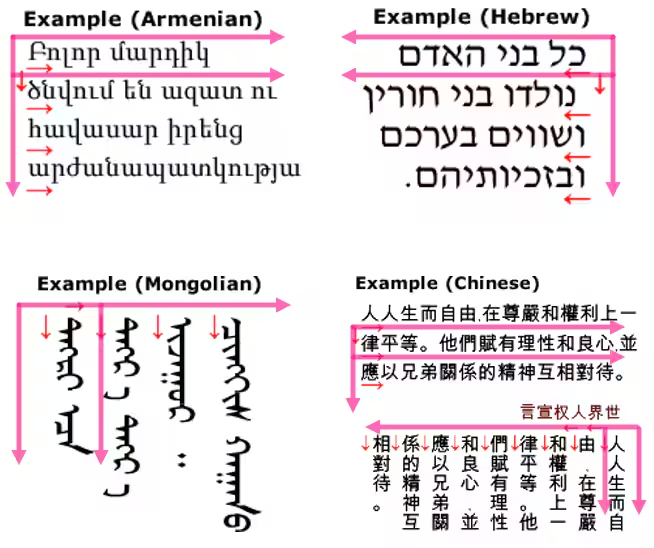
Left to right is true…for Occidental cultures, but some languages use right to left scripts (Arabic, Hebrew, Kurdish…) and some are even more complex/flexible like ideographic languages (Chinese, Japanese, Korean…) as they can be written left to right or vertically top to bottom. Sometimes even both directions can be combined on one page.
Principle #6: Organize content in blocks
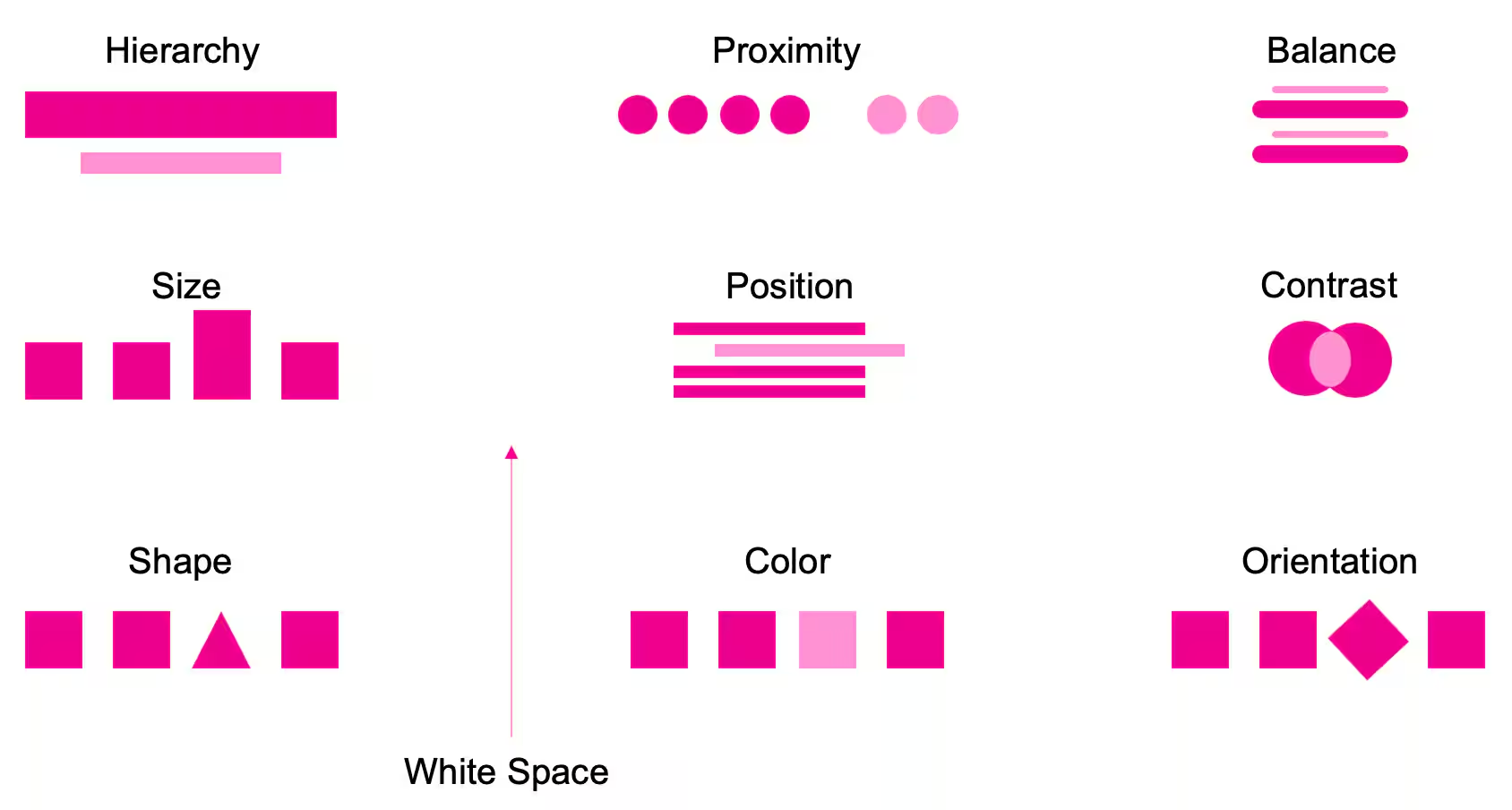
This is one of the most subtle yet essential dashboard guidelines, as this principle comes down to balance. See the “proximity” example below. Just by grouping KPIs and playing with white space (– also referred to as negative space – the blank area between elements featured on a dashboard design), your audience will automatically understand which KPIs are part of the same group.
Principle #7: The power of flows
Do not underestimate the power of a glass table! Imagine you want to monitor the health of a service (an app, a business process…you name it) in ITSI. You start displaying all the KPIs in the service analyzer, but one piece is missing… Someone (no names please ☺) in another team refuses to give you access to their dataset (unfortunately, working in silos is still common). Create a background image (we will see how to do it later) that displays all the components, import it on ITSI as a background, add the KPIs you have and show it to your manager, CIO, C-suite, etc. They will quickly understand the value that you’re providing but they will also quickly spot that a piece of information (KPI) is missing… now you have an ally to make sure that this “someone” will give you access to his/her dataset… but don’t tell anyone this trick (we learned it from a customer!).
Principle #8: Use the dramatic approach
Sometimes clean is not enough and a more dramatic approach is needed. By pulling out the important exceptions you can make it easier for your audience to digest what matters and take action. We are talking about incident management here after all. So use colors, contrast, scary icons ☺ and shapes to shift the focus from the full data to changes in the most critical KPIs
Principle #9: PowerPoint, Google, and ITSI
Ok, so you may be grateful for the previous principles, but you wonder: How can I apply them to Splunk ITSI?
Easy! If you followed the principles, you now should have a prototype on paper. All you need now is to talk to your marketing team and ask for the color guidelines, company icons, etc.
But you could also do this:
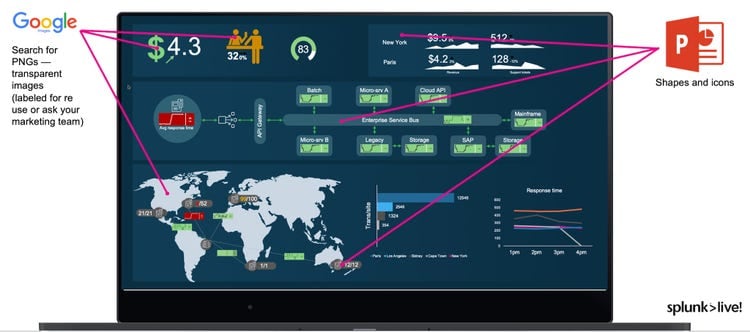
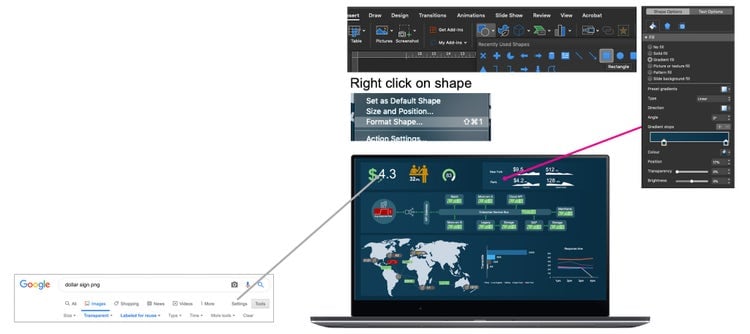
- Use a search engine like Qwant or Google and search for PNG images or icons with transparent background (make sure you filter the ones labeled for reuse)
- Import them to Powerpoint (previously filled with a background and maybe some “boxes” to structure your glass table)
- Place fake KPIs to make it look good
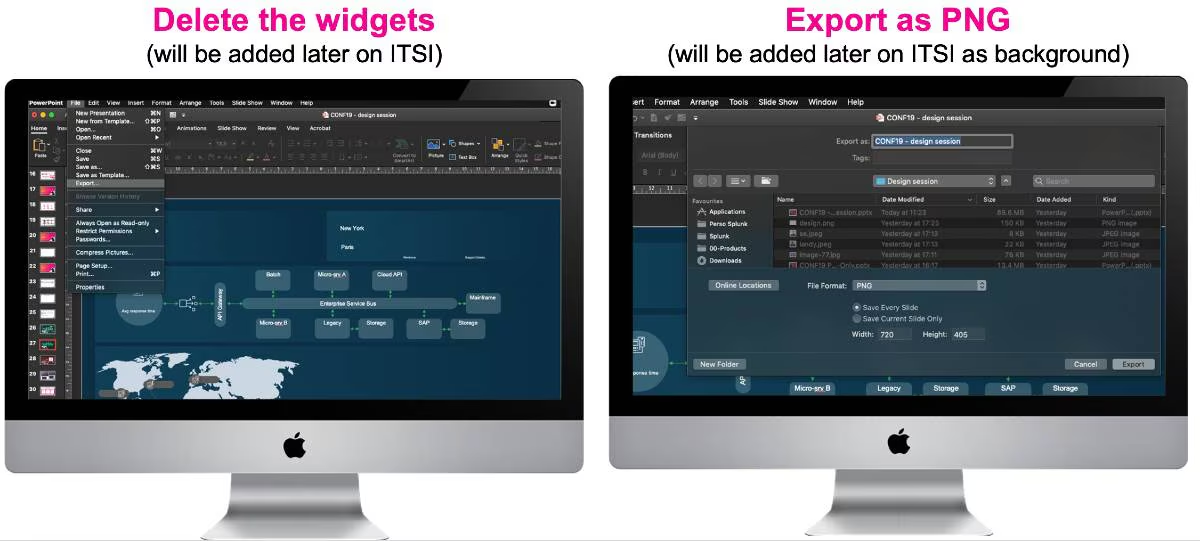
- Delete the KPIs and export your slide using PNG format
- Go to Splunk ITSI and import the PNG file
- Add your KPIs and voila!
Principle #10: Be trendy
According to Splunk CTO Tim Tully, we are entering the indulgent user experience era, which means that enterprise software (in our case, glass tables) doesn’t have to be a boring experience. “Elegant design pulls you forward”, he says. “It gives you an edge to tackle whatever action is in front of you. Using a well-designed product feels more like a motivation than a chore.”
So keep an eye on design trends to make sure your glass tables look modern and appealing.
Here are some trends you might want to look at:
- Flat design
- Color-blocking
- Overlapping
If you really enjoyed this post and want to see it in more detail, we recorded a session about design during the 2019 Splunk .conf event, available on-demand here:
- Video: https://conf.splunk.com/files/2019/summit/IT1523.mp4
- Slides: https://conf.splunk.com/files/2019/slides/IT1523.pdf
Thanks for reading!
Stéphane
P.s. Don't forget to check out Part 1: Glass Table Design: The Good, The Bad, The Ugly, and The Champion!