Detecting Lateral Movement with Splunk: How To Spot the Signs

To do that, they need to move laterally.
We have touched on two ways in which an adversary can traverse the network and we did this with only three sources of data — Windows Security, System events, and Sysmon. Other data sources like network metadata and registry entries can also be used for spotting lateral movement.
(Part of our Threat Hunting with Splunk series, this article was originally written by Derek King. We’ve updated it recently to maximize your value.)
What is lateral movement?
Lateral movement is one of the key indicators for any time when you actually have an Advanced Persistent Threat (APT) in your network. Finding this lateral movement can be difficult because adversaries often use legitimate credentials to move around your network.
Lateral movement happens in two ways:
- Using exploits against other vulnerable hosts.
- Using legitimate tools, but for malicious purposes.
In this post, we’ll focus on using legitimate tools for badness.
The importance of Windows event logs
First things first, if you’re not capturing Windows event logs from your endpoints, you're going to really struggle with hunting for and detecting lateral movement. It’s like fighting the English fog with one hand behind your back and an eye patch!
Fortunately, I don’t need to roll out on my high horse on the matter of endpoint logs since, here at Splunk, we’ve been talking about it for a long time.
Our hypothesis is that legitimate Windows tools can be used against us for moving laterally within our network. How might the adversary be hopping from one machine to another without exploiting vulnerabilities? Some long-established tactics are well known:
- Remotely creating WMI processes.
- Scheduling tasks.
- Creating services.
Psexec is a great sysadmin tool that allows administrators to remotely connect to other machines and carry out admin tasks. In fact, it's often found (legitimately) on networks. But what if psexec was used to gain a remote shell or execute a PowerShell cradle on the remote machine?
Let's look at how we can hunt for this type of activity.
Hunting for lateral movement
When looking for lateral movement, we're identifying processes connecting remotely into a host. Our initial search could use Windows security logs, looking for authentication events over the network from rare or unusual hosts or users.
index=wineventlog sourcetype=WinEventLog:Security (EventCode=4624 OR EventCode=4672) Logon_Type=3 NOT user="*$" NOT user="ANONYMOUS LOGON"
| stats  count  BY dest src_ip dest_nt_domain user EventCode
| sort count
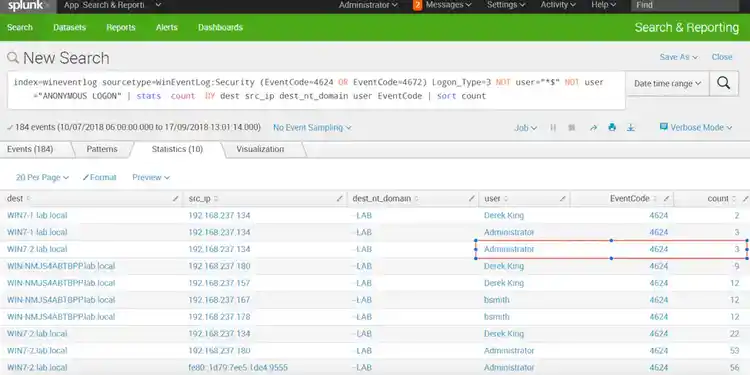
The EventCode for a successful Windows logon is 4624, the LogonType of 3 is a network connection, and 4672 is the EventCode for privilege escalation events. To keep our search tight, we exclude:
- Computer logons (*$)
- Unauthenticated sessions (ANONYMOUS LOGON)
With our result set, we count the events for each host and display the source IP address (src_ip), EventCode and user that authenticated. Finally, we sort them in ascending order to surface rare events.
Exploring hosts of interest
Using this information, we begin to lean in on hosts of interest. In particular, we see that the administrator has logged into host Win7-2 from IP address 192.168.237.134, which we're not expecting to see.
This is definitely not an admin or IT Support address — this is another client machine on the same subnet. Interesting! This warrants closer inspection.
We can use Splunk to drill directly into these raw logs by clicking on the row and viewing the events.
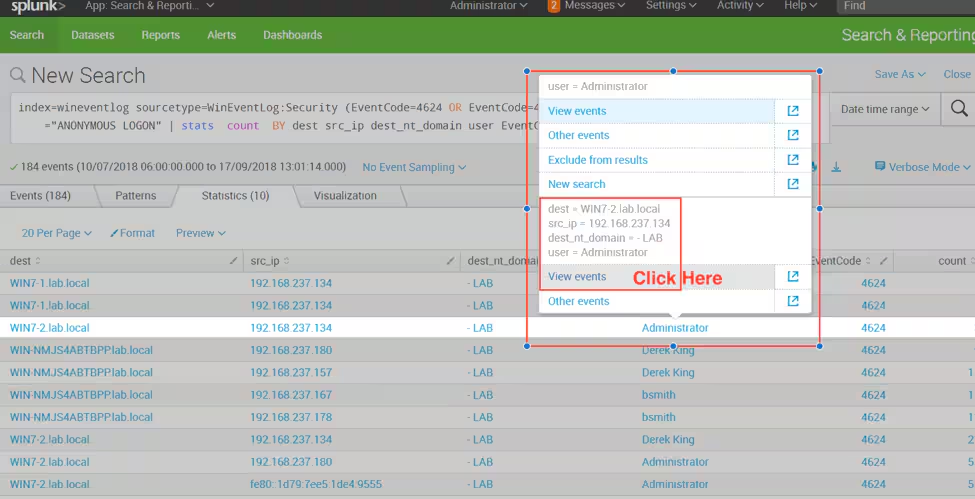
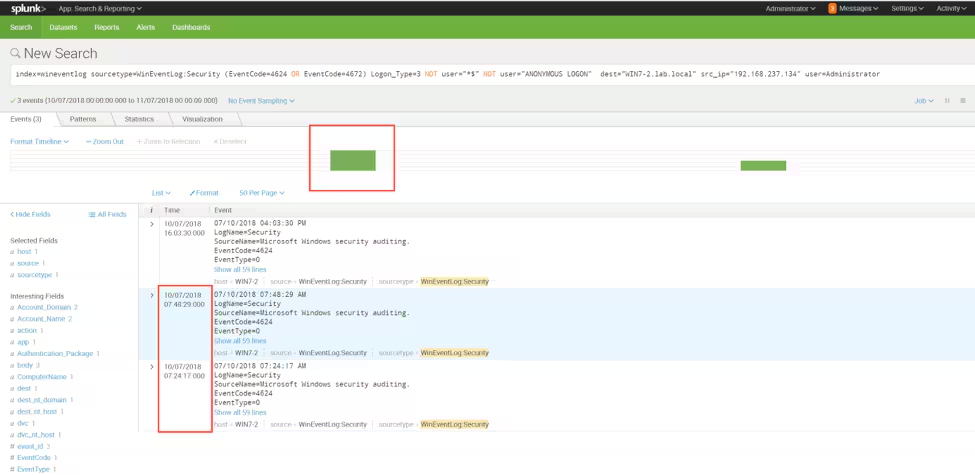
We now see the time the events occurred, two of which happened in fairly close proximity to one another.
Narrowing the time range
We can now modify our search to query all events from that host, and narrow the time range to focus on activity occurring around these two events, to see what else happened on that host.
index=* sourcetype=* host=win7-2
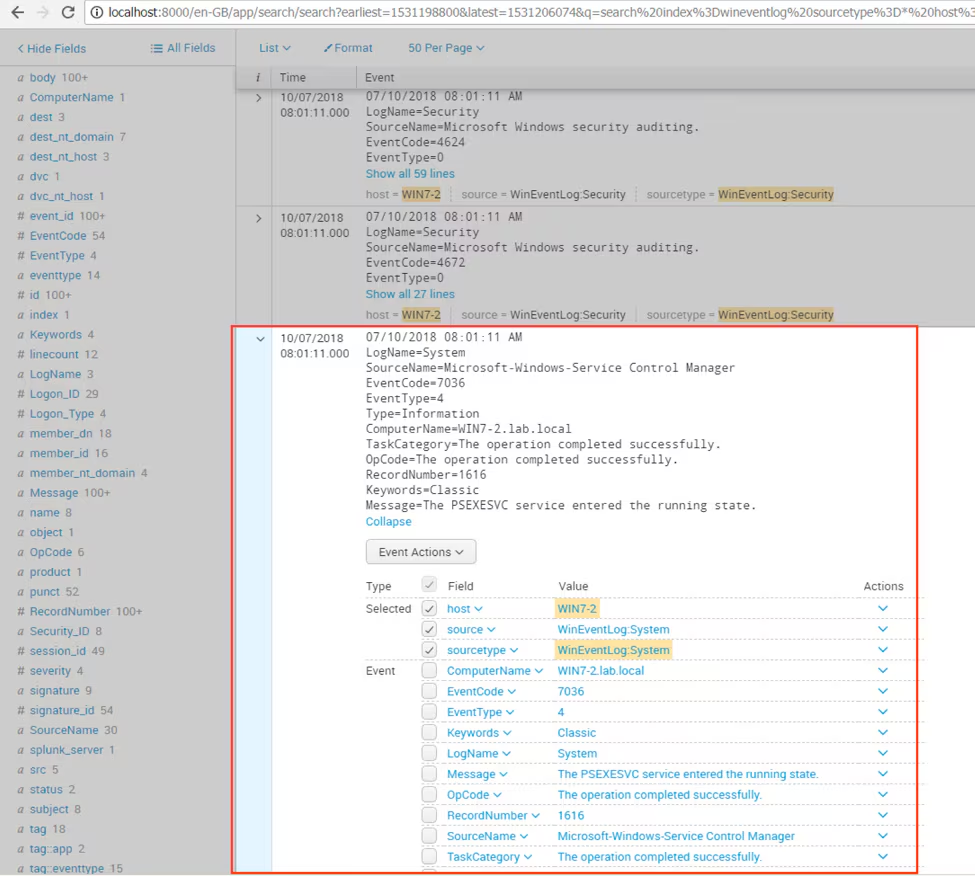
Immediately, we see entries for service creation (EventCode 7036) for psexec from the WinEventLog:System log.
At this point, we know the administrator connected remotely and ran psexec, but we have no idea of the context, good or bad! What did psexec actually run? Fortunately, if you're logging process creation events, we can answer that question! In our environment we collect Microsoft Sysmon logs (and, as you know, we love Sysmon).
We could run another search for process creations, but our previous search returned a number of events with the same timestamp. This warrants additional investigation.
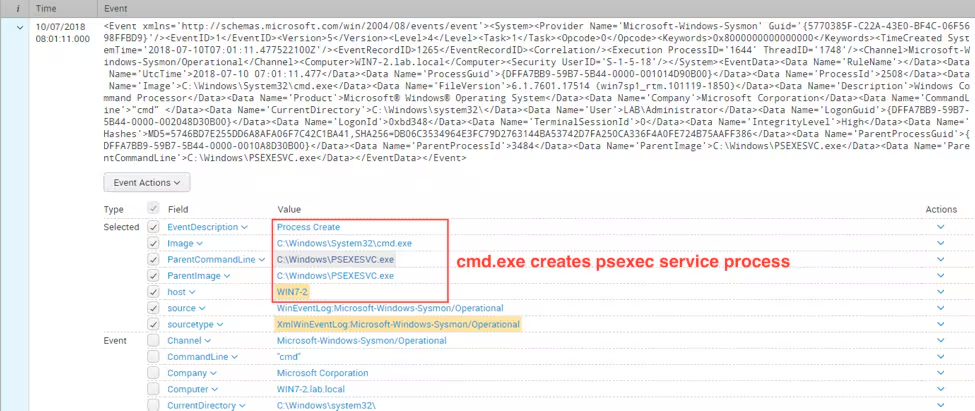
If we expand the first Sysmon event by clicking the right chevron (>) next to the event, we can see the psexec service executed cmd.exe.
Based on our searches, we now understand the user administrator connected over the network from 192.168.237.134 and gained command line access to our victim host.
Using psexec for lateral movement has been around for quite a while and is still very popular and relevant. But wait! There’s more… and just like psexec, it's a legitimate tool being employed for badness!
Hunting using DCOM and DDE
Distributed Component Object Model (DCOM) used with Dynamic Data Exchange (DDE) allows an adversary to traverse the network using built-in tools. If you are not aware of DCOM, it’s an extension to COM that provides a client / server architecture, allowing application communication across a network, and the DDE protocol is the process that enables data sharing and reuse between Microsoft Office applications.
Let’s take a look at how our previous approach stacks up against this technique.
Running the same search looking for network logons produces the same results as we would expect, since any connection needs to be authenticated.
index=wineventlog sourcetype=WinEventLog:Security (EventCode=4624 OR EventCode=4672) Logon_Type=3 NOT user="*$" NOT user="ANONYMOUS LOGON"
| stats  count  BY dest src_ip dest_nt_domain user EventCode
| sort count
Following exactly the same process of broadening our search for all events on the host and narrowing the timeline shows no evidence of service creation, but again Sysmon comes to our aid with process creation events.
index=* sourcetype=* host=win7-2
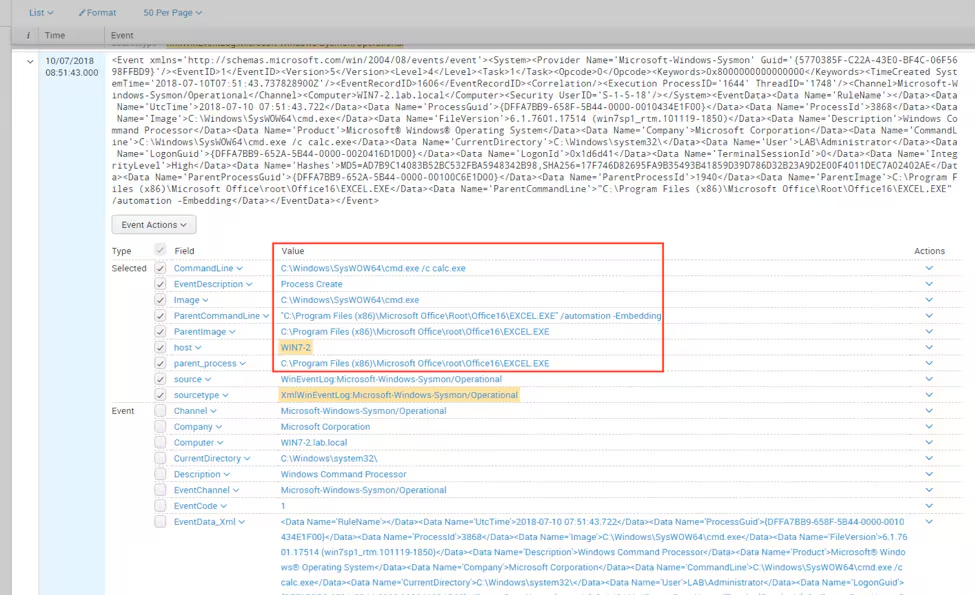
We see a parent process of Excel.exe and the command line executing calc.exe — that’s not normal behavior!
If you have a keen eye, you’ll also spot the ParentCommandLine using “/automation -Embedding” which occurs as a by-product of DDE creating the Excel object. Using this approach, we can hunt for a more recent lateral movement technique (DCOM), as well as one of the more established (psexec). Great!
From here, we should operationalize the searches and look for remote logins, service creations, and processes with “/automation -Embedding” in the ParentCommandLine in addition to parent processes that don’t look normal. Oh, and remember, filtering by time is always your friend!
More data sources for hunting lateral movement
If you would like further inspiration, take a look at the PEAK Threat Hunting Framework or explore MITRE ATT&CK.
As always, happy hunting!
Related Articles

Harness the Power of Cisco Talos Threat Intelligence Across Splunk Security Products

The Modern SIEM Has Come a Long Way From Your Grandmother’s SIEM

Meduza Stealer Analysis: A Closer Look at its Techniques and Attack Vector

Cisco Intends to Acquire Threat Detection and Defense Company SnapAttack, Driving Further Splunk Innovation to Power the SOC of the Future

Logs Are For Campfires: Log Data, Big Data, and Splunk Asset & Risk Intelligence

Introducing the OT Security Solution Accelerator

Bypassing the Bypass: Detecting Okta Classic Application Sign-On Policy Evasion
CosmicSting: A Critical XXE Vulnerability in Adobe Commerce and Magento (CVE-2024-34102)