New Keyword App

One of the most common requests I get from new customers is that they want to centrally collect all their machine generated time series data and search for a keyword like error or RuntimeException. Obviously Splunk can do this. Then, the next set of questions concern things like give me the top hosts or applications producing this keyword, show me a baseline of last week vs this week for this keyword, show me a slope line on the trend for this or any keyword(s), find outliers that go beyond the average occurrences for the keyword and then try to predict what may happen in the future.

To answer these questions and then some, I’ve created an app template that you can download from Splunkbase and simply install the Keyword App. The app has no inputs as it uses your own indexed data. You can modify the default indexes for the role that uses the app in Manager to include indexes beyond main. Usually, what I do next in these blog entries is describe how to use the app. However, in this case, a picture is worth a thousand words. Rather than continue to entertain you with my prose, I’ll simply embed the the self explanatory dashboards here.
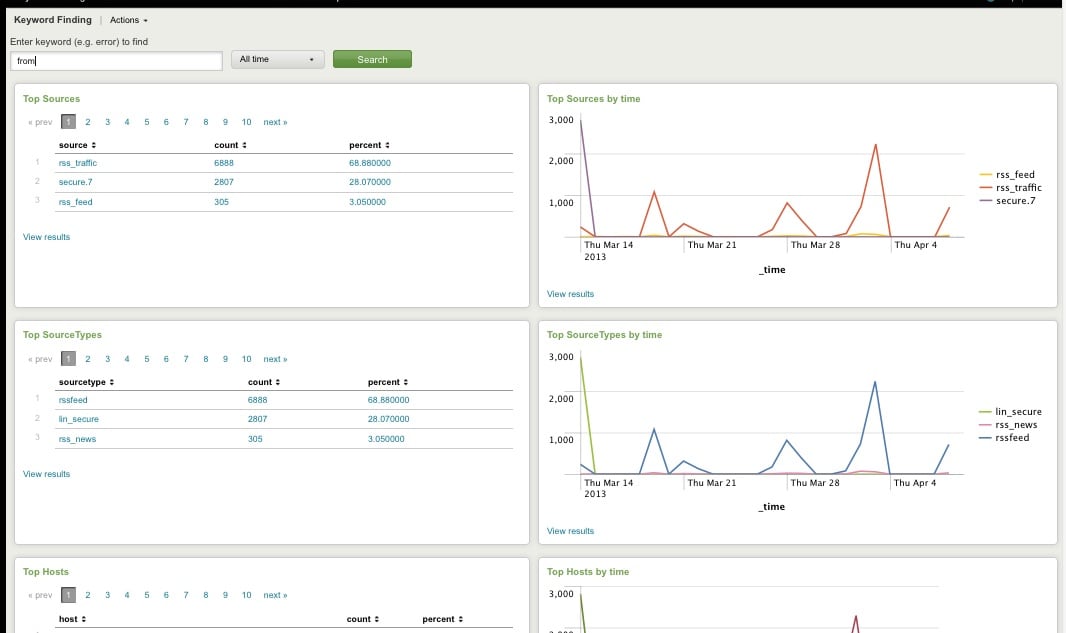
Top Host, Sourcetype, Source

Top Host, Sourcetype, and Source for Keyword
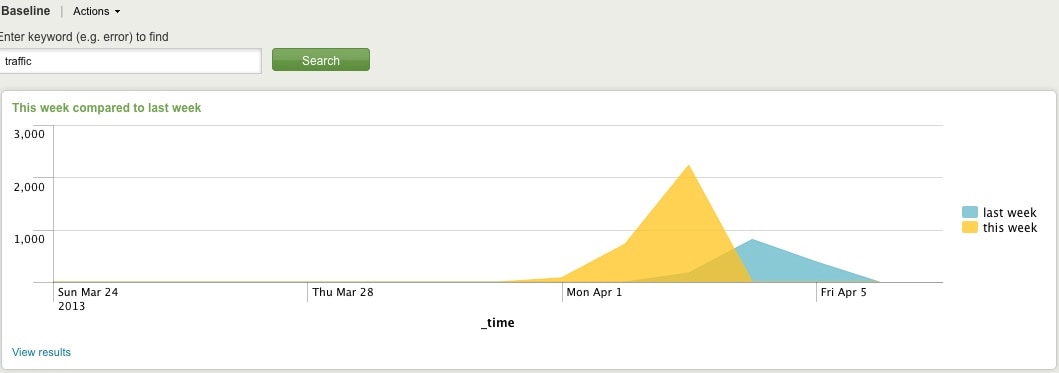
Comparing Present Count vs. Past Count
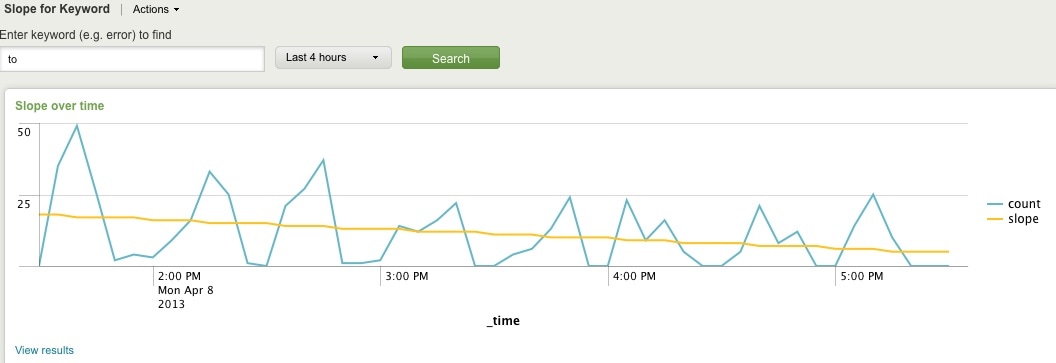
Slope for Trend
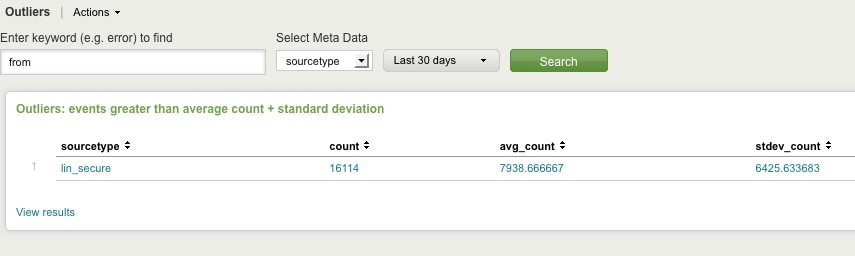
Find Outliers
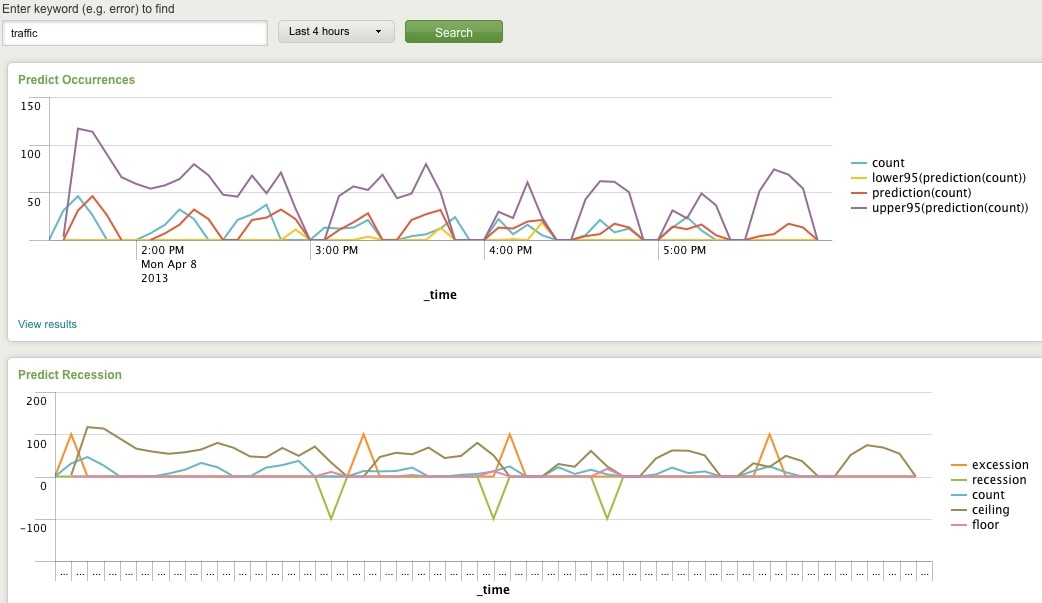
Predict Future Counts (Recession Predict is Jack Coate’s idea)

There’s a Donut Chart (Ron Naken’s Module) that allows you to split your list of keywords by top 10 host, source, or sourcetypes and see the distribution of events.
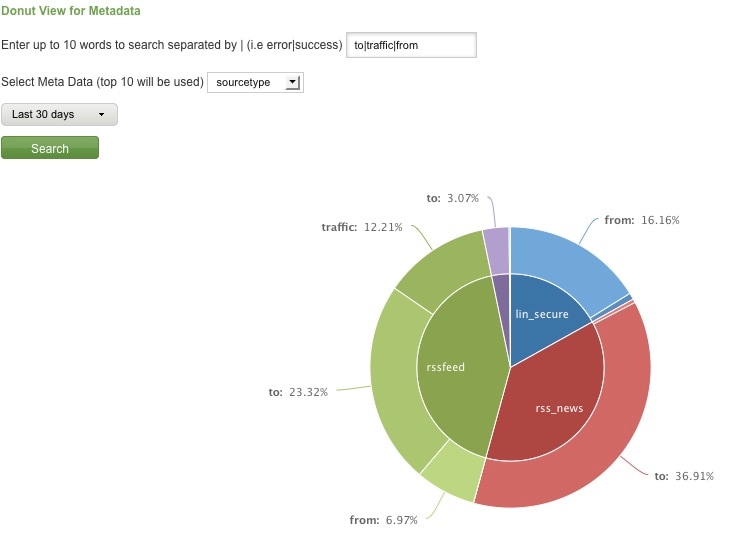
Split Keyword(s) Distribution by Top 10 Hosts, Source, or Sourcetype

Here are rare events based on your filter:
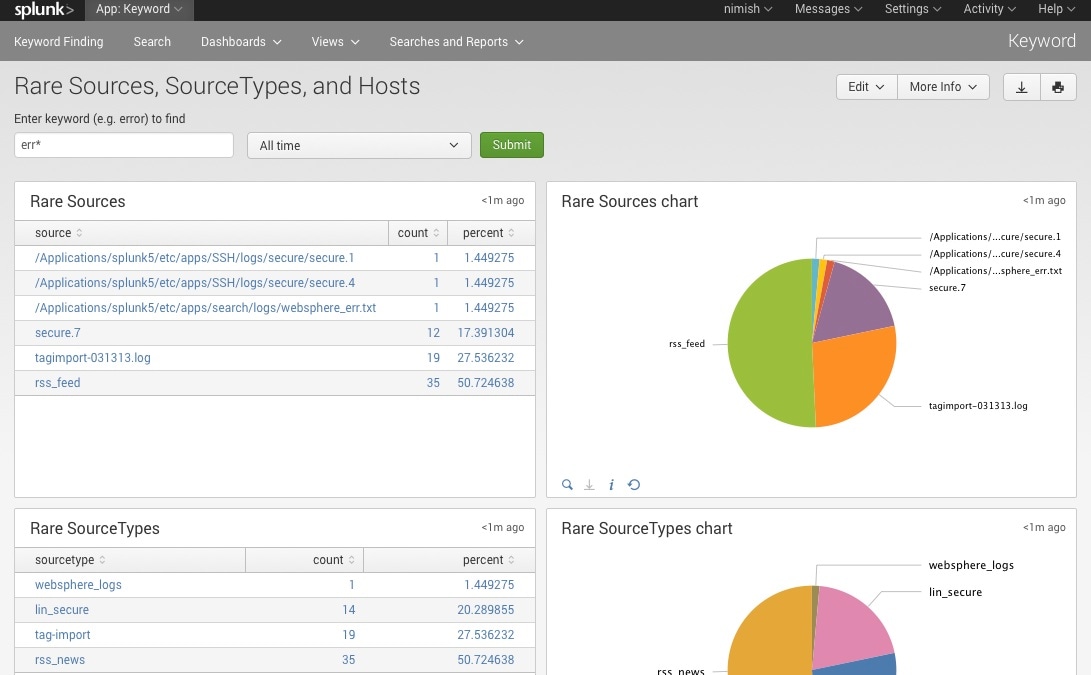
Rare

Finally, here are rare events based on punctuation.
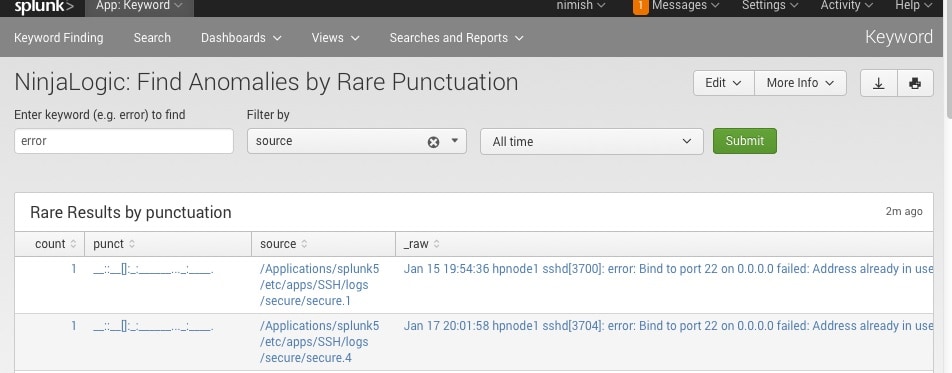
Punct

Conclusion

Hopefully, this template will satisfy all your needs out of the box. If you need to modify the searches, make a copy of the app’s default/data/ui/views/<dashboard>.xml file and put it into the app’s local/data/ui/views/<dashboard>.xml file and edit your local copy. I’m hoping this app will save you some time from configuring these common tasks.

Related Articles

Streamlining Vulnerability Management with Splunk Phantom

Security
2 Minute Read

Streamlining Vulnerability Management with Splunk Phantom

Manage the entire lifecycle of vulnerability management with automation and orchestration using Splunk’s SOAR technology, Splunk Phantom, to automate actions and reduce the time spent on patch management by 40%.
SUPERNOVA Redux, with a Generous Portion of Masquerading
Security
10 Minute Read

SUPERNOVA Redux, with a Generous Portion of Masquerading

A review of the Pulse Secure attack where the threat actor connected to the network via a the Pulse Secure virtual private network (VPN), moved laterally to its SolarWinds Orion server, installed the SUPERNOVA malware, and collected credentials, all while masquerading the procdump.exe file and renamed it as splunklogger.exe.
Monitoring Pulse Connect Secure With Splunk (CISA Emergency Directive 21-03)
Security
11 Minute Read

Monitoring Pulse Connect Secure With Splunk (CISA Emergency Directive 21-03)

Our Splunk security experts share a closer look at the Pulse Connect Secure attack, including a breakdown of what happened, how to detect it, and MITRE ATT&CK mappings.
Elevate Your Cloud Security Posture with Splunk and Google Cloud

Security
8 Minute Read

Elevate Your Cloud Security Posture with Splunk and Google Cloud

It’s more critical than ever to secure your company data and protect your workloads in the cloud. This blog post is a roundup of latest technical resources and product capabilities by both Google Cloud & Splunk to enhance your threat prevention, detection, and response techniques, regardless of where you are in your business-transforming cloud journey.
The Data-Centric Revolution: Restoring Sanity to Enterprise Security Operations

Security
7 Minute Read

The Data-Centric Revolution: Restoring Sanity to Enterprise Security Operations

TruSTAR CEO and Co-Founder, Patrick Coughlin, recently sat down with Dave McComb, President of Semantic Arts, to talk through what it means to be Data-Centric in a Data-Driven world.
Introducing Splunk Attack Range v1.0
Security
3 Minute Read

Introducing Splunk Attack Range v1.0

The Splunk Attack Range project has officially reached the v1.0 release – read on to learn how we got here, what features we’ve built for v1.0 and what the future looks like for Splunk Attack Range.
Detecting Clop Ransomware
Security
5 Minute Read

Detecting Clop Ransomware

As ransomware campaigns continue, malicious actors introduce different modus operandi to target their victims. In this blog, we’ll be taking a look at the Clop ransomware. This crimeware was discovered in 2019 and is said to be used for an attack that demanded one of the highest ransom amounts in recorded history.
Endpoint Security Data Collection Strategy: Splunk UF, uberAgent, or Sysmon?
Security
4 Minute Read

Endpoint Security Data Collection Strategy: Splunk UF, uberAgent, or Sysmon?

Many threats originate from the endpoint and detecting them requires insights into what happens on the endpoint. In this post we look at different endpoint activity data sources, comparing the benefits and capabilities of Splunk Universal Forwarder with vast limits uberAgent and homegrown solutions.
Taking Automation Beyond the SOC With Advanced Network Access Control
Security
2 Minute Read

Taking Automation Beyond the SOC With Advanced Network Access Control

Learn how you can scale IT operational processes and enhance network performance by leveraging security orchestration, automation and response (SOAR) tools such as Splunk Phantom.