New Keyword App

One of the most common requests I get from new customers is that they want to centrally collect all their machine generated time series data and search for a keyword like error or RuntimeException. Obviously Splunk can do this. Then, the next set of questions concern things like give me the top hosts or applications producing this keyword, show me a baseline of last week vs this week for this keyword, show me a slope line on the trend for this or any keyword(s), find outliers that go beyond the average occurrences for the keyword and then try to predict what may happen in the future.

To answer these questions and then some, I’ve created an app template that you can download from Splunkbase and simply install the Keyword App. The app has no inputs as it uses your own indexed data. You can modify the default indexes for the role that uses the app in Manager to include indexes beyond main. Usually, what I do next in these blog entries is describe how to use the app. However, in this case, a picture is worth a thousand words. Rather than continue to entertain you with my prose, I’ll simply embed the the self explanatory dashboards here.
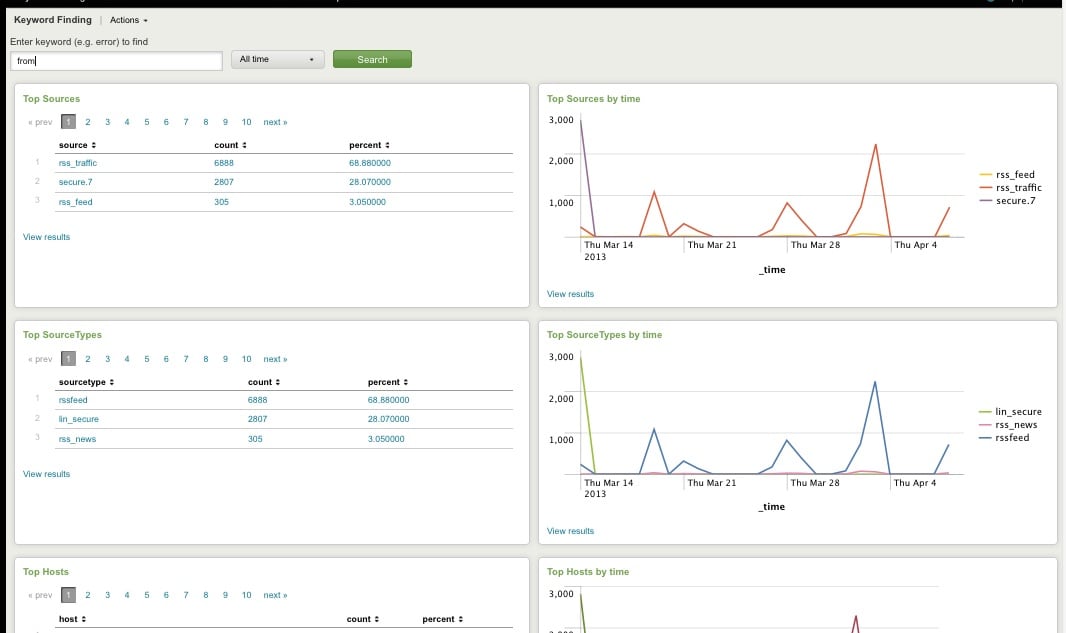
Top Host, Sourcetype, Source

Top Host, Sourcetype, and Source for Keyword
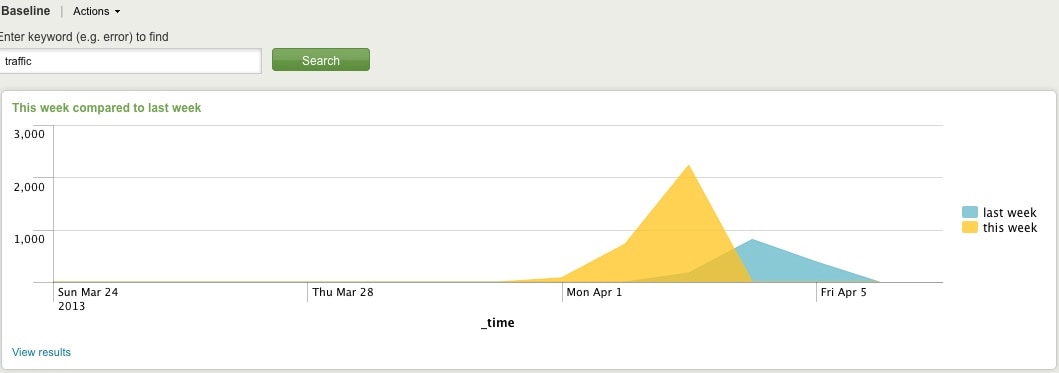
Comparing Present Count vs. Past Count
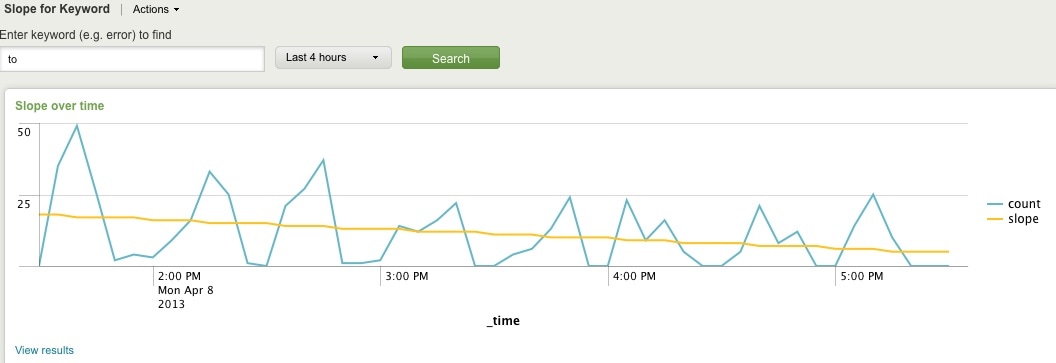
Slope for Trend
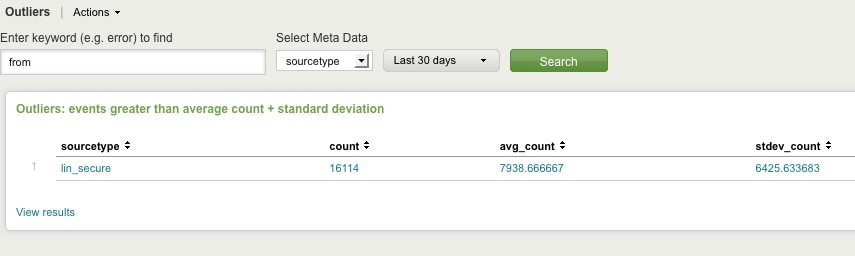
Find Outliers
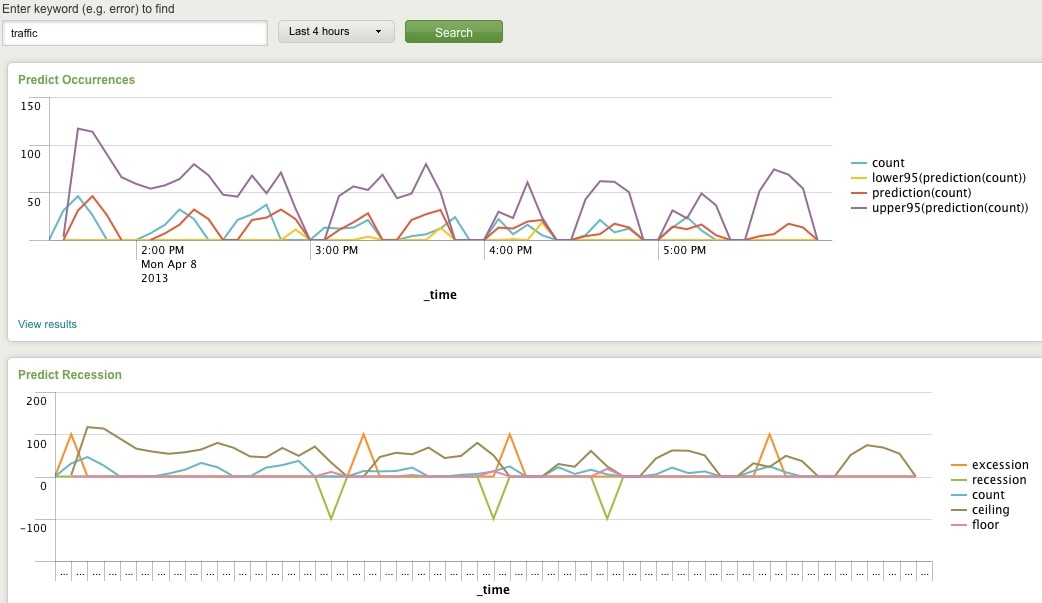
Predict Future Counts (Recession Predict is Jack Coate’s idea)

There’s a Donut Chart (Ron Naken’s Module) that allows you to split your list of keywords by top 10 host, source, or sourcetypes and see the distribution of events.
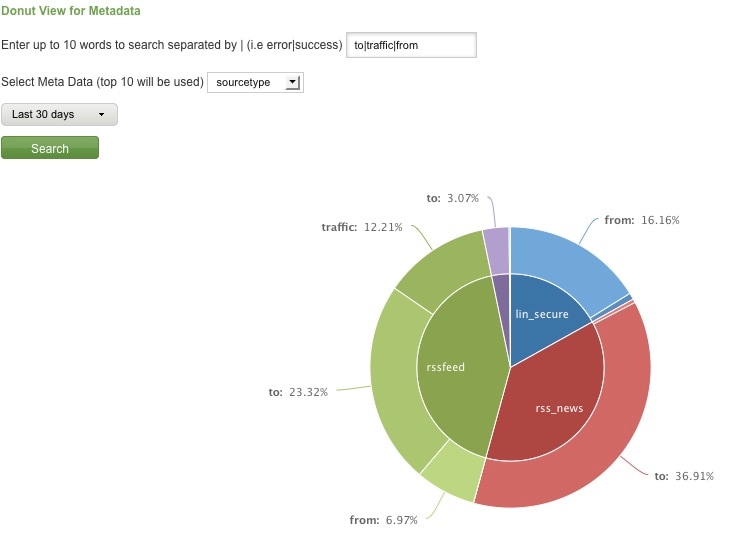
Split Keyword(s) Distribution by Top 10 Hosts, Source, or Sourcetype

Here are rare events based on your filter:
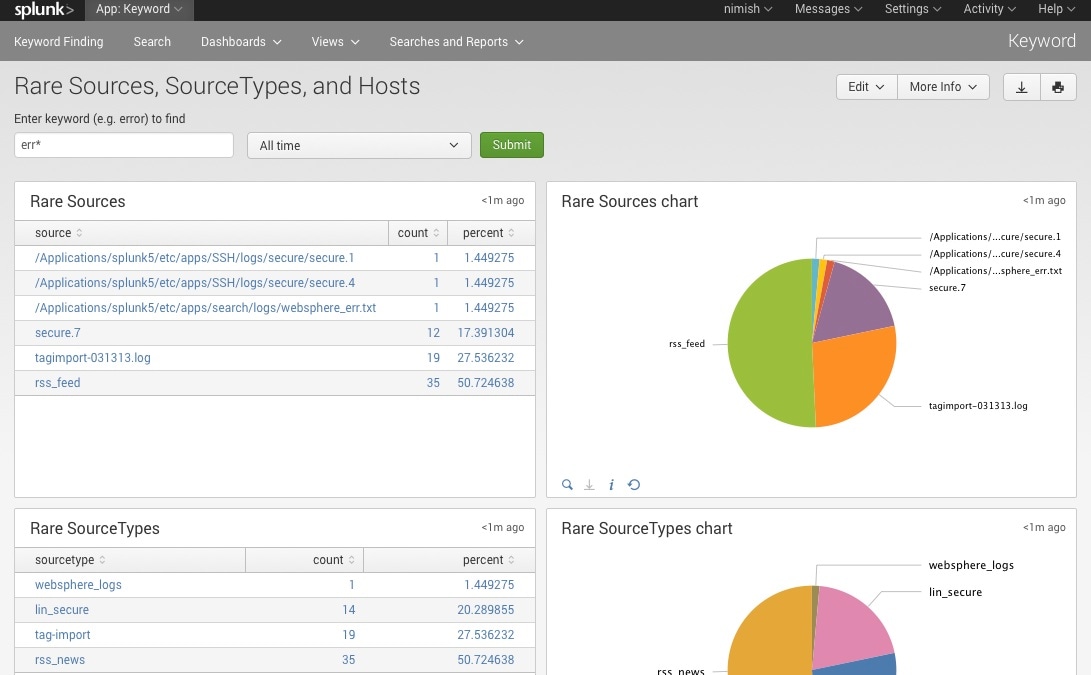
Rare

Finally, here are rare events based on punctuation.
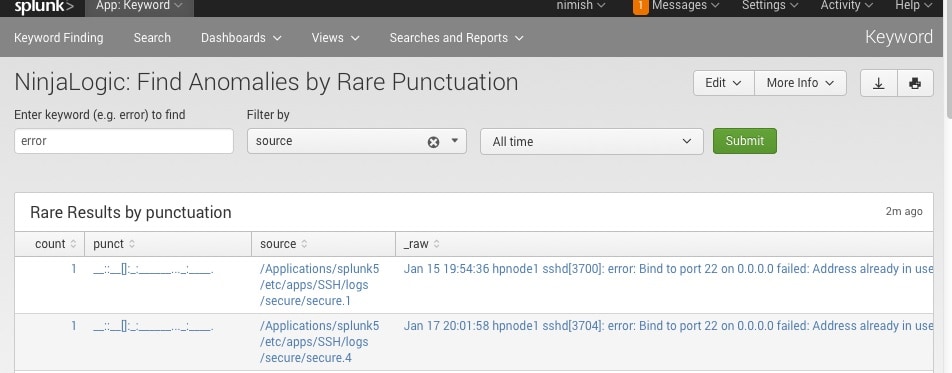
Punct

Conclusion

Hopefully, this template will satisfy all your needs out of the box. If you need to modify the searches, make a copy of the app’s default/data/ui/views/<dashboard>.xml file and put it into the app’s local/data/ui/views/<dashboard>.xml file and edit your local copy. I’m hoping this app will save you some time from configuring these common tasks.

Related Articles

High(er) Fidelity Software Supply Chain Attack Detection
Security
4 Minute Read

High(er) Fidelity Software Supply Chain Attack Detection

Software supply chain attacks are not going away. As our network defenses improve, adversaries must move up the chain to stay a step ahead of our defenses.
No Regrets Using Autoregress
Security
2 Minute Read

No Regrets Using Autoregress

The autoregression command, which is a centralized streaming command, is used to calculate a moving average. Learn how to use this command to gather information, just in time for Boss of the SOC v6!
Active Directory Discovery Detection: Threat Research Release, September 2021
Security
15 Minute Read

Active Directory Discovery Detection: Threat Research Release, September 2021

In this blog post, we’ll walk you through this analytic story, demonstrate how we can simulate these attacks using PoshC2 & PurpleSharp to then collect and analyze the resulting telemetry to test our detections.
Investigating GSuite Phishing Attacks with Splunk

Security
6 Minute Read

Investigating GSuite Phishing Attacks with Splunk

Splunk Threat Research Team (STRT) recently observed a phishing campaign using GSuite Drive file-sharing as a phishing vector. Learn more and deploy detections to prevent them in your environment.
Splunk and DTEX Systems Leverage Human Telemetry and Zero Trust to Mitigate Insider Risks and Account Compromise
Security
3 Minute Read

Splunk and DTEX Systems Leverage Human Telemetry and Zero Trust to Mitigate Insider Risks and Account Compromise

Splunk and DTEX Systems have partnered to offer an integrated solution that captures, analyzes and streams a single, noise-free endpoint data signal.
Hunting for Malicious PowerShell using Script Block Logging

Security
6 Minute Read

Hunting for Malicious PowerShell using Script Block Logging

The Splunk Threat Research Team recently began evaluating ways to generate security content using native Windows event logging regarding PowerShell Script Block Logging to assist enterprise defenders in finding malicious PowerShell scripts.
Partner Spotlight: Texas Bankers Association Operationalize Data Across Teams and Tools
Security
3 Minute Read

Partner Spotlight: Texas Bankers Association Operationalize Data Across Teams and Tools

TruSTAR, acquired by Splunk, recently spoke with Alvin Mills, TBA’s Vice President of Information Technology and Security to learn why the organization selected TruSTAR as its intelligence management platform for data-centric security automation.
PowerShell Detections — Threat Research Release, August 2021

Security
4 Minute Read

PowerShell Detections — Threat Research Release, August 2021

Adversaries are using PowerShell attacks, but luckily the Splunk Threat Research Team (STRT) has developed PowerShell analytics for Splunk by using the Splunk Attack Range to collect the generated logs, and hunt for suspicious PowerShell.
Staff Picks for Splunk Security Reading August 2021
Security
3 Minute Read

Staff Picks for Splunk Security Reading August 2021

These monthly postings will feature the favorite security-centric presentations, white papers and customer case studies from various peeps in the Splunk (or not) security world that WE think everyone should read. If you would like to read other months, please take a peek at previous posts in the "Staff Picks" series!