The gift of visibility: Mobile Real User Monitoring and Cisco ThousandEyes integration
As we gear up for the holiday season, we’re excited to unwrap a special gift for our customers — the gift of end-to-end visibility. Last summer, we announced the integration between Cisco AppDynamics and Cisco ThousandEyes to enhance Browser Real User Monitoring (BRUM) with network intelligence data. Now, the excitement continues as we broaden these capabilities for Mobile Real User Monitoring (MRUM), offering you true end-to-end visibility of your network and application data — wherever your customers are.
Customer digital experience monitoring for mobile applications
This seamless integration between MRUM and ThousandEyes stands as a testament to our commitment to providing unparalleled insights in an ever-evolving digital landscape. In an era where mobile applications dominate the purchasing landscape, businesses need more than just a glimpse into their network performance; they need a comprehensive view that transcends boundaries. In fact, during the Thanksgiving holiday sales period in 2022, 79% of U.S. online shoppers used mobile applications to shop online.
In the rush of digital holiday traffic, application performance can sometimes take a hit. With the MRUM and ThousandEyes integration, businesses can now achieve this coveted true end-to-end visibility, regardless of whether the application resides in a browser or on a mobile device. This means a complete and uninterrupted view of the mobile digital experience, from end-user devices to the cloud, enhancing monitoring and troubleshooting across various mobile platforms and locations.
How can this integration help you and your team? As we prepare for the holidays, I ask you to ponder a few questions:
- Has your mobile application ever experienced sudden performance degradation?
- Do you often encounter service disruption during high-traffic periods?
- Are you facing challenges in pinpointing the exact source affecting your application?
- How critical is it for your organization to proactively address potential performance concerns before they impact user experience, especially during peak business seasons?
New network insights for mobile apps
The integration of MRUM and ThousandEyes offers a solution to these challenges. This integration provides businesses with a comprehensive view of network insights alongside application performance metrics. By reducing mean time to resolution (MTTR) through precise identification and isolation of performance issues —such as high jitter causing video buffering or latency impacting page load times — businesses can swiftly address and rectify these concerns. Real-time monitoring enables proactive intervention, ensuring a seamless user experience even during periods of high traffic.
Is it the mobile app, backend or the network?
In peak traffic scenarios, mobile applications often encounter sudden performance degradation and service disruptions and identifying the exact source of these issues presents a challenge. The combined capabilities of MRUM and ThousandEyes empowers businesses to proactively tackle performance concerns before they impact user experience. This integration enhances network insights, incorporating metrics like jitter, packet loss and latency from ThousandEyes, which enables pinpointing root causes of issues affecting mobile applications. The result is real-time monitoring that facilitates prompt intervention, ensuring a smooth user experience in the face of high volumes of mobile traffic.
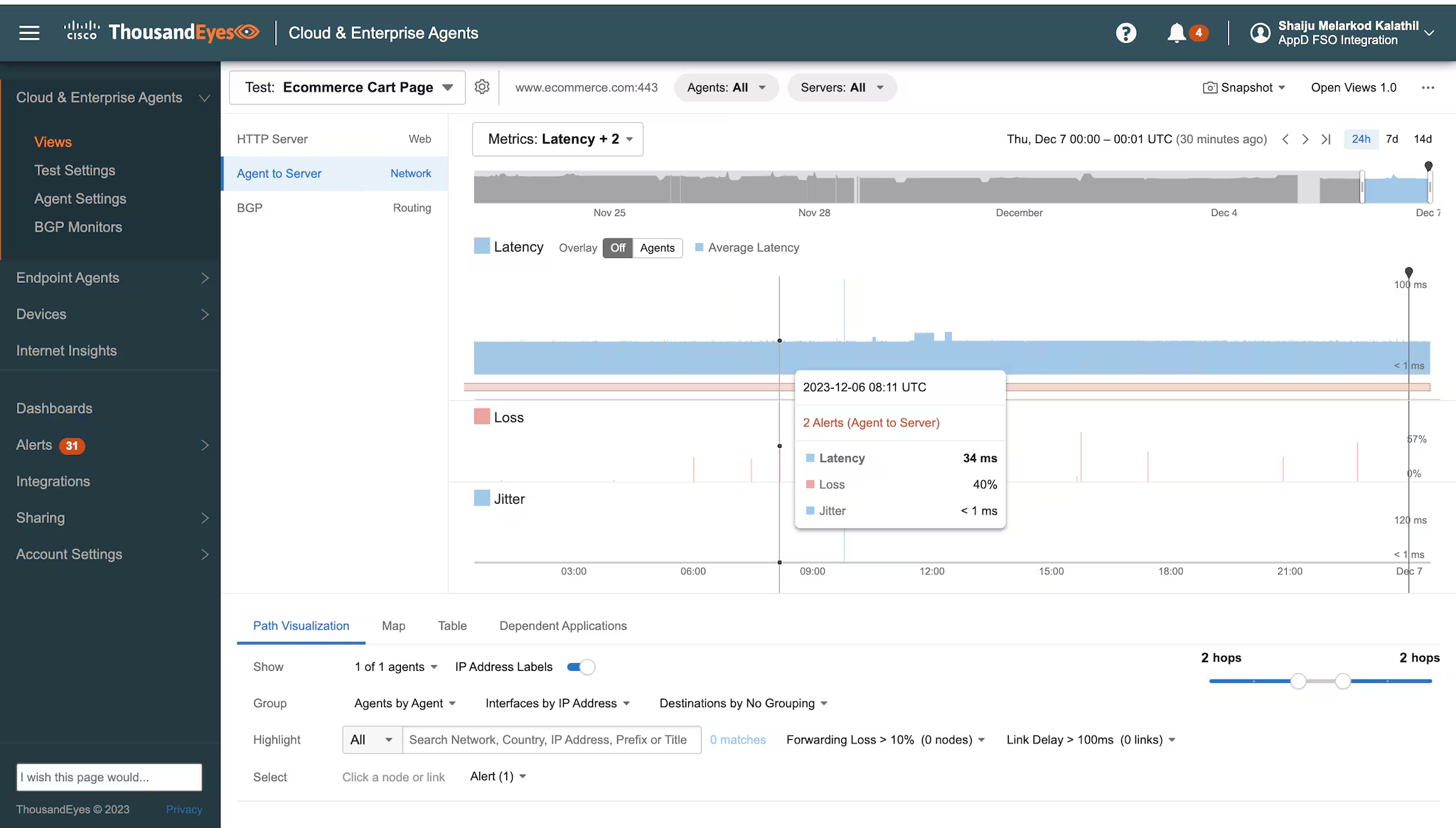
Figure 1. In-depth viewing of all test data for an eCommerce cart page with agent to server network details. You can navigate to compare network insight metrics between different perspectives, then drill down in the data to determine root cause.
Additionally, the collaboration between AppDynamics MRUM and ThousandEyes provides genuine end-to-end visibility into application and network capabilities. This integration now delivers a complete view of the mobile digital experience, from end-user devices to the cloud, enhancing monitoring and troubleshooting across various mobile platforms and locations. Paired with our existing BRUM integration, you can achieve full-stack observability.
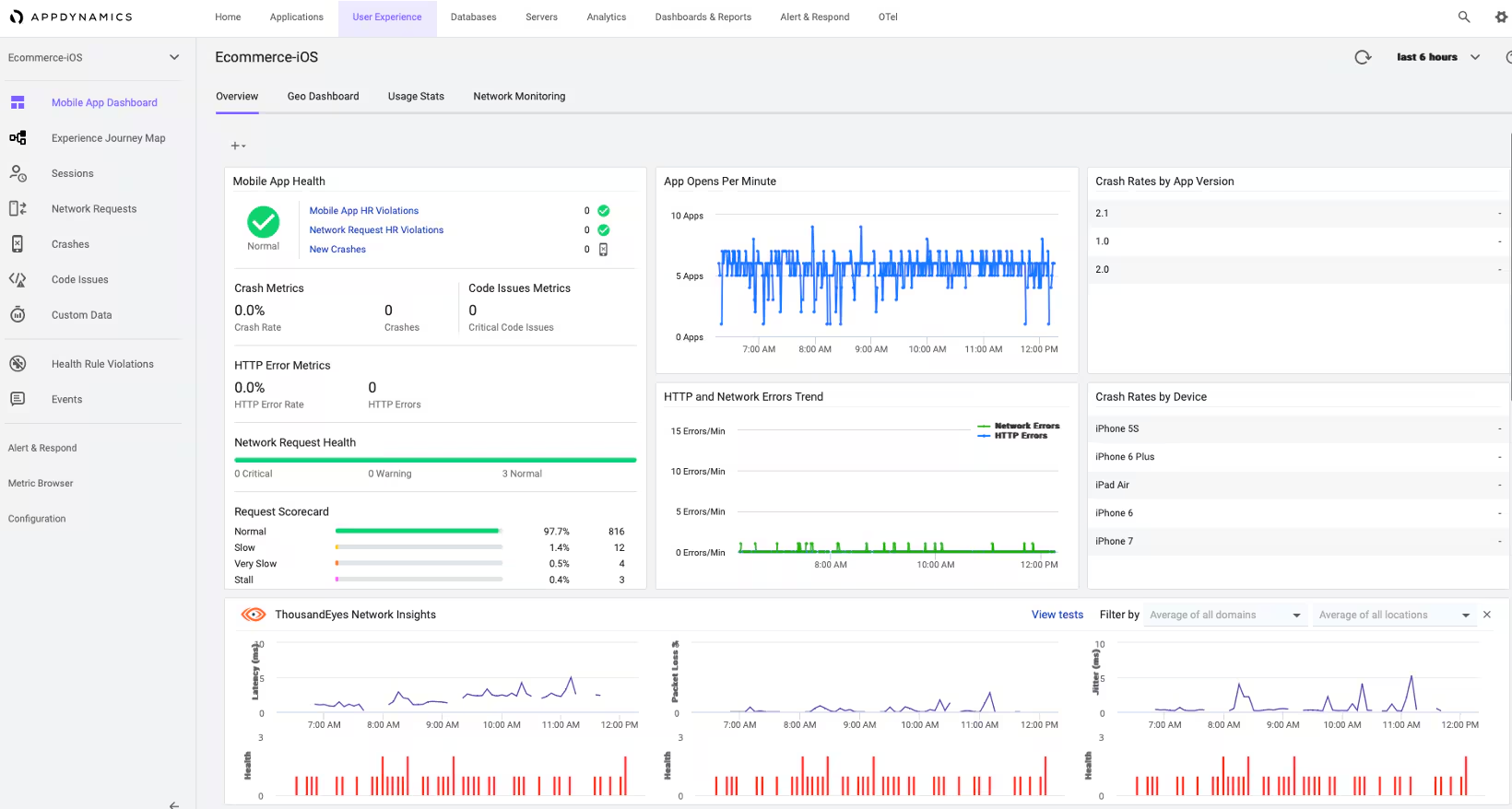

Figure 2 and 3. ThousandEyes network insights dashboard, integrated within AppDynamics MRUM displays network metrics across the domain and regions configured eCommerce application
Adopting these integrated tools enables developers to proactively manage application performance, address issues promptly and ensure a stellar holiday season for every customer.
Interested in optimizing your mobile experience? Explore MRUM capabilities from Cisco AppDynamics.
Related Articles
New Splunk Synthetic Monitoring Features Help Integrate Uptime and Performance Across the Entire Splunk Platform

Start Your Engines, Data Drivers
How Splunk Is Parsing Machine Logs With Machine Learning On NVIDIA’s Triton and Morpheus
Splunk IT Essentials Work: A Centralized App for All Things ITOps
Monitor and Troubleshoot VMware Infrastructure with Splunk
Splunk Developer Spring 2021 Update

Getting Started with OpenTelemetry Python v1.0.0
Low Latency Observability Into AWS Services With Splunk