An Introduction to Python WSGI Servers: Part 1
After releasing our new Python agent in early 2015, we’ve become obsessed with Python performance. One critical area that can impact the performance of your Python stack is your WSGI server. So, of course, we decided to collect the top 6 WSGI servers and put them to the test. In this post, we’ll provide an introduction and historical background to the top 6 WSGI servers, and in the second part of this series we’ll show you the results of our performance benchmark analysis so please stay tuned!
A Brief History of Python WSGI Servers
Python WSGI servers came about because web servers at the time could not comprehend or actuate Python applications. WSGI (pronounced “whiz-gee” with a hard “g” or “whiskey”) was developed by Phillip J. Eby (with help from Ian Bicking and others) in the early 2000s. An Apache module known as mod_python, developed by Grisha Trubetskoy in the late 90s, was up till then handling most of the execution of Python web applications. However, mod_python was not an official specification. It was simply created so they could run Python code on a server. Unfortunately, it was insecure, and developers began to look for a new solution.
WSGI is a descendant of CGI, or Common Gateway Interface. When the web was just taking baby steps, CGI proliferated because it worked with many languages, and there were no other solutions. On the downside, it was slow and limited. Python apps could only use CGI, mod_python, Fast CGI or some other flavor of a web server. WSGI was developed to create a standard interface to route web apps and frameworks to web servers.
Server and Web App
WSGI has two parts:
- The server–often high-profile web servers such as Nginx or Apache
- The web app made from a python script
The server executes the web app and sends related information and a callback function to the app. The request is processed on the app side, and a response is sent back to the server utilizing the callback function.
Sometimes there might be one or more WSGI middlewares between the server and the web app. Middleware is used to direct requests to various app objects, load balancing, content preprocessing and running several frameworks or apps alongside each other in the same process. Examples of Python frameworks that support WSGI include Django, CherryPy, Flask, TurboGears, and web2py.
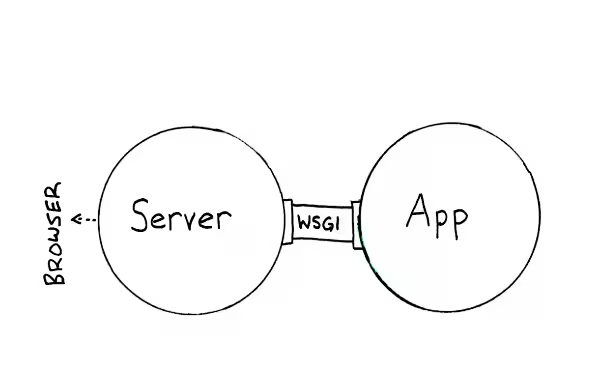
Figure 1: WSGI Interface (credit: thesoftjaguar.com)
Why You Need WSGI
You might be saying: “OK, but tell me again why I need WSGI in the first place.” There are several reasons:
- WSGI servers are designed to handle many requests concurrently. Frameworks are not made to process thousands of requests and determine how to best route them from the server.
- WSGI speeds up Python web application development because you only need to know basic things about WSGI. If you use TurboGears, Django or CherryPy, you do not need to be concerned about how your particular framework utilizes the WSGI standard. However, you will benefit by understanding how WSGI is implemented.
- WSGI gives you the flexibility of changing web stack components for alternatives without changing the application that runs with WSGI.
WSGI servers come in a variety of flavors and sizes. Some aim to be a full-stack solution while others are well-suited for specific frameworks — Gunicorn, for example, works with Django right out of the box. Here is a closer look at six WSGI servers on the market today — Bjoern, uWSGI, mod_wsgi, Meinheld, CherryPy and Gunicorn.
Bjoern
Bjoern is an asynchronous CPython WSGI server. It is Written in C and is very lightweight. Designed from the ground up to be small and fast, it was developed using an http_parser from Ryan Dahl (also the creator of Node.js) and the libev event loop from Marc Lehmann.
With a download size of only 18KB, it is made up of fewer than 800 lines of code. It takes up less than 1 MB of memory and utilizes no coroutines or threads. Bjoern is completely WSGI compliant and is regarded as one of the highest performing WSGI servers available.
It features persistent connection support and can bind to Unix sockets and TCP host:port addresses. Bjoern is considered faster than Gunicorn and less bloated than uWSGI and Meinheld. One drawback: it is not yet compatible with HTTP/1.1.
uWSGI
uWSGI was developed with the goal of becoming a full stack capable of constructing hosting services. An API and consistent configuration setup are used to implement application servers that can handle a wide variety of protocols and languages, process managers, proxies, and monitors. It is named after the WSGI Python standard and was the original plugin created for the project.
uWSGI features a pluggable architecture that can be expanded to handle different languages and platforms. Plugins can be developed in Objective-C, C, and C++. Components included in the latest release include:
- Loop engines that handle concurrency and events. Supported technologies include Greenlet, Gevent, and Tornado, among others.
- The Core, which handles socket creation, process management, cluster membership, logging, configuration, ipc, shared memory, and the uWSGI Subscription Server.
- Gateways which activate proxies, load balancers and routers.
- Request plugins to handle application server interfaces for many different platforms including PHP, CGI, and Rack.
An extensive and constantly evolving project, uWSGI allows you to do a lot more than host web apps. Many find it a powerful tool while others consider it somewhat bloated. Ongoing uWSGI development is handled by Unbit, an ISP based in Italy.
mod_wsgi
An Apache HTTP Server module developed by Graham Dumpleton, mod_wsgi provides a WSGI interface for Python web apps. The most recent release can handle Python 2.6 and 3.2. Created as an alternative to other solutions to integrate Python web apps–such as CGI, FastCGI, and mod_python–it can be installed as an Apache module or via mod_wsgi express. The second method makes it easier to install for Python developers who are not as familiar with Apache. Other advantages include:
- You do not need root access to complete installation.
- A local environment is created, reducing the risk of negatively impacting existing settings.
An ongoing project, development for mod_wsgi may seem slow at times due to it is being handled by a single developer. Another disadvantage is that the documentation is currently not well organized and can feel old and dated. The current focus is to make it easier to implement Apache using mod_wsgi in environments using Docker.
Meinheld
Created by Yutaka Matsubara, Meinheld is a WSGI-compliant server that leverages the power of picoev and greenlet to perform asynchronous I/O communications in a fast, lightweight profile. It can be used with a standalone HTTP server or through Gunicorn.
Meinheld has a dependency on a third-party component called greenlet. It gives developers an easy way to implement a continuation API. It must be installed before creating and installing the Meinheld package. Used under a BSD license, the source repository is located on GitHub. Meinheld supports Websockets and includes several monkeypatches over other modules to extend functionality.
CherryPy
Better known as a minimalist Python framework, CherryPy also comes with a WSGI Web Server that is thread-pooled and HTTP/1.1 compliant. The CherryPy team describes their Web server as a production-ready, high-speed, thread-pooled HTTP server. It features:
- Fast, easy configuration.
- Ability to be scaled.
- A small and easy-to-use solution for your Python applications.
- SSL handling.
CherryPy differentiates itself from better-known Web servers due to its ease-of-use and developer friendliness. You can be up and be running within a few minutes, running multi-processes using only one file called server.py. By combining CherryPy with Nginx, a powerful Web server reverse proxy, you gain a reliable way to serve your Python web apps. This is the case even if you develop the application itself using CherryPy, Bottle, Flask, Pyramid, Django or another platform. CherryPy was created by Remi Delon. He wanted to build a framework that adhered as closely to Python guidelines as possible.
Gunicorn
Created for use on UNIX, Gunicorn is a Python WSGI HTTP Server. The name is a shortened and combined version of the words “Green Unicorn.” The project site itself actually features a green unicorn. Gunicorn was ported over from the Unicorn project from Ruby. It is relatively fast, light on resources, easy to implement and works with a wide variety of web frameworks.
The Gunicorn team encourages you to use Nginx behind an HTTP proxy server. The Gunicorn server runs on localhost port 8000, and Nginx is typically used as a reverse proxy server. Gunicorn has no dependencies. Its advantages include:
- Works with Paster, Django, and WSGI out of the box.
- Worker process management is automatic.
- Python is easily configured.
- Many worker configurations can be used.
- A variety of server hooks.
Gunicorn works with Python versions between 2.x and 2.6 and 3.x to 3.2. However, there is no “keep-alive.” The sync workers were built to run behind Nginx. Nginx upstream servers only use HTTP/1.0.
So which one is the best WSGI solution for you? As in many things related to web development, it depends on your goals. Bjoern is very fast, written in C, is asynchronous but does not yet support HTTP/1.1. Meinheld is also written in C and is light and rapid. uWSGI is expansive, powerful and handles a variety of languages, but a few developers feel its goal to be a full stack solution make it bloated and unwieldy. Mod_wsgi works but feels old and dated to some. Gunicorn has decent speed, is light on resources and works with Django automatically. CherryPy’s built-in Web server is lean, stable and has been called by one developer “a joy to work with.” Review your goals and carefully consider which one works best for your web application.
In the next section of this post, we will show benchmark performance numbers for each of these servers and compare their performance against each other.
Related Articles

10 Top Things to Monitor in Amazon RDS

How We Monitor and Run Kafka at Scale
Monitoring Red Hat OpenShift with Splunk Infrastructure Monitoring
Metrics from Prometheus Exporters Are Now Available with the Splunk Smart Agent

Splunk Ranked No. 1 in Gartner’s Market Share for Performance Analysis
![Getting Started with Citrix in Splunk - [Part 1]](https://www.splunk.com/en_us/blog/it/media_19eaeb6da259811ed55e1c4bf408fd05ddb103b37.webp?width=300&format=webp&optimize=medium)
Getting Started with Citrix in Splunk - [Part 1]

Understanding and Baselining Network Behaviour using Machine Learning - Part I
Understanding and Baselining Network Behaviour using Machine Learning - Part II