The Software Development Lifecycle: The Most Common SDLC Models
Key Takeaways
- The Software Development Lifecycle (SDLC) is a structured framework that guides software projects through defined phases — requirements gathering, design, development, testing, deployment, and maintenance — to ensure consistent quality, manage risks, and align outcomes with business goals.
- Different SDLC models include Waterfall for a linear, document-driven approach; Agile for iterative, sprint-based delivery; and DevOps for tightly integrated development and operations, allowing teams to balance predictability, speed, and collaboration.
- Embedding continuous monitoring, automated testing, and feedback loops into the SDLC enables rapid issue detection, smoother releases, and ongoing improvements that keep applications secure, reliable, and responsive to changing requirements.
Developing high-quality software demands a structured approach that balances planning, execution, and adaptability. Turning an idea into a functional product requires addressing complex requirements, tight timelines, and user expectations.
To tackle these challenges, organizations use the software development lifecycle (SDLC), a proven framework designed to ensure efficiency, consistency, and quality throughout the development process.
In this article, we will be discussing why the SDLC is important, the stages of the lifecycle, and the most important and common models.
What is the software development lifecycle?
Besides developer expertise and engineering resources, quality software is the product of reliable processes. In technical terms, those reliable processes are known as the software development lifecycle (SDLC).
The software development lifecycle (SDLC) is a process for coding, designing, and managing software. It comprises several methodical stages prioritizing increasing system efficiencies, proper planning, and rigorous testing. SDLC enables organizations to produce the highest-quality software in the shortest possible time while minimizing costs.
Why is SDLC important?
The SDLC presents a way of remedying some of the software development challenges. These challenges, which are an unstable technology landscape, changing user/client requirements, and limited engineering resources, hinder the deployment of quality software. Hence, SDLC is necessary for the following reasons:
- Provides clarity: Developing modern applications is complex and resource intensive. Poor resource management, scope creep, missed deadlines, and other problems derail project execution. The SDLC gives developers a detailed plan and a clear vision of the end product. It also helps them easily identify tasks, risks, and problems at every stage of the development.
- Leads to better quality control: A buggy application leads to service issues when it’s integrated with the organization’s other systems. This results in downtime, lost transactions, and a diminished reputation. Thorough software testing built into the SDLC ensures that the software meets its technical and user requirements and is free of defects before it gets to users. Regular checks keep the project moving smoothly, so developers can spend more time building the software than on frequent code refactoring.
- Ensures project continuity: Unplanned events like the loss of a team member or the presence of new team members can delay a project’s progress. An effective SDLC maintains complete and detailed records of the entire project, so anyone joining midstream can pick up where the previous member left off.
- Reduces costs: The SDLC emphasizes clear deadlines and deliverables, while offering a structure that lets you see the project's timetables and costs. This keeps the project on budget and gives the project manager more room to improve efficiencies and productivity.
- Continuous improvement: SDLC creates a feedback loop. Information gathered from the testing, deployment, and maintenance stages feeds back to the earlier stages, allowing continuous improvements until the optimal product comes to life.
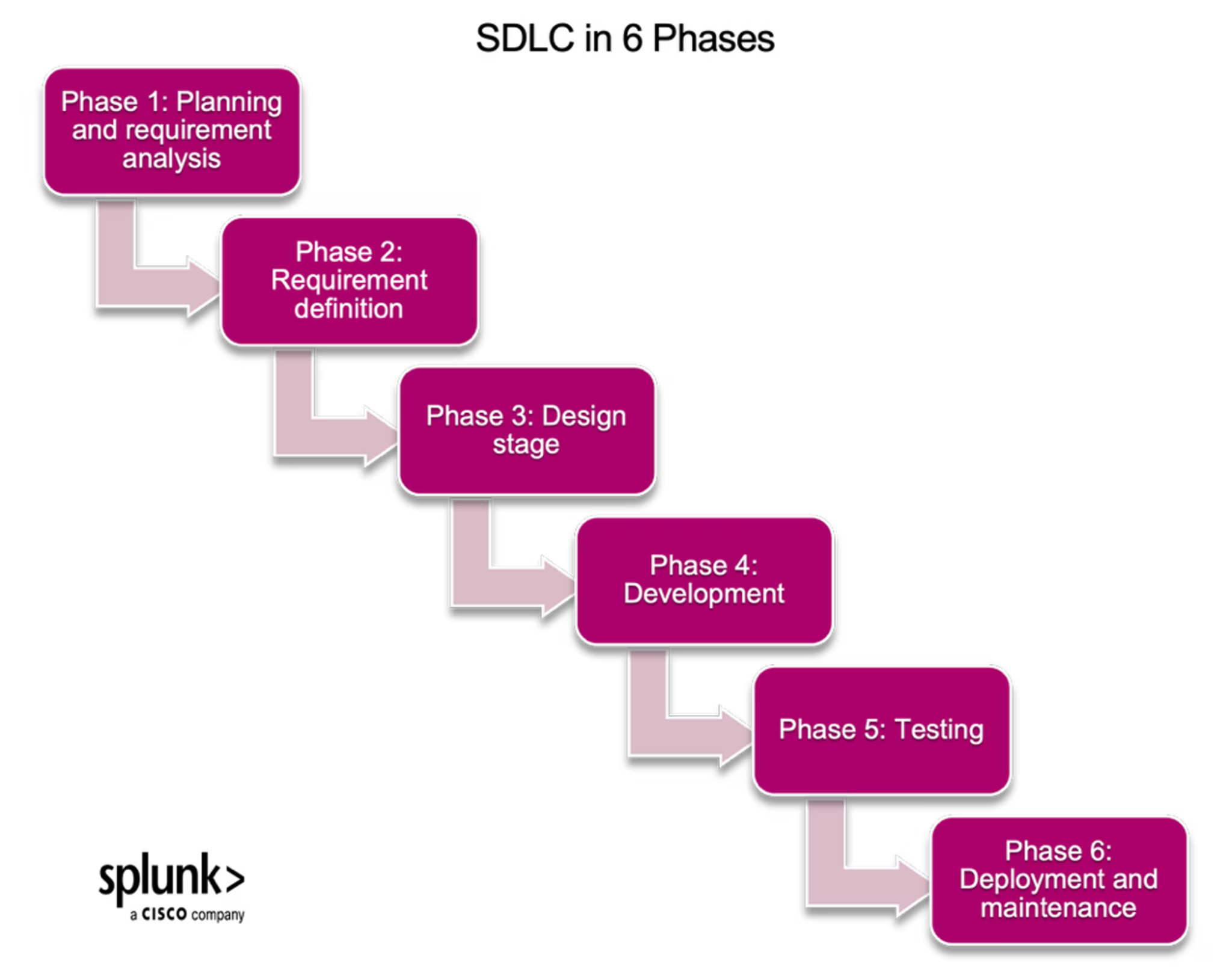
Phases of the software development lifecycle
Typically, there are six phases or stages of the Software Development Life Cycle, which are as follows:
Phase 1: Planning and requirements analysis
The SDLC begins with senior team members collecting requirements from the project’s stakeholders, determining its feasibility, and planning a basic approach. This stage should clarify the project's scope and any anticipated issues, risks, and opportunities.
This stage requires input from business analysts, finance teams, and project managers. The goal of this stage is to brainstorm and lay a foundation for the project’s success.
To make things easier to understand, let’s imagine that a development team needs to build an Identity Access Management (IAM) software. They’ll begin by meeting to get basic details about the product, like:
- Who it’s being built for, whether employees or customers.
- The specific systems and apps that need control.
- Compliance regulations to take note of.
- Necessary authentication methods like passwords, biometrics, or multifactor authentication.
Phase 2: Requirement definition
Once the requirements have been gathered and analyzed, the next stage is defining and getting them approved by stakeholders. At this point, the project’s timeline, cost, scope, and every other information agreed upon in the previous stage are finalized and documented in the Software Requirement Specification (SRS) document. The goal of this stage is alignment with all stakeholders, after which comes the technical aspect of building the software.
Using the example from the first stage, the development team ensures that the stakeholders agree on the requirements and documents them for reference.
Phase 3: Design stage
This stage is like creating a house's building plan. System architects work with the SRS to determine the product's best and most cost-effective architecture. Then, designers create the software’s interface while product managers review the plans to ensure they align with the business’s objectives.
Typically, more than one design is proposed and documented in a Design Document Specification (DDS), with the most optimal one selected according to timeline, robustness, and cost. The goal here is to create a blueprint for developers to work with when writing the software's code.
For the team working on an IAM software, it’s at this stage that they map out and design the different components of the product, some of which are:
- Administration portal
- Identity store
- API gateway
- Self-service portal
Phase 4: Development
This is when the product is built. Developers generate the programming language code according to the DDS and follow the organization’s coding standards and guidelines. They must also complete project modules and new features within established deadlines. The goal is to build functional software that meets user requirements.
At this stage, using our example, the development team will develop functional IAM system modules and unit-test the code to ensure it matches the blueprint.
Phase 5: Testing
As each component of the software build is completed, it’s sent to the testing team, where it’s thoroughly tested to ensure it’s working as expected. Any defects are documented and sent back to the development team for correction. The goal here is to deliver bug-free software.
An IAM software will need to undergo tests for different purposes, such as functional testing, integration testing, security testing, performance testing, and User Acceptance Testing (UAT).
Phase 6: Deployment and maintenance
Once the first version of the software has been tested and any defects removed in the production environment, it’s delivered to a large group of end-users, who will often discover undetected bugs and errors from the testing stage.
This is when the IAM software goes live with activated login portals, admin and user documentation, and any other details the client needs to launch with the software’s first version.
Thereafter, developers will incorporate any user feedback into the software's next release, as part of the maintenance stage. Security patches and feature enhancements are also maintenance activities.
Now that we have a clear idea of the structure of the software development lifecycle, how do you navigate these different stages while building software? Must they always be done sequentially? The next part of this article answers these questions.
Software development lifecycle models
The SDLC consists of different models, which are frameworks for developing software. They are:
Waterfall model
The oldest and most straightforward software development model gets its name from its linear beginning-to-end flow. Each stage follows its plan and must be completed before the next stage can begin, with one stage waterfalling into the next.
Pros:
- Provides specific deliverables.
- Ideal for projects with precise requirements.
- Easy to understand and implement due to its sequential approach
Cons:
- Delays testing till much later/project’s completion.
- Its rigidity makes it hard to pivot or make changes when necessary
- Outdated because it doesn’t fit into the dynamics of today’s technological space.
Best for: small teams, highly regulated industries, projects with fixed budgets and timelines.
Iterative model
In the iterative model, the goal is to build first and make improvements over time. Rather than aiming to produce a fully developed application at once, developers quickly create an initial version of the software and improve it with successive small iterations.
This approach is ideal for creating larger applications. It allows development teams to break the project into manageable chunks and quickly deploy software to users.
Pros:
- Ensures early delivery of software.
- Gives room for scope changes and timeline adjustments.
- Encourages continuous collaboration amongst all stakeholders.
Cons:
- Leads to resource wastage with each iteration.
- Needs careful coordination and constant tracking.
Best for: projects with tight timelines, changing requirements, and software whose core features can be delivered first.
Agile model
Using the iterative approach, the agile model divides the project into multiple cycles and delivers several releases. Each release generates feedback incorporated into the next release, allowing organizations to quickly adapt to an ever-changing market while reducing risks particular to the waterfall model.
Pros:
- More focus on building than documentation.
- Similar to the iterative model, it’s flexible and allows scope changes.
- Incorporates feedback, which leads to customer and stakeholder satisfaction.
Cons:
- Difficult to estimate timelines and budget.
- Frequent scope changes can limit the project’s progress.
Best for: early-stage startups, DevOps teams, and projects requiring flexibility and collaboration.
Spiral model
The spiral approach combines elements of the waterfall and iterative models. It repeats the planning, design, build, and test stages of development in linear succession, making iterative improvements with each pass through the process.
Pros:
- Continuous iterative development guarantees the delivery of high-quality software.
- Best SDLC model for risk management due to the kind of iterative approach it adopts.
Cons:
- Relies heavily on risk analysis, which is time-consuming.
- Resource-intensive, as each recurring SDLC stage requires resources.
Best for: ideal for large and complex projects with high-quality standards, like military or healthcare systems.
V-model
The V-model, also known as the verification or validation model, extends the waterfall model by incorporating testing at each stage of development rather than including a standalone testing stage at the end.
Pros:
- Improved quality assurance.
- Early detection of bugs or defects.
Cons:
- Quite rigid, which makes adaptability to project pivots hard.
- Time-consuming because it relies on documentation and testing.
Best for: small projects with clear requirements.
Big bang model
This approach minimizes formal structure and processes, instead relying on large amounts of time, effort, and resources to produce software. It is the highest-risk model and best suited for small teams.
Pros:
- Gives room for flexibility
- Easy to implement and requires little documentation.
Cons:
- High-risk due to the uncertainties involved
- Not ideal for large or complex projects
Best for: short-term low-risk projects and projects with evolving requirements.
SDLC best practices to follow
The following SDLC best practices will simplify each SDLC stage, improve code quality, and ensure successful software deployments:
- Document your processes: Apart from the requirement definition and design stages, which require specific documentation, it’s advisable to document processes to make them repeatable and improvable. Playbooks are a tool for doing this.
- Track progress at all times: Keep up with project status by tracking relevant engineering metrics. DORA and DevOps metrics are a good place to start, and project management tools such as Jira, Trello, and Git simplify this process.
- Embrace automation: Software development projects generally involve many developers working individually on different tasks. Manually managing these different team members takes time and risks introducing errors into the software. Automated tools used in key stages of the development lifecycle smooth transitions between team members and speed up processes by completing repetitive low-level tasks. Continuous integration/continuous delivery (CI/CD) is another way of automating the software development lifecycle.
- Make security a priority: A secure SDLC delivers functional software and helps your business’s reputation and overall bottom line. Ensure the security of the development lifecycle through regular code reviews, automated security scanning, penetration testing, and incident response planning.
- Establish coding standards: Set a benchmark for coding quality that developers must follow to ensure uniformity, reduce bugs within the code, and guarantee functional software for deployment. All these should be in an accessible document with clear guidelines for naming conventions, code formatting, and structure.
Successful software development starts with the SDLC
Building and maintaining software is not a walk in the park. Without clear objectives and processes, your software project risks getting derailed, with no clear way to get back on track. Following the SDLC stages and working with the right model ensures you can build the software you envision that perfectly meets your customers' needs from the outset.
FAQs about Software Development Lifecycle (SDLC)
Related Articles

Security Books & Articles: Must-Read List From InfoSec Experts

Incident Severity Levels 1-5 Explained

Cloud Network Monitoring: An Introduction

The Democratization of Data: The Pros & Cons of All That Data

Trunk-Based Development vs. GitFlow: Which Source Code Control is Right for You?

What Is TBD? Trunk-Based Development & Its Role in CI/CD

Status Pages: The Ultimate Guide

When and Why To Adopt Feature Flags