Why Knowing the Front-End and User’s Experience of Your Platform is Key to Understanding How that Platform is Working
We have all been there. When you are trying to buy a ticket and the app crashes or loads the next web page when booking a holiday only to find it takes forever and appears to hang. Our frustration level increases and if it continues, we will exit and go elsewhere. With banking apps though, we won’t move straight away but repeated bad experiences here will be remembered and eventually will make us move.
The reliance on apps and web platforms, as well as digital transformation as a whole, has accelerated rapidly over the last few years, with the recent pandemic being perhaps the biggest driver of this change in recent years. From searching for information, getting the latest train times, weather forecasts, and traffic alerts to buying cinema, theatre and plane tickets and paying bills through banking apps, these web apps and platforms are varied and span all elements of our lives today. When they stop working, crash or are slow, we can’t complete what we wanted to do. B2B platforms are no different; if they are not working, have performance issues and errors, employees can’t complete the tasks they need to do.
The Impact of Front-End and User Issues
The impact on your business can be high - from users exiting the platform without buying or an outage that stops all transactions with both resulting in significant drops in revenue through to the high cost, time and resources in finding and fixing the issue. There are also other impacts to consider too - when users can’t transact online they might call the call centre where there is likely to be a cost to service each call as well causing longer delays for customers to get through. Customers will remember their experiences, particularly if they happen more than once, and can easily decide that next time they will use a competitor, where possible, rather than come back. That customer is then lost indefinitely.
Issues with B2B platforms can fundamentally stop businesses from running too - for example, logistics platform problems can stop customer orders from being fulfilled and missing delivery SLAs, which can result in fines:
High Expectations
Our expectations as users are very simple:
- We should be able to do most things online.
- Apps need to be available wherever we are on a 24x7 basis. As long as we have connectivity, then we should be able to access that app or webpage.
- They need to work and work well. Mobile app crashes, long page load times and other glitches are not acceptable to today’s user community.
However, delivering these simple aims is a huge challenge for the teams that build and manage these platforms. Environments today are extremely different even from those a few years ago; everything is typically in the cloud, spread across thousands of microservices and containers, utilising the latest tech innovations and are heavily reliant upon third-party provided services. The pace of change is fast, with potentially multiple releases per day which are managed by large, distributed teams. They are also ephemeral, meaning that components could last for a few minutes before being destroyed. These approaches provide multiple advantages, with a key one being able to deliver innovation to your customers quickly. Marketing events can be coordinated with app and web platform updates to ensure you drive more users to your platform, for example. This constant change though increases the risk of things going wrong or something breaking and this can then undo all of that innovation in an instant as your users do not see the benefit, at least not immediately, and before you know it, developers are spending time troubleshooting and fixing issues rather than innovating.
And finally, all of this tech has to work so that your users can execute their transactions on your platforms and sadly they do not care about all of that complexity that sits behind them or indeed how they are managed. This is why it is so important to observe and understand the user’s experience of the platform. It provides the key indication of whether you have a problem that needs attention because it is affecting users. The last thing you want is to hear about platform issues via your users and social media! Adding to the mix of challenges is that most monitoring and observability are focused on the back-end application and infrastructure and not on the users and their experiences.
Why Do We Need to Know About the Users’ Experience?
First of all, let’s define what the user experience actually is: imagine you are on a web platform to search and buy a holiday - you will load URLs, click on links, add stuff to a basket etc., to purchase that holiday. Perhaps as you go through the buying journey, you encounter numerous challenges ranging from the page taking a long time to load in your browser through to not being able to select the holiday package you want because of an error. Maybe you are able to get to the payment page but you can’t make the payment. Alternatively, you may have had no issues and everything was great. Either way, when we talk about the experience of the platform, it is the above and having that visibility of the users’ experience means that you can immediately understand how the platform is performing for your users and answer that critical question of whether you have a problem that needs to be fixed. The same is true for mobile apps - understanding how they are performing to the user and whether they are crashing is key to knowing the user experience of them.
This visibility provides answers to key questions about your platform:
- Are users leaving because they cannot access the platform? If so, how many? Or is it across the whole platform or for a particular browser type or version?
- Are they having to exit out of their journeys because of a serious error?
- Why have our conversions and revenue dropped?
- Are users experiencing mobile app crashes?
- Are users doing what you expect them to do and is the platform showing the right pages, images, selections etc.?
- Do we have page design issues, third-party problems or has something broken had a negative impact on the front-end?
- Are the APIs working and working to that SLA?
Why Does the Front-End Have Issues?
The front-end is in itself a complex engine, with multiple moving parts and addressing those performance issues can be an extremely difficult task. What’s more is that users access platforms and the front-end through many different browser types and versions, running on different platforms and OSs as well as downloading mobile apps to run on Android and Apple devices, again, with different versions of the underlying OS.
There are hundreds of variables that can impact performance and combined with a lack of visibility make it difficult to prioritise what to fix and how to do so. From how the page is designed, constructed and built in the browser, complex JavaScript components, a variety of images through to third-party providers including content delivery networks and how the front-end interacts with the back-end, delivers a cocktail of front-end complexity, with multiple variables to manage.
Engineering teams can also be prioritising other issues on the platform, and in many cases, can be unaware of issues impacting their end users due to a lack of visibility. The monitoring of the back-end doesn’t provide a complete picture of the app’s health and user experience. A great example of why needing front-end and user visibility was the Fastly CDN outage and you can read more about that here.
User Experience and Front-End Visibility
So what is needed is the ability to observe and monitor the user's experience and the front-end. Gartner defines this part of Observability as DEM or digital experience management. Although over the years it has been called many names - end-user experience management, user experience management, digital experience monitoring etc. - and these are still used today. It is a major component of full-stack visibility and ties in nicely with metrics, traces and logs - more about this later on - which are the three pillars of observability. Splunk provides two key approaches to observe the front-end and user experience:
-
Synthetic:
- With Synthetic, we can script an emulation of the user’s journey through a browser so that you can always understand the performance and availability of both the platform and the journeys within it, regardless of whether it is being used by real users. Secondly, you can also test those other key elements, like API calls, to not only ensure that they are working but also how long they take.
- Synthetic provides a quick insight into the journey - how long does a page take to load, what dependencies does it rely upon, how does the page design (images, JavaScript components etc.) impact performance, are there errors being generated etc. Just doing this can provide lots of insight to improve the performance of your platform and it is something that Splunk offers here.
- Pre & Canary release testing to again provide that quick insight into whether there is an issue which could easily impact your users.
-
RUM or Real User Monitoring:
-
This is the monitoring, as the name suggests, of the real users that are on the platform using the mobile apps or accessing it through a browser.
- For web apps, this is achieved through a small piece of JavaScript that is inserted into the webpage and is downloaded when the user hits the site. This JavaScript component now resides on the page in the browser and is right where the user is. Imagine a stopwatch being next to them, timing each page load and transaction they are doing from where they are. It could be on an aircraft travelling across the pond, for example.
- For mobile apps, the app itself is easily instrumented and becomes part of the app that is downloaded onto the user’s device. So again, like above, the starting point is right where the user is.
-
This will allow you to now understand how your real users are experiencing your platform - how long does that mobile transaction take to complete, that web page take to load and whether they have experienced errors or crashes during their journey and as a result, are they leaving? You now have the best indicator that there is indeed an issue, that it can be correctly prioritised and subsequently actioned. Imagine a situation where you have more than one issue - you will be able to correctly focus and fix the most pressing problem.
-
But it is not just this visibility that is provided, it also allows you to troubleshoot the issue and get it fixed quickly.
-
-
Session Replay - which is part of RUM, is the ability to play back the user's session, much like a video recording. You can see which route they took, what they clicked on, what screens were delivered, what options were presented to them etc. It is great knowing how long a page took to load, but if it is the wrong page, image or component for example, then the user experience will equally be deemed poor by the user, particularly if it prevents them from continuing their journey.
Metrics, Traces, Logs
The visibility above can also be metricised so that you can track key metrics about user performance, including page response time and the web vital metrics. The front-end is also linked to the back-end, as each front-end call is traced through to the back-end, with further drill-downs into the relevant logs, thus speeding up troubleshooting and solving issues.
What Visibility Can We Get With Splunk?
The Splunk O11y platform has a comprehensive DEM solution that will provide user experience visibility into the front-end and user experience:
- Visibility - ensure that the front-end is performing correctly, with no significant errors and that users are having a great experience on your platform.
- Identify latency, errors and poor performance - easily identify these issues for each code change and deployment. Measure and understand how content, images and third-party dependencies impact your customers.
- Faster troubleshooting with AI-driven troubleshooting - quickly identify the issues impacting your customers, web pages and mobile apps the most, prioritise the ones to fix first and use automatic root cause to quickly get them fixed.
- Manage third parties and dependencies - understand the service they are providing for your platform, build out SLAs and ensure that they are adhered to. This is especially important as these third parties and dependencies are frequently not the responsibility of the IT and network teams. They are managed by other teams in the organisation depending on the function - traffic and behaviour analytics, SaaS editors, payment platforms etc.
- Improve core web vitals - benchmark and improve your customer experience with core web vitals as the industry standard for page load, interactivity and visual stability.
Synthetic Visibility
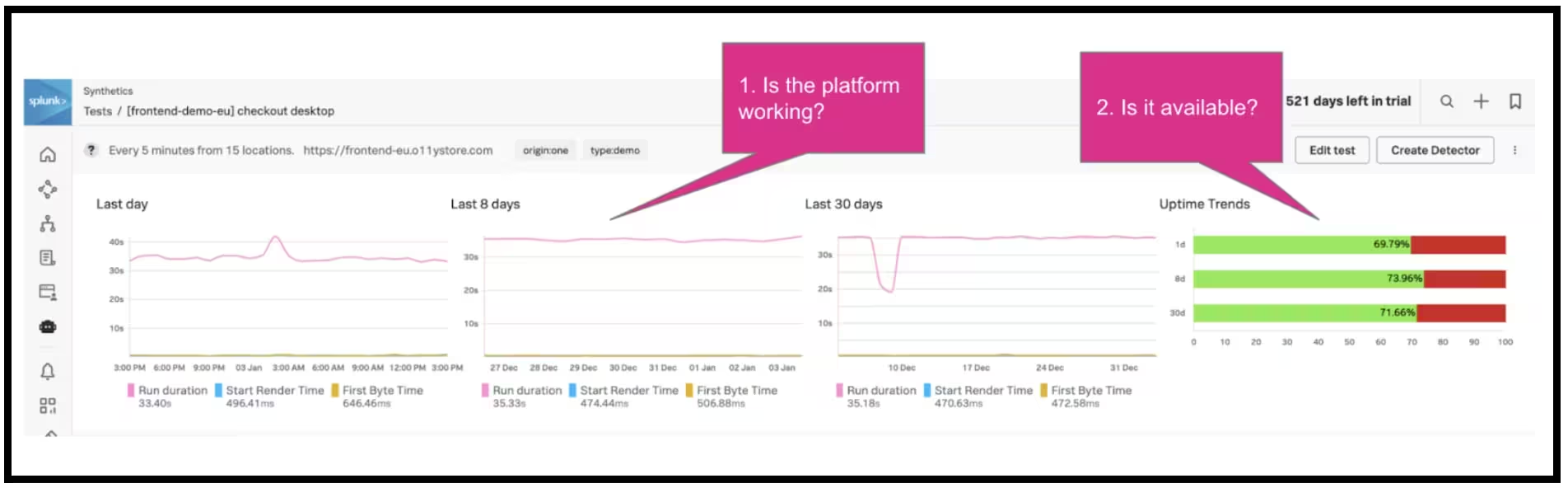
This visibility is easily provided without the need to install anything within the platform. From the screenshot below, you can quickly see the availability or uptime of your platform and how it has been performing over time. Has there been an outage that needs further investigating or a blip in performance over the last 30 days? If there has, we can drill down into the details as to why.
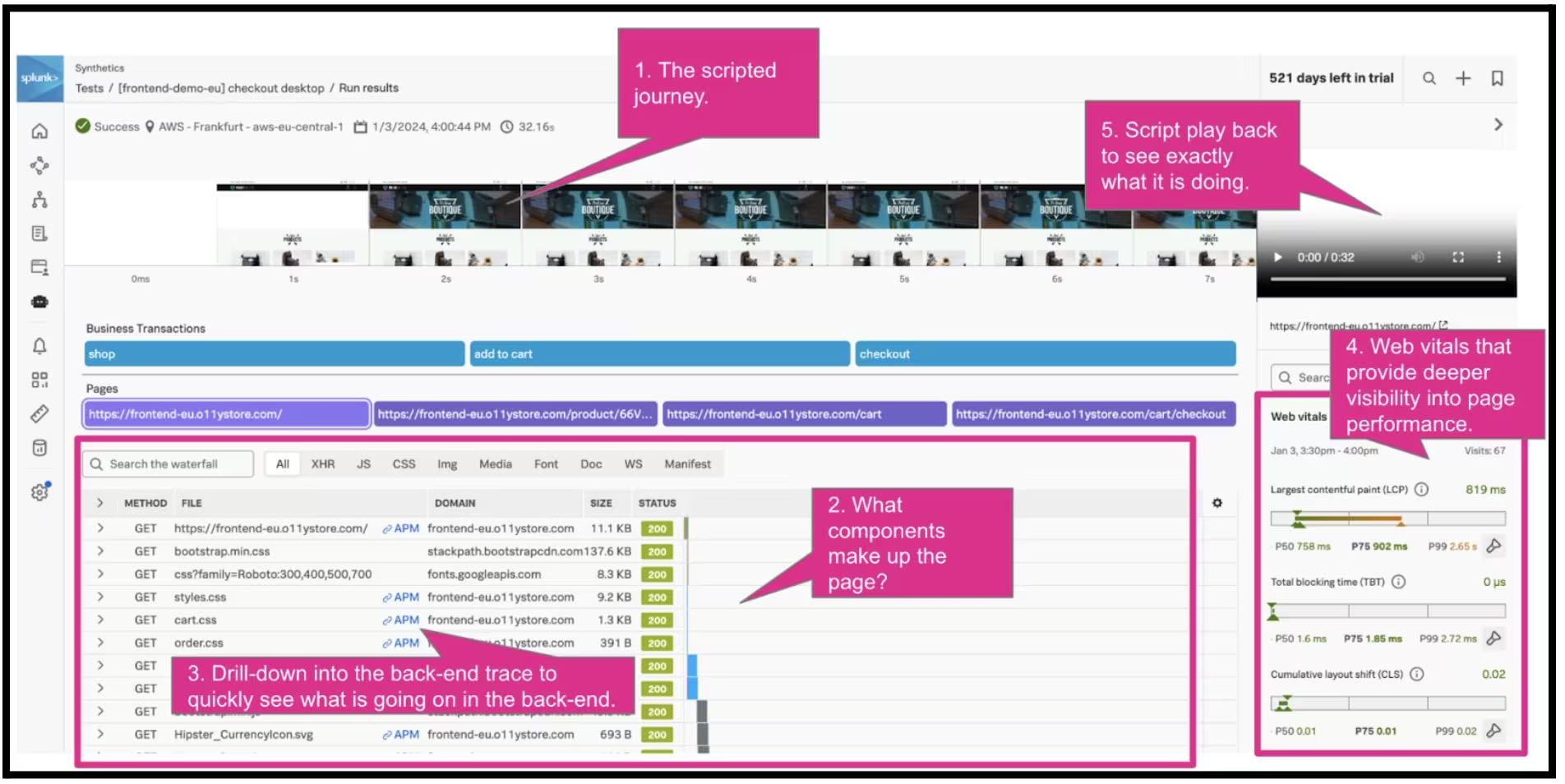
By drilling down into a synthetic test, you can get much deeper insight as depicted in the screenshot below. You can see immediately the components that make up the page, the key Google web vital metrics as well as links to the back-end traces for each of those components, therefore linking the front-end to the back-end for quicker troubleshooting. Any issues here can be acted upon and addressed, quickly and efficiently.
Don’t forget that this visibility can be provided for API as well as simple uptime tests.
Real User Monitoring (RUM) Visibility
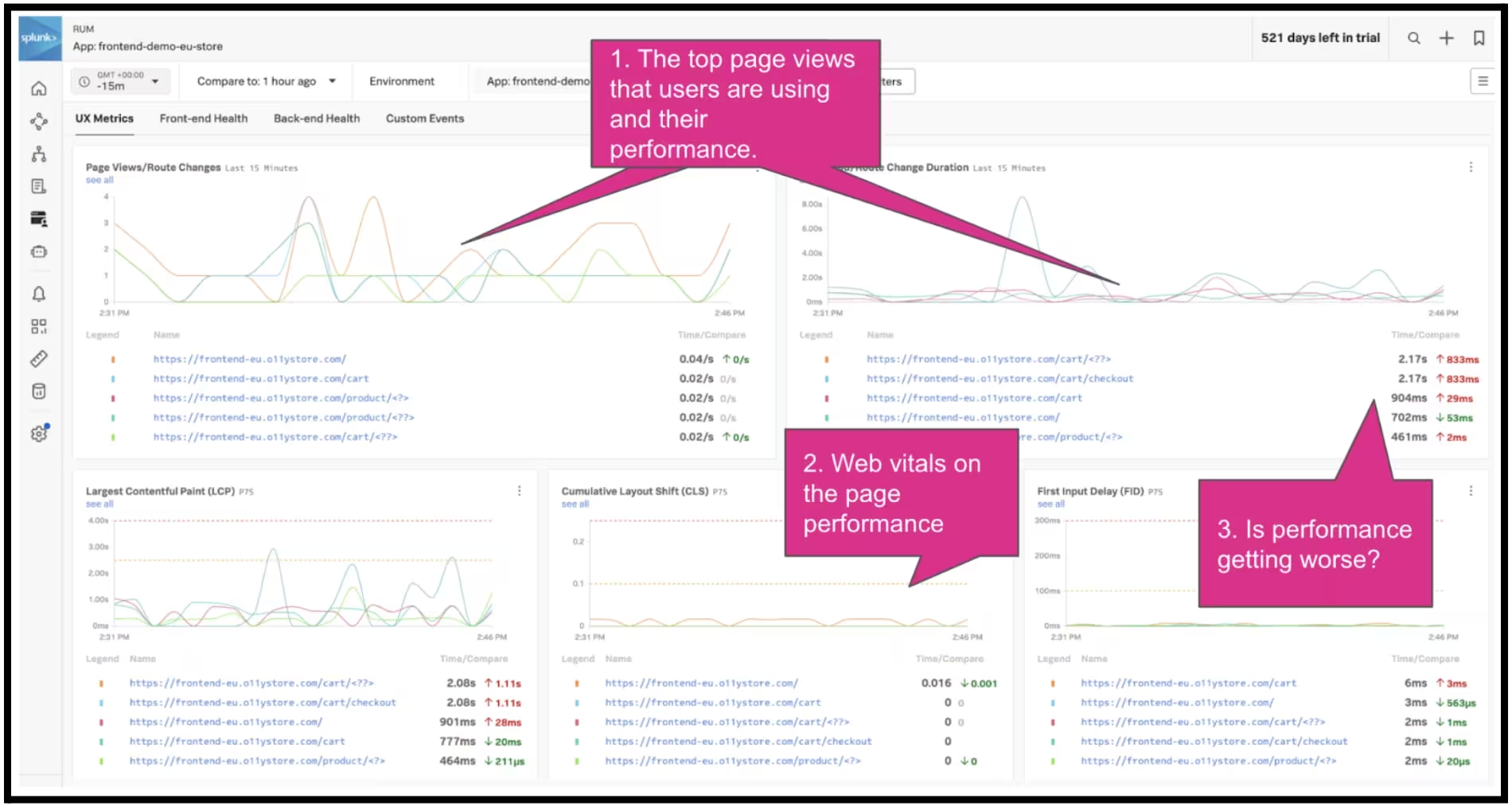
Once RUM is deployed, the performance of the browser-based or mobile app is captured and reported. The screenshot below shows this visibility for a browser-based app and you can quickly see which pages are being used, how frequently they are being accessed and their performance, with a detailed analysis of the core web vitals of each page. Any changes to the platform can be visualised to see if there is a negative impact on the front-end and the users.
You can drill down further into any page, to get further info on it either to help troubleshoot an issue or for performance optimisation. By drilling down into the checkout page, there is a range of additional info that can be seen - from where the users are coming from (to determine if there is a location-based issue) through to which browser and OS type and version the user is using to access the page. You can understand whether a problem is affecting all users and locations or a particular browser type.
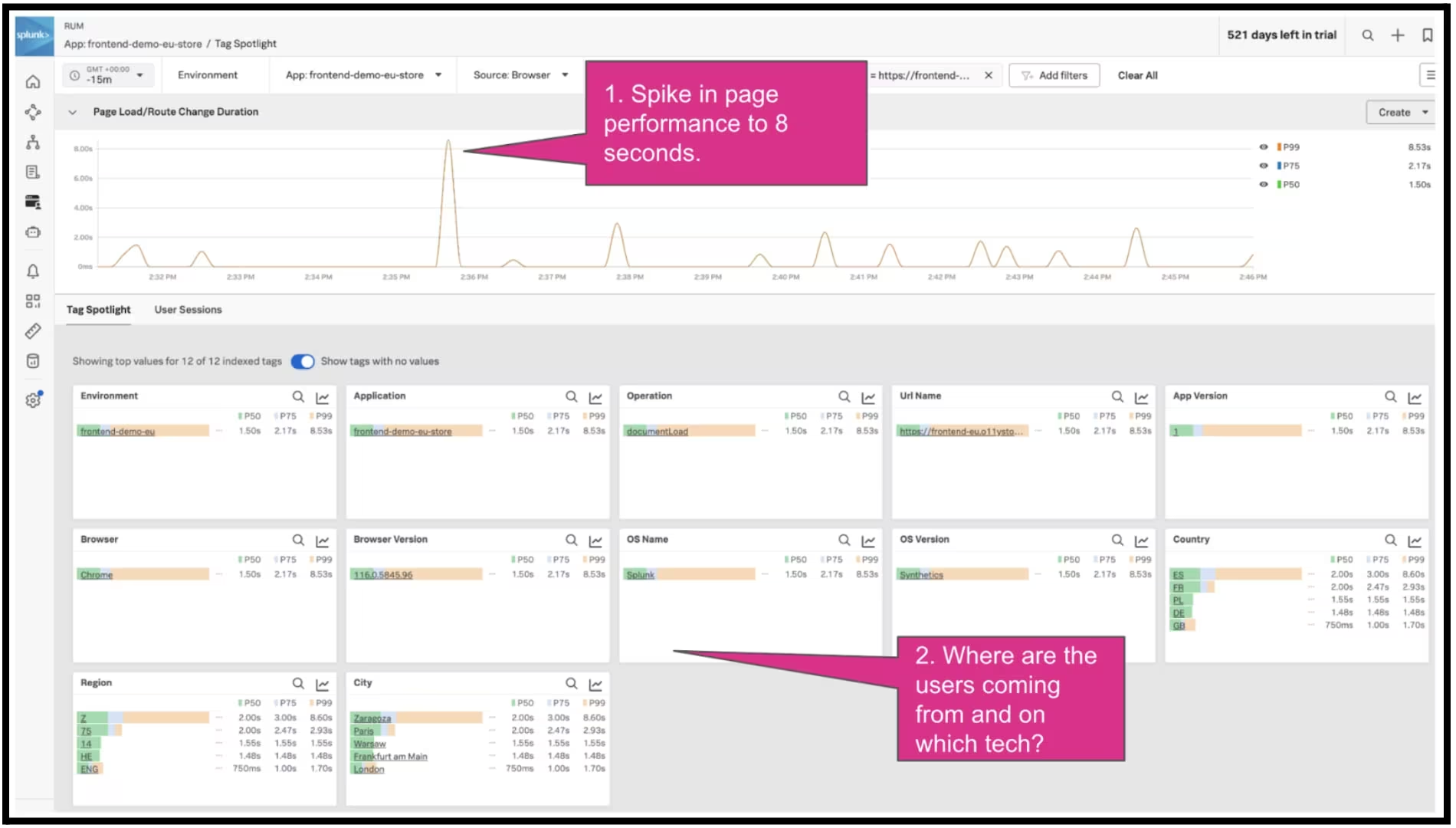
From this view, you can pivot into a full user session analysis and measure the customer impact of every resource, image, route change and API call, with complete visibility across every user session. Using session replay provides deeper visibility into the user’s experience with video reconstructions which are correlated with session waterfall, to truly understand what the user was doing.
Recommended Best Practices
From working and learning with our customers, I have put together some recommended best practices below which go through a suggested approach to achieve this front-end and user visibility:
- Validate front-end performance:
- Synthetic checks on your platform are a quick win to spot problems and improve the front-end and user experience. The information gleaned here can be fed back to the UX teams to provide quick fixes to the identified issues.
- Proactive front-end and user visibility:
- It is also easy to extend this visibility into key user journeys and measure performance and uptime from multiple locations around the world. It can also be incorporated into the release cycle as part of pre-release testing, prior to that release going live, to reduce the risk of an issue going into production.
- Deploy Real user visibility into your platform for both mobile and browser-based apps. The information provided here can then be used to see if there are any immediate issues that need to be prioritised and resolved. Like synthetics, RUM should also be deployed in testing and pre-release environments to ensure problem-free experiences.
- Manage third parties and dependencies - get a deeper level of understanding of how third parties and dependencies are being consumed on your platform as well as how they are performing. This in turn will allow SLAs to be agreed upon and monitored to ensure optimum performance.
- Performance optimization - once the fires have been fought and put out, the next key step in any performance journey is to look at optimising and the front-end and user experience provides plenty of opportunities for this. This of course can start at making things faster, particularly on slower internet connections but it also covers the more complex elements like shortening the journey for the user.
Try Splunk O11y for yourself by signing up for a free trial. Check out the links below for some great further reading:
- Video: Learn about Splunk Observability in less than 2 minutes
- Case Study: Learn how Puma improved its eCommerce experience to boost revenue by $10,000 per hour
- E-book: Boost your Core Web Vitals and Web Performance with some simple steps.
- Blog - RUM Session Replay Or How "Watching Videos" Will Help Us With Digital Experience Monitoring!
- Read all about Splunk Real User Monitoring