Talk to Your Logs: LLM-Powered Chat UI in DSDL 5.2.3
Artificial Intelligence Huaibo ZhaoWe are excited to announce the release of the Splunk App for Data Science and Deep Learning (DSDL) version 5.2.3. Since 2018, DSDL has served as an innovation hub for custom AI integrations within Splunk.
In 2025, the release of DSDL 5.2.0 introduced customizable Large Language Model (LLM) integrations, bringing Retrieval Augmented Generation (RAG) and Agentic AI workflows to Splunk users. DSDL’s mission has always been to solve complex, advanced AI use cases while providing the best possible user experience.
Today, we are proud to extend these LLM capabilities further with a new interactive chat interface. This feature was developed in collaboration with our customer, the Defence Science and Technology Agency (DSTA) of Singapore, based on their presentation at .conf25.
Recap on DSDL LLM Integrations
As a Splunk app, DSDL can be installed on both Splunk Enterprise and Splunk Cloud. To extend Splunk with deep learning and LLM capabilities, DSDL connects to external Docker or Kubernetes environments to deploy specialized DSDL containers.
For LLM integrations, these containers act as orchestrators. They receive requests from Splunk search queries and connect to various components including LLMs, vector databases, and AI tools, to return responses as search results. Consequently, users can search any data in Splunk, pipe it into a DSDL fit command along with a prompt, and receive the LLM’s analysis directly within their search results.
Interactive Log Analysis in DSDL 5.2.3
One common use case for DSDL LLM integration is log analysis. The vast amount of machine data ingested into Splunk can be difficult to decipher and troubleshoot during daily operations. In the current AI era, LLMs have demonstrated a powerful ability to understand textual information and provide insights that analysts might overlook or spend too much time investigating. These log analysis operations can be further enhanced through interactive conversations between users and LLMs directly within the Splunk interface, where target logs can be searched and added to the conversation anytime.
Building on existing LLM features, DSDL 5.2.3 introduces a built-in chat interface for interactive log analysis. This chat box allows users to intuitively incorporate LLMs into their daily troubleshooting workflows within Splunk.
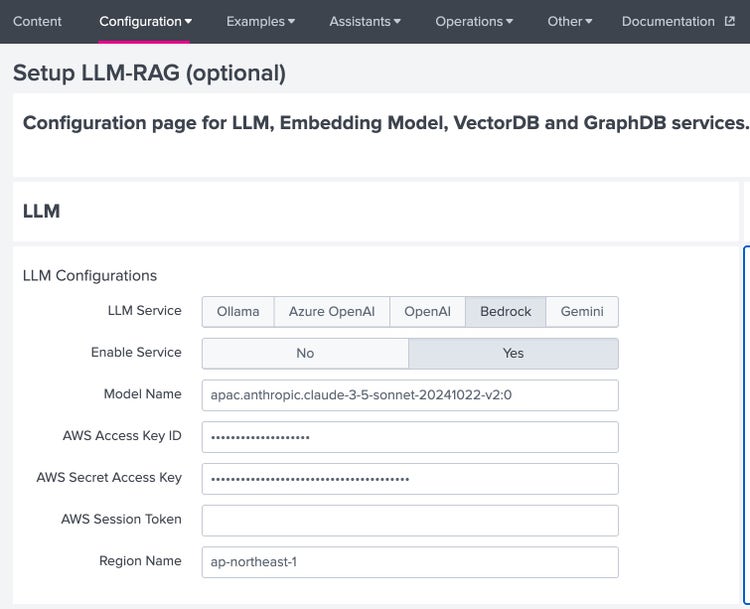
The chat interface utilizes the LLM-RAG configuration page introduced in DSDL 5.2.1 (found under Configuration > Setup > Setup LLM-RAG). Users can configure multiple LLM options, including both on-premises and SaaS models, and switch between them dynamically during a chat session.
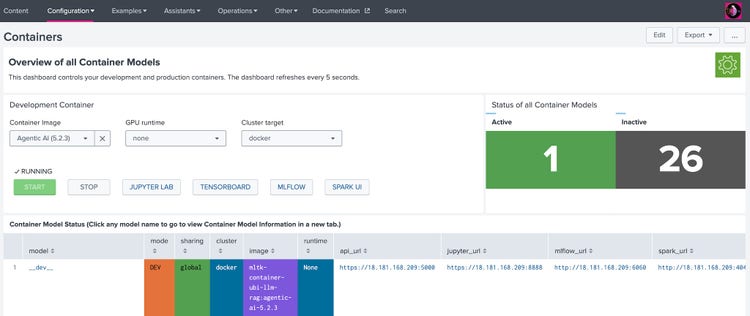
Once the setup is complete, start the Agentic AI (5.2.3) container from the Configuration > Containers page. This container provides the backend support for the interactive chat interface.
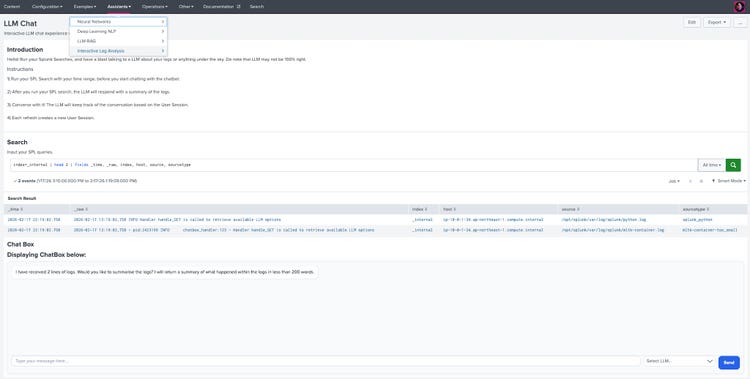
Once the setup is complete, navigate to Assistants > Interactive Log Analysis > LLM Chat to access the chat interface. As shown below, the dashboard features a search bar that allows users to query logs and add them to the chat history. The chat box is located beneath the search results panel, enabling users to select LLM options, input queries, and receive responses from the LLM.
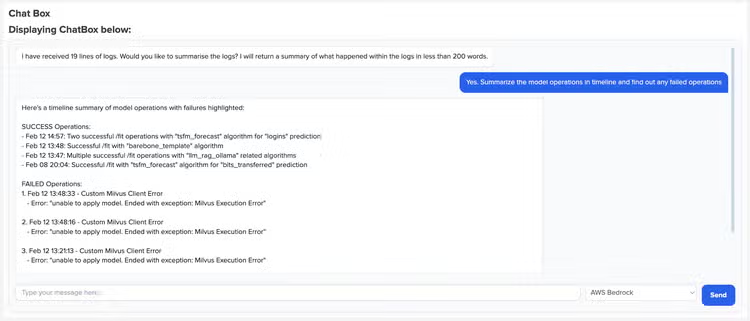
In our example, we initiate the chat by searching internal logs to analyze the workload of DSDL models. The LLM returns a list of successful and failed operations with associated timelines, providing a clear view of service status and helping to identify potential issues.
Once the failed operations are identified, we use the search bar to query the relevant container backend logs. These results are automatically added to the chat history. We then continue the conversation within the chat box to determine the root cause of the failures.
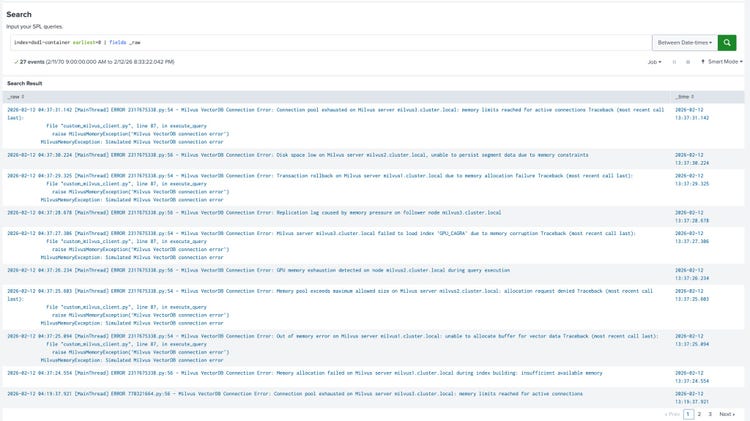
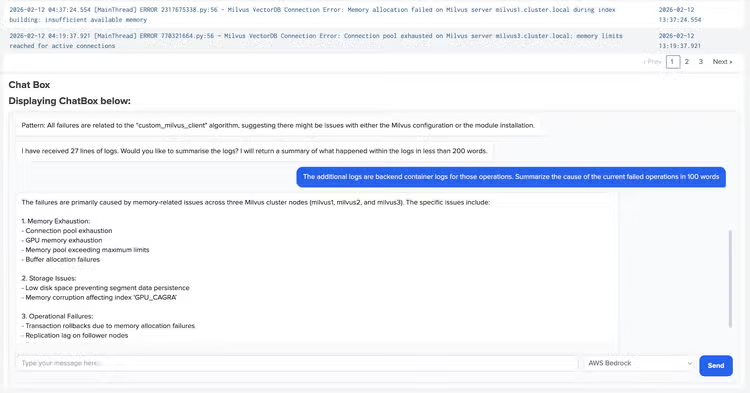
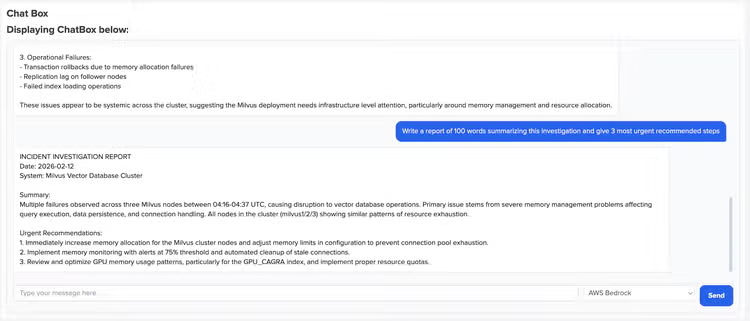
The LLM proved highly effective at processing selected logs, identifying specific issues and their causes, and providing a thorough analysis. We can then prompt the LLM to generate a report containing observations and suggested next steps. Through interactive log analysis, we were able to identify the problem, determine the root cause, and take actions without manually reviewing every log entry.
Conclusion
With the release of DSDL 5.2.3, we have introduced a LLM chat interface for interactive log analysis. By bridging the gap between raw machine data and AI-driven insights, this feature simplifies complex troubleshooting and accelerates root cause analysis directly within the Splunk platform.
Looking ahead, this milestone is just the beginning. We are excited to continue our collaboration with the Defence Science and Technology Agency (DSTA) of Singapore to explore new frontiers in the Agentic AI space. Our goal remains to deliver innovative, user-centric AI solutions that help our customers solve their most challenging data problems.
Acknowledgement
We would like to extend our heartfelt appreciation to the DSTA team for their outstanding collaboration and technical expertise throughout this integration. Special thanks to DSTA’s Central Log Management System (CLMS) Team, Infocomm Infrastructure (ICI) Programme Centre for their dedication, innovation and commitment to excellence.
Your collective efforts have been instrumental in bringing this powerful LLM-chat interface to the Splunk DSDL community. Thank you for making this milestone possible!
Related Articles
Ensuring Success with Splunk ITSI - Part 1: Thresholding Basics

Staff Picks for Splunk Security Reading April 2024