A New Way to Work with Splunk: Splunk CLI and Agent Skills
Artificial Intelligence Sancha NorrisKey takeaways
- Splunk Agent Skills teach AI agents how experienced practitioners handle tasks like searches, dashboards, and troubleshooting, and are free to inspect on GitHub.
- splunkctl is a new command-line tool that lets people, scripts, and AI agents manage Splunk searches, indexes, users, and dashboards from outside the usual interface.
- splunkctl respects existing user permissions and requires confirmation before making changes, keeping humans in control even when AI agents perform the work.
More work is moving beyond traditional application interfaces and into terminals, automation pipelines, AI-native development environments, and agents. That changes what it means to work with Splunk.
Instead of requiring every interaction to begin in the Splunk UI, developers, administrators, and increasingly AI agents need ways to bring Splunk into the tools and workflows where they already work.
That’s why we’re introducing splunkctl, the new Splunk CLI purpose built for the agentic era, and expanding the library of Splunk Agent Skills. Since launching our first three open-source agent skills in August, we’ve grown the collection to nearly 30 Splunk-built skills available through Splunkbase and GitHub.
Together, these capabilities connect expertise with execution: an Agent Skill tells an agent how to do the job, while splunkctl gives people and agents a consistent way to carry out authorized work.
Give Your Agents Splunk Expertise
General-purpose AI agents can write searches, modify dashboards, and help troubleshoot problems. But access to Splunk alone doesn’t mean an agent knows how an experienced Splunk practitioner would approach the task.
That’s where Agent Skills come in.
The first Splunk Agent Skills released on GitHub in August focused on three common tasks: Splunk Search, Dashboard Studio conversion, and building custom visualizations. Each gives an agent something it normally doesn’t have: a Splunk-specific playbook. Now we have added more skills to nearly 30 and it’s also available in Splunkbase.
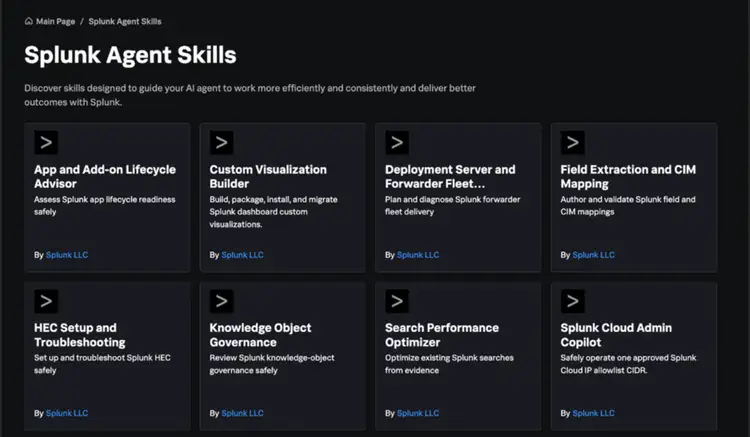
A skill can include task-specific instructions, procedures, examples, expected outputs, validation guidance, constraints, and Splunk conventions. The objective isn’t simply to create a large collection of prompts. It’s to capture repeatable Splunk expertise in a form agents can use consistently.
An experienced practitioner may know how to structure a search, investigate an issue, configure a workflow, or validate a result almost instinctively. Agent Skills make more of that knowledge explicit and reusable.
That can give newer practitioners a stronger starting point, help experienced teams avoid repeatedly solving the same problems, and carry Splunk expertise into the AI-native environments where more work is taking place.
And because the skills are open source, you can inspect the instructions being given to the agent and adapt them for your environment.
Operate Splunk from the Tools and Environment You Already Use
Expertise alone, however, doesn’t perform the work.
An agent may understand what it should do next and still need a reliable, machine-accessible way to interact with Splunk. That’s where splunkctl comes in.
splunkctl is an open-source Splunk command-line interface designed for people, automation, and AI agents. It provides a consistent way to operate Splunk programmatically, with discoverable commands, structured responses, and errors designed to be understandable to people and machines.
With splunkctl, you can:
- Create and inspect search jobs
- Create indexes and update retention policies
- Manage users, permissions, and HEC tokens
- Create saved searches, check alerts, and manage knowledge objects
- Create or update dashboards, change dashboard ACLs, and work with KV Store collections
- Work with applications, clusters, and other Splunk objects
The same interface can be used by an administrator working at a terminal, a script running in a pipeline, or an AI agent executing an authorized workflow.
That consistency makes Splunk easier to invoke, automate, and validate without requiring every interaction to happen through the UI.
Because splunkctl is also open source, teams can inspect the implementation, incorporate it into their own development and automation workflows, and contribute as the project evolves.
When Expertise Meets Execution
Consider asking an agent to diagnose a Splunk problem.
A Splunk agent skill can define what information to gather, which sequence to follow, what common failure patterns to consider, and how to validate the result. splunkctl gives the agent commands to retrieve information, inspect results, or carry out authorized actions. The same operations can run from a shell, CI/CD pipeline, scheduled automation, or an AI-native environment, without requiring a person to navigate the Splunk UI for each action.
Operating Splunk through commands does not mean operating without control. splunkctl respects the existing role-based access controls configured in Splunk, so people and agents can only access data and perform actions permitted for the authenticated user. The CLI does not grant additional privileges simply because the work is being performed through an agent or from the command line.
For operations that modify the Splunk environment, splunkctl adds another safeguard: confirmation is required by default before the action proceeds. This creates a human-in-the-loop checkpoint that can help prevent an agent from making an unintended change. For trusted automation where that confirmation is not needed, a user can explicitly bypass the prompt with the “--yes” flag.
That combination, Splunk expertise, existing access controls, and safeguards around execution, gives agents a powerful way to work with Splunk while keeping people in control of how that power is used.
Skills give agents Splunk expertise. splunkctl gives them a way to act on it.
Together, they can make agent workflows more useful, repeatable, and easier to govern.
Bring Splunk Expertise Wherever Your Agents Work
There won’t be one way enterprises adopt agents.
Some teams are already working in AI-native development environments and with command-line agents. Others want to build agents directly within Splunk.
Splunk is supporting both paths.
The public Splunk Agent Skills repository gives developers a portable, open-source way to bring Splunk expertise into compatible agents and AI-native tools. Select skills from that repository will also be available through Agent Launchpad, where customers can discover skills and use them to build custom agents within Splunk.
Customers can also use Agent Skills with the Splunk MCP server when a curated interface to Splunk tools is the right fit.
These capabilities are complementary. Agent Launchpad provides an integrated Splunk experience for building and using custom agents. The Splunk MCP server gives compatible external agents a curated interface to Splunk tools. splunkctl provides a broader command surface for developers, administrators, automation, and agents.
Agent Skills can bring reusable Splunk expertise across those environments.
The important point isn’t that there are multiple interfaces. It’s that you shouldn’t have to recreate Splunk knowledge every time the model, agent framework, or interface changes.
Building Splunk for a World of Agents
Enterprise software has traditionally been designed around people interacting with applications and interfaces.
Agents introduce another kind of consumer. They need machine-accessible tools, clear instructions, context, permissions, and repeatable ways to complete work. And as agents become part of how teams develop software, automate operations, and investigate problems, enterprise platforms need to meet them where that work happens.
Splunk is adapting to the new world of humans and agents.
Agent Skills make Splunk expertise portable. splunkctl makes Splunk capabilities easier for people, automation, and agents to invoke.
Together, they represent a new way to work with Splunk, one where Splunk increasingly becomes part of the tools, workflows, and agents you already use, rather than simply a destination you navigate to.
Explore the growing library of Splunk Agent Skills on Splunkbase and GitHub, and check out splunkctl on GitHub to start building more capable, Splunk-aware workflows.
Related Articles

OT Security Is Different, Isn’t IT?

Splunk Insights: Investigating the 3CXDesktopApp Supply Chain Compromise