From Discovery to Defense: Detecting Local LLMs to Address Shadow AI
Artificial Intelligence Rod SotoThe development and widespread adoption of AI has also brought many challenges, including the shifting of priorities, the need to adapt and embrace these new technologies, and use them in a leveraging manner. This has also brought many challenges that come with the adoption and use of these technologies. One of them is the risk of proprietary information being sent or disclosed to the cloud processing backends where these models run, not to mention the fact that the use of these models by itself improves them and provides these vendors with the possibility of developing their own applications and competitive products.
One of the ways many enterprises have chosen to adopt GenAI, specifically Large Language Models (LLMs), is by following the “Sovereign AI” direction, where these Models are deployed locally or in private clouds. The data and the models are isolated, fine-tuned, and trained with their proprietary data, keeping them safe from public cloud or internet interactions. This also means cost savings and faster access than using a public provider, where resources are shared with every client, along with all the implications this brings.
Another advantage and feature of the current AI technologies is the ability to deploy smaller versions of these large models on desktop computers or laptops. In the specific case of desktop or mobile computers, many users, in their anxiety to learn these technologies, have rushed to download and deploy many available frameworks that can run these models locally, bringing with them a number of risks that threaten the organizations where these applications are executed.
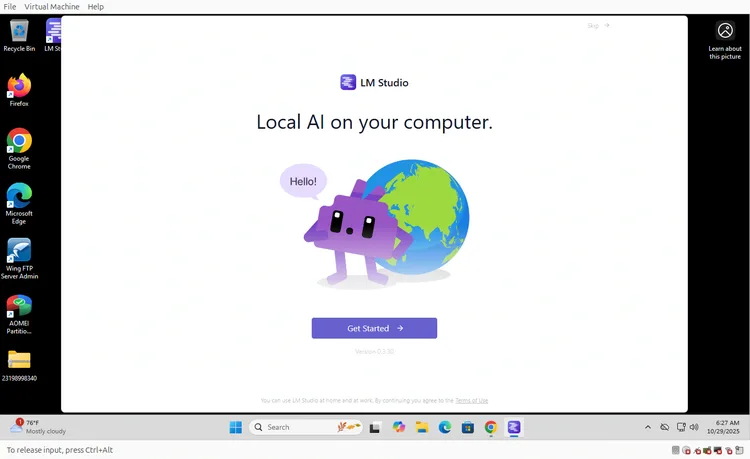
In this blog, the Splunk Threat Research Team (STRT) focuses on several publicly available applications that can be downloaded from the internet, installed on local desktop or mobile computers, and run local LLMs or connect to cloud LLMs, bypassing authorization, control, or visibility from organizations—a phenomenon known as Shadow AI. We will also address how many campaigns and newer payloads are taking advantage of it and how to detect and defend against this phenomenon.
Local AI Frameworks
Downloading frameworks that can run local or cloud based LLMs is not difficult. All the user needs to do is a simple search on the internet, or Search LLMs (Perplexity, Co-pilot), and simply download them. Also, running them locally does not require a lot of hardware as there are very small models that do not even need GPUs in order to run. Any laptop with at least 16GB or RAM, current processor, and an SSD with enough storage are certainly enough to get started.
Thanks to the process known as Quantization, where model precision and weights are reduced, the size of the model and VRAM usage can be significantly decreased, allowing these models to operate on consumer hardware. There are different methods of quantizing a Large Language Model. It is important to know this because it will be seen in extensions of downloaded models. Here are some examples:
GGUF (Georgi Gerganov Universal Format)
Also known as the MP3 of model formats, it is universally compatible and flexible. It works with CPU, GPU, or both, however, it tends to be slower than GPU only formats. You can find this in tools like Ollama and LM Studio. It is not a coincidence that these two are the most popular frameworks to run local LLMs.
GPTQ (Generative Pre-trained Transformer Quantization)
This is a more advanced quantization technique that is optimized to run on NVIDIA GPUs. It tends to run faster, have better compression, and accuracy. Although they are GPU only and tend to be more difficult to set up.
AWQ (Activation aware Weight Quantization)
Newer and more advanced quantization format that matches with GPTQ. Features improved speed and accuracy. NVIDIA GPU only.
You will see that some of these model quantization formats can be found by the extension GGUF, which is something we can use as well to detect the presence of these frameworks.
As of the writing of this blog the following are the most popular and available frameworks.
Ollama
Ollama is a free and easy-to-use tool that lets you download and run powerful open-source large language models, like Llama 3 and Mistral, on your own computer.
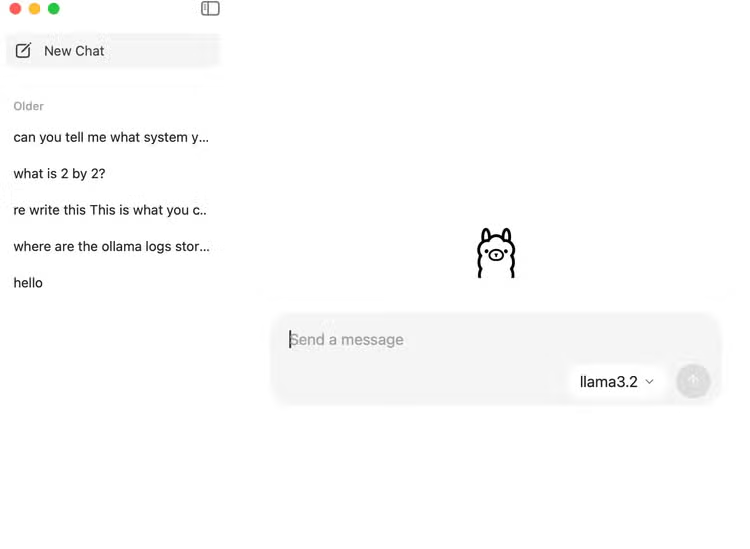
Ollama is the most popular framework for Desktop deployment and for Enterprise local deployment. STRT has previously addressed the Ollama framework extensively.
LM Studio
LM Studio is a free desktop application that provides a polished, user-friendly graphical interface for downloading and running local LLMs on your computer. It features a built-in model browser and a chat window, making it simple for anyone to experiment with different models without needing to use the command line.
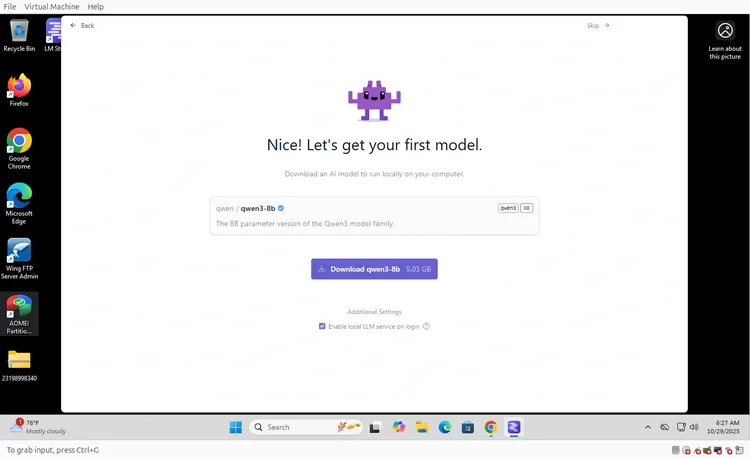
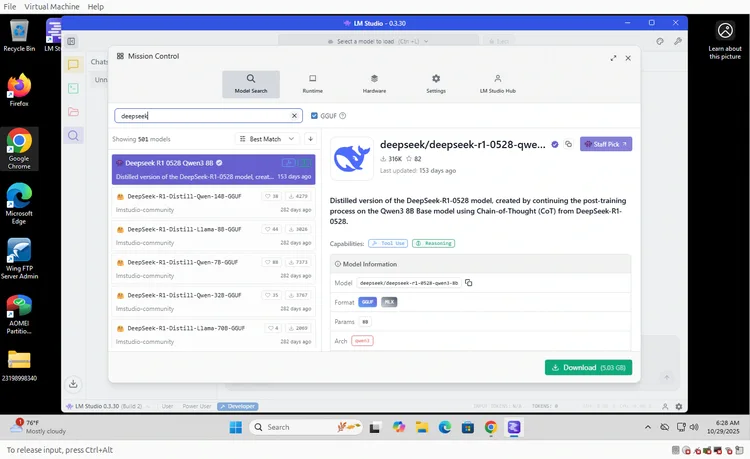
In comparison with Ollama, LM Studio serves general users and beginners. In this sense LM Studio is easier to setup and operate making it more user friendly than Ollama due to it’s more developed GUI. LM Studio is closed sourced unlike Ollama. As seen in the above figure you can directly search for models that can be downloaded and then installed. Also, LM Studio can connect to a cloud provider such as OpenAI.
GPT4All
One of the first projects to make local LLMs accessible to everyone. Privacy focused and reliable CPU performance with a large user base. Their target audience is beginners and privacy focused users. This framework can also run on older hardware and without a powerful GPU.
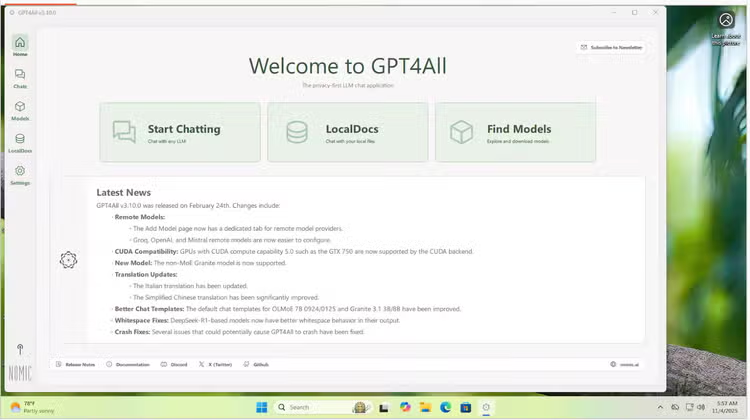
GPT4 can download models but cannot connect to external models as it is designed for local first privacy.
Llama.cpp Not an Application but a Core Engine
Llama.cpp is a high performance engine C++ library created to run Large Language Models and is very efficient at running them on consumer hardware with CPUs or GPUs. It was created originally to run Meta’s LLaMA model. This engine is run by command line, there is no GUI and focused mainly on power users.
It runs Quantized model files (GGUF format) and executes them as fast as possible. You can use Llama.cpp in a LM Studio bundle and Ollama uses it as well within its framework. Think of Ollama and LM Studio as wrappers of Llama.cpp as the main engine that allows the execution of local LLMs. Llama.cpp is the foundational engine of both, even though you can run llama.cpp on its own. When you run a GGUF model in either you are technically using llama.cpp but in a more user friendly manner.
Other Noticeable Frameworks
The landscape of local LLM tools offers other options catering to different needs, from user-friendly applications to powerful backend services. For users seeking a polished, open-source desktop client, Jan.ai provides a compelling alternative to LM Studio with its clean graphical interface. In contrast, developers often gravitate towards solutions like LocalAI, which functions as a versatile, self-hosted API server designed to be a drop-in replacement for the OpenAI API. For more specialized creative tasks, KoboldCpp stands out as a high-performance web UI optimized specifically for role-playing and collaborative storytelling, offering fine-tuned controls for narrative generation. Alongside these established tools, more niche or emerging projects like Nutstudio also contribute to the ecosystem, each aiming to serve specific user workflows or experimental features.
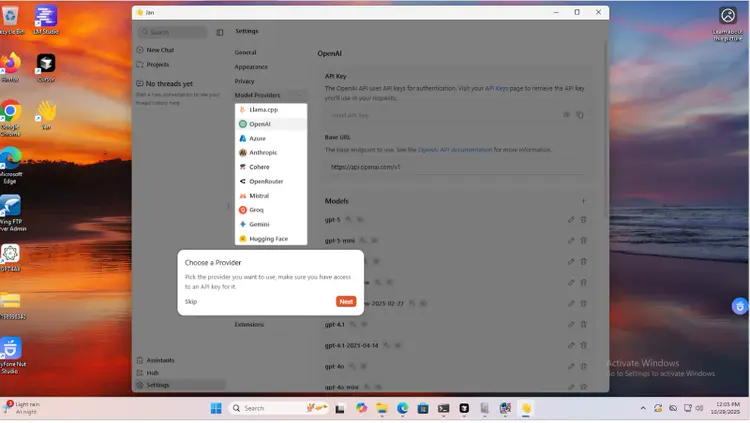
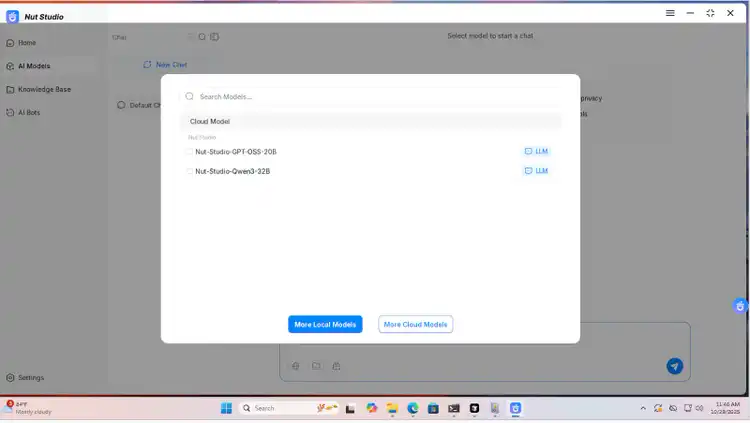
We have addressed some of the most common, easy to use local llm frameworks, which can be found here.
The Link Between Local LLMs and Shadow AI
As previously stated, the unauthorized use of AI tools, models or APIs outside of IT or security teams is known as Shadow AI. As seen in the above descriptions of these frameworks they can be easily installed and used by individuals or teams bypassing corporate oversight, procurement and governance channels. Employees may adopt these tools for productivity, experimentation or automation, often unaware of the risks or compliance implications.
Here are some of the risks associated with Shadow AI:
- Data Leakage: Sensitive data can be inadvertently exposed to external AI platforms risking privacy and intellectual property loss.
- Compliance violations: Unauthorized use of AI tools may breach regulations such as GDPR, HIPPA or PCI DSS leading to legal penalties
- Security vulnerabilities: Unapproved AI solutions may content unpatched flaws, increasing cyber attack risks and expanding attack surfaces.
- No audit trail: Shadow AI operates without accountability or traceability, making it difficult for organizations to track decisions or investigate incidents.
- Inconsistent or biased output: Results from shadow AI are often unreliable, which can affect business decisions and erode trust in data-driven processes.
- Unmoderated models which can be downloaded from many places can provide malicious outputs, such as instructions for cyberattacks or harmful activities with no safety guardrails in place.
Shadow AI Already Showing Its Teeth
Several campaigns and malware strains are now exploiting shadow AI and local LLM deployments, taking advantage of unsanctioned, unmanaged model use for malicious purposes. Here are some examples:
- Ray AI Framework Campaign (Cryptojacking)
Live cryptominer attack exploiting vulnerabilities in Ray, an open source AI framework commonly used for distributed workloads. The attackers were exploiting misconfigurations of the Ray AI framework, specifically those exposed to the internet.
This attack highlights the targeting of actual AI infrastructure. It is important to understand that in some instances AI models are connected to company databases or other internal systems.
- PromptLock Ransomware
PromptLock is a proof of concept ransomware that demonstrates how local LLMs (via frameworks like Ollama) can be orchestrated to generate polymorphic malware code on demand automating payload generation.
Each run of PromptLock uses natural language prompts to delegate planning and code creation to an embedded LLM model, producing unique variants for every infection and increasing the difficulty of detection and attribution
The payload utilized local API endpoints to invoke open-weight LLMs, demonstrating how shadow AI instances become high value assets for adversaries seeking stealth and flexibility
- Drive by ComfyUI plugin
An employee from a well known enterprise downloaded an unverified AI art generation tool from Github described as a plugin or extension from ComfyUI (ComfyUI_LLMVISION) intending to experiment with local AI-powered image generation.
The downloaded software appeared legitimate but contained embedded malware and an info stealer. The malware compromised an employee's computer, stole credentials and enabled attackers to access Enterprise internal communications, systems and confidential files.
- Major corporation internal information exposed via ChatGPT
Two major corporations had incidents where proprietary code and sensitive internal information was placed into Chatgpt, causing proprietary data to appear in model responses.
- Malicious Deepseek Installers
Malicious code impersonating Developer Tools posing as Deepseek installer in multiple campaigns:
- Fake installers to deliver the Sainbox RAT and hidden rootkit. Installers in the form of MSI files delivered via phishing advertised as Deepseek installer.
- Leveraging deepseek popularity malicious actors created domains and fake CAPTCHA pages to conduct code injection and execution at victim’s systems.
- Malicious actors created fake installers of AI model DeepSeek and loaded it with malware.
Deepseek is a very popular AI model which can be found in multiple model repositories in locations outside of the U.S, places like Openrouter or Ali Baba cloud are usually the place where users will download these type of models and also where local LLM frameworks that target users outside of the U.S, the same goes for IoT or AI embodiment artifacts (Robots). The reason of the so many versions of Deepseek is because this model is created via distillation, a technique where a larger model is used to train a smaller model to mimic is behavior and reasoning, and that is why you can see in model repositories models that are named “deepseek” along with others like in the figure below.
Why Monitoring is Critical
Monitoring frameworks that run LLMs locally is essential for preventing data leakage, which poses significant risks to organizational security and compliance. Unmonitored LLMs can inadvertently expose sensitive or regulated data through various channels including prompts, fine-tuning processes, or generated outputs. This exposure can lead to serious privacy breaches and violations of critical compliance frameworks such as GDPR, HIPAA, and PCI DSS, potentially resulting in severe legal and financial consequences for organizations.
The absence of proper monitoring creates dangerous blind spots in organizational decision-making and accountability. When AI-driven business decisions emerge from shadow deployments—unauthorized or untracked LLM implementations—they leave no audit trail, making it impossible to track, explain, or manage the risks associated with these decisions. Additionally, local frameworks operating without oversight often lack essential security measures including centralized access controls, comprehensive logging systems, and regular vulnerability patching, making them attractive targets for malicious actors seeking to exploit these weaknesses
Detection Opportunities
The following are some of the detection opportunities we can pursue when trying to discover and then defend against the possibility of ShadowAI via local llm frameworks.
-
Active Discovery: Organizations must routinely scan for locally running LLM instances, exposed endpoints, and unauthorized model use, using tools like shodan to identify exposed Ollama instances to the internet.
-
Use current windows logs either via Sysmon or AD to detect these frameworks. Actively look for processes (i.e ollama.exe, llama-run.exe, jan.exe, lms.exe).
-
Monitor networking ports:
- LM studio (1234, 43411)
- Ollama (11434)
- LocalAI, Llama.cpp (8080, 8000)
- Jan.ai (1337)
- Text Generation Web UI (7860,5000)
- GPT4All (4891)
-
File system artifacts (i.e ~/.ollama, ~/jan/, ~/.cache/lm-studio)
-
Model Files (i.e .gguf, ggml, bin) usually very large size files
-
Installation Directories (i.e /Applications, /opt, C:\Users\user\AppData\Local\Programs
-
API Endpoints
- Localhost , 127.0.0.1
- OpenAI compatible API paths /v1/chats/completions, /v1/completions, /api/tags, /api/generate
-
Resource Usage Patterns
- High CPU utilization (i.e CUDA)
- Significant RAM usage (8GB - 32GB)
- CPU spikes during inference
- Disk I/O for model loading
-
DNS Network traffic (i.e huggingface.co, ollama.ai)
-
Browser extensions
Shadow AI Splunk Detections
There are plenty of reasons to drive efforts into discovering, monitoring and defending against ShadowAI. Here is a Sysmon policy guidance file that can be used to add your Sysmon policy arsenal. If you also have auditing for eventid 4688 you can also deploy some of the following detections designed to discover and detect these frameworks. Also remember to check the previously mentioned extensive list of local LLM frameworks which should help me modify your Sysmon policies and the provided detections according to your environment.
The following are some samples of STRT local LLM framework detections targeting ShadowAI:
Comprehensive Framework Detection Query (ALL AI/LLM Tools)
This detection identifies the execution of local LLM frameworks and AI tools on Windows endpoints by monitoring process creation events (Event ID 4688). It tracks popular open-source and locally-hosted AI platforms that could indicate shadow IT usage, data exfiltration risks, or unauthorized AI tool deployment within the enterprise environment.
index="llm4688" sourcetype=XmlWinEventLog EventID=4688

| spath

| rename "Event.System.Computer" as Computer, "Event.System.EventID" as EventID

| eval NewProcessName=mvindex('Event.EventData.Data', mvfind('Event.EventData.Data{@Name}', "NewProcessName"))

| eval ParentProcessName=mvindex('Event.EventData.Data', mvfind('Event.EventData.Data{@Name}', "ParentProcessName"))

| eval CommandLine=mvindex('Event.EventData.Data', mvfind('Event.EventData.Data{@Name}', "CommandLine"))

| eval SubjectUserName=mvindex('Event.EventData.Data', mvfind('Event.EventData.Data{@Name}', "SubjectUserName"))

| search (

    NewProcessName="*ollama*" OR

    NewProcessName="*llama*" OR

    NewProcessName="*llama-run*" OR

    NewProcessName="*gpt4all*" OR

    NewProcessName="*lmstudio*" OR

    NewProcessName="*nutstudio*" OR

    NewProcessName="*koboldcpp*" OR

    NewProcessName="*jan*" OR

    NewProcessName="*jan.exe*" OR

    CommandLine="*transformers*" OR

    CommandLine="*langchain*" OR

    CommandLine="*huggingface*" OR

    CommandLine="*llama-run*" OR

    CommandLine="*nutstudio*" OR

    ParentProcessName="*ollama*" OR

    ParentProcessName="*lmstudio*" OR

    ParentProcessName="*nutstudio*" OR

    ParentProcessName="*gpt4all*" OR

    ParentProcessName="*jan*" OR

    ParentProcessName="*llama-run*"

)

| eval Framework=case(

    like(NewProcessName, "%ollama%") OR like(ParentProcessName, "%ollama%"), "Ollama",

    like(NewProcessName, "%lmstudio%") OR like(NewProcessName, "%LM Studio%") OR like(ParentProcessName, "%lmstudio%"), "LM Studio",

    like(NewProcessName, "%nutstudio%") OR like(ParentProcessName, "%nutstudio%") OR like(CommandLine, "%nutstudio%"), "NutStudio",

    like(NewProcessName, "%gpt4all%") OR like(ParentProcessName, "%gpt4all%"), "GPT4All",

    like(NewProcessName, "%jan%") OR like(ParentProcessName, "%jan%") OR like(NewProcessName, "%jan.exe%"), "Jan",

    like(NewProcessName, "%koboldcpp%") OR like(CommandLine, "%koboldcpp%"), "KoboldCPP",

    like(NewProcessName, "%llama-run%") OR like(ParentProcessName, "%llama-run%") OR like(CommandLine, "%llama-run%"), "Llama-Run",

    like(CommandLine, "%transformers%") OR like(CommandLine, "%huggingface%"), "HuggingFace/Transformers",

    like(CommandLine, "%langchain%"), "LangChain",

    like(NewProcessName, "%llama%") OR like(NewProcessName, "%llama.cpp%") OR like(ParentProcessName, "%llama%"), "Llama.cpp",

    1=1, "Related Activity"

)

| stats count by Computer, Framework, EventID, ParentProcessName

| sort Computer, Framework, -count

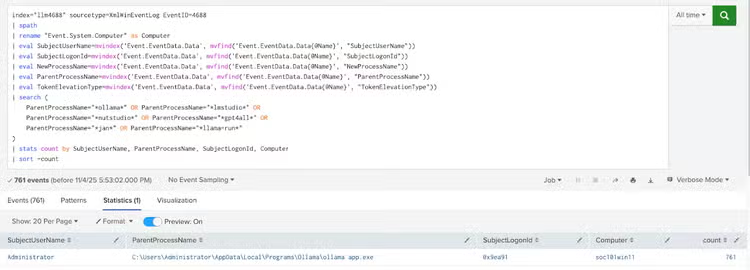
Track Local LLM framework by logon session
This Splunk search identifies local LLM framework usage (Ollama, LM Studio, GPT4All, Jan, etc.) by tracking Windows process creation events (Event ID 4688) and correlating them to specific user sessions through logon IDs. It extracts key process details including parent process names, user accounts, and computer names to provide visibility into which users are running AI tools across the enterprise. The search aggregates results by user session, showing frequency of LLM framework execution to help identify shadow AI deployments and monitor AI tool adoption patterns.
index="llm4688" sourcetype=XmlWinEventLog EventID=4688

| spath

| rename "Event.System.Computer" as Computer

| eval SubjectUserName=mvindex('Event.EventData.Data', mvfind('Event.EventData.Data{@Name}', "SubjectUserName"))

| eval SubjectLogonId=mvindex('Event.EventData.Data', mvfind('Event.EventData.Data{@Name}', "SubjectLogonId"))

| eval NewProcessName=mvindex('Event.EventData.Data', mvfind('Event.EventData.Data{@Name}', "NewProcessName"))

| eval ParentProcessName=mvindex('Event.EventData.Data', mvfind('Event.EventData.Data{@Name}', "ParentProcessName"))

| eval TokenElevationType=mvindex('Event.EventData.Data', mvfind('Event.EventData.Data{@Name}', "TokenElevationType"))

| search (

    ParentProcessName="*ollama*" OR ParentProcessName="*lmstudio*" OR

    ParentProcessName="*nutstudio*" OR ParentProcessName="*gpt4all*" OR

    ParentProcessName="*jan*" OR ParentProcessName="*llama-run*"

)

| stats count by SubjectUserName, ParentProcessName, SubjectLogonId, Computer

| sort -count
Detect All Present Local LLM frameworks (Sysmon)
index="llsysmon" | spath

| eval EventID='Event.System.EventID'

| eval Image=mvindex('Event.EventData.Data', mvfind('Event.EventData.Data{@Name}', "^Image$"))

| eval TargetFilename=mvindex('Event.EventData.Data', mvfind('Event.EventData.Data{@Name}', "^TargetFilename$"))

| eval QueryName=mvindex('Event.EventData.Data', mvfind('Event.EventData.Data{@Name}', "^QueryName$"))

| search ( Image="*ollama*" OR Image="*gpt4all*" OR Image="*lmstudio*" OR Image="*kobold*" OR Image="*jan*" OR Image="*llama-run*" OR Image="*llama.cpp*" OR Image="*oobabooga*" OR Image="*text-generation-webui*" OR TargetFilename="*.gguf*" OR TargetFilename="*ollama*" OR TargetFilename="*jan*" OR QueryName="*huggingface.co*" OR QueryName="*ollama.com*" )

| eval Framework=case(

    match(Image, "(?i)ollama") OR match(TargetFilename, "(?i)ollama") OR match(QueryName, "(?i)ollama"), "Ollama",

    match(Image, "(?i)lmstudio") OR match(Image, "(?i)lm-studio") OR match(TargetFilename, "(?i)lmstudio"), "LMStudio",

    match(Image, "(?i)gpt4all") OR match(TargetFilename, "(?i)gpt4all"), "GPT4All",

    match(Image, "(?i)kobold"), "KoboldCPP",

    match(Image, "(?i)jan") OR match(TargetFilename, "(?i)jan"), "Jan AI",

    match(Image, "(?i)llama-run") OR match(Image, "(?i)llama-b") OR match(Image, "(?i)llama.cpp"), "llama.cpp",

    match(Image, "(?i)oobabooga") OR match(Image, "(?i)text-generation-webui"), "Oobabooga",

    1=1, "Other"

)

| search Framework!="Other"

| stats count by Framework, Event.System.Computer, host

| sort -count

Conclusion
ShadowAI is a clear and present threat to enterprises driven by users trying to learn and embrace this technology and enterprises trying to keep proprietary information from the public cloud and lowering costs of using LLM frameworks. It is necessary to discover, monitor and analyze the use of these frameworks in the enterprise to prevent and defend against the risks associated with these technologies as outlined in this blog. The STRT now provides detection guidance and content for these applications and popular frameworks to help our customers address the threat of ShadowAI.