T-Shirt Analytics at RSAC 2025: How We Used iOS Shortcuts & Splunk to Track T-Shirt Giveaways!
*Dashboards: Jason Pettit
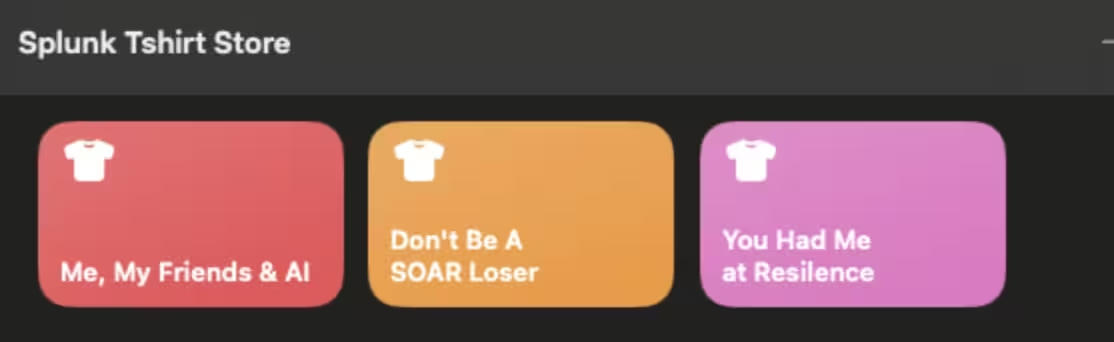
Want to make data collection fun? At RSAC 2025, we did just that by using iOS Shortcuts to track every t-shirt we handed out, then piping that data straight into Splunk Cloud for real-time analytics.
Why? Because who says data ingestion has to be boring?
The Problem: Tracking Swag Like a Pro
Handing out free t-shirts at a conference is great until you realize you have no idea which slogans were most popular, which sizes ran out first, or how many shirts you’ve given away by the hour.
We needed a fast, fun, zero development and foolproof way to capture this data without slowing down the swag frenzy.
The Solution: iOS Shortcuts + Splunk = Magic
Instead of clipboards or spreadsheets, or assembling our own POS system, we built custom iOS Shortcuts for every t-shirt slogan. Here’s how it worked:
- Pick a Shirt Design – Each slogan had its own shortcut (e.g., "Me, My Friends & AI", "Don’t Be A SOAR Loser", "You Had Me at Resilience").
- Select the Size – Tap the shortcut, choose S, M, L, or XL, and boom, data captured!
- Send to Splunk Cloud – Each entry fired off an HTTP event to Splunk, logging the time, slogan, and size.
Why This Was Genius
✅ No manual entry – Just tap and go.
✅ Real-time dashboards – We could see which shirts were hottest (literally and figuratively).
✅ Engagement tracking – Correlate shirt giveaways with booth traffic spikes.
✅ Fun for attendees – People loved tapping the buttons themselves!
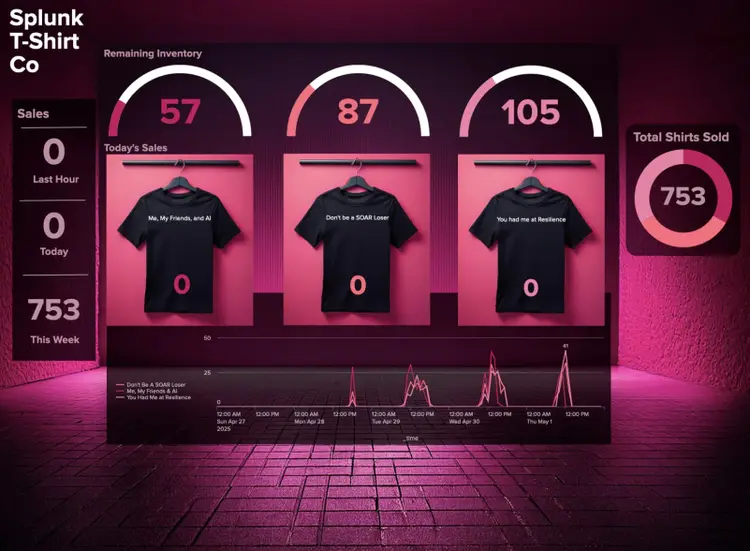
More Data, More Insights (and More Shenanigans!)
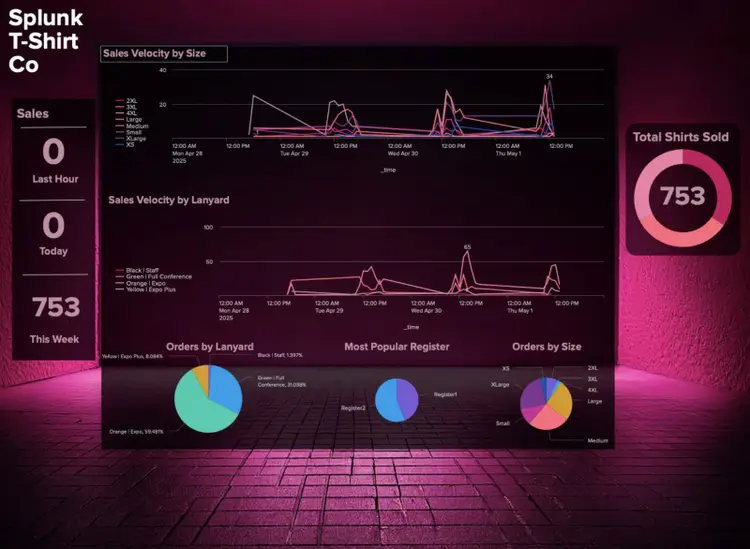
Because why stop at t-shirts? We also geeked out on extra metrics like which team members iPad was the most popular swag-distributing device (battery health included, because a dead tablet means no more data!). Even attendee lanyard colors got logged, because maybe "Sponsor" pass holders had a secret love for our "Don’t Be a SOAR Loser" design. Spoiler: They did.
The Splunk Dashboard: T-Shirt Analytics in Action
Once the data hit Splunk Cloud, we built a dashboard showing:
📊 Total shirts given out per hour
👕 Most popular slogans & sizes
🌈 Interest by lanyard color
💻 What register was the busiest?
📈 Peak giveaway times (spoiler: right before lunch)
We even set up alerts when we were running low on certain sizes because nobody wants an angry attendee missing out on their favourite shirt.
Why This Matters (Beyond Just T-Shirts)
This wasn’t just about swag—it was about making data collection seamless, engaging, and scalable.
The same approach could work for:
- Event check-ins
- Survey responses
- Merchandise tracking at pop-ups
And the best part? It took less than an hour to set up.
Try It Yourself!
Want to build something similar? Here’s the basic flow:
- Create iOS Shortcuts (one per shirt design).
- Use a “Choose from List” action for sizes.
- Send data to Splunk via HTTP Event Collector (HEC).
- Build a killer dashboard and impress your team.
We’ll post a tutorial soon—stay tuned!
Final Thought: Data Doesn’t Have to Be Boring
Next time you’re tracking something at an event, think: How can I make this fun? Whether it’s t-shirts, stickers, or even coffee runs, there’s always a way to turn it into data gold.
Now, if you’ll excuse us, we need to check our dashboard, someone just requested an XXL "Drop Your Breaches" shirt. 😉