Using Splunk Federated Search for Amazon S3 to Search AWS WAF Logs: Part Two
Welcome back. Well I hope you are returning from reading the first part of this blog and not just jumping to the end!
In this second part of our two part blog series, we will continue to step through how to configure Splunk’s Federated Search for Amazon S3 against AWS WAF logs. If you haven’t read the first part then you will have missed all of the AWS pieces you need to do first before setting up Splunk. Disclaimer out of the way, let’s jump straight back into the driving seat and pick up where we left off.
Configuring Splunk FS-S3 to Search AWS WAF
There are two major parts to setting up Splunk Federated Search.
- Creating a federated provider
- Creating a federated index
Creating a Federated Provider
- From your Splunk console, navigate to Settings, then Federation
- From the Federation page, click the Add Federated provider button
- Select Amazon S3 and click next:
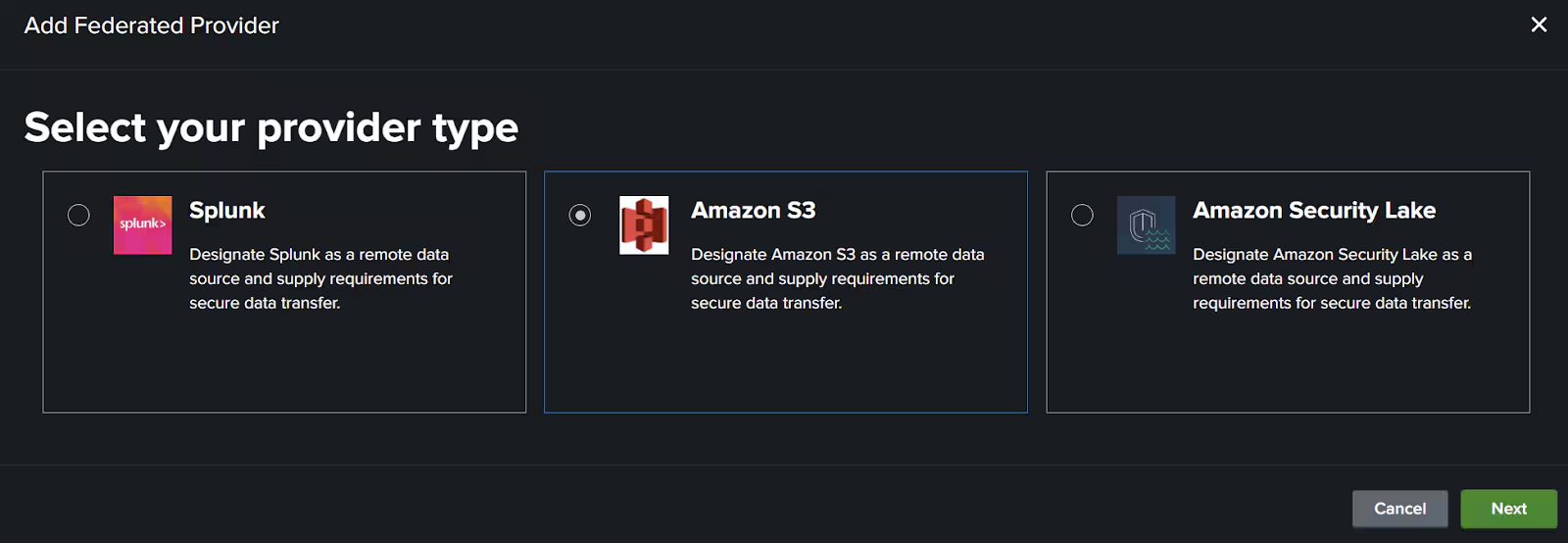
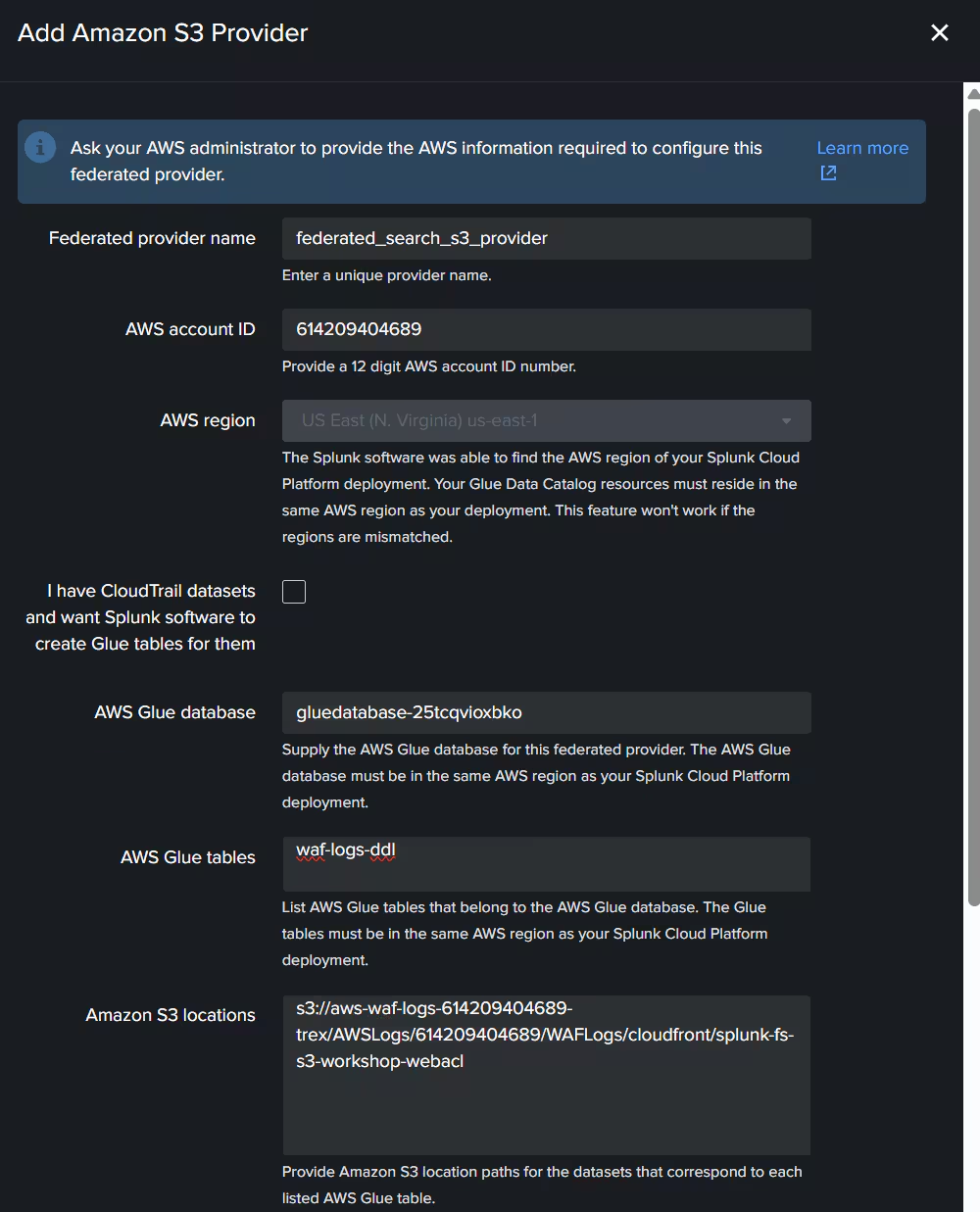
4. On the next page fill out the following items:
-
Federated Provider Name: e.g. “federated_search_s3_provider”
-
AWS Account ID: This is the AWS account where your data and Glue is.
-
Region: Already filled in as per where your Splunk Cloud is.
-
AWS Info: The next three items are all found in the AWS Glue table settings shown in the screen above:
- Glue Database Name
- Glue Table Name
- Amazon S3 Location
Example screenshot of filled in data:
5. Once all of those settings are filled in. Click the Generate Policy Button.
6. Copy the policy for the Glue Data Catalog resource policy.
7. Navigate back to your Glue tab and click the Catalog Settings section on the left hand menu.
WARNING: If you already have an existing policy in here, please take care to merge the policies together.
8. Paste or Merge in the policy from Splunk and click save.
9. Navigate back to your Splunk Federated screen and expand and copy the S3 bucket policy.
10. Navigate to the S3 bucket tab you had open for AWS WAF logs. Go back to the top level folder and select the permissions tab.
WARNING: Again this will most likely have an existing policy already on the S3 bucket. Take care to merge the policy from Splunk into this existing policy.
11. Copy in or Merge the policy into the S3 bucket policy. Click Save when happy and go back to the Splunk screen.
12. Now that we have setup the permissions of Splunk, tick both the agree buttons and Click Save:
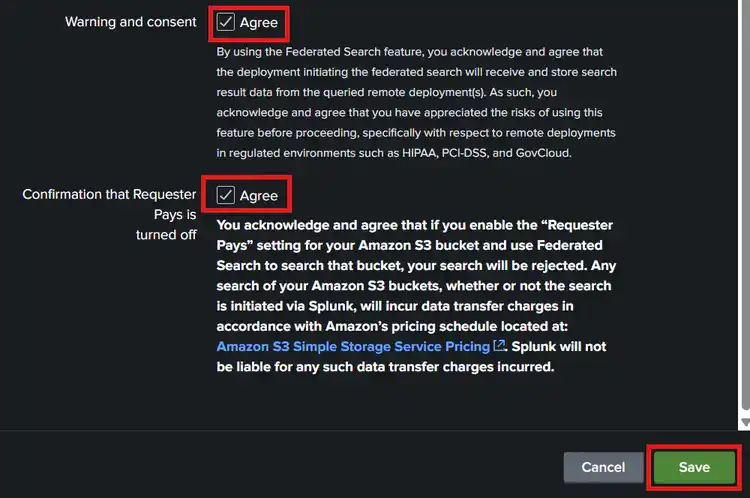
This should now have created a federated provider. Let’s now create our federated index for AWS WAF logs.
Set Up a Federated Index
-
Select the federated indexes tab in Splunk
-
Click the Add federated index, followed by For S3 provider buttons.
-
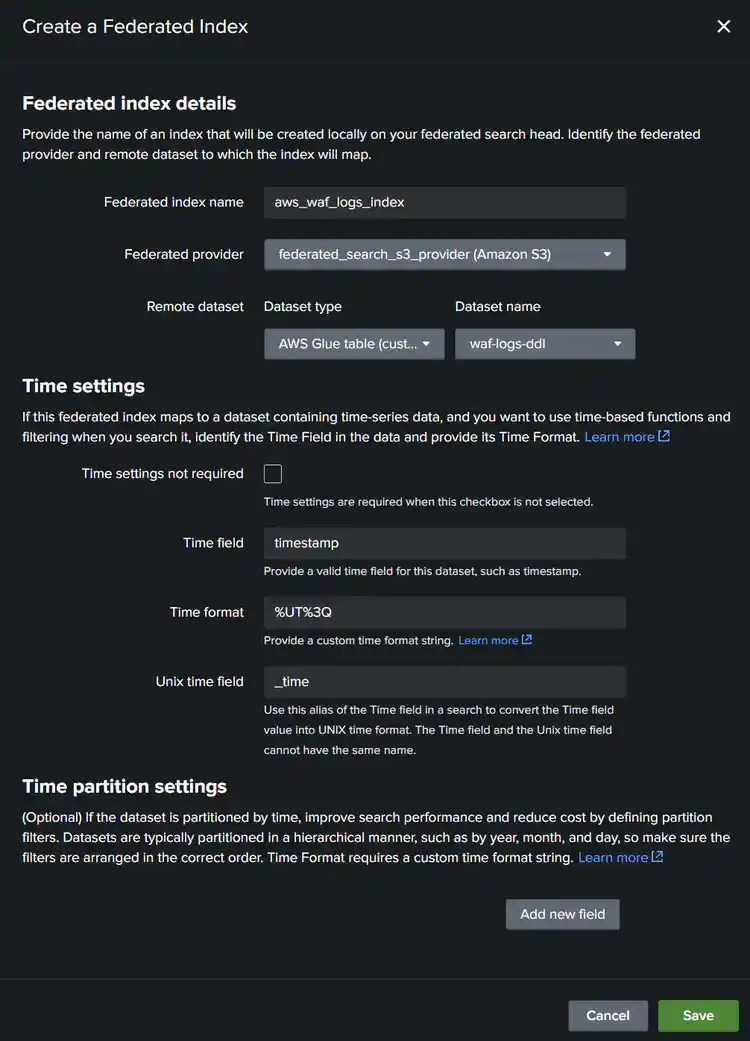
Fill in the following fields to create an index:
- Federated index name: eg aws_waf_logs_index
- Select our new Federated Provider we created
- Dataset type: Make sure (customer created) is selected
- Dataset Name: Select our glue table name created earlier eg waf-logs-ddl
-
Fill in the following fields to Time Settings:
- Time settings not required: Leave unticked
- Time field: timestamp (this is the timestamp field from AWS WAF logs)
- Time format: %UT%3Q (this is UNIX time with millisecond format)
Sample screen shot with fields filled in:
Click Save when happy.
You should now have created both the federated provider and federated index. It's time now to see if everything is working!
Running Basic SDSELECT Command Against AWS WAF Logs
- From your Splunk console, select Apps, Search and Reporting
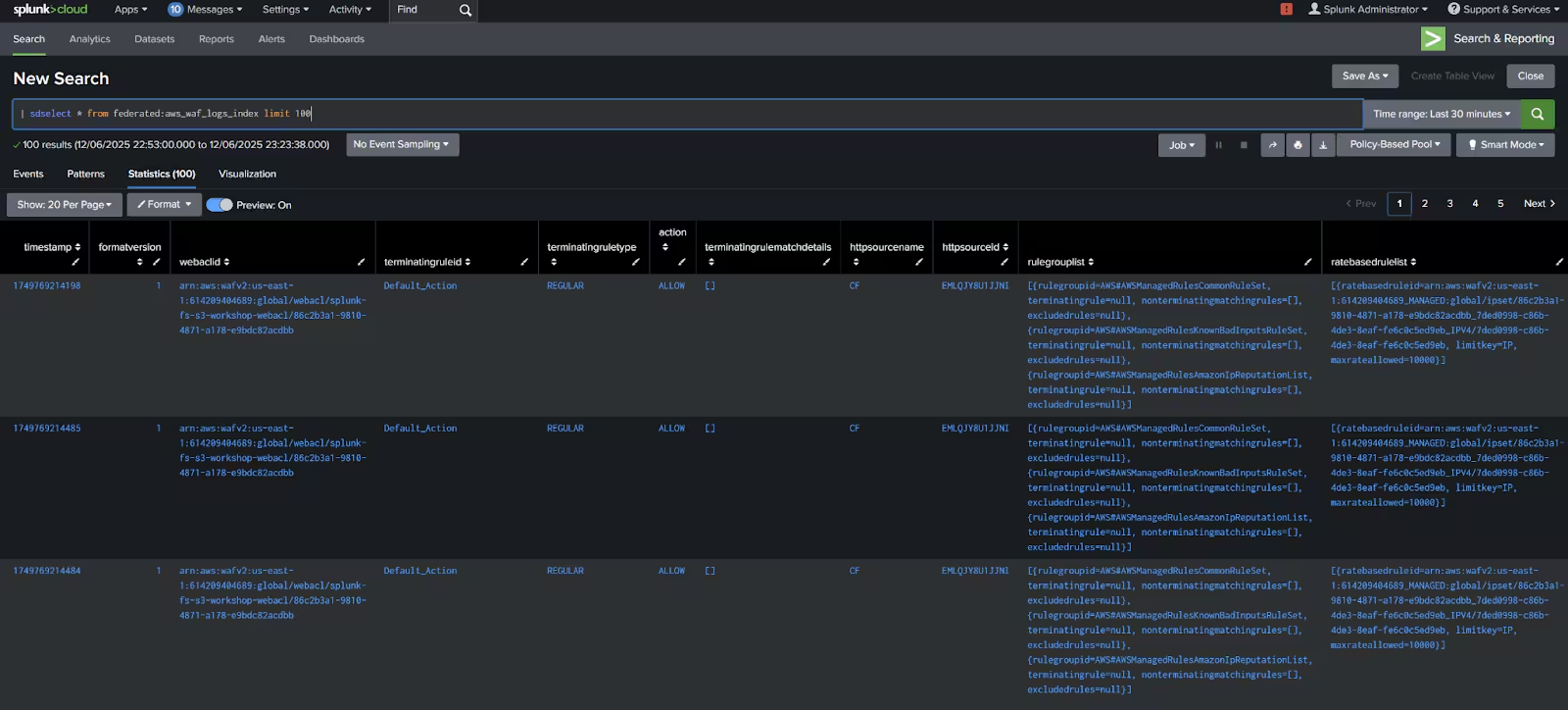
From here we will interact with our Splunk Search Processing Language (SPL). - From your search bar, let’s try a simple search. Copy and paste the below SPL into the search bar and click search:
| sdselect * from federated:aws_waf_logs_index limit 100
Note: it may take a minute or two for the permissions to propagate properly. But after a minute or two you should hopefully see the following result as an example:
That’s it! You have now configured a connection between Splunk and AWS to search in place your AWS WAF Logs.
Before calling it a day let’s quickly discuss the ‘So What’ part of this blog.
So, It's Running. Now What?
When I talk to a lot of Splunk users around Federated Search the biggest challenge sometimes is what I call phase three on the learning path.
- Phase 1: How does this thing work
- Phase 2: Yes, I got some data in
- Phase 3: Now, let’s use it.
When thinking about how to use Federated Search for something useful we need to make sure we remember the key reason why this feature exists.
It is not designed for real-time threat hunting of data analysis. It's designed for infrequent or ad-hoc searching of data.
Before I move into common use cases for federated search I quickly wanted to mention how it's charged.
Splunk Federated Search Charging Model
Splunk Federated Search uses what we call a Data Units Scanned charging model. This is not specific to Splunk, a lot of people in the market use this type of model. Effectively you pre-purchase a chunk of data (think of it like a prepaid phone plan) where you get ‘x’ number of terabytes to consume before you have to buy more.
Each time you run a search against your data it will eat into that pre-paid amount depending on how much data you scan inside the Amazon S3 bucket. It's important to remember it's the data scanned not the data returned. So if you run an inefficient search across an entire S3 bucket you will consume a lot of your license. This blog won’t go into the details of how to be efficient with searches or methods on how to optimize this (will save that for the course mentioned in the blog part 1!).
Now we understand the licensing model let’s continue on to the so what and use cases.
Federated Search Use Cases
When we talk common use cases for Federated Search, three main use cases help with understand more of ‘so what’ of federated search:
Use Case One: Forensic Investigations
Now remember there is a difference between threat hunting and forensic investigations. The former is continually looking for some anomalous behavior, something that should be flagged for..you guessed it, the latter, forensic investigations!
Generally when you have an investigation you have narrowed it down to a point in time. Eg during this week or month or even day. This type of search is a great use case for federated search because you are being very specific and narrow in your search. It ticks the two major boxes for searching in place:
- Infrequent search
- Specific window of time
This means you have been very efficient and only using data (and your license) to a point in time.
Use Case Two: Historical Analytics
You could use federated search to generate some statistics over your historical data. You could be storing data in Amazon S3 over very long periods of time and perhaps you want to generate a report based on a subset of that data over time and pull out trends of specific information.
Again this a great and efficient way to do this as you haven’t had it in your data platform the entire time and although this might not be random search as described in use case one above, it is still very efficient as you run it infrequently on a subset of data.
Use Case Three: Data Enrichment
This is another good and common use case. Perhaps you have a large set of data stored for historical purposes in Amazon S3 and you would like to supplement a Friday or monthly report with details from that data.
This is a perfect way to do that. You can run the search, return the results and add it to an existing report or search to add additional data to a report or analysis to show trends etc.
Conclusion
Hopefully this two part blog helped you:
- Understand why Splunk created a feature like Federated Search for Amazon S3
- How to get started with configuring Federated Search for Amazon S3
- Gave you some ideas on how or what you could use it for in your organization
Hope you enjoyed the blog. See you in the next one!
Related Articles

Unlocking New Possibilities: Splunk and AWS Better Together

Executive Q&A: Accelerating AI Success with Splunk and AWS

Accelerate Operations with AI: New Splunk and AWS Integrations

Introducing Splunk Victoria Experience on Google Cloud: Faster, Clearer, More Resilient

Splunk Cloud Platform: Accelerating Digital Resilience for the Agentic AI Era in Kingdom of Saudi Arabia with Google Cloud

How Splunk and Dataminr Work Together to Help Accelerate Resilience

Splunk Named 2025 Americas Partner of the Year Finalist by Microsoft

Managed Enterprise Platform: Delivering Mission-Critical Observability with Splunk
