Distributed Tracing for Kafka Clients with OpenTelemetry and Splunk APM
In this blog, we'll cover how to enable distributed tracing for Kafka clients with OpenTelemetry and Splunk APM.
Distributed tracing has emerged as a critical part of the DevOps tool chain to manage the complexity that distributed architectures such as Kafka bring. It provides the context across the life of messages flowing through Kafka and can be used to visualize data flow and identify or triage performance anomalies.
Apache Kafka 0.11 onwards introduced the ability to add headers to Kafka messages. Headers are just key:value pairs that contain metadata, similar to HTTP headers. We can take advantage of these headers by adding all relevant tracing metadata into headers alongside Kafka messages. OpenTelemetry provides a convenient library (on top of Shopify’s sarama library) that we can use to inject tracing with your messages.
We’ve provided simple examples extending what OpenTelemetry provides by adding a wrapper span around both the producer and consumer group.
Details on instrumenting Kafka clients are as follows:
Producer Instrumentation
Step 1: We first initialize a tracing library. You are free to choose any library, in this example we’ve used the Jaeger tracing library:
func tracerProvider(url string) (*sdktrace.TracerProvider, error) { // Create the Jaeger exporter exp err := jaeger.NewRawExporter(jaeger.WithCollectorEndpoint(jaeger.WithEndpoint(url)))
a: We provide the endpoint we want to send our Jaeger traces to:
jaeger.WithCollectorEndpoint(jaeger.WithEndpoint(url))
b: We also provide a service name (required for any tracing instrumentation to recognize our service):
sdktrace.WithResource(resource.NewWithAttributes(attribute.String("service.name","kafka-producer"),..)
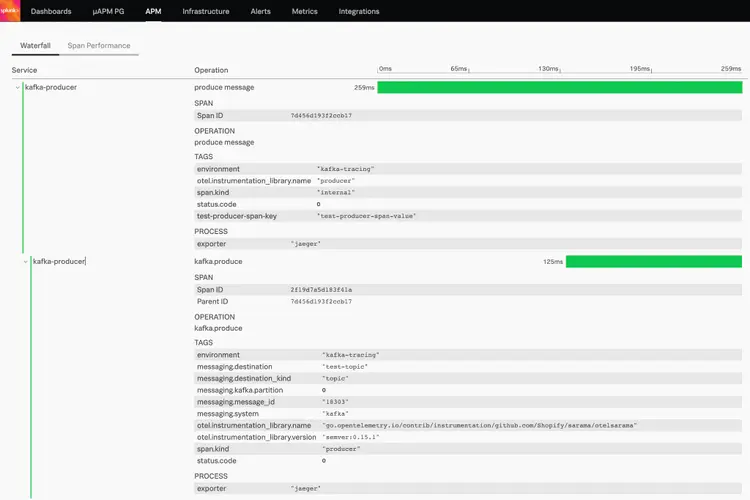
Step 2: Create our parent producer span, which can also include the time taken for any preprocessing you want to consider before generating the Kafka message.
We provide a name for our operation - “produce message” in this case. And start a root span.
ctx, span := tr.Start(context.Background(), "produce message")
Step 3: Call another function which will use the opentelemetry method (WrapAsyncProducer) to wrap the kafka message with a span. We pass along our trace propagator, which will allow the downstream service to extract our parent span and create a new span as a child of this parent span.
`// Wrap instrumentation - pass in the tracer provider and the appropriate propagator
producer = otelsarama.WrapAsyncProducer(config, producer,otelsarama.WithTracerProvider(tracerProvider),otelsarama.WithPropagators(propagators))`
Step 4: Create a message and inject the tracer as a header into the message:
// Inject tracing info into message msg := sarama.ProducerMessage{ Topic: topicName, Key: sarama.StringEncoder("random_number"), Value: sarama.StringEncoder(fmt.Sprintf("%d", rand.Intn(1000))), } propagators.Inject(ctx, otelsarama.NewProducerMessageCarrier(&msg))
Final Step: Optionally, we can add any extra metadata/key:value pairs to our parent span. Notice, we’ve explicitly commented out the message offset and partition because the OpenTelemetry instrumentation automatically adds that in the kafka.produce operation span.
`span.SetAttributes(label.String("test-producer-span-key","test-producer-span-value"))
// span.SetAttributes(label.String("sent message at offset",strconv.FormatInt(int64(successMsg.Offset),10))) // span.SetAttributes(label.String("sent message to partition",strconv.FormatInt(int64(successMsg.Partition),10)))`
Also, if you do intend to run the code provided, you will need to set a couple of environment variables, specifically KAFKA_PEERS for your list of brokers and KAFKA_TOPIC for the topic name. You would also need a tracing backend, such as Splunk APM or a Jaeger server.
Consumer Instrumentation
We'll be instrumenting a high-level kafka consumer, also known as a consumer group. Kafka consumer group is a set of consumers which work together to consume data from topics.
Step 1: Similar to producer instrumentation, we begin by initiating the Jaeger tracer:
func tracerProvider(url string) (*sdktrace.TracerProvider, error) { // Create the Jaeger exporter exp, err := jaeger.NewRawExporter(jaeger.WithCollectorEndpoint(jaeger.WithEndpoint(url)))
a: We provide the endpoint we want to send our Jaeger traces to:
jaeger.WithCollectorEndpoint(jaeger.WithEndpoint(url))
b: We also provide a service name (required for any tracing instrumentation to recognize our service):
sdktrace.WithResource(resource.NewWithAttributes(attribute.String("service.name","kafka-consumer"),..)
Step 2: Start a consumer group using the opentelemetry consumer group wrapped handler and we provide it with the appropriate trace propagators.
// Initialize Trace propagators and use the consumer group handler wrapper propagators := propagation.TraceContext{} handler := otelsarama.WrapConsumerGroupHandler(&consumerGroupHandler,otelsarama.WithPropagators(propagators))
Step 3: Create a consumer claim and as we read each message, we add a new method to do some additional processing on that message (in this case, it is trivial processing — simply printing the message).
// ConsumeClaim must start a consumer loop of ConsumerGroupClaim's Messages(). func (consumer *Consumer) ConsumeClaim(session sarama.ConsumerGroupSession, claim sarama.ConsumerGroupClaim)error { for message := range claim.Messages() { printMessage(message) session.MarkMessage(message, "") } ...
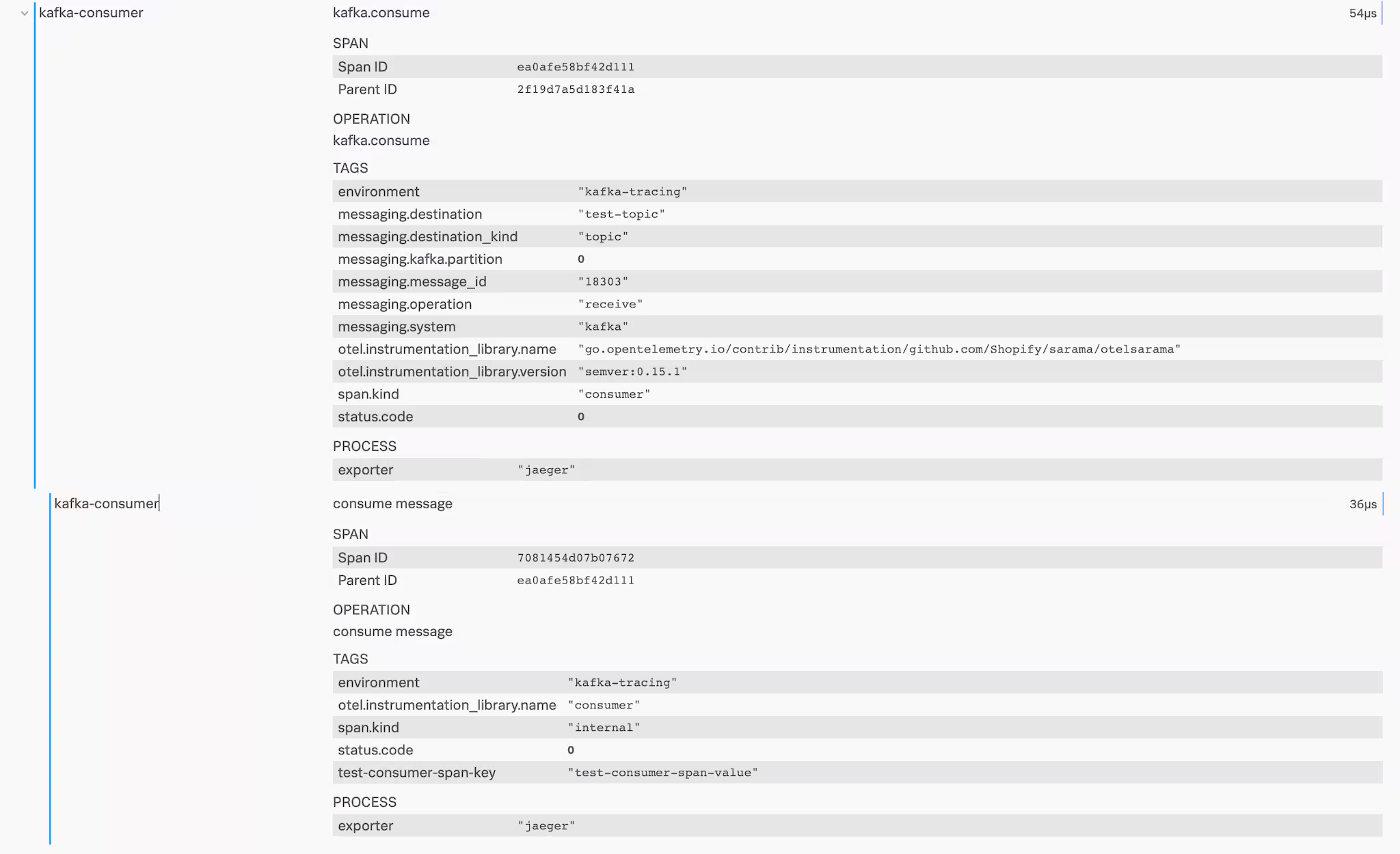
Step 4: Create a post processing span. Start by extracting the parent span from golang's context. Opentelemetry passes all tracing data around within this context object. In our example, the parent span, stored within the context object, represents the kafka.consume operation instrumented by the opentelemetry wrapper that we used. Next, you simply create a new span and associate it with the context, which will setup our new span as a child of the parent span.
propagators := propagation.TraceContext{} ctx := propagators.Extract(context.Background(), otelsarama.NewConsumerMessageCarrier(msg)) ... // Create a post-processing span from the context object, thus setting it as a child of the span that already exists within the context object. _, span := tr.Start(ctx, "consume message")
Step 5: Set optional span attributes. You'll notice that we've explicitly commented out the offset, partition and topic of the message because these attributes get automatically captured in our parent span (the one that represented the kafka.consume operation in Step 4) by the opentelemetry instrumentation.
`span.SetAttributes(label.String("test-consumer-span-key","test-consumer-span-value"))
// Set any additional attributes that might make sense //span.SetAttributes(label.String("consumed message at offset",strconv.FormatInt(int64(msg.Offset),10))) //span.SetAttributes(label.String("consumed message to partition",strconv.FormatInt(int64(msg.Partition),10))) //span.SetAttributes(label.String("message_bus.destination",msg.Topic))`
Final Step: Optionally, you can also inject the current span, the one we called the post-processing span, into the context object. This way any further processing in goroutines (aka lightweight threads in go) or in any downstream service/microservice can be captured as part of the same transaction/trace.
`// Inject current span into the context object.
propagators.Inject(ctx, otelsarama.NewConsumerMessageCarrier(msg))`
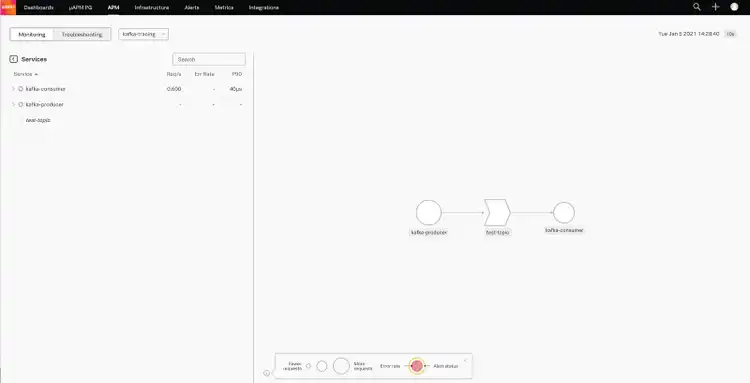
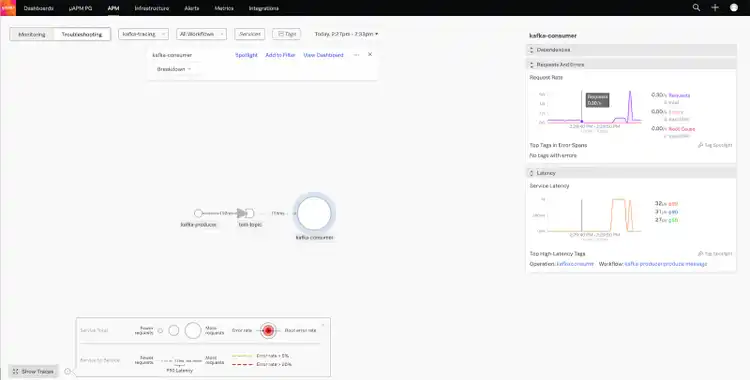
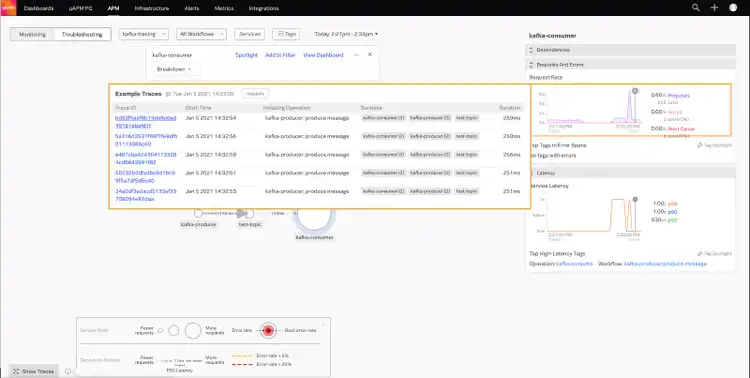
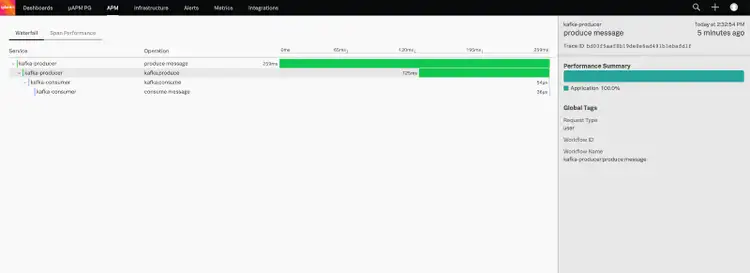
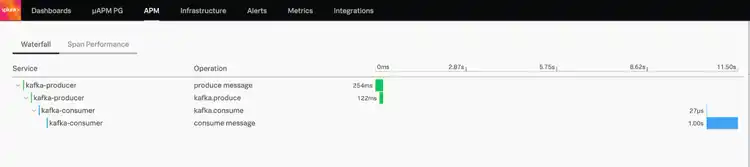
Once the instrumentation is all complete and we start sending to and consuming from Kafka, we get an automatically generated service map within Splunk APM.
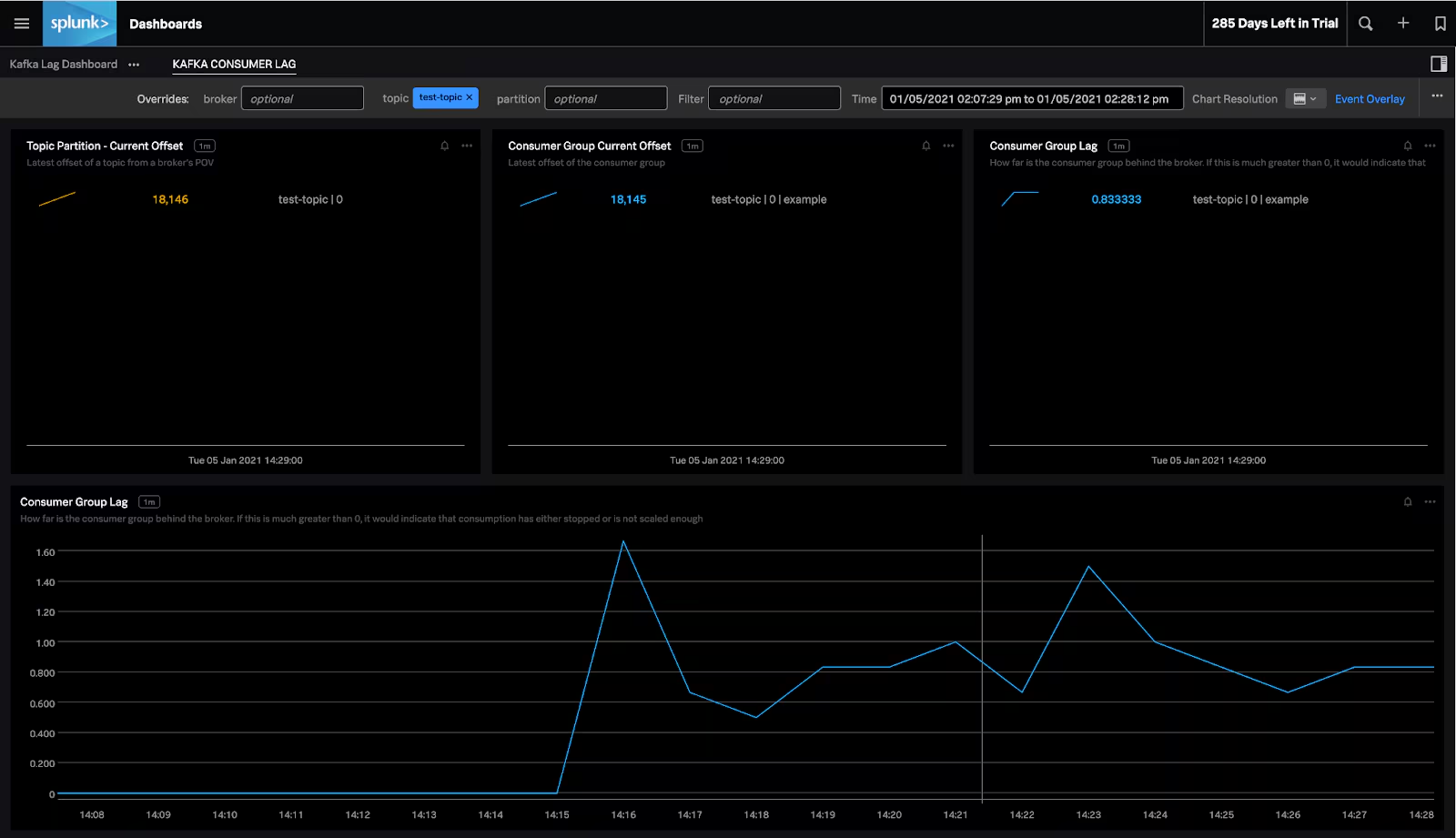
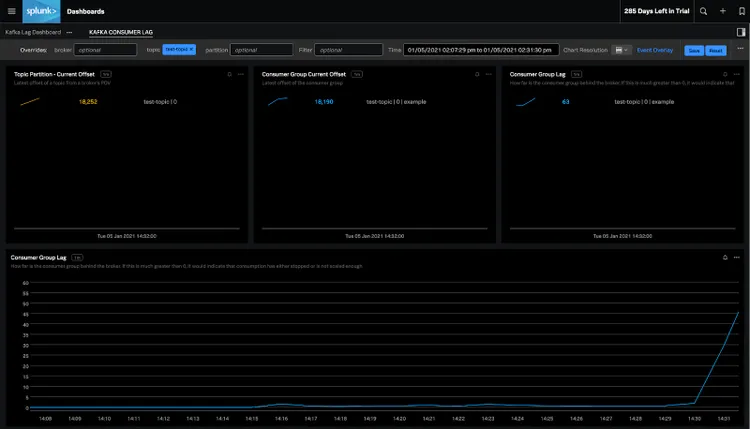
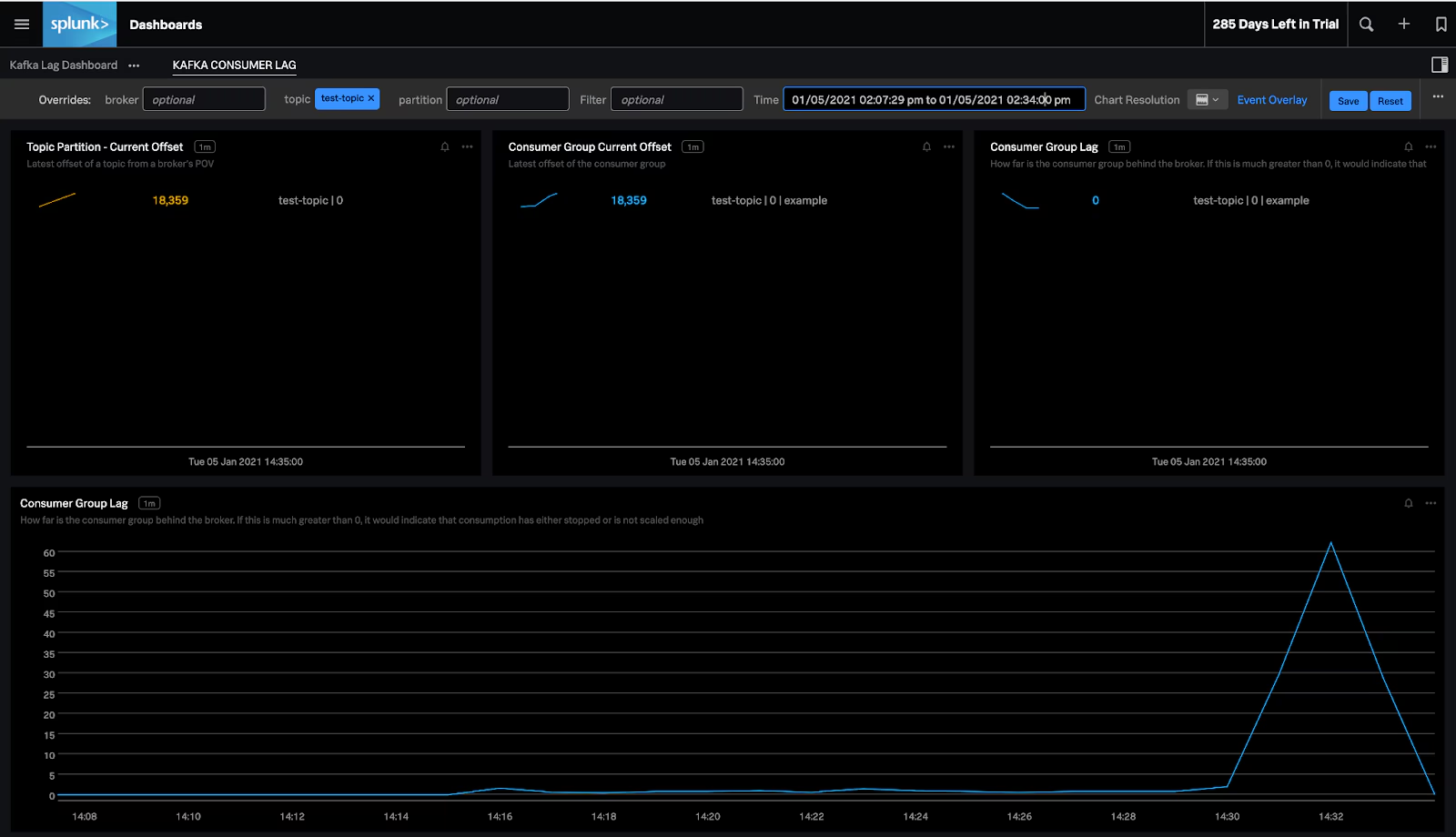
We setup a small Kafka broker and starting sending to and consuming from a "test-topic" on the broker. To determine the behavior of the producer and consumer, we logged into Splunk Observability Cloud and navigated to the Kafka consumer lag dashboard. We were able to observe that the topic offset was increasing, as well as the consumer group's current offset. The consumer lag was barely 1-2 messages behind. So our consumer was keeping up fairly well with the producer.

End-to-End Observability into Your Kafka-Based Applications
Splunk Observability Cloud provides end-to-end observability for your streaming applications based on Kafka.
Get started today by signing up for a free trial of Splunk Observability Cloud.
This blog post was co-authored by Splunk's Amit Sharma.