Using Splunk to Monitor the Security of MCP Servers
In this blog we are going to address how to use Splunk to monitor security of MCP Servers, a new technology that has been developed by Anthropic and has definitely bridged the use of local applications with Large Language Models (LLMs).
What Is MCP?
Model Context Protocol (MCP) is described as a universal translator that allows an AI to safely "talk to" different systems - whether that's your company's database, a file system, web APIs, or other software tools. Instead of each AI system needing custom integrations for every possible data source, MCP provides a common language and set of rules.
Anthropic has been the primary driver of MCP development and has the most mature support for MCP, but the protocol is designed to be used more broadly across the AI ecosystem. Here is a visual example of how a MCP Server works. In the following screenshot a user asks Claude LLM to create a local file in the specified folder. Claude LLM is hosted in the cloud however via MCP Server it can interact locally with the operator's computer.
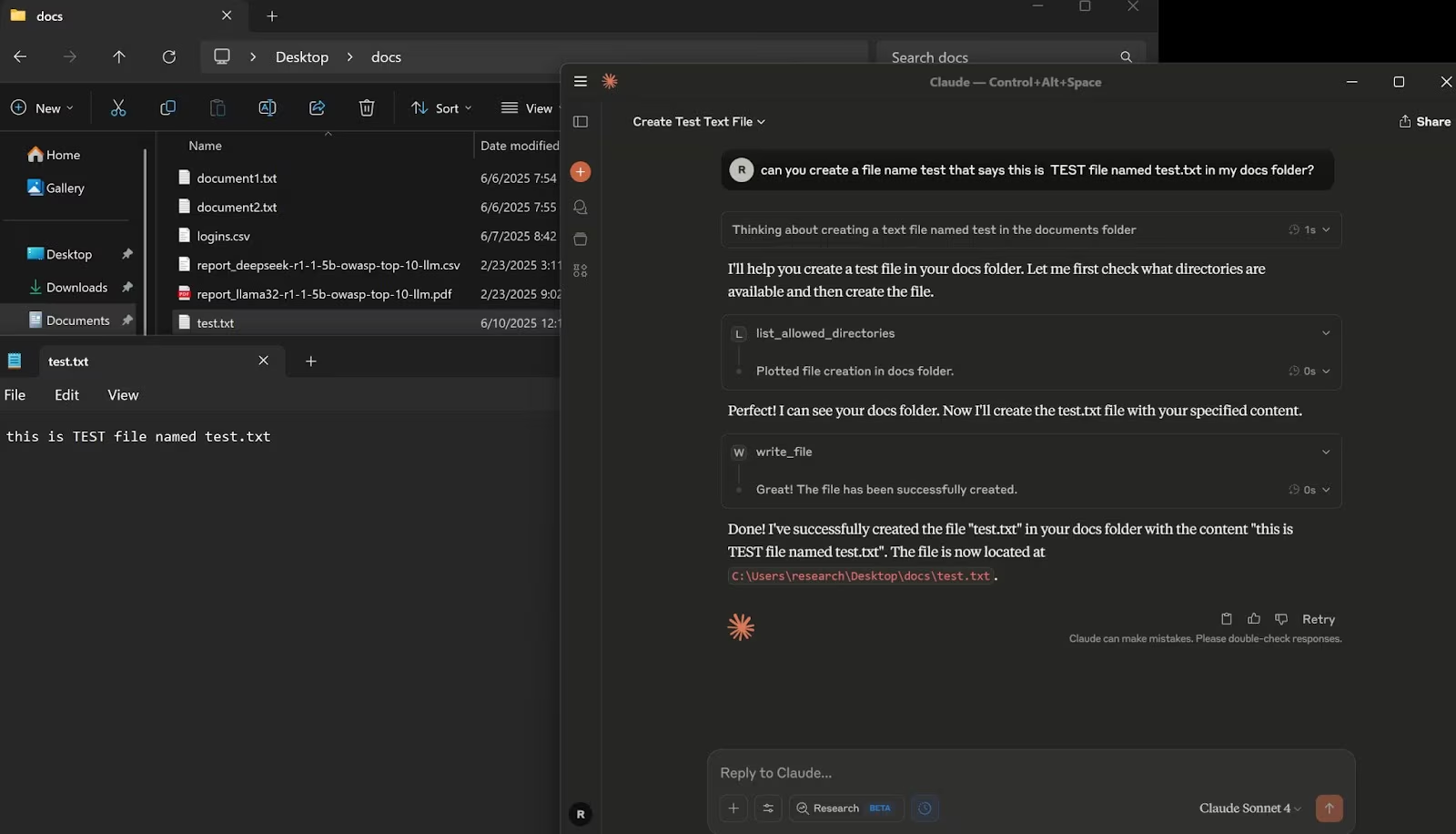
Using MCP AI can safely "talk to" different systems — whether that's your company's database, a file system, web APIs, or other software tools. This capability has propped MCP popularity of possible uses and driven the development of multiple MCP Servers catered to specific applications.
In this blog we are going to address the use of MCP interacting directly with the operating system and using MCP to operate Splunk and by doing so we will address possible security challenges when using this technology.
Architecture Overview of a MCP Server
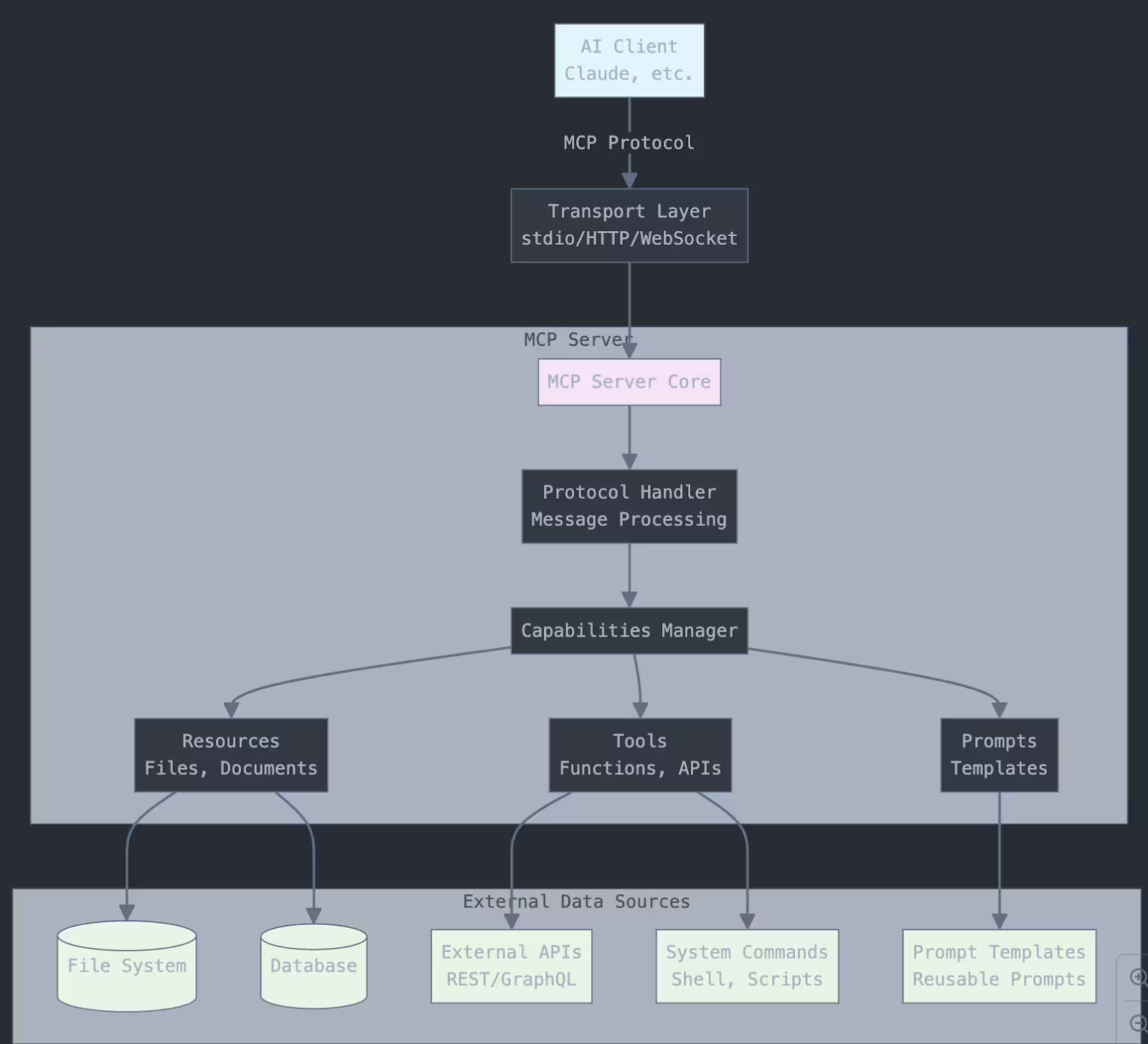
Top Level (Client):
- AI clients like Claude connect to the MCP server using the standardized protocol
Transport Layer:
- Handles the communication method (typically stdio for local connections, HTTP/WebSocket for remote)
MCP Server Core:
-
Protocol Handler: Processes MCP messages and requests
-
Capabilities Manager: Manages what the server can do
-
Three main capability types:
- Resources: Access to files, documents, data
- Tools: Functions the AI can call (APIs, system commands)
- Prompts: Reusable prompt templates
External Data Sources:
- The actual systems the MCP server connects to (databases, file systems, APIs, etc.)
The server acts as a secure bridge between the AI and your data/tools.
In this blog we are going to use a MCP Server based on this code found in my github . This code is used to create a file and Splunk MCP Server. We will then look at the logs produced during the usage of these MCP Servers and how we can approach monitoring of MCP Servers.
Log File Structure Overview
For this research two MCP Servers were created. A MCP file server (interacts with specified folders, can list, read and write files). A Splunk MCP server (interacts with the Splunk instance, including performing SPL queries, reading indexes and even performing application related queries). It is important to note that above actions can be limited by permissions and user’s rights. For example when using MCP file server, Caude desktop will ask you if you allow the action requested at your local system. With Splunk this can be addressed via Splunk accounts and roles permissions. Both of these MCP Servers were installed on a Windows 11 with NVIDIA 4070 GPU and 32 GB of RAM.
We are going to take a look at the log files created during the use of these MCP Servers. We will be focusing on the client (Computer running Claude Desktop). These logs are located in our setup at “C:\Users\--user–\AppData\Roaming\Claude\logs\”.
Claude Application Logs
main.log
- Contains app startup/shutdown events, version info, update checks
- Platform details (Windows x64, Node.js version)
- Auto-update error messages and network connectivity issues
window.log
- Browser window/renderer process logs
- JavaScript errors and DOM manipulation issues
- Message parsing errors
MCP Server Logs
mcp-server-filesystem.log
- File system MCP server communication
- JSON-RPC messages between client and server
- File operations (get_file_info, read_file, write_file)
- Real-time logging of all filesystem tool calls
mcp-server-splunk.log
-
Connection timeous and MCP communication errors
-
JSON-RPC Communication Logs
-
Bidirectional communication
-
Tool Invocation Logs
- splunk_search - Executed SPL queries
- splunk_indexes - Listing available indexes
- splunk_test - Connection testing
-
Search Execution Details
- Query Content: Full SPL queries being executed
- Job Management: Splunk Job SIDs(Search IDs)
- Results Metrics: number of results returned
- Execution Status: Success/failure tracking
- Response Codes: HTTP status codes (201 for job creation)
General MCP server logs
-
JSON RPC Communications
-
Timestamp Format: ISO 8601
-
LogLevels:{info],[error],[debug]
-
Message Types:
- Client requests(Message from client)
- Server Responses(Message from server)
- Tool Invocations (tools/call)
- Capability negotiations(prompts/list, resources/list)
MCP Security Monitoring
As stated previously at blog How to Use Splunk to Monitor Security of Local LLMs (Part II). There are fundamentally 3 areas to monitor when defending AI / Models.
- When using it (Prompts, API, RPC calls)
- Where it is used (Host where model is running or used from)
- When it is being developed (Training data, Model Algorithms, Adversarial ML)
Based on the above items we can approach MCP desktop applications as clients using MCP Server as a bridge between the model, hosted either locally or in the cloud. With that said we will need to look at the use via MCP bridge application(as indicated by type of logs above) and host where this MCP Server is running (MCP server logs).
Now that we have an idea on what we have and what to look for let’s take a look at some SPL searches that would give us specific monitoring information on the MCP servers.
Spl Code - File Operations
index=* (sourcetype=*mcp* OR source=*mcp* OR source=*filesystem*)
    ("tools/call" OR "read_file" OR "write_file" OR "list_directory" OR "get_file_info" OR "create_directory" OR "move_file" OR "search_files" OR "directory_tree" OR "edit_file")
| rex field=_raw "\"method\":\"tools/call\",\"params\":{\"name\":\"(?P<file_operation>[^\"]+)\",\"arguments\":{(?P<full_arguments>[^}]+)}"
| rex field=full_arguments "\"path\":\"(?P<file_path>[^\"]+)\""
| rex field=full_arguments "\"content\":\"(?P<file_content>[^\"]{0,100})"
| rex field=full_arguments "\"source\":\"(?P<source_path>[^\"]+)\""
| rex field=full_arguments "\"destination\":\"(?P<dest_path>[^\"]+)\""
| rex field=full_arguments "\"pattern\":\"(?P<search_pattern>[^\"]+)\""
| rex field=full_arguments "\"paths\":\[(?P<multiple_paths>[^\]]+)\]"
| rex field=_raw "\"id\":(?P<request_id>[^,}]+)"
| rex field=_raw "\[(?P<component>\w+)\]\s+\[(?P<log_level>\w+)\]"
| rex field=_raw "Message from (?P<message_direction>client|server)"
| rex field=_raw "\"result\":{\"content\":\[{\"type\":\"text\",\"text\":\"(?P<result_preview>[^\"]{0,200})"
| rex field=_raw "\"error\":{\"code\":(?P<error_code>[^,]+),\"message\":\"(?P<error_message>[^\"]+)\""
| where isnotnull(file_operation) AND match(file_operation, "read_file|write_file|list_directory|get_file_info|create_directory|move_file|search_files|directory_tree|edit_file|read_multiple_files")
| eval operation_category=case(
    match(file_operation, "read_file|read_multiple_files"), "Read Operations",
    match(file_operation, "write_file|edit_file"), "Write Operations",
    match(file_operation, "list_directory|directory_tree"), "Directory Browsing",
    match(file_operation, "search_files"), "File Search",
    match(file_operation, "get_file_info"), "File Information",
    match(file_operation, "create_directory"), "Directory Management",
    match(file_operation, "move_file"), "File Movement",
    true(), "Other Operations"
)
| eval file_extension=if(isnotnull(file_path) AND match(file_path, "\."),
    replace(file_path, ".*\.([^\.\\\\]+)$", "\1"),
    if(isnotnull(file_path), "no_extension", "N/A"))
| eval file_directory=if(isnotnull(file_path),
    replace(file_path, "^(.*)[\\\\/][^\\\\/]+$", "\1"),
    "N/A")
| eval file_name=if(isnotnull(file_path),
    replace(file_path, "^.*[\\\\/]([^\\\\/]+)$", "\1"),
    "N/A")
| eval operation_status=case(
    isnotnull(error_code), "Failed",
    isnotnull(result_preview), "Success",
    message_direction="server", "Response",
    true(), "Request"
)
| eval file_size_category=case(
    match(result_preview, "size:\s*(\d+)") AND tonumber(replace(result_preview, ".*size:\s*(\d+).*", "\1")) > 1000000, "Large (>1MB)",
    match(result_preview, "size:\s*(\d+)") AND tonumber(replace(result_preview, ".*size:\s*(\d+).*", "\1")) > 100000, "Medium (100KB-1MB)",
    match(result_preview, "size:\s*(\d+)"), "Small (<100KB)",
    true(), "Unknown"
)
| eval timestamp_formatted=strftime(_time, "%Y-%m-%d %H:%M:%S.%3N")
| eval hour_of_day=strftime(_time, "%H")
| eval day_of_week=strftime(_time, "%A")
| sort -_time
| table timestamp_formatted, component, message_direction, operation_category, file_operation, operation_status, file_path, file_name, file_extension, file_directory, source_path, dest_path, search_pattern, file_size_category, error_code, error_message, request_id, result_preview
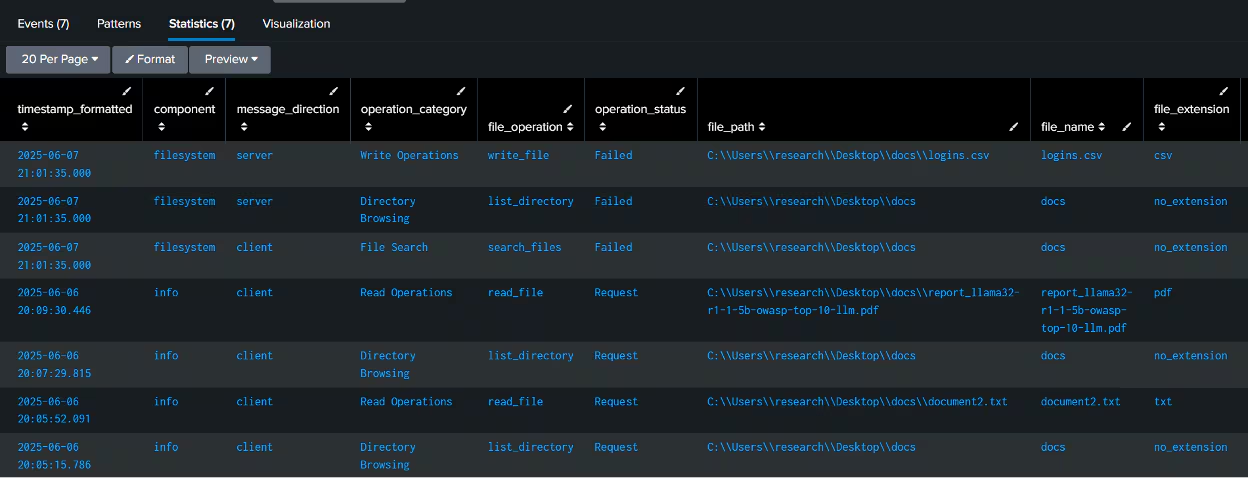
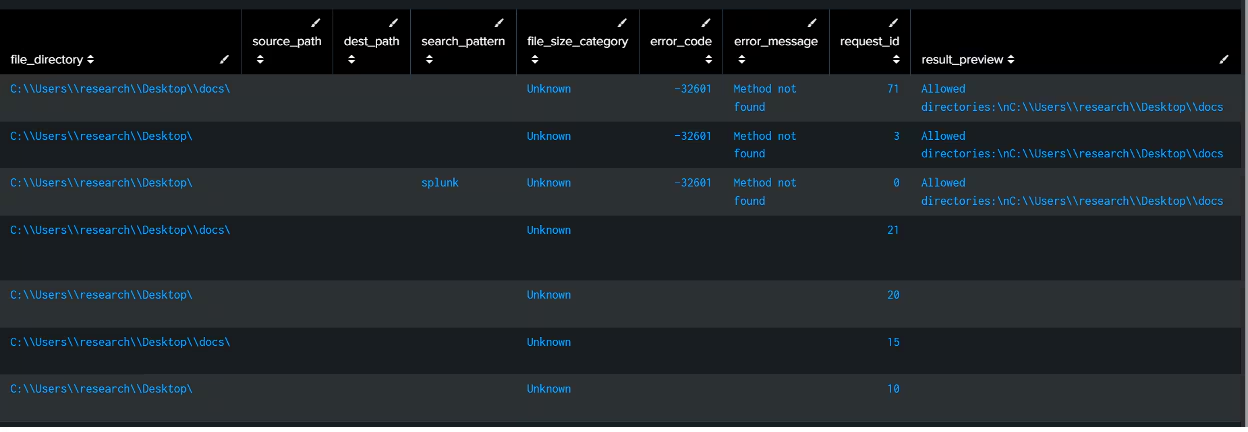
Spl Code - Splunk Queries Performed via MCP Server
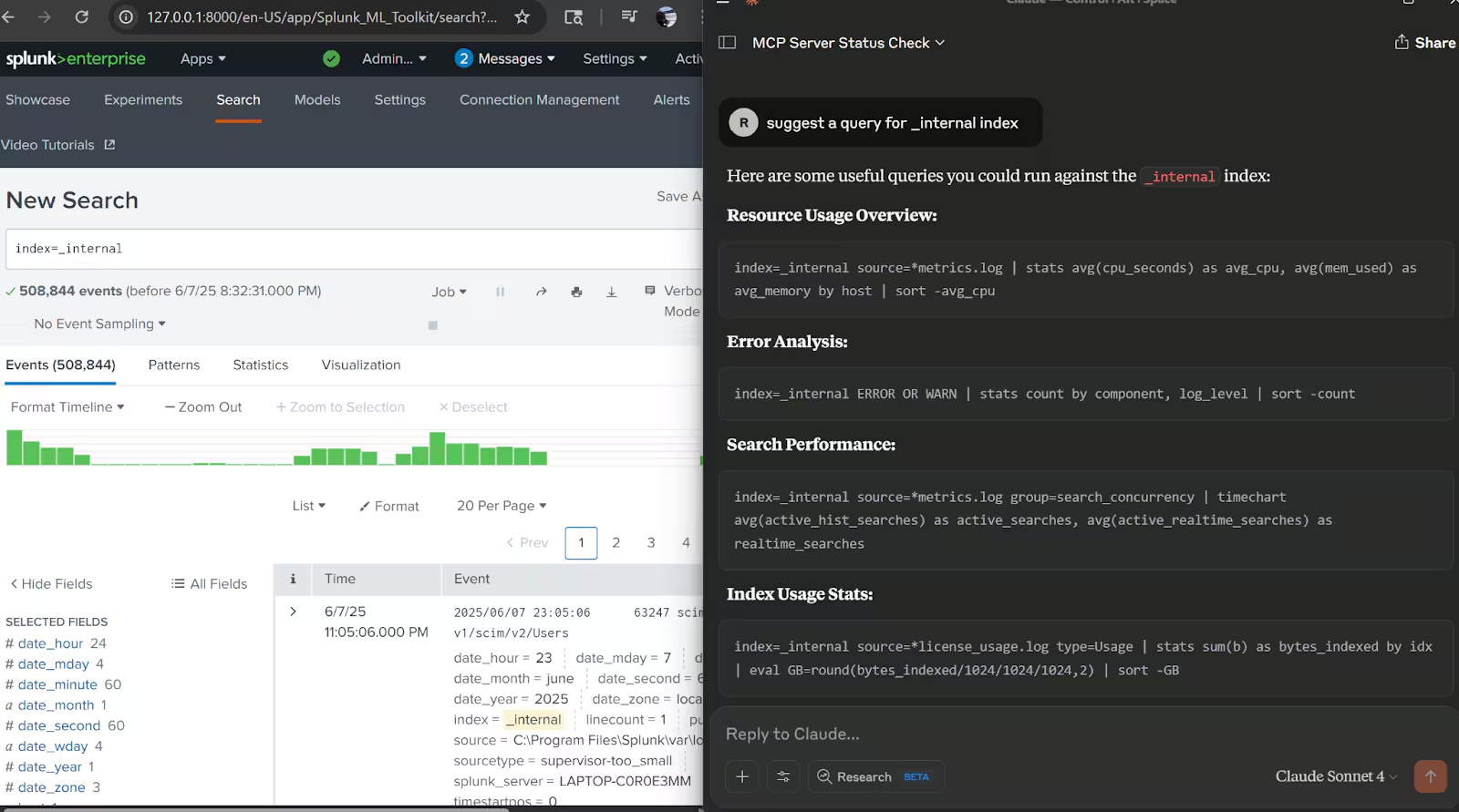
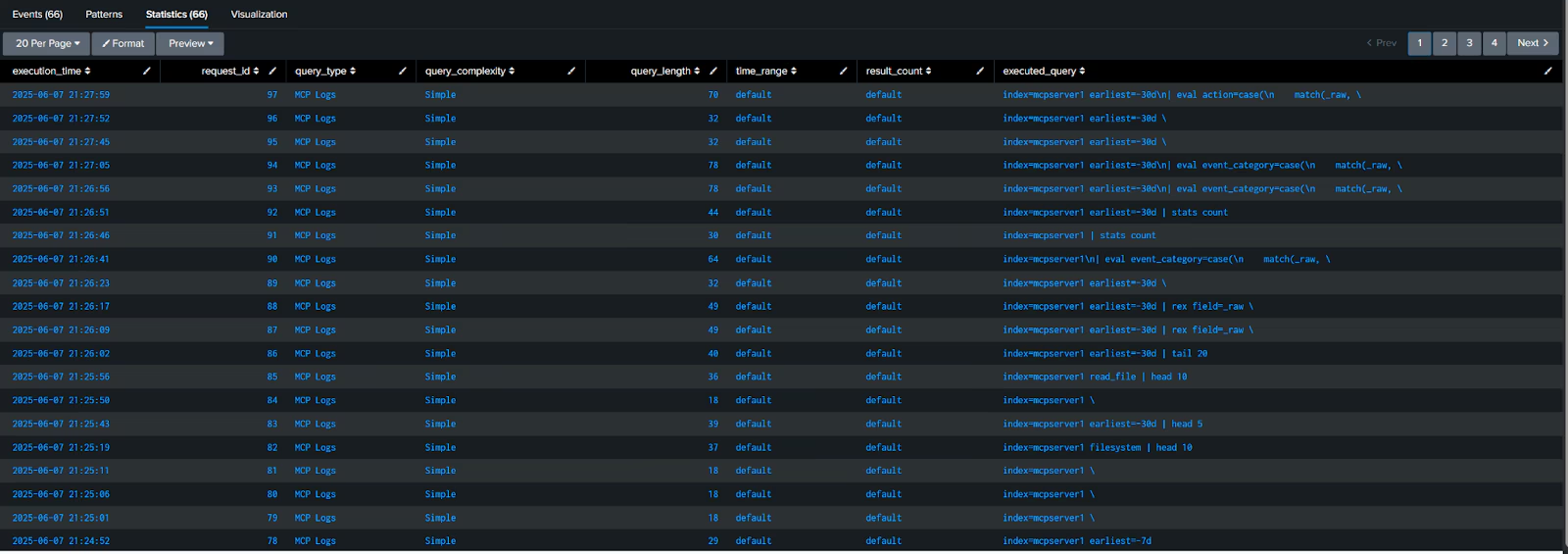
index=main sourcetype=mcpjson "tools/call" "splunk_search"
| rex field=_raw "\"query\":\"(?P<executed_query>[^\"]+)\""
| rex field=_raw "\"id\":(?P<request_id>[^,}]+)"
| rex field=_raw "\"earliest_time\":\"(?P<time_range>[^\"]+)\""
| rex field=_raw "\"count\":(?P<result_count>[^,}]+)"
| where isnotnull(executed_query)
| eval query_type=case(
    match(executed_query, "(?i)index=\\*"), "Cross-Index Search",
    match(executed_query, "(?i)index=_internal"), "Internal Logs",
    match(executed_query, "(?i)index=main"), "Main Index",
    match(executed_query, "(?i)index=mcp"), "MCP Logs",
    match(executed_query, "(?i)\\| rest"), "REST API Call",
    match(executed_query, "(?i)\\| makeresults"), "Data Generation",
    match(executed_query, "(?i)\\| inputlookup"), "Lookup Table",
    match(executed_query, "(?i)predict"), "Machine Learning",
    match(executed_query, "(?i)stats|eval|where"), "Data Analysis",
    true(), "Other"
)
| eval query_complexity=case(
    len(executed_query) > 200, "Complex",
    len(executed_query) > 100, "Medium",
    true(), "Simple"
)
| eval execution_time=strftime(_time, "%Y-%m-%d %H:%M:%S")
| eval query_length=len(executed_query)
| eval time_range=coalesce(time_range, "default")
| eval result_count=coalesce(result_count, "default")
| table execution_time, request_id, query_type, query_complexity, query_length, time_range, result_count, executed_query
| sort -_time
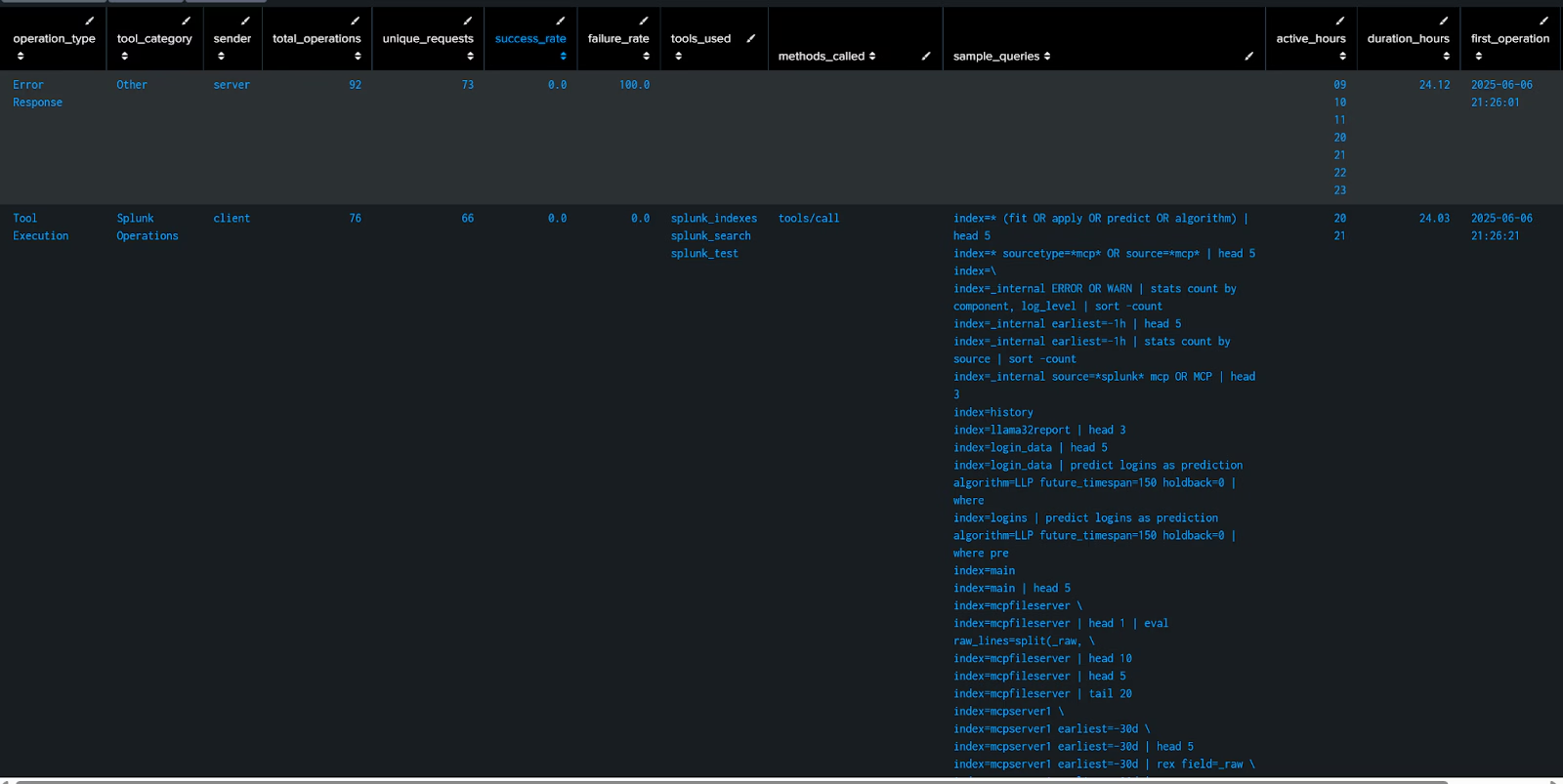
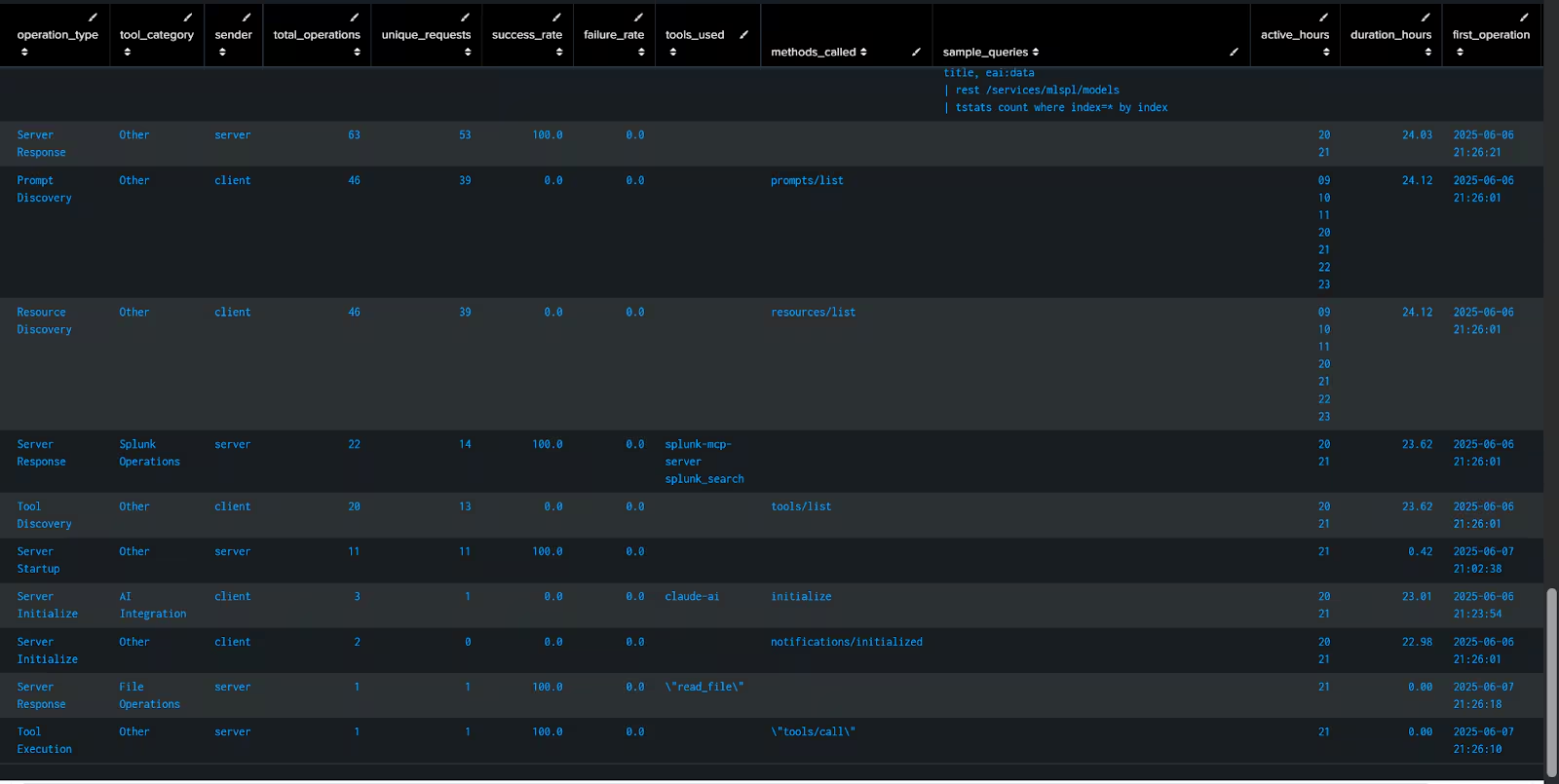
Spl Code - MCP Server Operations
index=main sourcetype=mcpjson
| rex field=_raw "\"method\":\"(?P<method>[^\"]+)\""
| rex field=_raw "\"name\":\"(?P<tool_name>[^\"]+)\""
| rex field=_raw "Message from (?P<sender>server|client)"

| rex field=_raw "\"id\":(?P<request_id>[^,}]+)"
| rex field=_raw "\"error\":\{\"code\":(?P<error_code>[^,]+)"
| rex field=_raw "\"query\":\"(?P<splunk_query>[^\"]{1,100})"
| eval operation_type=case(
    match(method, "tools/call"), "Tool Execution",
    match(method, "tools/list"), "Tool Discovery",
    match(method, "initialize"), "Server Initialize",
    match(method, "notifications/initialized"), "Initialization Complete",
    match(method, "prompts/list"), "Prompt Discovery",
    match(method, "resources/list"), "Resource Discovery",
    match(_raw, "Initializing"), "Server Startup",
    isnotnull(error_code), "Error Response",
    sender="server" AND isnull(method), "Server Response",
    sender="client" AND isnull(method), "Client Request",
    true(), "Unknown"
)
| eval tool_category=case(
    match(tool_name, "splunk"), "Splunk Operations",
    match(tool_name, "read_file|write_file|list"), "File Operations",
    match(tool_name, "claude"), "AI Integration",
    true(), "Other"
)
| eval success_status=case(
    isnotnull(error_code), "Failed",
    match(_raw, "\"result\""), "Success",
    true(), "Pending"
)
| eval hour_of_day=strftime(_time, "%H")
| eval day_of_week=strftime(_time, "%A")
| stats
    count as total_operations,
    dc(request_id) as unique_requests,
    values(tool_name) as tools_used,
    values(method) as methods_called,
    count(eval(success_status="Success")) as successful_ops,
    count(eval(success_status="Failed")) as failed_ops,
    values(error_code) as error_codes,
    values(splunk_query) as sample_queries,
    earliest(_time) as first_operation,
    latest(_time) as last_operation,
    values(hour_of_day) as active_hours,
    values(day_of_week) as active_days
    by operation_type, tool_category, sender
| eval
    success_rate=round((successful_ops/total_operations)*100, 1),
    failure_rate=round((failed_ops/total_operations)*100, 1),
    duration_hours=round((last_operation-first_operation)/3600, 2),
    first_operation=strftime(first_operation, "%Y-%m-%d %H:%M:%S"),
    last_operation=strftime(last_operation, "%Y-%m-%d %H:%M:%S")
| table operation_type, tool_category, sender, total_operations, unique_requests, success_rate, failure_rate, tools_used, methods_called, sample_queries, active_hours, duration_hours, first_operation, last_operation
| sort -total_operations
Security Considerations and Monitoring Items for MCP Servers
- Authentication and Access Control Monitoring: Authentication attempts, failed logins and privilege escalation. Clients connecting to MCP servers, authentication tokens and detect unauthorized attempts of access. Permission changes or modified privileges.
- Data Exposure and Leakage: Detection of potential exfiltration of data or leakage of proprietary data when using the models (Especially if the backend is in the cloud). Data accessed (file operations), volume of information accessed.
- Resource Usage and Abuse: Tracking of computation resources, API rate limits, tool execution frequency, resource intensive operations, automated scraping, denial of service attempts.
- Network Traffic and Communication Security: Inbound and outbound traffic, proper use of encryption. Suspicious network patterns, unexpected external connections, attempts to bypass controls through the MCP interface.
- Auditing Logging and Forensic: Comprehensive logs of MCP tools, data access events and server interactions. Auditing logs of sensitive data access, log integrity and protection.
- Input validation: Monitor malicious payloads in tool parameters, prompt injection attempts and command injection patterns.
- Configuration Changes: Security patches and dependencies update.
- Sandboxing: Session isolation, database proxy, process level isolation, permission based tool access.
As we have seen in this blog we can certainly monitor the data produced from MCP Servers at the client level. With this information plus backend logs as the ones explored in the previous blog. We can comprehensively address the use at client and server side of LLM models not only from the direct usage (what was prompted or imputed) but also from the platforms running clients and server backend.