Now Offering the AI Assistant Usage Dashboard in Cloud Monitoring Console
Artificial Intelligence Dan HolloranOver the last year, Splunk’s AI assistant capabilities and skills have expanded quite a bit. With the releases of more AI assistants, more skills, more accurate responses, personalization and optimization features, and more, we’ve discovered even more ways for you to leverage these tools. With that in mind, today we’re excited to announce the release of a new AI assistant usage dashboard in Cloud Monitoring Console!
Based on community feedback, we understood that customers wanted dashboards purpose-built for Splunk Admins — helping you monitor and analyze the usage of AI assistants within your teams. The new AI assistant usage dashboard in Cloud Monitoring Console provides you with actionable insights into how AI assistants are being used, which features drive the most value, and which features are underutilized. The usage metrics also serve as a baseline to help understand how you can drive greater AI adoption across your organization.
With these insights, Splunk Admins get the help they need to optimize the adoption of AI assistants and ensure the AI assistant delivers measurable impact.
Key Features of the AI Assistant Usage Dashboard in Cloud Monitoring Console
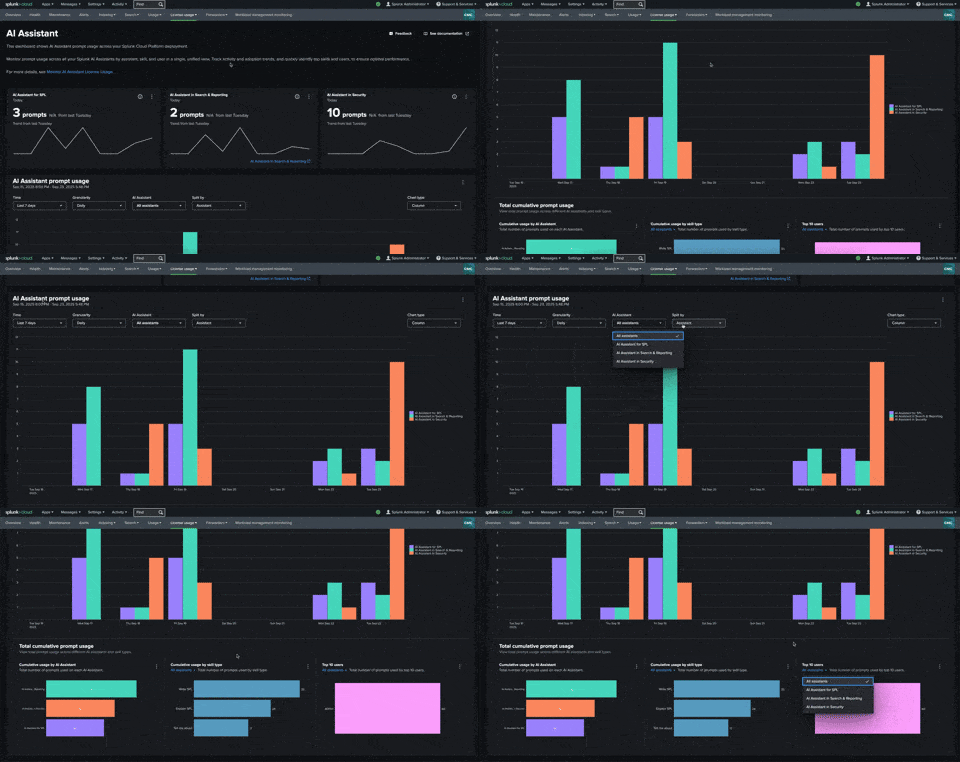
Splunk Admins can see the following metrics in the dashboard to better understand AI assistant usage across the organization and make choices to enhance the experience:
-
Measure overall usage:
- Record the frequency of prompts and responses.
- Compare overall usage at different scales (e.g., 10 vs. 100,000 interactions).
- Break down the dashboard and filter by different timeframes or AI assistants.
-
Track individual skill usage for each AI assistant:
- Gather metrics on which skills are being used most across your organization.
- Look across all AI assistants or sort the chart by individual AI assistants.
-
Review top users:
- Analyze who is using which AI assistant features and skills, and how/why they are using them.
- Optimize AI assistant usage everywhere by understanding who’s using what and enhancing team workflows based on this feedback.
Which Skills and AI Assistants Are Supported
With this release, we will support the following Splunk AI assistants with support for more coming later:
- AI Assistant for SPL
- AI Assistant for SPL in Search and Reporting
- AI Assistant in Security
On top of overall AI assistant usage, you can measure which skills are being most used for each tool. The current skills supported will include the following:
- Write SPL: The AI assistant writes an SPL query for you based on a natural language prompt.
- Explain SPL: Ask the AI assistant to explain an existing SPL query so you can understand what it does.
- Tell me about: Query Splunk documentation with natural language by asking the AI assistant a question.
- Optimization: Optimize SPL queries for speed and cost, leading to more efficiency in your Splunk usage (must opt-in to enable this in the settings page).
- Personalization: Personalize generated SPL queries to consider specific data from your environment, things like indexes, field names, or sourcetypes to create more accurate SPL queries (must opt-in to enable this in the settings page).
- Report: Generate a report with the AI Assistant in Security to quickly summarize what occurred during an incident and share your findings.
- Summarize findings: Ask the AI Assistant in Security to summarize its findings while troubleshooting an incident in real-time so you can gain context more quickly.
How Do I Get Access?
This AI assistant usage dashboard sits amongst a number of other valuable Admin tools in Splunk Cloud Monitoring Console. Access to Splunk Cloud Monitoring Console and the AI assistant usage dashboard is provided at no additional cost to Splunk Admins with a Splunk Cloud Platform deployment.
Start monitoring AI assistant usage across your Splunk Cloud Platform deployment and keep track of prompt usage across all your Splunk AI assistants — broken out by assistant, skill, and user in a single, unified view. Track activity and adoption trends, and quickly identify top skills and users, to ensure optimal performance.
For more details, see the documentation for the AI assistant usage dashboard in Cloud Monitoring Console.