How We Built End-to-End LLM Observability with Splunk and RAG
Artificial Intelligence Yogesh KulkarniLarge Language Models (LLMs) are reshaping user experiences across all industries. LLMs power critical applications that deliver real-time insights, streamline workflows, and transform how people interact with technology.
At Cisco, for example, our Splunk AI Assistant leverages a Retrieval-Augmented Generation (RAG) system to provide instant, accurate answers to FAQs using curated public content. But running LLM-powered applications at scale in a modern, complex digital environment brings unique challenges—ranging from accuracy and reliability to cost control and user trust.
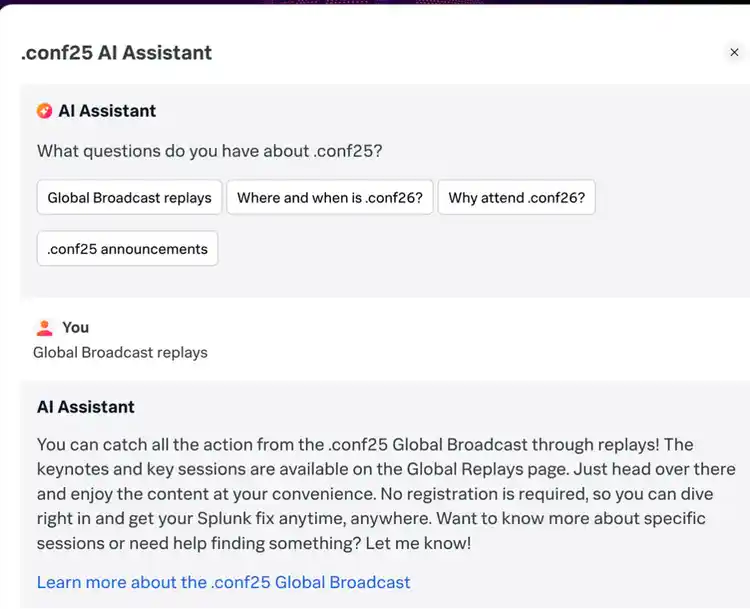
How We Built It: RAG via CIRCUIT
- Approach: Retrieval-Augmented Generation API via CIRCUIT, developed in a hackathon-style sprint
- Data scope: Real .conf24 materials—session lists, event policies, tips and tricks, global broadcast schedule, and curated content matrices (Cisco Public)
- Operations: We used the power of Splunk Search and Splunk Observability to build dashboards and alerts that keep context refreshed and secure
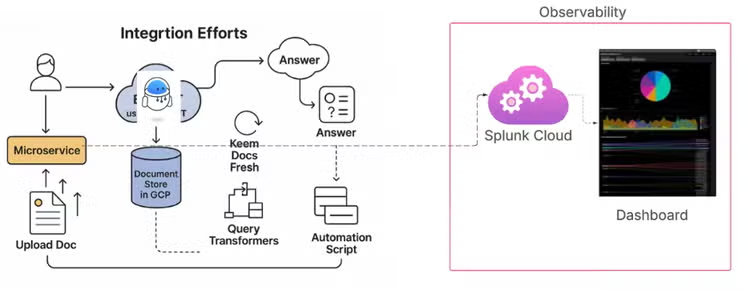
Key takeaway: Build observability in from day one across prompts, retrieval, and generation to accelerate iteration and de-risk launch.
Splunk for LLM Observability
Monitoring LLM (Large Language Model) and RAG (Retrieval-Augmented Generation) systems requires visibility into not just performance (like latency), but also the quality and trustworthiness of responses. The Splunk dashboard below provides a single-pane-of-glass view that brings together key signals from across the stack—LLM output, source documents, latency, and reliability scores.
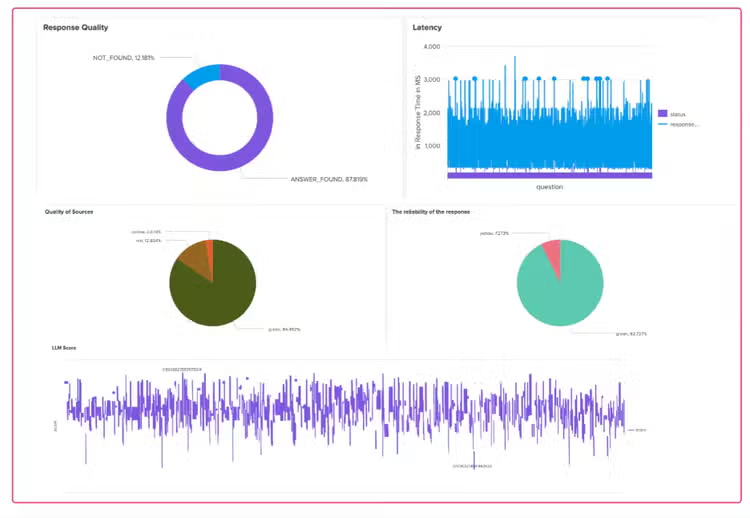
Here’s how each element contributes to comprehensive LLM observability:
- 🔍 Single pane of glass: This dashboard correlates key metrics—response quality, model latency, document reliability, and cost—in one unified view. It allows operations, ML teams, and content owners to investigate performance and answer quality without jumping between multiple tools or logs.
- 📑 Document transparency: The "Documents in context" section of the dashboard makes it clear exactly which source documents were retrieved and passed to the LLM for a given user query. This is essential for auditing and debugging issues like hallucinations, as teams can trace back a poor response to the documents it was based on.
- 🟢🔴 Source reliability mix: Source documents are classified into reliability tiers (green/yellow/red) based on predefined quality criteria. The distribution helps teams identify whether bad outputs are caused by poor source curation and prioritize which documents to clean, reindex, or remove.
- 🧠 RCA (Root Cause Analysis) workflow: If a response is marked low quality, this dashboard supports end-to-end investigation—from the user question, through the retrieved documents, the LLM prompt, response latency, token usage (cost), and even which model version handled the request. This reduces mean time to resolution (MTTR) for LLM failure cases.
Key takeaway: By integrating these views into Splunk, teams running production-grade LLM or RAG applications can:
- Reduce hallucinations
- Optimize prompt+retrieval configurations
- Monitor system performance
- Track and improve source document health
Example: Monitoring the Quality of LLM Application
This screenshot shows a custom Splunk SPL dashboard purpose-built for monitoring the quality of a RAG (Retrieval-Augmented Generation) application. It combines metrics related to response correctness, document relevance, model confidence, and latency—giving a 360° view of RAG output quality.
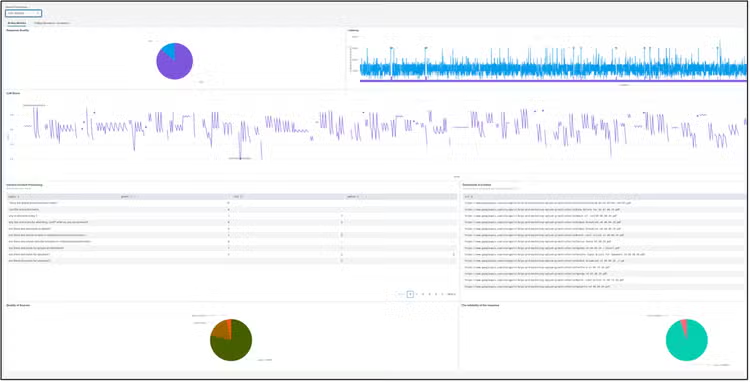
Combined value: End-to-end RAG quality monitoring
-
Layer: Retrieval, LLM Output, and Latency.
-
Sources monitored: Context labels and document sources; LLM score and true/false response; latency time series; quality of sources pie.
-
Value added:
- Ensures relevant documents are fed to the LLM
- Captures correctness and hallucination risk
- Monitors performance and user wait time
- Lets you clean up training and retrieval datasets
Key takeaway: Combine retrieval, output quality, and latency to see cause and effect, not just point-in-time metrics.
Example: Hallucination
This example perfectly illustrates a mild hallucination and underscores the critical need for observability, particularly in RAG-based LLM systems.
Two similar queries, different outcomes
Question 1: “My flight to Boston will arrive pretty late, around 8PM on Sunday night. What’s the registration hour at the conf center to get my badge, etc.?”.
- Outcome: Without the explicit prompt to “look at the agenda,” the LLM did not prioritize the most relevant document. It likely relied on the “Know Before You Go” document, which contained some registration information but lacked the specific weekday schedules needed for a complete response. This resulted in an incomplete or potentially misleading answer, a mild hallucination.
Question 2: “Can you take a look at the agenda and re-answer this question: my flight to Boston will arrive pretty late, around 8PM on Sunday night. What’s the registration hour at the conf center to get my badge, etc.?”
- Outcome: The LLM successfully retrieved the detailed “Agenda” document due to the explicit instruction, providing a precise answer about registration hours.
Why this matters for LLM Observability
- Input Monitoring: Tracking prompt quality and structure would show that the second question lacked the directive present in the first.
- RAG Pipeline Monitoring: Observing the “Context Content Processing” and “Quality of Sources” (as seen in the Splunk dashboard example) would reveal which documents were retrieved for each query. For Question 1 above, observability would show that the “Agenda” document, containing the precise answer, was not prioritized or retrieved, leading to the mild hallucination.
- Output Monitoring: An LLM score or human-in-the-loop feedback could flag the answer to Question 1 as incomplete or less relevant, triggering an investigation.
Key takeaway: Observability with human-in-the-loop reveals when incomplete context causes mild hallucinations and guides prompt and retrieval refinements.
Example: Structured Log Payload (RAG Answer)
The following is a sample application log captured for a successful RAG answer, including prompt and answer context, retrieval sources, and tracing metadata. This level of structure enables precise dashboards, alerting, and root-cause analysis in Splunk.
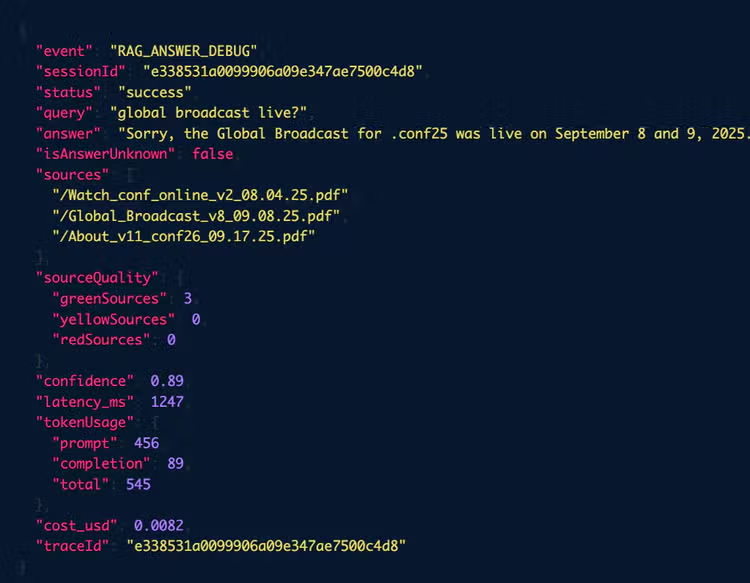
Highlights That Power Observability and RCA
- Event type and status: event=RAG_ANSWER_DEBUG, status=success, isAnswerUnknown=false, and errorCode=0.
- Query and answer: query=global broadcast live? plus the rendered answer for user-facing verification.
- Retrieval transparency: sources, sources_initial, references, and url_category (green/yellow/red) for reliability and coverage analysis.
- Grounding signals: memory_facts_probability_category=green to correlate with factuality.
- Tracing context: mdc.trace_id, mdc.span_id, and trace_flags to join logs with traces in Splunk Observability.
- Runtime metadata: hostName, processName, and container context for fleet-wide comparisons.
Key takeaway: Structured logs that include prompts, sources, and trace IDs enable precise dashboards, alerting, and root-cause analysis.
Example: SPL to Measure Response Quality
Sample SPL query to find out response quality.
index="web-eks" sourcetype="kube:container:*" container_name="it-ai" cluster_name="wmd-columbia" "event=RAG_ANSWER"
| spath input=message
| rex field=message "answerStatus\\s*=\\s*\\\"(?[^\"]+)\\\""
| stats count by answerStatus
| eventstats sum(count) as total
| eval percentage=round((count / total) * 100, 2)
| table answerStatus count percentage
| eval answerStatus=case(
    answerStatus="true", "NOT_FOUND",
    answerStatus="false", "ANSWER_FOUND"
)
Where this helps
- Converts raw application logs into a response-quality distribution suitable for SLAs.
- Supports alerts when “NOT_FOUND” exceeds a threshold over a time window.
- Enables trend analysis by model version, route, or source reliability segment.
Key takeaway: Use SPL to convert logs into actionable metrics and alerting aligned with SLAs.
Visualization and Alerting
- Real-time KPIs: Groundedness and relevance, latency, error rate, token budgets, and cost-per-request.
- Drift and staleness: Alerts when groundedness dips or when key source documents become stale.
- Security: Prompt-injection and jailbreak pattern detection with anomaly alerts.
- Root-cause analysis: Pivot from a low-quality answer to the prompt, retrieved documents, model version, and cost.
Key takeaway: Alert on groundedness dips, source staleness, and prompt-injection patterns—not just errors.
Summary in RAG Observability Context
This screenshot below shows observability monitoring of a RAG application using Splunk Observability Cloud, specifically focusing on the ai-deployment service in a production environment (service-prod).
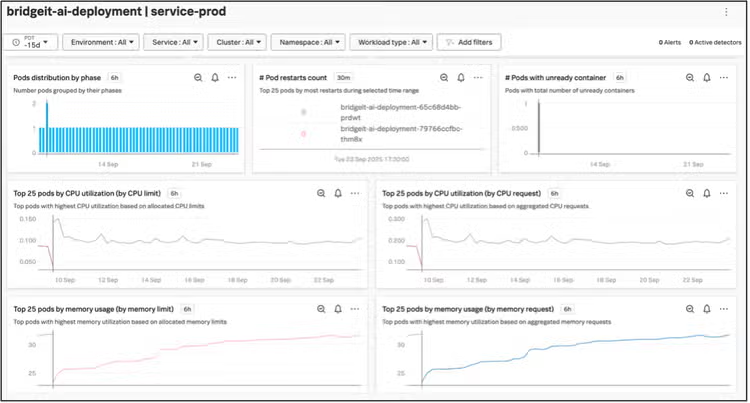
Kubernetes and resource health
This APM dashboard from Splunk Observability Cloud is monitoring the bridget-ai-svc service, which is the main AI orchestration the .conf RAG pipeline.
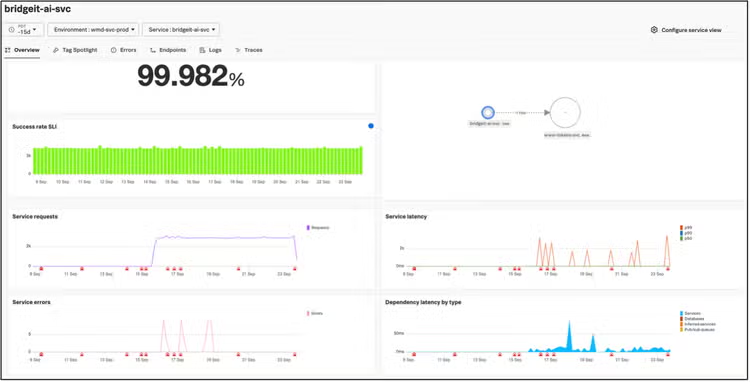
Summary for RAG Observability via APM
Key takeaway: APM surfaces success rates, latency, and dependencies that directly impact generative AI monitoring and user experience.
Example: Needle-in-Haystack
These APM trace screenshots from Splunk Observability Cloud represent a “needle in a haystack” detection scenario—an essential aspect of observability when troubleshooting RAG systems.
Traces Overview
This screenshot from the Traces tab of the Splunk APM dashboard provides a comprehensive snapshot of RAG service behavior, highlighting both error patterns and performance outliers.
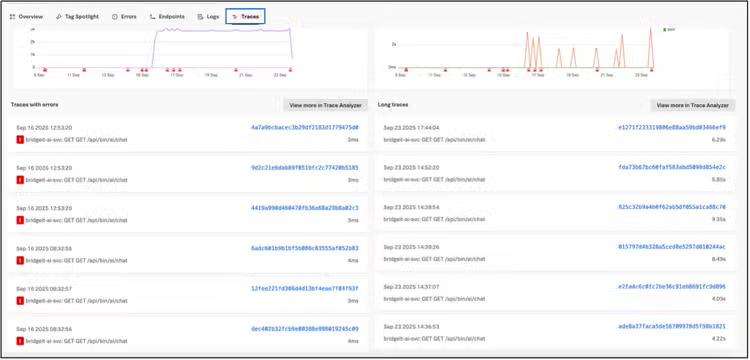
RAG-specific observability takeaways
A single user request can span several internal services. Finding what exactly went wrong for one bad request among thousands of good ones is the classic needle-in-a-haystack problem.

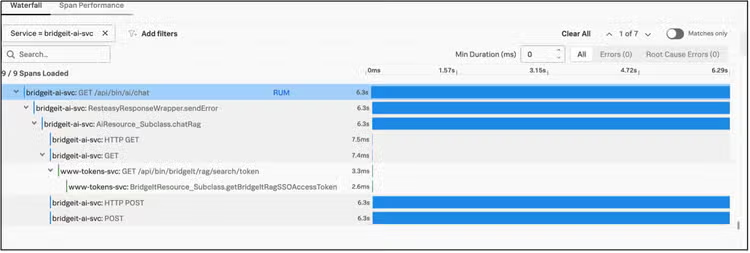
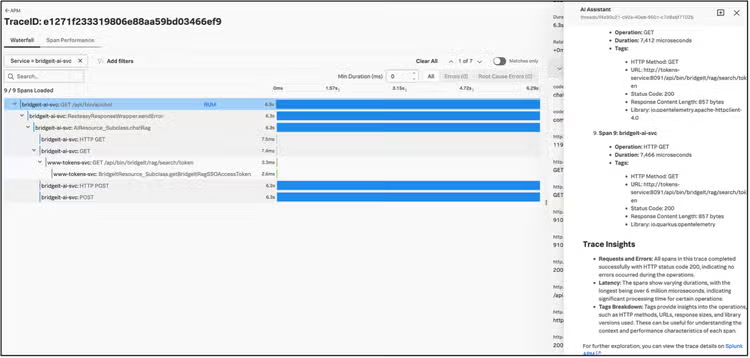
Key Observability Benefits Demonstrated
Key takeaway: Trace-driven RCA pinpoints rare failures across the RAG lifecycle and accelerates fixes.
Governance and Reproducibility
- Scope and data minimization: Cisco Public data only; no personal data in prompts, RAG, testing, or logs
- Deployment and access: Hybrid deployment with global reach for .conf attendees, respecting embargoed regions
- Monitoring and maintenance: Plan for drift monitoring, regular testing, and incident response
- Versioning: BridgeIT RAG-as-a-Service for retrieval, index, and model version control and rollback
Key takeaway: Minimize data, version rigorously, and plan for drift to meet governance and reliability needs.
Make Observability Your Competitive Advantage
✅ What We Learned
LLM observability isn’t just a nice-to-have—it’s the bridge between experimentation and operational excellence. It turns black-box AI behavior into measurable, actionable insight. For Retrieval-Augmented Generation (RAG) systems in particular, observability allows you to track the full lifecycle of an AI answer—from the user query, through document retrieval and prompt construction, to the LLM's final response and its evaluated quality. At Cisco, we’ve adopted Splunk as our observability backbone for LLM-powered applications. It gives us a unified view of how response quality, infrastructure performance, and business impact intersect. This helps us respond quickly to degradation, drift, or unexpected behaviors—before users notice and before costs spiral.
🚀 Make Observability Your Competitive Advantage
LLM observability transforms AI from a hopeful experiment into a reliable product. It's the difference between guessing why your AI performs well and knowing exactly what contributes to its success or failure.
In the context of RAG systems, this means being able to monitor and correlate:
- Prompt handling
- Document retrieval quality
- Context construction
- Latency and cost of generation
- Output evaluation and source traceability
Organizations that invest in this level of visibility will deliver more trustworthy, cost-efficient, and scalable AI solutions. Those that don’t will face mounting issues in reliability, cost control, and user trust.
🔧 Your Next Steps
To operationalize LLM observability:
- Define your success metrics: What quality, cost, and performance levels are acceptable for your use case?
- Instrument your pipeline: Ensure every part of your LLM/RAG flow logs meaningful, structured data
- Build connected dashboards: Visualize how technical metrics (e.g., latency, token usage) tie to business outcomes (e.g., answer accuracy, support deflection)
- Set proactive alerts: Monitor for quality drops, latency spikes, or cost overruns—before they impact users
- Establish review cadences: Bring together engineering, data science, and product stakeholders to continuously improve your AI stack